turn signal VOLKSWAGEN BEETLE 2011 Owner´s Manual
[x] Cancel search | Manufacturer: VOLKSWAGEN, Model Year: 2011, Model line: BEETLE, Model: VOLKSWAGEN BEETLE 2011Pages: 138, PDF Size: 49.24 MB
Page 89 of 138
Downloaded from www.Manualslib.com manuals search engine ParkPilot di play
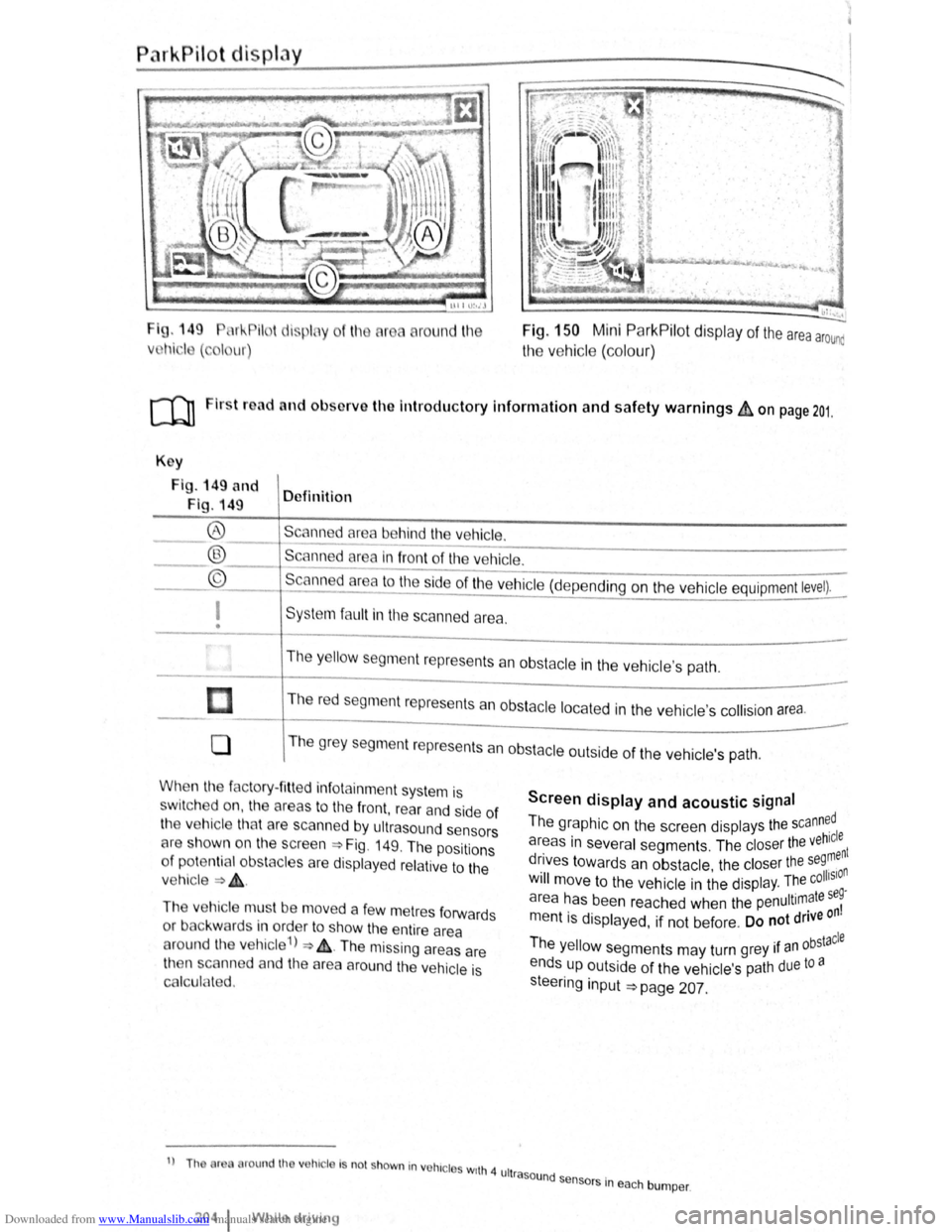
I g. 149 11 !--Pilot lispl y
Vl l~i ·I ( , I ur)
round l11e Fig. 150 Mini ParkPilot display of the area arounc
the vehic le (co lo ur)
ro Firs t road and ol>sorve the Introductory Information and safety warnings&, on page 201.
Key
Fig . 149 and
Fig. 149 Definition
Scann d
area behind the vehicle. ®
® ©
------------------------ -----------Scanned area in front of the ve hicle.
--------------------------------Scanned area to the ~ide of the vehic le (depe nding on the ve hicl e equipment level).
I
• Sys te m fa ult in the scanned area .
The
y ello w segm ent represents an obstacle in the vehic le's path .
Th e r
ed segment represents an obsta cle loca te d in the vehicle's collision a rea.
0 T he grey segment represents a n obstacle outside of the ve hicl e's path.
When the factory- fitt ed inf otainment syste m is
sw it c h ed on , the a reas to the front , rear and side of
the vehicle tha t are scanned by ultrasound sensors
cH e sh own o n the scree n =>Fig. 149. The positions
o f
potentia l obs tacles are displa ye d re lative to the
v e hic le
=> & .
The vehicle mus t be move d a fe w m etres forwards
or back war
ds in order to show the e ntire area
around the vehicle 1
) => & . The missing areas are
t11en scanned and the area around the vehic le is
Cf'llcula ted.
1
) Th or round th v hic le Is no t shown in vohrc l s wrth 4 ult
2o4 1 Whil e driving
Screen display and acoustic signal
The graphic on the screen displays the scann~dl
areas in several segments . The closer the veh~:nt
drives towards an obstacle the closer the se9, n . • olhSIO Will move to the ve hicle in the displ ay. The c .
a r
ea has been reache d when the penultimate se~
m entis displayed, if not be fore . Do not drive on
Th . bstacle e yello w segments may turn grey 1f an °
ends up outside of the vehi cle's path due to a
s teeri
ng input =>page 207.
rasound se .
n sors m eac h bumper .
Page 98 of 138
Downloaded from www.Manualslib.com manuals search engine park Assist system
WJl Introduction
is c ha pt er contain s information on th e following
5 bJects :
par in g using the Park Assist system . . . . . . . 214
Driv in g out of a parkin g space with the Park
Assist s y stem (only parking spaces paralle l to
s id e of
road) . . . . . . . . . . . . . . . . . . . . . . . . . . . . 216
A
toma ti c brak e intervention . . . . . . . . . . . . . . 216
; e Park As sist s y stem helps the driver in findi ng
su·table park in g spaces, when parking in suitable
p a ra
lle l or perpend icu lar parking spaces and whe n
get ·n g o ut of para lle l parking spaces.
T
e Park Ass ist system has certa in system-rela ted
limitations and th e driver should be particularly
carefully when using the Park Assist system => 4::,..
One element of the Park Assi st system is the Park
Pilo~ which is des igned to provide assist an ce
when parkin g.
In vehicles w ith ParkP ilot optical display the scan
ned area to the front , rear and to the sides of the
vehicle will be shown on the screen of the radio or
the navigat ion sys tem. W ith in the scope permitted
by the sys tem , the pos it ion of obstacles w ill be
s
hown in rel at ion to the vehicle .
T he
Park Ass is t system cannot be sw itched on if
the factory -fitted towing bracket is e lectrically co n
n e
cted to the trailer.
Additional information and warnings:
• Exterior views =>page 6
• Braking , stopp ing and parking =>page 179
• ParkPilo t =>page 201
•
C leaning and caring for the vehicle exterior
~page 294
• Accessor ies, mod ificatio ns, repairs and renew al
of Parts =>page 320
..._A W ARN ING
D o not le t the extra convenience afforded by
the Park Assist system tempt you into taking
any risks when driving-this can cause acci
dents. The system is not a substitute for the
full concentration of the driver.
• Un intentional vehicle movements can
cause serious injury.
A WARNING (Continuec;f) -
• Always adapt your speed and driving style
to suit visibility, weather, road and traffic con
ditions.
• The surface of certain objects, including
clothing, as well as external noise sources do
not reflect the signals from the Park Assist
system or the parking distance warning sen
sors or can cause the system to fail to detect
objects or persons.
• Sensors have blind spots in which obsta
cles and people cannot be detected.
• Always monitor the area around the vehi
cle as the sensors will not always detect in
fants, animals and objects.
..
A WARNING .. p k
When driving into or out of a parking space
using the Park Assist system, the steering
wheel will automatically make quick turning
movements. You could be injured if you at
tempt to touch the steering wheel spokes.
• The Park Assist system uses parked vehi
cles, the kerb and other objects as guidance.
Please ensure that the wheels and tyres are not
damaged when parking the vehicle. If necessa
ry, stop the parking procedure in good time to
prevent damage to the vehicle.
• The sensors may not always be able to de
tect objects such as trailer drawbars, thin rails,
fences, posts, trees and open or opening tail
gates. This can result in damage to your vehi
cle.
•
If the ParkPilot has detected an obstacle
and issued a warning, the obstacle may move
out of the detection range of the sensors as the
vehicle approaches it, particularly if the object
is very high or very low. These objects are no
longer registered. The vehicle can sustain con
siderable damage if the warning given by the
ParkPilot is ignored. The same applies to the
Park Assist system, for example when parking
behind a lorry o r a motorbike. Therefore, al
ways check the space in front of and behind
the vehicle and stop the vehicle in good time if
necessary.
I D•ive• assist systems 12t3
~~------------------~-~! ----------------~~@~-~· ~---J~-
Page 100 of 138
Downloaded from www.Manualslib.com manuals search engine ' '' '
-
,li ~lP lllP lUll' slynr~l for tl1e s.ide o f th e s tree t
11 1, ,,u v ;:~r1l t
o l P lP ·t a pllrk111g space . Th e ,,, ,, 11 ' ' ~1,, ruli11\.l ~ide f the lr ells sl1own o n the tn-
'''"P , ~\111111P11 l itlq{(ll displlly
I p8d,ir1\-J ~pc:n·e i s t gmdod as suit ab le i f it is
:IIPR~l o a 11, lo11u o r lllall llle ve hi cle.
1'~1 "'" • WIIPil 1 AI kin g prtrall el to the road: driv e pas t
thE~ pe~'"'''~ Rp;:~ce Rl a SI ee d of no m ore than
~~ ~rll'h ( r. rnpll) and at a d is ta n ce betw een ap
pr\.l\llllRlr l Q .r. Ill cmd 2 rn from the parking sp ace .
, Wlum p~r kin perpendicular to the road:
dn\ e pns tllle p;:1rl~i11 space a t a sp ee d of n o mor e
lhan :£0 ""'11' (1 2 111~h) and a t a dista nce be tw ee n
ili'P' \ltmle ly 0.5 m a nd 2 m from the parking
~I'R '9 .
• Yuu \1 ill R ·lli eve b st parkin g result s if yo u stop
, ur el11 ·le a para lle l as possib le to the parke d
veh1 ·I o r tll o edge of til e road.
• If a ullal>l e par king space is indi cated in the in-
l1lll11e llt ·lust r disp la y, s lop the ve hicle and , after
a brief pause, se lect rev erse gear.
• F 11 w til e Ins tructions in the instrum ent cluster
dtSIJI~y
• Rei :la e til e steeri ng wheel wh en th e following
me· age Is sh ow n ~ in Introduc tio n on
Page21 teering intervent. active!
Monitor the area around vehicle.
• Clle k the area aro und the ve hi cle and careful-
1 depress til e acce lerator p e dal - do not exceed
7 hm/11 (4 nliJh).
• The Park Ass is t sys te m will only operate the
steenng wheel duri ng the parki ng pro ced ure. The
driver operates the accelerator, clutch, gear
hift and bra ke .
• r=ollow the vis ual in stru ctions and the acoustic
Wan~ing to nes of the Park As sis t system until the
Palkll1g procedur e has bee n completed .
• lhe Park Assis t sys te m will guide the vehicle
\Vhen d rivin g fo rw ards and re ve rsing until the vehi
cle Is parked straig ht in the parking space.
t Wait until the stee ring has completed the steer
ng P1~C dure at the e nd of eve ry parking move
nlent In orde r to ac hieve an optimal p arking result.
; )
A n1es age is display ed on the instrument clus
Ger one the parking procedure is completed and
n ~cou tic s ignal tone may b e he ard .
... .__ -.. -r ---.J'-
Interrupting or automatically stopping the
parking procedure
The Park Ass is t system will stop the parking proce
dure if th e following happens :
• The 8 button is pressed.
• The ve hi cle spee d when parking is higher than
app roxim ate ly
7 km /h (4 mph).
• The driver operates the steering wheel.
• The parking procedure was not completed with
in approximately 6 minutes of activating the auto
matic stee ring intervention .
• There is a system fault (system is temporarily
un ava ilable) .
•
The TCS is switched off or the TCS or ESP
starts to regulate .
r::l The Park Assist system has system-related
l!J limitations . For example, the Park Assist sys
t e m cannot help you to park the
vehicle on tight
b e nd s.
r::l Wh en parking parallel to the road , a warning
L!J signal can be heard to tell the driver to switch
between driving forwards and reversing because
the change
of direct ion should not take place in the
permanent tone area
of the ParkPilot.
r::l The progress bar in the instrument cluster
l!J display will symbolically indicate the relative
distance remaining .
W If the Park Assist system turns the steering
l!J wheel when the vehicle is stationary , the 6l
symbol appears as well. Depress the brake pedal
so that the steering movement takes place with the
vehicle stationary, keeping the required number of
parking movements to a minimum.
r::l If the parking result worsens after a wheel is
~ changed, the system will first have to syn
chronise
itself with the new wheel. The synchroni
sation procedure is carried out
automatically while
the vehicle is in motion. You can support this proc
ess by driving slowly (less than 20 km/h (12 mph))
through a bend, e.g. in an empty car park.
Page 104 of 138
Downloaded from www.Manualslib.com manuals search engine th . troductory information and safety warnings & on page 218 First
read and observe e m ·
Function
Switching on the CCS .
Switch position, switch op~ration
on the turn signal lever~ Fig. 160
or button on the multifunction
steering wheel ~Fig. 161
Move switch CD on the turn signal
lever to position ON, or press the @
button on the multifunction steering
wheel.
Action
--.
The system is switched on. Nos~
has yet been stored and th e sp eed.
not yet being contro lled .
Switching between the
CCS and the speed limit
er. Press
button
@ on the turn signal
lever,
or press the @ button on the
multifunction steering wheel. This switches between the CCS a
the speed limiter ~page 222.
Activating
the CCS.
Switching off the CCS
control temporarily.
Resuming
CCS control.
Increasing the set speed
(during
CCS control) . Press button
@ on
the turn signal
lever at the area marked
SET/-, or
press the @iJ button on the multifunc
tion steering
wheel.
Press switch CD on the turn signal
lever into position
CANCEL, or press
the
@ button on the multifunction
steering wheel.
OR: briefly press the @0 button on the
multifunction steering wheel.
OR:
depress the brake pedal.
Press button
@ on the turn signal
lever
at the area marked RES/+, or
press the @] button on the multifunc
tion steering wheel.
Press button
@ in the area marked
RES/+, or briefly press the@) button
on the multifunction steering wheel to
increase the speed in
small incre
ments
of 1 km/h (1 mph) and to store
the speed .
The current speed is stored and coo
trolled .
Control is switched off temporarily .
The speed is stored in the memory.
· t d and The stored speed is reactJva e
controlled .
Press the
Q button on the multifunc
tion steering wheel
briefly to increase
the speed
in increments of 1 0 km/h
(5 mph) and to store the speed .
. ntil ct1vely u The vehicle accelerates a
it reaches the new set
speed.
Press button
@on the turn signal
lever in the area marked
RES/+, or
press and hold the Q button on the
multifunction steering wheel to in
crease the speed continuously until
the button is released and to store the
speed .
Page 105 of 138
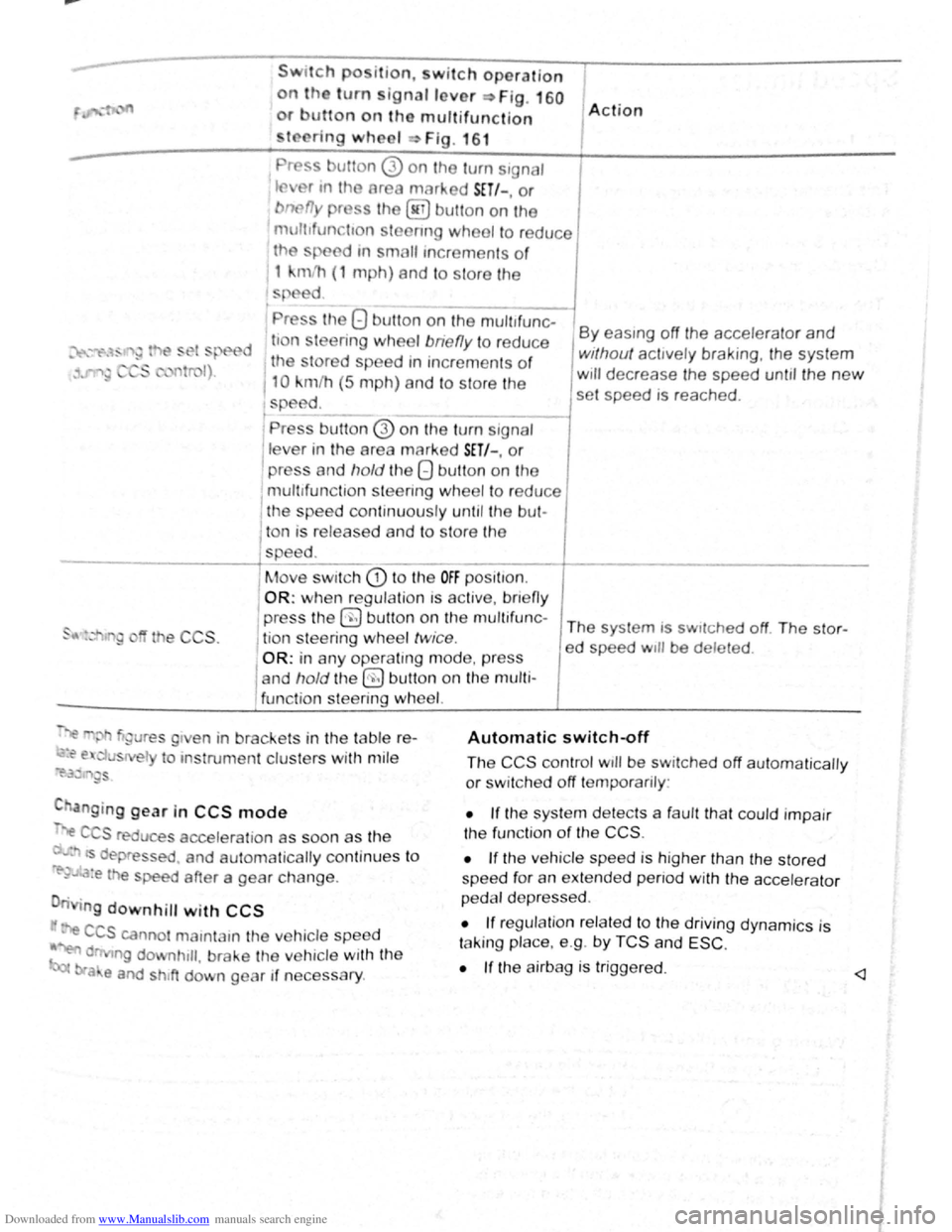
Downloaded from www.Manualslib.com manuals search engine Swttch po ition, w itch operation
on the turn ignallover ~Fig. 160
or utton on tho multifunction
to ring wheel Fig . 16 1
Pr ss utton 0 on the turn s1gnaJ
tflv r tn tho area marked SET/-, or
bnefly pr ss the @ button on the
mult1fun tton stoenng wheel to reduce
th
sp ed tn small tncrements o f
1 kmlh (1 mph) and to s tore the
s ed
' Pr ss the 8 button on the mult~~
d ti n leering wheel bne fly to redu ce
1 the tored speed tn increments of
110 km/h (5 m ph) and to store the
speed. t -------l Pre s button @ on the tu m signal
lev r in the area marked SET/-. or
I press and hold the 8 button on the
mult tfunc tion st
eering wheel to re du ce 1 the spee d con tin uously un til the bul-
1 A ction
By eas1ng off the accelerator and
without acttvely braking, the system
w111 decrease the speed unt1l the new
set speed is reached .
l ton is released and to s tore the
-----------+spee d. ____ _
I
Move swi tch CD t o the OFF posi t1on.
OR: when regula tio n IS ac tiv e, bnefl y
the CCS .
press the 0 b utt on on t he mu ltif u n c-The system is sw1tched off The stor-
j tio n s teering wheel twice . ed speed w1ll be deleted .
OR: in any operating mode , p res s
and
hold t he §) butt on on the multi
func tion steering
wh eel.
~"' gure s g1 en in brackets in th e table r e-
~~ e. u s el to ms trume nt clus ters with mil e
~i'.3~ '"~gs
C anging gear in CCS mode
".e C S reduce s accelera tio n as soon as th e
· ts dep ressed . and automa tically continu es t o
re-~..~:a:e the speed after a gear change .
n g
downhill with CCS
· e CCS canno t mamtam the ve hicle speed
~ d ng downhtll , brake the ve hicle with the
bra e and shtft down gear if neces sary .
Automatic switch~ff
The CCS control wtll be switched off automaticall y
or sw it c h e d off temporarily :
• If the sys te m d etects a fau lt th at co uld impair
th e fun ctio n
of th e CCS .
•
If th e ve hicle spee d is h igher than the stor ed
spee d for an exte nd ed p enod with the acc ele ra to r
p e dal d ep re ss ed .
• If reg ulation re la te d to the driv ing dyn ami cs is
t a kin g place. e.g . by
TCS and ESC .
•
If the a irbag is trigge red. <1
Page 107 of 138
Downloaded from www.Manualslib.com manuals search engine ~
A WARNING ...
~re to observe illuminated w~rning lan1ps
d text messages can lead to your vehicle
an tt· d breaking down in tra 1C, a n can cause acci-
dent and serious injury.
• Never ignore any Illuminated w arning
lamps or text messages,
CD I'. [
Failure to observe illuminated indicator lamps
and text messages can lead to your vehicle be-
ing damaged.
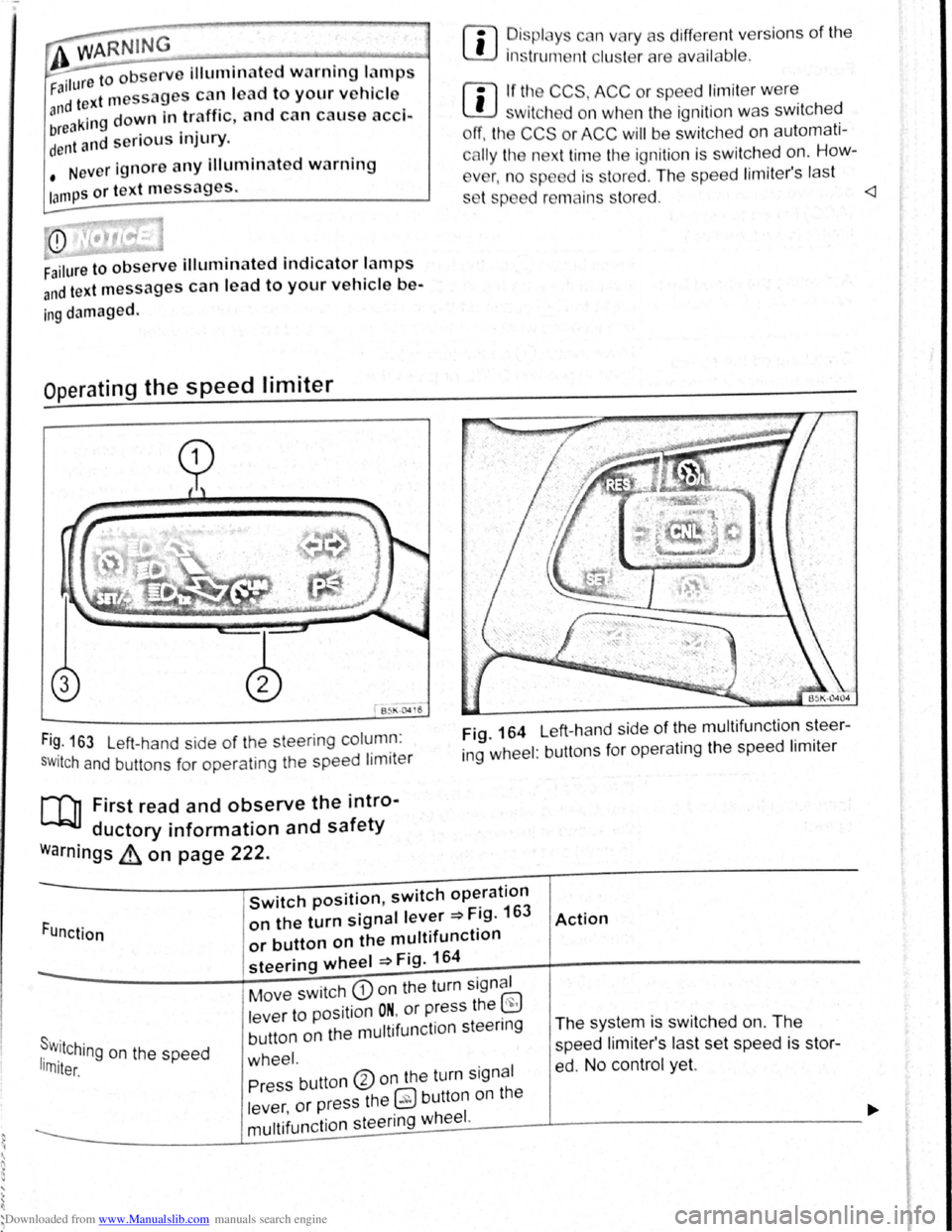
Operating the speed limiter
B~l\·04 16
Fi~. 163 Left-hand side of the steering column :
SWitch and buttons for operating the speed limiter
[Q] First read and observe the intro-
ductory information and safety
warnings ~ on page 222.
rn
• ~is plc y c n vary as different vers ions of the
1ns trum nt clu t rare availab le .
rn
• If tl~ CCS, ACC or spe ed limit er w ere
w1tch d on wh n the ignition was switched
ff, the CCS or ACC will be switched on automati
c
lly the n xt time the ignition is switched on. How-
v
r, n o sp d is stored . The speed lim iter's last
s t p d r mains s tored.
ing wheel : buttons for operating the speed limiter
Function
Switch position, switch operation
on the turn signal lever ~Fig. 163
or button on the multifunction
steering wheel ~Fig. 164
Action
s . r w.11Ching on the speed 1rn1ter.
Move switch CD on the turn signal
lever to position
ON. or press the ~
button on the multifunction steenng
wheel.
The system is switched on. The
speed li miter's las t set speed is st or
ed. No control yet. Press button ®on the turn signal
lever ,
or press the 0 button on the
----------------~m~u~lti~fu~n~c~ti~o~n~s~te~e~r~in~g~w~he~e~I~·------J----------------------------~
Page 108 of 138
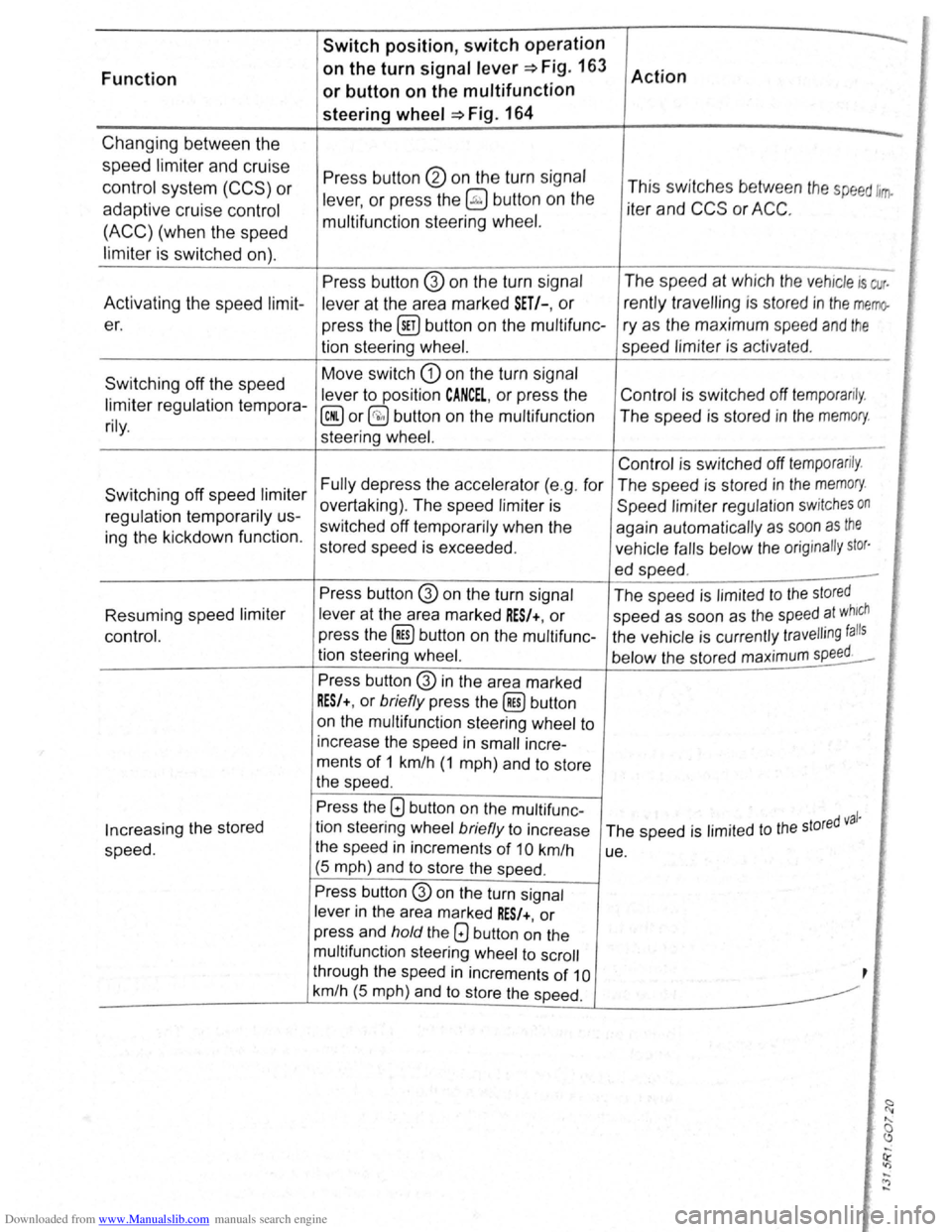
Downloaded from www.Manualslib.com manuals search engine Switch position, switch operation
Function on
the turn
signal lever~ Fig. 163
Action
or button on the multifunction
steering
wheel ~Fig. 164
Changing between the -
speed limiter and cruise Press button @ on the turn signal control system (CCS) or lever, or press the ~ button on the This
switches between the speed ltrrfo
adaptive cruise control iter and CCS or ACC.
(ACC) (when the speed multifunction
steering wheel.
limiter
is switched on).
Press button @ on the turn signal The
speed at which the vehicle is cur.
Activating the speed
limit-
lever at the area marked SET/-, or rently travelling is stored in the memo-
er.
press the @!) button on the multifunc- ry as the maximum speed and the
tion steering wheel. speed limiter is activat ed.
Switching off the speed Move
switch
G) on the turn signal
lever to position
CANCEL, or press the Control
is switched off temporarily. limiter regulation tempora-@ or§;) button on the multifunction The speed is stored in the memory. rily. steering wheel. ,' [ '
Control is switched off temporarily .
Switching off speed limiter Fully depress the accelerator (e.g . for The speed is stored in the memory.
overtaking) . The speed limiter is
Speed limiter regulation switches on regulation temporarily us-
switched off temporarily when the
again automatically as soon as the ing the kickdown function.
stored speed is exceeded . vehicle falls below the orig inally stor·
ed speed . -
Press button @ on the turn signal
The speed is limited to the stored
[i' Resuming speed limiter lever at the area marked RES/+, or speed as soon as the speed at which
control. press
the (ill) button on the multifunc- the vehicle is currently travelling falls
tion steering wheel.
below the stored maximum speed. I'
Press button @ in the area marked
RES/+, or briefly press the (ill) button
on the multifunction steering wheel to
increase the speed in
small incre-
ments
of 1 km/h (1 mph) and to store
the speed .
Press the G) button on the multifunc -d val· Increasing the stored tion
steering wheel briefly to increase
The speed is limited to the store
speed. the
speed in increments of 10 km/h
ue.
(5 mph) and
to store the speed .
Press button G) on the turn signal
lever
in the area marked RES/+, or
press and
hold the Q button on the
multifunction steering wheel to scroll
through the speed
in increments of 10 ,
km/h (5 mph) and to store the speed.
-<")
-
Page 109 of 138
Downloaded from www.Manualslib.com manuals search engine ... . ·
' '
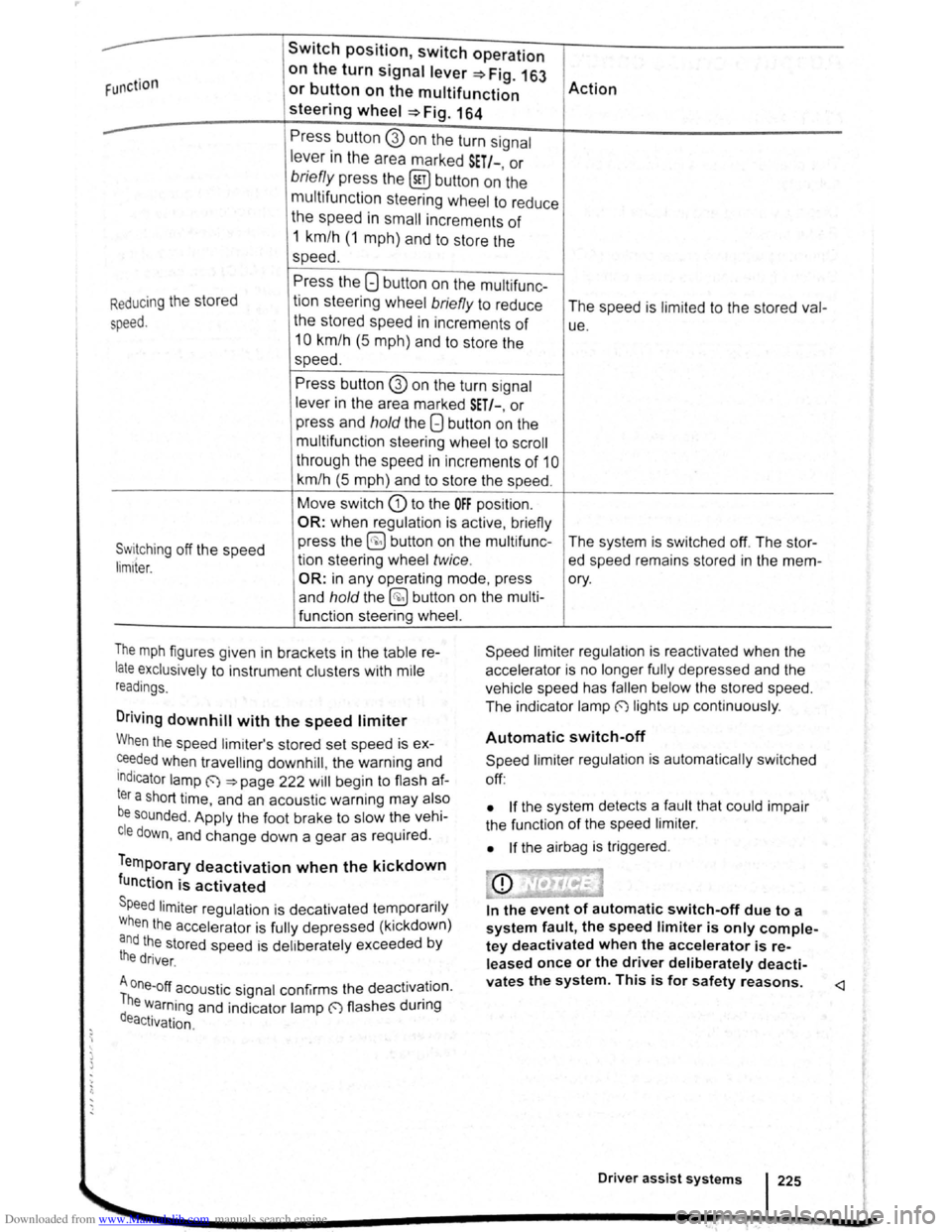
Swit c h posit ion , switch oper ation
F unction
on the turn signal lever=> F ig. 16J
Action or button on the multifunction
steering wheel =>Fig . 164
--Press butto n G) on the turn signal
lever in the area marked S ET/-, or
brie fly pre ss the (sET) button on the
multifu nction
steerin g whe el to reduce
the speed in small increments of
1 km/h ( 1 m ph) a nd to store the
speed.
Press the 8 button on the multi func-
R
educing the stored
tion steering wheel briefly to reduce
The speed is limit e d to the stored val-
speed. the stored speed in increments of ue .
10 km /h (5 m p h) a nd to sto re the
speed.
Press button @ on the turn s ignal
lever i n the a rea marked SET/-, or
p r
ess and hold the Q button on the
m ult ifunctio n stee rin g
wheel t o sc ro ll
t h roug h th e spee d in i ncre m ents
of 1 0
km/h (5 m ph) and to sto re the speed .
Move switc h G) to the OFF position.
OR: when regula tio n is active , briefly
Switching off the speed press
the ~ butto n on th e multifunc -
The system is switched off. The stor-
tion stee rin g wheel twice . ed speed remains stored in the mem -lim1ter.
OR: in any opera tin g m od e, pr es s ory.
a nd
hold th e @ button on the mult i-
f u n ctio n steering wheel.
T
he m ph figures given in bracke ts i n the tab le re
late exclusively to instrument clu sters with mile
r
ead ings.
Driv ing downhill w ith the speed limiter
Speed limi te r regu lat io n is reactivated when the
acce le ra to r is no longe r fully depressed and th e
ve hic le s pee d h as
falle n be low th e s tored speed.
The ind icato r lam p
(') lig hts up continuo usly .
When the speed lim ite r's stored set speed is ex
~e~ded when travellmg downhill, the warn in g a nd
Indicator lamp ~ ~page 22 2 will begi n to flas h af
ter a short tim e, and an aco ustic warnin g may also
be sounded . A pp ly the foot brake to s low the ve hi
cle down, and change down a gear as req uir e d .
Temporary deactivation when the kickdown
function is activated
Speed limite r reg ulatio n is decati va ted te m po rari ly
W he n
the acce le ra to r is fully dep ressed (kickdown)
and the sto red speed is delib erate ly exceede d by
the driver .
A one-off acoustic signal confirms th e deac tivation.
The warning and indicato r lamp (') flashes durin g
deactivation .
. .
Automatic switch-off
Spee d li mi ter regu lat ion is automatically switched
off :
• If the syste m d etects a fa ul t that could im pai r
t he fun ction of th e spee d
limit e r.
•
If t h e airbag is triggered .
In the event of automatic switch-off due to a
system fault, the speed limiter is only comple
tey deactivated when the accelerator is re
leased once or the driver deliberately deacti-
vates the system. This is for safety reasons.
Page 117 of 138
Downloaded from www.Manualslib.com manuals search engine I ation to standstill (only vehicles with pece er )
rnatic gearbox 3uto hicle travelling ahead brakes to a standst1ll ,
If a ;~c will also brake your vehicle to a s tands till.
~:e vehicle is then he ld stationary by th e brakes.
Stationary phase (only vehicles with
autornatic gearbox)
If the adap tive cruise control has decele ra t d the
vehicle to a standstill, the adapt.ive cruise contr o l
will not be switched off automatically wh en the
brake pedal is depressed .
The electronic parking brake will be activated auto4
matically and the adap tive cruise control will be
switched off if one of the following situations occurs
while the vehicle is stationary:
• The safety be lt is unfastened .
• The driver's door is opened.
• The ignition is switched off.
• The stationary phase lasts longer than approxi4
mately 3 minutes .
Driving off after a stationary phase (only
vehicles with automatic gearbox)
After a stationary phase, the adaptive cruise con
trol can start the vehicle moving automatically as
soon as the vehicle in front begins to move again.
Overtaking
If the turn signal is activated when starting an over
taking manoeuvre , the adaptive cruise control ac
celerates the vehicle automatically and thus re
duces the distance to the vehicle in front.
If you move your vehicle into the overtaking lane
and there is no vehicle ahead of you , the ACC will
automatically increase the speed to your set level
and maintain it.
Acceleration can be stopped at any point
by de
Pressing the brake pedal or pressing the @ button
on the multifunction steering wheel ~page 229.
When driving through bends
While dr iving through bends, the radar sensor may
sometimes lose the ve hicle travelling ahead or
rnay r eac t to a ve hicle in the next lane
; Fig. 169 A. In such situations, the vehicle might
.
ecel e rate unnec essarily or not react to the veh icle
In front. In this case the driver must override the
Abcc by depressing the accelerator, or interrupt the rak· lng procedure by depressing the brake peda l
or Pressing the ~ button on the multifunction
ste · ~ enng wh eel ~page 229.
Driving In tunn I
Th rnd~u nso r run .tton mt y lH n slt11.l clln tun ·
n Is. Sw1tch off th ACC m tunn I•
Narrow v e hlcl
situation
nd · zl -z g tr ff c
Vehicles with special load or p cl
equipment
Any load or cc sari th, t pr
trude from tile sld , r r or ov r 111 r o f o f th v •
hicle m y no t be d t et d y th ACC .
Swit ch
off the ACC wh n tt1 v 'hi cl ~h ld h e
special lo d or sp ci I equi pm nt o r whil ov rt ;Jk·
ing such vehic les. If req uir d. brak th v hi I
yourself.
When othe r vehicles change lane
V ehicles that are ve ry close whon th y mov Into
your lane can onl y be do tec t d by th r d. r s n
sors when they h ave moved Into the s nsor r ng
This w ill resul t in a late r action by th dap tiv
cruise control
F1g. 17 0 C. If r quir d , br ke th e
vehicl e your self.
Stationary vehicles
The ACC do es not de tec t st tionary obj cts durin
a journey , such as st tion ary traffic
or a ve hi cl
th at has brok en down .
If a stationary ve hi cle is hidd en behind a ve hi cle
th at h as been detected by
the adap tive cruis e con
trol and this vehic le turns off the road or changes
la ne , the adaptive cruise contr ol will not be ble to
re ac t to the s ta tion ary vehicle Fig.
170 D. If re-
quired, brake the vehic le yourself.
Oncoming vehicles and vehicles crossing
your path
The adap tive cruise contro l does not react to ap
proaching vehicles or v ehicles crossing your p th.
Metal
objects
M eta l objects, such as tracks In the road or m et 1
plates used in roadworks, can confuse the radar
sensor and cause in correc t reactions from the
adap tive cr uise con trol.
..,..
Driver assist systems 233