ABS VOLKSWAGEN BORA 1998 Repair Manual
[x] Cancel search | Manufacturer: VOLKSWAGEN, Model Year: 1998, Model line: BORA, Model: VOLKSWAGEN BORA 1998Pages: 339, PDF Size: 2.35 MB
Page 64 of 339
Downloaded from www.Manualslib.com manuals search engine 01-61
Measured value block, reading
Note:
All functions which could previously be
performed with V.A.G 1551 can also be
performed with the tester VAS 5051.
The control module can transfer a considerable
amount of test data. This test data delivers
information on the operational condition of the
system and/or sensors connected to it. In many
cases the transferred test data supports
troubleshooting and repair. The test data has
been summarized into single display groups
because all the information cannot be
evaluated at the same time. The information
can be selected via display group numbers.
Стр. 41из 81 ABS ITT Mk 20 IE On Board Diagnostic (OBD) program
Page 65 of 339
Downloaded from www.Manualslib.com manuals search engine 01-62
Safety precautions
Observe following if test and measuring
instruments are required during a test drive:
Test and measuring instruments must be
secured to rear seat and operated by a 2nd
person from this location.
When test and measuring instruments are
operated from the front passenger seat there is
a danger that the person sitting there could be
injured in an accident when the airbag is
triggered.
Стр. 42из 81 ABS ITT Mk 20 IE On Board Diagnostic (OBD) program
Page 66 of 339
Downloaded from www.Manualslib.com manuals search engine 01-63
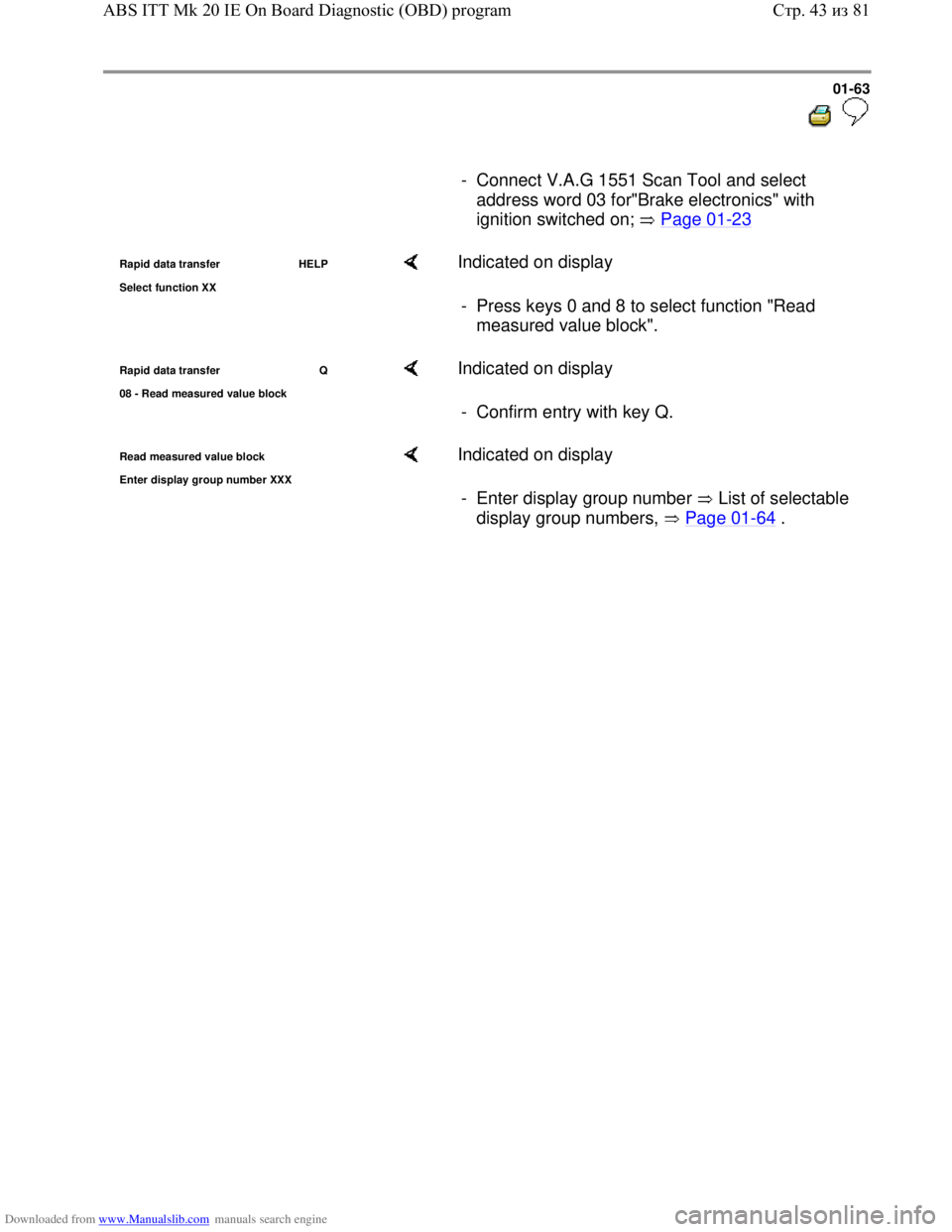
- Connect V.A.G 1551 Scan Tool and select
address word 03 for"Brake electronics" with
ignition switched on; Page 01
-23
Rapid data transfer HELP
Select function XX Indicated on display
- Press keys 0 and 8 to select function "Read
measured value block".
Rapid data transfer Q
08 - Read measured value block Indicated on display
- Confirm entry with key Q.
Read measured value block
Enter dis
play group number XXX
Indicated on display
- Enter display group number List of selectable
display group numbers, Page 01
-64 .
Стр. 43из 81 ABS ITT Mk 20 IE On Board Diagnostic (OBD) program
Page 67 of 339
Downloaded from www.Manualslib.com manuals search engine 01-64
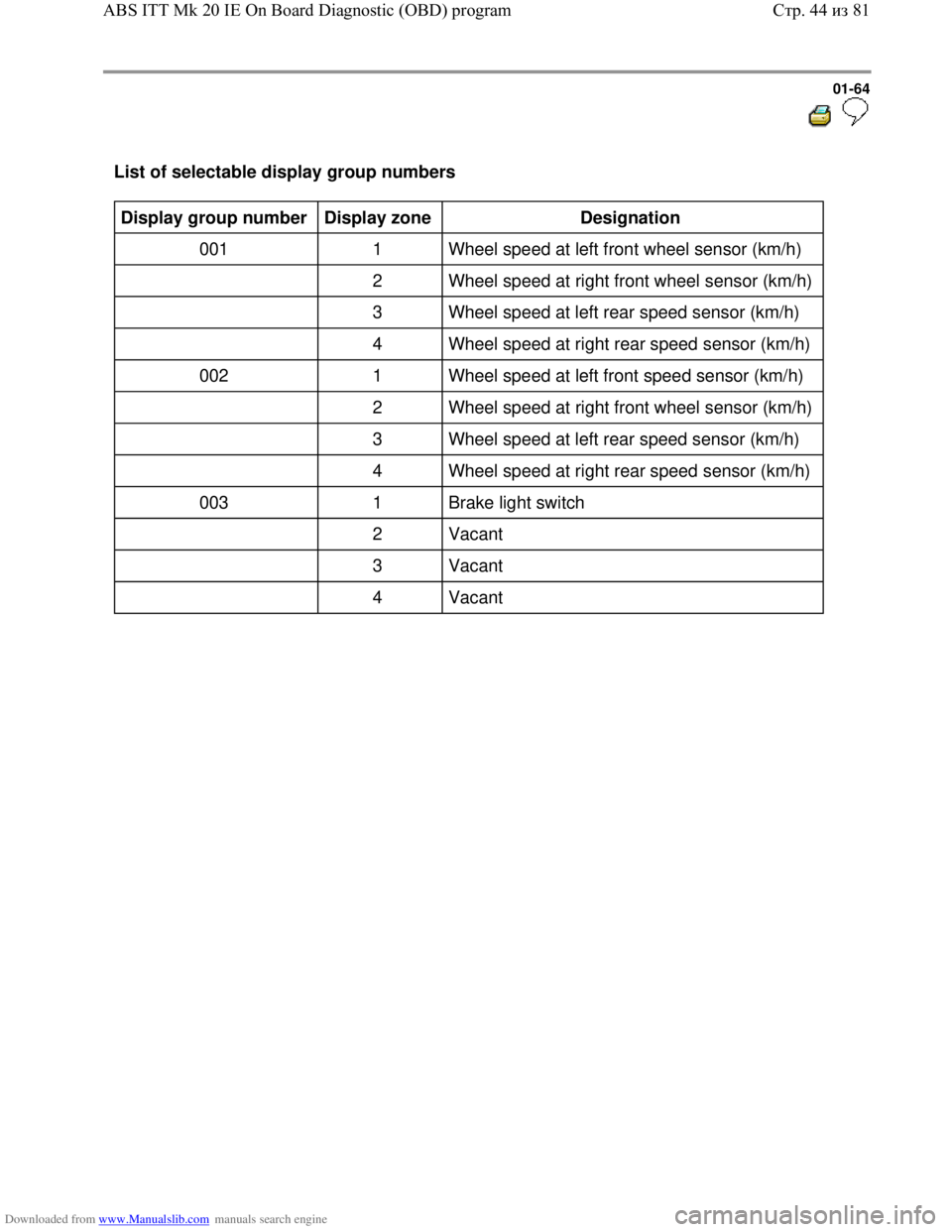
List of selectable display group numbers
Display group number
Display zone
Designation
001 1 Wheel speed at left front wheel sensor (km/h)
2 Wheel speed at right front wheel sensor (km/h)
3 Wheel speed at left rear speed sensor (km/h)
4 Wheel speed at right rear speed sensor (km/h)
002 1 Wheel speed at left front speed sensor (km/h)
2 Wheel speed at right front wheel sensor (km/h)
3 Wheel speed at left rear speed sensor (km/h)
4 Wheel speed at right rear speed sensor (km/h)
003 1 Brake light switch
2 Vacant
3 Vacant
4 Vacant
Стр. 44из 81 ABS ITT Mk 20 IE On Board Diagnostic (OBD) program
Page 68 of 339
Downloaded from www.Manualslib.com manuals search engine 01-65
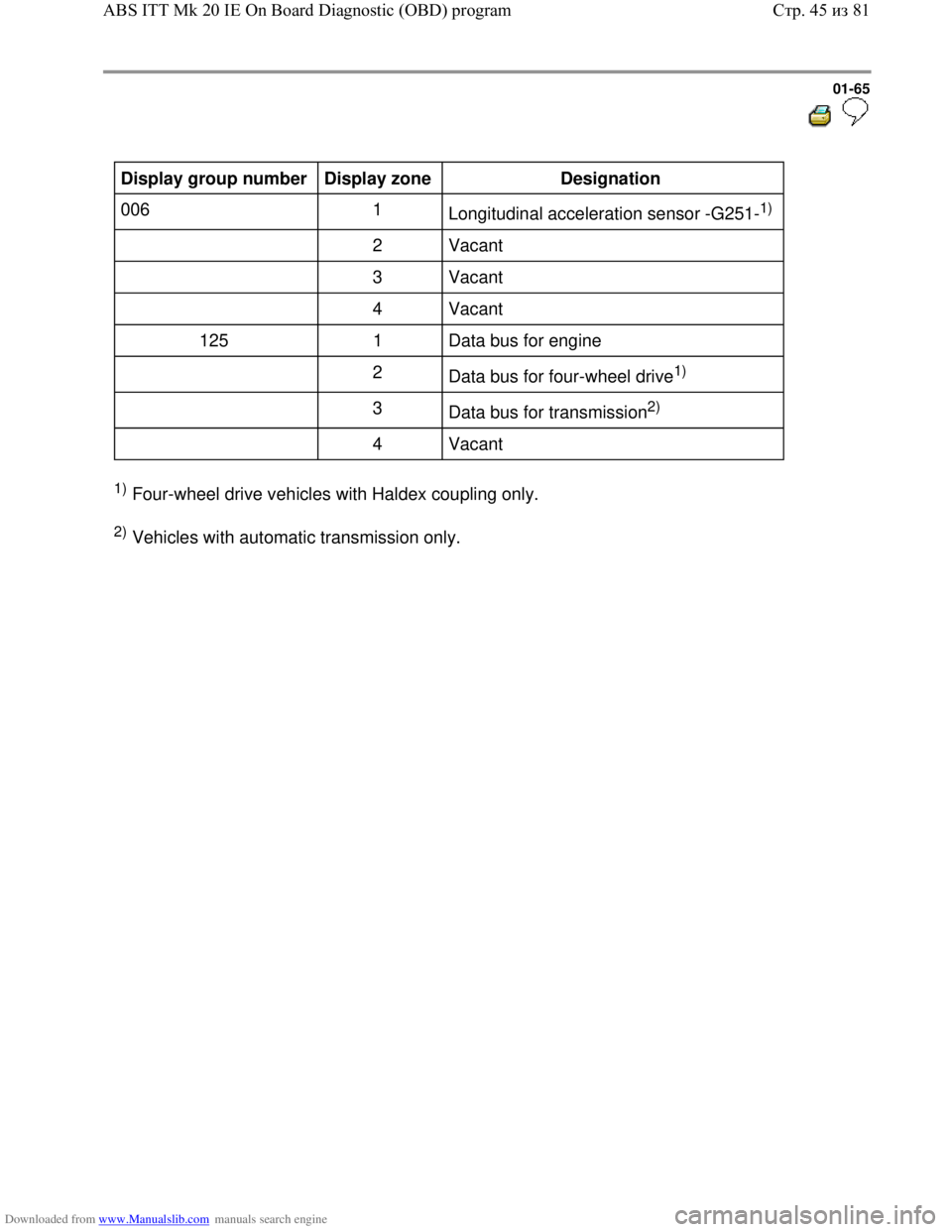
Display group number
Display zone
Designation
006 1
Longitudinal acceleration sensor -G251-
1)
2 Vacant
3 Vacant
4 Vacant
125 1 Data bus for engine
2
Data bus for four-wheel drive
1)
3
Data bus for transmission
2)
4 Vacant
1) Four-wheel drive vehicles with Haldex coupling only.
2) Vehicles with automatic transmission only.
Стр. 45из 81 ABS ITT Mk 20 IE On Board Diagnostic (OBD) program
Page 69 of 339
Downloaded from www.Manualslib.com manuals search engine 01-66
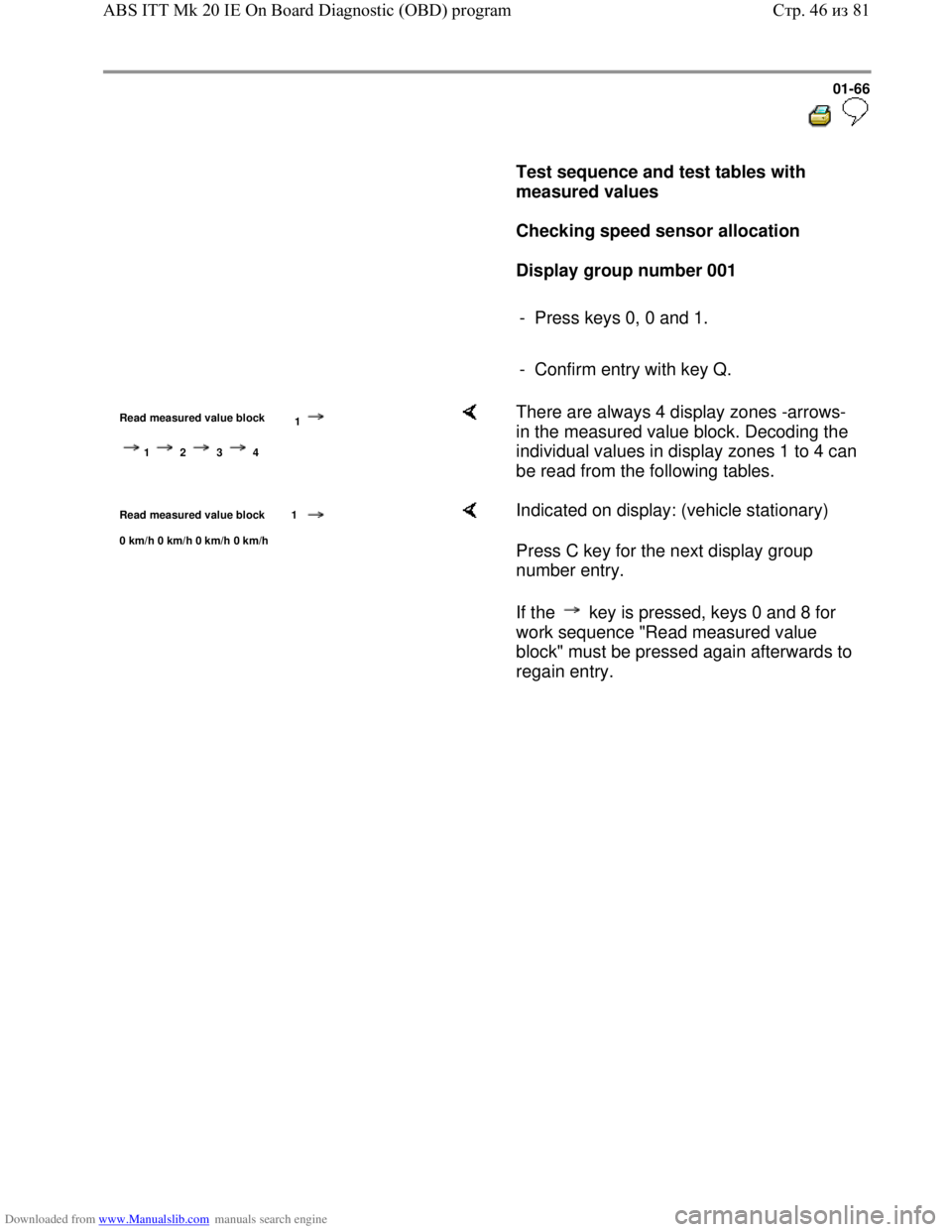
Test sequence and test tables with
measured values
Checking speed sensor allocation
Display group number 001
- Press keys 0, 0 and 1.
- Confirm entry with key Q.
Read measured value block
1
1 2 3 4
There are always 4 display zones -arrows-
in the measured value block. Decoding the
individual values in display zones 1 to 4 can
be read from the following tables.
Read measured value block 1
0 km/h 0 km/h 0 km/h 0 km/h
Indicated on display: (vehicle stationary)
Press C key for the next display group
number entry.
If the key is pressed, keys 0 and 8 for
work sequence "Read measured value
block" must be pressed again afterwards to
regain entry.
Стр. 46из 81 ABS ITT Mk 20 IE On Board Diagnostic (OBD) program
Page 70 of 339
Downloaded from www.Manualslib.com manuals search engine 01-67
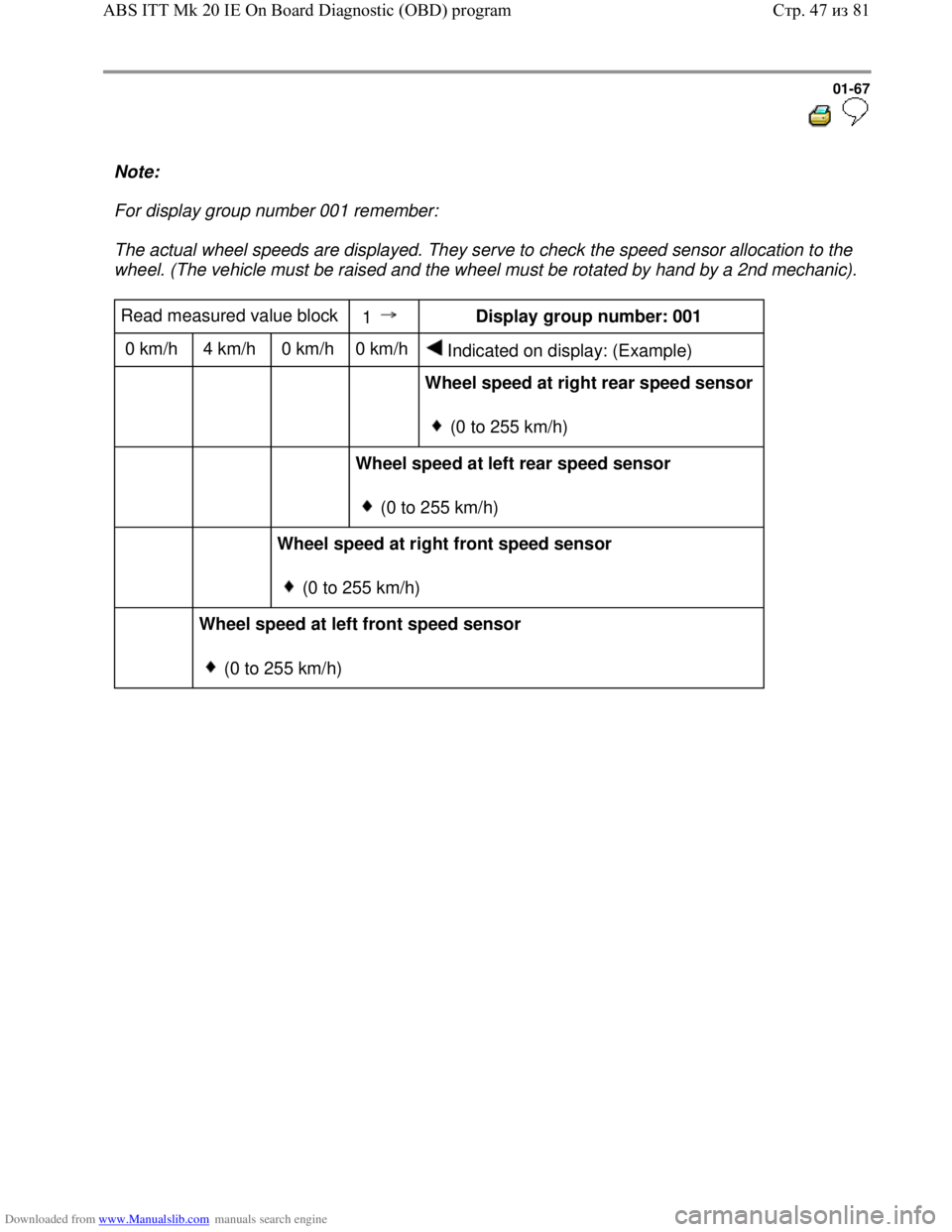
Note:
For display group number 001 remember:
The actual wheel speeds are displayed. They serve to check the speed sensor allocation to the
wheel. (The vehicle must be raised and the wheel must be rotated by hand by a 2nd mechanic).
Read measured value block
1 Display group number: 001
0 km/h 4 km/h 0 km/h 0 km/h
Indicated on display: (Example)
Wheel speed at right rear speed sensor
(0 to 255 km/h)
Wheel speed at left rear speed sensor
(0 to 255 km/h)
Wheel speed at right front speed sensor
(0 to 255 km/h)
Wheel speed at left front speed sensor
(0 to 255 km/h)
Стр. 47из 81 ABS ITT Mk 20 IE On Board Diagnostic (OBD) program
Page 71 of 339
Downloaded from www.Manualslib.com manuals search engine 01-68
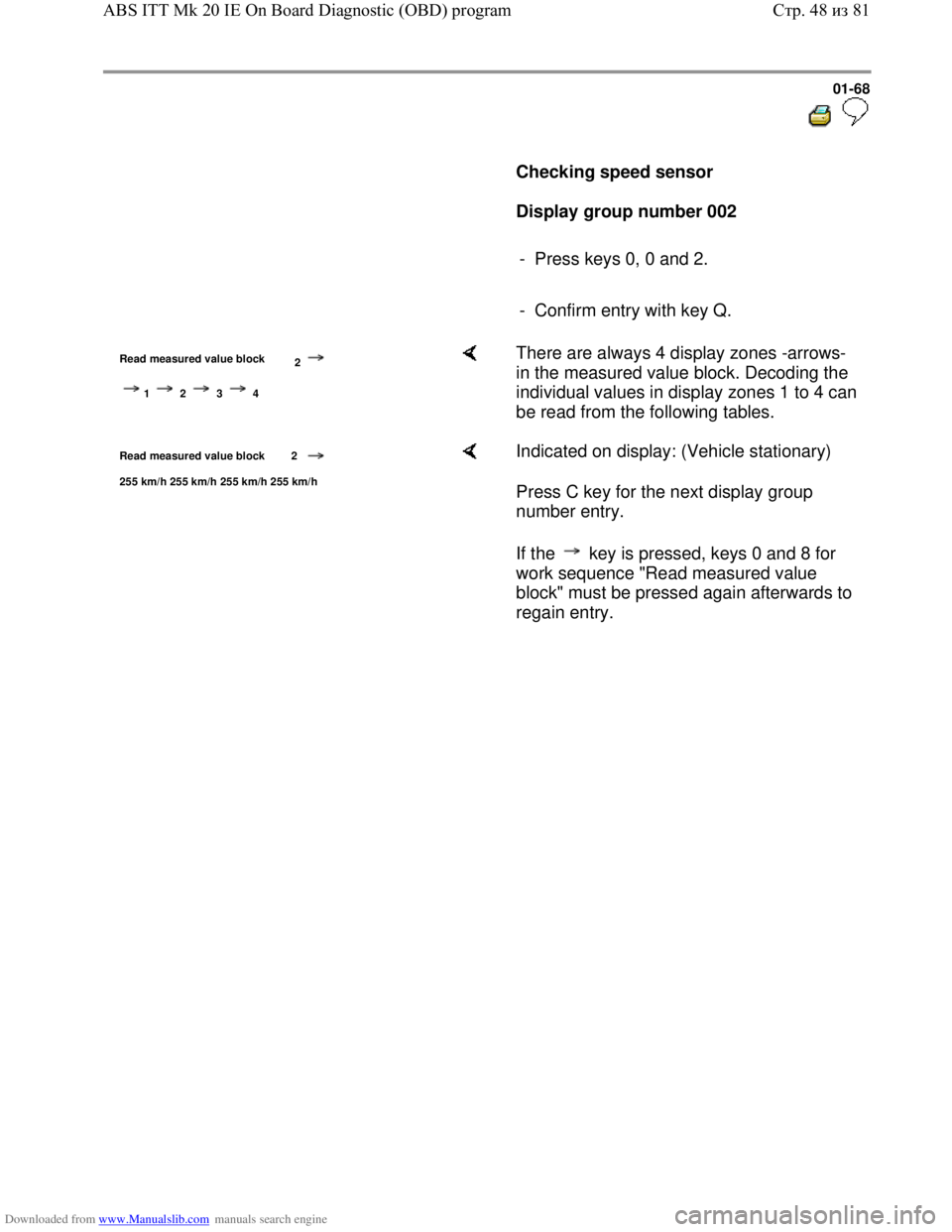
Checking speed sensor
Display group number 002
- Press keys 0, 0 and 2.
- Confirm entry with key Q.
Read measured value block
2
1 2 3 4
There are always 4 display zones -arrows-
in the measured value block. Decoding the
individual values in display zones 1 to 4 can
be read from the following tables.
Read measured value block 2
255 km/h 255 km/h 255 km/h 255 km/h
Indicated on display: (Vehicle stationary)
Press C key for the next display group
number entry.
If the key is pressed, keys 0 and 8 for
work sequence "Read measured value
block" must be pressed again afterwards to
regain entry.
Стр. 48из 81 ABS ITT Mk 20 IE On Board Diagnostic (OBD) program
Page 72 of 339
Downloaded from www.Manualslib.com manuals search engine 01-69
Note:
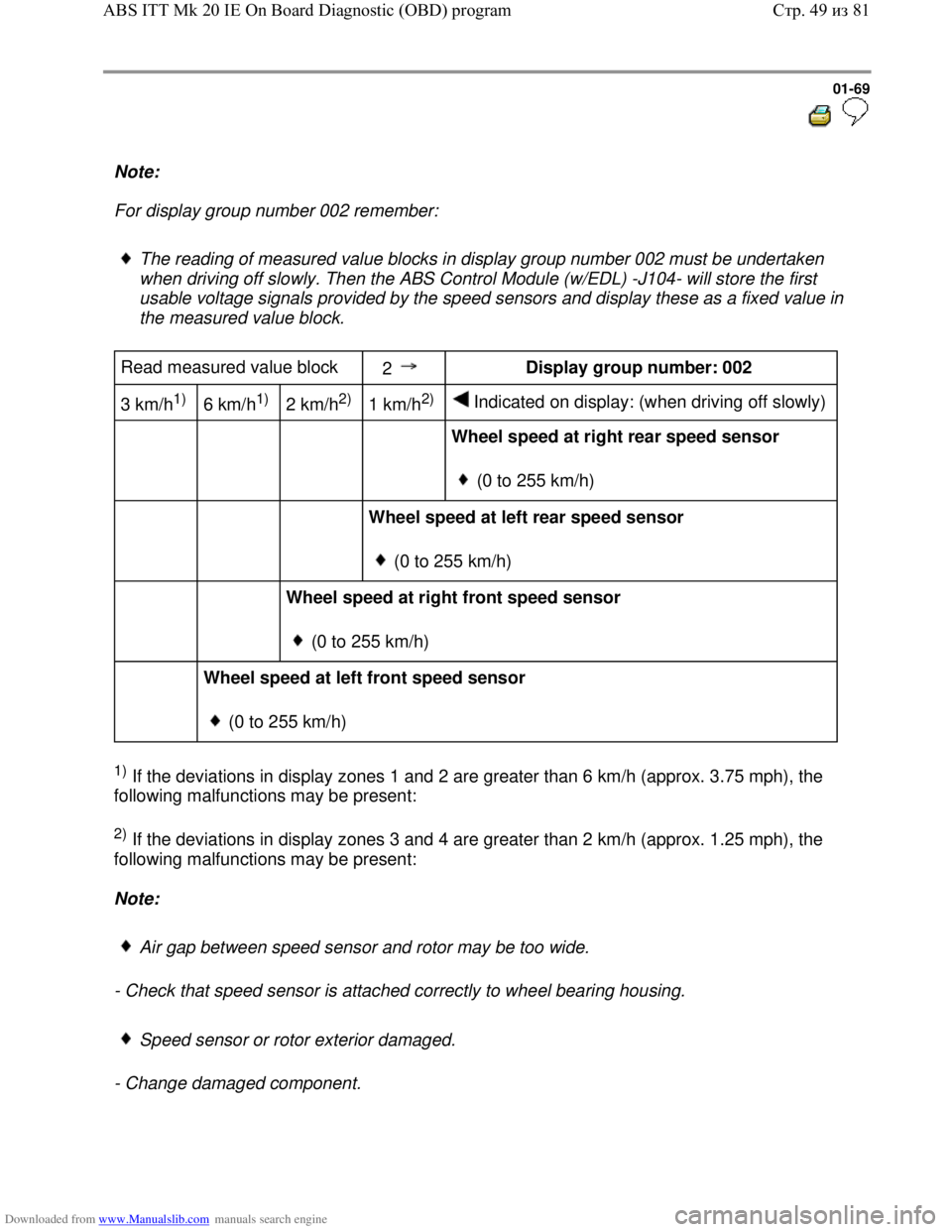
For display group number 002 remember:
The reading of measured value blocks in display group number 002 must be undertaken
when driving off slowly. Then the ABS Control Module (w/EDL) -J104- will store the first
usable voltage signals provided by the speed sensors and display these as a fixed value in
the measured value block.
Read measured value block
2 Display group number: 002
3 km/h
1)
6 km/h1)
2 km/h2)
1 km/h2)
Indicated on display: (when driving off slowly)
Wheel speed at right rear speed sensor
(0 to 255 km/h)
Wheel speed at left rear speed sensor
(0 to 255 km/h)
Wheel speed at right front speed sensor
(0 to 255 km/h)
Wheel speed at left front speed sensor
(0 to 255 km/h)
1) If the deviations in display zones 1 and 2 are greater than 6 km/h (approx. 3.75 mph), the
following malfunctions may be present:
2) If the deviations in display zones 3 and 4 are greater than 2 km/h (approx. 1.25 mph), the
following malfunctions may be present:
Note:
Air gap between speed sensor and rotor may be too wide.
- Check that speed sensor is attached correctly to wheel bearing housing.
Speed sensor or rotor exterior damaged.
- Change damaged component.
Стр. 49из 81 ABS ITT Mk 20 IE On Board Diagnostic (OBD) program
Page 73 of 339
Downloaded from www.Manualslib.com manuals search engine 01-70
Checking brake light switch for ABS and
ABS/EDL function
Display group number 003
- Press keys 0, 0 and 3
- Confirm entry with key Q.
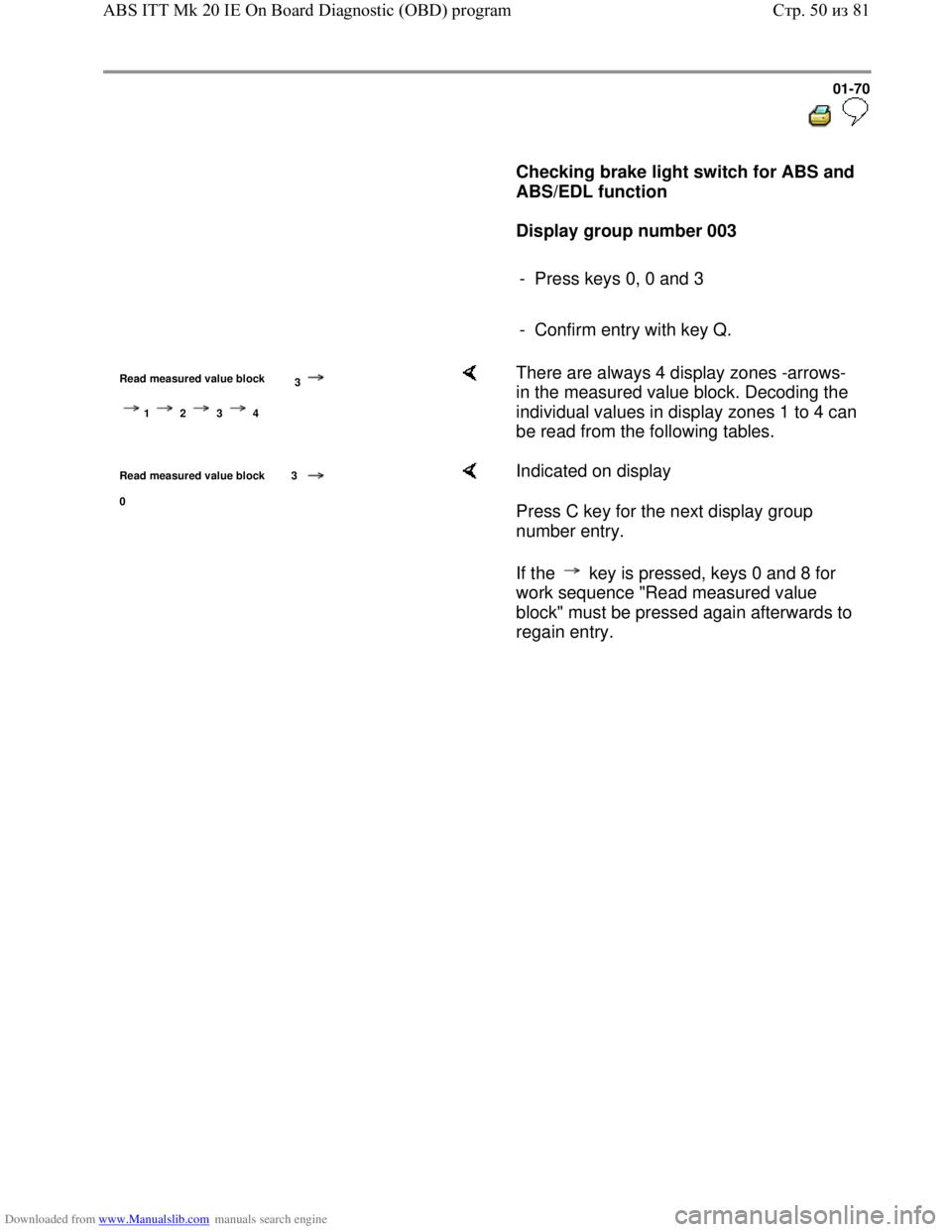
Read measured value block
3
1 2 3 4
There are always 4 display zones -arrows-
in the measured value block. Decoding the
individual values in display zones 1 to 4 can
be read from the following tables.
Read measured value block 3
0
Indicated on display
Press C key for the next display group
number entry.
If the key is pressed, keys 0 and 8 for
work sequence "Read measured value
block" must be pressed again afterwards to
regain entry.
Стр. 50из 81 ABS ITT Mk 20 IE On Board Diagnostic (OBD) program