light VOLKSWAGEN CC 2015 Owner´s Manual
[x] Cancel search | Manufacturer: VOLKSWAGEN, Model Year: 2015, Model line: CC, Model: VOLKSWAGEN CC 2015Pages: 578, PDF Size: 8.42 MB
Page 28 of 578
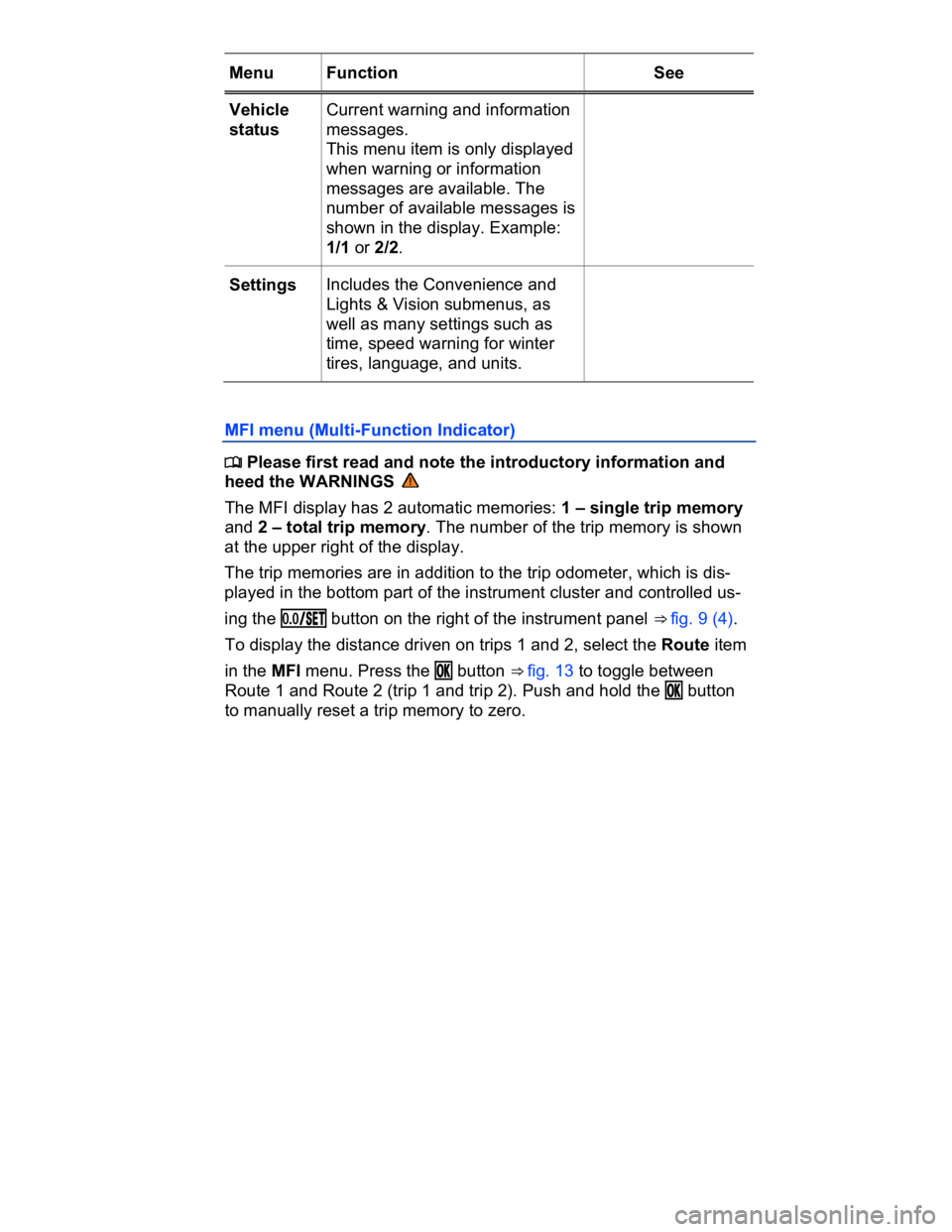
Menu Function See
Vehicle
status
Current warning and information
messages.
This menu item is only displayed
when warning or information
messages are available. The
number of available messages is
shown in the display. Example:
1/1 or 2/2.
Settings Includes the Convenience and
Lights & Vision submenus, as
well as many settings such as
time, speed warning for winter
tires, language, and units.
MFI menu (Multi-Function Indicator)
Page 32 of 578

Settings
menu
Function
Lights &
Vision
Vehicle lighting settings
Time Set hours and minutes for the instrument cluster
clock, the Radio & Navigation System clock, and the
analog clock. The digital clocks can be set to show
the time in 12 or 24 hour format, and can also be set
to daylight savings time.
Snow tires Set up a visual and acoustic speed warning. Use the
feature only when winter tires are installed that have
a speed rating less than top vehicle speed.
Compass Calibrate the compass on vehicles without a factory-
installed navigation system. To calibrate, follow the
instructions in the instrument cluster display
Units Set the units in which temperature, fuel consumption,
and distances should be displayed (for example,
whether to show distance driven in miles or kilome-
ters).
Service View the service reminder display
Factory
setting
Reset the functions in the Settings menu back to the
factory settings.
Lights & Vision submenu
Page 33 of 578
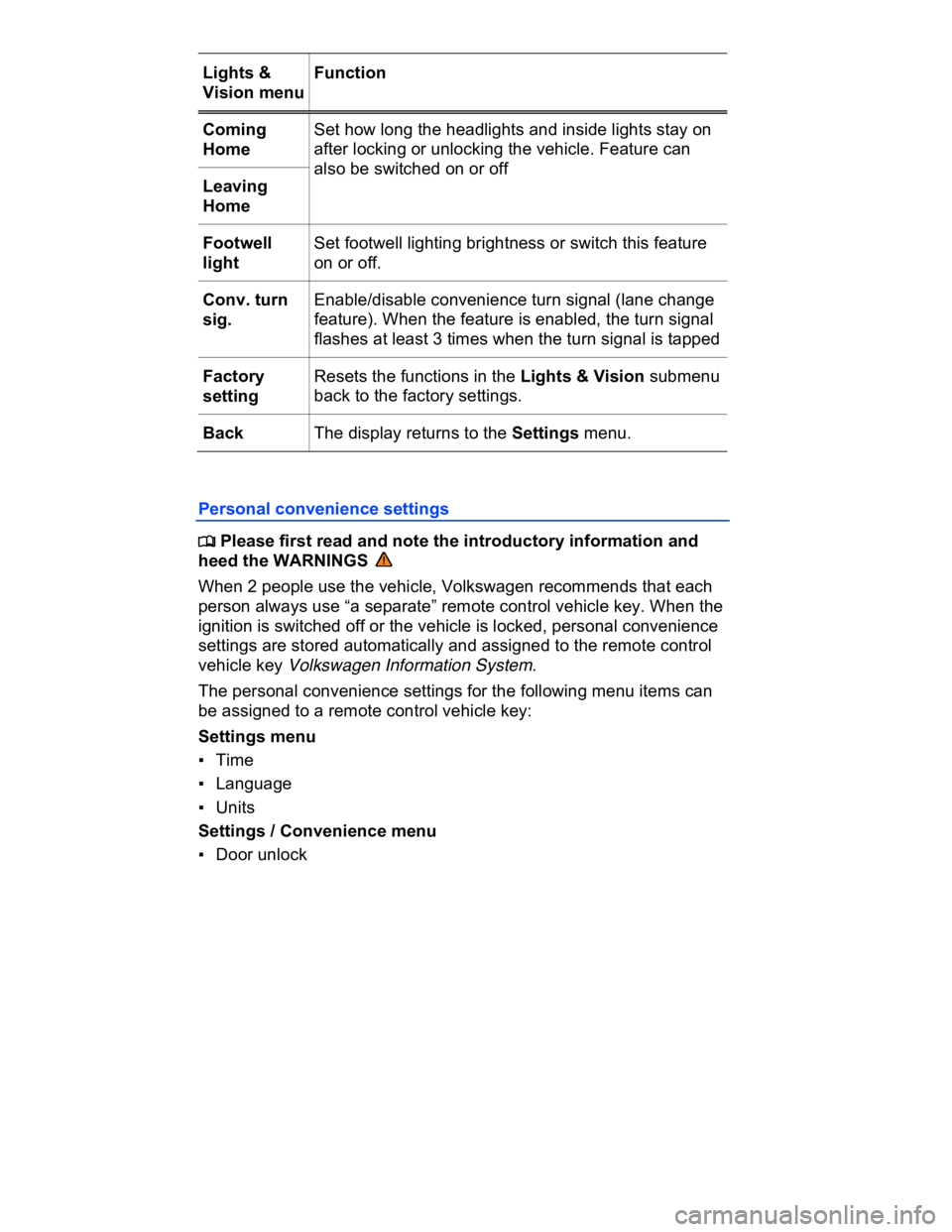
Lights &
Vision menu
Function
Coming
Home
Set how long the headlights and inside lights stay on
after locking or unlocking the vehicle. Feature can
also be switched on or off
Leaving
Home
Footwell
light
Set footwell lighting brightness or switch this feature
on or off.
Conv. turn
sig.
Enable/disable convenience turn signal (lane change
feature). When the feature is enabled, the turn signal
flashes at least 3 times when the turn signal is tapped
Factory
setting
Resets the functions in the Lights & Vision submenu
back to the factory settings.
Back The display returns to the Settings menu.
Personal convenience settings
Page 34 of 578

▪ Mirror down
Settings / Lights & Vision menu
▪ Coming Home / Leaving Home
▪ Convenience turn signal (lane change feature)
The stored settings are recalled when the ignition is switched on.
Please also see information about the memory seat ⇒ Seat functions.
Page 37 of 578

Remote Vehicle Access – Interact with your vehicle through your
Volkswagen Car-Net iPhone® or Android® app, computer or a
Volkswagen Car-Net Customer Specialist (text and data rates apply).
Diagnostics & Maintenance – Manage your vehicle health with
diagnostic checks and service scheduling.
You can access Volkswagen Car-Net services via your Volkswagen
Car-Net iPhone® or Android® app (text and data rates apply) and the
Volkswagen Car-Net website (http://www.vw.com/carnet). If you have
a question or would like to subscribe, please either press the • button
in your vehicle or contact the Volkswagen Car-Net Response Center
at 1-877-820-2290. For more information or to log on to your
Volkswagen Car-Net account, visit http://www.vw.com/carnet.
Note: Please review the Volkswagen Car-Net Terms of Service and
Privacy Policy at http://www.vw.com/carnet.
Subscription required
Automatic Crash Notification (ACN) may be engaged for up to 6
months, starting from the date of new vehicle sale, without activating
a trial or paid subscription.
The Manual Emergency Call service and all other Volkswagen Car-
Net features require a trial or paid subscription. To begin your trial or
paid subscription, authentication and activation are required. For
more information, please visit the website
(http://www.vw.com/carnet), press the • button in the 3-button mod-
ule in your vehicle or contact the Volkswagen Car-Net Response
Center at 1-877-820-2290.
The LED light in the 3-button module will be green during the trial
period and whenever you have an active subscription. The LED light
will go off if the trial period is over and the customer has not sub-
scribed to the Volkswagen Car-Net services. The LED light will be red
only during a VW Car-Net hardware malfunction or fault ⇒ 3-button
module.
Once a trial or paid Volkswagen Car-Net subscription has been
activated, please advise all who use the vehicle that different
kinds of data can be sent and received automatically by the ve-
hicle, including speed, location and more.
Page 38 of 578
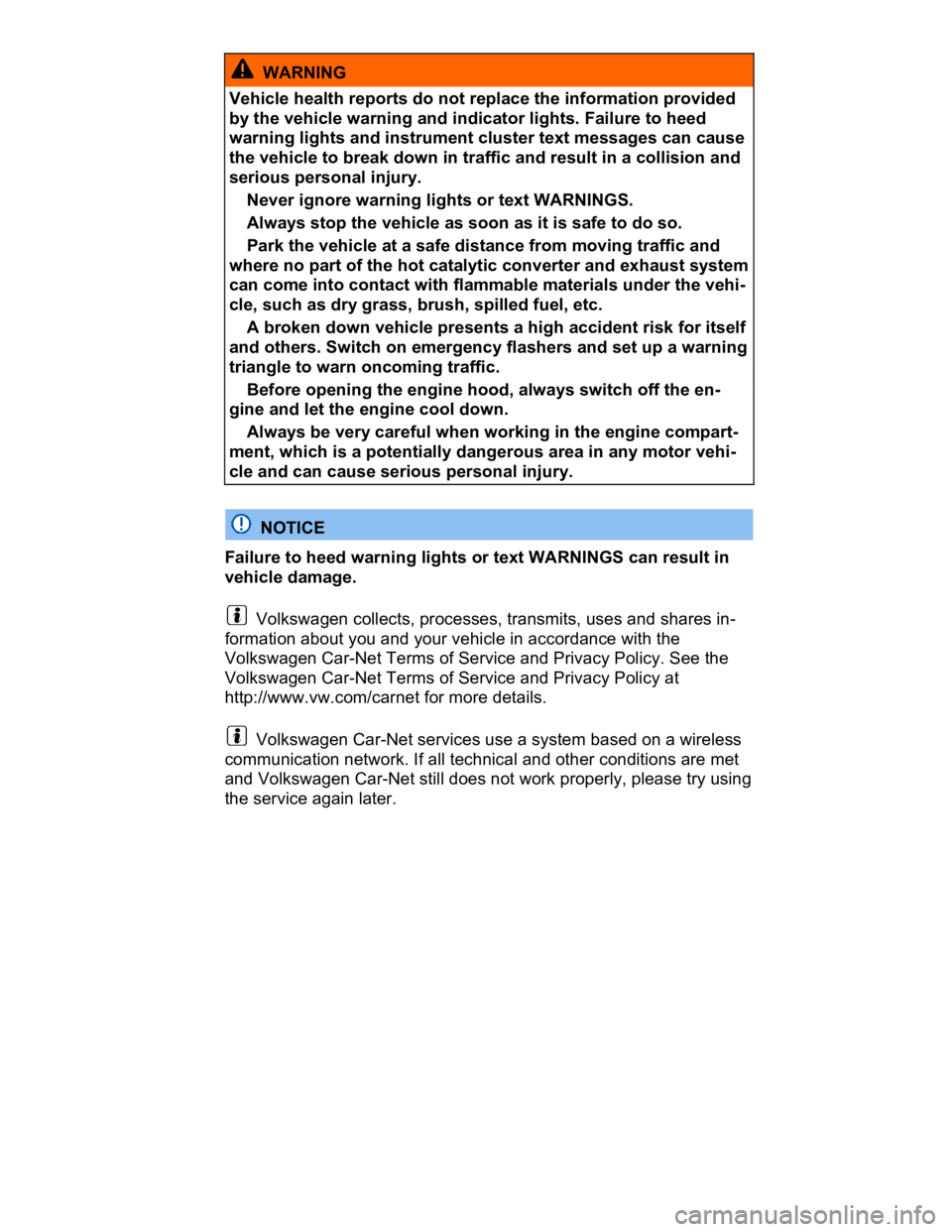
WARNING
Vehicle health reports do not replace the information provided
by the vehicle warning and indicator lights. Failure to heed
warning lights and instrument cluster text messages can cause
the vehicle to break down in traffic and result in a collision and
serious personal injury.
Never ignore warning lights or text WARNINGS.
Always stop the vehicle as soon as it is safe to do so.
Park the vehicle at a safe distance from moving traffic and
where no part of the hot catalytic converter and exhaust system
can come into contact with flammable materials under the vehi-
cle, such as dry grass, brush, spilled fuel, etc.
A broken down vehicle presents a high accident risk for itself
and others. Switch on emergency flashers and set up a warning
triangle to warn oncoming traffic.
Before opening the engine hood, always switch off the en-
gine and let the engine cool down.
Always be very careful when working in the engine compart-
ment, which is a potentially dangerous area in any motor vehi-
cle and can cause serious personal injury.
NOTICE
Failure to heed warning lights or text WARNINGS can result in
vehicle damage.
Volkswagen collects, processes, transmits, uses and shares in-
formation about you and your vehicle in accordance with the
Volkswagen Car-Net Terms of Service and Privacy Policy. See the
Volkswagen Car-Net Terms of Service and Privacy Policy at
http://www.vw.com/carnet for more details.
Volkswagen Car-Net services use a system based on a wireless
communication network. If all technical and other conditions are met
and Volkswagen Car-Net still does not work properly, please try using
the service again later.
Page 41 of 578

Feature Description
Remote
Door Unlock
You can send a request to unlock the vehicle doors
through your Volkswagen Car-Net iPhone® or An-
droid® app, the Volkswagen Car-Net website or by
calling the Volkswagen Car-Net Response Center
(text and data rates apply). If none of the vehicle
doors are opened within about 30 seconds, the car will
lock again.
Remote
Honk and
Flash
You can send a honk and flash signal to the car using
the Volkswagen Car-Net website or the VW Car-Net
iPhone® or Android® app (text and data rates apply).
The car will honk the horn and blink the headlights
and emergency flashers for up to 10 seconds.
Last Parked
Location
You can locate your last parked location using your
Volkswagen Car-Net iPhone® or Android® app (text
and data rates apply).
Destinations
Only appli-
cable for
vehicles
equipped
with a facto-
ry-installed
navigation
system.
Points of Interest (POIs) or other destinations can be
imported remotely into the factory-installed navigation
system (if equipped) from a computer or the
Volkswagen Car-Net iPhone® or Android® app (text
and data rates apply). These destinations can be
called up and used by the navigation system.
Destination
Download
Only appli-
cable for
vehicles
equipped
with a facto-
ry-installed
navigation
system.
Press the • button in the 3-button module: The vehi-
cle will connect directly to the Volkswagen Car-Net
Response Center where a Volkswagen Car-Net Cus-
tomer Specialist will assist with destinations. The ad-
dress of a dealer’s location can also be sent by the
Customer Specialist to your factory-installed naviga-
tion system (if equipped).
Page 42 of 578

Remote Vehicle Access:
Feature Description
Remote
Status
Check
Current information about the vehicle can be viewed
through a computer or your Volkswagen Car-Net iPh-
one® or Android® app (text and data rates apply). You
can find out if the doors, luggage compartment and
engine hood are open or closed, whether the car lights
are on or off, the level of fuel in the tank, when the
vehicle needs to be serviced next and more.
Diagnostics & Maintenance:
Feature Description
Dealer
Scheduling
Press the • button in the 3-button module: The vehi-
cle will initiate a call to the Volkswagen Car-Net Re-
sponse Center where a Volkswagen Car-Net Custom-
er Specialist will connect you with an authorized
Volkswagen dealer to schedule your service appoint-
ment. The address of the dealer’s location can also be
sent by the Customer Specialist to your factory-
installed navigation system (if equipped).
Vehicle
Health
Report
View a vehicle health report to proactively manage
maintenance and other services and to receive up-to-
date diagnostics in a monthly email report or by im-
mediate request.
Page 43 of 578
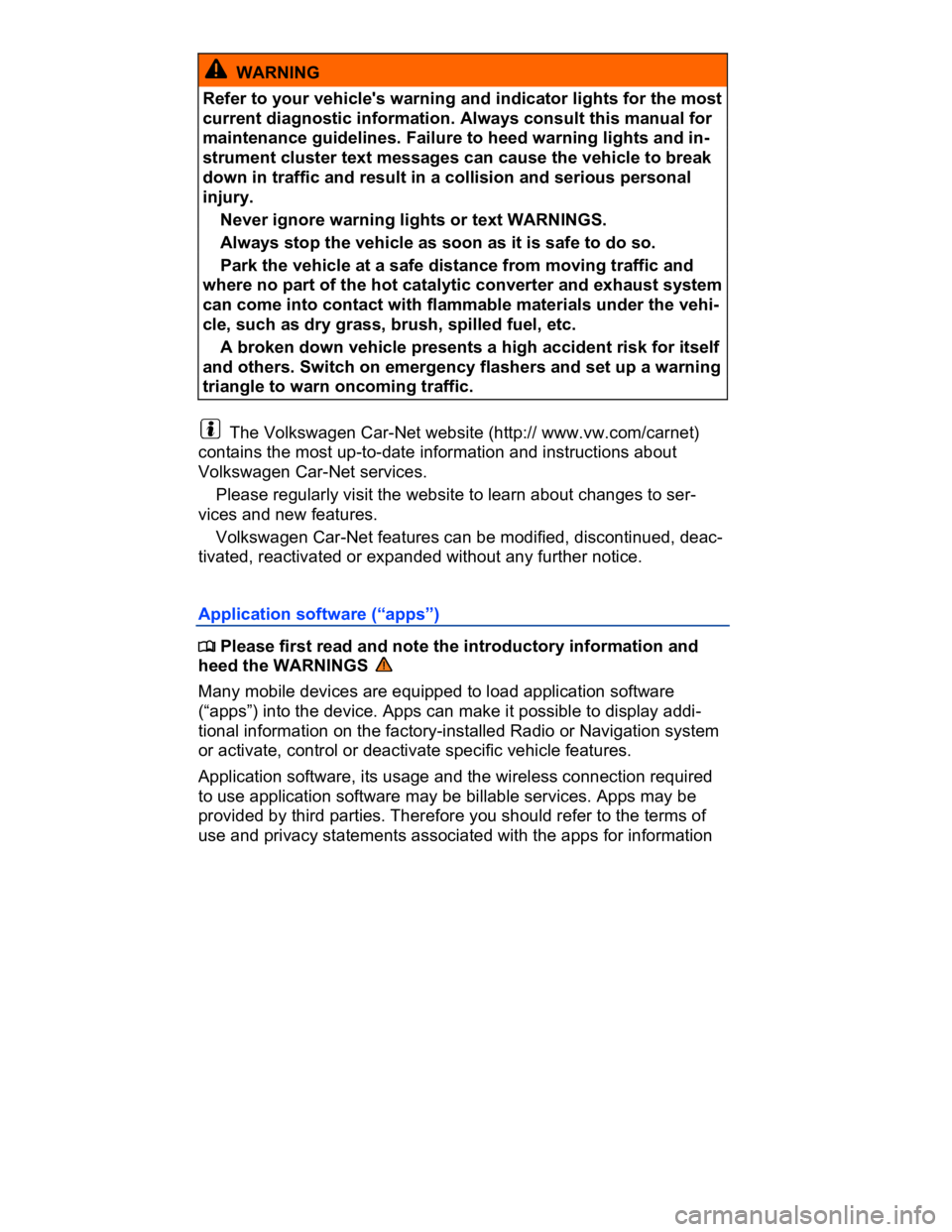
WARNING
Refer to your vehicle's warning and indicator lights for the most
current diagnostic information. Always consult this manual for
maintenance guidelines. Failure to heed warning lights and in-
strument cluster text messages can cause the vehicle to break
down in traffic and result in a collision and serious personal
injury.
Never ignore warning lights or text WARNINGS.
Always stop the vehicle as soon as it is safe to do so.
Park the vehicle at a safe distance from moving traffic and
where no part of the hot catalytic converter and exhaust system
can come into contact with flammable materials under the vehi-
cle, such as dry grass, brush, spilled fuel, etc.
A broken down vehicle presents a high accident risk for itself
and others. Switch on emergency flashers and set up a warning
triangle to warn oncoming traffic.
The Volkswagen Car-Net website (http:// www.vw.com/carnet)
contains the most up-to-date information and instructions about
Volkswagen Car-Net services.
Please regularly visit the website to learn about changes to ser-
vices and new features.
Volkswagen Car-Net features can be modified, discontinued, deac-
tivated, reactivated or expanded without any further notice.
Application software (“apps”)
Page 46 of 578
LED light in the 3-button module
The LED light in the 3-button module will be green during the trial
period and whenever you have an active subscription. The LED light
will go off if the trial period is over and the customer has not sub-
scribed to the Volkswagen Car-Net Services. The LED light will be
red only during a VW Car-Net hardware malfunction or fault.
WARNING
Application software and Volkswagen Car-Net services that are
unsuitable or improperly used can cause accidents, serious
personal injury and vehicle damage.
Volkswagen Car-Net services can be used only where ade-
quate cellular and GPS signals are available
Volkswagen recommends using only services and applica-
tion software that are provided by Volkswagen or Verizon
Telematics, Inc. (VzT) specifically for your vehicle.
Protect the mobile device and its application software from
misuse.
Never modify application software and Volkswagen Car-Net
services.
Always read and heed the operating instructions for the mo-
bile device.
WARNING
Driver distraction causes accidents, collisions and serious per-
sonal injury! Using application software and Volkswagen Car-
Net services while driving can distract the driver from traffic.
Always drive attentively and responsibly.
NOTICE
The system does not support simultaneous Volkswagen Car-Net
and mobile phone calls via the mobile phone package.
When a Volkswagen Car-Net service is accessed through the
3-button module call buttons any calls on a mobile device con-
nected to the vehicle’s mobile phone package will be automati-
cally disconnected.