display VOLKSWAGEN EOS 2015 1.G User Guide
[x] Cancel search | Manufacturer: VOLKSWAGEN, Model Year: 2015, Model line: EOS, Model: VOLKSWAGEN EOS 2015 1.GPages: 393, PDF Size: 5.57 MB
Page 54 of 393

NOTICE
The door handle sensor surfaces can be activated by a strong stream of water or steam if a valid vehicle key is within range of the vehicle.
The door may not open if the outside and inside door handles are used at the same time.
If the vehicle battery or the battery in the remote control vehicle key is weak or dead, it might not be possible to unlock and lock the vehicle using Keyless Access. The vehicle can still be manually locked or unlocked with the key bit, Emergency closing and opening.
The driver message Key not in range appears in the instrument cluster display if there is no remote control vehicle key inside the vehicle or if the system does not recognize the remote control vehicle key. The key may not be recognized, for example, if it is covered by something that interferes with the signal (such as a briefcase), or if the remote control vehicle key battery is weak. Electronic devices such as mobile phones can also interfere with the signal.
Dirt on the door handles that contains a lot of salt (especially in winter) can affect the way the door handle sensors work. Cleaning the door handles can help with this problem, Exterior care and cleaning.
If the automatic transmission is not in Park (P) position, the electronic steering column lock will not lock and the vehicle will not lock via sensors in the front door handles or the remote control vehicle key.
Anti-theft alarm system
Page 57 of 393

If a door is not closed properly, the vehicle icon appears in the instrument cluster display showing an
open door ⇒ fig. 12, ⇒ fig. 13.
Depending on your vehicle's equipment and options, the icon may still be displayed even after the ignition is switched off as long as the key has not been taken out of the ignition. The icon in the instrument cluster display goes out about 15 seconds after the vehicle has been locked.
Page 59 of 393
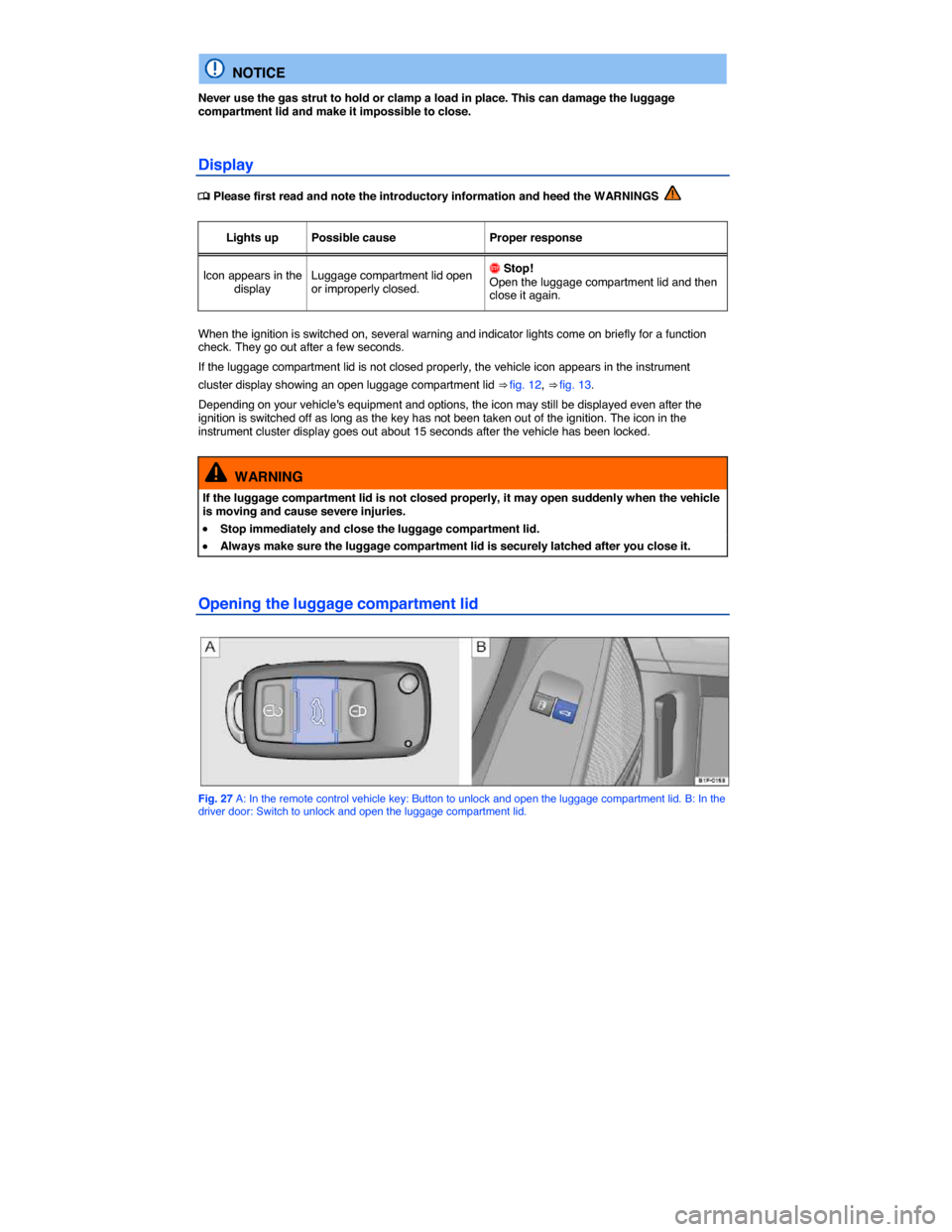
NOTICE
Never use the gas strut to hold or clamp a load in place. This can damage the luggage compartment lid and make it impossible to close.
Display
Page 68 of 393

Lights up Possible cause Proper response
CSC roof is opening or closing. Wait until the CSC roof has fully opened or fully closed.
Flashes Possible cause Proper response
The CSC roof opening or closing process is not finished or there is a CSC roof malfunction.
Check if the opening or closing process has finished. If necessary, end the process using the convertible top button
Check if all technical requirements are met. If not, take the necessary steps to meet the technical requirements
Check if there is a malfunction in the CSC roof. If necessary, correct the malfunction or have the system checked by your authorized Volkswagen dealer or authorized Volkswagen Service Facility
Messages in the instrument cluster display
When the ignition is switched on, the indicator lights come on briefly for a function check. They go out after a few seconds.
Display text Proper response
Trailer: No convert. top operation!
Unhitch trailer.
Close luggage compartment cover! Flip down the inside luggage compartment cover. Make sure that it has locked into place.
Speed too high! Stop the vehicle at an appropriate spot. The CSC roof can only be operated when the vehicle is not moving
Close trunk lid! Close the luggage compartment lid. The CSC roof can only be operated when the luggage compartment lid is closed. Use emergency procedure to close the open CSC roof if necessary
Obstacle in rear area! Remove any obstacles behind the vehicle or move the vehicle forward so as to have enough room for the luggage compartment lid to swing out.
Close sliding roof! Close the power sunroof. While doing so, make sure that it is working properly. If necessary, see an authorized Volkswagen dealer or authorized Volkswagen Service Facility.
Page 69 of 393

Display text Proper response
Close side windows! Close the windows. Make sure the power windows are operating properly. If necessary, see an authorized Volkswagen dealer or authorized Volkswagen Service Facility.
Error: convertible top Service!
See an authorized Volkswagen dealer or authorized Volkswagen Service Facility. The CSC roof will not go up or down if a system component malfunctions.
Error: Open convertible top! Open the CSC roof
Error: Close convertible top! Close the CSC roof
Low voltage: Please start engine! The vehicle battery is drained to the point that it cannot provide the power needed to completely open or close the CSC roof. Start the engine, by jump-starting if necessary. Open or close the CSC roof while the engine is running. Volkswagen recommends taking a longer drive afterwards to recharge the vehicle battery.
Temperature too high Sliding roof! or Temperature too high Convertible top!
Wait for a short time until the hydraulic and electrical unit cool down; they may have overheated. Opening and closing the CSC roof with great frequency may cause the hydraulic and electrical unit to overheat. Overload protection disables the roof until the unit cools down.
Convertible top open The message and an acoustic signal confirm that the CSC roof is completely open or closed.
Convertible top closed
Convertible top not functional. Owners Manual!
Check the outside temperature shown in the instrument cluster display. At temperatures below +5 °F (-15 °C) you can close the CSC roof, but not open it.
Have the system checked by an authorized Volkswagen dealer or an authorized Volkswagen Service Facility. There is a malfunction in an ECU. It is not possible to open or close the roof. Use emergency procedure to close an open CSC roof if necessary
The instrument cluster displays and their arrangement may vary depending on the vehicle model and engine. For displays without warning and information messages, malfunctions are only signaled with indicator lights.
Page 72 of 393

x Switch on the ignition, if necessary, Starting and stopping the engine.
x Pull the lever in the center console up ⇒ fig. 32 and hold it until the CSC roof is completely
closed ⇒ : A chime sounds every few seconds while the CSC roof is closing. A message may also appear in the instrument cluster display. When the roof is completely closed, the chime stops and the indicator light or display message in the instrument cluster goes out. Keep the lever pulled to close all windows.
Interrupting CSC roof operation
Releasing the lever interrupts CSC roof operation ⇒ .
WARNING
Accidents and severe injuries can result if the CSC roof is opened or closed when someone is in the way.
x Never open or close the CSC roof unless the vehicle is parked at a safe distance from traffic.
x Do not open or close the CSC roof unless you have made sure that nobody is in the way of the luggage compartment lid, the roof system, or other moving parts.
x Check to make sure that the closed CSC roof is securely latched.
x If CSC roof operation is interrupted, please note the following:
– The CSC roof may not stop moving immediately. Gravity may cause the CSC roof to keep moving.
– Gradually (may take up to 8 minutes), the CSC roof will automatically lower itself into a balanced position.
– The CSC roof is, however not latched in this position. Stop!
WARNING
If interruption of opening or closing process causes the roof to come to rest in its forward position, the roof will not be latched.
x If you are unable to get the CSC roof to close “normally,” latch the roof using the emergency closing procedure, Emergency closing and opening.
x Watch for a message in the instrument cluster display indicating whether the roof has been properly closed.
NOTICE
Frequent opening and closing of the CSC roof drains the vehicle battery. To help prevent the battery from running down, you should keep the engine running if you need to open and close the roof frequently.
NOTICE
Always close the CSC roof before leaving the vehicle and when it may rain or snow. If the CSC roof is open, rain or snow can damage the vehicle interior and can cause extensive damage to the electrical system.
Page 76 of 393

Description Possible solution
CSC roof stops while opening or closing.
– Check the instrument cluster display (where applicable) for information on what to do – If the CSC roof stops exactly in the middle, give the roof a gentle “nudge” forward so that it will close.
– Push and hold the lever shown in ⇒ fig. 32 to close the CSC roof completely and to lock it into place. – If the CSC roof does not completely close and latch, try to close and latch it using the emergency procedure – Get professional help if necessary and have the system checked by an authorized Volkswagen dealer, an authorized Volkswagen Service Facility, or another qualified workshop.
Automatic Rollover Support System
Page 120 of 393

Function Action
Switching the DRL off: – Switch the ignition on. – Turn the light switch to the / position. – Set the parking brake.
Switching the DRL back on: – Release the parking brake.
Static cornering lights
Your vehicle may have fog lights under the front bumper, which on some models are also static cornering lights. On some models the static cornering lights may be integrated in the headlights. At speeds below about 25 mph (40 km/h), the light on one side of the vehicle will come on automatically when you turn a corner. If you turn to the right, the right fog light comes on; turn left and the left fog light comes on. The light dims and goes out when the steering wheel is straightened out again.
When you move the selector lever to Reverse (R), the static cornering lights on both sides of the vehicle may come on so that you can see the area around the vehicle better when backing up.
The static cornering lights work only when the headlights are on. If you are using automatic headlight
control (headlight switch in the !54/ position ⇒ fig. 84), they work only when the headlights have been automatically switched on. The static cornering lights do not come on when the headlight switch is in the / position or when the fog lights themselves have been switched on, Switching lights on and off.
Automatic headlight control (!54/)
Automatic headlight control is a convenience feature only and cannot always recognize all lighting and driving situations.
If the light switch is in the !54/ position, both vehicle lighting and instrument and switch lighting are
automatically switched on and off in the following situations ⇒ :
Automatic activation: Automatic deactivation:
If the low-light sensor registers darkness, for example when driving through a tunnel. If sufficient brightness is registered.
If the rain sensor recognizes rain and switches the windshield wipers on. If the windshield wipers have not moved for several minutes.
Adaptive Front Lighting System (AFS)
The Adaptive Front Lighting System works only with the low beams switched on and only at speeds above about 6 mph (10 km/h). The swivel-mounted lamps automatically improve road illumination during cornering.
On vehicles equipped with the Adaptive Front Lighting System, the feature is switched on and off via the Assistants menu in the instrument cluster display, Volkswagen Information System .
Page 136 of 393
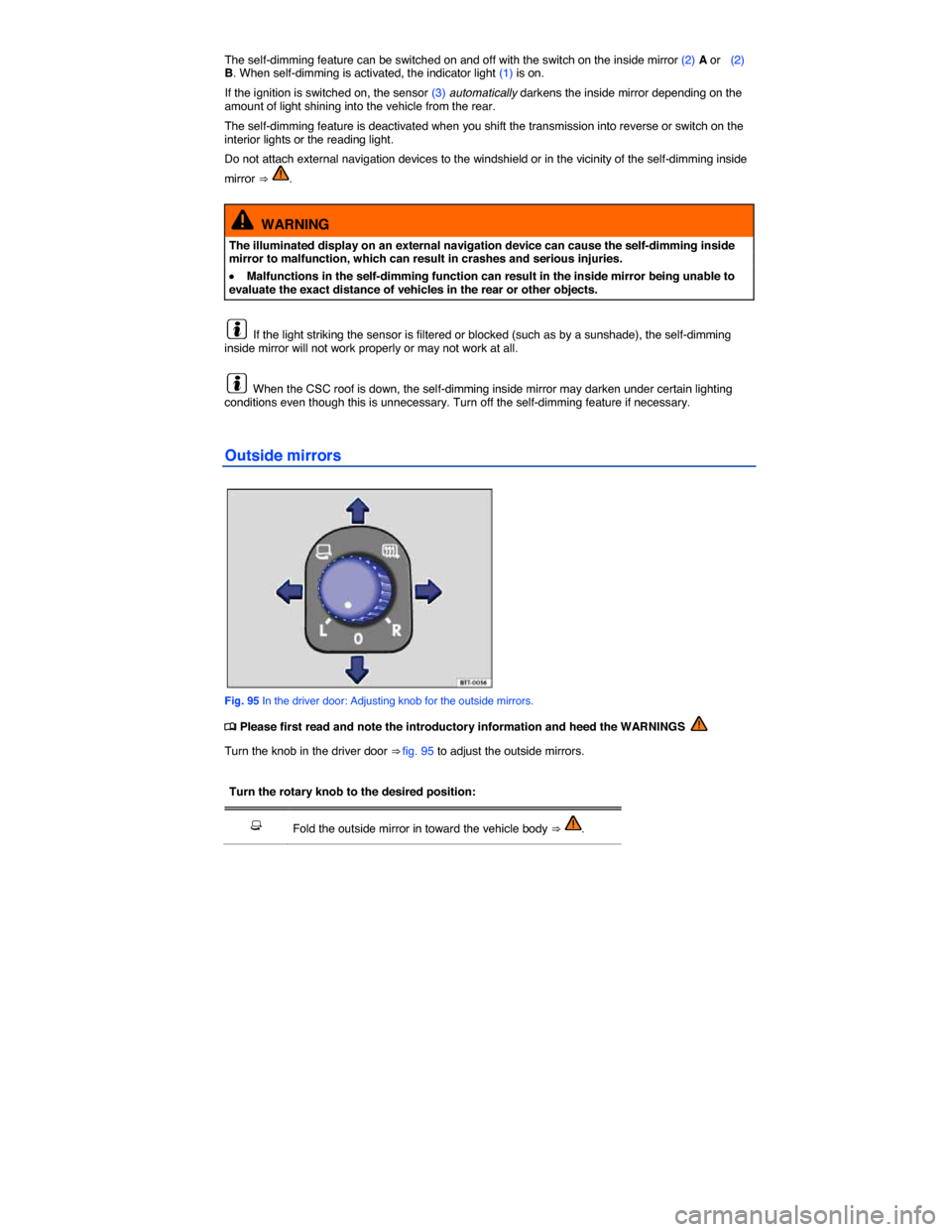
The self-dimming feature can be switched on and off with the switch on the inside mirror (2) A or (2) B. When self-dimming is activated, the indicator light (1) is on.
If the ignition is switched on, the sensor (3) automatically darkens the inside mirror depending on the amount of light shining into the vehicle from the rear.
The self-dimming feature is deactivated when you shift the transmission into reverse or switch on the interior lights or the reading light.
Do not attach external navigation devices to the windshield or in the vicinity of the self-dimming inside
mirror ⇒ .
WARNING
The illuminated display on an external navigation device can cause the self-dimming inside mirror to malfunction, which can result in crashes and serious injuries.
x Malfunctions in the self-dimming function can result in the inside mirror being unable to evaluate the exact distance of vehicles in the rear or other objects.
If the light striking the sensor is filtered or blocked (such as by a sunshade), the self-dimming inside mirror will not work properly or may not work at all.
When the CSC roof is down, the self-dimming inside mirror may darken under certain lighting conditions even though this is unnecessary. Turn off the self-dimming feature if necessary.
Outside mirrors
Fig. 95 In the driver door: Adjusting knob for the outside mirrors.
Page 167 of 393

x Install only radial tires only of the same make, the same dimensions (tread circumference), and similar tread profile on all 4 wheels.
x The tread depth of new tires can differ between tire models and manufacturers because of different design features and tread design.
Replacing tires
x Tires should be replaced in pairs and not individually (both front tires or both rear tires at the same
time) ⇒ .
x Replace tires only with tires that have the same specifications, including width and diameter, load and top speed rating as the tires approved by Volkswagen for your vehicle and model.
x Never use tires that are larger or wider than the dimensions of the tires approved by Volkswagen for your vehicle and model. Larger tires could scrape and rub on the vehicle body or other parts of the vehicle.
Tire Pressure Monitoring System (TPMS) considerations
Factory-installed wheels are equipped with a sensor that constantly monitors tire pressure, then
transmits this information to the TPMS ⇒ Tire Pressure Monitoring System (TPMS). If you are going to replace the wheels, make sure that the new wheels also have sensors that are compatible with the TPMS on your vehicle. New wheels with sensors have to be recognized and integrated into the system. The new wheels and sensors are recognized and integrated when driving off the first time.
If you install wheels that do not have sensors, or have sensors that are not compatible, the TPMS will not work properly. In this case, the TPMS will not be able to monitor tire pressure or warn you if pressure is low. An error message may appear in the instrument cluster display or the TPMS will switch itself off.
x Whenever you change sensors, you have to install new valves and seals. Please see an authorized Volkswagen dealer of an authorized Volkswagen Service Facility.
x Always drive with the valve caps securely installed. We recommend using factory-supplied valve caps. Ask an authorized Volkswagen dealer or an authorized Volkswagen Service Facility to replace lost caps.
If you install new tires that differ the original Volkswagen specifications, for your vehicle and model, the benchmark tire inflation pressure values stored in your vehicle's TPMS may have to be adjusted (reprogrammed). This requires professional assistance. For more information, contact your authorized Volkswagen dealer or authorized Volkswagen Service Facility.
Installing replacement tires with steel cord body plies in the tire sidewall may cause malfunction of the TPMS, and is not recommended (cord material information in molded on the tire sidewall).
Always check the TPMS indicator light after replacing one or more tires on your vehicle. If the indicator light is on, the TPMS is not working properly. Your replacement tire might be incompatible with the system, or some component of the TPMS may be damaged.
For detailed information about TPMS, how it works and what you need to know ⇒ Tire Pressure Monitoring System (TPMS).
WARNING
New tires tend to be slippery and must be broken in.
x Always drive with special care for the first 350 miles (560 km) to help reduce the risk of losing control, a collision, and serious personal injuries.