door lock VOLKSWAGEN EOS 2015 1.G User Guide
[x] Cancel search | Manufacturer: VOLKSWAGEN, Model Year: 2015, Model line: EOS, Model: VOLKSWAGEN EOS 2015 1.GPages: 393, PDF Size: 5.57 MB
Page 55 of 393

Deactivating the alarm
Unlock the vehicle with the unlock button on the remote control vehicle key or switch on the ignition with a valid remote control vehicle key.
For vehicles with Keyless Access, the alarm can be deactivated by grasping one of the front door handles when a valid vehicle key is in range or by holding the remote control vehicle key to the right of the steering column trim and pressing the starter button, Unlocking or locking the vehicle with Keyless Access.
After the alarm has stopped and the vehicle is opened again in the same or a different area that is protected by the alarm, the alarm is triggered again. For example, the alarm will sound again if the luggage compartment lid is opened after one of the doors has been opened.
The anti-theft alarm system is not activated when the vehicle is locked with the power lock switch
Page 57 of 393

If a door is not closed properly, the vehicle icon appears in the instrument cluster display showing an
open door ⇒ fig. 12, ⇒ fig. 13.
Depending on your vehicle's equipment and options, the icon may still be displayed even after the ignition is switched off as long as the key has not been taken out of the ignition. The icon in the instrument cluster display goes out about 15 seconds after the vehicle has been locked.
Page 64 of 393

One-touch opening and closing
The one-touch feature automatically opens/closes a power window all the way. The window switch does not have to be held down/up.
For one-touch opening: Press the switch for the window down briefly as far as it goes.
For one-touch closing: Pull the switch for the window up briefly as far as it goes.
Stopping automatic movement: Pull/press the switch again.
Reactivating the one-touch feature
If the vehicle battery is disconnected or dead and the windows are not completely closed, the one-touch feature will not work and must be reactivated:
x Close all windows and doors.
x Insert the vehicle key into the door lock and turn and hold the key for more than 2 seconds in the direction of locking. See, Manually unlocking and locking the driver door.
x Release the key and then again turn and hold it in locking direction for more than 2 seconds. The one-touch feature is now reactivated.
The one-touch feature can be reactivated for one or more windows at the same time.
Convenience closing
The convenience closing feature lets you close the windows and the power sunroof from outside the vehicle as follows:
x Manual locking: lock the vehicle with the vehicle key bit in the driver door and keep the key turned in the locking position to close all windows and the power sunroof, Manually unlocking and locking the driver door.
Convenience closing first closes the windows and then the power sunroof.
WARNING
Improper use of power windows can result in serious personal injury.
x Never let anyone get in the way of a power window when closing it.
x When locking the vehicle from the outside, make sure that no one, especially children, remains in the vehicle. The windows will not open in case of an emergency.
x Always take the key with you when you leave the vehicle. You can still use the power windows for several minutes after the ignition is switched off as long as the driver or passenger door has not been opened.
NOTICE
The windows must go down slightly when you unlock the vehicle. Otherwise the windows and seals could be damaged when opening the doors.
If the power windows malfunction, the one-touch feature, as well as pinch protection may not work properly. See an authorized Volkswagen dealer or authorized Volkswagen Service Facility right away.
If convenience closing of the power windows requires removing the cover cap of the lock cylinder on the driver door, the cover cap must be reinstalled after the vehicle is locked, Manually unlocking and locking the driver door.
Page 97 of 393

Function Action for seat heating ⇒ fig. 50
Switch on: Press the A or e button. Seat heating is switched on to maximum.
Adjust the heating level: Press the A or e button repeatedly until the desired heating level is set.
Switch off: Press the A or e button repeatedly until all indicator lights in the button are off.
Special seat heating features
On the driver side, the seat heating will resume at the setting that was set when the ignition was switched off. However, this feature only works within 10 minutes of switching off the ignition and if the key is not taken out of the ignition switch, or, for vehicles with Keyless Access, the driver door is not opened or the vehicle is not locked.
People suffering from a low level of perceived pain or a lowered awareness of pain as from
medication, paralysis, or chronic illness (e.g. diabetes) should NEVER use the seat heating feature ⇒
!
The use of seat heating by persons with these conditions could result in burns to the back, buttocks, and legs that may take a long time to heal and may never heal completely. If you have any of these conditions, you should take regular breaks and get out of the vehicle, particularly on long trips. Consult your doctor for advice regarding your specific condition.
WARNING
Certain medical conditions, such as paralysis and diabetes, and certain medications can increase the risk of serious burns when the seat heating feature is switched on.
x Vehicle occupants who have a low level of perceived pain or a lowered awareness of pain can receive serious burns to the back, buttocks, and legs that take a long time to heal or may never heal completely.
x Never use the seat heating feature if you or your passengers are at risk of being burned because of a medical condition. Take regular breaks and get out of the vehicle, particularly on long trips. Consult your doctor for advice regarding your specific condition.
x Never let exposed skin remain in contact with the seat upholstery when the seat heating is being used.
WARNING
A wet seat can cause the seat heating to malfunction and increase the risk of serious burns.
x Always make sure the seats are dry before using the seat heating.
x Never sit on the seat with wet clothes.
x Never put damp or wet things including clothes on the seat.
x Never spill liquids on the seats.
Page 136 of 393
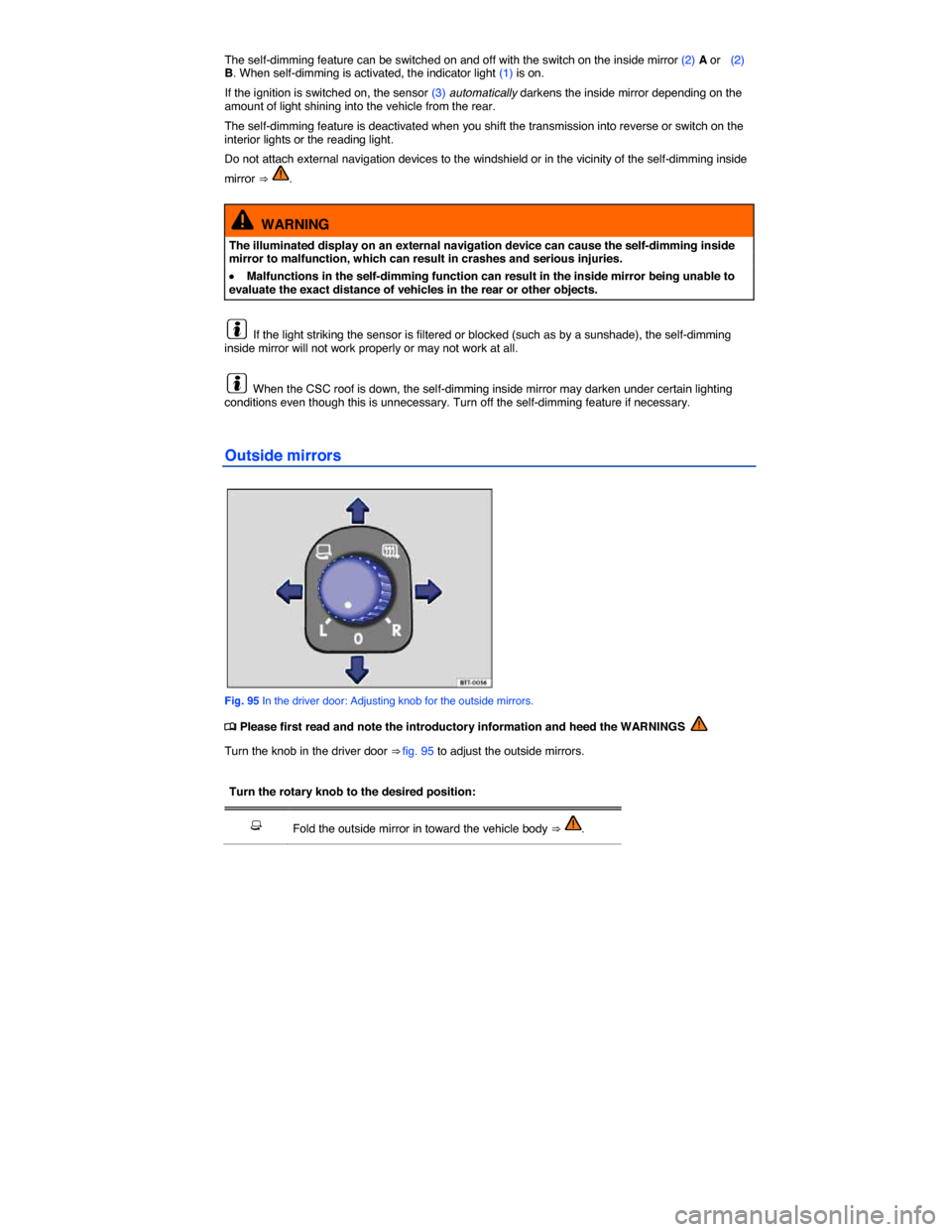
The self-dimming feature can be switched on and off with the switch on the inside mirror (2) A or (2) B. When self-dimming is activated, the indicator light (1) is on.
If the ignition is switched on, the sensor (3) automatically darkens the inside mirror depending on the amount of light shining into the vehicle from the rear.
The self-dimming feature is deactivated when you shift the transmission into reverse or switch on the interior lights or the reading light.
Do not attach external navigation devices to the windshield or in the vicinity of the self-dimming inside
mirror ⇒ .
WARNING
The illuminated display on an external navigation device can cause the self-dimming inside mirror to malfunction, which can result in crashes and serious injuries.
x Malfunctions in the self-dimming function can result in the inside mirror being unable to evaluate the exact distance of vehicles in the rear or other objects.
If the light striking the sensor is filtered or blocked (such as by a sunshade), the self-dimming inside mirror will not work properly or may not work at all.
When the CSC roof is down, the self-dimming inside mirror may darken under certain lighting conditions even though this is unnecessary. Turn off the self-dimming feature if necessary.
Outside mirrors
Fig. 95 In the driver door: Adjusting knob for the outside mirrors.
Page 210 of 393

WARNING
Improper use of vehicle keys can result in serious personal injury.
x Always take the key with you when you leave the vehicle. The engine can be started and vehicle systems such as the power windows can be operated, leading to serious personal injury.
x Never leave children, disabled persons, or anyone who cannot help themselves in the vehicle. The doors can be locked with the remote control vehicle key. This could result in people being trapped in the vehicle in an emergency. For example, depending on the time of year, people trapped in the vehicle can be exposed to very high or very low temperatures.
x Heat buildup in the passenger and luggage compartment of a parked vehicle can result in temperatures in the vehicle that are much higher than the outside temperatures, particularly in summer. Temperatures can quickly reach levels that can cause unconsciousness and death, particularly to small children.
x Never remove the key from the ignition switch while the vehicle is moving or rolling to a stop. The steering wheel will lock and you will not be able to steer or control the vehicle.
Leaving the key in the ignition for a long time when the engine is not running will drain the vehicle battery.
Leaving the selector lever for a long period of time in any position other than Park (P) when the ignition is switched off can drain the vehicle battery.
On automatic transmission vehicles, the vehicle key can be removed from the ignition switch only when the transmission is in Park (P). You may have to press the release button on the transmission selector lever to put the lever into Park (P).
Starter button
Fig. 126 On the right side of the steering column: Starter button for the Keyless Access locking and starting system.
Page 212 of 393

WARNING
Unintended vehicle movement can cause serious personal injury.
x Do not depress the brake pedal when switching on the ignition, as the engine could otherwise start immediately.
WARNING
Improper use of vehicle keys can result in serious personal injury.
x Always take the key with you when you leave the vehicle. Children or unauthorized persons may use it to lock the vehicle, start the engine, and operate vehicle systems such as the power windows, leading to serious personal injury.
x Never leave children, disabled persons, or anyone who cannot help themselves in the vehicle. The doors can be locked using the remote control vehicle key. This could result in people being trapped in the vehicle in an emergency. For example, depending on the time of year, people trapped in the vehicle can be exposed to very high or very low temperatures.
x Heat buildup in the passenger and luggage compartment of a parked vehicle can result in temperatures in the vehicle that are much higher than the outside temperatures, particularly in summer. Temperatures can quickly reach levels that can cause unconsciousness and death, particularly to small children.
If the ignition is switched on or the engine is running and the driver door is opened, a chime sounds. The chime is also a reminder to switch off the engine and turn off the ignition before leaving and locking the vehicle from the outside.
Starting the engine
Page 214 of 393

Please perform these steps only in the order listed.
Step Vehicles without Keyless Access Vehicles with Keyless Access
2. Depress and hold down the brake pedal until step 4 is completed.
3. Shift the transmission into Park (P).
4. Apply the parking brake to help prevent the vehicle from moving
5. Turn the vehicle key to position ⇒ fig. 125 (0) in the ignition switch. Briefly press the starter button ⇒ fig. 126. If the engine will not switch off, carry out the emergency shut-off procedure
6. Removing the vehicle key from the ignition switches off electrical equipment and activates the steering column lock.
Opening the doors switches off electrical equipment and activates the steering column lock.
WARNING
Never stop the engine before the vehicle has come to a complete stop. You can lose control of the vehicle, crash, and be seriously injured.
x The airbags and safety belt pretensioners will not work when the ignition is switched off.
x The brake booster does not work when the engine is not running. More brake pedal pressure will be needed to stop the vehicle.
x The power steering system does not work when the engine is not running, and you will need more force to steer the vehicle.
x When the key is removed from the ignition switch, the steering will lock and you will not be able to steer the vehicle.
NOTICE
If the vehicle has been driven hard for a long time, the engine could overheat when it is stopped. To reduce the risk of engine damage, let the engine idle in Neutral for about 2 minutes before you switch off the ignition.
If the ignition is switched on or the engine is running and the driver door is opened, a chime sounds. The chime is also a reminder to switch off the engine and turn off the ignition before leaving and locking the vehicle from the outside.
The vehicle key can only be removed from the ignition when the transmission is in Park (P).
After the engine has been switched off, the radiator fan in the engine compartment may keep running for several minutes, or may start running after the vehicle has been parked for a while, even if the ignition is switched off and the vehicle key has been removed. The radiator fan shuts off automatically when the engine has cooled down enough.
Page 230 of 393
WARNING
Parking improperly can cause serious personal injury.
x Never remove the key from the ignition switch while the vehicle is moving or rolling to a stop. The steering wheel will lock and you will not be able to steer or control the vehicle.
x Never park the vehicle where the hot exhaust system or catalytic converter could ignite flammable materials, such as brush, leaves, dry grass, spilled fuel, etc.
x Always apply the parking brake when parking your vehicle.
x Improper use of the parking brake can seriously injure you and your passengers.
x Never use the parking brake to slow down the vehicle when it is moving, except in an emergency. The stopping distance is much longer because only the rear wheels are braked. Always use the foot brake to stop the vehicle.
x Never activate the throttle manually from the engine compartment when the engine is running and the automatic transmission is in gear. The vehicle will start to move as soon as the engine speed increases even if the parking brake is on.
x Never leave children or anyone who cannot help themselves behind in the vehicle. They could release the parking brake and move the gear selector lever or gear shift, which could cause the vehicle to start moving. This can lead to a crash and serious personal injuries.
x Always take the key with you when you leave the vehicle. The engine can be started and vehicle systems such as the power windows can be operated, leading to serious personal injury.
x Never leave children, disabled persons, or anyone who cannot help themselves in the vehicle. The doors can be locked with the remote control vehicle key, trapping passengers in the vehicle in an emergency. For example, depending on the time of year, people trapped in the vehicle can be exposed to very high or very low temperatures.
x Heat buildup in the passenger and luggage compartment of a parked vehicle can result in temperatures in the vehicle that are much higher than the outside temperatures, particularly in summer. Temperatures can quickly reach levels that can cause unconsciousness and death, particularly to small children.
NOTICE
x Always be careful when you park in areas with parking barriers or high curbs. These vary in height and could damage your bumper and related parts if the front of your vehicle hits a barrier or curb that is too high while you are getting into or out of a parking spot. To help prevent damage, stop before the tires of your vehicle touch a parking barrier or curb.
x Always be careful when you enter a driveway or drive up or down steep ramps or over curbs or other obstacles. Parts of the vehicle close to the ground may be damaged (such as bumper covers, spoilers, and parts of the engine, suspension, and exhaust systems).
Warning and indicator lights
Page 283 of 393

Opening the engine hood
x Before you open the hood, make sure that the windshield wiper arms are resting on the windshield
⇒ .
x Open the driver door and pull the inside hood release lever in the direction of the arrow ⇒ fig. 150.
The engine hood is released from its latch by a spring ⇒ .
x Push the outside hood release lever ⇒ fig. 151 (arrow) and lift the hood all the way up. A gas-filled strut will hold the hood up.
Closing the engine hood
x Pull the hood down to overcome the resistance of the gas-pressure strut ⇒ .
x Lower the engine hood by hand until it is about 1 ft. (30 cm) above its latch and then let it drop into place to latch it. Do not push down on it afterwards!
If the hood does not close completely, open it again and close it properly.
When the hood is properly closed, you can see that it fits flush with the other body parts. The display
in the instrument cluster no longer indicates that the engine hood is open ⇒ Display.
WARNING
If the hood is not closed properly, it could fly up and block your view while you are driving. This can lead to a crash and serious personal injuries.
x After closing the engine hood, check that the hood release lever is properly latched into the hood latch. The engine hood must be flush with the surrounding auto body parts.
x If you ever notice that the hood latch is not properly secured when the vehicle is moving, stop at once and close it.
x Never let anyone get in the way of the hood when closing it.
NOTICE
x Make sure the windshield wipers are switched off and the windshield wiper arms are resting on the windshield before you open the hood. Otherwise, the windshield wipers and the hood may be damaged.
x Always put the windshield wiper arms down against the windshield before driving the vehicle.
NOTICE
Before opening or closing the engine hood, make sure there is enough room to do so, for example when the vehicle is in a garage.