key VOLKSWAGEN EOS 2015 1.G User Guide
[x] Cancel search | Manufacturer: VOLKSWAGEN, Model Year: 2015, Model line: EOS, Model: VOLKSWAGEN EOS 2015 1.GPages: 393, PDF Size: 5.57 MB
Page 44 of 393
Canadian customers can contact an authorized Volkswagen dealer or Volkswagen Service Facility or call the Volkswagen Canada Customer CARE Center at 1-800-822-8987.
NOTICE
The remote control vehicle keys contain electrical components. Protect them from damage, moisture and rough handling.
Do not press the buttons on the remote control vehicle key unless you actually want to use the function in question. Since terrain and conditions vary, pressing a button on the remote control vehicle key when it is not necessary may unlock the vehicle or set off the panic alarm, even if you think you are out of range.
Remote control vehicle key functions can be temporarily disrupted by interference from transmitters near the vehicle that use the same frequency range (such as radio equipment or mobile phones).
Things between the remote control vehicle key and vehicle, bad weather, as well as a weak battery can reduce the operating range.
If the remote control vehicle key buttons ⇒ fig. 19 or the power locking buttons ⇒ page 52, Unlocking or locking the vehicle from the inside are pushed repeatedly in quick succession, the power locking system is switched off for a brief period to help keep it from being overloaded. The vehicle is then unlocked for about 30 seconds. Unless a door or the luggage compartment lid is opened in this span of time, the vehicle is automatically locked afterwards.
Indicator light in the remote control vehicle key
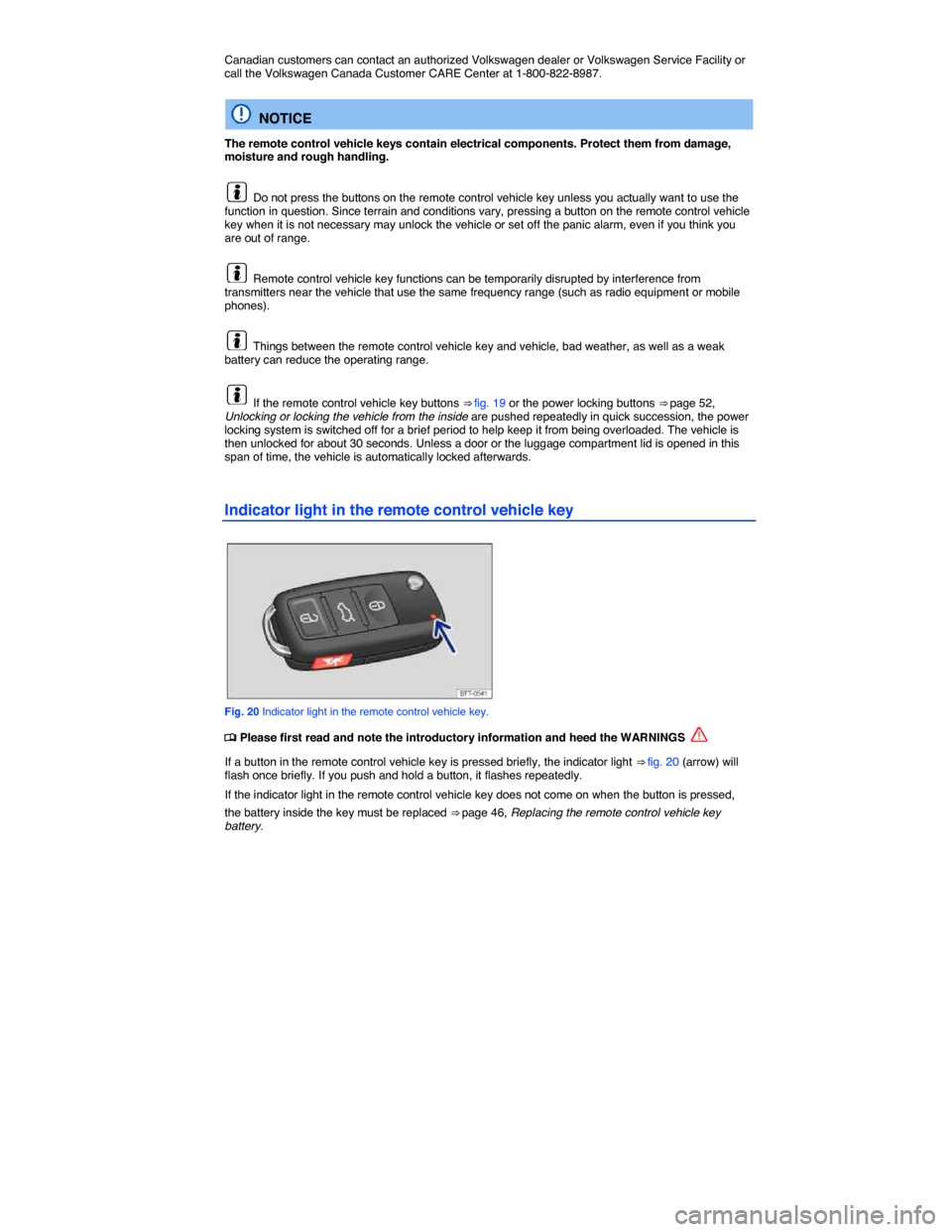
Fig. 20 Indicator light in the remote control vehicle key.
Page 45 of 393
A Declaration of Compliance with United States FCC and Industry Canada regulations is found in the Consumer information section of this Manual, Consumer information.
Replacing the remote control vehicle key battery
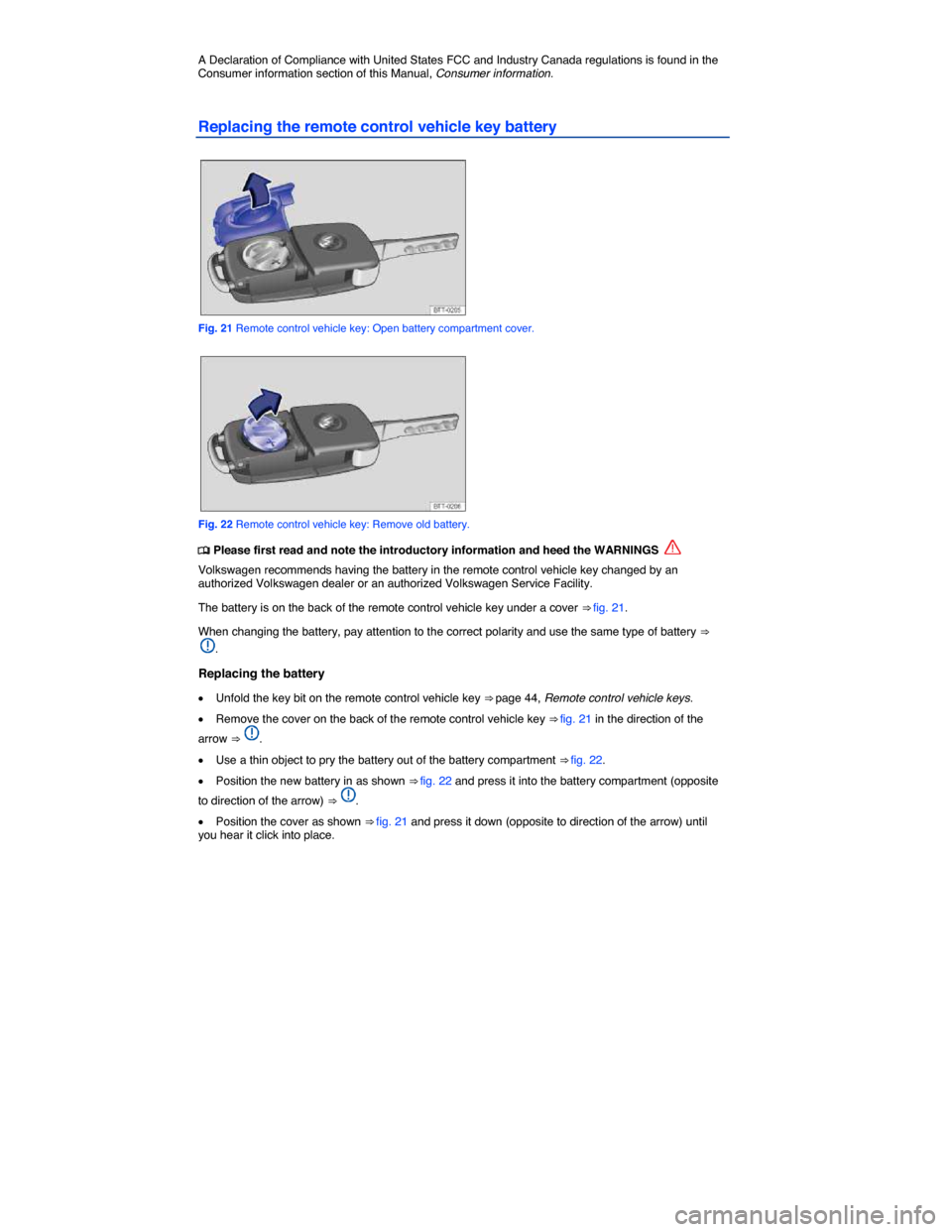
Fig. 21 Remote control vehicle key: Open battery compartment cover.
Fig. 22 Remote control vehicle key: Remove old battery.
Page 46 of 393

NOTICE
x Changing the battery improperly can damage the remote control vehicle key.
x Using the wrong battery can damage the remote control vehicle key. Replace a dead battery with a new one that has the same voltage, size, and specifications.
x Make sure the plus and minus poles of the battery are correctly positioned.
Dispose of old batteries in an environmentally responsible manner and keep them out of the reach of children.
Batteries of the type used in your remote control vehicle key may contain Perchlorate Material. Special handling may apply – see http://www.dtsc.ca.gov/hazardouswaste/perchlorate. Obey all legal requirements regarding handling and disposal of these batteries. Authorized Volkswagen dealers and authorized Volkswagen Service Facilities are familiar with the requirements, and we recommend that you have them perform this service for you.
Synchronizing the remote control vehicle key
Page 49 of 393

Special functions of the power locking system can be turned on or off via the Convenience submenu in the Settings menu, Volkswagen Information System or by an authorized Volkswagen dealer or authorized Volkswagen Service Facility.
The doors and the luggage compartment lid can be locked manually if the vehicle key or the power locking system is not working, Emergency closing and opening.
Automatic locking (Auto lock)
The vehicle locks automatically when it reaches a speed of about 10 mph (15 km/h). When the vehicle
is locked, the indicator light
Page 50 of 393
Unlocking or locking the vehicle from the outside
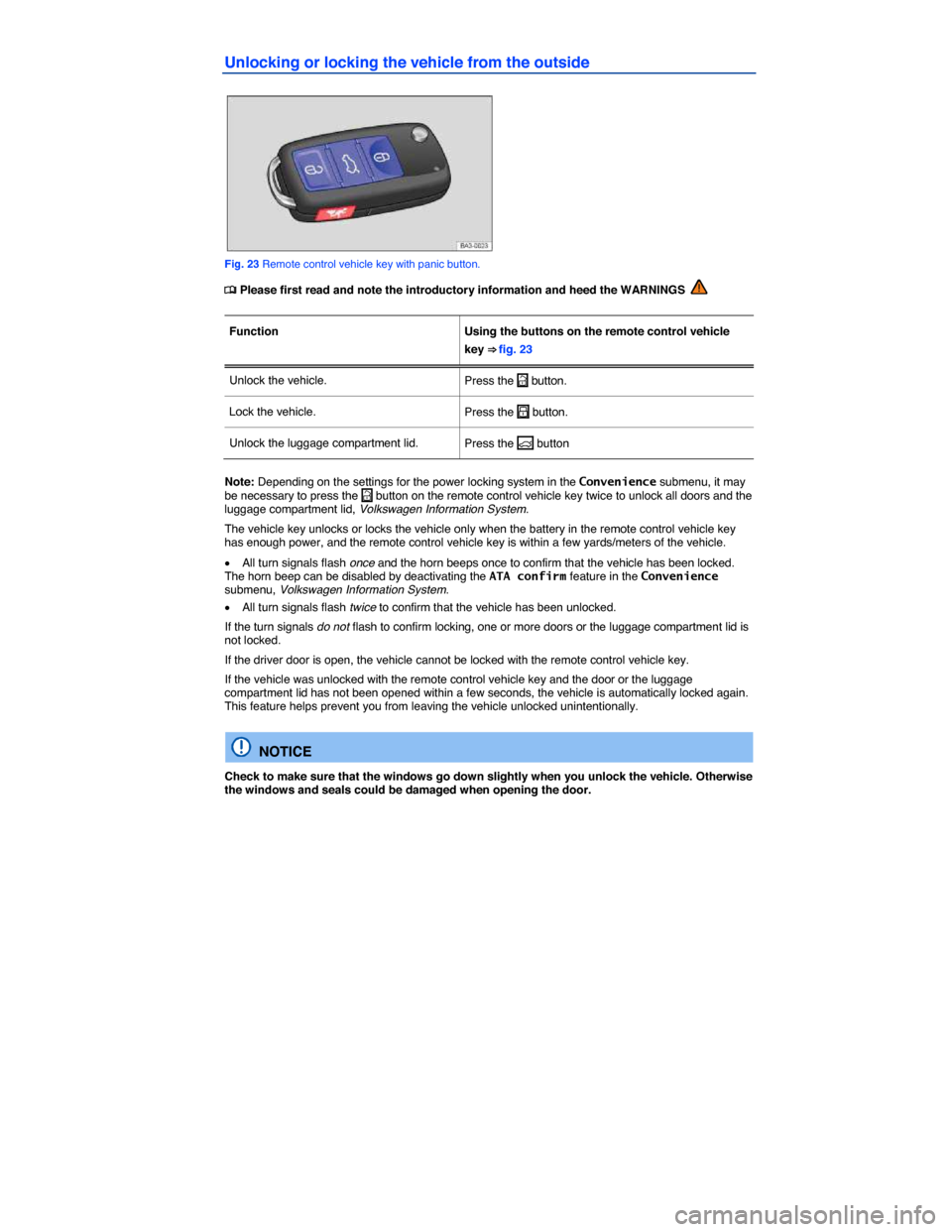
Fig. 23 Remote control vehicle key with panic button.
Page 52 of 393
Unlocking or locking the vehicle with Keyless Access
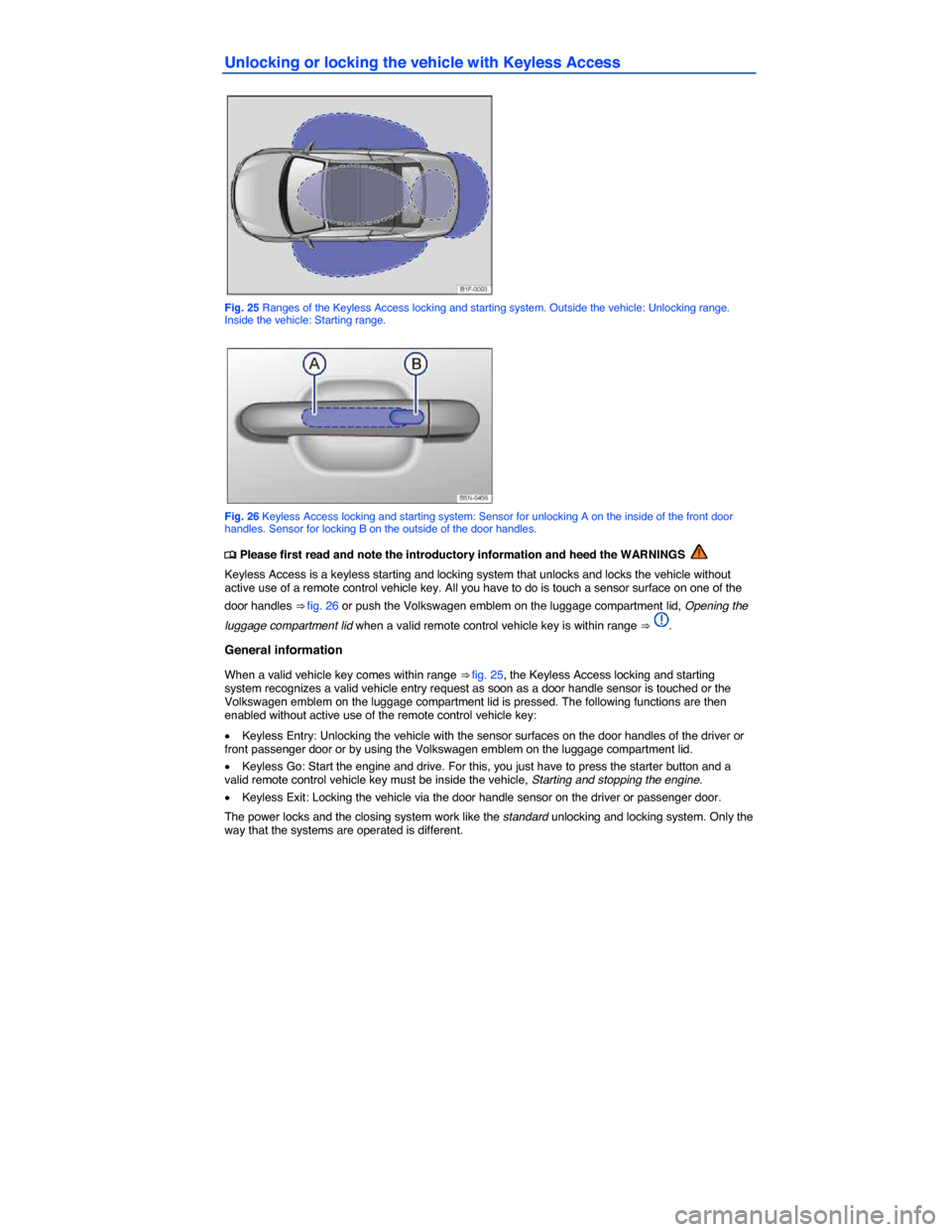
Fig. 25 Ranges of the Keyless Access locking and starting system. Outside the vehicle: Unlocking range. Inside the vehicle: Starting range.
Fig. 26 Keyless Access locking and starting system: Sensor for unlocking A on the inside of the front door handles. Sensor for locking B on the outside of the door handles.
Page 53 of 393

All turn signals flash twice to confirm that the vehicle has been unlocked and once to confirm that it has been locked.
If the vehicle was unlocked and within the next few seconds neither a door nor the luggage compartment lid has been opened, the vehicle is automatically locked again.
Unlocking and opening doors (Keyless Entry)
x Grasp the door handle of the driver or front passenger door so that you touch the unlocking sensor
surface ⇒ fig. 26 (A).
x Open the door.
Closing and locking doors (Keyless Exit)
x Switch the ignition off.
x Close the driver door.
x Touch the sensor surface in the door handle on the driver or front passenger door (B). The vehicle is locked. The door being locked must be closed.
Unlocking and locking the luggage compartment lid
If the vehicle is locked and a valid remote control vehicle key is within range ⇒ fig. 25 of the luggage compartment lid, it unlocks automatically when opened.
Open and close the luggage compartment lid as you would a standard luggage compartment lid, Luggage compartment lid
The luggage compartment lid locks automatically when it is closed except in the following situations:
x The vehicle is completely unlocked.
x When an authorized remote control vehicle key is inside the vehicle.
Locking with a second vehicle key
If a remote control vehicle key is inside the passenger compartment, the vehicle can be locked from the outside only if a second valid remote control vehicle key is within range.
When the vehicle is locked from the outside, the keyless go (starting) function of any keys left in the passenger compartment will be deactivated, Starting and stopping the engine. A key that was inside the vehicle when it was locked from the outside is reactivated by pressing the
Page 54 of 393

NOTICE
The door handle sensor surfaces can be activated by a strong stream of water or steam if a valid vehicle key is within range of the vehicle.
The door may not open if the outside and inside door handles are used at the same time.
If the vehicle battery or the battery in the remote control vehicle key is weak or dead, it might not be possible to unlock and lock the vehicle using Keyless Access. The vehicle can still be manually locked or unlocked with the key bit, Emergency closing and opening.
The driver message Key not in range appears in the instrument cluster display if there is no remote control vehicle key inside the vehicle or if the system does not recognize the remote control vehicle key. The key may not be recognized, for example, if it is covered by something that interferes with the signal (such as a briefcase), or if the remote control vehicle key battery is weak. Electronic devices such as mobile phones can also interfere with the signal.
Dirt on the door handles that contains a lot of salt (especially in winter) can affect the way the door handle sensors work. Cleaning the door handles can help with this problem, Exterior care and cleaning.
If the automatic transmission is not in Park (P) position, the electronic steering column lock will not lock and the vehicle will not lock via sensors in the front door handles or the remote control vehicle key.
Anti-theft alarm system
Page 55 of 393

Deactivating the alarm
Unlock the vehicle with the unlock button on the remote control vehicle key or switch on the ignition with a valid remote control vehicle key.
For vehicles with Keyless Access, the alarm can be deactivated by grasping one of the front door handles when a valid vehicle key is in range or by holding the remote control vehicle key to the right of the steering column trim and pressing the starter button, Unlocking or locking the vehicle with Keyless Access.
After the alarm has stopped and the vehicle is opened again in the same or a different area that is protected by the alarm, the alarm is triggered again. For example, the alarm will sound again if the luggage compartment lid is opened after one of the doors has been opened.
The anti-theft alarm system is not activated when the vehicle is locked with the power lock switch
Page 57 of 393

If a door is not closed properly, the vehicle icon appears in the instrument cluster display showing an
open door ⇒ fig. 12, ⇒ fig. 13.
Depending on your vehicle's equipment and options, the icon may still be displayed even after the ignition is switched off as long as the key has not been taken out of the ignition. The icon in the instrument cluster display goes out about 15 seconds after the vehicle has been locked.