lock VOLKSWAGEN EOS 2015 1.G User Guide
[x] Cancel search | Manufacturer: VOLKSWAGEN, Model Year: 2015, Model line: EOS, Model: VOLKSWAGEN EOS 2015 1.GPages: 393, PDF Size: 5.57 MB
Page 52 of 393
Unlocking or locking the vehicle with Keyless Access
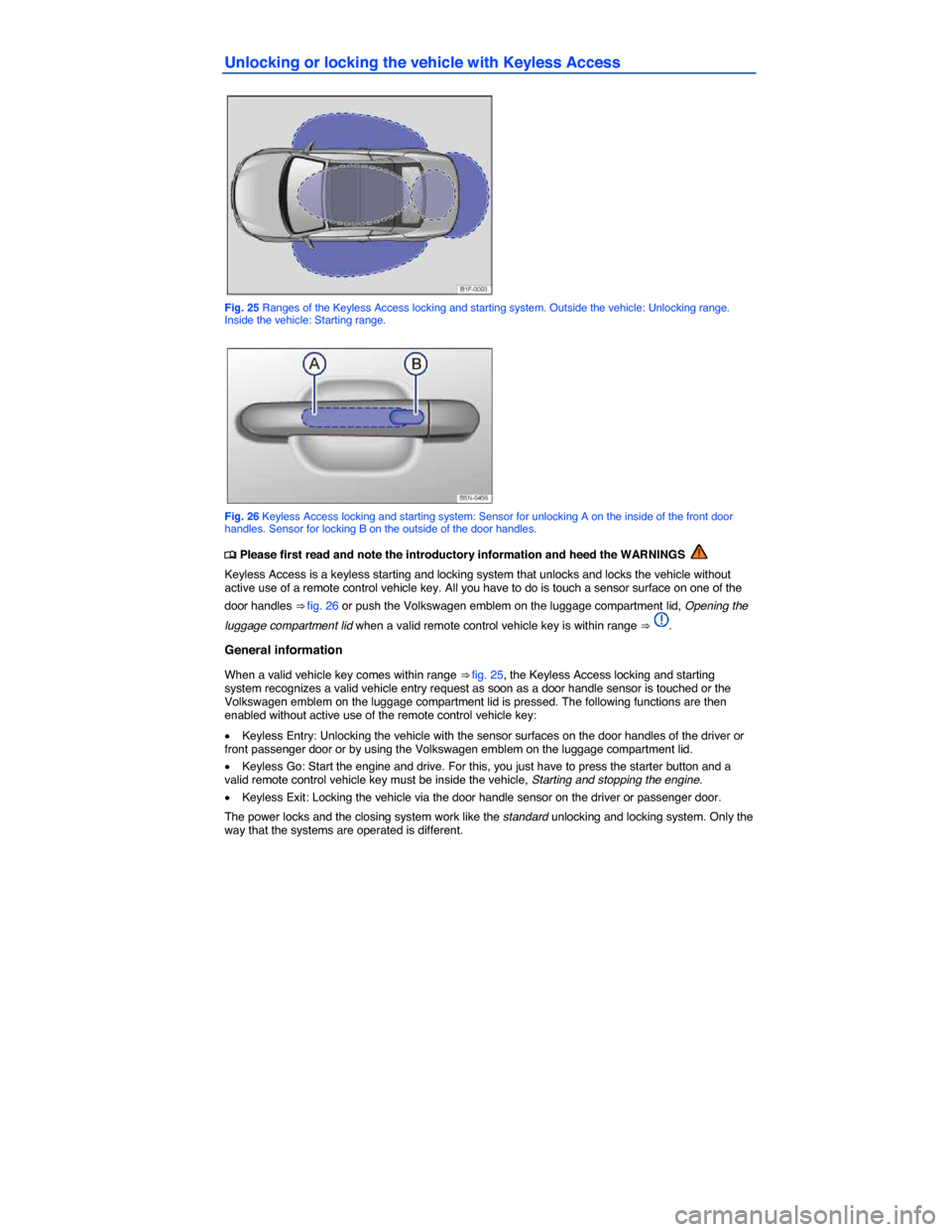
Fig. 25 Ranges of the Keyless Access locking and starting system. Outside the vehicle: Unlocking range. Inside the vehicle: Starting range.
Fig. 26 Keyless Access locking and starting system: Sensor for unlocking A on the inside of the front door handles. Sensor for locking B on the outside of the door handles.
Page 53 of 393

All turn signals flash twice to confirm that the vehicle has been unlocked and once to confirm that it has been locked.
If the vehicle was unlocked and within the next few seconds neither a door nor the luggage compartment lid has been opened, the vehicle is automatically locked again.
Unlocking and opening doors (Keyless Entry)
x Grasp the door handle of the driver or front passenger door so that you touch the unlocking sensor
surface ⇒ fig. 26 (A).
x Open the door.
Closing and locking doors (Keyless Exit)
x Switch the ignition off.
x Close the driver door.
x Touch the sensor surface in the door handle on the driver or front passenger door (B). The vehicle is locked. The door being locked must be closed.
Unlocking and locking the luggage compartment lid
If the vehicle is locked and a valid remote control vehicle key is within range ⇒ fig. 25 of the luggage compartment lid, it unlocks automatically when opened.
Open and close the luggage compartment lid as you would a standard luggage compartment lid, Luggage compartment lid
The luggage compartment lid locks automatically when it is closed except in the following situations:
x The vehicle is completely unlocked.
x When an authorized remote control vehicle key is inside the vehicle.
Locking with a second vehicle key
If a remote control vehicle key is inside the passenger compartment, the vehicle can be locked from the outside only if a second valid remote control vehicle key is within range.
When the vehicle is locked from the outside, the keyless go (starting) function of any keys left in the passenger compartment will be deactivated, Starting and stopping the engine. A key that was inside the vehicle when it was locked from the outside is reactivated by pressing the
Page 54 of 393

NOTICE
The door handle sensor surfaces can be activated by a strong stream of water or steam if a valid vehicle key is within range of the vehicle.
The door may not open if the outside and inside door handles are used at the same time.
If the vehicle battery or the battery in the remote control vehicle key is weak or dead, it might not be possible to unlock and lock the vehicle using Keyless Access. The vehicle can still be manually locked or unlocked with the key bit, Emergency closing and opening.
The driver message Key not in range appears in the instrument cluster display if there is no remote control vehicle key inside the vehicle or if the system does not recognize the remote control vehicle key. The key may not be recognized, for example, if it is covered by something that interferes with the signal (such as a briefcase), or if the remote control vehicle key battery is weak. Electronic devices such as mobile phones can also interfere with the signal.
Dirt on the door handles that contains a lot of salt (especially in winter) can affect the way the door handle sensors work. Cleaning the door handles can help with this problem, Exterior care and cleaning.
If the automatic transmission is not in Park (P) position, the electronic steering column lock will not lock and the vehicle will not lock via sensors in the front door handles or the remote control vehicle key.
Anti-theft alarm system
Page 55 of 393

Deactivating the alarm
Unlock the vehicle with the unlock button on the remote control vehicle key or switch on the ignition with a valid remote control vehicle key.
For vehicles with Keyless Access, the alarm can be deactivated by grasping one of the front door handles when a valid vehicle key is in range or by holding the remote control vehicle key to the right of the steering column trim and pressing the starter button, Unlocking or locking the vehicle with Keyless Access.
After the alarm has stopped and the vehicle is opened again in the same or a different area that is protected by the alarm, the alarm is triggered again. For example, the alarm will sound again if the luggage compartment lid is opened after one of the doors has been opened.
The anti-theft alarm system is not activated when the vehicle is locked with the power lock switch
Page 57 of 393

If a door is not closed properly, the vehicle icon appears in the instrument cluster display showing an
open door ⇒ fig. 12, ⇒ fig. 13.
Depending on your vehicle's equipment and options, the icon may still be displayed even after the ignition is switched off as long as the key has not been taken out of the ignition. The icon in the instrument cluster display goes out about 15 seconds after the vehicle has been locked.
Page 64 of 393

One-touch opening and closing
The one-touch feature automatically opens/closes a power window all the way. The window switch does not have to be held down/up.
For one-touch opening: Press the switch for the window down briefly as far as it goes.
For one-touch closing: Pull the switch for the window up briefly as far as it goes.
Stopping automatic movement: Pull/press the switch again.
Reactivating the one-touch feature
If the vehicle battery is disconnected or dead and the windows are not completely closed, the one-touch feature will not work and must be reactivated:
x Close all windows and doors.
x Insert the vehicle key into the door lock and turn and hold the key for more than 2 seconds in the direction of locking. See, Manually unlocking and locking the driver door.
x Release the key and then again turn and hold it in locking direction for more than 2 seconds. The one-touch feature is now reactivated.
The one-touch feature can be reactivated for one or more windows at the same time.
Convenience closing
The convenience closing feature lets you close the windows and the power sunroof from outside the vehicle as follows:
x Manual locking: lock the vehicle with the vehicle key bit in the driver door and keep the key turned in the locking position to close all windows and the power sunroof, Manually unlocking and locking the driver door.
Convenience closing first closes the windows and then the power sunroof.
WARNING
Improper use of power windows can result in serious personal injury.
x Never let anyone get in the way of a power window when closing it.
x When locking the vehicle from the outside, make sure that no one, especially children, remains in the vehicle. The windows will not open in case of an emergency.
x Always take the key with you when you leave the vehicle. You can still use the power windows for several minutes after the ignition is switched off as long as the driver or passenger door has not been opened.
NOTICE
The windows must go down slightly when you unlock the vehicle. Otherwise the windows and seals could be damaged when opening the doors.
If the power windows malfunction, the one-touch feature, as well as pinch protection may not work properly. See an authorized Volkswagen dealer or authorized Volkswagen Service Facility right away.
If convenience closing of the power windows requires removing the cover cap of the lock cylinder on the driver door, the cover cap must be reinstalled after the vehicle is locked, Manually unlocking and locking the driver door.
Page 67 of 393

WARNING
Accidents and serious injury may result from driving when the CSC roof has not properly locked into place or when the process of opening or closing the roof is incomplete. Even at low speeds, air resistance can twist or deform the roof or tear it off completely, endangering vehicle occupants and others.
x Never drive when the CSC roof is not completely open or not completely closed and securely latched unless you must move the vehicle to a safe place away from traffic.
x If you must move the vehicle to another location for safety reasons and the CSC roof is not completely open or not completely closed and securely latched, we recommend that you do not drive any faster than a slow walk.
x When opening and closing the CSC roof, always make sure no one will be injured by the supports and other moving parts.
NOTICE
x To help prevent damage, remove ice and snow from the CSC roof before opening it in winter weather.
NOTICE
x Volkswagen advises against all unauthorized changes to the CSC roof controls or to the way the roof opens and closes.
x Damage to the CSC roof system caused by changes to the CSC roof system controls will not be covered by any Volkswagen Limited Warranty. The terms and conditions of your
Volkswagen Limited Warranties are in the ⇒ Booklet Warranty and Maintenance.
x The CSC roof has been designed to be opened and closed only when the vehicle is stopped. As your vehicle was manufactured, the roof cannot be opened or closed when the vehicle is being driven, for example, at low speeds. Roof operation even at low speeds can cause the roof to be deformed and damaged because of the increased forces from wind resistance. Wind resistance can also cause parts of the linkages and the hydraulic system to wear prematurely, and could even cause parts of the roof to separate and fall into the vehicle or onto the roadway or onto another vehicle.
x The CSC roof has been designed to open and close only when the lever on the center
console ⇒ fig. 32 is pushed or pulled and held in that position until the roof has opened / closed completely. Releasing the lever stops roof movement. A chime sounds when the roof is moving. As your vehicle was manufactured, the roof cannot be operated in a one-touch up or down mode. The roof was designed this way for your safety and that of your passengers. One-touch operation would make it possible for the driver to leave the vehicle unsupervised while the roof, rear lid, and windows move into position. This would increase the risk of vehicle damage and personal injury to bystanders, especially to children.
x If the way the CSC roof works on your vehicle has been changed from the way it was manufactured, we urge you to have your authorized Volkswagen dealer or authorized Volkswagen Service Facility change it back so that it will only open and close as originally manufactured. Mechanical changes and changes to the vehicle software must be entered in the
⇒ Booklet Warranty and Maintenance.
Indicator light
Page 68 of 393

Lights up Possible cause Proper response
CSC roof is opening or closing. Wait until the CSC roof has fully opened or fully closed.
Flashes Possible cause Proper response
The CSC roof opening or closing process is not finished or there is a CSC roof malfunction.
Check if the opening or closing process has finished. If necessary, end the process using the convertible top button
Check if all technical requirements are met. If not, take the necessary steps to meet the technical requirements
Check if there is a malfunction in the CSC roof. If necessary, correct the malfunction or have the system checked by your authorized Volkswagen dealer or authorized Volkswagen Service Facility
Messages in the instrument cluster display
When the ignition is switched on, the indicator lights come on briefly for a function check. They go out after a few seconds.
Display text Proper response
Trailer: No convert. top operation!
Unhitch trailer.
Close luggage compartment cover! Flip down the inside luggage compartment cover. Make sure that it has locked into place.
Speed too high! Stop the vehicle at an appropriate spot. The CSC roof can only be operated when the vehicle is not moving
Close trunk lid! Close the luggage compartment lid. The CSC roof can only be operated when the luggage compartment lid is closed. Use emergency procedure to close the open CSC roof if necessary
Obstacle in rear area! Remove any obstacles behind the vehicle or move the vehicle forward so as to have enough room for the luggage compartment lid to swing out.
Close sliding roof! Close the power sunroof. While doing so, make sure that it is working properly. If necessary, see an authorized Volkswagen dealer or authorized Volkswagen Service Facility.
Page 73 of 393
NOTICE
The height of the vehicle changes when the CSC roof is moving. When there is not enough room above the vehicle, for example in a garage, the CSC roof could hit something and be damaged.
x Always make sure that there is enough room above the vehicle when opening or closing the CSC roof.
If you park vehicle with the roof down, the passenger compartment can be damaged by rain or snow, and it is also open to unauthorized persons.
x Always close the CSC roof before you leave the vehicle.
x If you must leave things in the vehicle when the top is down, you should lock them in the luggage compartment.
Wind blocker
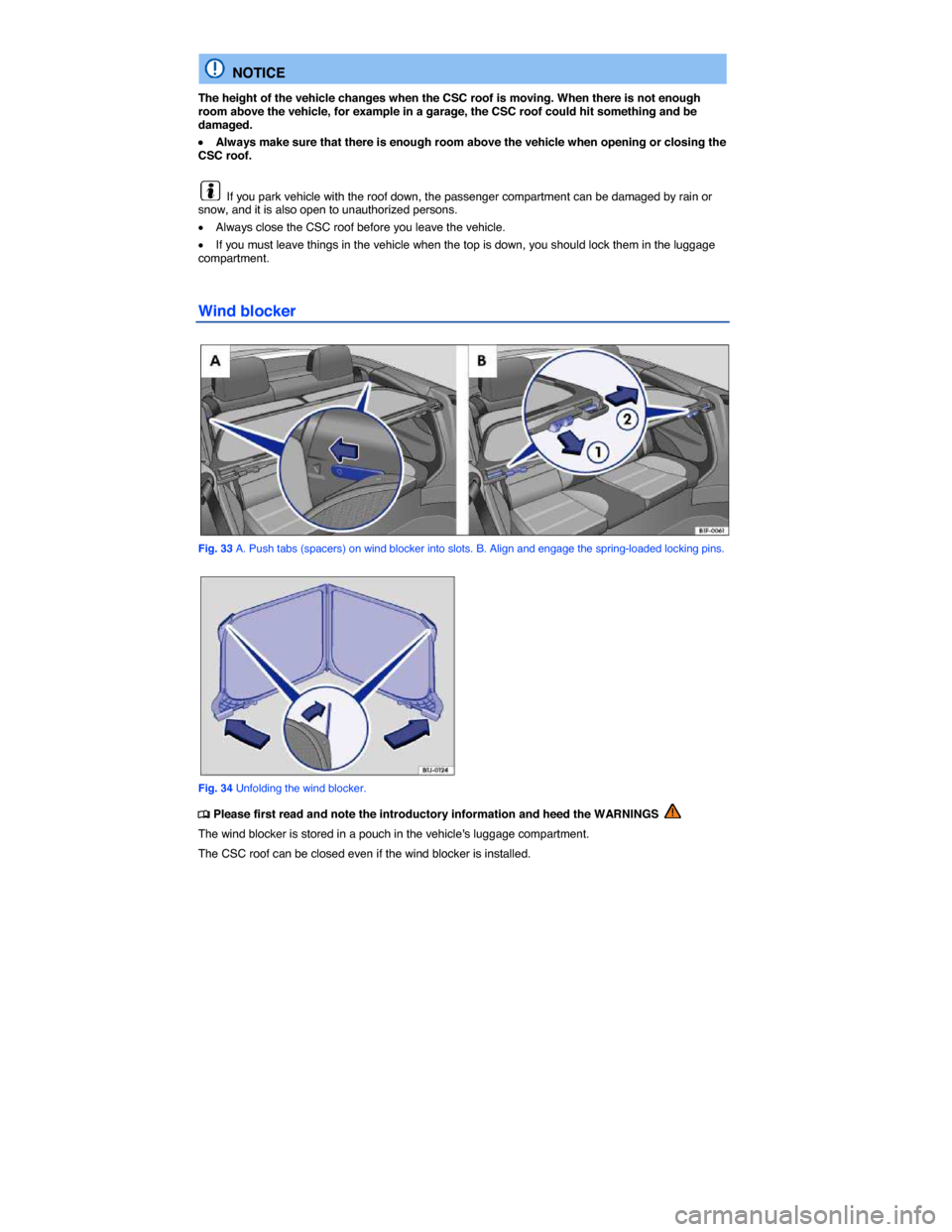
Fig. 33 A. Push tabs (spacers) on wind blocker into slots. B. Align and engage the spring-loaded locking pins.
Fig. 34 Unfolding the wind blocker.
Page 74 of 393

Unfolding the wind blocker
Folding the wind blocker outward before installing it is the easiest way to get it into the correct position for installation.
x Take the wind blocker out of its pouch.
x Fold out both sides in the direction of the arrows ⇒ fig. 34.
x Fold both tabs outward ⇒ fig. 34 (magnified view).
Installing the wind blocker
x Turn the wind blocker so that the longer side faces toward the front of the car and the frame is at the top.
x Position the wind blocker horizontally against the rear seat backrest.
x Gently insert the tabs on the back of the wind blocker into the slots (next to the rear seat backrests)
until they latch ⇒ fig. 33 A (inset).
x Pull the handle ⇒ fig. 33 B in the direction of arrow (1) and then slide the locking pin in the direction of arrow (2) into the retainer.
x Press the wind blocker down gently in the center until it clicks into place.
x Repeat this process for the passenger side.
Raising and folding the wind blocker
For the wind blocker to function properly, it must be raised before driving. Fold the wind blocker back down before removing.
x To raise: Grasp the upper section of the wind blocker in the center and raise it until it clicks into
place ⇒ .
x To fold: Grasp the upper section of the wind blocker in the center and fold it down gently toward
the rear of the vehicle ⇒ .
Removing the wind blocker
x Press the handle ⇒ fig. 33 B (magnified area) opposite the direction of the arrow (1) and slide the locking pin opposite the direction of the arrow (2) out of the side retainer.
x Gently lift the center of the wind blocker upward.
x Slide both wind blocker tabs opposite the direction of the arrow out of the slots ⇒ fig. 33 A (magnified area).
x Repeat this process on the passenger side.
Folding the wind blocker closed
x Lift the center of the wind blocker upward from the rear seats.
x Fold both sides inward opposite the direction of the arrows ⇒ fig. 34.
x Fold both tabs inward ⇒ fig. 34 (magnified area) opposite the direction of the arrow.
x Stow the wind blocker in the pouch.
WARNING
Installing or removing the wind blocker by the side of the road near moving traffic can cause accidents and serious personal injuries.
x Always park the vehicle a safe distance from moving traffic when installing or removing the wind blocker.
x Never install or remove the wind blocker while driving.