steering VOLKSWAGEN EOS 2015 1.G Owner's Guide
[x] Cancel search | Manufacturer: VOLKSWAGEN, Model Year: 2015, Model line: EOS, Model: VOLKSWAGEN EOS 2015 1.GPages: 393, PDF Size: 5.57 MB
Page 332 of 393

Therefore we strongly recommend that you use your mobile telephone in your vehicle only when it is properly attached to an appropriate cradle mounted on a base plate on the instrument panel.
Because of the large number and variety of mobile telephones on the market and the frequency with which new models are introduced, Volkswagen does not offer cradles for mobile telephones. Please check with the manufacturer of the mobile telephone that you plan to use.
Bluetooth® is a registered trademark of Bluetooth® SIG, Inc.
WARNING
A mobile phone on the seat, instrument panel or in other places can be thrown around the inside of the vehicle during a sudden braking maneuver, a crash or other accident and injure vehicle occupants.
x Never place or attach accessories or other objects (such as cup holders, telephone brackets, note pads, navigation systems, large, heavy or bulky objects) on the doors, on the windshield, over or near the area marked “AIRBAG” on the steering wheel, instrument panel, backrests or between these areas and the occupant. Such objects could cause serious injury in a collision, especially if an airbag inflates.
WARNING
Using a mobile phone or CB radio inside the vehicle without a properly installed and separate outside antenna can be dangerous to your health and that of your passengers because the electromagnetic radiation energy that mobile phones and CB radios emit may be above established limits. This also applies if the outside antenna is not installed properly.
x Always keep the mobile phone antenna at least 8 in. (20 cm) away from pacemakers. Heart specialists advise that mobile phones can adversely affect the way pacemakers work.
x Never carry a mobile phone that is switched on in the breast pocket directly over a pacemaker.
x If you suspect there may be interference with a pacemaker or other medical device, switch the mobile phone off immediately.
Page 339 of 393

Frequently asked questions (FAQ)
If you suspect a malfunction or vehicle damage, read and follow the following advice before contacting an authorized Volkswagen dealer or an authorized Volkswagen Service Facility. You may also find helpful information under “Special considerations” or “Checklist” in the index.
Description Possible causes, among others Possible remedy
Engine does not start.
Vehicle battery dead. – Perform jump-start – Charge vehicle battery
The wrong vehicle key is used. Use a valid vehicle key
Fuel level too low. Refuel
Vehicle cannot be locked or unlocked using vehicle key.
– Battery in the remote control vehicle key is dead. – Too far away from the vehicle (out of range). – Buttons have been pressed too many times.
– Replace the battery in the remote control vehicle key – Move closer to vehicle. – Synchronize vehicle key – Lock or unlock vehicle manually
Unusual noises. Cold engine, braking assist systems, electronic steering column lock.
Check the “Noises” entry in the index.
Odd driving behavior. Assistance systems activated. Check the “Assistance systems” entry in the index.
DSG® Direct Shift Gearbox too hot. Stop vehicle as soon as you can safely do so.
Front seats cannot be adjusted with power controls.
Vehicle battery dead. Charge vehicle battery
Fuse blown. Check fuse and replace if necessary
CSC roof will not move. CSC roof malfunction. Check whether any technical requirement for opening and closing the CSC roof is not met. If necessary contact an authorized Volkswagen dealer or an authorized Volkswagen Service Facility.
Features do not work as described in this manual. Settings were adjusted in the Volkswagen Information System.
Check and reset to factory settings if necessary
Page 348 of 393
windows and the power sunroof6. Note the instructions for the anti-theft alarm system ⇒ Power locking system.
x Unfold the key bit from the remote control vehicle key ⇒ , Vehicle key set.
x If the lock cylinder has a cover cap, insert the key bit from below into the opening of the cover cap
on the driver door ⇒ fig. 164 (arrow) and lift the cover cap off. Grasping the door handle and pulling slightly makes it easier to remove the cap.
x Insert the key bit into the lock cylinder of the driver door and unlock or lock the door.
x Reinsert the cover cap from top to bottom and press until it clicks into place. Grasping the door handle and pulling slightly makes it easier to reinstall the cap.
Special considerations when unlocking:
x If the vehicle is equipped with an anti-theft alarm system, the system remains activated for the
unlocked vehicle. But the alarm is not triggered at first ⇒ Power locking system.
x Open the driver door. The alarm will sound.
x Switch on the ignition. For vehicles with Keyless Access, deactivate the alarm by holding the remote control vehicle key to the right of the steering column trim and pressing the starter button Starter button, if necessary. The electronic immobilizer recognizes a valid remote control vehicle key when the ignition is switched on and deactivates the anti-theft alarm system.
The driver door can be unlocked separately from the inside the vehicle by pulling the door handle
to open the door ⇒ Power locking system.
The anti-theft alarm system is not activated when the vehicle is locked manually with the key bit Power locking system.
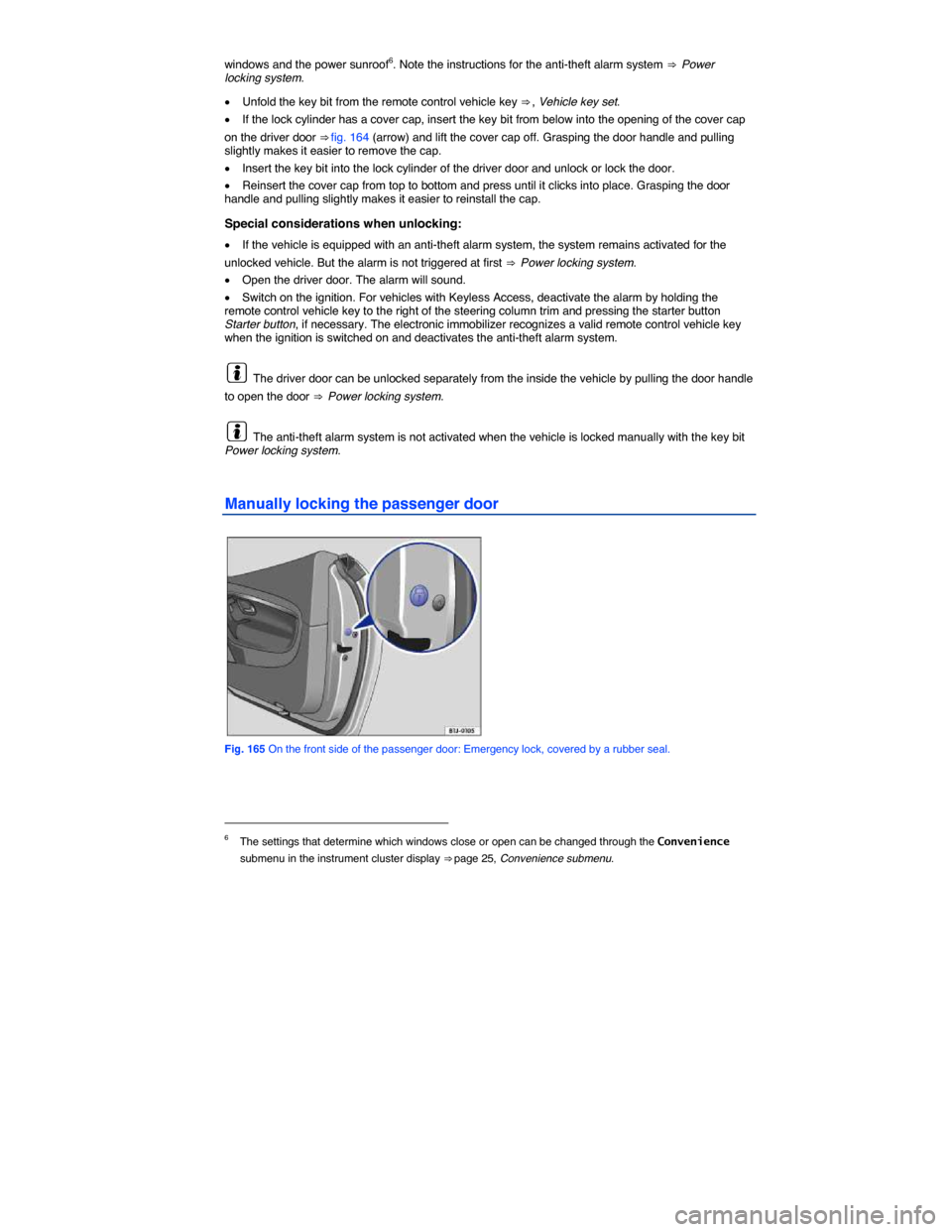
Manually locking the passenger door
Fig. 165 On the front side of the passenger door: Emergency lock, covered by a rubber seal.
6 The settings that determine which windows close or open can be changed through the Convenience
submenu in the instrument cluster display ⇒ page 25, Convenience submenu.
Page 386 of 393

WARNING
Towing a vehicle changes the way it handles and brakes. To help reduce the risk of an accident and serious personal injury, note the following:
x The driver of the vehicle that is being towed:
– Since the brake booster also does not work when the engine is stopped, you will need to press harder on the brake pedal to slow down or stop. Always be alert so as not to rear-end the towing vehicle.
– Will have to use considerably more force to turn the steering wheel because the power steering is not working.
x The driver of the vehicle that is doing the towing:
– Must accelerate gradually and gently and avoid jerking movements.
– Must not brake hard or steer sharply.
– Must brake earlier and more gently than in normal driving.
NOTICE
x Be careful not to damage the paint when installing and removing the towing eye and the cover for the threaded hole behind the bumper.
x Unburned fuel can get into the catalytic converter during towing and damage it.
Towing on a commercial tow truck
Page 388 of 393
Towing other vehicles
x Obey all legal requirements
x Read and heed all towing information in the owner's manual for the other vehicle.
A vehicle can be towed only if the electronic steering column lock is released. In case of a power loss or malfunctions of the electrical system, the engine may have to be jump-started in order to release the electronic steering column lock.
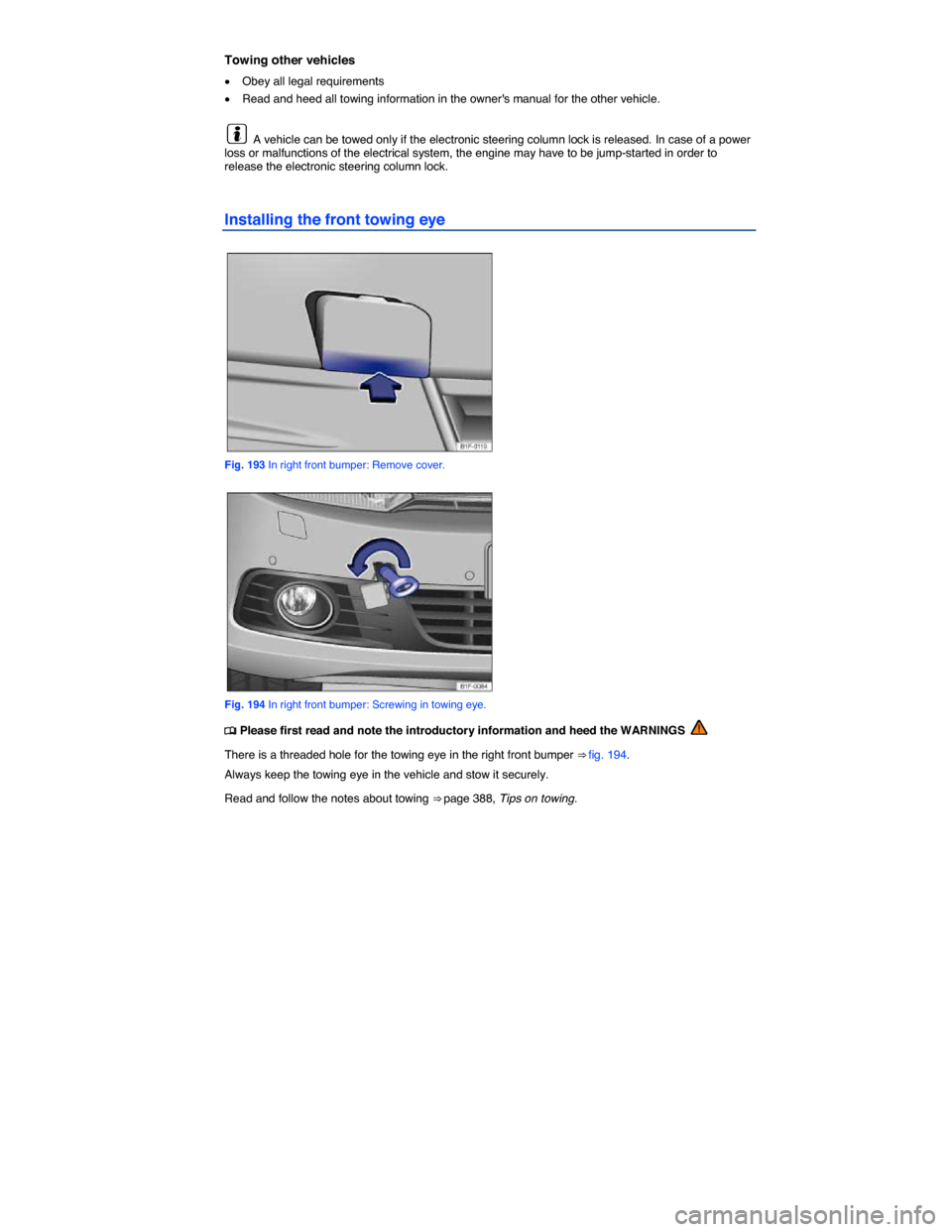
Installing the front towing eye
Fig. 193 In right front bumper: Remove cover.
Fig. 194 In right front bumper: Screwing in towing eye.
Page 391 of 393

As the driver of the vehicle being towed:
x If your vehicle is the one being towed, the ignition switch must be switched on to keep the steering wheel from locking. Also make sure that the turn signals, horn, windshield wipers, and windshield washers work properly.
x Since power steering does not work when the engine is switched off, more effort is needed to steer the vehicle.
x Since the brake booster also does not work when the engine is stopped, you will need to press harder on the brake pedal to slow down or stop. Do not hit the towing vehicle.
x Read and heed the information and WARNINGS in the towing vehicle's owner's manual.
As the driver of the towing vehicle:
x Drive especially carefully and accelerate gently. Avoid sudden driving maneuvers.
x Brake earlier and more gently than usual and with light pedal pressure.
x Read and heed the information and WARNINGS in the owner's manual of the vehicle being towed.