ignition VOLKSWAGEN GOLF 2004 User Guide
[x] Cancel search | Manufacturer: VOLKSWAGEN, Model Year: 2004, Model line: GOLF, Model: VOLKSWAGEN GOLF 2004Pages: 444, PDF Size: 92.7 MB
Page 193 of 444
Booklet 3.1 Controls and Equipment
with compass and sound syste m
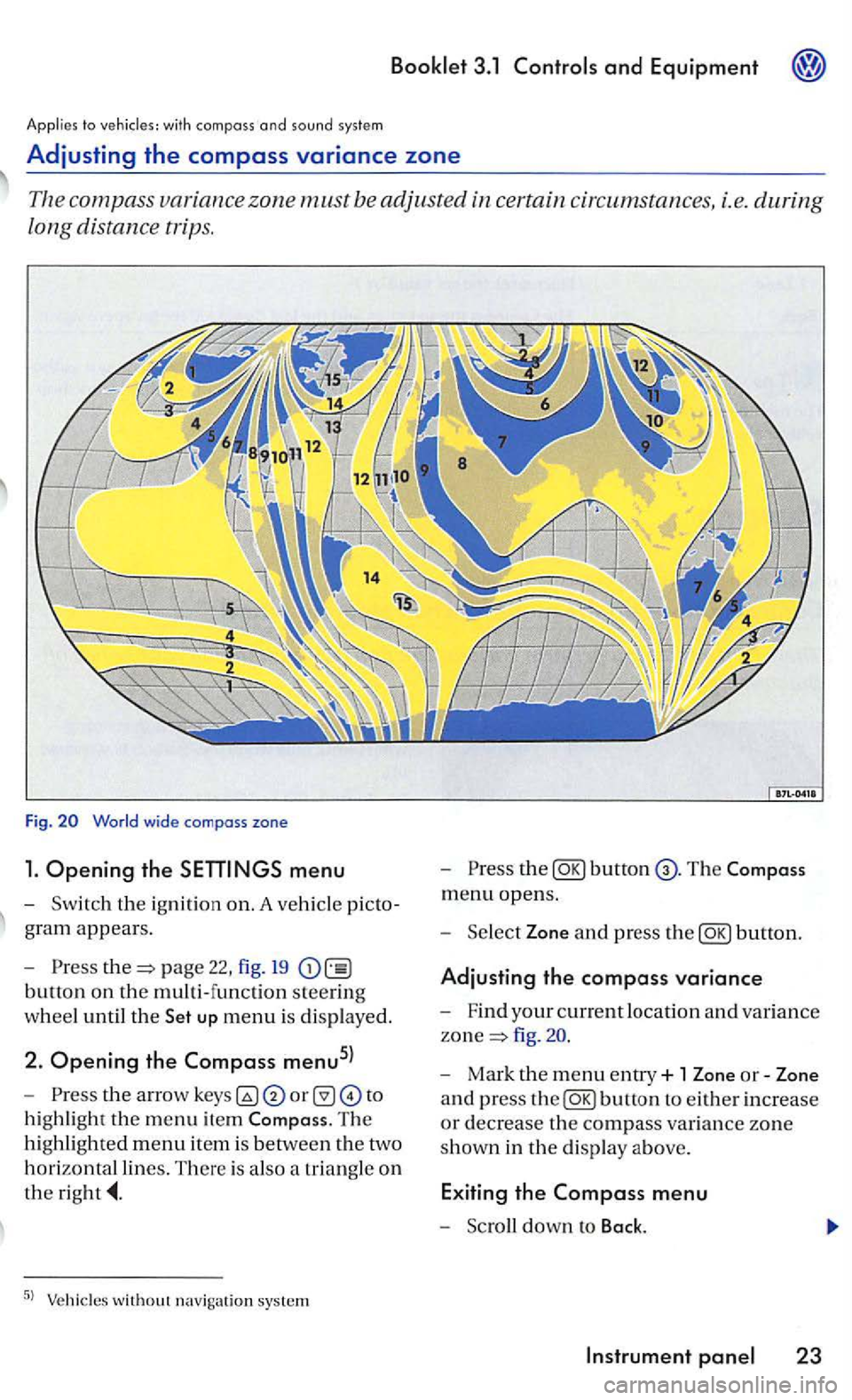
Adjusting the compass variance zone
Th e com pass zone must be adjusted certain circum stances, i.e. during
long distance trips.
Fig.
menu
-Sw itch the ignition on. A ve hicl e picto
g ra m
appears.
- Pre
ss page 22, fig. 19
button on the multi-function steering
w h
eel until the up menu is displayed.
2. Opening the Compass menu5l
-th e arrow to
h ig hli
ght the m enu item The
hi ghlighted menu item is betwee n th e two
h
orizontal lines. There is also a triangle o n
the
the
menu opens.
- Sel
ect Zone and press the
fig .
- Mark the menu entry+ 1 Zone or-Zone
a n d press
the
Page 194 of 444
Press button.
Compass
+ 1
-1
Bock
Tips
In display F uncti on
T he
name of the d is played menu
Increase th e set value b y I
Decreases th e set val ue by I
The Compa ss menu closes and t he last di sp layed menu opens aga in.
T
he menu s s hown in t he display depend s on the
ve hicle electro nics and the options in stalled on
yo ur ve hicle. If you are not s u re, ask your rized Volkswagen deale r or qualified work s hop for
Steer ing
Applies to vehicles: with multi-function steer ing whee l
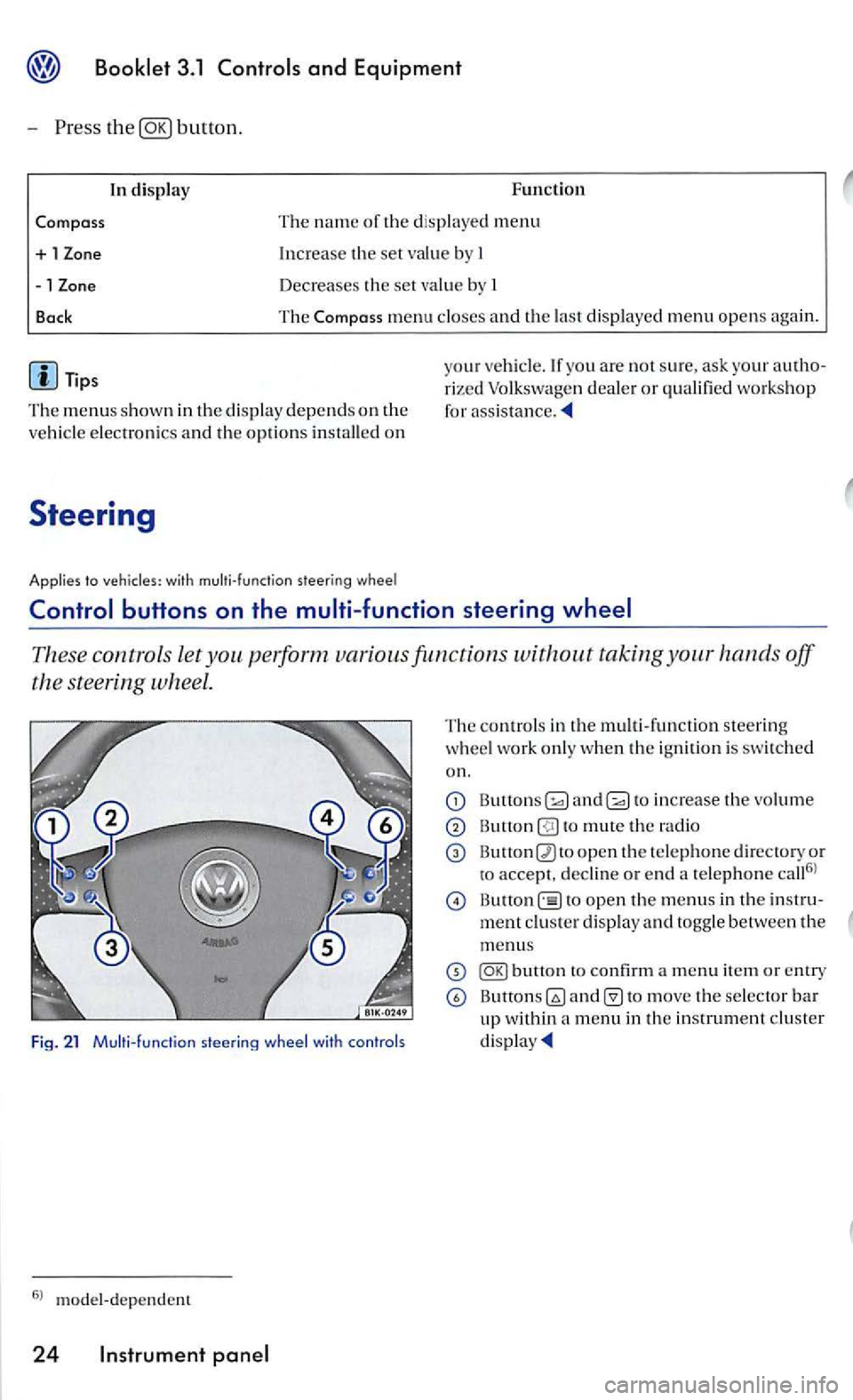
These contro ls let taking your hands off
the steering wheel.
Fig. 21 Multi- funct ion
The contro ls in th e m ult i- fun ctio n steering
w heel work only when the ignition is swi tched
on.
and to increase the vo lume
to mute th e radio
open th e te le phone d irectory or
to accept. decli ne or e nd a te lephone call6
l
open th e menus in th e
to move the selector bar up within a menu in th e in strument cluster
Page 200 of 444
and Equipment
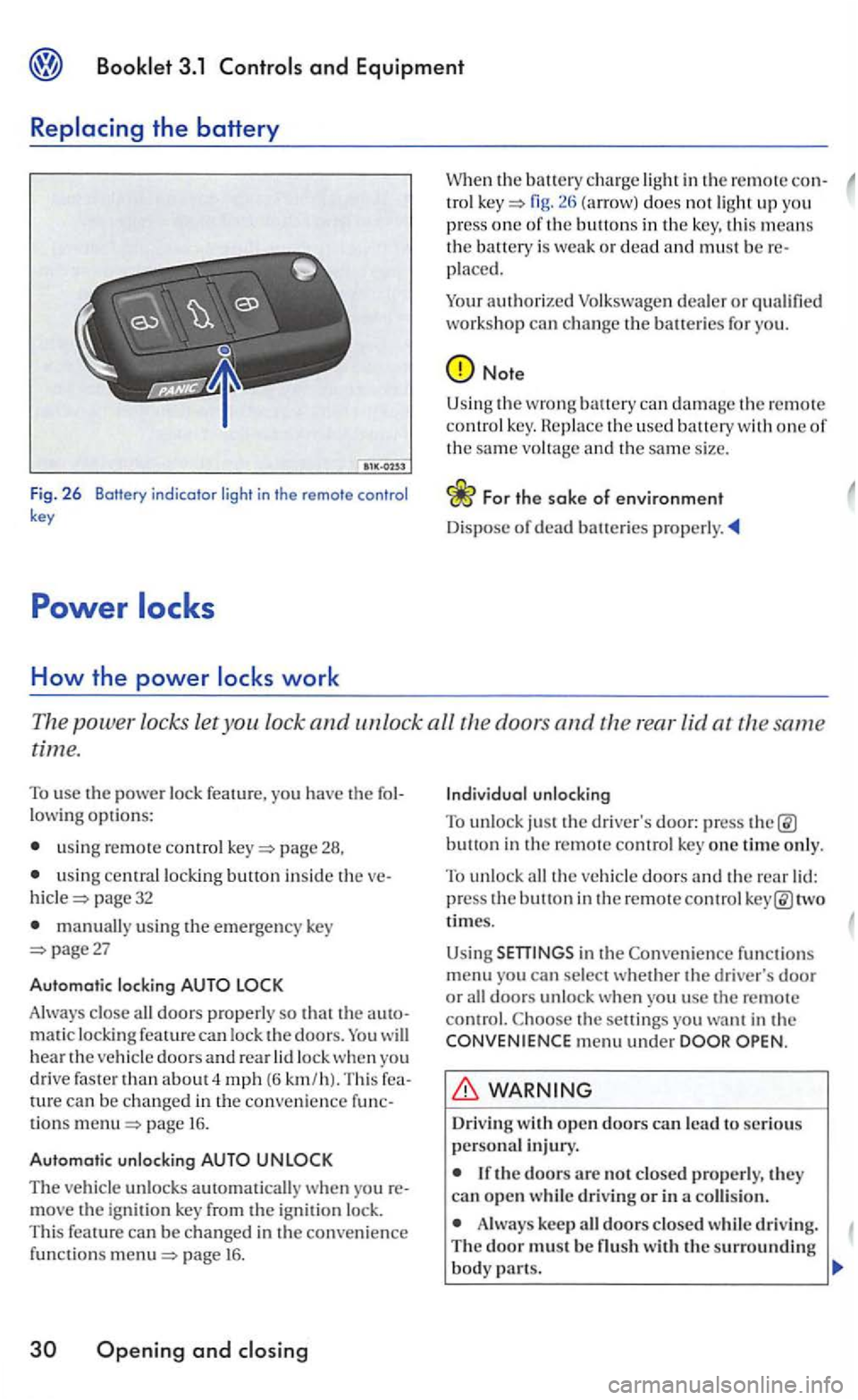
Fig. 2 6 Botfery indicator light in the remote control key
How the power
in the remote con-tro l fig. does not ligh t up you
press one of th e buttons in the key, this means the battery is weak or dead and must be placed.
Your
authorized
Note
Using the wrong can damage t h e remote co ntrol key. th e used battery with one of the same vo ltage and th e same size.
Th e power locks let you lock and unlock all the doors and the rear lid at the same
time.
To use the power lock feature, you have the
usin g remote control page 28,
u sing central locking button inside the page 32
manually using the emergency key page27
Automatic locking
Always close all doors properly so that the matic locking feature can lock the doors. will hear the vehicle doors an d rear lock when yo u
drive faster than about 4 mph (6 km /h). Thi s can be changed in the convenience tions page 16.
Automatic unlocking
The vehicle unlocks automatically w hen yo u move the ignit ion key from the ignition lock.
This feature can be changed in the convenience funct io ns page 16 .
Openin g and
button in the remote control key one time only.
To unlock all the veh icle doors and the rear two
times.
Using
functions menu you can sel ect whether the driver's door or all doors unlock when you usc the remote control. the setti ngs you want in the menu under
Driv ing
Always keep all doors closed whil e driving. The door must be
Page 203 of 444
3.1
lock th e veh icle usin g the centra l
l ock ing button whil e th e driver's doo r is still open, the driver 's door will not lock. Th is featu re
Doors
Doo rs which are not closed prop erly can open while you are driving.
If a door is not clo sed properly, th e
wa rnin g
light in the instrume n t clust er
or a m essage in the disp lay7
> appears. T he
m essa ge al so
comes on wit h th e ignition
switched off and goes out approximately
I S
seconds a fte r locking the ve hicl e.
- Stop th e vehicle.
-
t h e door and close it again (to th e
second catch).
Applies to doors
WARNING
A door whi ch is no t closed properly can accident ally open and cause injuri es and accidents.
Never close a door in attentive ly or w ith out checkin g first -can i nju re yourse lf or o ther peopl e. Always make certain that no o ne is
s ta nd in g w ithin range of the door that is bein g
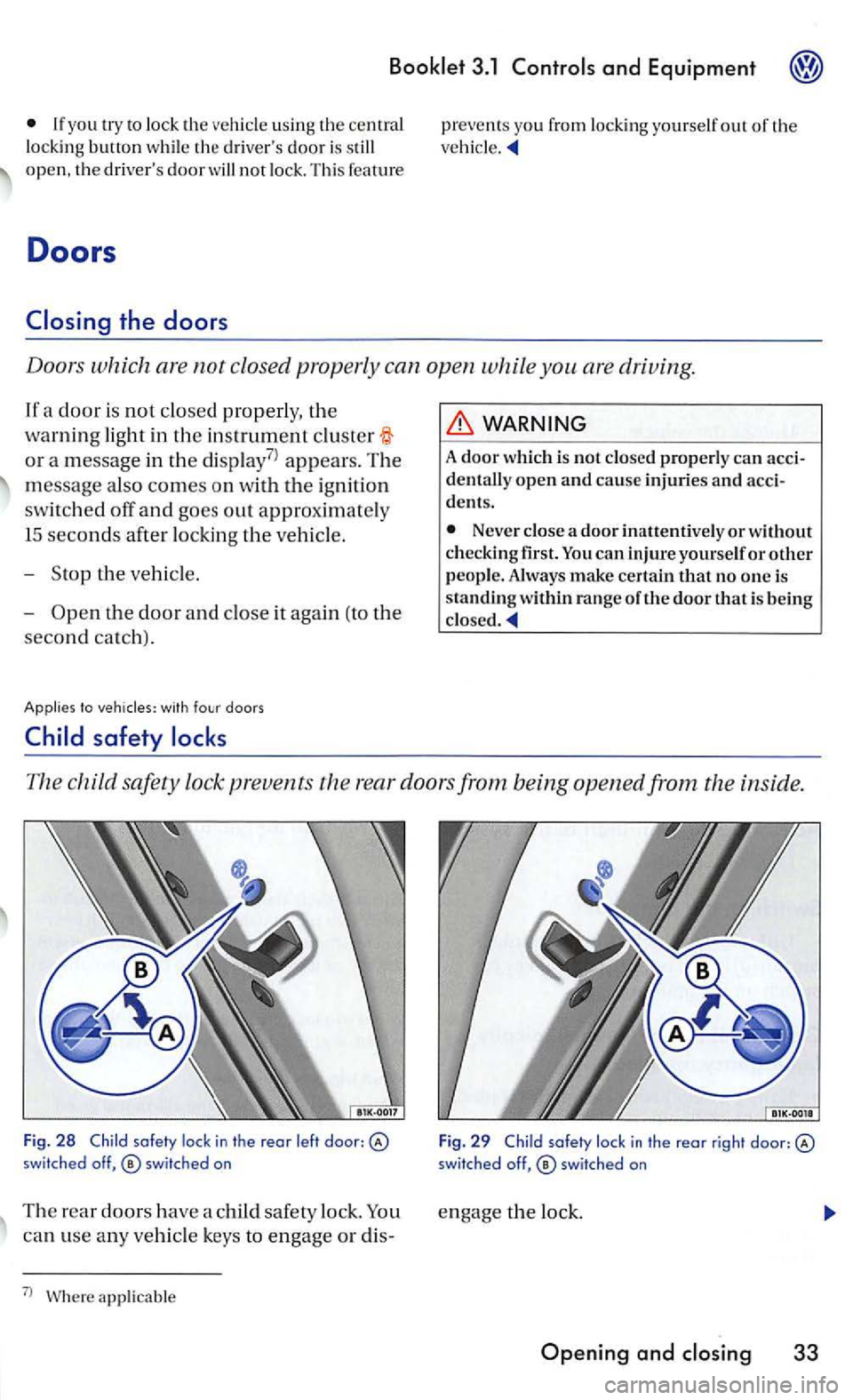
The child safety lock prevents th e r ear doors from being opened from the inside.
Fig. 2 8 Child lock in th e reor l eft door: switched off,
can use any ve hicle keys to e ngage or dis-
7
l applicable F
ig .
29 Child
Page 208 of 444
Booklet 3.1
the driv er's door. The
other doors each have a switch for their own window.
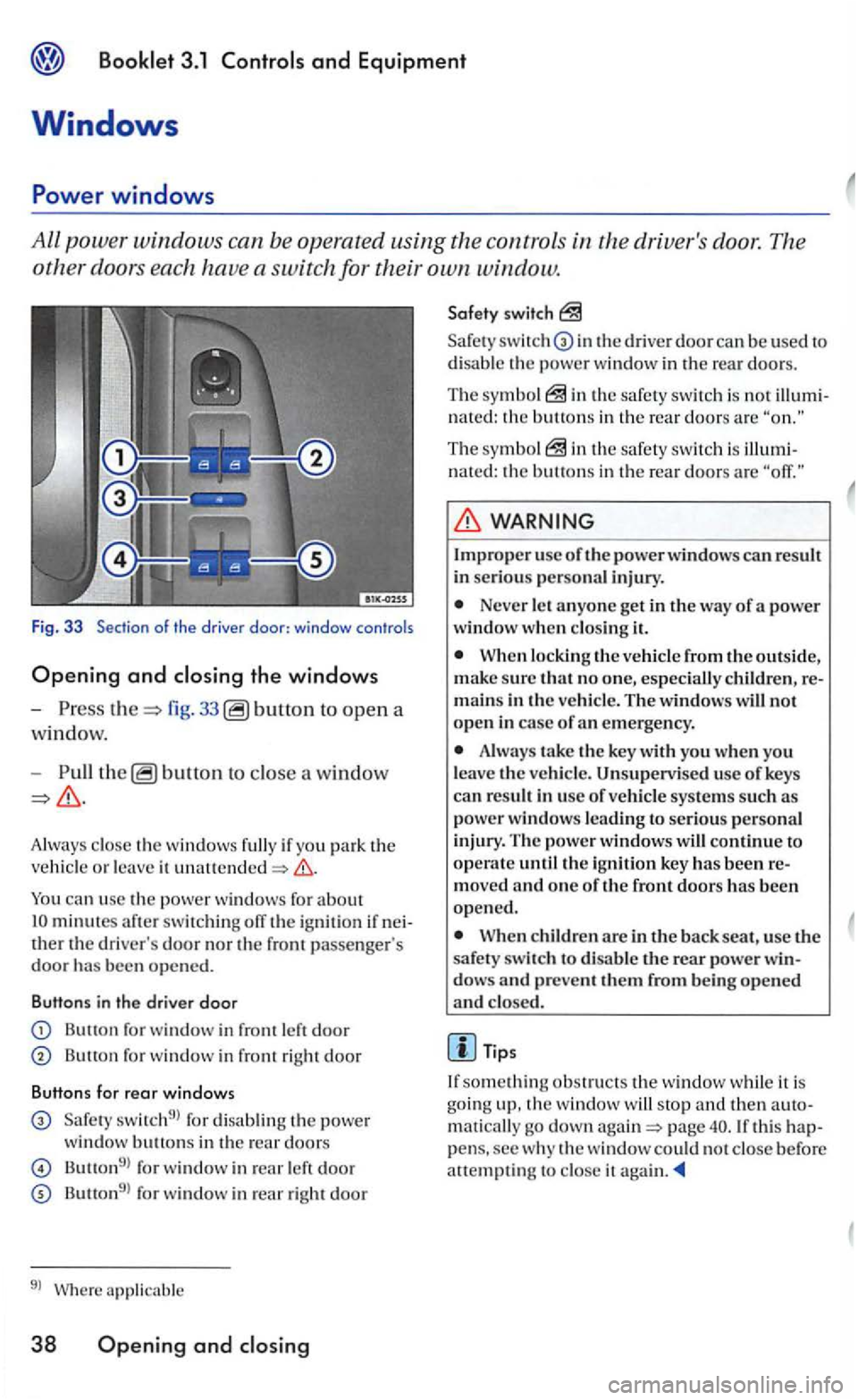
Fig. 3 3 Section of the driver door: windo w controls
Opening and closing the windows
-fig. 33 to open a
wi
ndow.
-b utto n to close a window
minutes after switch ing off the ign ition if ther the dri ver's door nor the front passe nger's door bee n opened.
Butt ons in the driver door
Button for window in front
Butto n for window in front right door
Butt ons fo r rear windows
switch9l for disa blin g th e powe r
window buttons in the rear doors
Button9l for window in left door
Button9l for window in rear right door
9l Where applicab le
38 Ope ning and closing
switch
in the driver door can be used to
d isab le the powe r w indow in the rear doors.
The sym bo l the safety switch is not n a ted : the buttons in the rea r doors are
The symbo l nated: the buttons in th e rea r doors are
Improper usc of the power window s can result in serious personal injury.
Never let a n yo ne get in th e way of a power window w hen clo sing it.
When locking the ve hicle fro m the outside, su re that no one, especially children, mains in th e ve hicle. The w indows will not open in case of emergency.
Alwa ys take the key with you wh en you
l eave the ve hicle. Unsupervised use of keys
ca n re sult in use o f vehicl e sys te m s such as power window s lead ing to serio us pe rsonal in jury. Th e powe r windows will continue to operate until the ignition key bee n
When children are in the back seat, use the
s afet y switch to disable the rear power dows and prevent them from being opened and closed.
Tip s
something obstructs the w indow while it is goin g up, the window will stop maticall y go down page pens, sec w hy the window could not close before att empting to close it
Page 213 of 444
and Equipment
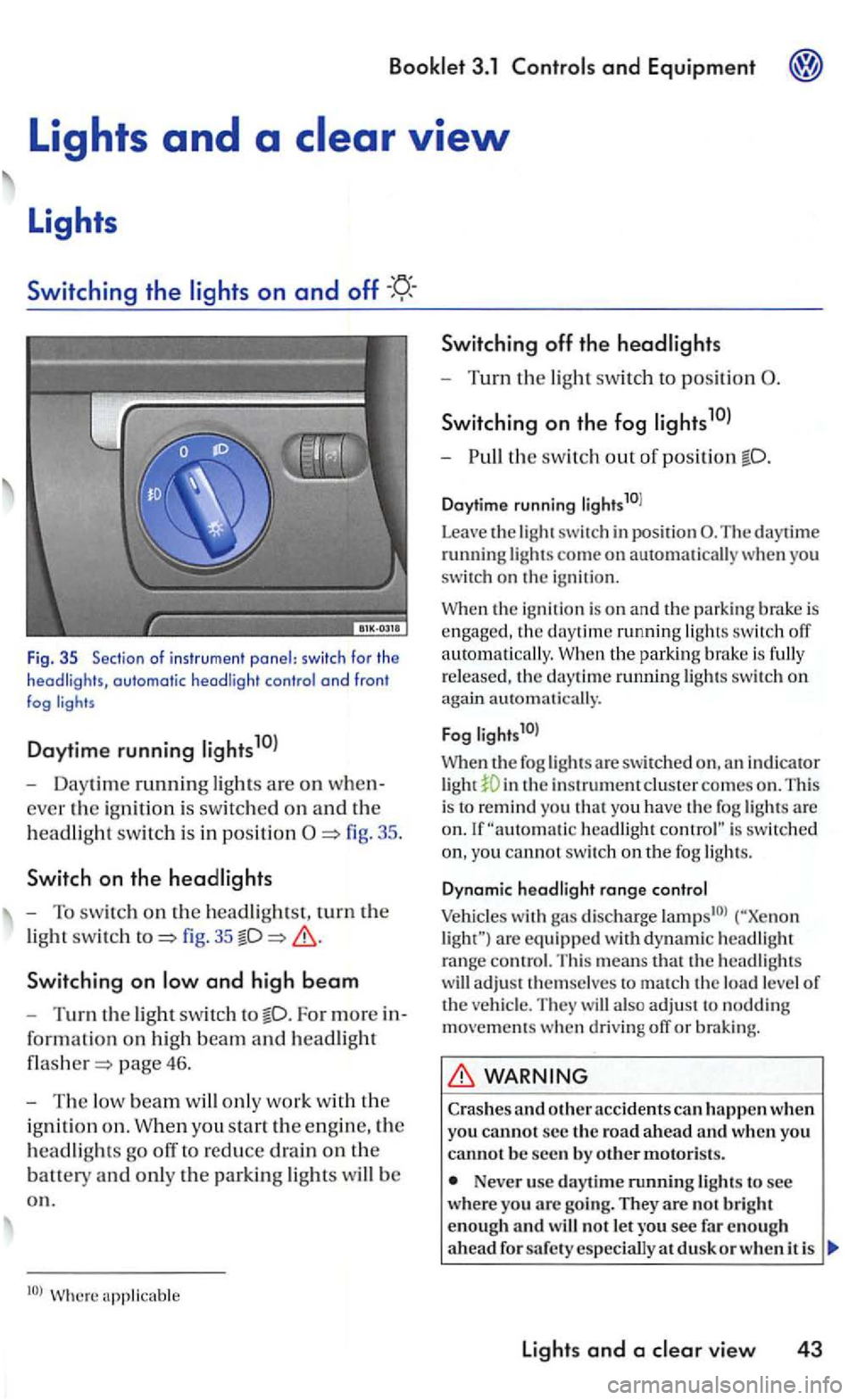
Fig . 35 Sec tio n of i nstr u m ent panel: switc h fo r th e headligh ts, automatic headli ght contro l a nd fron t fog
Daytime running
- Daytime running ligh ts are on when
ever the ig ni tio n i s sw itc hed on an d th e
h
eadlig ht swit c h i s in positi on
fig. 35
Switchin g on
For more in
for ma
tion on hig h beam an d headlight
page 46.
-The low beam w ill only work w it h th e
i g ni
tion o n . W hen you sta rt the e ngin e, the
h
eadlights go off to reduce drain on the
batt ety an d only th e parkin g lights will b e
o n .
Switching off th e headlights
- Turn the light swit ch to position
S wi tch ing on the fog
-th e switch out o f position
Daytime running li g hts10l
Leave
the light switch in posit ion The daytime running lights come on automatically you
switch on the igni tio n.
the ignition is o n and the parking brake is engaged , the daytime running ligh ts switch off
a uto m atically. the park in g bra ke is fully
r e leased , th e daytime ru nning lights swit c h on again automati cally.
F
og l ights1 0l
When th e fog lights a re swit ch ed in th e instrument clus te r comes on . This
i s to remind you t h at yo u have the fog lights are headlight is switc hed
yo u cannot switc h on th e fog ligh ts.
D ynam ic hea d light range co ntrol
Vehicles with gas discharge are eq uip ped w ith d yn am ic headlig h t range contro l. T his means that th e headlig hts
w ill adjust t hemselves to match th e load level of the ve hicl e. They will also ad ju st to noddin g movements when d riving off or braking.
WARNING
Crashes and o ther acc idents can h appen when you cannot s e c the ro a d a head and w hen you canno t b e seen by o th er motoris ts.
Never use day tim e running lights to see wher e you arc goi ng. They are no t b rig h t
enough an d w ill not le t you see fa r en o ug h
a head d usk o r w hen i t is
lights and a vie w 43
Page 219 of 444
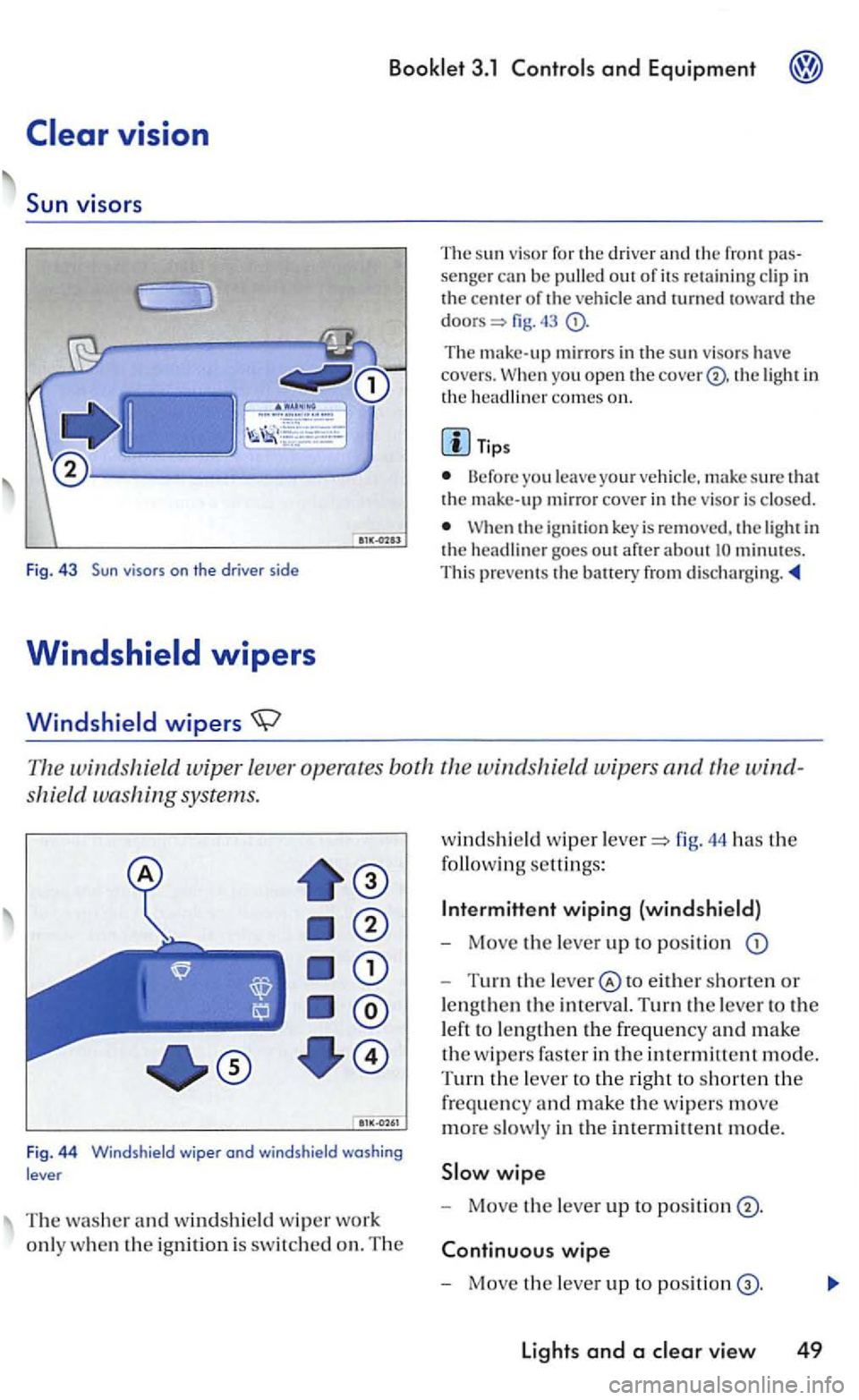
The su n viso r for th e drive r a nd the fro nt senger can be pulled out of its re taining clip in the of the vehicle and lUrned fig.
The mirrors in the sun viso rs have covers. yo u open the cover® . the light in
the com es on.
Tip s
Before you leave your vehicle , make sure that the make-up mirror cover in th e visor is closed.
the ignition key is re m oved, the light in the headliner goes out after about minutes.
This prevents th e
windshie ld wiper leve r operates both the windshield wip ers and
shield washing systems.
Fig . 4 4 Windshield wiper ond windshield washing
lever
T he washer and windshield w ip er wo rk
onl y w hen
the ignition is switch ed on. The
windshi eld wip er fig. 44 has the
following settings:
Inte rmittent wiping (windshield)
- Move the lever up to position
-Turn the to either shorten or
lengt hen
the in terval. Turn the lever to the
l eft to le n g
then the frequency and make
the w ipers faste r in the intermittent mode.
T
urn the lever to the right to shorten the
frequency and make the w ipers move
more slowly in the intermittent mode.
wipe
- Move the lever up to positi on
wipe
- Mo ve the lever up to positi on
Lights and a
Page 238 of 444
3.1 and Equipment
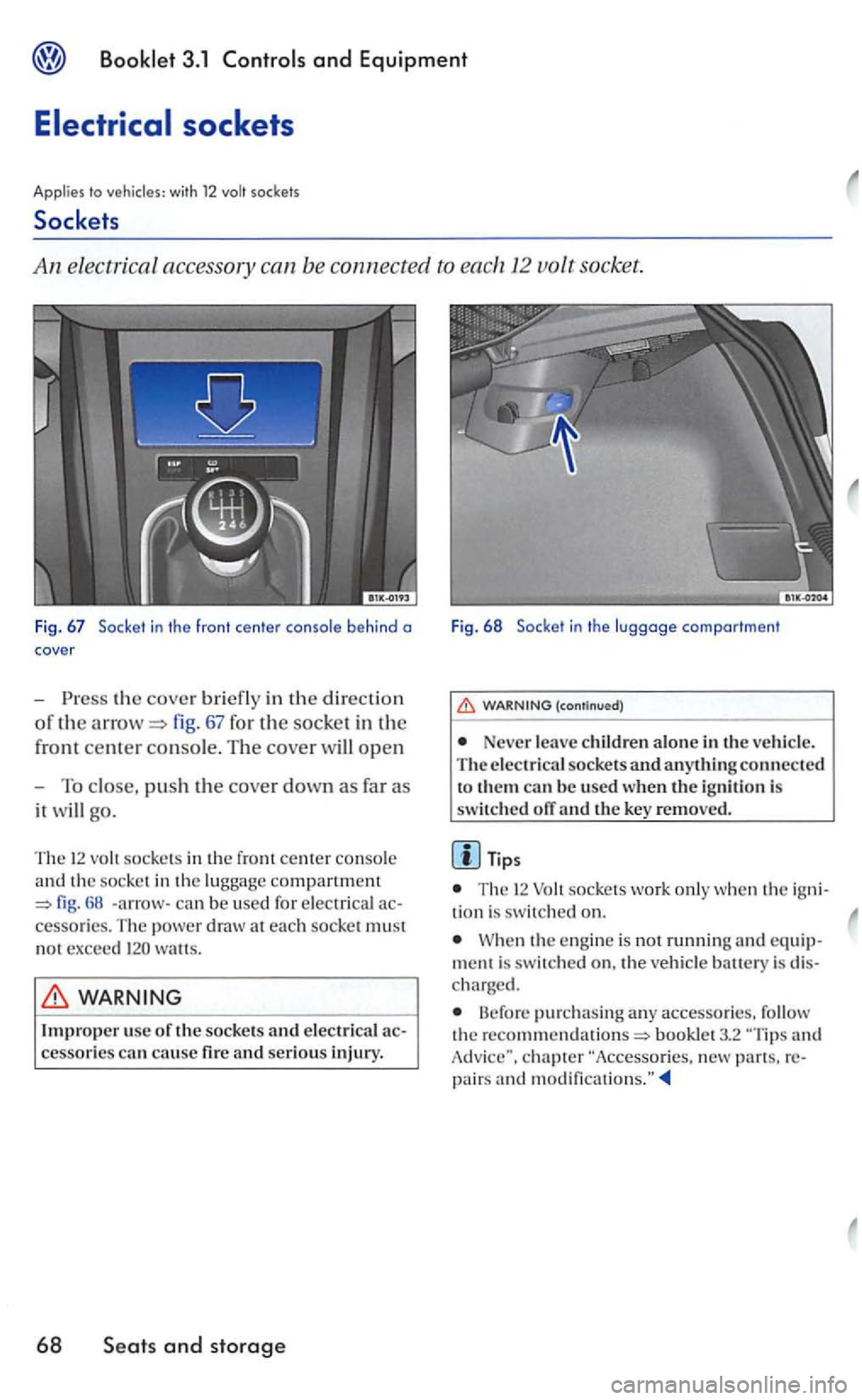
the cover briefly in th e directio n
of th e fig. 67 for the socket in the
front
center con so le. Th e cover will open
- To close, pus h the cove r down as far as
it will go.
Fig. 68 Socke t in th e luggage compo rtment
(continued)
Never le a ve children alone in the vehicl e.
T he electrical socke ts and anything connect e d
to the m can b e used when the ignition is switch ed orr and the key removed.
Tips
The 12 sock e ts wo rk onl y whe n th e igni -
The 12 sock e ts in the fr ont cente r console
a nd the so c ket in the lu ggage compartment
WARNING
Improper usc of the sockets and electrical cause fir e and serious injury.
68
the e ng ine is no t running and ment is s witc hed the vehicl e battery is c harged.
B efo re purchasing any accessorie s. follow th e booklet 3.2 and
Page 254 of 444
Booklet 3.1 Controls and Equipment
Driving
Ignition
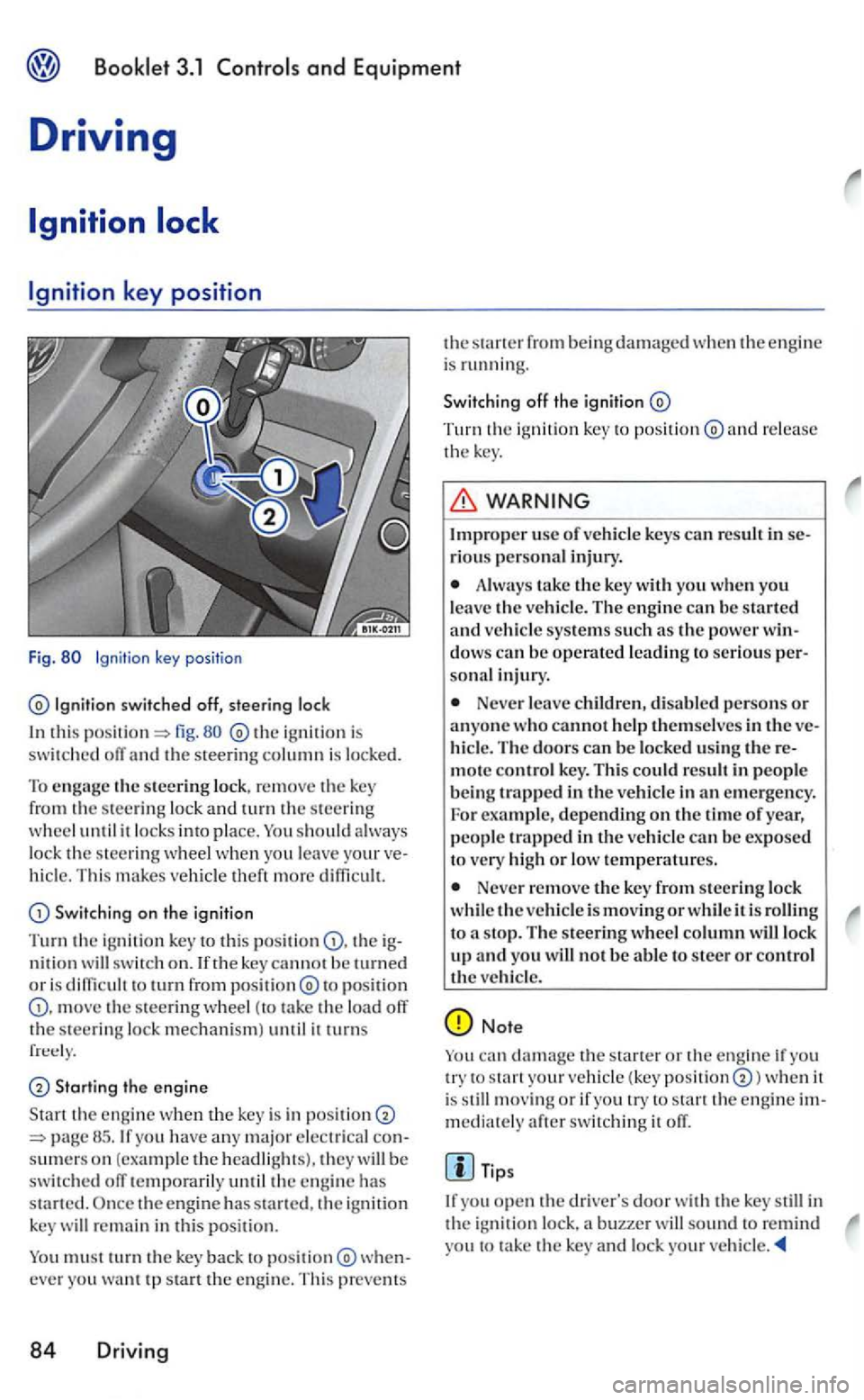
key position
Fig.
switched off, steering loc k
this fig. ig niti on i s swit c h ed off an d the ste erin g column is locked.
T o engage th e s teering lock . remove the key
from th e s teering lock a nd turn the s teerin g wheel u ntil it locks into place. You sh o uld lo ck th e s teering when you leave vehicl e. T his m akes ve hicle th eft m ore diffi cu lt.
Swi tch ing on th e ignition
Turn the ignition key t o this th e ig
n iti o n sw itc h on. lfth e key cannot be turned o r i s to turn from to p osition th e steering wheel (to tak e the load off the s teering lock mechani sm ) until it turns
Starting the e ng in e
Sta rt th e e ng in e when the key is in posit io n have any m ajo r e lectri cal consumers on (example the headli ghts). they
re mai n in thi s posi tion.
Y o u
must turn th e key back to
Tu rn the ig ni tio n key to po sition re lease
t h e key .
usc of vehicle ke ys can result in se
r iou s personal in jury.
Alwa ys take the key with yo u when you leave th e ve hicle. The engine can be starte d
and vehicl e sys te m s such a s the pow er windows can be operate d leading to serio us persona l injury.
N ever leave children, di sabled perso ns or anyone who ca nnot help themselve s in the ve
hicle. The doors can be locked u sin g t he re
mote con tro l key. This could res ult in people b e ing trapped in the ve h icl e in an emergen cy .
For example, depending on the tim e of year,
peopl e trapped in the vehicle can b e exposed to very high or lo w temperatures.
Never re m ove the key from steering lock
w hi le the vehicl e is movi ng or w hil e it is to a s top. The s teerin g wheel column will lock up and yo u w ill not be able to steer or contro l the vehicl e.
Note
yo u try to s tart your ve hicl e (k ey position when it
is still mov ing or if yo u try s ta n the en gin e immediate ly after switc h in g it off.
yo u open th e in
the i g nit ion lock, buzzer yo u to take the key and lock your ve hicle.
Page 255 of 444
Booklet 3.1 and Equipment
Applies to
The ig nition key be removed from the ignition lock only with the selector
th e position.
Afte r th e ignition is sw itch ed move the key if the selecto r lever for the ma tic tran smissio n is in pos ition P . Afte r th e nitio n key is removed , th e sele ctor lever i s
l ocked. order to remove the ignition key from
the ig n it ion lock on vehicles equipped with
tomati c transm iss io n. the ig nition must switched off an d th e selecto r lever mus t b e in the posit ion . O nce you have rem ove d th e ig ni tio n
key. the sel ector lever be locke d. be
s ure to ap ply th e park ing brake whenever you move the key from the
immobilizer help s to prevent
ac tivates the immobilizer w hen you put the key into the ignition lock .
The e lec troni c immobilizer is automatica lly tivated when you the key out oft h e igni tion
l oc k. The
en gine
can only be started usin g key.
co rrect ly
code d genuine key . You may have prob le m s s tarting the vehicle if a genuine and
correc tly code d
with o gasoline engine
Starting the engine
only be started (manual transmission ) or brake
pedal
transmission. ) is fully depressed using a coded Volkswag en
maste r key.
Manual transmiss ion
-Move th e gearshif t leve r into neutral.
- Depress the clutch p edal full y and hold
it d epressed.
-Turn th e ign itio n key to position
page 84, fig. to start the e n gin e.
- Rel
ease th e ig nition key when the
gin e starts. Do not le t th e starter to
tinue to run.
Automatic transmissio n
Move the selector lever toP
page 88.
-
Turn th e ignition key to position
fig . start th e en g in e.
-
the ignition key when the
tinue to run. When starting a hot en g in e.
yo u
need to press th e accelerator
briefly .
Driv ing 85