esp VOLKSWAGEN GOLF 2010 User Guide
[x] Cancel search | Manufacturer: VOLKSWAGEN, Model Year: 2010, Model line: GOLF, Model: VOLKSWAGEN GOLF 2010Pages: 516, PDF Size: 105.12 MB
Page 88 of 516
Settings (SETUP)
Sound,
this section
button
settings
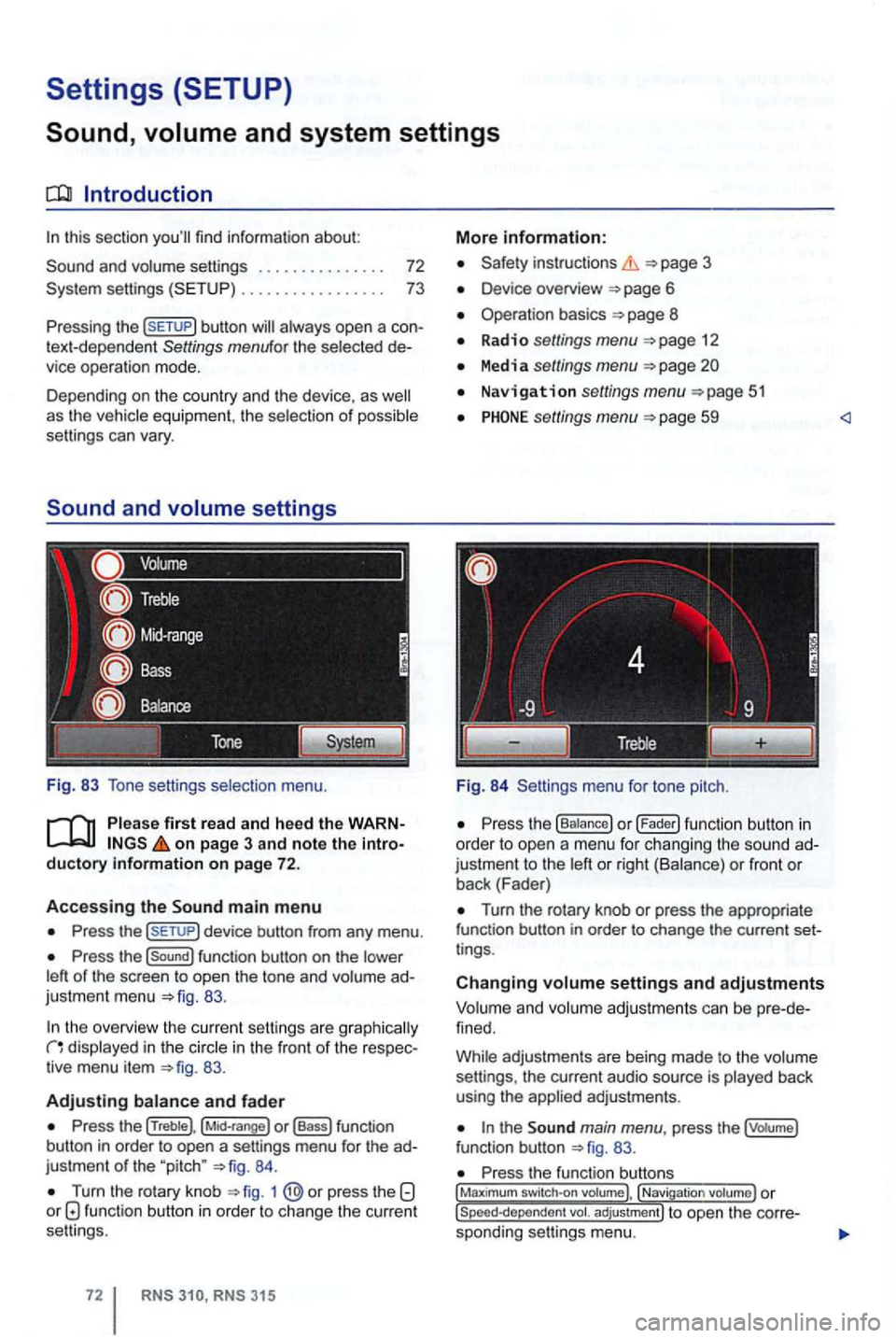
Fig. 83 Tone setti ngs selection menu.
on page 3 and note the introductory information on page 72.
Accessing the main m enu
Press the
Press the function button on the
83.
the overview the cu rrent se ttings are g raphica lly in the in the front of the respec
tiv e menu item 83.
Adjusting
Press the (Treble), o r (Bass) function
button in order to open a settings menu for the ad
justme nt
of the "pitch " 84.
Turn the rotary knob 1 function button in order to change the current
se ttings .
RNS RNS 31 5
More information:
Safety instructions 3
Device overview
Operation basics 8
Radio settings menu 12
Media settings menu
Navigation settings menu
settings menu 59
Fig. 84 Settings menu fo r tone pitch.
Turn the rotary knob or press the appropriate
function button in order to change the current set
t ings .
Changing settings and adjustments
Vo lum e and volume adjustm ents can be pre -de
f ined.
Whi le adjustmen ts are being made to the volume
settings , the current audio source is played back
using the
the main menu , press the (votume)
fun ction button 83.
Press the function , Navigati on
Page 119 of 516
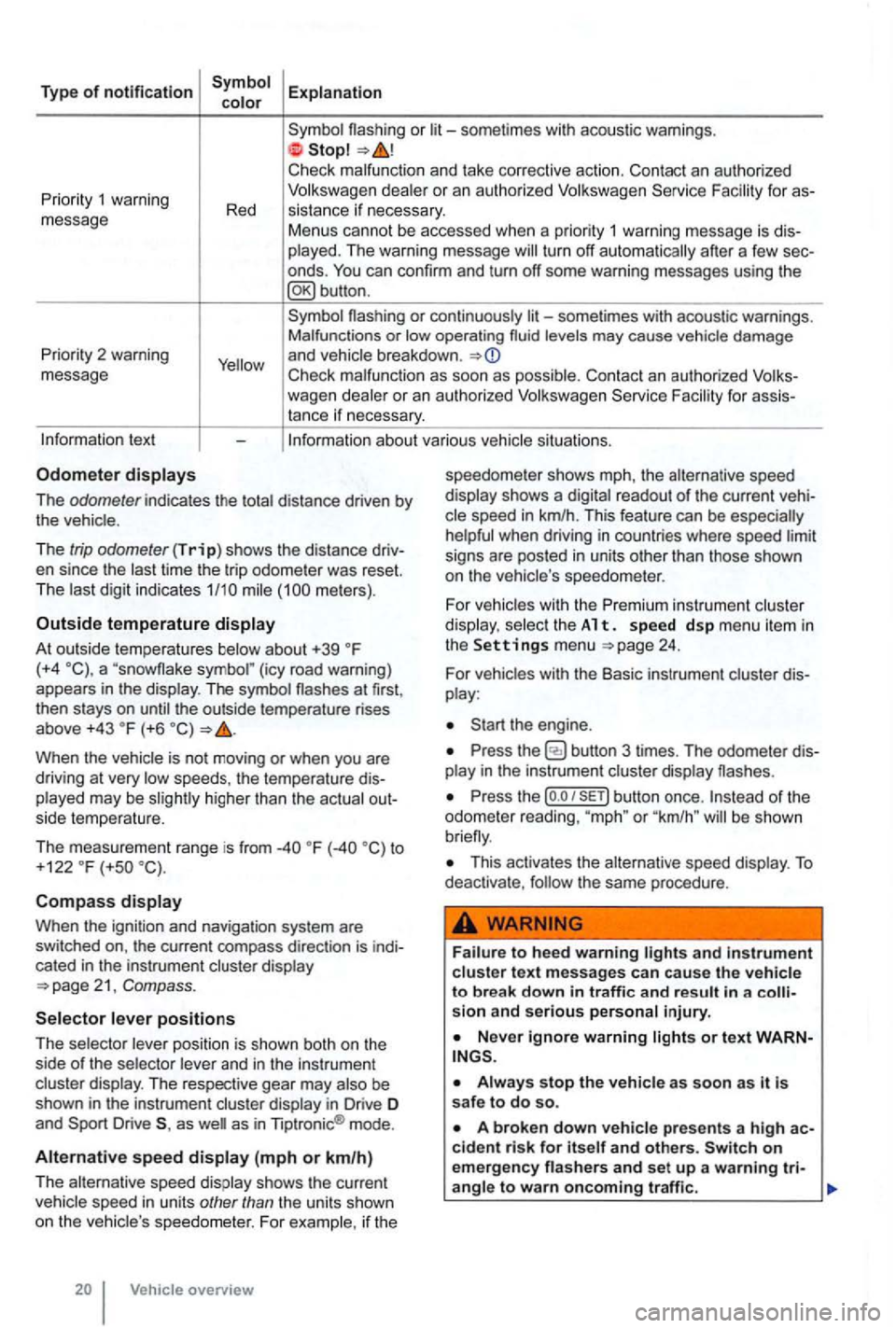
Type of notification
or
deale r o r an autho rized
turn off automatically after a few sec
onds .
Priority 2 warning
message
or continuously levels may cause vehicle damage
and vehicle breakdown .
Check malfunc tion as soon as possib le. Con tact an authorized for assistance if necessary.
tex t
The odometer indicates the distance driven by the vehic le .
The
trip odometer (Trip) shows the distance driv
en since the time the trip odometer was reset.
The meters) .
Outside temperature
At out side temperatures (+4 (icy road warning)
appears in the display . The symbol the outside temperature rises
above +43 (+6
higher than the actual out
side temperature.
The measurement range is from
to
+122 (+so
Compass
Whe n the ignit ion and navigation system are
switched on, the current compass direction is indi
cated
in the instrument cluster display
position is shown both on the
side of the selector and in the instrument
cluster display. The respective gear may
as as in Tiptronic ® mode .
Alternative speed (mph or km/h)
The alternative speed display shows the current
Vehicle overview speedometer
shows mph, the alternative speed
display shows a
readout of the current veh i
signs are posted in units other than those shown
on the vehicle 's speedo meter .
For
vehicles with the Premi um instrument cluster
di splay. select th e A 1 t. s pe ed d sp me nu it em in the Settings menu 24.
For vehicles with the Basic instrument cluster dis
play :
Press the
Press the (o .o button once. or "km /h " be shown
This activates the alternative speed display . To deactivate , the same procedure .
and in strument cluste r text messages can cause the vehicle to break down in traffic and result in a sion and serious personal injury.
on emergency
Page 128 of 516
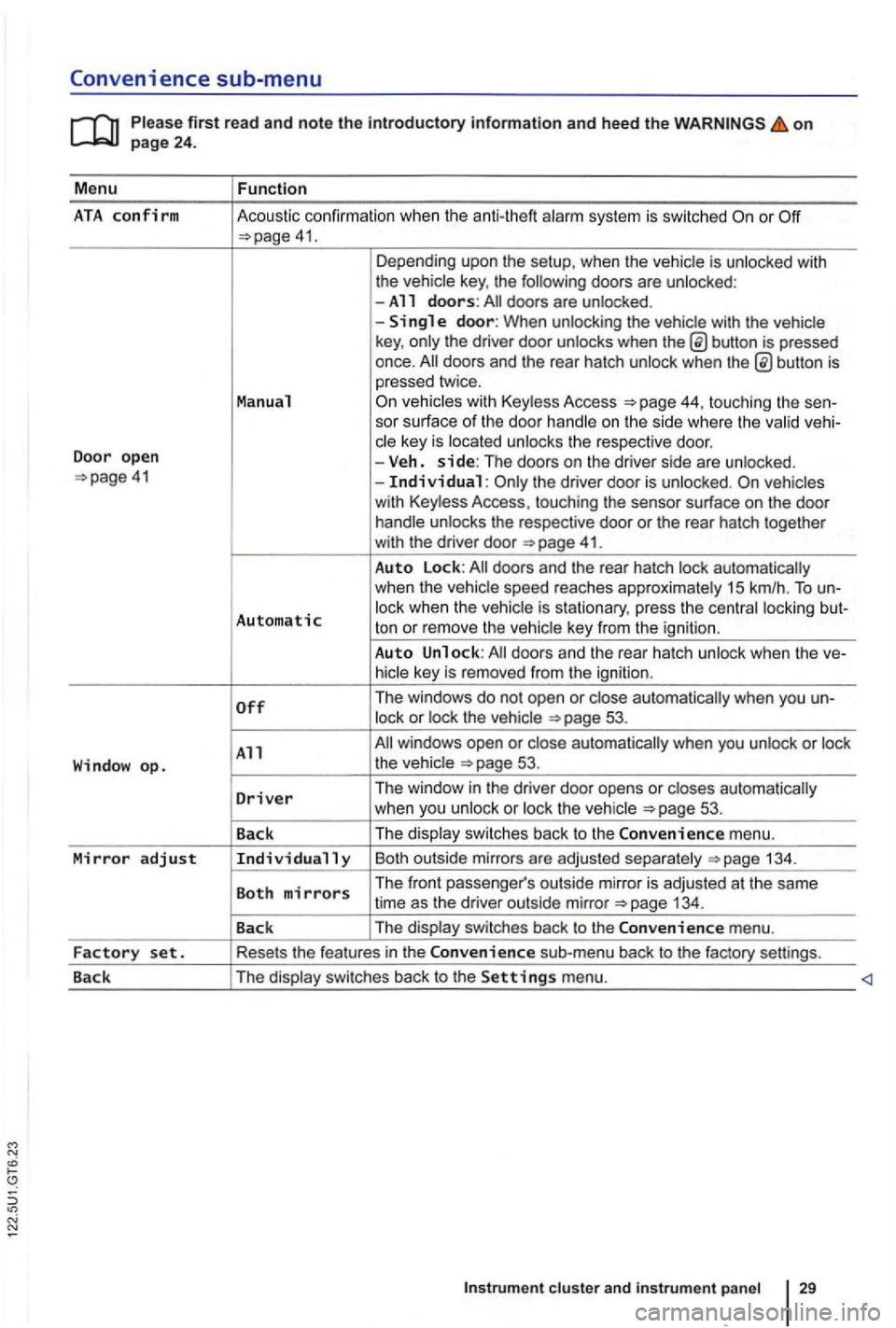
Convenience sub-menu
on
41. Depending upo n the setup, when the vehicle is unlocked with
the vehic le key , the following doors are unlocked :
-All doors: doors are un locked .
-
button is pressed
once.
44, touching the sen-
sor surface of the door handle on the s ide where the valid vehi-
c le key is located unlocks the respective doo r.
Door open -Veh. side: The doors on the dr iver side are unlo cked. the driver door is unloc ked.
41.
Auto Lock:
Automatic lock when the vehic le is s tationary, press the centra l locki ng but-
ton or rem ove the ve hic le key from the igni tion .
Auto Unlock:
53.
All 53.
D
river Th e window in the driver door opens or closes automatically
w hen you unlock or loc k th e ve hicle 53 .
Back The
displa y swi tc
hes back to the Convenience m enu.
Mirror adjust Individually Bo th outsi de mirrors a re ad juste d sepa ra te ly 134 .
Both mirrors The front passe nger's outs ide mirro r is adj usted at th e same
time as the driver out side mirror
Page 138 of 516
Replacing the remote control vehicle key battery
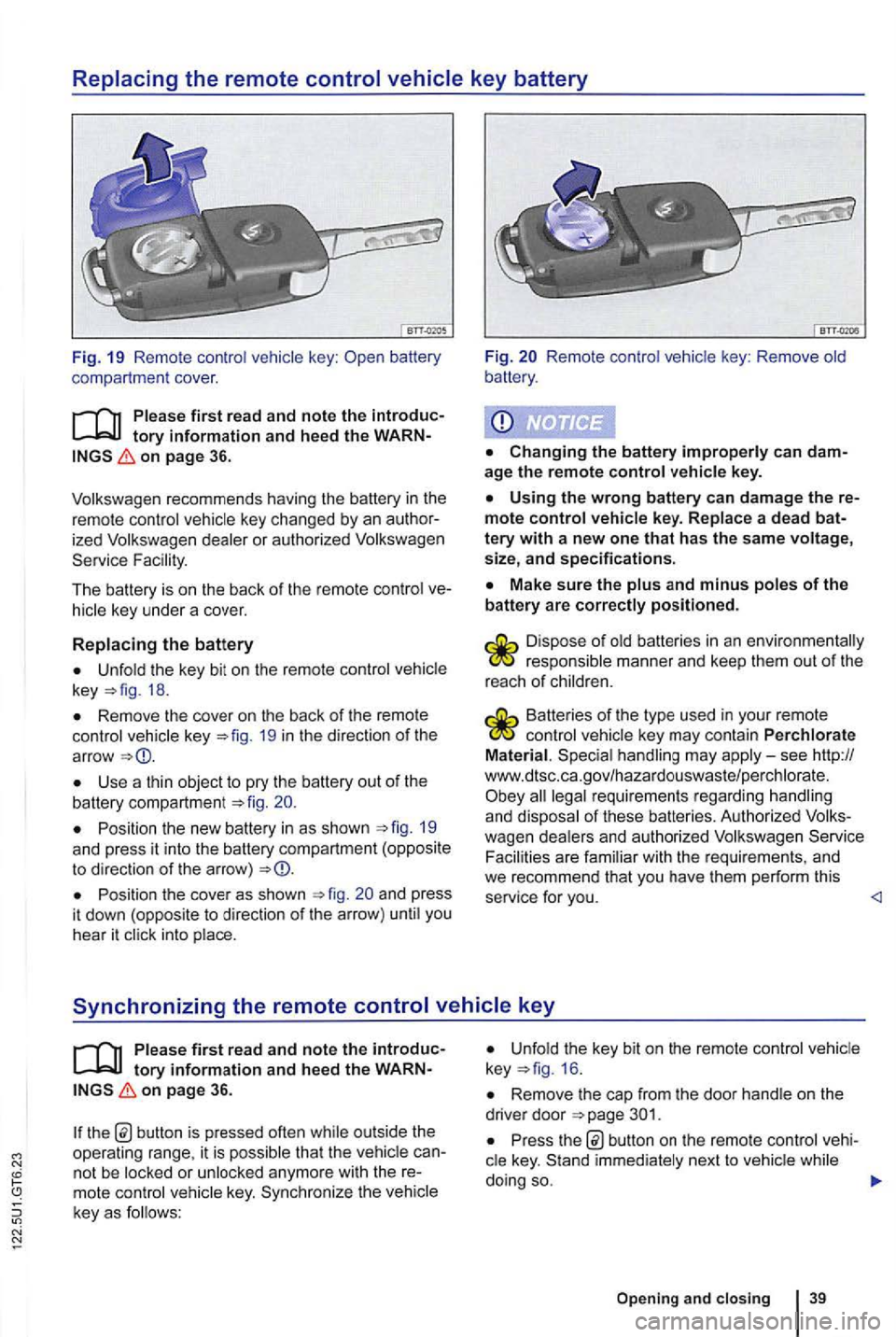
Fig. 19 Remo te contr ol key :
on page 36.
ized dealer or authori zed Service Fac ility.
The battery is on the back of the remo te control
Unfold the key bit on th e re mote control key 18.
Remove the cover on th e back of the remote control vehicle key 19 in th e d irection of th e
ar row
Use a thin object to pry the battery out of the battery compartment 20.
Position the new battery in as shown 19 and press it into the battery compartm ent (opposite to direction of the arro w)
Position the cove r as shown and press
i t dow n (oppos ite to direction of the arrow ) unti l you
hear it click into place.
Fig. Remote control vehic le key : Remove old
battery .
age the remote control vehicle key.
Using the wrong battery can damage the mote control vehicle key. Replace a dead
Make sure the plus and minus poles of the battery are correctly positioned .
responsible manner and keep them out of the
r eac h of ch ild ren.
Batteries of the type used in your re mote control veh icle key may contain Perchlorate
Material . Special handling may apply-see http://
www.dtsc .c a.go v/hazar douswaste/pe rchlo rate. all legal requirement s regardin g han dling and dispo sal of these batteries. Authorized Serv ice
Facili ties are fami lia r with the re quirements , and we recommend that you have them perform this
service for you.
tory information and hee d the on page 36.
th e b utton is pressed often while out side the
operating range, it is p ossib le tha t the vehicl e
key. Sy nchr oniz e the veh icle
key as f o llows:
Unfold the key bit on the remote control 16 .
Remove the cap from the door hand le on the
drive r door
Pr ess button on the remote cont rol
Opening and closing 39
Page 149 of 516
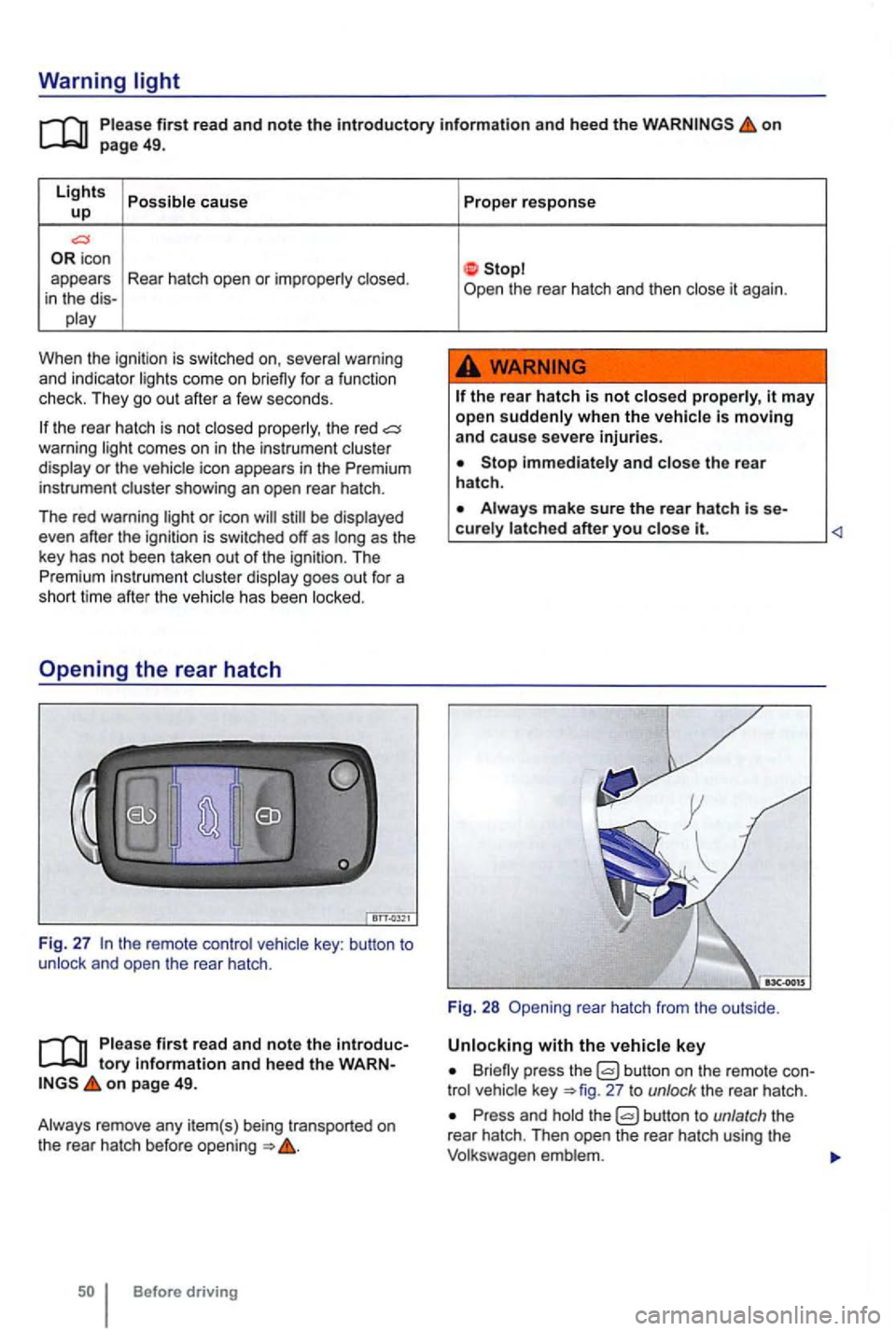
Warning light
first read and note the introductory information and heed the on page 49.
Lights cause up
icon
appears Rear hatch open or
When the ignitio n is swi tc hed on,
the rear hatch is no t the red comes on in the instrum ent or the icon appears in the Premium
instrument
be
has been
key : button to and open the rear hatch .
first read and note the tory informa tion and heed the on page 49.
Before driving Proper
response
the
rear hatch is not it may
open when the
Stop and the rear
hatch .
it.
Fig. 28 rea r hatch from the outside .
Briefly press the button on the remote 27 to unlock the rear hatch .
Press and the
Page 153 of 516
Power windows-features
on page 53.
One-touch opening and closing
The one-touch feature automatically opens/closes
a power window
the switch for the
window up briefly as far as it goes.
For one-touch opening: Press lhe switch for the
window down brie fly as fa r as it goes.
touch feature
Close
up the switch for the respect ive window
and hold it for at least 2 seconds in this position.
Release the switch, up and hold again. The
one -touch feature is now reactivated .
T h e one-touch feature can be reactivated for one
or more windows at the same time.
Convenience closing
T he convenience closing feature lets you close the
windows and the power sunroof as follows:
Power window pinch protection
on page 53.
Pinch protection can help reduce the risk
of
one-touc h wi ndow closing meets res istan ce or
there is something in the way, the window stop
a nd go down again.
Check why the window did not close.
Try one -touch window closing again.
Before driving
up and hold the
switch for the drive r wi ndow until
Improper use of power windows can result in serious personal injury.
use the power windows for several minutes after the ignition is switched off as long as the driver or front passenger door has not been opened .
the power windows malfunction, the touch feature, as as pinch protection
the windo w meets resistance a second time,
so that it stops and goes back down, one-touch
closing is deactivated for about
seconds.
you the powe r w indow button up the
way and hold it duri ng this close without pinch protection
Page 158 of 516
ment area is clear .
on page 58.
No t wea ring or imp rope
rly fastening safety belts creases the risk of seve re o r fatal injuries . Safety
be lts can work only w hen they are p roperly tioned on th e body . An improper seating pos itio n
significan tly impai rs the protection provided by safety belts. Thi s can cause severe or even fatal
inj uries . seating positions also increase
the ris k of ser iou s in jury o r de ath when an airbag
dep loys and strikes an occ upant who is not in the
proper seating position. The driver is respo nsible
f or all passengers
and espec ially c hildren riding in th e vehicle.
T he following are only some examples
of seating
posi tions that will increase the risk of s eri ous injury or death.
Therefore, whenever the vehicle is moving:
Never sit on the edge of the seat.
Never sit sideways.
Contact with parts of the vehicle interior can cause serious personal injury in a crash.
Page 163 of 516
Removing and reinstalling head restra ints
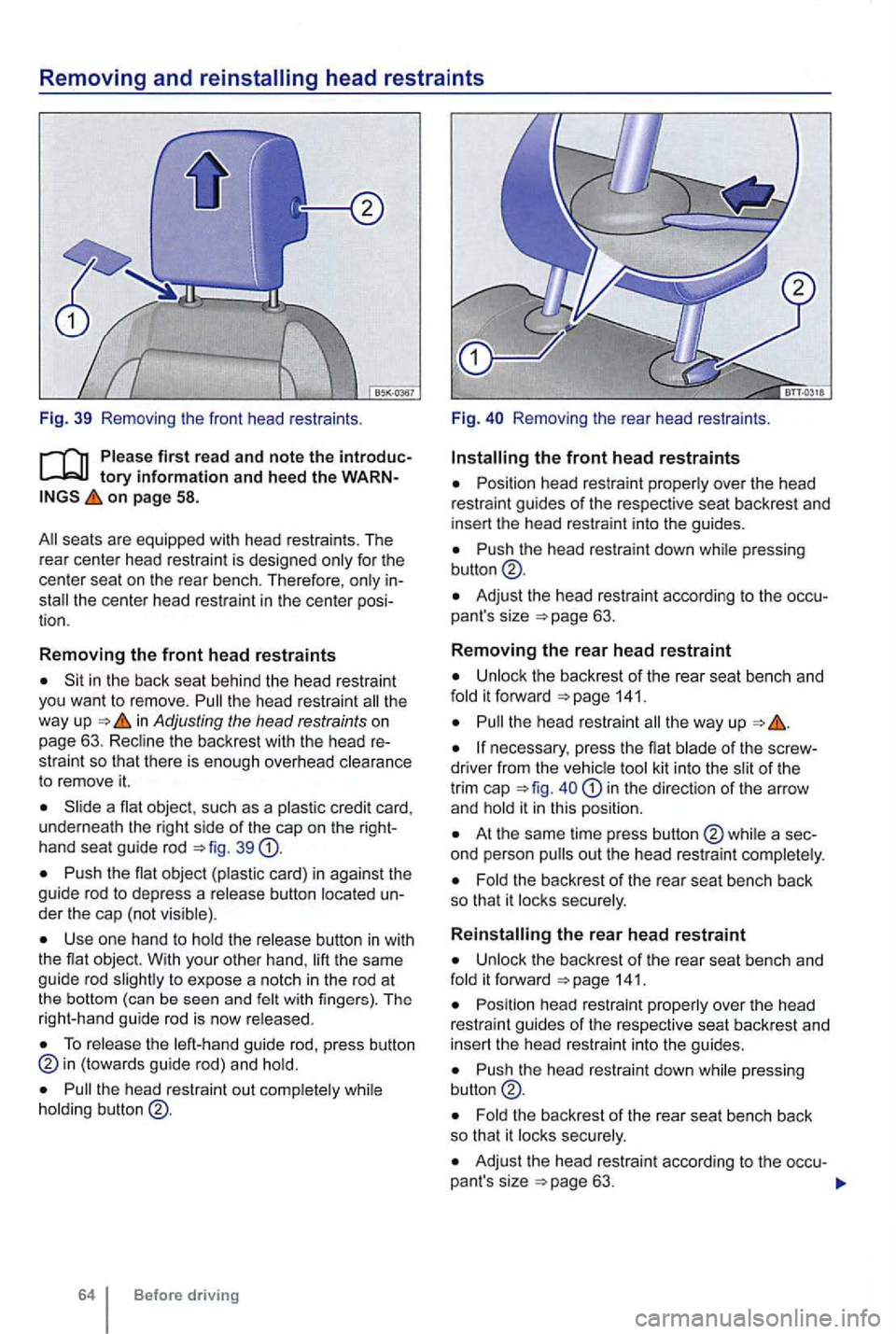
Fig. 39 Remo ving the front head restraints .
on page 58.
for the
center seat on the rear bench . T he refore ,
Sit in the back seat behind the head restraint
you want to remove. the head restraint th e
way up in Adjusting the head restraints on
page 63. the backrest with the head re
stra int so that there is enough overhead
to remove it.
a nat object , such as a
button
Use one hand to the same
guide rod to expose a notc h in the rod at
t he bottom (can be seen and with fingers) . T he
r ight-hand guide rod is now
To the guide rod, p ress button (towards guide rod) and
the head restraint out
64 Before driving F
ig.
Removing the rear head restr aints .
Posi tion head restraint over the head
restr aint guides of the respective seat backrest and
i nsert the head restra int into the guides.
Push the head restraint down
Adjust the head rest raint according to the occu
pant's size 63.
Removing the rear head restraint
the backrest of the rear seat bench and it forward 141.
the head restrain t
necessary , press the nat of the scr ew
d river from the kit in to the of the
tr im cap in the direction of the arrow
and
At the same time press button
the back rest of the rea r seat bench back
so that it
it forward 141.
P osition head restraint over the head
restraint guides of the respective seat backrest and
i ns e
rt the head restrain t into the guides.
Push the head restraint down pressing
t he backres t of the rear seat bench back so that it
Adjust the head restraint according to the occu-
pant 's size
Page 166 of 516
this section find information about:
. . . 67
More information:
Adjusting the seating position 58
69
Airbag system page 82
safety and restraints
Outside mirrors 134
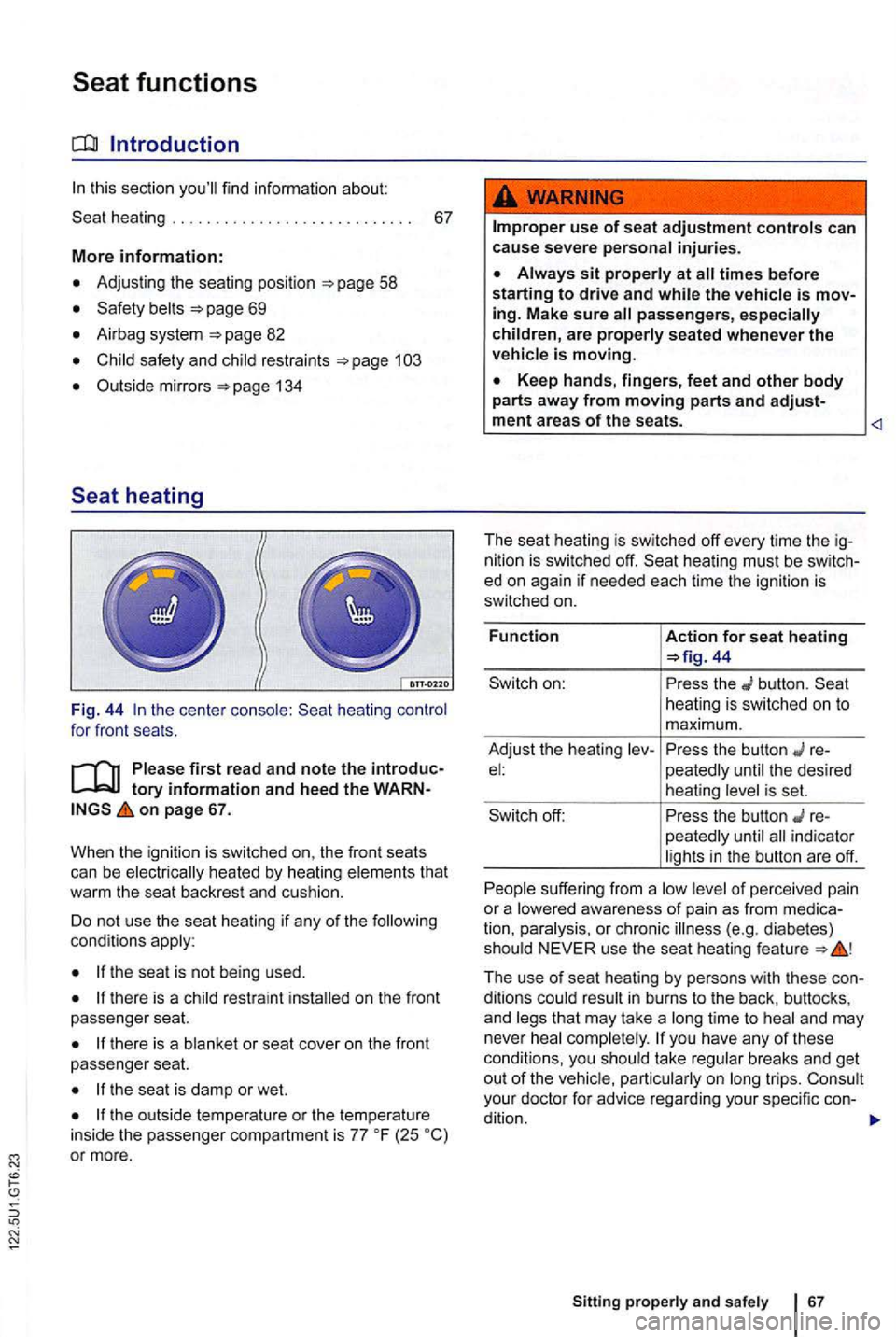
the cente r heating for front seats.
on page 67.
When the igni
tion is sw itched on, the front seats
can be that
wa rm the seat backrest and cush ion .
Do not use the seat heating
if any of the cond itions
the sea t is not being used.
on the front
passenger seat.
there is a or seat cover on the front
passenger seat.
the seat is damp or wet.
(25 or more .
use of seat adjustment controls can
cause severe personal injuries.
passengers, especially
children, are properly seated whenever the
44
button. heating is sw itched on to
m aximum.
Adjust the hea ting
re-the desired
heating
the button re
peatedly indicator
s uff ering from a of perce ived pain
or a
The use of seat heating by persons with these conditions time to and may
never
take breaks and get out of the trips. your docto r fo r advice rega rding your specific con-
dition.
Sitting a nd 67
Page 169 of 516
Damage to safety belts re duces their effective ne ss and increa ses the risk of serious personal injury and death whenever the
v ehicle is being used.
Torn or frayed safety belts can te ar, and
damag ed safety belt hardware can break
web
bing, bindings, buc kles, or retractors are damaged , hav e the belts replaced immediate
ly with the correct replacement belts proved by Volkswagen for your vehicle, model , and model yea r.
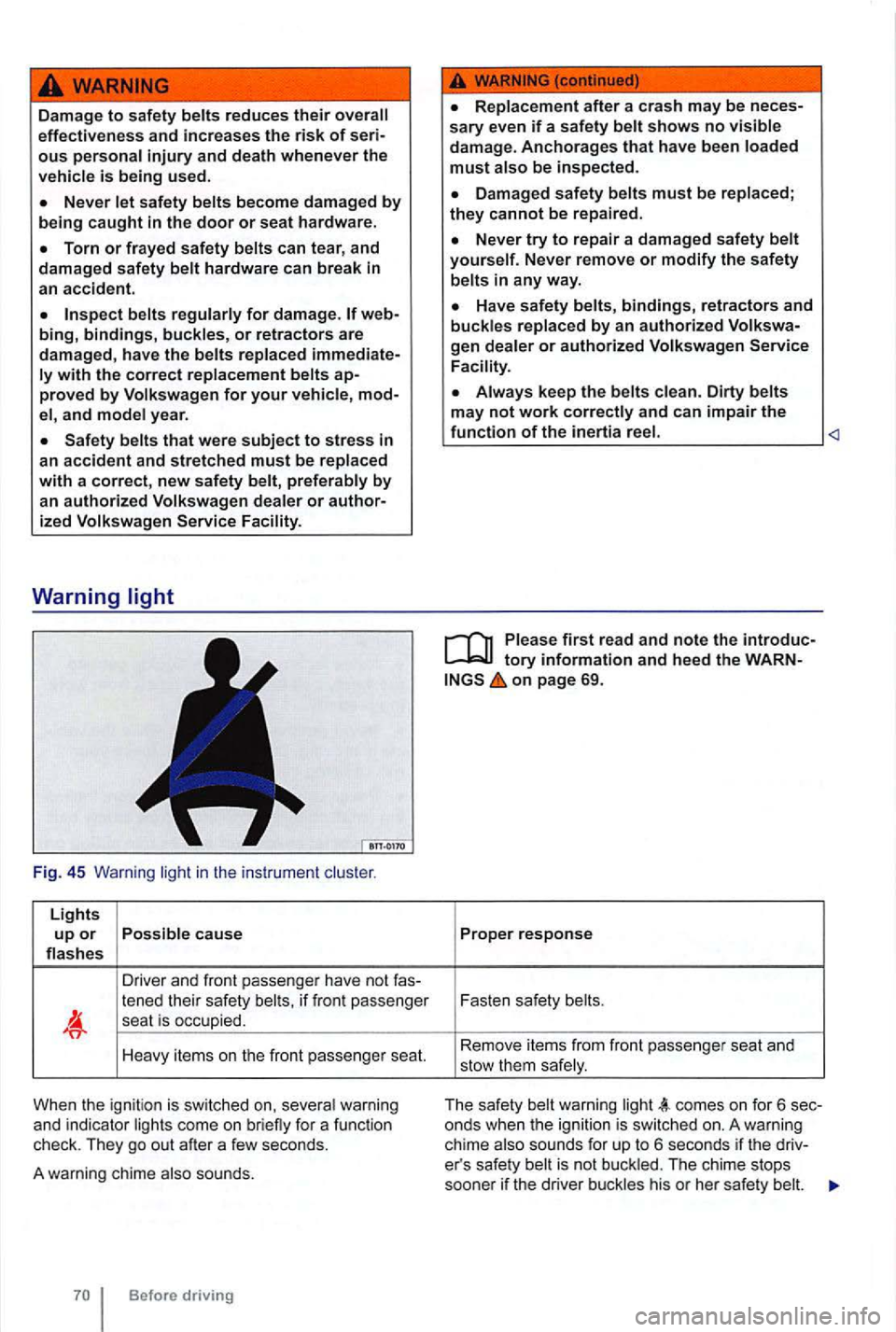
Fig . 45 Warning light in the instrume nt
Lights up or Possible caus e flas hes
Driver and front p asse nge r have not
tened their safety belts, if fr o nt passenger sea t is occup ied.
Heavy items on the front passe nge r seat.
Whe n the ign itio n is switched on, seve ra l warni ng
and indica tor lights come on brie fly for a func tion
check. They go out after a few seconds.
A warning chime also sounds.
Replacement after a crash may be neces
s ary even if a sa fety belt shows no visible damag e. Anchorages that have been loaded must also be inspect ed .
D amaged safety belts must be replaced ; they cannot be repaired .
Never try to repair a dam ag ed s afety belt yourself. Never remove or modify the safety
belts in any way.
Have safety belts, bindings, retractors and buckles replaced by an authorized
Always keep the belts clean . Dirty belts
may not work
tory information and heed the WARNon page 69.
Proper response
Fasten safety belts .
Re move it e m s f
rom fr ont passe nger seat and
stow them safe ly .
T
he safety belt wa rnin g light comes on f or 6 sec
onds when the ignition is sw itched on. A warning
ch ime also sounds for up to 6 seco nds if the driver's safe ty belt is not bu ckl ed . Th e c hime stops
soone r if the driver buckles his or her safe ty be lt.