lock VOLKSWAGEN GOLF 2010 User Guide
[x] Cancel search | Manufacturer: VOLKSWAGEN, Model Year: 2010, Model line: GOLF, Model: VOLKSWAGEN GOLF 2010Pages: 516, PDF Size: 105.12 MB
Page 117 of 516
Instrument cluster
Introduction
this section find information about:
overview . . . . . . . . . . . . . . . . . . . . . 18
Displays . . . . . . . . . . . . . . . . . . . . . . . . . . .
. . . 19
Compass . . . . . . . . . . . . . . . . . . . . . . . . . . . . . .
21 Service reminder display . . . . . . . . . . . . . . . . . 22
More information:
Warning and indicator
Display of the selected gears (automatic transmiss ion ) 171
Service reminder inform ation Warranty and Maintenance.
overview
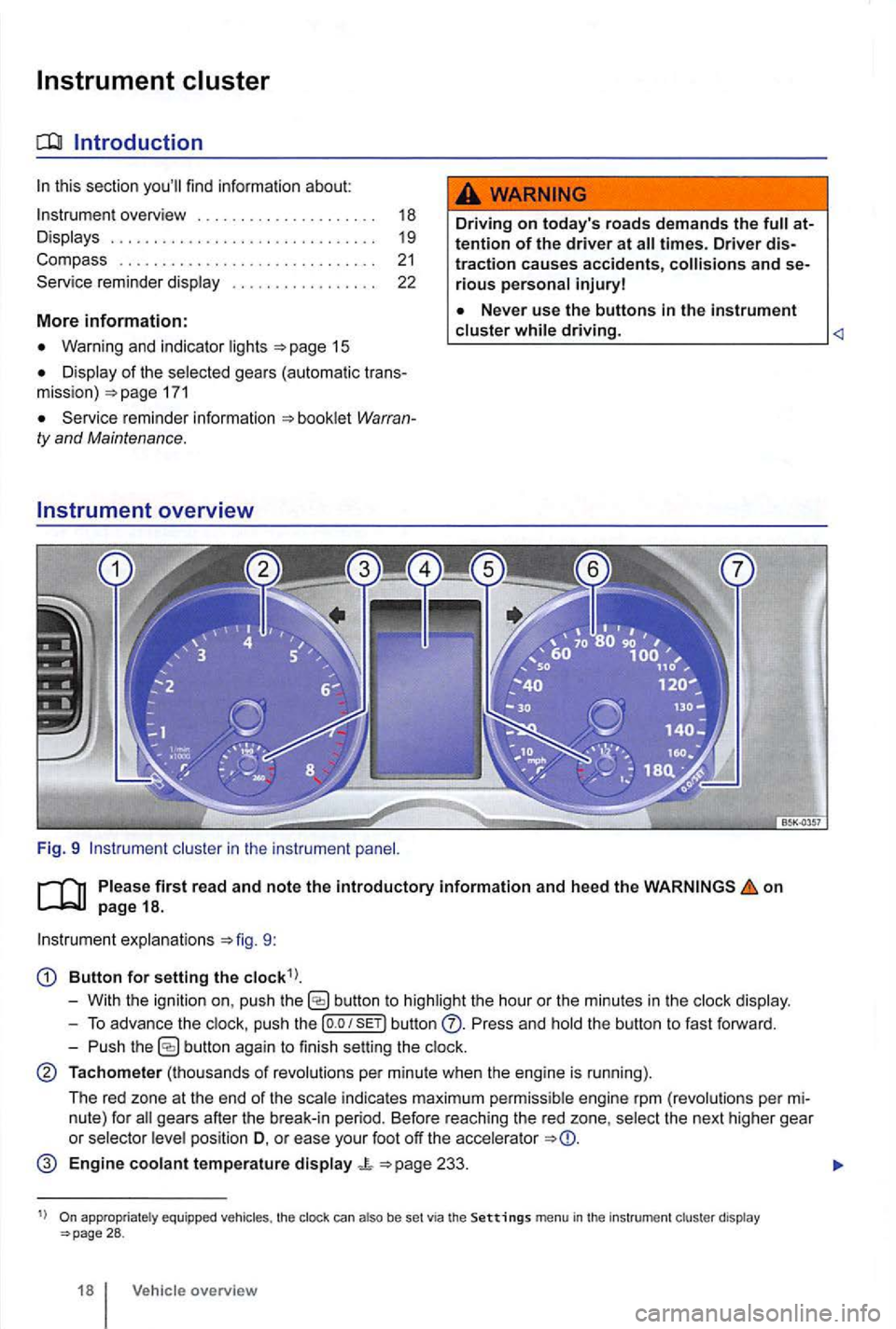
Fig. 9 cluster in the instrument
Driving on today 's roads demands the attention of the driver at
driving.
explanations 9:
Button for setting the
butto n to highlight the hour or the minutes in the
push the button Press and the button to fast forward.
- Push
button again to finish setting the
Tachometer (thousands of revolutions per minute when the engine is running).
The red zone at the end of the
indi cates maximum pe rmi ssibl e engi ne rpm (revolution s pe r
pos ition D, o r ease your foot off the accele rator
Engine coolant temperature display 233.
appropriate ly equ ippe d vehicles , the clock can also be set via the Settings menu in the instrumen t cl uster display 28 .
18 Vehicle overview
Page 124 of 516
Avg. Consu m.
Route
Avg . speed
Dig it. speed
warning
Back
Compass
Convenience
ATAconfirm
Dooropen
Manual
(All doors , door, Veh . si de,
Automa tic (Auto Lock, Auto Unlock)
Mirror adjust
Factory
Lights & Vision
Background lighting
Footwell ligh ting
L n. Chg.
F actory setting
Ti me
Units
Alternative speed display
Reset
Factory setting
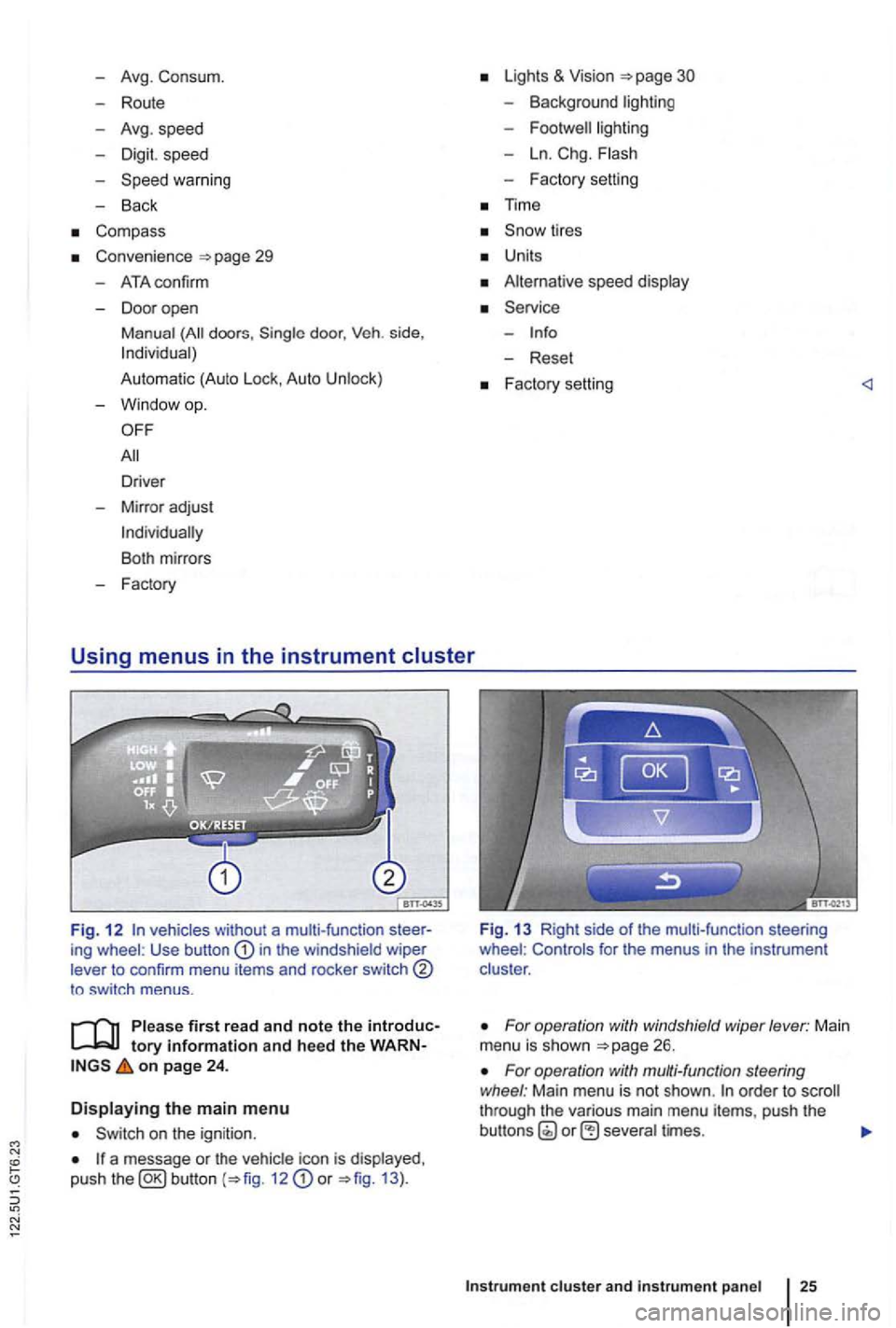
Fig. 1 2 vehicles without a multi-function ing wheel : Use button in the windshield wiper
lever to confirm menu items and rocker switch
to sw itch menus .
tory information and heed the on page 24 .
Displaying the main menu
on the ignition .
a message or the vehi cle icon is displayed ,
push the 12 or 13 ).
Fig. 13 Right side of the mult i-func tion steering
wheel : Controls for the menus in the instrumen t
clus ter .
For operation with windshield wiper lever: Main
menu is shown
For operation with multi-function steering
wheel : Main menu is not shown . order to through the various main menu items, push the
cluster and instr um ent pan el
Page 128 of 516
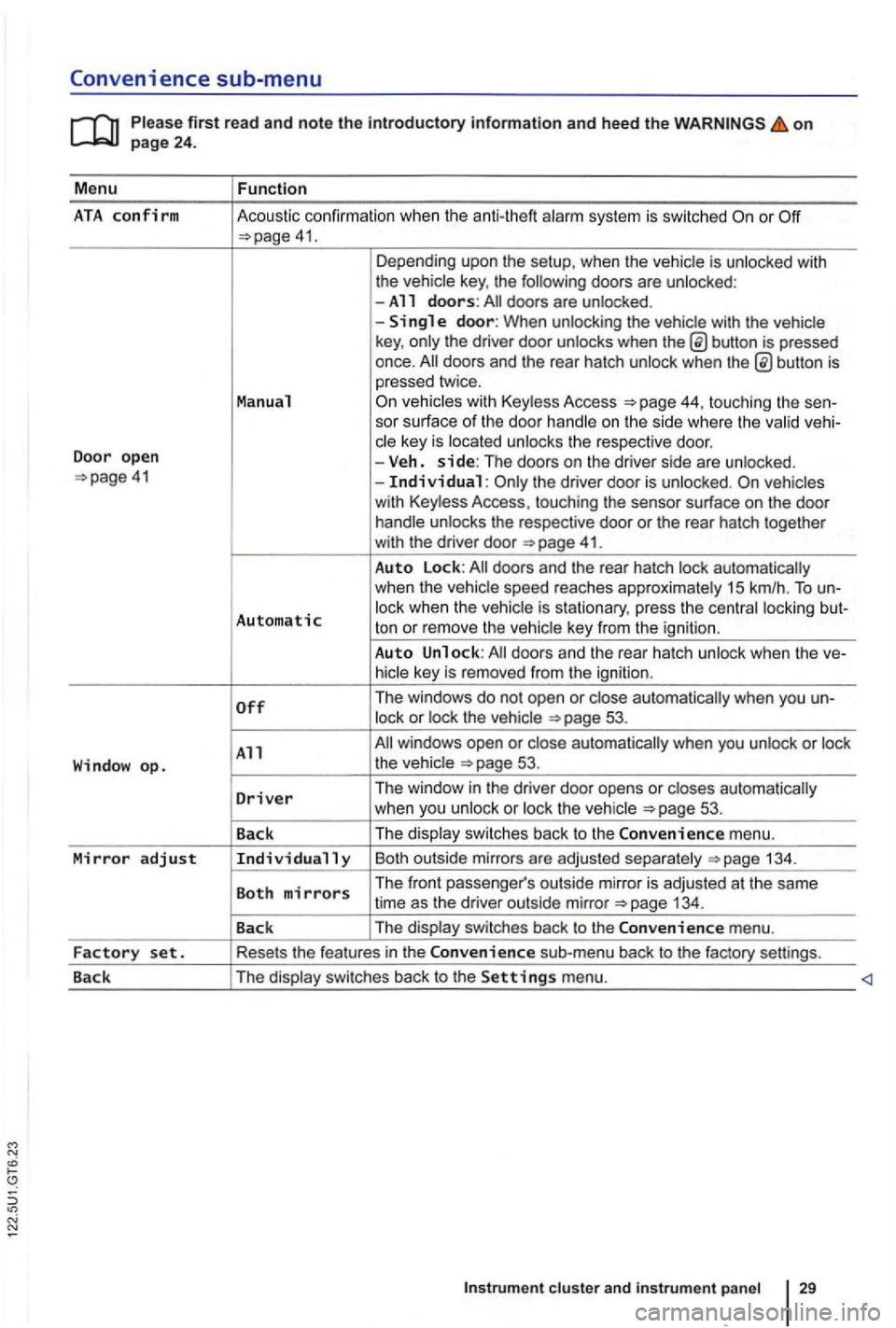
Convenience sub-menu
on
41. Depending upo n the setup, when the vehicle is unlocked with
the vehic le key , the following doors are unlocked :
-All doors: doors are un locked .
-
button is pressed
once.
44, touching the sen-
sor surface of the door handle on the s ide where the valid vehi-
c le key is located unlocks the respective doo r.
Door open -Veh. side: The doors on the dr iver side are unlo cked. the driver door is unloc ked.
41.
Auto Lock:
Automatic lock when the vehic le is s tationary, press the centra l locki ng but-
ton or rem ove the ve hic le key from the igni tion .
Auto Unlock:
53.
All 53.
D
river Th e window in the driver door opens or closes automatically
w hen you unlock or loc k th e ve hicle 53 .
Back The
displa y swi tc
hes back to the Convenience m enu.
Mirror adjust Individually Bo th outsi de mirrors a re ad juste d sepa ra te ly 134 .
Both mirrors The front passe nger's outs ide mirro r is adj usted at th e same
time as the driver out side mirror
Page 135 of 516
Opening and closing
this section find info rmation about:
R em o
te control vehicle keys . . . . . . . . . . . . . . 37
Mec hanical key . . . . . . . . . . . . . . . . . . . . . . . . . 38
Volkswagen
Power locking and clos ing system 41
Starti ng and stopping the engine
Cons ume r inf ormat ion
Eme rgen cy closin g and opening
Always keep remote control vehicle key fobs with batteries, spare batterie s, as as
dead button mm batteries out of the reach of children.
Get medical attention immediately if you suspect that a battery has been swallowed .
use of vehicle key s can result in se-rious personal injury.
36 Before driving
Always take the key with you when you leave the vehicle . can be used to start the
engine and operate vehicle systems s uch as
the powe r windows, leading to se rious personal injury.
the vehicle is moving or to a stop. The steering wheel lock and you
Page 136 of 516
Remote control vehicle keys
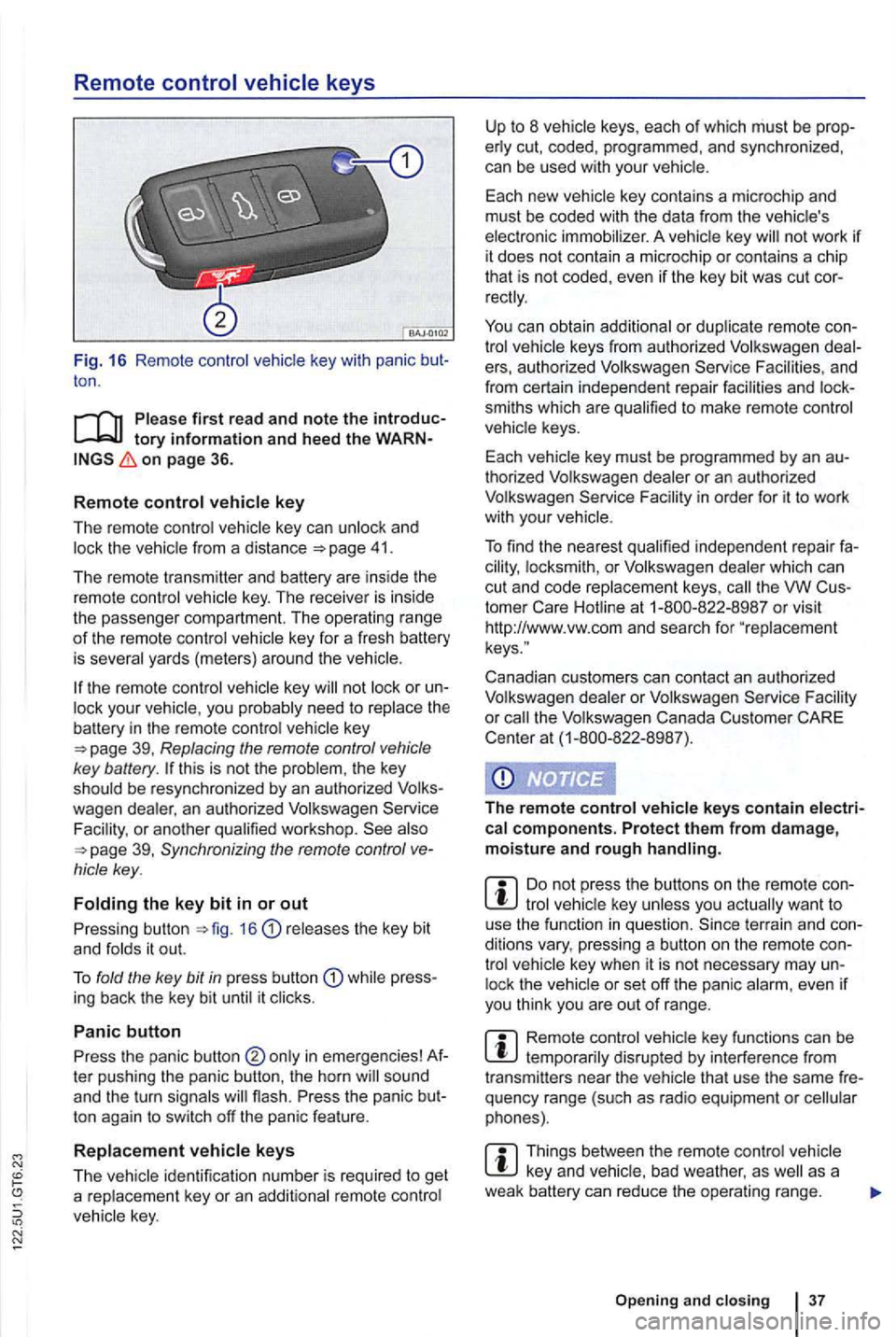
Fig. 16 Remote contro l key with panic ton .
on page 36.
R
emot e control key
The remote control vehicle key can unlock and 41.
The remote transmitter and battery are ins ide the
remot e control vehicle key . The receiver is inside
the passenger compartment. The operating ra
nge of th e remote control key for a fresh battery
is severa l yards (meter s) around the
key or your vehic le , you probably need to rep lace the battery in the remote control key
this is not the problem , the key
should be resynchronized by an authorized
39, Synchronizing the remote control
releases the key bit
and fo lds it out.
T o fold the key
bit in press butt on while press
ing back the key bit until it clicks .
Panic button
Press the panic button ter pushing the panic button , the horn
ton again to switch off the panic feature .
R
eplacement vehicle keys
The
not work if it does not contain a microchip or contai ns a chip
th at is not coded, even if the key bit was cut
keys from authorized Volkswagen e rs, au thorized Volkswagen Service and
from certain independent repair facilities and
smiths which are qualified to make remote control
vehicle keys.
Each vehicle key must be programmed by an
thorized Volkswagen dealer or an au thorized
Volkswagen Service
th e VW
Canadian customers can contact an authorized
Volkswagen dealer or Volkswagen Service
the Volkswagen Canada Customer CARE
Center at (1-800-822 -8987).
The r
emote control vehicle keys contain electrical components. Protect them from damage, moisture and rough handling.
tro l lock the
Remote control disrupted by interferenc e from
transmitters near the vehicle that use the same
Things between the remo te control vehicle as a
weak battery can re duce the opera ting range.
Open ing and clo sin g 3 7
Page 137 of 516
21 or the power locking buttons 22 are pushed repeatedly in quick succes
sion , the power locking system is switched off for a
br i
ef period to help keep it from being overloaded.
Mechanical key
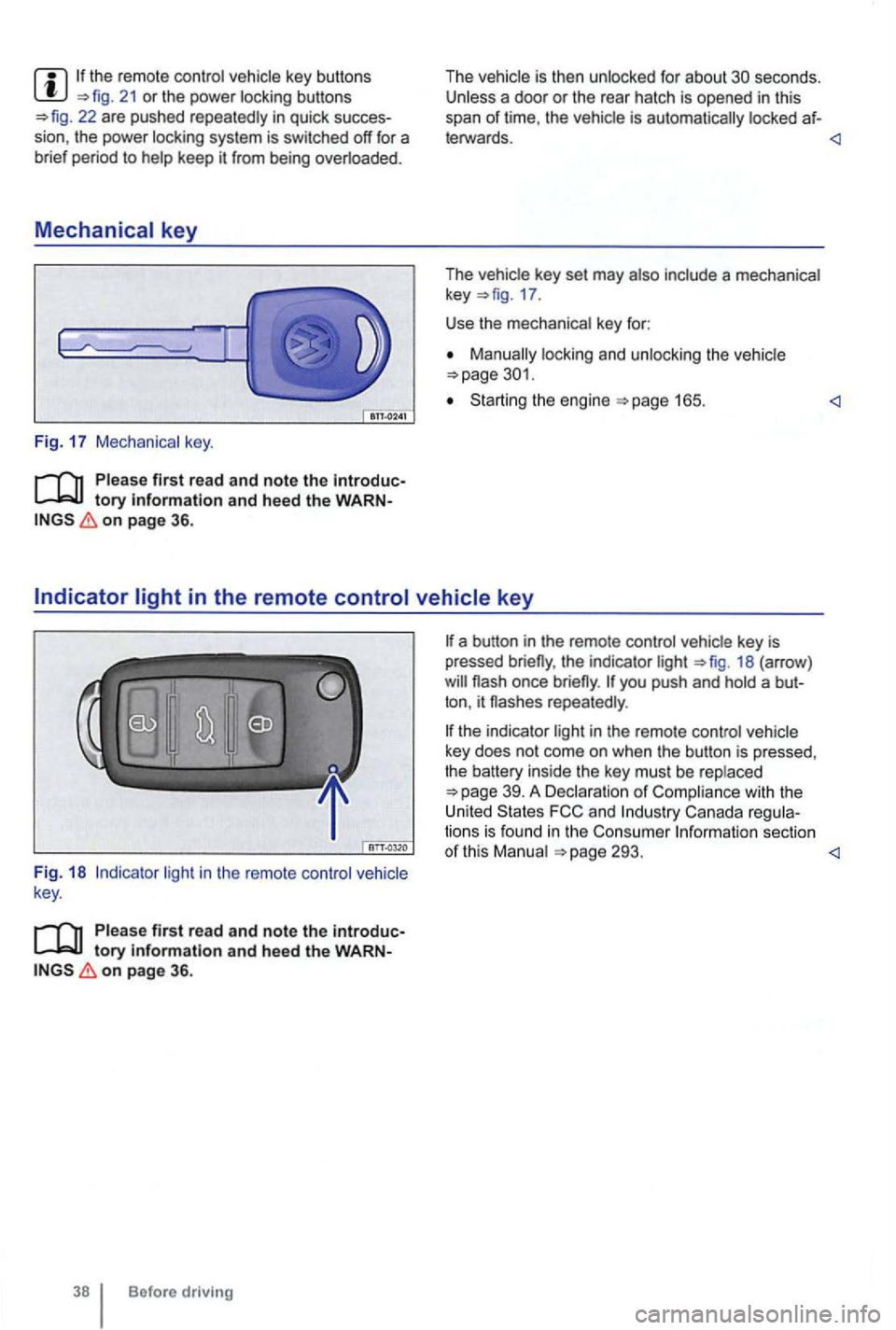
Fig. 17 Mechanical key.
tory information and heed the WARNon page 36.
The vehicle is then unlocked for about secon ds. Unless a door or the rear hatch is opened in this
span of lime , th e vehicle is automatically locked af-
leiWards.
key 17 .
Use the mechanical key for:
locking and unlocking the vehicle
Starting the engine
light in the remote control vehicle
key .
Please first read and note the introductory information and heed the WARNon page 36.
Before driving
the indicator light 18 (arrow )
repeatedly .
the indicator light in the remote control vehicle
key does not come on whe n the button is pressed,
t he battery inside
the key mus t be rep laced
293.
Page 140 of 516
Power locking and closing system
Introduction
this section find information about:
Description of the power locking system .
41
Unlocking and locking the
Exterior views 6
Persona l comfort setting in the Volkswagen formation
Veh icle key set 36
Doors
Rear hatch 49
Power windows
Power sunroof 56
149
Emergency closing and opening
can result in se
rious personal injury.
The power locking button doors. Locking the doors from the inside can
assistance to vehicle occupants and rescue from the outside in an accident or other emergency.
children or anyone who cannot doors can be locked from the inside with the power button. This people trapped in the vehicle in an emergency. De
pending on the time of year, people trapped in the vehicle can be exposed to very high or very temperature s.
A closed vehicle can become very hot or very depending on the season. Particuin the summer, heat build-up in the pas
senger and luggage compartment of a parked vehicle can result in temperatures in the vehithat are much higher than the outside temperatures. Temperatures can quickly reach
Never passengers to remain in a
locked vehicle. an emergency any person inside the vehicle might not be
Description of the power locking system
on page 41.
The power lock
ing system you unlock and lock doors , the rear hatch , and the flap:
From outside with Keyless Access
From the inside with the power locking switch
fun ctions of the power locking system can
be activated or deac tivated via the Convenience
sub-menu in the Settings menu on
Facility .
The doors,
the rear hatch, and the fuel
Page 141 of 516
Automatic locking (Auto Lock)
The vehicle locks au tomatically when it reaches a
speed of about 10 mph (15 km/h) . When the vehi
cle is locked , the indicator light comes on in the
power lock ing button
a door once.
-
a door once.
- Lock the vehicle with the remote control vehicle key.
21 or one of th e power locking buttons
on page 41.
Fun c
tion
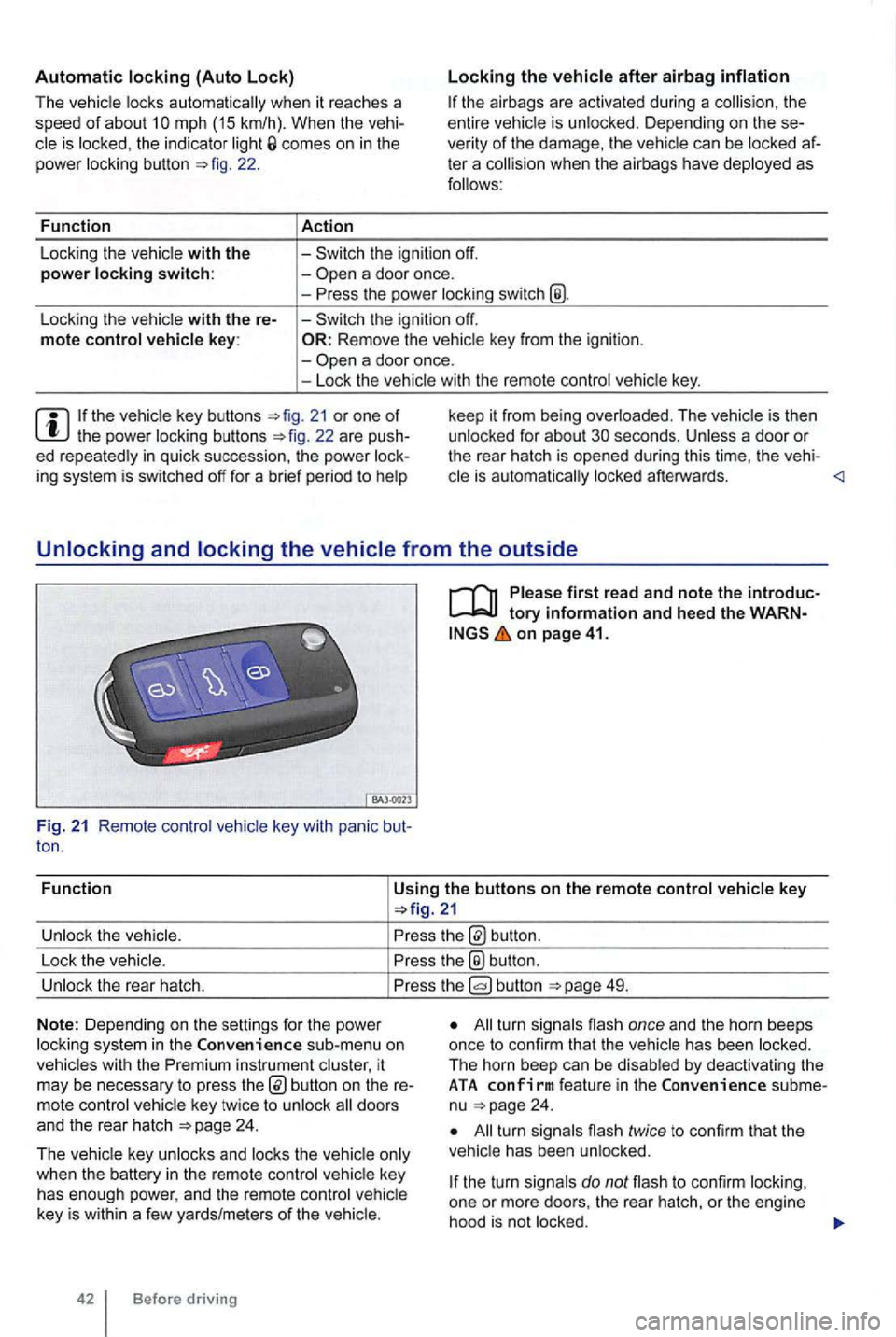
Using the buttons on the remote control vehicle key
button.
Lock the vehic le.
the® button .
Unlock the rear hatch. button 49.
N o
te: Depending on the settin gs for the power
l ock ing system in the sub-menu on
vehicles with the instrument cluster, it
may be necessary to press
24 .
T he vehicle key unlocks and locks the vehicle only
when the battery
in the remote control vehicle key
has enough power, and the remote control vehicle
key is wi
thin a few yards/me ters of the vehicle.
42 Before driving
All turn signals flash once and the horn beeps
once to confirm that the vehic le has been locked.
The horn beep can be disabled
by deactivating the ATA co nfirm feat ure in the subme
nu 24 .
All turn signals flash twice to confirm that the
vehicle has been unlocked.
the turn signals do not flash to confirm lock ing,
one or mor e doors , the rear hatch, or the engine
hood is not
locked.
Page 142 of 516
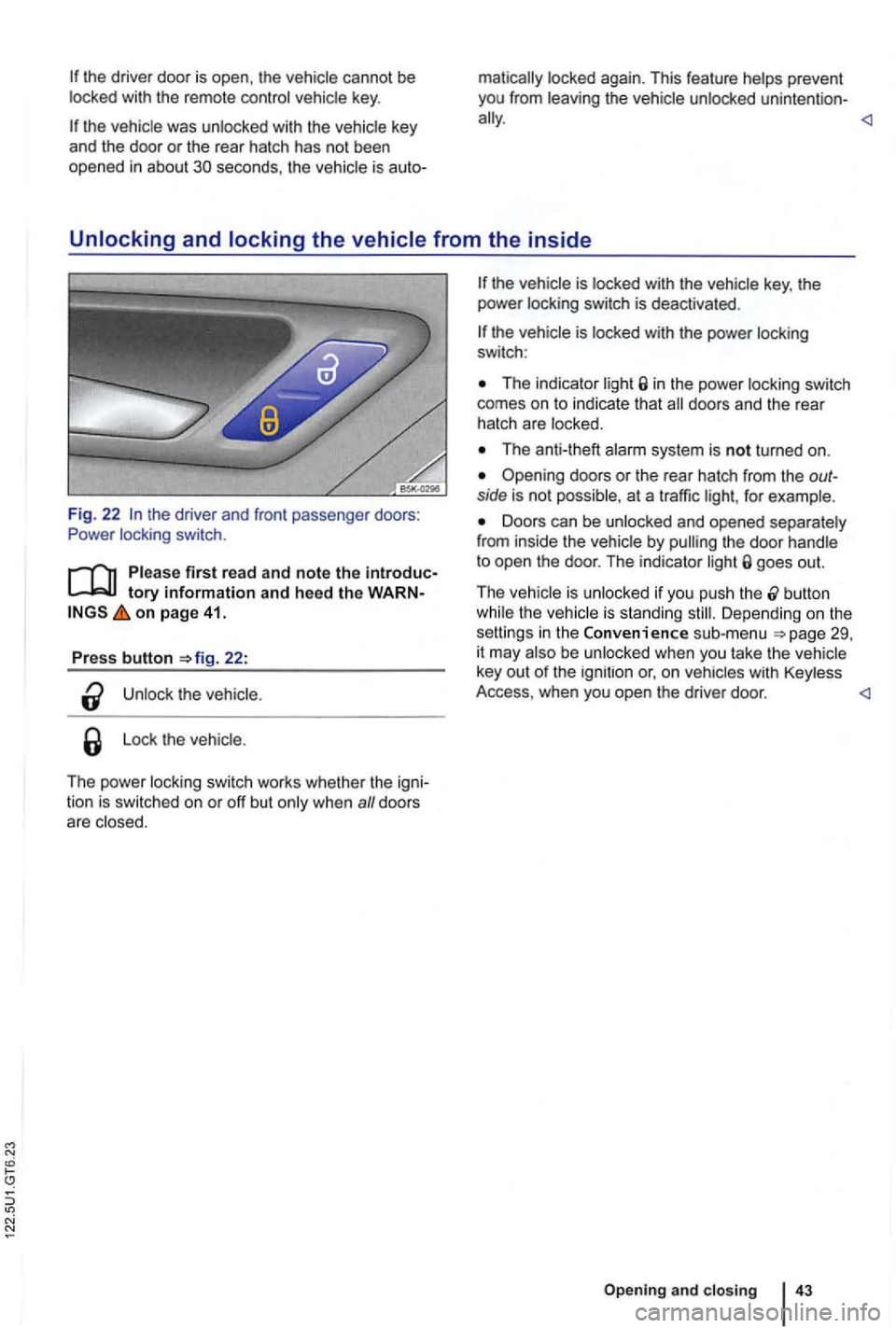
the driver door is open , th e vehicle cannot be with the remote contro l vehicle key.
Unlocking and locking the vehicle from the inside
Fig. 22 the driver and front passenger doors:
Power locking switch.
tory information and heed the WARN on page 41.
Press button 22:
the
Lo ck the vehicle .
The power locking switch works whethe r th e igni
tion is switched on or off but
The indicator in the power locking switch
comes on to indicate that
The anti-theft
Opening doors or the rea r hatch from the outside is not possible, at a traffic for example.
Doors can be unlocked and opened separately
from inside the vehicle by goes out.
T he vehicle is unlocked if you push the
button the vehicle is standing Depending o n the
setti ngs in the Convenience sub-menu be unlocked when you take th e vehicle
key out of the ignition or, o n
Opening and closing
Page 143 of 516
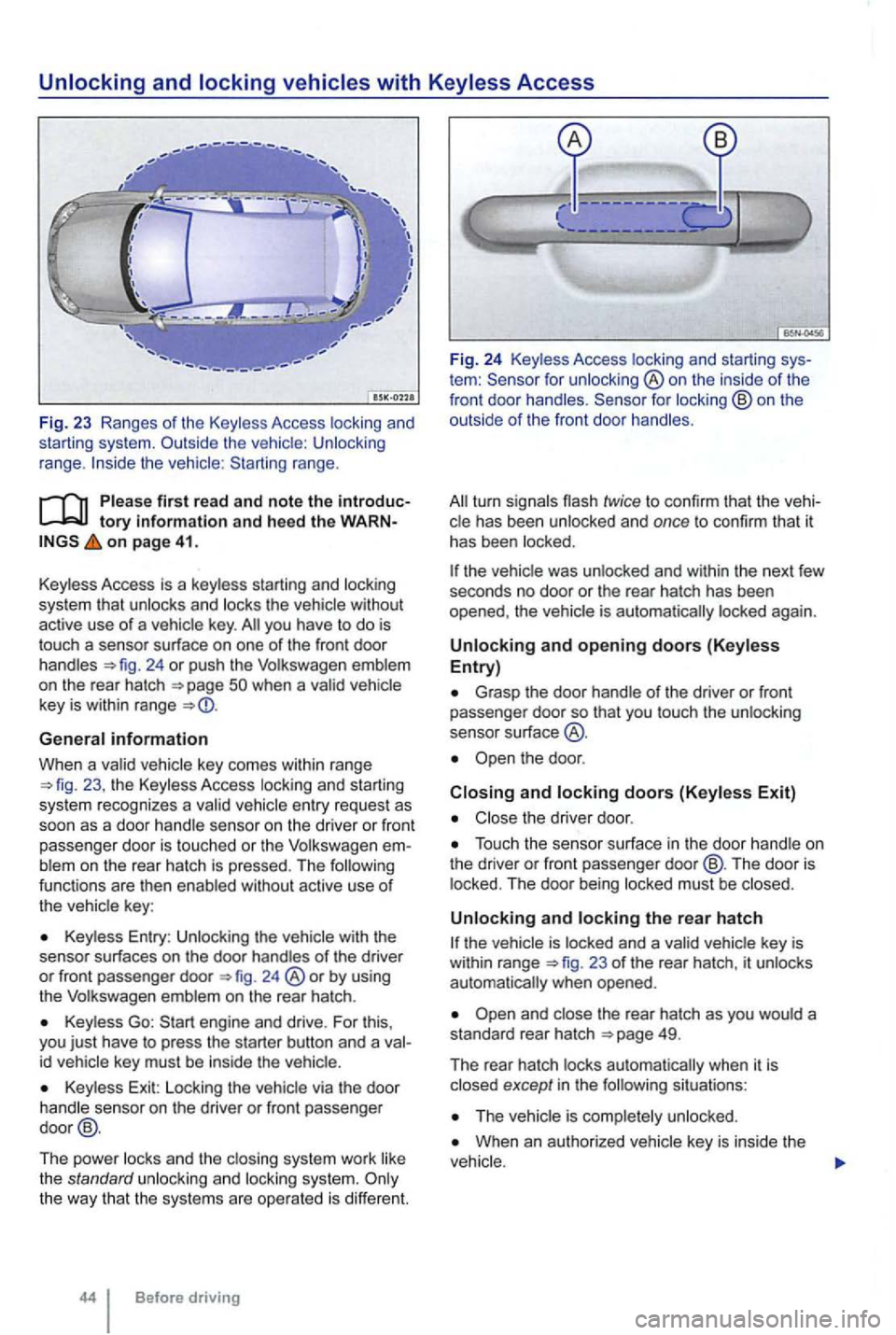
range.
tory information and heed th e o n page 41.
Key less Access is a key less starting and locking
system that
unlocks and locks the vehicle without
active use of a vehicle key. you have to do is
touch a sensor surface on one of the front door
handles 24 or push the Volkswagen emblem
on the rear hatch
General information
When a va lid ve hicl e key comes within range 23 , the Keyless Access locking an d starting
sys tem recognizes a va lid vehicle entry reques t as
soon as a doo r hand le se nso r on the driver or front
passenger door
is touched or the Volkswage n blem on the rear hatch is pressed. The functions are then enab led without active use of
the vehic le key :
Keyless Entry : Unlocking the with the
senso r surf aces on the door handles of the driver or front passenger door 24 ®or by using
the Volkswagen emblem on the rear hatch .
Keyless Go:
id vehicle key must be inside the vehic le.
Key less Exit: Locking the vehicle via the door
handle sensor on the driver or front passenger
door @.
The power locks and th e clos ing system work like
the standard unlocki
ng and locking system.
tem : for unlocking ®on the inside of the
front door handles .
the vehic le was unlocked and within the next few
seco nds no door or the rear hatch has been
opened , the vehic le is aut oma tically locked again.
Unlocking and opening doors (Keyless Entry)
Grasp the door handle o f the driver or fron t passe nger door so that you touch the unlocking
sensor su rface
the door .
Closing and locking doors (Keyless Exit)
Close the driver door .
Touch the sensor surface in the door handle on
the dri ver or front passenger door@ . The door is
locked . The door being locked must be closed .
Unlocking and locking the rear hatch
23 of the rear hatch, it unlocks
automatically when opened.
situations :
When an authorized vehicle key is inside the