phone VOLKSWAGEN GOLF 2010 Owner's Guide
[x] Cancel search | Manufacturer: VOLKSWAGEN, Model Year: 2010, Model line: GOLF, Model: VOLKSWAGEN GOLF 2010Pages: 516, PDF Size: 105.12 MB
Page 388 of 516
on the steering wheel, instrument panel, backre sts or between these
a reas and the occupant. objects could cause serious injury in a
phone or and sepa
rate outside antenna can be dangerous to
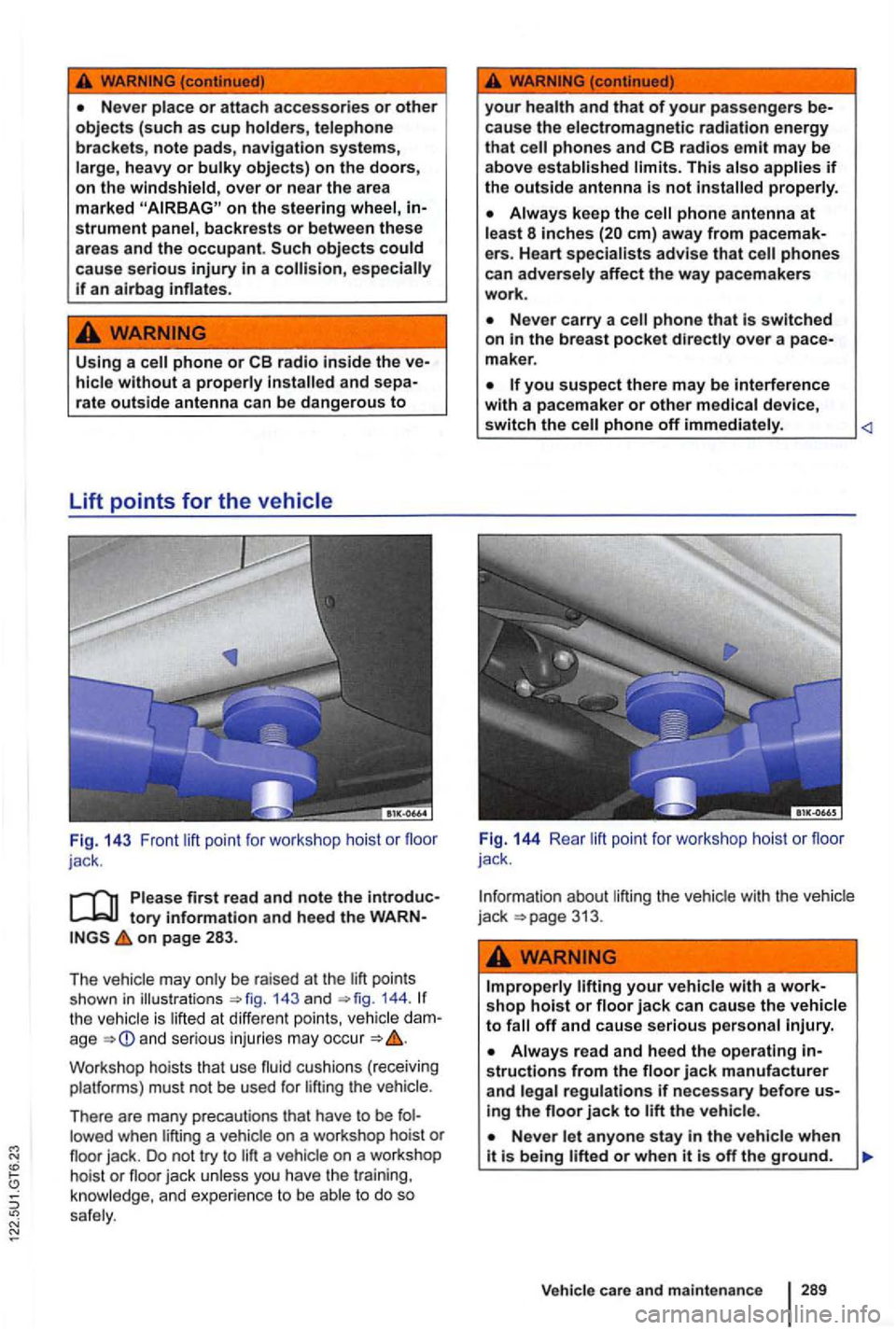
Fig. 14 3 Front point for work sh op hoist or floor
jack .
tory information and heed the WARNon page 283 .
The 143 an d 144 . the is lift e d at diff erent po ints, dam
age and ser io us injuri es ma y occur
Works hop hois ts that use fluid cushion s ( rece iving
platfo rms) must n ot be used for lifti ng t he
There are many precautions that have to be fol
lowed when lifting a vehicl e on a workshop hoist or
your health and that of your passengers be
cause th e e lectromagnetic radiation energy
that phones and limits. This a lso p roperly.
Always keep the em) away from pacemak
e rs. Heart phones can adverse ly affect the way pacemakers work.
Never carry a phone that is switched on the breast pocket directly over a pace
maker .
you suspect there may be Interference with a pacemaker or other medical device, switch the phone off immediately.
Fig. 144 Rea r lift point for works hop hois t or floor jack .
I n formation about liftin g t
he veh icle with the
Improper ly your vehicl e with a workshop hoist or floor jack can cause the vehicle to off and ca use serious per son al Injury.
Always read and heed the operating structions from the floor jack manufacturer and legal regulations if necessary before using th e floor jack to the vehicle .
Never let anyone stay in the vehicle whe n
Vehicle care and maint enanc e
Page 392 of 516
Treadwear
The treadwear grade is a comparative ratin g based
on the wear rate of the lire when tested under
(T readwe ar-value
T he relative performance of tires depends upon
t he actual conditio ns of their use, however , and may depart significantly from the norm due to iations in driving habits, service practices and
to stop on wet pavemen t as measured under conditions on specified government test
surfaces of asphalt and concrete . A tire marked
Temperature
The temperat ure grades are A (th e highest), B,
and
e ra tio n of heat, an d its to diss ipa te hea t
w he n tested under
tory information and heed the on page 291.
introduction.
To order service information contact:
Technica l Literature Ordering Center
www. vw.techliterature .com
Sustained high temperat ure can ca use the material of the lire to degenerate and reduce tire and
excessive temperature can ure.
The grade
of p erfo rmance
which
forma nce on th e la b oratory test
The traction grade assigned to this tire is based on straight-ahead braking traction tests, and does not include acceleration,
The temperature grade for this tire is
tion or e xcess ive loading, either separately or in combination, can caus e h eat buildup and possible tire failure.
sonal injuries.
E lectro nic immobil izer.
care and maintenance 293
Page 452 of 516
fect after publica tion of the radio and navigation instructions in
the
MEDIA-IN multimedia interface (MDI)
RCD Media mode
Telephone control (Phon e)
K orea: Device and functional overview
other
details . descriptions and information for ope rat ion and
me nt of your device, as as informa tion that you should
know for your own safe ty and the safety of your passengers.
Page 455 of 516
lists
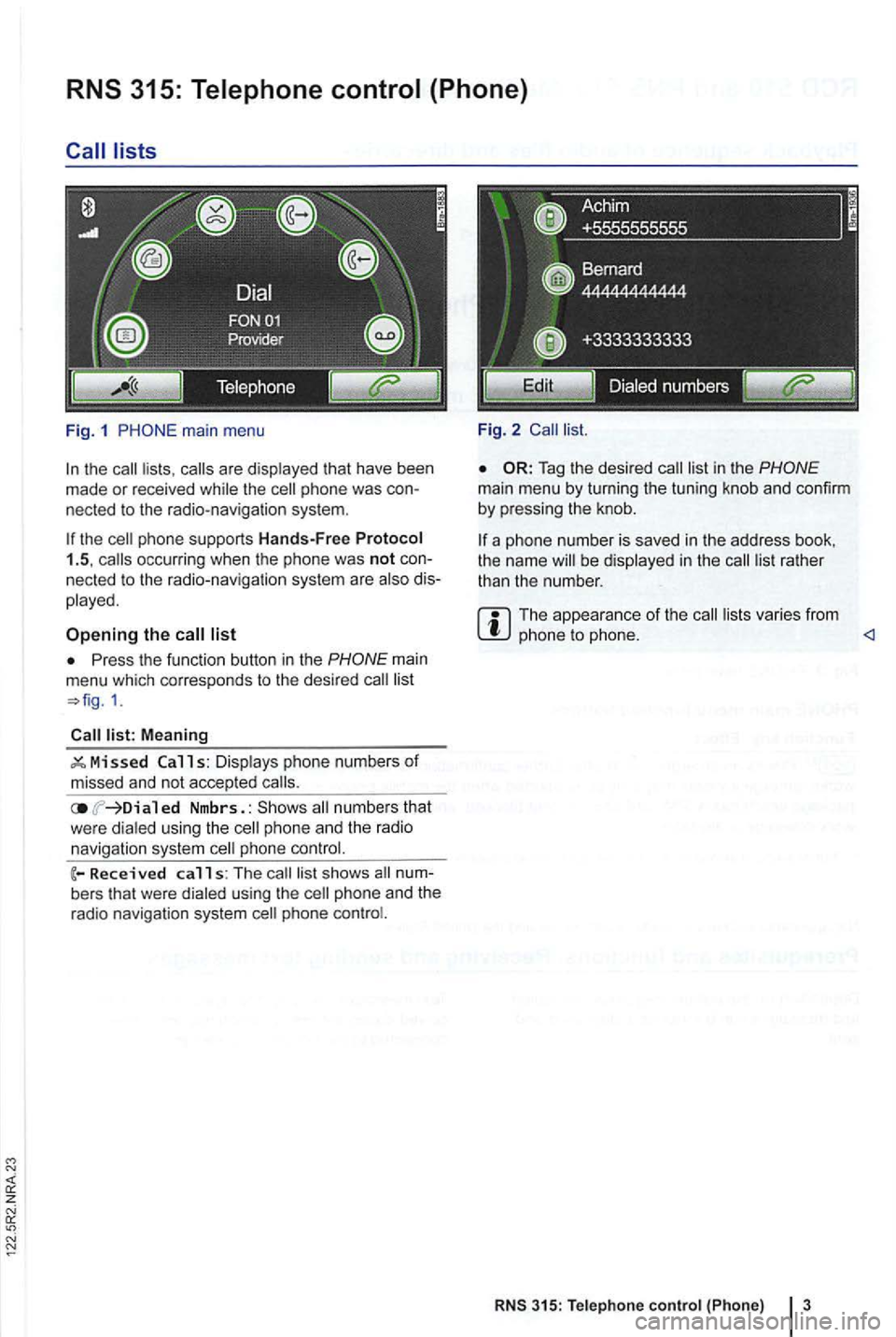
Fig. 1
the the
list
Press the function button in the
Meaning
ed Nmbrs. : numbers that
w ere dialed using th e phone an d the radio
navigation system phone
calls: The s hows
phone
Fi g. 2
Tag the desired
the name be displayed in the
The appea ra nce of the varies from phone to phone.
RNS 315: Tele phone control {Phone) 3
Page 456 of 516
are not but must be selected by using the
menu for track selection.
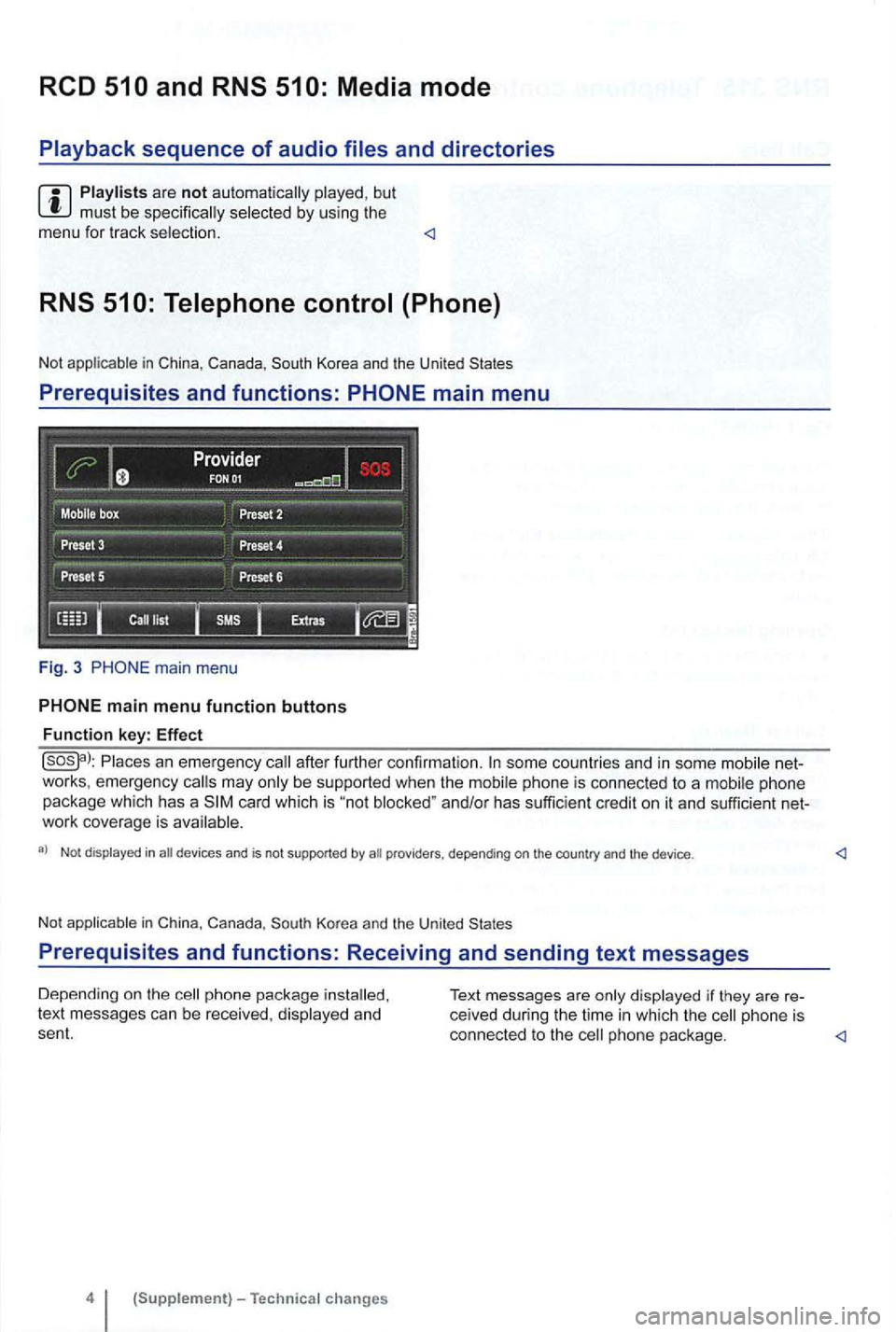
Prerequisites and functions: PHONE main menu
Fig. 3 PHO NE ma in menu
Places an eme rgency after further confirmat ion. some countries and in some mobile net
works , emergency may be supported when the mob ile phone is connec ted to a mobi le phone
package which has a card which is "no t and/or has suffic ien t credit on it and sufficient net
work coverage is
a) Not displayed in an devi ces and is not supported by
phone package text messages can be received , displayed and
sent. connected to the phone package.
Page 458 of 516
Valid only in Korea
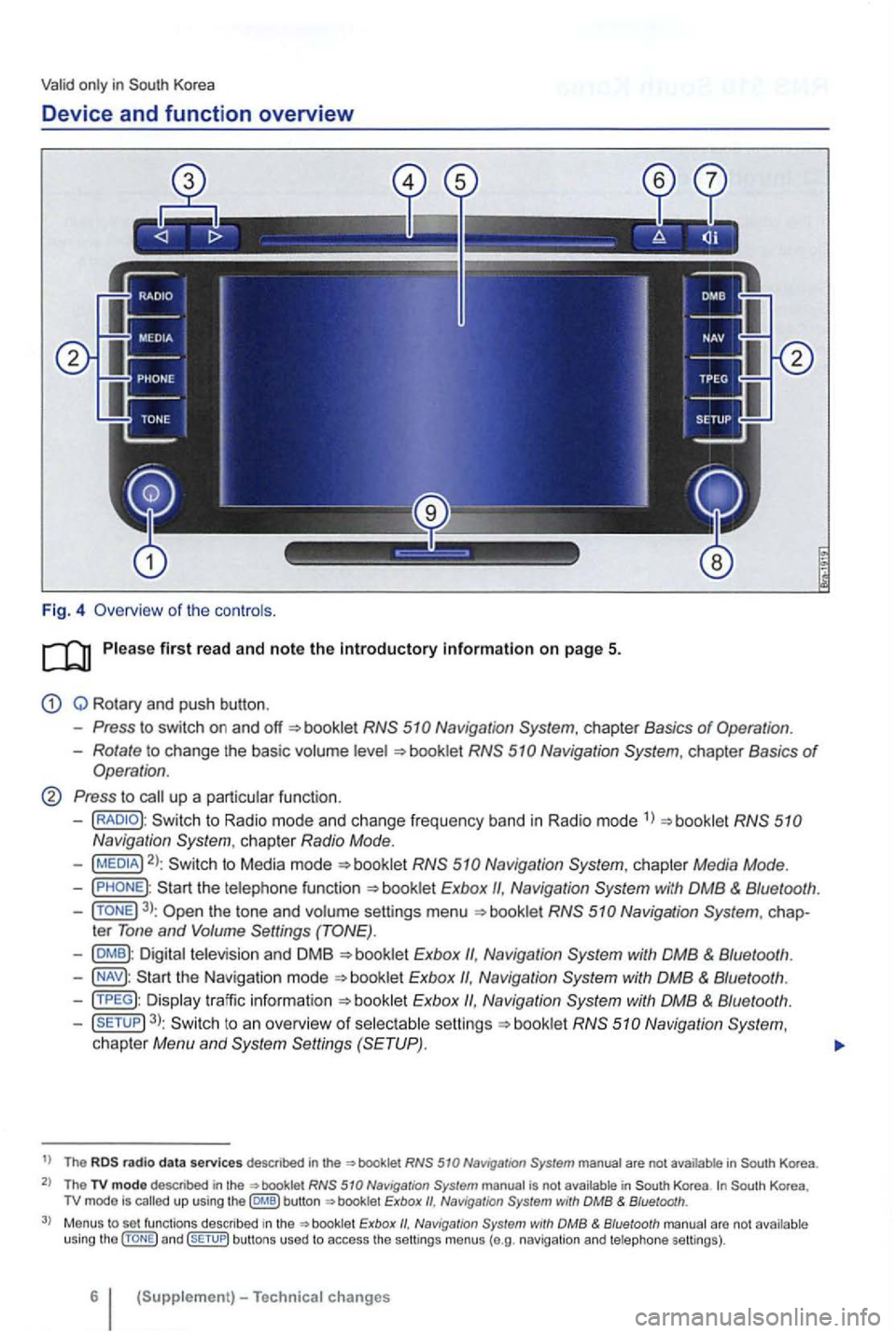
Device and function overview
Fig. 4 Overv iew of the controls .
Q Rotary and push button .
Press to switch on and booklet
Rotate to change the basic volume
Press to call up a particular function.
-to Radio mode and change frequency band in Radio mode 1
)
2): to Media mode
Navigation
3): the tone and volume settings menu
Exbox Navigation
Exbox
Exbox Navigation
3): to an overview of selectable booklet Navigation System, chapter Menu and
t) The radio d ata services descnbed in the in
The TV modo descr ibed in the not Korea up using the button Naviga tion with DMB & Bluetooth .
Menus to set functions described Exbox with DMB & Bluetooth arc not u sing and bu ttons used to access the settings menus (e.g . navig ation and telephone settings).
6
Page 480 of 516
Consumer Protection
BBB
your authorized or gen Customer CARE Representative has been address your concern ,
a dispu te program adminis
tered by the of Better Business Bureaus.
T he BBB
so BBB for more
1
you BBB information:
Your name and address
The Number
The make , and year of your
The date and current of your
A description of the concern with your
The BBB program consists of two
parts : mediation and arbitration. Mediation means
tha t BBB staff
negotiations between
the parties in an effo rt to bring your
you do not agree
with the mediated you may request an
The arbitra
tors are not connected with th e basis . may attend
the hearing in person, bring witnesses, and give
supporting evidence.
of appearing in son, you may request a written or eve n a phone arbitration h earing . Th e BBB of your
in 40 days of when your was state or provides otherwise .
you accept the decision , the manufacturer
its with in the time frame specified by the arbit rator .
you reject the decision , you are free to pursue
other remedies and the manufacturer not be required to
State-Specific Warranty Enforcement Laws
Each sta te has enacted warranty enforcement referred to as that
permit owners to obtain a or a
refund of the purchase price und er certain circum
stances . Although the provisions of these vary from state to state , their intent is to provide
owners with certain rights if they experience signifi
cant
To the extent by
each state's
explaining the nonconformity that the owner has
expe rienced with the ve hicle, and to Votks-
(in
Customer CARE Road Auburn 48326
Depending on th e state's
t aw , th e owne r may
to BBB before seeking other
r emedies. ref er to the BBB