gear VOLKSWAGEN GOLF 2015 Owner´s Manual
[x] Cancel search | Manufacturer: VOLKSWAGEN, Model Year: 2015, Model line: GOLF, Model: VOLKSWAGEN GOLF 2015Pages: 400, PDF Size: 5.95 MB
Page 12 of 400
The red zone at the end of the scale indicates maximum permissible engine rpm (revolutions per minute) for all gears after the break-in period. Before reaching the red zone, select the next
higher gear or selector lever position D, or ease your foot off the accelerator ⇒ .
(3) Displays
(4) Reset, set, and display button
(5) Fuel gauge
(6) Engine coolant temperature display ~
NOTICE
x To help prevent engine damage, always avoid high engine speeds, full throttle acceleration, and heavy engine loads when the engine is cold.
x To help prevent engine damage, the tachometer needle should only enter the red zone (warning zone) briefly.
Upshifting early into the next higher gear saves fuel and reduces engine noise.
Displays
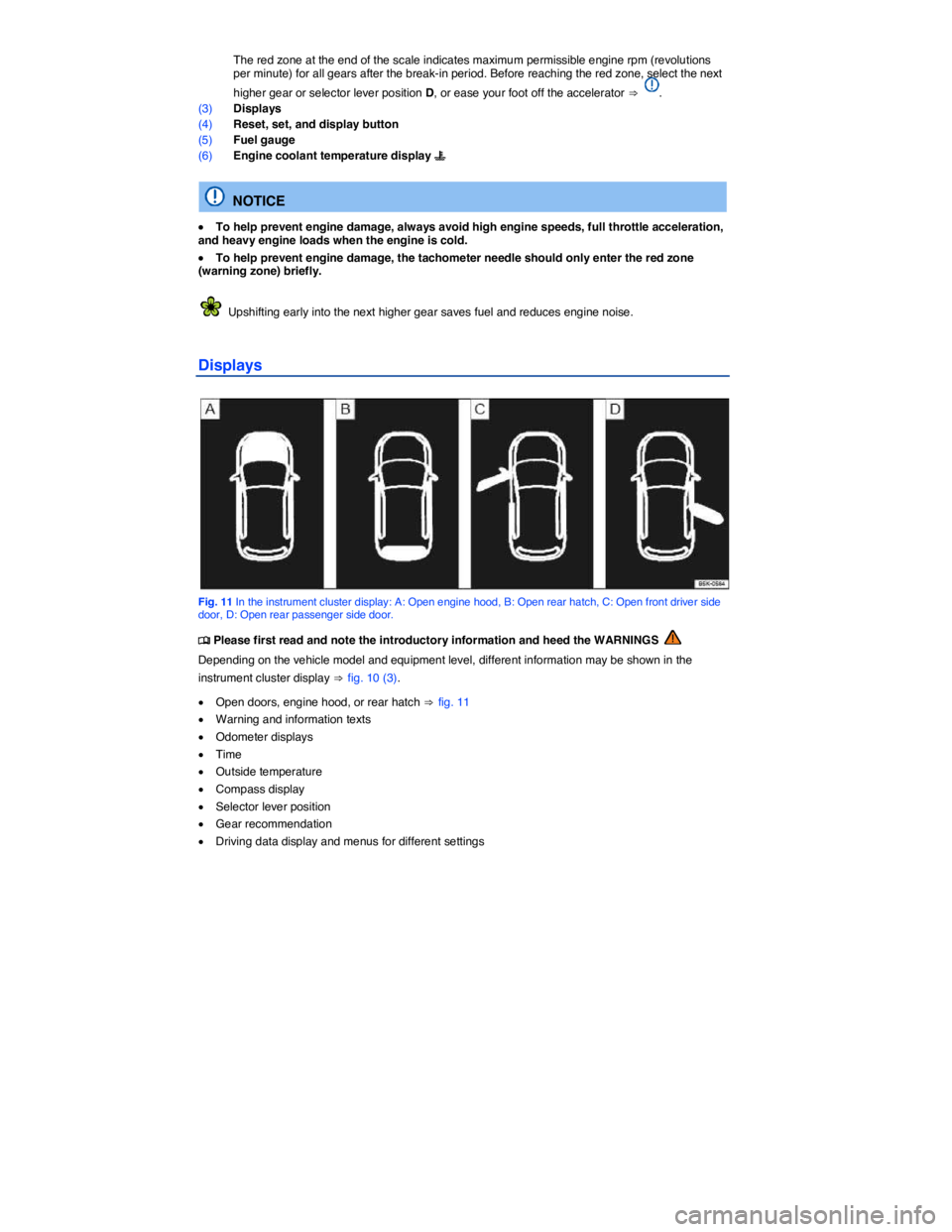
Fig. 11 In the instrument cluster display: A: Open engine hood, B: Open rear hatch, C: Open front driver side door, D: Open rear passenger side door.
Page 15 of 400
Gear recommendation
When the vehicle is moving, a fuel economy gear recommendation may appear in the instrument
cluster display ⇒ Shifting.
Speed warning
A display in the instrument cluster indicates when the set maximum speed has been exceeded
⇒ Volkswagen Information System.
On appropriately equipped vehicles, the speed warning can be set and changed in the Infotainment
system by pressing the #!2 button followed by the
Page 27 of 400

Menu Submenu Setting options See
Lights Light Assist Turn the following systems on or off: – Adaptive front lighting (AFS) (if equipped) – Automatic headlights during rain (head-lights turn on with rain sensor) – Convenience indicating (lane change feature)
Adjust the following feature: – Switch-on time for automatic headlights (!54/)
Interior lighting Adjust the following features: – Door ambient lighting – Footwell lighting
Coming/Leaving home function Set the following: – Duration that the Coming Home feature is switched on – Duration that the Leaving Home feature is switched on
Mirrors and wipers Windshield wipers Turn the following features on or off: – Automatic wiping during rain (rain sensor) – Wipe rear window in reverse gear
Open and close Window operation Turn convenience opening feature for the power windows on or off (if applicable).
Central locking Set door unlocking.
Turn the following features on or off: – Lock automatically (Auto lock feature) – Acoustic confirmation (horn beep after the vehicle is locked from outside)
Multifunction display (MFD) – Display or hide the following data in the Multifunction display: – Current fuel consumption – Average fuel consumption – Convenience consumers – Eco tips – Travel time – Distance traveled – Average speed – Digital speed display – Speed warning
– Reset the following data in the Multifunction display: – Driving data for “Since start” trip memory – Driving data for “Extended period” trip memory
Page 212 of 400
WARNING
To reduce the risk of serious personal injury when starting and running the vehicle's engine:
x Never start the engine or let it run in a confined or enclosed area. Engine exhaust contains carbon monoxide, a poisonous, colorless, and odorless gas. Carbon monoxide can cause unconsciousness and death.
x Never start the engine or let it run if oil, fuel, or other flammable substances are under, around, or have leaked from the vehicle, for example, due to vehicle damage.
x Never leave the vehicle unattended with the engine running, especially when it is in gear. The vehicle could move suddenly or some other unexpected event could occur, resulting in property damage, fire, or personal injury.
x Never use starting assist fluids. Starting fluids can explode and can cause a “run-away” vehicle condition.
WARNING
The vehicle exhaust system and the catalytic converter get very hot and can cause fires and serious personal injury.
x Never park the vehicle where the hot exhaust system or catalytic converter could ignite flammable materials, such as brush, leaves, dry grass, spilled fuel, etc.
x Never apply additional undercoating or rust proofing on or near the exhaust manifold, exhaust pipes, catalytic converter, or heat shields.
Indicator lights
Page 217 of 400
Please perform these steps only in the order listed.
Step Vehicles without Keyless Access Vehicles with Keyless Access
5. If the engine does not start, switch off the ignition and start again after about 1 minute. If the engine does not start, switch off the ignition and start again after about 1 minute. Use the emergency start feature if necessary
6. Release the parking brake when you are ready to start driving
WARNING
Never leave the vehicle unattended with the engine running, especially when it is in gear. The vehicle could move suddenly or some other unexpected event could occur, resulting in property damage, fire, or personal injury.
WARNING
“Starting fluids” can explode and can cause a “run-away” vehicle condition.
x Never use starting assist fluids.
NOTICE
x You can damage the starter or the engine if you try to start the engine when the vehicle is still moving, or if you try to restart the engine right after switching it off.
x Avoid high engine speeds, full throttle acceleration, and heavy engine loads when the engine is cold.
x Do not try to start the engine by pushing or towing the vehicle. Unburned fuel can get into the catalytic converter and damage it. The steering column may also be locked.
Do not let your vehicle warm up while standing; instead, start driving right away after making sure that you have good visibility through all windows. This will help the engine reach operating temperature faster and keep down emissions.
Major consumers of electricity are temporarily switched off when the engine is being started.
After starting a cold engine, there may be increased operating noises for a few seconds. This is normal and harmless.
Stopping the engine
Page 218 of 400
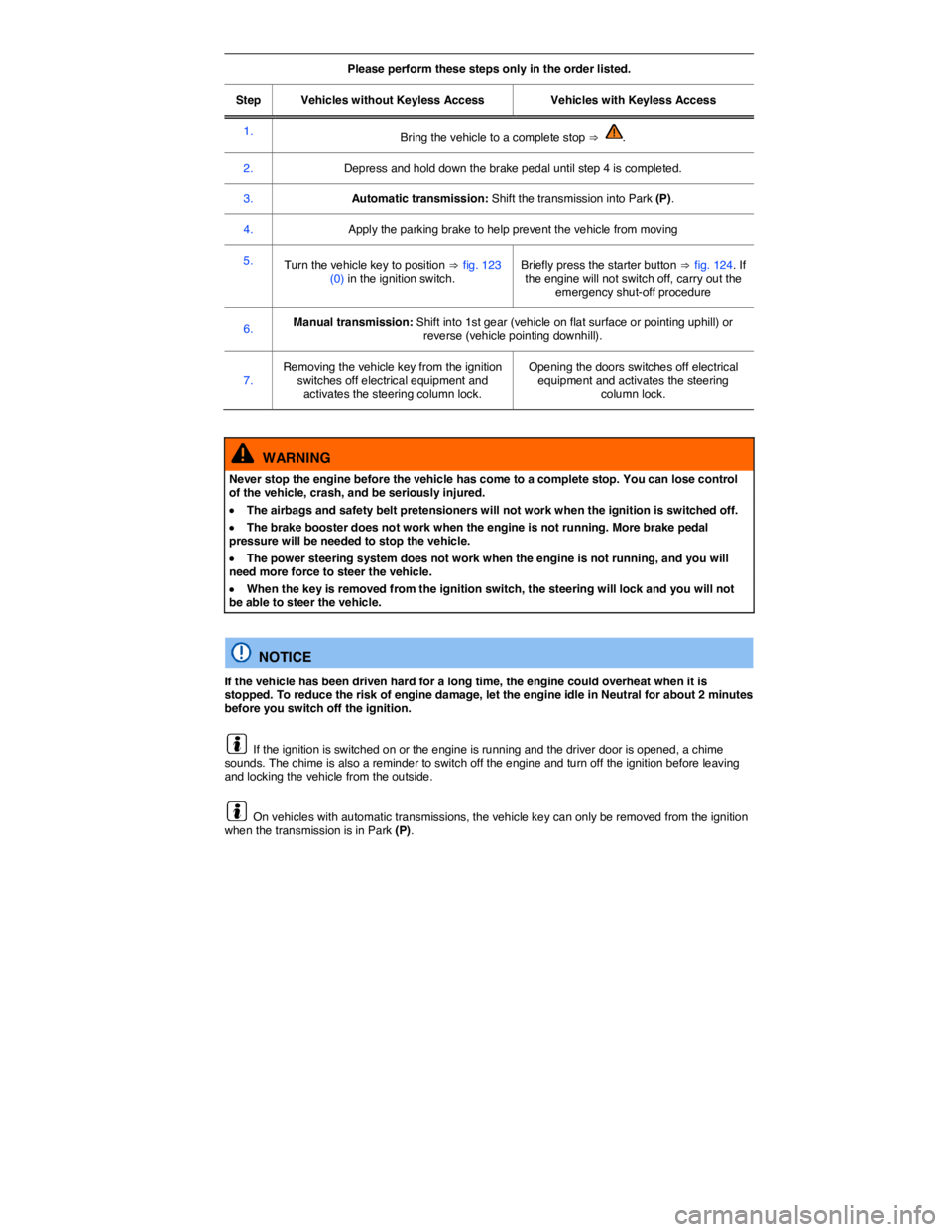
Please perform these steps only in the order listed.
Step Vehicles without Keyless Access Vehicles with Keyless Access
1. Bring the vehicle to a complete stop ⇒ .
2. Depress and hold down the brake pedal until step 4 is completed.
3. Automatic transmission: Shift the transmission into Park (P).
4. Apply the parking brake to help prevent the vehicle from moving
5. Turn the vehicle key to position ⇒ fig. 123 (0) in the ignition switch. Briefly press the starter button ⇒ fig. 124. If the engine will not switch off, carry out the emergency shut-off procedure
6. Manual transmission: Shift into 1st gear (vehicle on flat surface or pointing uphill) or reverse (vehicle pointing downhill).
7. Removing the vehicle key from the ignition switches off electrical equipment and activates the steering column lock.
Opening the doors switches off electrical equipment and activates the steering column lock.
WARNING
Never stop the engine before the vehicle has come to a complete stop. You can lose control of the vehicle, crash, and be seriously injured.
x The airbags and safety belt pretensioners will not work when the ignition is switched off.
x The brake booster does not work when the engine is not running. More brake pedal pressure will be needed to stop the vehicle.
x The power steering system does not work when the engine is not running, and you will need more force to steer the vehicle.
x When the key is removed from the ignition switch, the steering will lock and you will not be able to steer the vehicle.
NOTICE
If the vehicle has been driven hard for a long time, the engine could overheat when it is stopped. To reduce the risk of engine damage, let the engine idle in Neutral for about 2 minutes before you switch off the ignition.
If the ignition is switched on or the engine is running and the driver door is opened, a chime sounds. The chime is also a reminder to switch off the engine and turn off the ignition before leaving and locking the vehicle from the outside.
On vehicles with automatic transmissions, the vehicle key can only be removed from the ignition when the transmission is in Park (P).
Page 221 of 400
WARNING
Rapid acceleration can cause skidding and loss of traction, especially on slippery roads, resulting in a loss of vehicle control, collisions, and serious personal injury.
x Only use the kick-down feature or fast acceleration if visibility, weather, road, and traffic conditions permit and other drivers will not be endangered by your driving and the vehicle's acceleration.
WARNING
Constant braking causes the brakes to overheat and even to fail leading to collisions and serious personal injury.
x Never “ride” the brakes or apply the brake pedal too often or too long.
x Riding the brakes will substantially reduce braking performance, increase stopping distance, and can cause complete brake system failure.
NOTICE
x Never “ride” the brakes by keeping your foot on the brake pedal when you do not want to brake. This will make the brakes wear faster.
x Before driving downhill, especially on hills that are long or steep, always reduce speed and shift into lower gear (manual or automatic transmission). This will let the vehicle use engine braking and reduce the load on the brakes. Otherwise, the brake system could overheat and even fail. Only use the brakes when you need them to slow the vehicle down more or to stop.
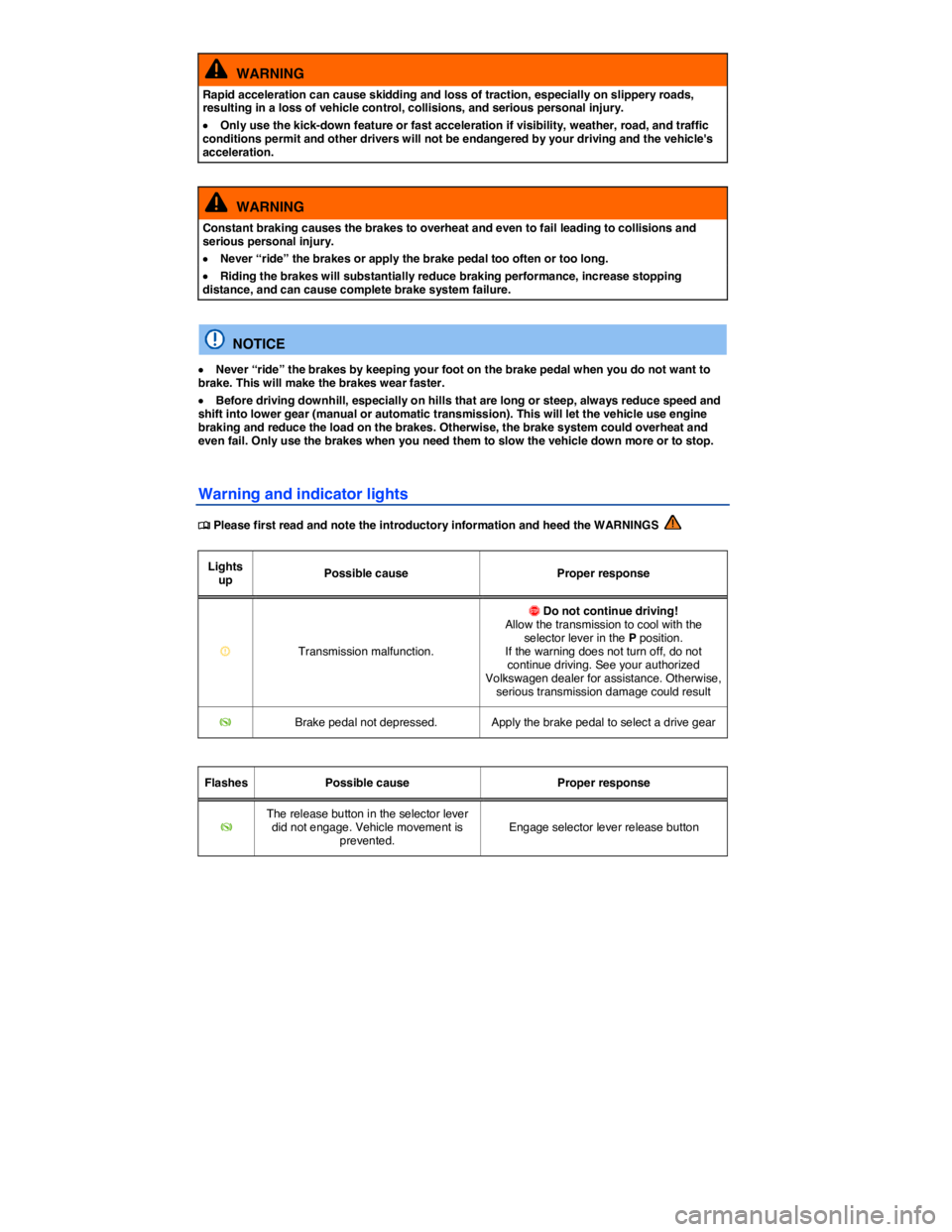
Warning and indicator lights
Page 223 of 400
Only use floor mats that leave the pedal area free and are held securely in place with floor mat fasteners to help prevent sliding.
If a brake circuit malfunctions, more brake pedal travel is needed to bring the vehicle to a full stop, and it is important that nothing is in the way when you have to depress the brake pedal harder and farther than normal.
WARNING
Objects in the driver footwell can prevent the pedals from moving freely. This can cause loss of vehicle control and increase the risk of serious personal injuries.
x Always make sure that nothing can interfere with the pedals.
x Always fasten floor mats securely to the floor.
x Never put floor mats or other floor coverings on top of already installed floor mats.
x Always make sure that nothing can fall into the driver footwell while the vehicle is moving.
NOTICE
Always make sure that the pedals are able to move freely and that nothing can interfere with them. If a brake circuit fails, more brake pedal travel will be needed to bring the vehicle to a stop. The brake pedal must be pressed farther and harder than normal.
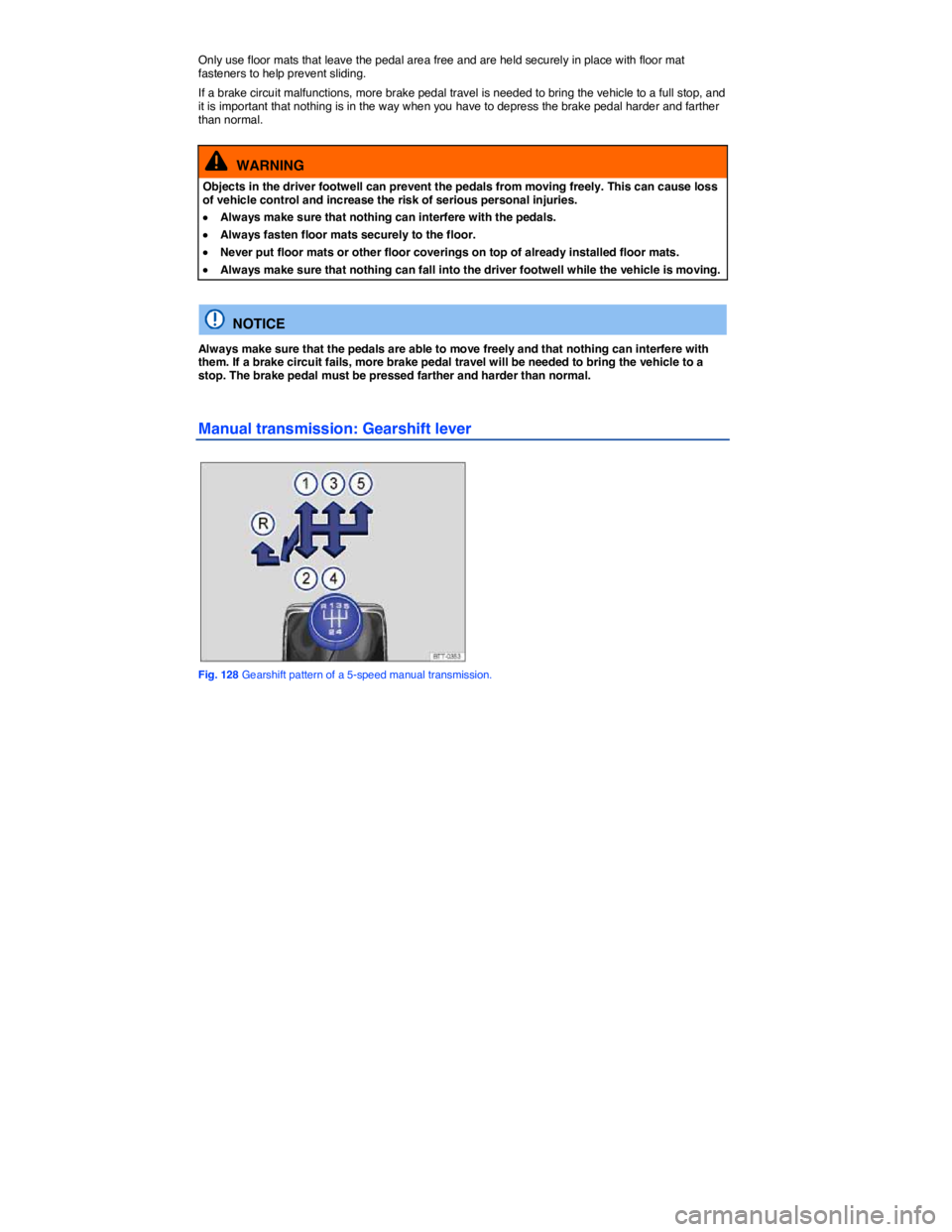
Manual transmission: Gearshift lever
Fig. 128 Gearshift pattern of a 5-speed manual transmission.
Page 224 of 400
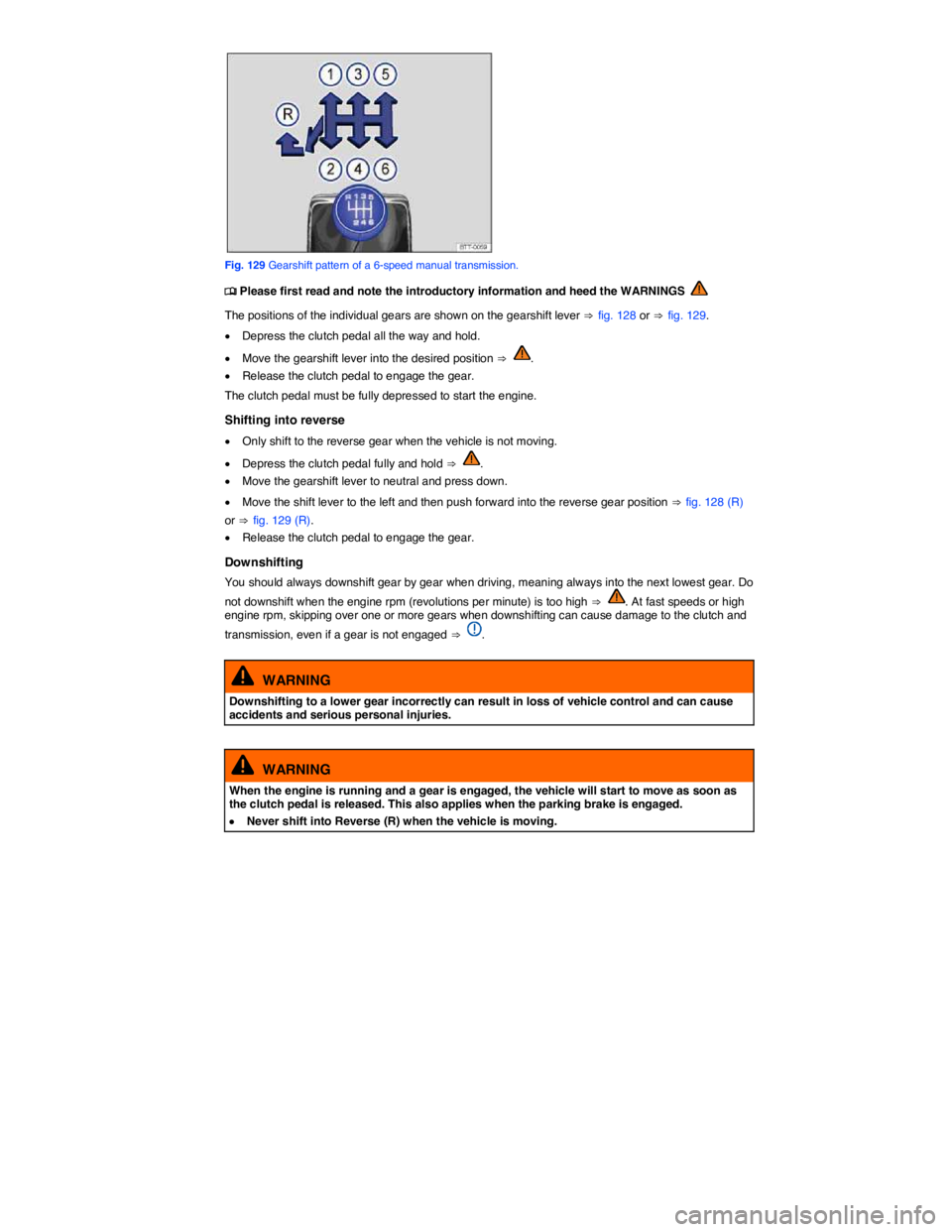
Fig. 129 Gearshift pattern of a 6-speed manual transmission.
Page 225 of 400
NOTICE
Shifting down to a gear that is too low when driving at fast speeds or high engine rpm can cause extensive damage to the clutch and transmission. That is true even if the clutch pedal is pressed so that the clutch is not engaged.
NOTICE
To help prevent damage and premature wear:
x Do not rest your hand on the gearshift lever while driving. Over time, the pressure will cause premature wear in the transmission.
x Make sure that the vehicle has come to a complete stop before shifting into Reverse (R).
x Always depress the clutch pedal all the way when changing gears.
x Do not hold the vehicle on a hill using engine power with the clutch pedal partially engaged and the engine running.
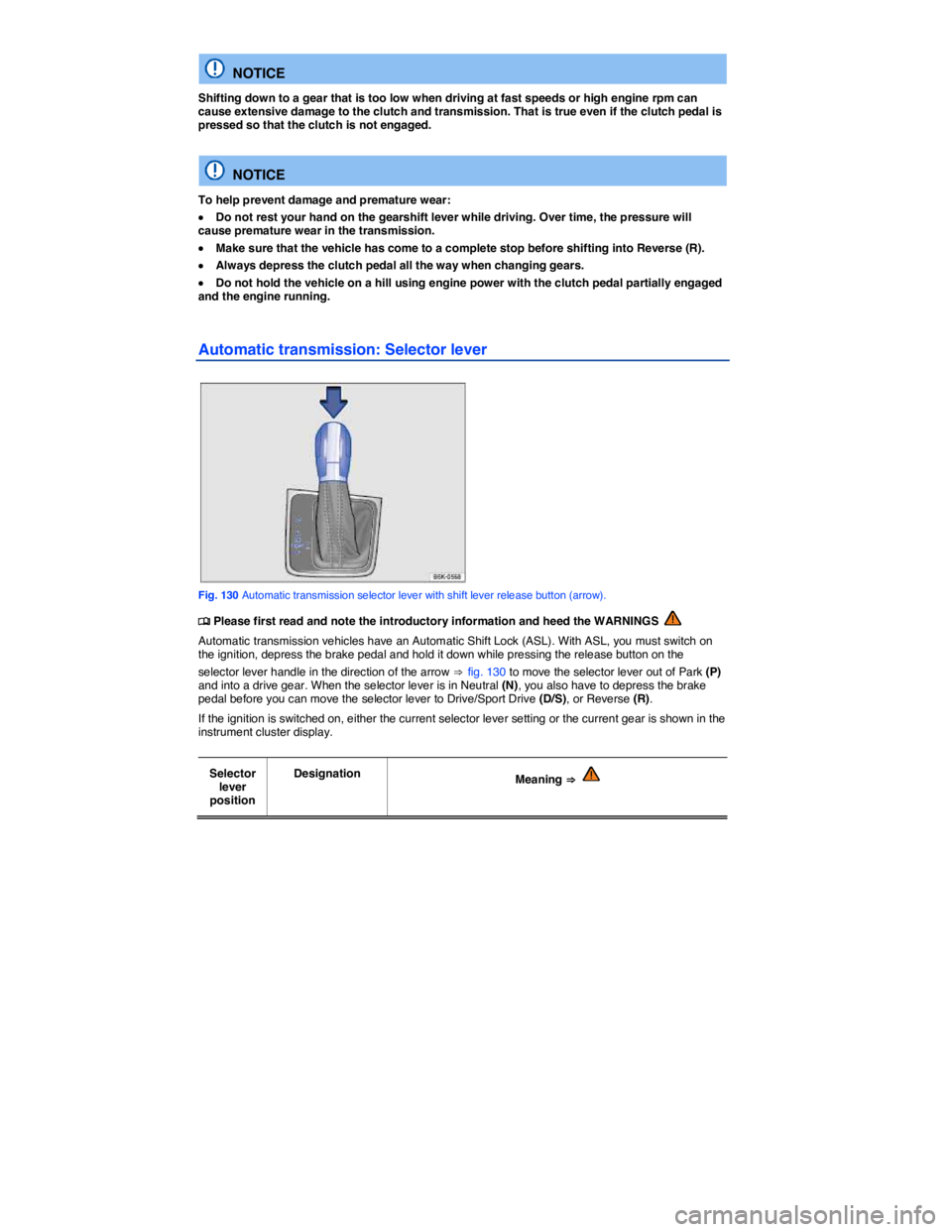
Automatic transmission: Selector lever
Fig. 130 Automatic transmission selector lever with shift lever release button (arrow).