change time VOLKSWAGEN GOLF PLUS 2004 User Guide
[x] Cancel search | Manufacturer: VOLKSWAGEN, Model Year: 2004, Model line: GOLF PLUS, Model: VOLKSWAGEN GOLF PLUS 2004Pages: 541, PDF Size: 98.86 MB
Page 454 of 541
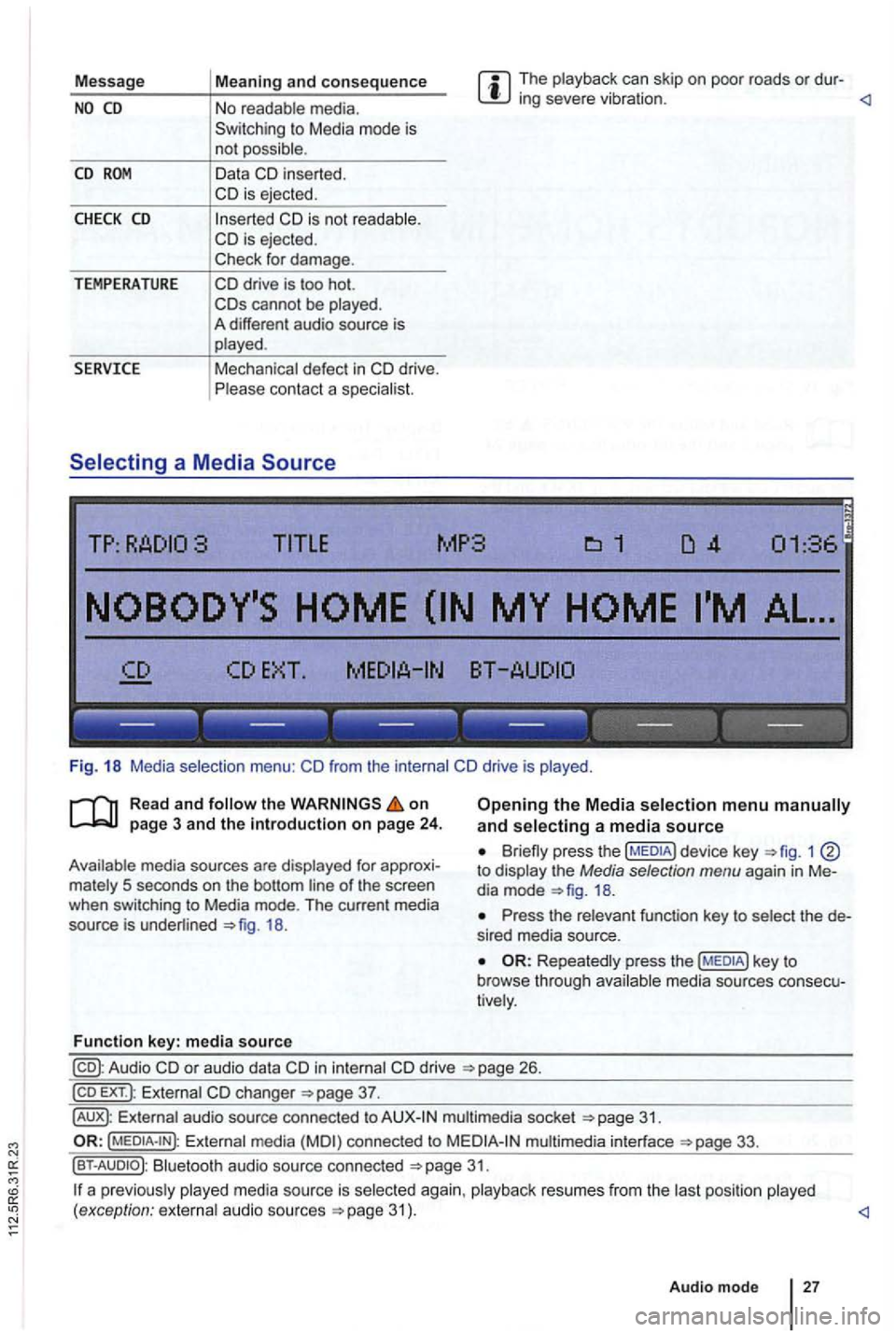
Message The playback can skip on poor roads or dur-ing severe vibration .
CD
CHECK CD
TEMPERATURE
in serted.
cannot be played .
A different audio source is
played .
Mechanical defect
in
------------------
Fig. 18 Media selection menu:
the on
18.
Function key: media source
Opening the Media selection menu and selecting a media source
1 to display the Media selection menu again in Me
dia mode
Press the relevant function key to select the de
s ired media source.
Repeatedly press the media sources consecu
tively .
in internal drive 26.
EXT .): External changer
audio source connected to multimedia socket
Externa l media connected to multimedia interface
Bluetooth audio source connected 31.
a p reviously 31 ) .
Audio mode
27
Page 468 of 541
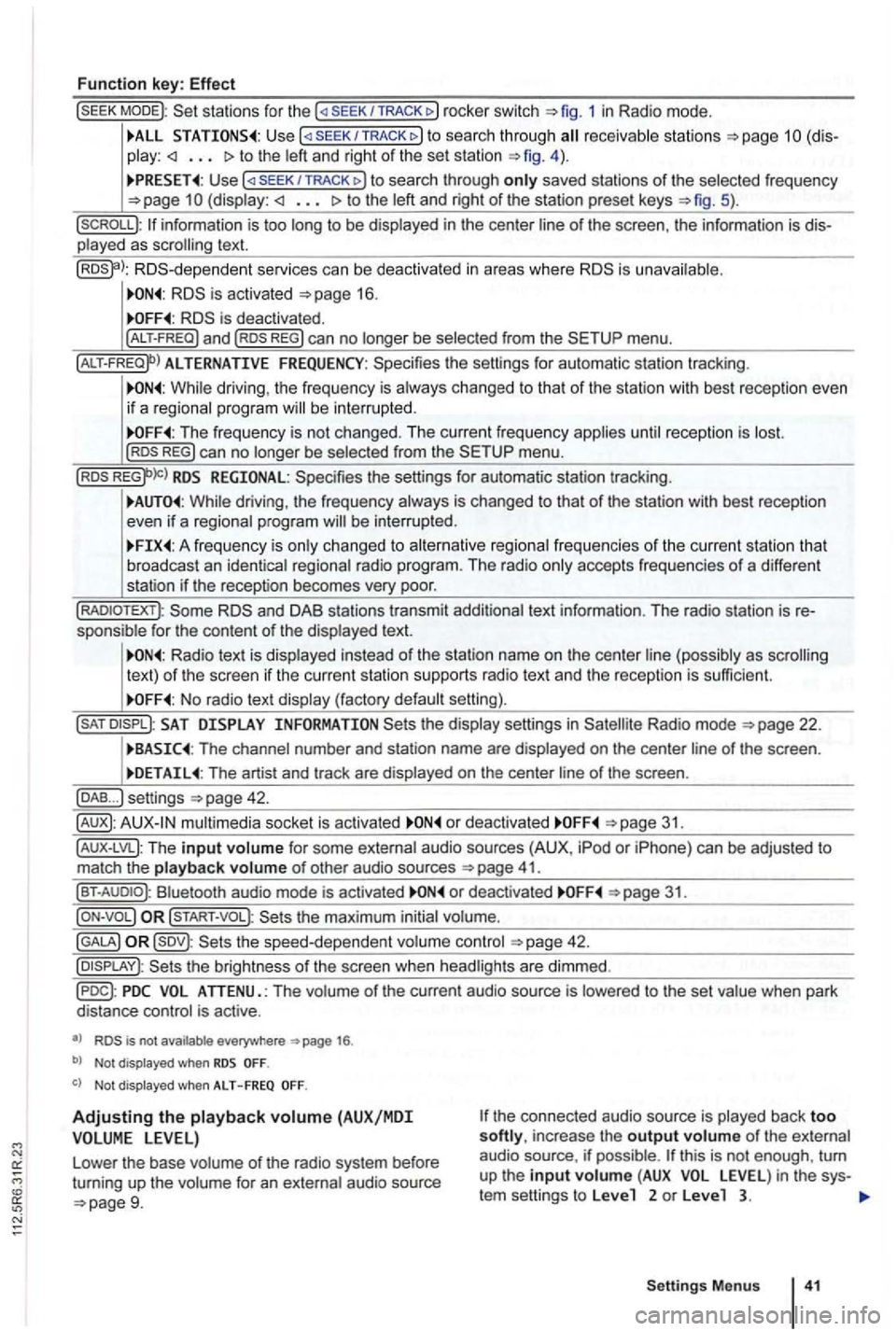
Function key: Effect
sta tions for the SEEK/TRACK 1 in Radio mode.
TRACK to sea rc h throug h receivab le s ta ti ons to the left and right of the set station 4 ) .
U se /TRACK to search through only saved stations of the selected frequency (display: to the left and right of the station preset keys 5).
p layed as scrolling text.
RDS -d epende nt serv ices can be deactiva ted in areas where is unava ilable .
is deactivated .
ALTERNATIVE FREQUENCY: Spec ifies the settings for automatic station tracking .
While driving , the frequency is always changed to that of the station with best re ceptio n even
i f a reg ional progra m will be inte rru pted .
The frequency is not changed . T he current frequency applies unti l reception is lost. REG) can no longer be selected from the menu .
RDS REGIONAL: Specifies the settings for automa tic station tracking.
While driving , th e freque ncy always is changed to that of the station with best reception
even if a regional program will be interrup ted .
A freq uency is on ly changed to alternative regional frequen cies of t he current station tha t
broadcast an iden tica l regiona l radio program . The rad io only accepts frequencies of a diffe ren t
station if t he reception becomes very poor.
and DAB stations transmit additional text information . The radio station is sponsible fo r the content of the displayed text.
Radio text is disp layed instead of the station name on the cente r line (possibly as scrolling
text) of t he screen if the current statio n su pports radio text and the recept ion is sufficient.
No radio text display (factory default setting).
SAT the display settings in Radio mode
The channel number and station name are displayed on the center line of the screen .
The artist and track are displayed on the center line of the screen .
... ) settings
mu ltimedia socket is activated o r deact ivated
41.
Bluet ooth audio mode is activated or deactivated 31.
the maximum initial volume.
42.
is not available everywhere 1 6 .
b) Not displayed when
Not displayed when ALT - F REQ
Adjustin g the playback volume (AUX/MDI the connected aud io source is played back too softly, increase the output volume of the external
audio source . if possible .
Settings Menus
Page 472 of 541
. . . . . . . . . . 41
ALT-FREQ
. . . . . . . 16
AUX
.............................. 3 1 ,44
B
. . . . . . . . . . . . . . . . . . . . . . . . . . . . . . . . . . 31 and ........................... 31 A U X-LV L (AUX
. . . . . . . . . . . 31 Not disp layed ! . . . . . . . . . 40
Volume ..............•............. 40
Balance
.... .......................... 39
Basic volume
Adjusting . . . . . . . . . . . . . . . . . .
. . . . . . . . 9
Mut e
................................ 26
changer . . . . . . . . . . . . . . . . . . 37
.............•..•.......... 26
operation . . . . . . . . . . 26
...............•............. 26
Characteristics Anti -theft coding . . . . . . . . . . . . . . . . . . .
. . 9
L owering volume . . . . . . . . . . . . . . . . . . . . . 8 Radio coding . . . . . . . . . . . . . . . . . . . . . . . 9 ........................... 26
Code
number . . . . . . . . . . . . . . . . . . . . . . . . . . 9
D
DAB ................................. 44
Activating . . . . . . . . . . . . . . . . . . . . . . . . . . 22
Activ a
tion . . . . . . . . . . . . . . . . . . . . . . . . . . 19 . . . . . . . . . . . . .
ANN OUN CEMENT . . . . . . . . . . . 42
A nnouncements . . . . . . . . . . . . . . . . . . . . . 19 Autostore
. . . . . . . . . . . . . . . . . . . . . . . . . . 20
Changing a channe l . . . . . . . . . . . . . . . . . . 22
Changing stations . . . . . . . . . . . . . . . . . . .
19
. . . . . . . . . . . 42
E nsemble . . . . . . . . . . . . . . . . . . . . . . . . . . 19
ANNO UNCEMENT . . . . . 4 2 .......................... 13,20
. . . . . . . 42
Settings . . . . . . . . . . . . . . . . . . . . . . . . . . . 42
. . . . . . . . . . . . . . . . . . . . . . . . . . . 42 track ing . . . . . . . . . . . . . . . . . . . . 43 upda te . . . . . . . . . . . . . . . . . . . . . . 21
Switching channels . . . . . . . . . . . . . . . . . . 20
TP traffic program . . . . . . . . . . . . . . . . . . . 42 . . . 42
Upd ate . . . . . . . . . . . . . . . . . . . . . . . . . . . . 21
Device
keys (hard keys) . . . . . . . . . . . . . . 8
Device overview . . . . . . . . . . . . . . . . . . . . . . 6
radio DAB ....... ................... 19
. . . . . . . . . . . . . . . . . . . . . 40
E
Energy management . . . . . . . . . . . . . . . . . . . 9
......................... , ....... 44
audio source
F
AUX . . . . . . . . . . . . . . . . . . . . . . . . . . . . . . 31 Biuetoo th Au dio . . . . . . . . . . . . . . . . . . . . 31 Ext ernal media . . . . . . . . . . . . . . 33
in put volume . . . . . . . . . . . . . . . . . . . . . . . 41
.................... .......... 33 multimedia interface . . . . . . . . . 33 Media requirements . . . . . . . . . . . . . 33
MP3 player . . . . . . . . . . . . . . . . . . . . . . . . 33
Play back . . . . . . . . . . . . . . . . . . . 41
Fader
............................... . 39
Features
AUX mode ..
........... ............ 3 1
. . . . . 8
Function
settings . . . . . . . . . . . . . . . . . . . . . . 40
G
GALA ........ ....................... 40
Page 475 of 541

Volkswagen AG works constantly to im pro ve of
its products. Due to o ngoing veh icle development ,
changes
in d esig n, equipment , and techn ology are
possible at any time. The i nform atio n regardi ng
equipment . appea rance. performance, di
mensions .
weights . fuel consumption , standards , a nd functions of the vehicles is the information that was
available as of the editor ia l deadline.
rights based on th e law regarding copyrights. Subject to
c han ge.
Produced in Ger man y.
© Volkswag en AG
Page 485 of 541

Afterword
or
it s products . Due to ongo ing changes in design , equipmen t. and at any time. The inrormation regarding
eq uipme nt, appearance, perrormance. dimensio ns. weights, consump tion . standard s, a nd
as o r the Some or the
equipmen t may not be
in certain marke ts. Contact yo ur
authorized or authorized
No reprint. reproduction , or or this is perm itted. even in excerp ts , wi thout the press written consent or AG.
re serves Sub ject to change.
Produced in Ger many .
©
This paper was made rrom
Page 518 of 541
::
ice can be honored by any author ized Volkswagen
dealer in the United including it s territories.
The Volkswagen Carefree Maintenance Program
Service , while traveling in Canada , should be
formed by an authorized Volkswagen dealer.
Volkswagen Carefree Maintenance Program.
Missed Maintenance Service
Volkswagen reco mm end s that the custome r have Maintenanc e Serv ices performed at the scheduled time or mil eage.
Howev er, if a Maint enance
is mi ssed, it
need not be "picked
ice upon consider ing the vehicle's age and driven. Reimbursement for the missed service not be provided. Canadian
dealers can submit a claim. Pr
oof of United residence is requi red . the an dealer cannot submit your claim , you may be
asked to pay for the repair . your return to the
United please present the invoice to your
United
Additional services not sp ec ified in the nance sugg ested by the dealer or
gram .
Volkswage n not reimburse owners for
Maintenance Services performed at independent
facili
ties.
car, on the date such vehicle is first placed in service
. Th e Volkswagen Carefree Maintenance
Program is automatically transferred without cost
if the ownership of the vehic le changes within the
cove rage period .
Page 519 of 541
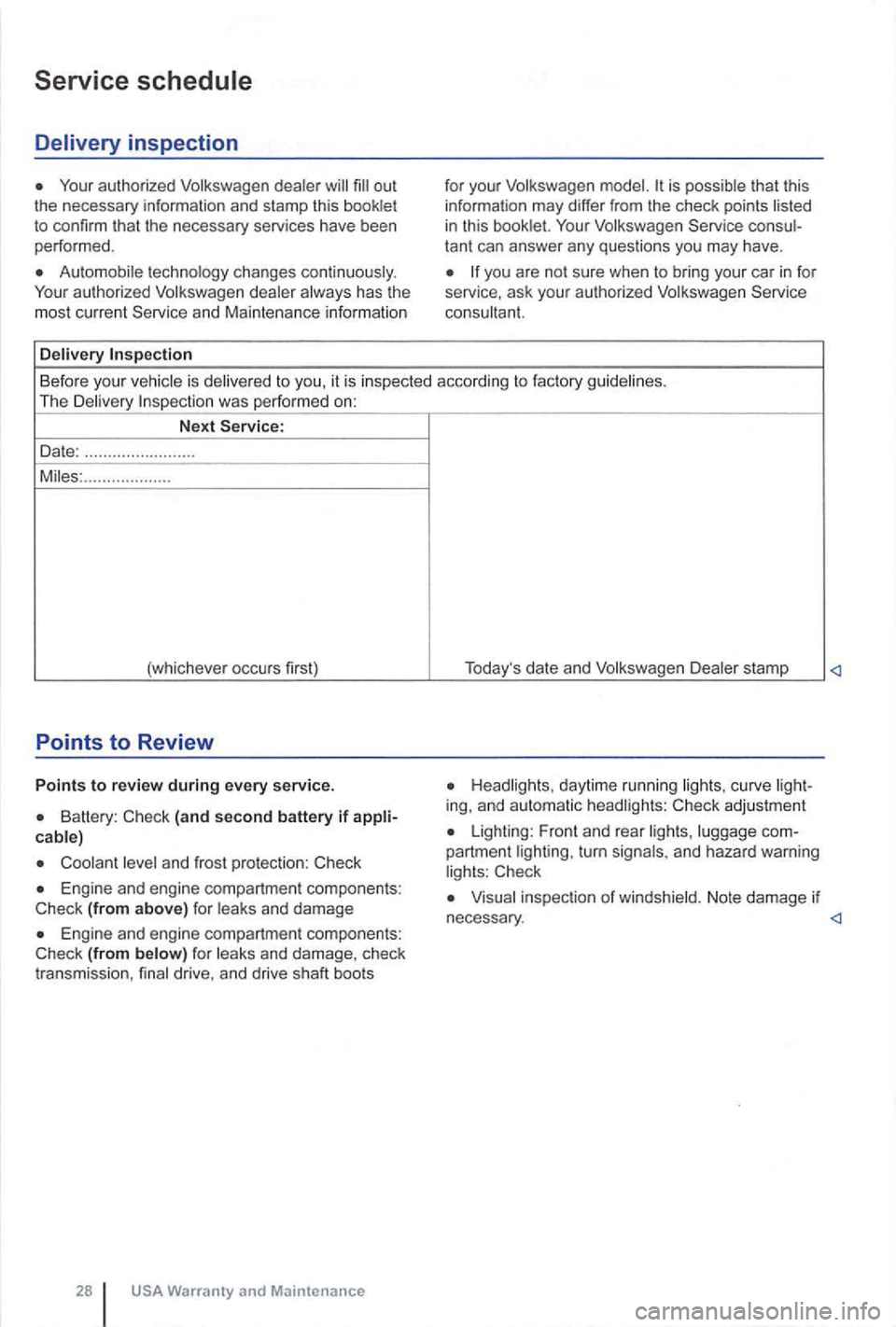
Your autho rized Volkswagen dealer
Automobi le technology changes continuously .
Your authorized Volkswagen dealer always has the
most current Service and Maintenance information
Delivery
for your Volkswagen is possible that this
information may differ from the check points
you are not sure when to bring your car in for
service, ask your authorized Volkswagen Service
consultan
t.
Before your vehicle is delivered to you, it is inspected according to fac tory guidelines .
The Delivery
Battery : (and second battery if
and frost protection:
Engine and engine compartment components: (from above) for leaks and damage
(from below) for leaks and damage , check
transmission , final drive , and drive shaft boots
28
Headlights , daytime running lights, curve
Lighting: Front and rear lights , luggage
Visua l inspection of winds hield. Note damage if
Page 531 of 541
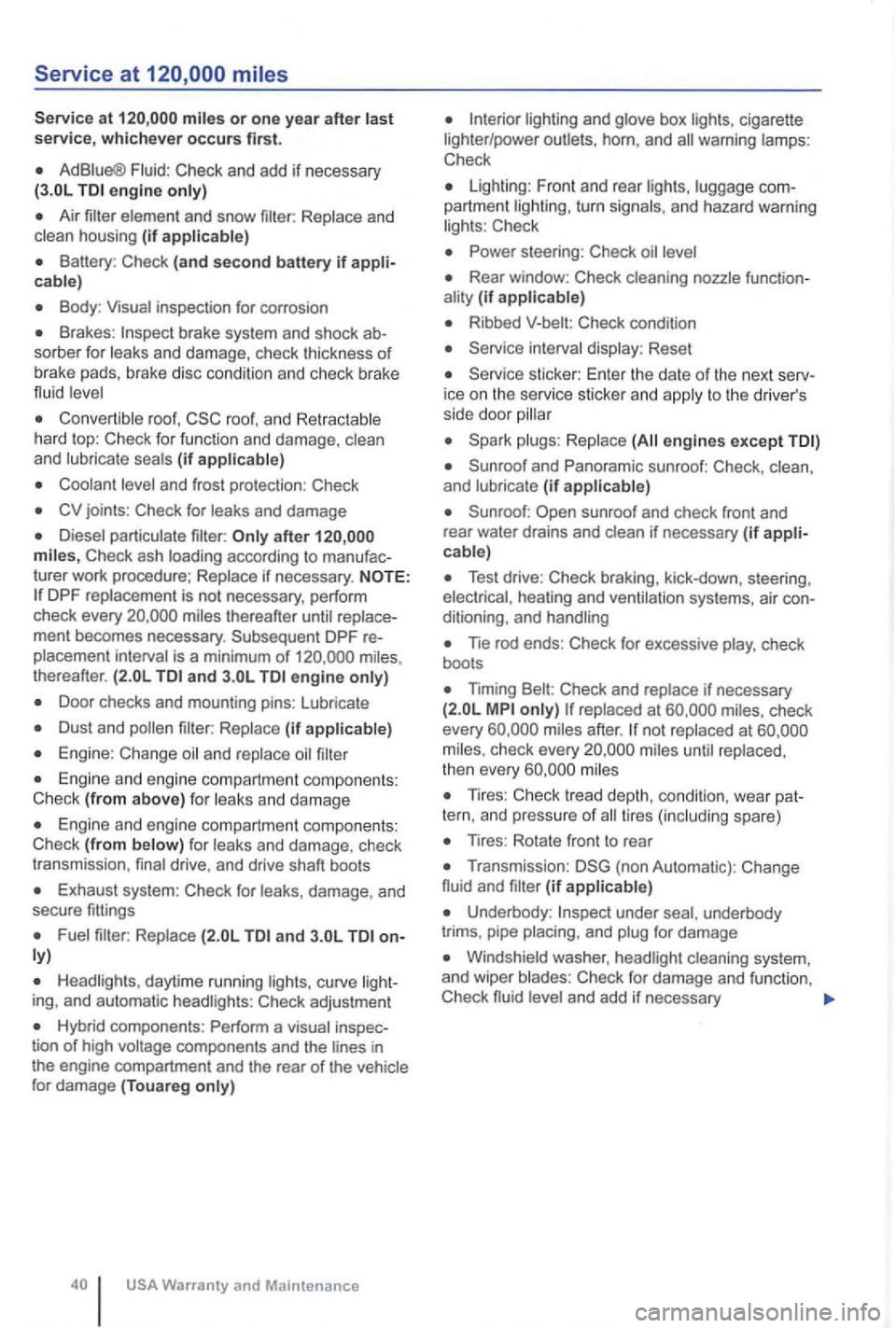
miles or one yea r after last service, whichever occurs first.
AdBiue® Fluid: Check and add if necessary engine only)
Air
cable)
Body : Visua l inspection for corrosion
Brakes : sorber for leaks and damage, check thickness of
b ra ke pads, brake disc cond itio n and chec k br ake
flu id
r oof, roof, a n d hard top : Check for func tion and damage, clean
and (if
joints : Check for leaks and damage
turer work proced ure;
thereafter ment becomes necessary . Subsequent DPF is a minimum of thereafter. and engine
Door checks and mounting pins: lubricate
(if
Engine: Change
and damage
Engine and engine compart ment co mponents :
Check (from f or and damage , check
t r ansm ission , drive, and drive shaft boots
Exhaust system : Check for damage, and
secure fittings
and
daytime running ing, and automatic Check adjustmen t
Hybrid components : Perform a tion of high
and box cigarette
lighter /power outlets , horn, and
Check
lighting : F ront and rear partment turn and hazard warning Check
Rear window: Check (if
Ribbed Check condition
Reset
ice on the service sticke r and to th e drive r's
side door
engines except
and (if
Test drive: Check braking, kick-down, steering,
Tie rod ends : Check for excessive check
boots
Timing Check and if necessary check
every not at check every
Tires: Check tread depth, condi tio n, wea r spare)
Tires: Rotate fron t to rea r
(non Automatic) : Change
fluid and (if
under underbody
trims . pipe and
Windshield washer,
and add if nec e ssary
Page 533 of 541
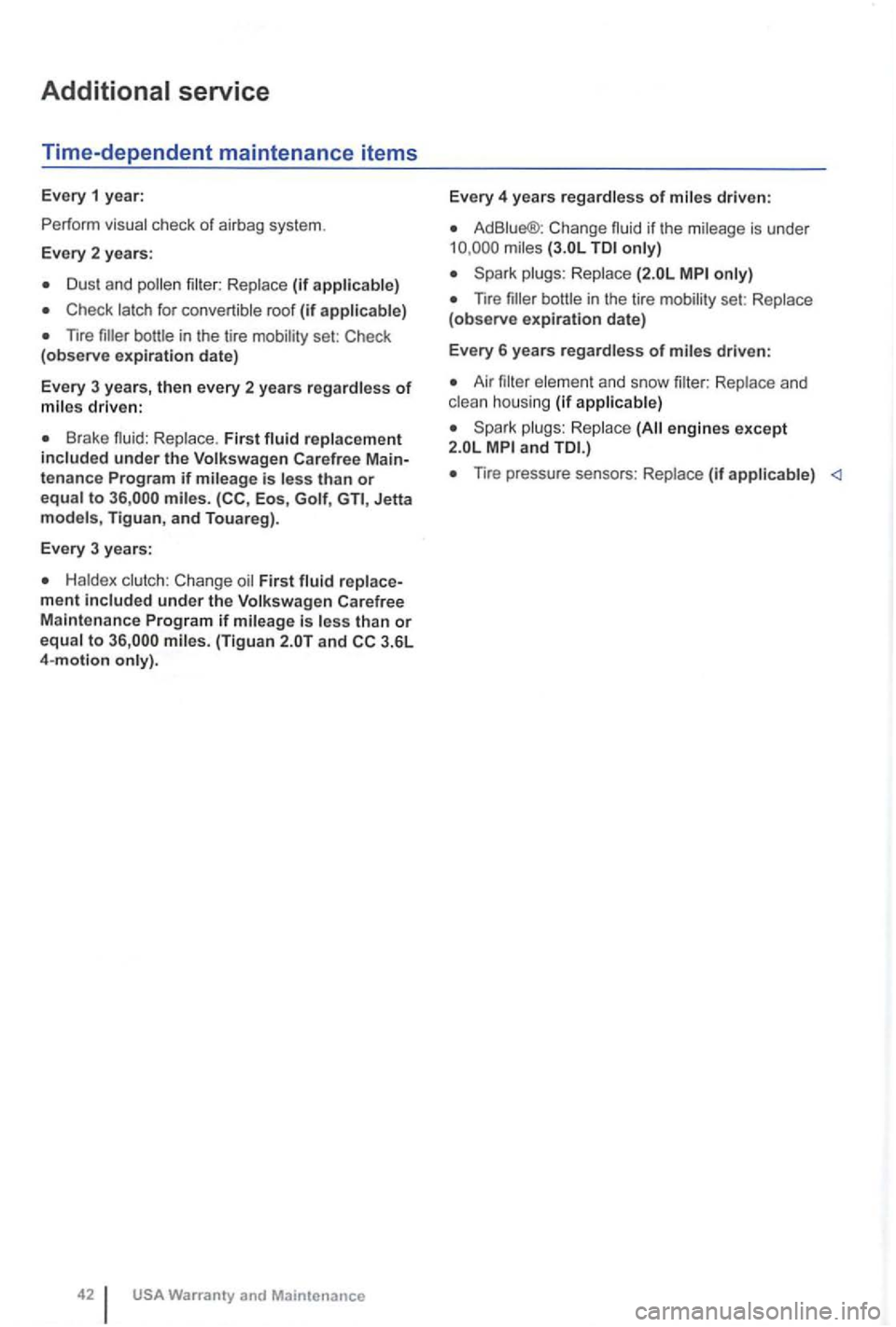
Additional service
Time-dependent maintenance items
Every 1 year:
P erf or m
ch ec k of a ir b ag sy stem.
Every 2 yea rs :
D us t and (if
Check roo f (if
nre set: Check
(observe expiration date)
Every 3 years,
then every 2 years driven:
Brake fluid : First under the
to (CC , Eos , Jetta Tigua n, and Touareg).
Every 3 years:
First
USA Warranty and Maintenance
Every 4 years regardless of
Ad Change is und er
nre set:
driven:
Air and sn ow ho using (if
eng ines except
2.0 L
nre pressure sensors: (if
Page 540 of 541

Afterword
has been Volkswage n's improv e it s products. Volkswage n, the refore ,
reserves the righ t to mak e changes in design and
s pe cif ica tio ns, and to make additi ons or men ts to it s pro duct s without incurring any tion to them on products previou sly f a ctur ed.
or in
part without the w ritten consent of Volkswagen
Gro up of Am erica, Specifica tions a re subject
to change without not ice .
Text and specifications in this a re ba sed on inf ormatio n and at the time of
printing .
M ay no t b e reproduced or trans lated
in o r in part without cons en t o f Volkswag en AG.
Print ed
in Germany
©
Print ed on en vironm entall y pape r without