phone VOLKSWAGEN GOLF PLUS 2012 Owner's Manual
[x] Cancel search | Manufacturer: VOLKSWAGEN, Model Year: 2012, Model line: GOLF PLUS, Model: VOLKSWAGEN GOLF PLUS 2012Pages: 541, PDF Size: 98.86 MB
Page 361 of 541
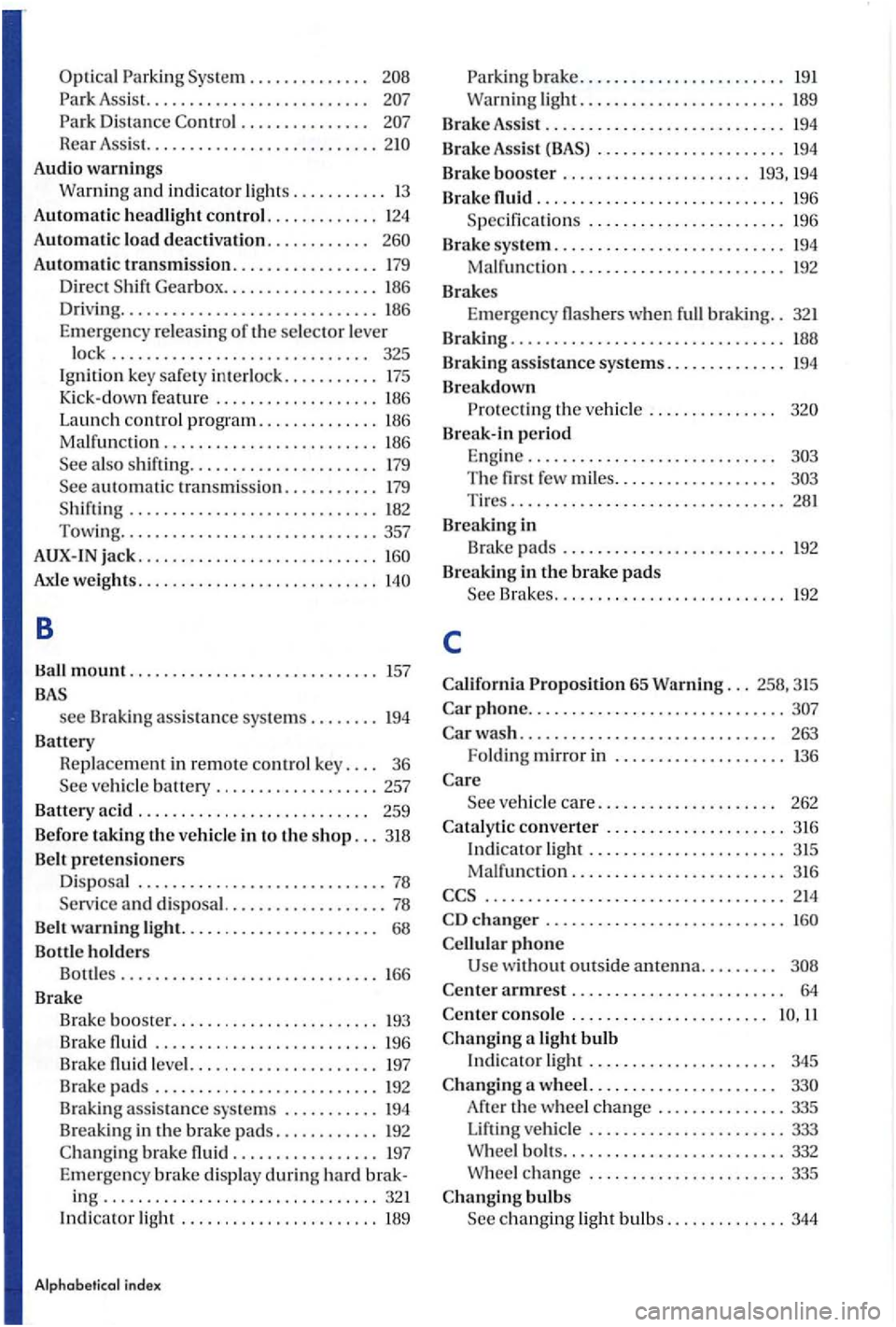
Optical Parking Sys tem . . . . . . . . . . . . . .
. . . . . . . . . . . . . . .
Rear Assis t. .................. ........
Audio warnin gs
Warning and
indicator lights ........... 13
Automat ic headlight control ............. 124
Automa ti c load deactivation. . . . . . . . . . . .
Automatic transmission ................. 179
Direct
th e selector lever
l
ock .............................. 325
Ignition key saf e ty interlock ........... 175
Kick-down feature ................... 186
Launch
control program .............. L86
Ma lfun cti on ......................... 186
Axle weights ............................
B
mount ............................. 157
see Braking assistance syste ms .. ...... 194
Battery Replac e
ment in remote co ntrol key. . . . 36
Belt warning light. . . . . . . . . . . . . . . . . . . . . . . 68
Bottle
holders
Bottles . . . . . . . . . . . . . . . . . . . . . . . . . . . . . 166
Brake
Brak e booste r.
...........
.......................... 196
Brake l eve l. ...... ..... .......... 197 Brake pads .......................... 192
Brak ing
assistance sy s tems ........... 194
b rake ............. .... 197
Emerge ncy brake display
during hard brak-ing ................................ 321 Indicato r light ................... .... 189
Alphab etical index
Parking brake ........................ 19 1
Warning
light ....................... . 189
Brak e Assist ............................ 194
Brake Assist . . . . . . . . . . . . . . . . . . . . . . 194
B rake booste r ...................... 193, 194
Brake
............................. 196
Specifica tions
....................... 196
Brake sys
tem ........................... 194
Malfun ction ......................... 192
Brakes
Eme r
gency when full braking .. 321
Braking . . . . . . . . . . . . . . . . . . . . . . . . . . . . . . . .
Braking assistance systems. . . . . . . . . . . . . . 194
Breakdown Protect in g th e ve hicl e . . . . . . . . . . . . . . .
Break-in period
E ngin e .............................
Brakes ......... .................. 192
c
phone ....... ..... ..................
changer ........................... .
phone
w ithout outside antenna. . . . . . . . .
con so le . . . . . . . . . . . . . . . . . . . . . . .
a light bulb
Indicator light . . . . . . . . . . . . . . . . . . . . . . 345
th e wheel change ... ............ 335
ve hicl e ....................... 333
W heel bolt s ..................... ..... 332 W hee l change ....................... 335
Page 387 of 541
Booklet 1.1 Consumer
Consumer Protection Information
888
your authorize d Volkswagen dealer or swagen CARE Representati ve has
been unable to sat isfactorily address your cern, Volkswagen offers addi tional assistance throug h BBB a dispute reso luti on
program administ ered by the Council of Bette r
Business Bureau s.
The BBB progra m is free of c h arge to
yo u but there are some vehicl e age and mileage
limitatio ns, so please for more details:
1
yo u please be prepared
to pro vide the follo wing information:
name and address
The Number
Th e model, and model year of your
T he del ive ry date and current mileage of your vehicl e
A descri ption of the concern with your
The BBB program consis ts of two parts: mediation and arbi tratio n . Mediation m ea ns th atBBB staff fac ilitate negot iations between th e parties in an effor t to bring your
to a mutually acceptable reso lution . you do not agree with the mediated solution, you may req uest an arb itratio n hea ring.
Arbitration is a process by whic h an imparti al
p e rson makes a deci sion o n your claim. The bitrato rs are not connected with the a utomobile industry and serve on a voluntary basis.
p orti ng evide nce. ln stead of appearing in pe rso n, yo u m ay req uest a wri tten or eve n a phone a rbitrati on h ear ing. The BBB shaJ l m ake
every effort to obtain a finaJ reso lution of your within 5 business days of the heari ng ( that w as filed),
unl ess stat e or Federal law prov ides otherwise. then have the opp o rtunity to accept or reject
th e decision .
you accept the decision, th e manufacturer
will be bound by th e dec is ion a nd will be quire d to fulfill its obligation with in the frame specified by th e arbitra to r.
yo u r eject th e decis ion, you arc free to pursue other lega l re m edie s available under s ta te or fe deral law, and the manufacturer will
n o t be requir ed to com ply with any part of th e
permit ow ners to obta in a rep lacement ve hicl e or a refund of the purchase price under ce rtain circumstances. Althoug h th e provisio ns of these la ws vary from sta te to state, their intent is to p
rovide
owners wit h certain right s if th ey experi
e n ce significant serv ice -related diffi cul ties with
th eir new vehicle .
To the exte nt allowed by
each stat e's law, Vol kswage n requires that the ow ner first send wr itten n otificat io n to Volk -
Page 397 of 541
be performed in order to operate the device and to be functions to their extent:
Familiarize with the phone package .
Read the user's of the to be connected .
Driver distraction can cause accidents and serious injury. on or using a phone while driving can distract the driver from traffic.
settings so that the acoustic from the outside are (for the sirens of emergency
rescue vehicles).
areas with no or poor in garages and subways, phone conversations may be
interrupted, and it may be impossible to make
phone
some countrie s, emergency may be supported when a mobile phone is connected to a and/or has sufficient credit on it.
A or in other
switch off your phone at gas stations or wherever there is a fire or sion hazard. The electromagnetic radiation can cause sparks that can ignite vapors
and cause a fire.
nect to the phone age is disconnected.
Using a radio device in the without a connection to an ceed electromagnetic radiation thresholds. This if the outside antenn a is not
8 inches tween the antennas of the phone and the pacemaker , since phones can
Nev er carry a phone that is ed on in the breast pocket over a
pacemaker .
The center armrest can interfere with the er's movement and thu s cause dents and seve re injuries.
keep the armrest
area on the stee ring the seat ests or the areas between these points and the drive r/passengers.
driving.
Owner's
Page 398 of 541
areas with regulations to or prohibiting the use of
and
in
recharge rs may damage the
High speeds, poor weather or road tions as as the quality of the network nection can the
General information
if the phone is no t set in the
ph one in the phone to the pho n e package via Hands-Free (HFP ).
the operat ional instructions of the
int erru ptions may
occur in dead spots .
Most
devices are sh ielded against RF
( high- fre qu ency) signals. some rare cases, ever, elec tronic devices may not be shielded
against the
terference may occur.
Bluetooth technology connects a phone to
the hands-free equipment of the vehic le .
use compa tible Bluetooth devices . tion regarding compatible Blu etooth products can be obtained from the
Some phones are detected when the ign ition is swi tched on and nected. Therefore , the phone and the
tooth function of the active
Declaration of Conformity
S1nn GmbH & Co. KG herewith declares that the
UHV-High device conforms to the requ irements of the regulations of the 1999/5/EC directive. A copy
o f the
Some countries may have restrictions
authorities.
safety inst ructi ons, read of the device connected to the
Bluetooth-compatible devices.
Introduction 5
Page 399 of 541
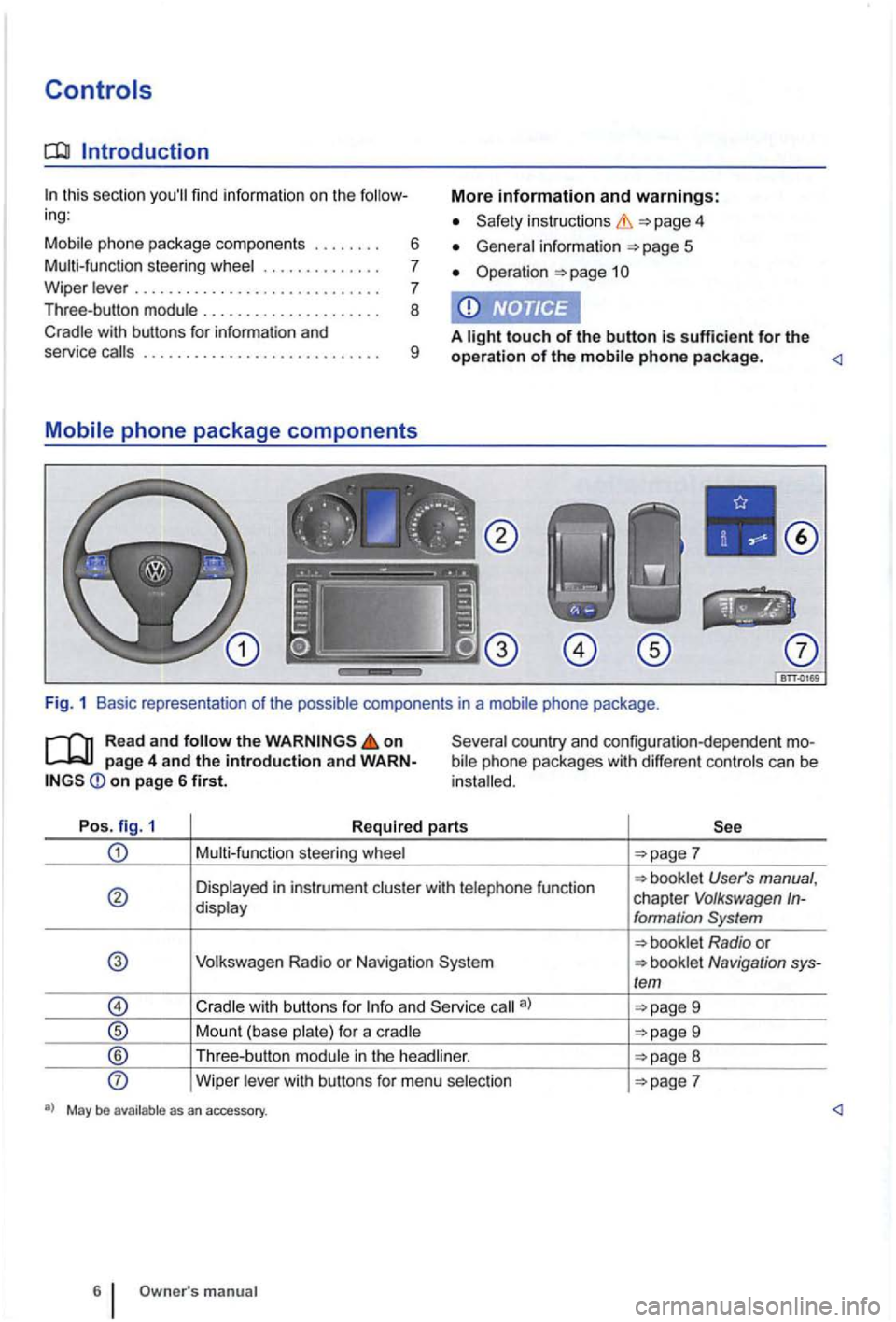
Introduction
In this section you'll find information on the follow
ing :
Mobil e phone package component s
....... .
Multi-func tion stee
ring whee l ............. .
W ipe r leve r
............................ .
Three-bu tton modu le .................... .
Cradle with buttons for information and
6
7
7
8
More information and warnings:
instruction s 4
General in fo rma tion 5
Ope rat ion page 1
A light touch of the button is sufficient for the service call s ............. .............. . 9 operation of the mobile phone p ackage.
bile phone packages with different controls ca n be
in stalled.
Po s. fig. 1
Required parts
Multi-funct ion steering whee l
User's manual , chapter V olkswagen In-display formation System
Volkswagen Radio or N avigation Navigation sys-/em
9
Mount (base plate) for a c radle 9
® Th ree -button module in the head liner. 8
Wipe r lever with bu ttons for menu selection
manual
Page 400 of 541
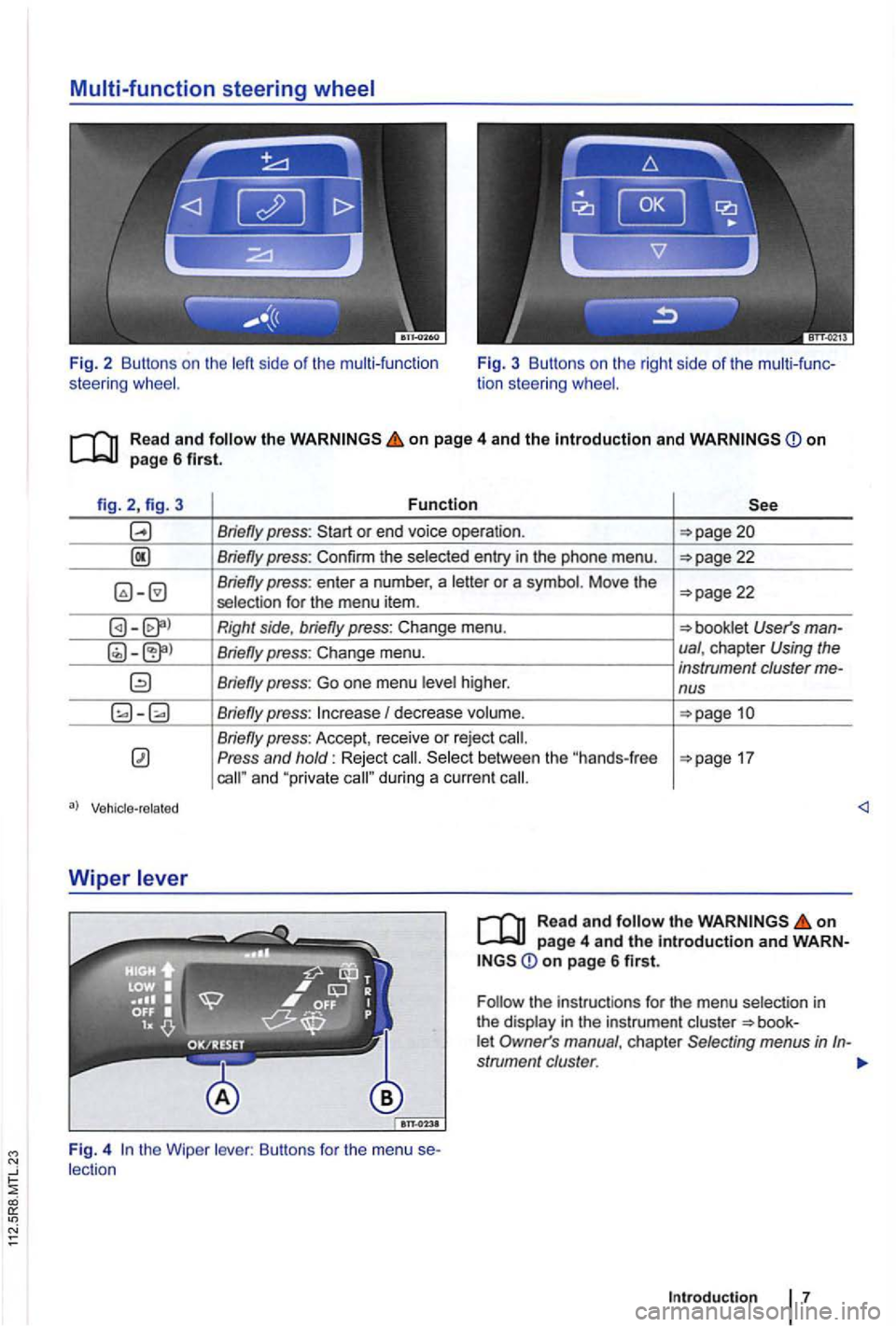
Fig. 2 Buttons on the left side of the multi -function
steering F ig. 3 Buttons on the right side of the
on page 4 and the Introduction and
Wiper
Function
Briefly press:
Briefly press: Confirm the selected entry in the phone menu.
22 selection for the menu item.
Right side, briefly press: Change menu.
I decrease volume.
Press and hold: Reject and "private
on page 6 first.
the instruc tions for the menu selection in
the display in the instrument
Page 402 of 541
-
-
--= -
-
-
--
Not in the United
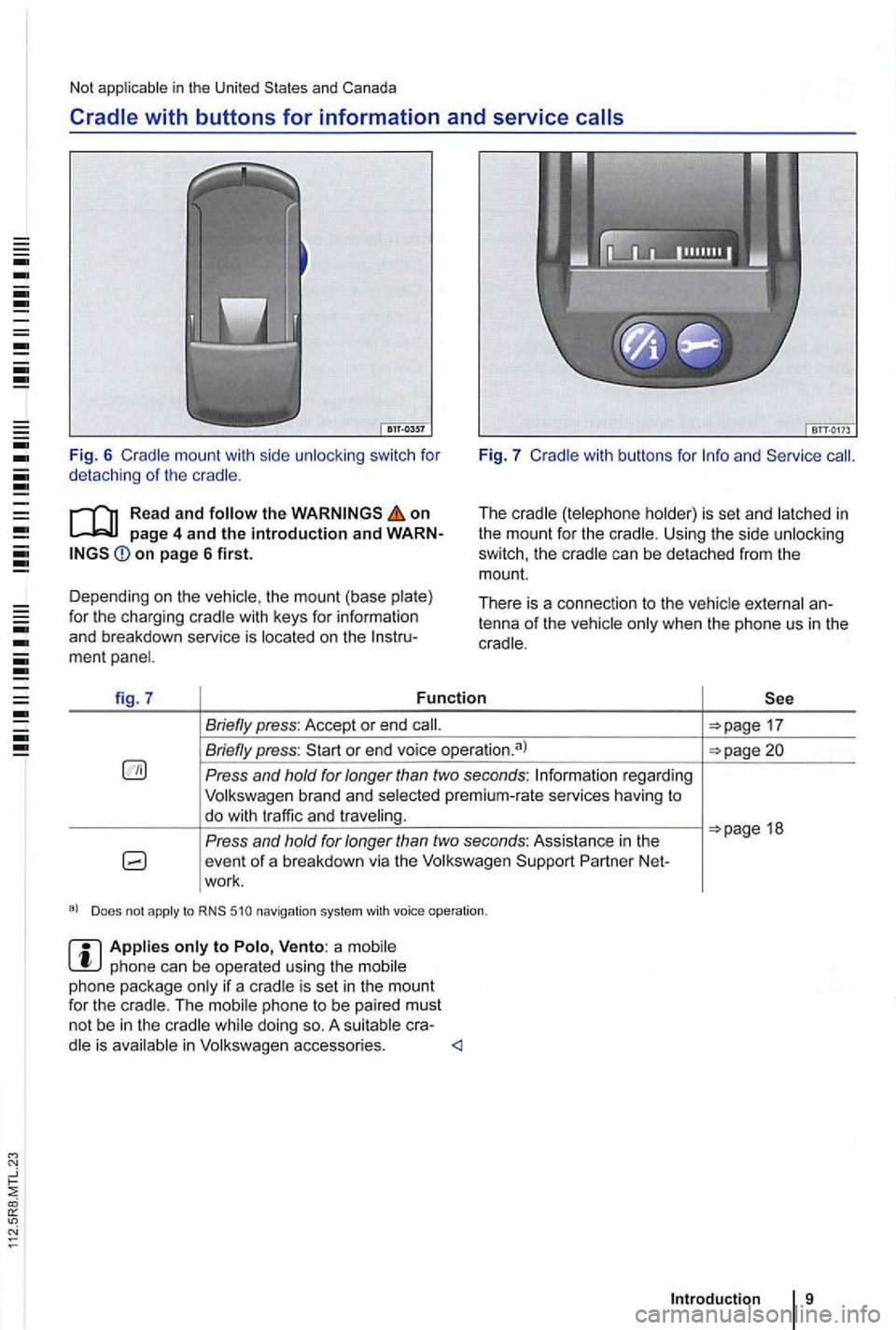
switch for
detach ing of the
Read and the on page 4 and the introduction and on page 6 first.
Depending on the the mount (base for the charging
Fig . 7
The Us ing the side can be detached from the
mount.
Th ere is a connec tion to the
fig . 7 Function
Briefly press: Accept or end
Briefly press:
Press and hold for longer than two seconds: regard ing
Volkswagen brand and
Press and
Does not apply to 510 navigation syst em with voice operation .
phone can be operated using the phone package is set in the mount
for the The phon e to be pa ired must not be in the is
18
Intr oduction 9
Page 403 of 541
Operation
Basic functions
ing:
Switching on or off . . . . . . . . . . . . . . . . . . . . . . . 1
. . . . . . . . . . . . . . . .
funct ions and settings are when the ed by
of the
?the page 7 or on the wiper
Switching on or off
on page 4 and the introduction on page
The key in the ignition.
C hanging the
on page 4 and the introduction on page
The can be set using the
can phone.
More information and warnings:
instructions
information
page 6
page 12
Operating a can cause noise in the speakers.
off th e ignition.
Remove the phone package is switched off.
An act ive
is made or received
via the phone package.
W ith incoming or ou
tgoing the radio program
o r any other source of music is sw itched to mute ,
so that the not be interrupted by
unn ecessary background noise.
to "maximum" and adjust
the knob on the radio .
Page 404 of 541
Navigation system
the event that route guidance has been started,
navigation instructions are also issued during calls.
necessary, disconnect active, i.e. automatically connected, Bluetooth connections of the mobile
phone .
Deac tivat e the key lock and screen saver of the mobi le phone .
To
Activa te Bluetooth on the mobile phone .
Connect the mob ile phone with the mobile phone package .
phone can be operated using the mobile
phone package only if a cradle is set in the mount
for the cradle . The mobi le phone to be paired must
not be in the cradle while doing so. A suitable cra-
dle is avai lable in Volkswagen accessories.
Operation
Page 405 of 541
First steps
Introduction
this section
and warnings:
inst ructions 4
General information 5
Controls page 6
17
menu 22
Driver distraction can cause accidents and serious persona l
hicle is not moving.
guage -depend ent chara cters and services .
Pairing the
Read and on page 4 and the introduction and on page 12 first.
E
ach mobile phone must be initia lly paired to the
mo bile phone packag e via Bl uetooth hands-free
profile (HFP
).
Linking takes several minutes .
vehicles without the menu in the instrument cluster, perform pairing
via the mobi le phone 13 .
Applies to vehicles with a charging cradle: is not necessary to set the
phone package and
the mobile phone.
Depending on the
1: the Bluetooth connection to visible
Activate the Bluetoot h function on the mobile
phone.
Th e mobile phone is no w visible for several nutes.1> Repeat steps 1 and 2 after the time tion if no successful pairing took place.
Access ph one menu in the ins trum ent cluster
d isp lay.
Phone search to search for comp atible
B luetooth phones in the vehic le . After a
successful search , a l ist with the Bluetoot h names of
3: Pair the mobile phone
Time-limited password entry! Please finish reading
step 3 completely before carrying out next steps .
if n ecessary, activate "Wait for inco ming tooth connec tions " on the mobile phone.1
)
Have the mobile phone handy, since there is a
time limit for entry of the password .
phone from the device list in the display on the instrumen t cluster .