Automatic off VOLKSWAGEN GOLF PLUS 2012 Owners Manual
[x] Cancel search | Manufacturer: VOLKSWAGEN, Model Year: 2012, Model line: GOLF PLUS, Model: VOLKSWAGEN GOLF PLUS 2012Pages: 541, PDF Size: 98.86 MB
Page 25 of 541
MFD menu
Please first read and not e the introductory information and heed the on page21.
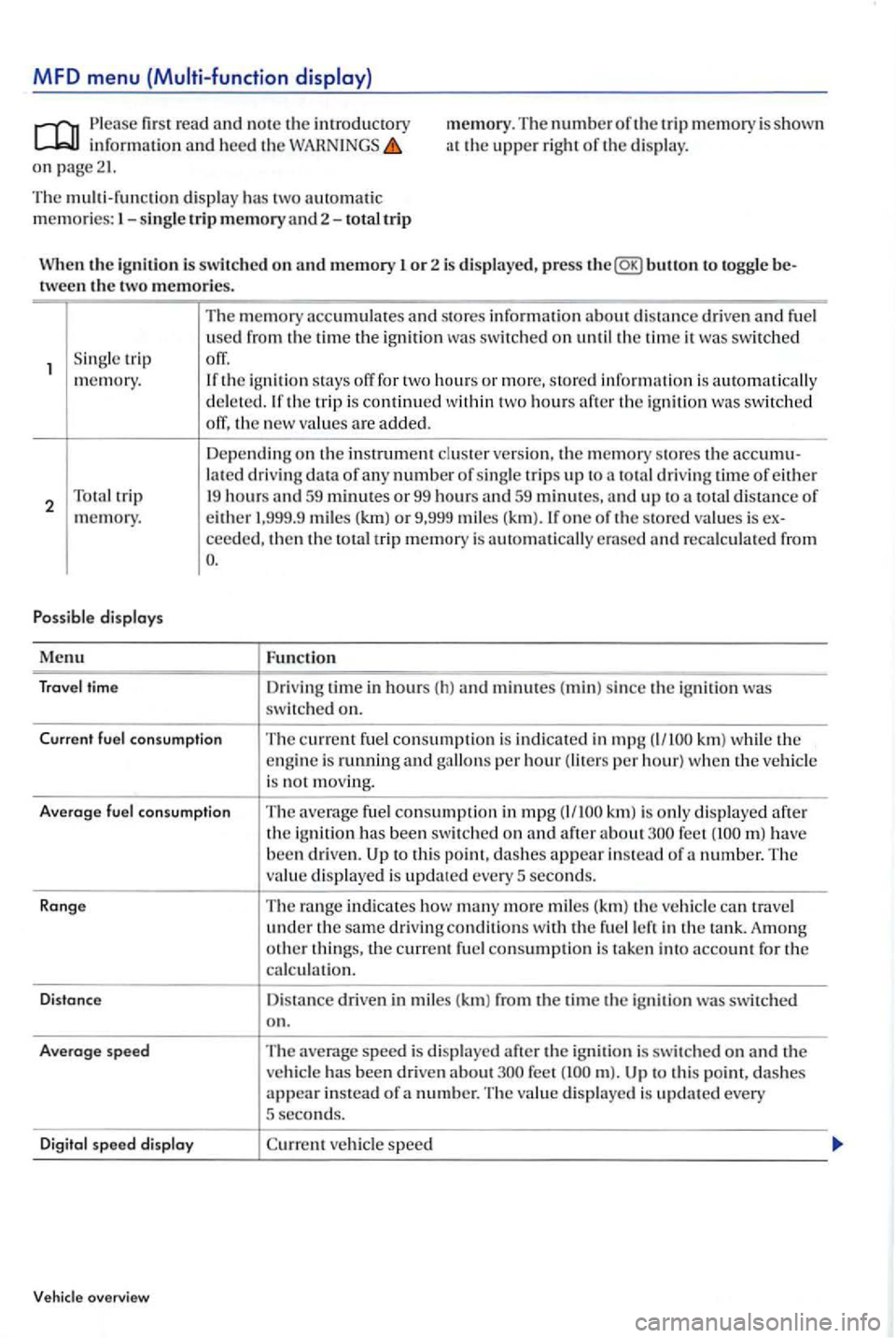
memory. The number of the trip memory is shown at the upper right of th e di splay.
The multi-function displ ay has two automatic memories:
the ignition to toggle tween the two memories.
S in gle trip
memory.
2
s tores information about d istance driven and fuel
u se d from the time the ignition
switched off, the new va lues are added.
Dependin g on the in strument cluster ve rs ion, the m emory stores the lat ed driving data of a ny number of sing le trip s up to total driving time of either 19 hours
ceed ed, then the total trip memory is
Function
Dri ving time in hours ( h) and minutes (min) si nce the ignition was switched on.
Current fuel co nsump tion
The current f u el consumption is indicated in mpg km) the engine is running and per hour) w hen the ve hicle
i s not m ov ing.
Averoge
fuel co nsum ption The average fuel consumption in mpg after about have been driven. to this point, dashes appear in stead of a number. T he
v alu e displayed is update d every 5 seconds.
Ronge
The range indicates how many more mi les (km) the veh icle travel under the same dri ving conditions w ith the fuel
speed is di splayed after the ignition is switched on and the ve hicle has been driven about to thi s po i dashes appear in stead of a n umber. Th e va lue displayed is updated every 5 second s.
D
igit o l speed disploy vehicle speed
Vehicle overview
Page 28 of 541
Lights & sub-menu
Ple ase first read and note the introductory in formation and heed the on page 21.
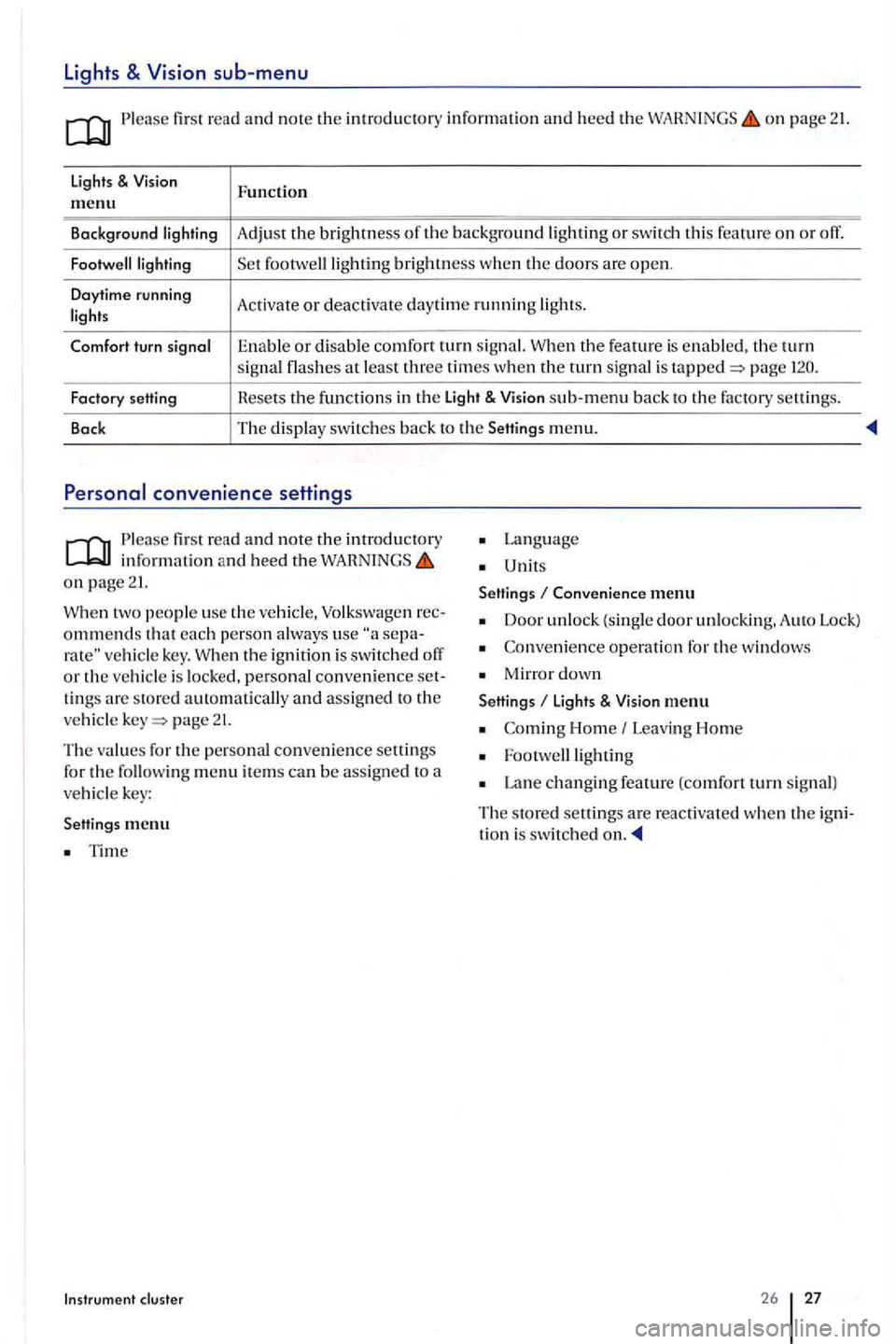
lights & Function m enu
Background Adjust the brightness th e background or swit ch thi s feature o n or off.
brightness w he n the doors are open .
Daytime running
Activate or deac tivate day tim e running
the feature is enable d . the turn signal at least three times when the turn sig nal is page
Factory setting Hesets the f
u nctions in th e Light & sub-m enu back to the factory settin gs.
Back The
display switc hes back to the Setting s menu.
Please first re ad and note the introductory in fo rmatio n and heed the on page 21.
two people use th e ve hicle, Volkswage n ommends that each p erson a lways use vehicle key. th e ignition is swit ch ed o ff or the vehicl e is locked, personal convenience tings are store d automatically and assign ed to the
ve hicl e page 21.
The values for the personal convenience settings
for the followin g m enu item s can be assig n ed to a vehicl e key:
Settings me
nu
Tim e
Instrum ent cluster
Lan g uage
Unit s
Settings
Conven ience menu
Door unlock (single door unlockin g. A uto Lock)
Co nveni ence operati on for the windows
Mirro r down
Settings li ght s & menu
Home Leavi ng Hom e
Lan e changing feature (comfort turn s ig n al)
The s tore d settings are reac tiva ted whe n the tion i s switched
26 27
Page 50 of 541
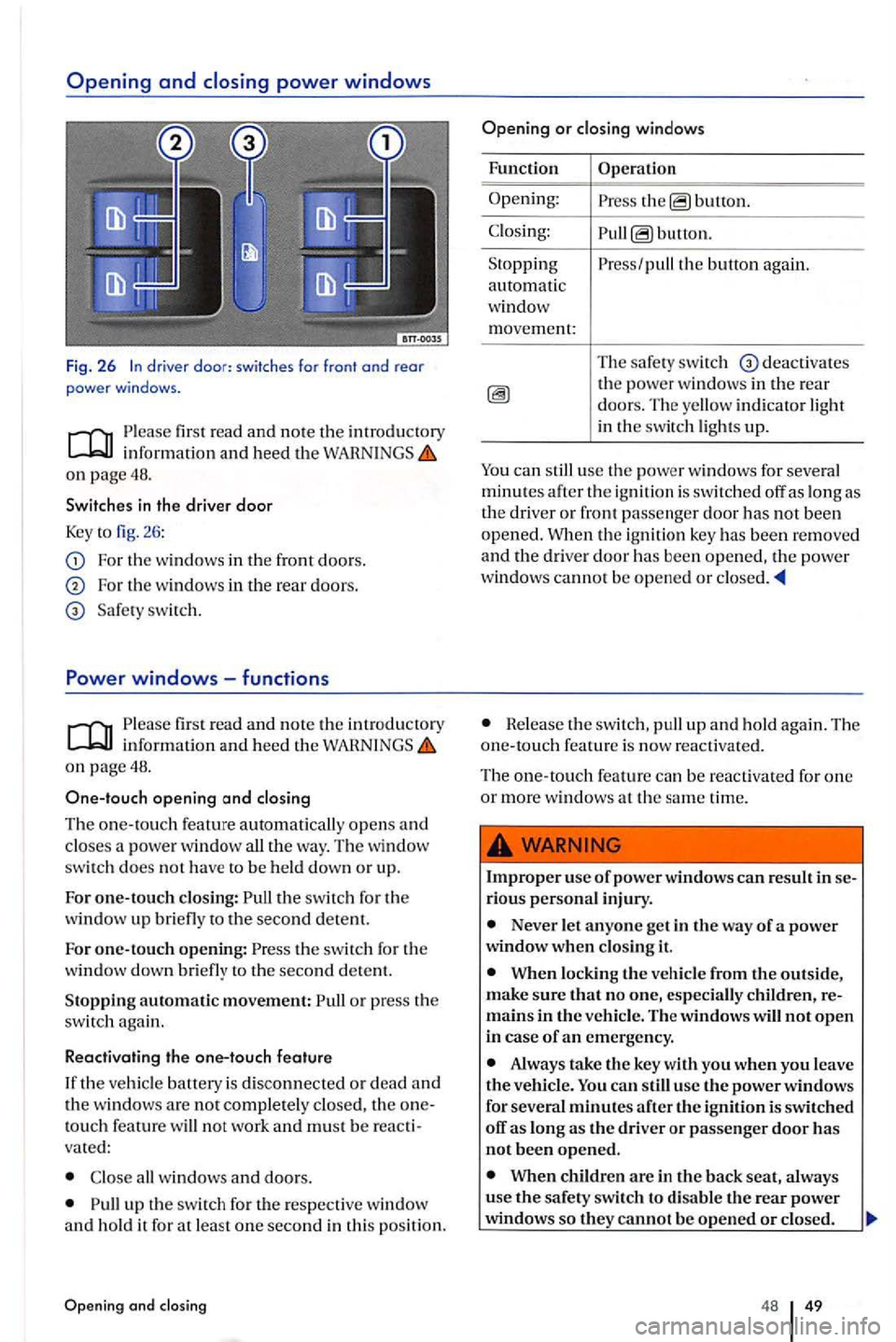
driver door: sw itches for front o nd rear power windows.
first r ea d and not e the introduc tory in formation and heed th e on page 48.
Switches
in the driver door
Key t o fig. 26 :
For th e windows in the fr o n t doors.
For the windows in the rear doors.
windows -functions
fir st r ead and note the introdu ctory information and heed th e on page 48.
One-touch
opening and
th e switch for the
window up to the second detent.
For one-touch ope nin g: the swit ch f or th e
w indow down bri efly to th e seco nd dete nt.
Stopping automatic movement: or press the switch again.
Reactivating the one-touch
feature
If t he ve hicl e ballery is di sconnecte d or d ea d and
th e win dows are not completely closed, the onetouch feature will not work and must be re acti
vat ed:
up th e sw itch for the re spectiv e w indow and hold it for at least one second in thi s po sition .
Opening and closing
buuon.
button.
the button again.
Th e
safe ty switc h deact ivates the power windows in th e rear doors. T he yellow indi cator ligh t
in the switch lig ht s up.
You can still use th e power w in dows for seve ral minutes aft er th e ign itio n is switc h ed off as long as
the driver or front passe nger doo r has not been opened. When the ignitio n key has bee n re moved and th e dri ver door ha s been open ed , the powe r
w ind ows cannot be ope ned or
He lease th e swit ch , pull up and hol d aga in. Th e one-to uch fea tu re is now react iva te d.
The one-touch feature ca n be reactiva ted for one or more window s at the same tim e.
Imprope r use of power windows can result
N ever let anyone get in the way of a power when clo si.ng
When lo cking the vehicl e from the outside, make sure that no one, especially c hildren, remains in the vehicl e. Th e w indows will not open in case of an emergency.
Always take the key with you when you leave the vehicl e. You ca n still use the power windows
for several minutes after the
When children are in the back seat, always
u se the safety switch to disable the rear power windows so they cannot be opened or closed .
48 49
Page 124 of 541
Switching lights on and off
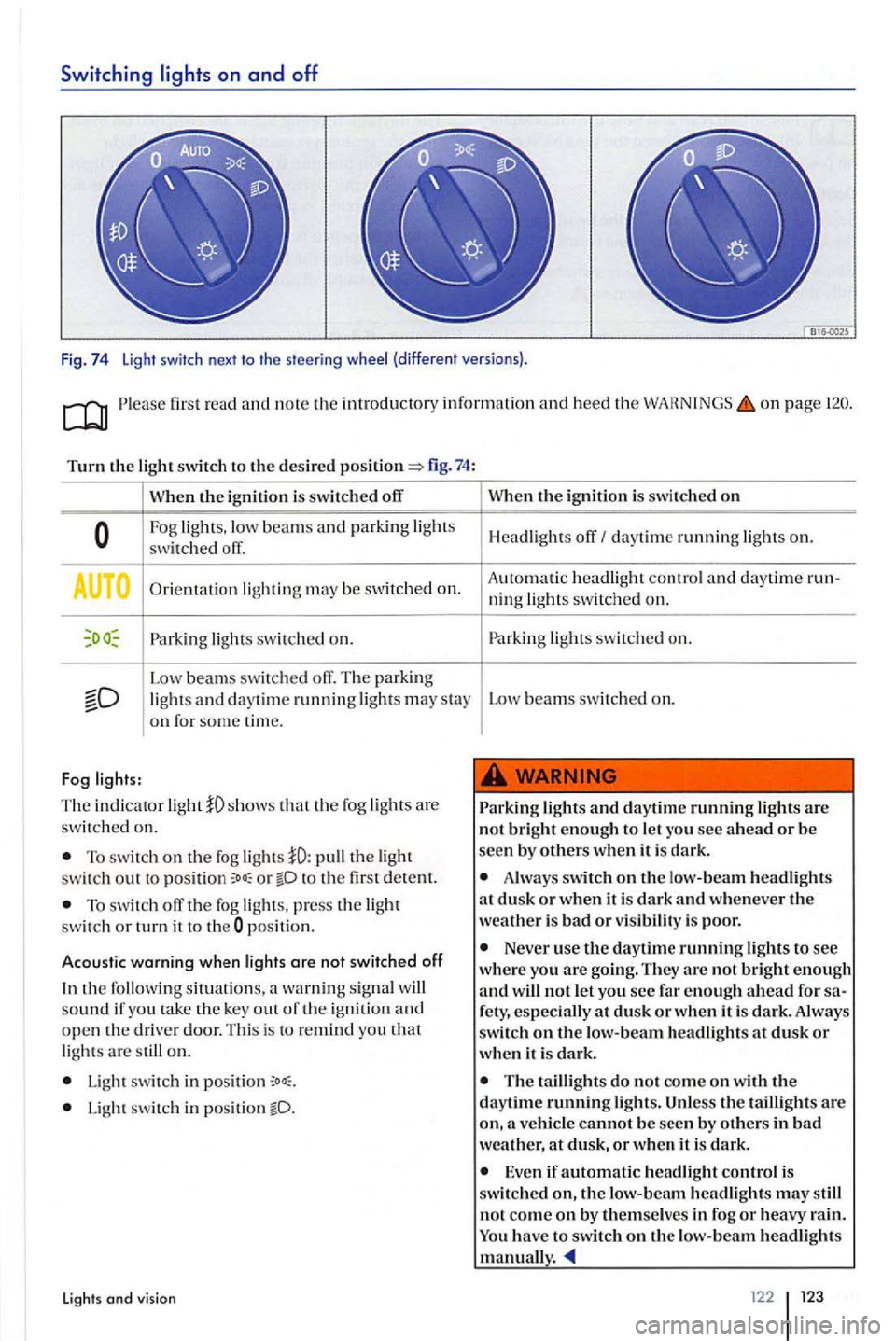
Fig. 74 Light switch next to the steeri ng (different versions).
first read and note the introducto ty information and heed the o n page
Turn the switch to the desired fig . 74:
When t11e ignition is swit ch ed off
Fog lights,
Orientation light ing may be switched on.
light s sw itched on.
--Low beam s swi tc h ed off. T he park ing and day tim e runnin g light s may stay on for some time.
Fog
The indicator light
To switch on the fog the swi tc h out to o r to the first detent.
T o switch th e fog lights, press the ligh t switch or turn it to t he pos ition.
Acoustic warning when lights are not switched off
the following situati on s, a wa rnin g sig nal sound if you take the k ey out o f th e op en th e driver door. This is to remind you that lights are on.
Light switch in
Light switch in position
Lights and vision
t11c ignition is swi tched on
Headligh ts daytim e running on.
A ut
omatic headligh t and daytime ning lights sw itched on.
switched on.
Low beams switched on.
lights and daytime running lights are not bright enough to let
Always switch on t11e lo w-beam headlights at dus k or when it is dark and whenever weather is bad or visibility is poor.
Never use the daytime running lights to see where you are going. They are not bright enough and will not let you see far enough ahead for
The taillight s do not come on t11e daytime running light s. the taillight s are on,
Even if automatic headlig h t control is switched on, the headlights may st ill
not come on by themsel ves in fog or heavy rain. have to switch on the low-beam headlights manual!.
122 123
Page 125 of 541
Lights and Vision functions
Please first read and note the introdu ctory information and heed the on page
Da ytime running lights
Separa te l
amps are installed in the
Turning on daytime running light s
Press a
nd hold the turn signal leve r and high beam switch and to th e back (right s ig nal an d
h eadlight flash e r).
The daytime running lights are switched on every
tim e the ignitio n is swit ch ed on and the light
swi t
ch is in pos ition or T he indicato r light DRL in the in slrument cluster in dicates th e t iva te d function page 121.
If the light sw itch is in position
page
Automatic headlight control
Aut omati c headl ight contro l is resource only and cannot a lways recogn ize all driv ing situ ations.
Automatic activati on:
I f th e tw
ilig ht sensor reg isters darkness, for
km /h ).
If the ra in
sensor recog nizes rain and switches th e windshield wipe rs o n.
Adoptive
Front Lighting
T he Adaptive Front Lightin g
mounte d lamps automatically improve road mination durin g co rnerin g.
veh icles equipped with th e feature is sw itched o n and page
som e m ode ls. the headlight s move dentl y of eac h other, eve n in strai ght-ahead
drivi ng. They adapt to weather con diti ons and speed to be n er illum in ate th e roadway. The light s return to t heir orig in al posit io n after a delay ,
dependin g on th e s pee d of the ve hicle.
B
efor e driv in g If
the light switch is
in the positio n , veh icle
lighti ng, as as instrument and switc h nati on, automatically turn on and off in the lowing
brightness is regis te red.
I f drivi ng u
nder mph (65 km /h ) for
tlles.
I f
the win dshie ld wipe rs have no t moved for
an d other accidents can happen w hen yo u cannot see the road ahead and w hen yo u
cannot b e seen by other motorists.
Never use daytime running lights to see where you a re going . Daytime running lights a re
not bright enough to
T he ta illi ghts do not come on w he n the time runni.n g lights are switch ed on. A vehicle without ta illight s on cannot be seen by o th ers
w hen it is dark or raining or v is ibility is o ther-
wis e poor.
Page 130 of 541
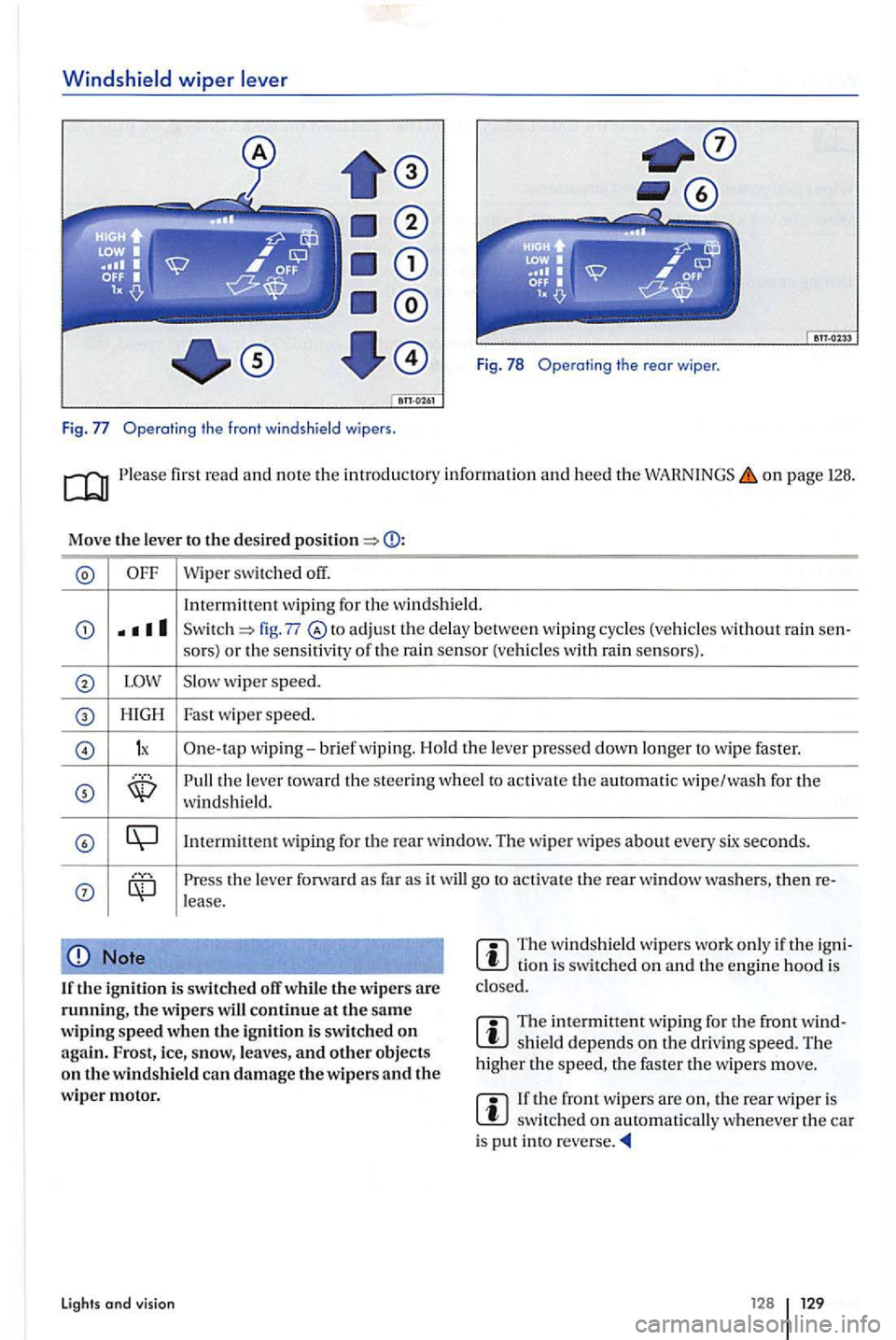
Windshield wiper lever
Fig . 78 Operating the rear wiper .
Fig. Operatin g t he front windsh ie ld wipers .
on page 128.
Move the leve r to t he des ired
Wipe r switched off.
In term itt
ent wiping for the w ind shield.
fig. 77 to adj ust the delay between wip ing cycles (vehicles wit hout rain sen-
so rs) or the sensit iv ity of th e rain sensor (vehicle s w ith rain senso rs).
w iper speed.
H IGH Fast wipe r speed.
1x One-ta p wip ing-brief wiping. Hold th e lever presse d down longer to wipe faster.
the le ve r towa rd t he stee ring whee l to activat e the au toma tic wipe/wa sh for the windsh ie ld.
the leve r forward as far as it will go to ac tiva te the rear window then re-lease.
Note
If the ig n it io n i s swi tc h ed off whil e the w ipers are th e w ipers continue a t the sa me
w ip ing sp eed when the ign ition i s swi tched on agai n.
The w in ds hield wipe rs work only if th e tio n i s sw itched on and th e engine hood is
clo sed.
Th e intermittent wip ing for the front shield depends on the driving speed. The
h igh er the the faster th e wipers move.
th e rear w ip e r is s witc hed on automatically w henever the car is pu t in to
Lights and visi o n 12 8
Page 131 of 541
Wiper functions
first read and note th e introductory informat ion an d heed the on page 126.
Wip
er p erformanc e in diffe rent situations:
W he n th e veh icle is
not mov ing : The wip er speed changes tempo ra ril y to the next lower speed.
W hil e
the washer sys te m is wo rking, the climate control
During automatic wipe/wash: sys
te m switches to recircul ation for about seconds h elp prevent th e w asher flu id odor from enterin g the ve hicl e int e-rior.
D urin g int e
rmittent wip ing: S
peed-dependent interval con tro l: The high er th e speed, the faste r the wipers m ove.
Heated washer nozzles
The heatin g tha ws frozen wash er nozzles, but not the fluid suppl y hoses. When the ig niti on is
sw itch ed on, th e heat applied to the was he r zles is au to mat ically regulate d d ep ending o n th e
outs id e ai r t emperature .
Headlight washer system
T he headlight washer sys te m clea ns the headli ght
glass.
I f th e ign it io n
and the headli ghts (high or lo w arc swit ch ed on, the headlight s time and every fifth time th e front windshi eld washers a re activa te d. Thi s happen s only when the low or hig h beams are on whe n th e
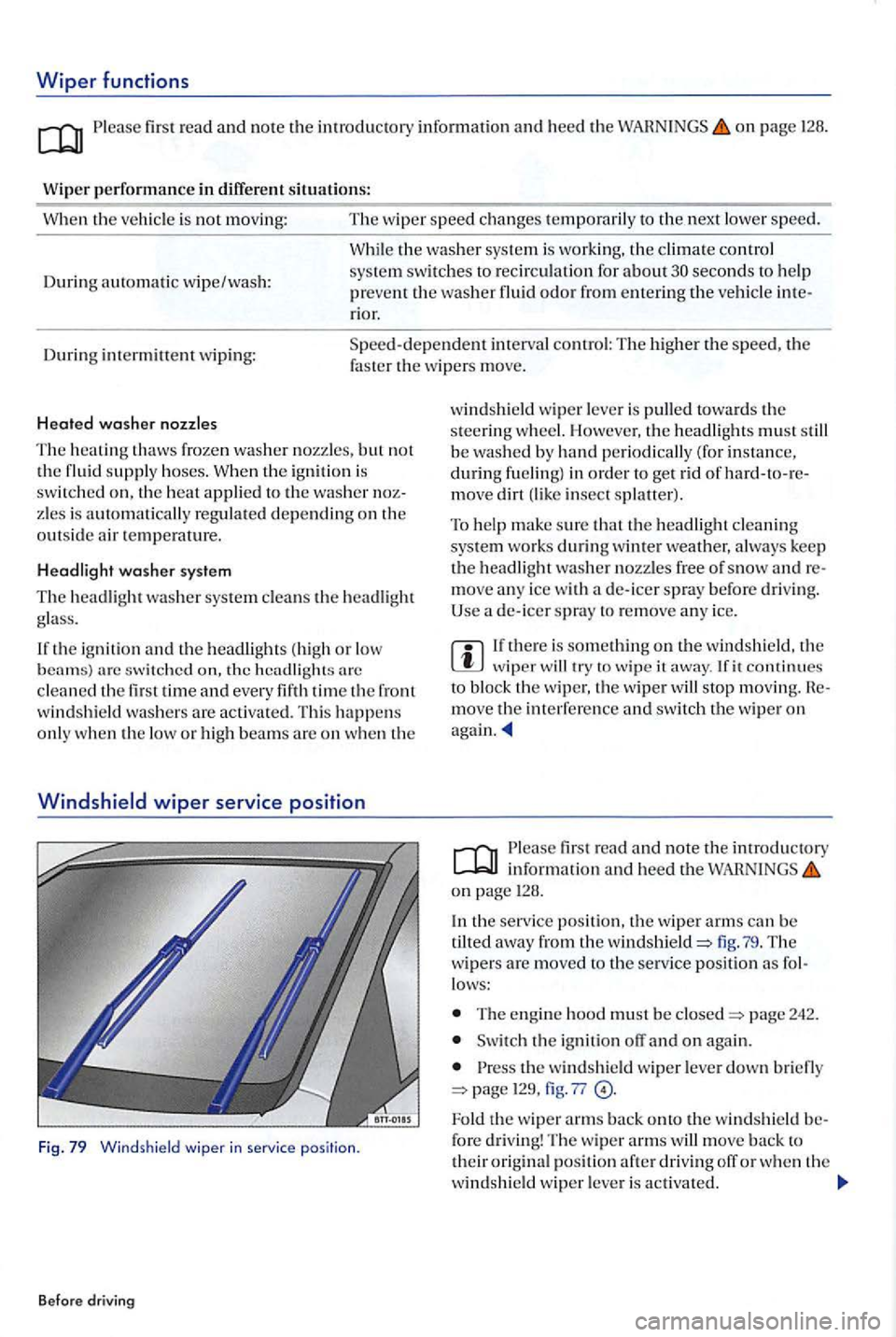
Windshiel d wi pe r service posit ion
Fig. 79 Wind sh ield wiper in ser vice position .
Before driving
windshi eld wip er leve r is pulle d towards th e
s teering w heel. Howeve r, th e headli ghts must s till
b e was hed by ha nd periodically (for i nstance, during fue ling) in order to get riel of move dirt insect splaller).
T o hel p
make sure th at th e headli gh t cleanin g syste m wo rk s during winter weather, a lways keep the headlight washer nozzles fre e of snow move an y ice w ith de- icer spray before drivi ng.
Use a de- icer spra y to re m ove an y ice.
wiper will try to wip e it away . fit continues bloc k the wiper, th e wiper wil l s top moving. move th e in terfer ence and swit ch th e wip er on
firs t read and note the introductory in formation and heed th e o n page 128 .
I n
the service posit io n, th e wiper arms can be
tilted away from the windshield=> lig . 7 9 . The w ipers are move d to the ser vice pos it io n as lows:
T he e ngin e hood must b e closed=> page 242.
Switch the ig nition o n again .
th e windshie ld wiper leve r down brie fly page 129, fig . 77
Fold the wipe r arm s back onto the w indshi eld fo re driving! Th e w iper arms will move back t o their origin al positi on afte r dri vin g off or w he n th e
winds hi eld wip e r leve r is activa te d .
Page 132 of 541
lifting and folding the wiper blades away from
th e
windshield
Move the wiper arm s th e serv ice position
Do not handle the wiper b lades; h andle the
wipe r arms o nl y at the a uachment above the w iper blades.
Rai n sens or
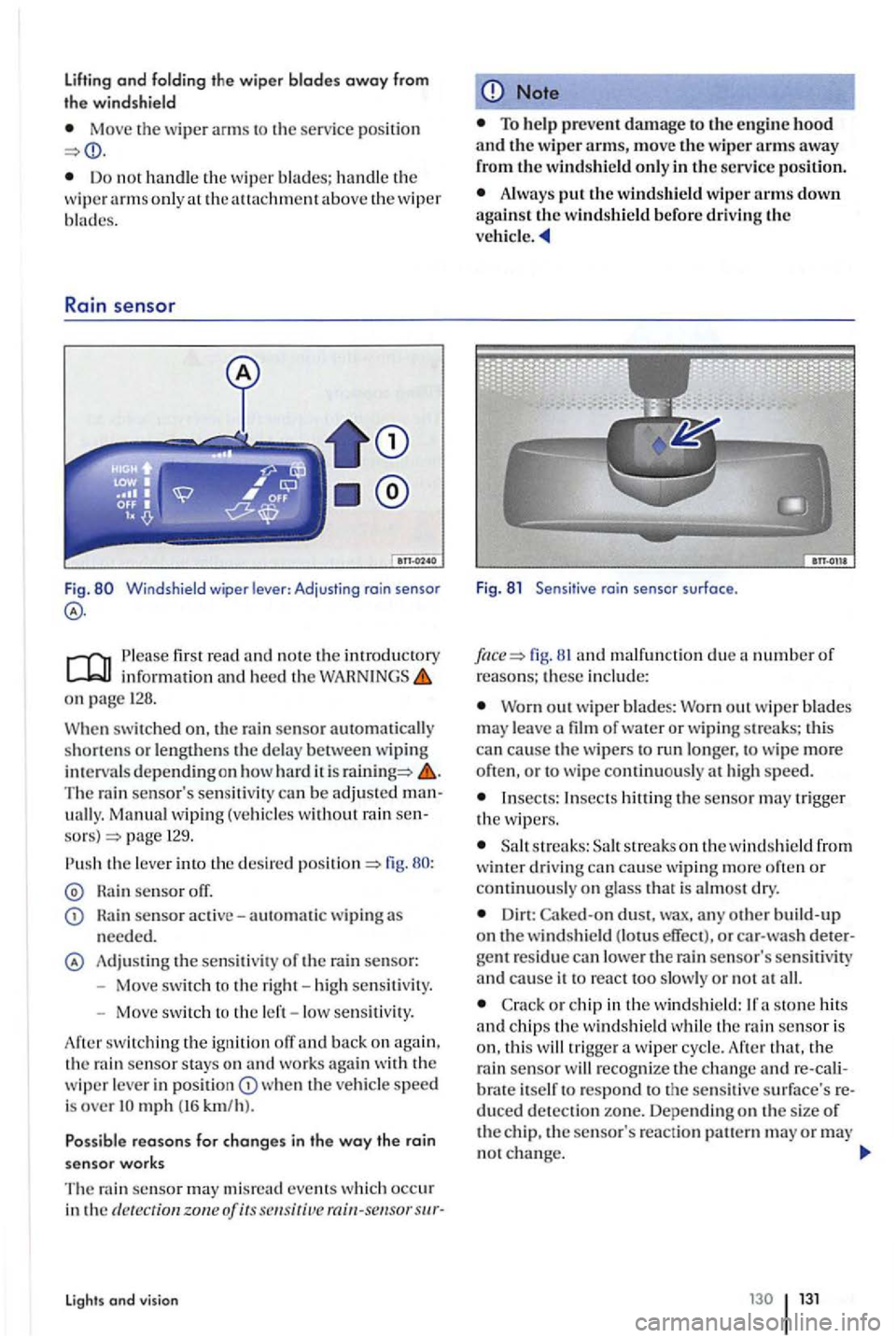
Fig. Windshield wiper lever : Adjusting rain senso r
first read and note the introductory information and heed th e WARNINGS on page 128.
When
swit ched on. the rain sensor automatically
shorte n s or le ngthens the de lay betwee n wiping in tervals depend in g on how hard it is The rain sensor's sensiti vity can be adjusted manuall y. Manual wiping (vehicle s w ith out rain sensors) page 129.
Rain sensor off.
sensor active-automatic wiping needed.
Adju stin g the sensit iv it y of the rain sensor:
- Move switc h t o the right -hi gh sen siti vity.
- Move sw itch to the left - low se nsitivity.
swit ch in g th e ignition off an d back on again ,
t h e ra in sensor stays o n and works agai n with the wiper leve r in w he n the vehicle speed is over
events which occur in the dete ction zone of its
Lights and vision
Note
Always the windshield wiper arms down against the windshield before driving the ve hicle.
Fig . 8 1 Sensit ive rai n sensor surface .
fig. 81 an d malfu nction due number of reasons; these in clu de:
Worn out w ip er blades: Wo rn out w iper blades m ay lea ve a film of water or w ipi ng streaks; thi s can cause the wipers run longe r, to wip e more often , o r to w ipe continu ously at h ig h speed.
Insects: Insects the sensor may tri gger the w ipers .
s tr eaks: streaks o n th e w indsh ie ld from
w inter drivin g can cause wiping more often or continu ously on g lass that is almos t dry.
Dirt: Caked-on dust, wax, any build- up on the windshield (lotus effect), or car -w ash detergent residue can lower the rain sensor's sen siti vity and cause it to react too slowly or n o t all.
C ra ck or chip in the wind shi eld :
th at, th e
rai n sensor will recog nize the c ha nge re -cal iitself to respond to the sensit ive su rface's reduced detection zone. Depending on th e s ize of the chip, the sensor's reaction ern may or may no t change.
Page 157 of 541
Driving with a
Please fir st read and note the introductory
o n page 152.
Headlight settings
Towing a tra
ile r can ra ise the fron t end of th e ve
hicle enough fo r the low beam s to blind other road u sers. the headlight ra nge adjustment feature
to lower the light cones as req uired . your vehicle does not have headlight range adjustment, have
the headli gh ts adjusted by an authorized Volkswage n dealer or au th orized Volkswagen Serv ice Facility . Vehicles with gas-d ischa rge lamps self-adjus t to vehicle load an d do not need manual adjustme nt.
Special towing
considerations
Due to th e combined towing weig h t includin g the hi gh er gross vehicle weight, the stopping distance is longer .
Before driving downhill , especially on hills that
a re long or steep, shift in to a lower gea r (m anual
t ransmi ssion) or a lower drive position (automatic
t ra n smi ssion) so that the eng in e helps to brake th e vehicl e. Otherwise, the b rake system could ove rheat and might fail.
The ve hicle's center of grav ity and, i n
Weigh t dis tr ibutio n i s especially bad if the
tow ing veh icle is e mpty and the traile r i s loaded. If
you absolutely must d rive with this combination , drive with extra care an d at a reduced speed.
Starting off with a trail er on hills
Depend ing o n how steep the h ill is and the combined tow ing weig ht, a parked vehicle wi th trailer can roll backwards when yo u firs t sta rt mov ing.
When sta rti
ng off with a trailer on a hill :
Depress and ho ld the brake pedal.
Befo re driv ing
Ma nual transmiss io n : d epress th e clutch fully.
Shift into fir s t gear or drive posi t ion D page 179,
Unlock the par ki ng brake and release it
w hil e ho ld ing th e unl ock butto n.
page assistance systems.
Do not re lease th e parkin g bra ke leve r until the engine sta rt s to move th e vehicle fonvard. your veh icle has an automatic t ransmissio n, yo u can
also depress a nd ho ld the brake pedal for added b raking and then letup on th e brake pedal w hen
you feel th a t the vehicle to move fo rward.
Drive ahead slowly at first.
A lways watch what i s happening up a head
and a round you. Brake earlier than you would if yo u were not to wing a trailer.
Drive especially care full y and accel erate gently. Always avoid sudde n m an euvers and h ard braking.
Be especiall y care ful when p ass ing other hicles. Reduce speed immediate ly if t he trailer
s hows the s lightes t sig n of swayin g. Reduce speed immediatel y if the t ra ile r shows even the
slightest sig n of sway ing.
Neve r try to sto p th e swayin g by accelerating.
Page 176 of 541
hide key can be removed from the ig nition
sw itch only when th e tra nsmiss ion is in Park
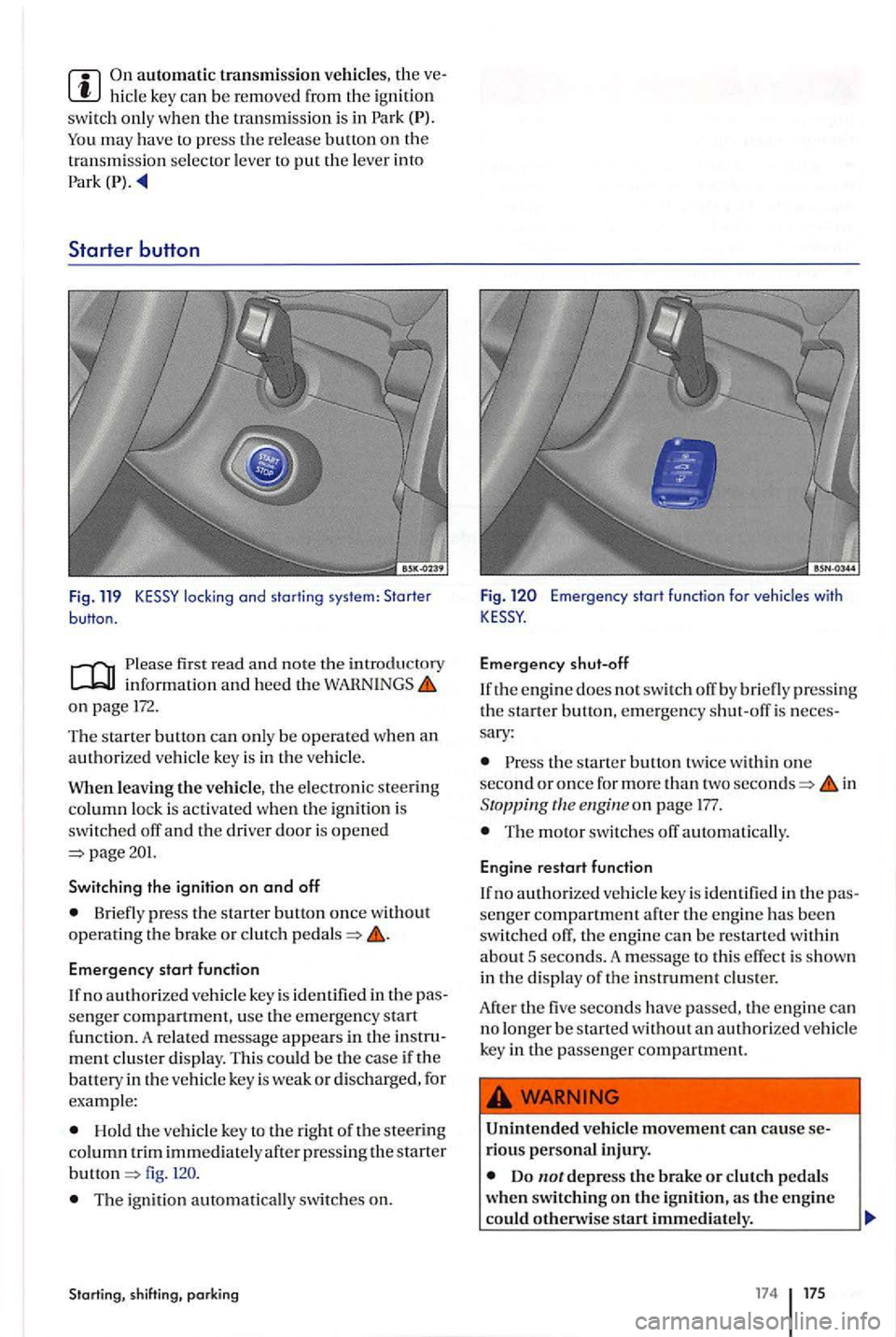
locking and starting system: Starter button.
first read and no te th e in trod uctory inform ation and heed the on page 172.
The starter button can only be opera ted when an authorized vehicle key is in t h e vehicl e.
leaving the ve hicl e, the e lectronic stee rin g
co lumn lock is ac tiva te d when th e ign ition is switch ed off and the driver door is opened page201.
Switching the ignition on and off
Briefly press the s ta rt er button once w ithout opera ting th e brak e or clutch
Emergency start function
If n o authorized vehicle key is identifi ed in the pas
se nger compartment, use th e e merge ncy start functio n . A re lated message appears in the in stru ment cluster disp lay. This could be the case if th e
battery in th e ve hicl e key is wea k or discharged, for
e xample:
Hold the vehicle key to the righ t of the stee rin g
column trim immedi a te ly after press ing the star te r button fig .
T he ign ition automatically switc h es on.
Starting, shi fting, parking
Fig . Emerge ncy start function for vehicles with
Emergency shut-o ff
If the en g ine does no t sw itch off by bri efly pre ssing the s tart er bulton, emergen cy shut-off is neces
sary :
the starte r buuon twice withi n one
second o r once for more than two seconds=> in Stoppingtlleengineon page 177.
The moto r switch es off automatically.
Engine restart function
If no authorized vehi cle key is identi fied in the pas
se nger compartment after the engine has been
switc hed off, the e ng in e can b e res ta rted w it hin about 5 seconds. A message to this effect is sh own
in the di sp lay of th e in stru ment clu ster.
After the five seconds hav e passed, the en gin e ca n
no longer be starte d without an authorize d ve hicle
key in the passenger compartment.
Unintended vehicl e movement can ca use se
rious personal inju ry.
Do
__ e_n_v_is_e_s_t_a_rt_i_m __
17 4 175