navigation VOLKSWAGEN ID.4 2020 Owner´s Manual
[x] Cancel search | Manufacturer: VOLKSWAGEN, Model Year: 2020, Model line: ID.4, Model: VOLKSWAGEN ID.4 2020Pages: 417, PDF Size: 6.31 MB
Page 138 of 417
Position engaged and ECO assistance deac-
tiv
ated: no brake energy recuperation.
Position engaged and ECO assistance acti-
v
ated: automatic brake energy recuperation.
The energy recovery level is selected auto-
matically depending on the navigation data
and traffic situation.
Position engaged: high brake energy recu-
peration
The v
ehicle also performs recuperation when
the brake pedal is pressed.
Eco assistance
The ECO assistance function helps the driver
to use the engine braking effect of the vehi-
cle efficiently. It selects the energy recovery
level depending on the navigation data and
traffic situation.
The ECO assistance function can be switched
on and off in the vehicle settings in the Info-
tainment system.
Driving down hills
When driving down hills, you should drive in
position B if possible.
Never allow the vehicle to roll down moun-
tains or hills in the neutral position N. WARNING
The higher the charge level of the high-
v
oltage battery, the lower the engine brak-
ing effect, to the point where no engine
braking effect may be generated at all. This
puts more strain on the vehicle brake.
x Never fully charge the high-voltage bat-
tery at high elevations, e.g. at the top of
a pass, in order to facilitate a braking ef-
fect by means of recuperation when de-
scending.
x Reduce your speed before driving down
a long, steep gradient.
x When driving down a long, steep gradi-
ent, slow the vehicle using the vehicle
brake. Troubleshooting
Deactivation of the drive is imminent
The charge level of the high-voltage battery
is too low.
The indicator lamp lights up during v
ehicle
operation.
The indicator lamp lights up red.
A text message is shown on the ID. Cockpit
Page 153 of 417
Adaptive Cruise Control
(ACC)
Introduction to the topic
The Adaptive Cruise Control (ACC) main-
tains a constant speed that you ha
ve set.
If the vehicle approaches a vehicle in
front, the ACC automatically adapts the
speed so that a distance you have selec-
ted is maintained.
Does the vehicle have ACC?
The vehicle is equipped with ACC if you can
adjust settings for ACC in the Assist systems
menu in the Infotainment system.
Speed range
You can set the speed between 20 km/h
(15 mph) and the maximum speed.
Driving with ACC
You can override the active ACC system at
any time. Cruise control will be stopped if you
brake. If you accelerate, cruise control will be
interrupted while you are accelerating and
then resumed.
The intervention by the ACC system is less
dynamic when towing a trailer.
Driver intervention prompt
If automatic deceleration by the ACC
system is not sufficient or the system
limits have been reached, the ACC
system will request you to also brake
by a corresponding message on the
instrument cluster. In addition, the
red warning lamp lights up and an
acoustic warning is given. Take over
control of the vehicle and be prepared
to brake.
Radar sensor
ACC detects driving situations using a radar
sensor at the front of the vehicle. The range of the radar sensor is up to approximately
160 m (
around 520 ft). WARNING
The intelligent ACC technology cannot
o
vercome the laws of physics, and func-
tions only within the limits of the system.
Never let the extra convenience tempt you
into taking safety risks when driving. Care-
less or unintentional use of ACC can cause
accidents or injuries. The system is not
a substitute for the full concentration of
the driver.
x Adapt your speed and the distance from
the vehicles ahead to suit visibility,
weather, road and traffic conditions.
x Never use the ACC in poor visibility, on
steep or winding roads, or on slippery
road surfaces, e.g. due to snow, ice,
moisture or loose chippings, or when
roads are flooded.
x Never use the ACC offroad or on unsur-
faced roads. The ACC is designed for use
on surfaced roads only.
x Take control of the vehicle immediately
if requested to do so by a prompt on the
instrument cluster display or if the speed
reduction by ACC is not sufficient.
x Brake if the vehicle starts moving unin-
tentionally, e.g. after a driver interven-
tion prompt.
x Be prepared to control the speed your-
self at all times. Special driving situations
Please refer to at the start of the chap-
ter on page 151.
Predictiv
e cruise control system
If the vehicle is equipped with the Dynamic
Road Sign Display function and an Infotain-
ment system with navigation, ACC can pre-
dictively adapt the vehicle speed to detected
speed limits and the course of the road ahead
Adaptive Cruise Control 151
11A012720AB
Page 222 of 417
WARNING
Driving recommendations and traffic sym-
bols displayed by the na vigation system
may differ from the current traffic situa-
tion.
x Road signs, traffic signals, traffic regula-
tions and local conditions have priority
over the recommendations and displays
provided by the navigation system.
x Adapt your speed and driving style to
suit visibility, weather, road and traffic
conditions.
x Certain events can make the originally
planned driving time and route to the
destination considerably longer or make
navigation there temporarily impossible,
e.g. due to a road being closed. NOTICE
The radiation produced by the mobile device
when switched on may interf
ere with sensi-
tive technical and medical equipment, possi-
bly resulting in malfunction or damage to the
equipment.
x Always switch off your mobile device in
areas where special regulations apply and
when the use of mobile devices is forbid-
den. NOTICE
The loudspeakers can be damaged if the vol-
ume is set at too high a le
vel and by playback
which is too loud or distorted.
x Choose the volume setting so that the
loudspeakers are not damaged. Notes on use
Please refer to and on page 218.
Page 241 of 417
the announcement. All other navigation an-
nouncements are giv
en with this volume set-
ting or are muted.
Navigation announcements are not
given if the Infotainment system has
been muted.
Restrictions during navigation
When the Infotainment system cannot re-
ceive any data from GPS satellites, e.g. in
a tunnel or underground car park, navigation
can still continue using the vehicle sensors.
In areas that are not or are not completely in-
cluded in the Infotainment memory, the Info-
tainment system will also try to enable route
guidance.
If navigation data is unavailable or incom-
plete, the navigation system may be unable
to determine the exact vehicle position. As
a result, the navigation may not be as exact
as usual.
Road navigation is subject to continuous
changes, e.g. new roads, road works, road
closures, changes in the road names and
house numbers. In the case of obsolete navi-
gation data, there may be errors or inaccura-
cies during navigation.
Controlling the navigation map
For optimal viewing, you can also operate the
navigation map with advanced finger move-
ments.
Moving the navigation map Recommendation: use your index finger.
Page 242 of 417
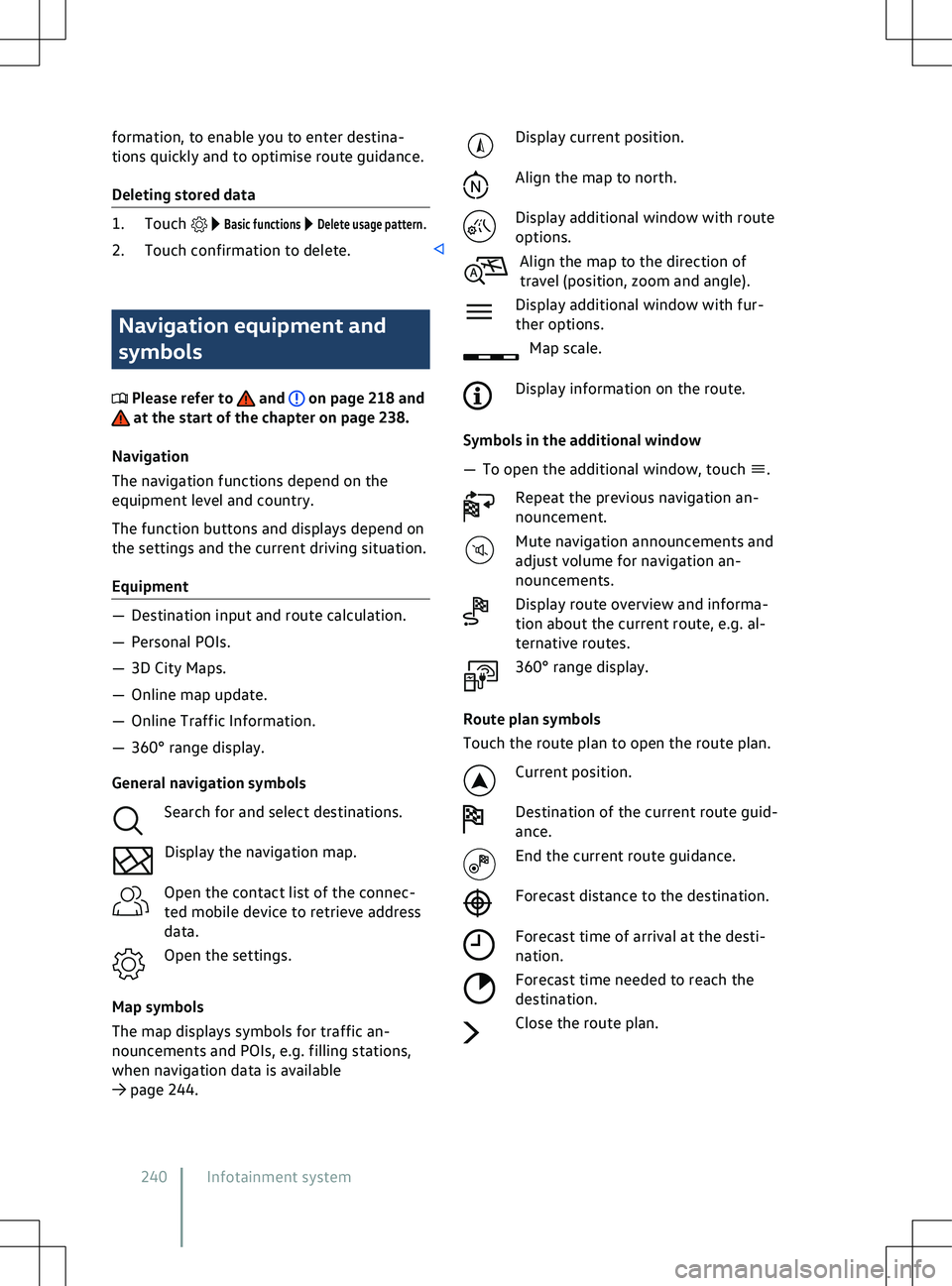
formation, to enable you to enter destina-
tions quickly and to optimise route guidance.
Deleting stored data
1. Touch Basic functions Delete usage pattern.
2. Touch confirmation to delete. Navigation equipment and
symbols
Please refer to and on page 218 and
at the start of the chapter on page 238.
Na
vigation
The navigation functions depend on the
equipment level and country.
The function buttons and displays depend on
the settings and the current driving situation.
Equipment
Page 244 of 417
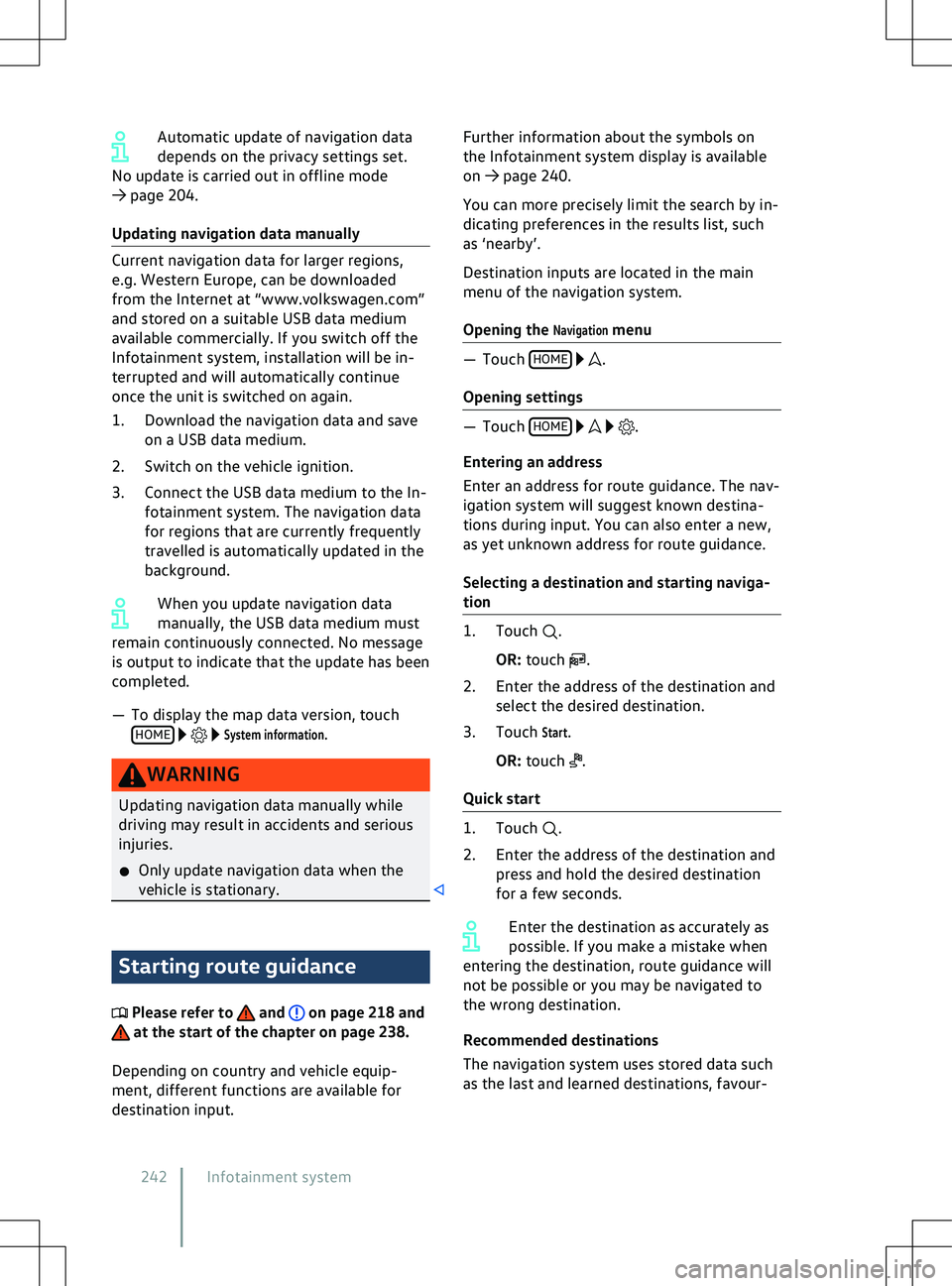
Automatic update of navigation data
depends on the priv
acy settings set.
No update is carried out in offline mode
Page 245 of 417
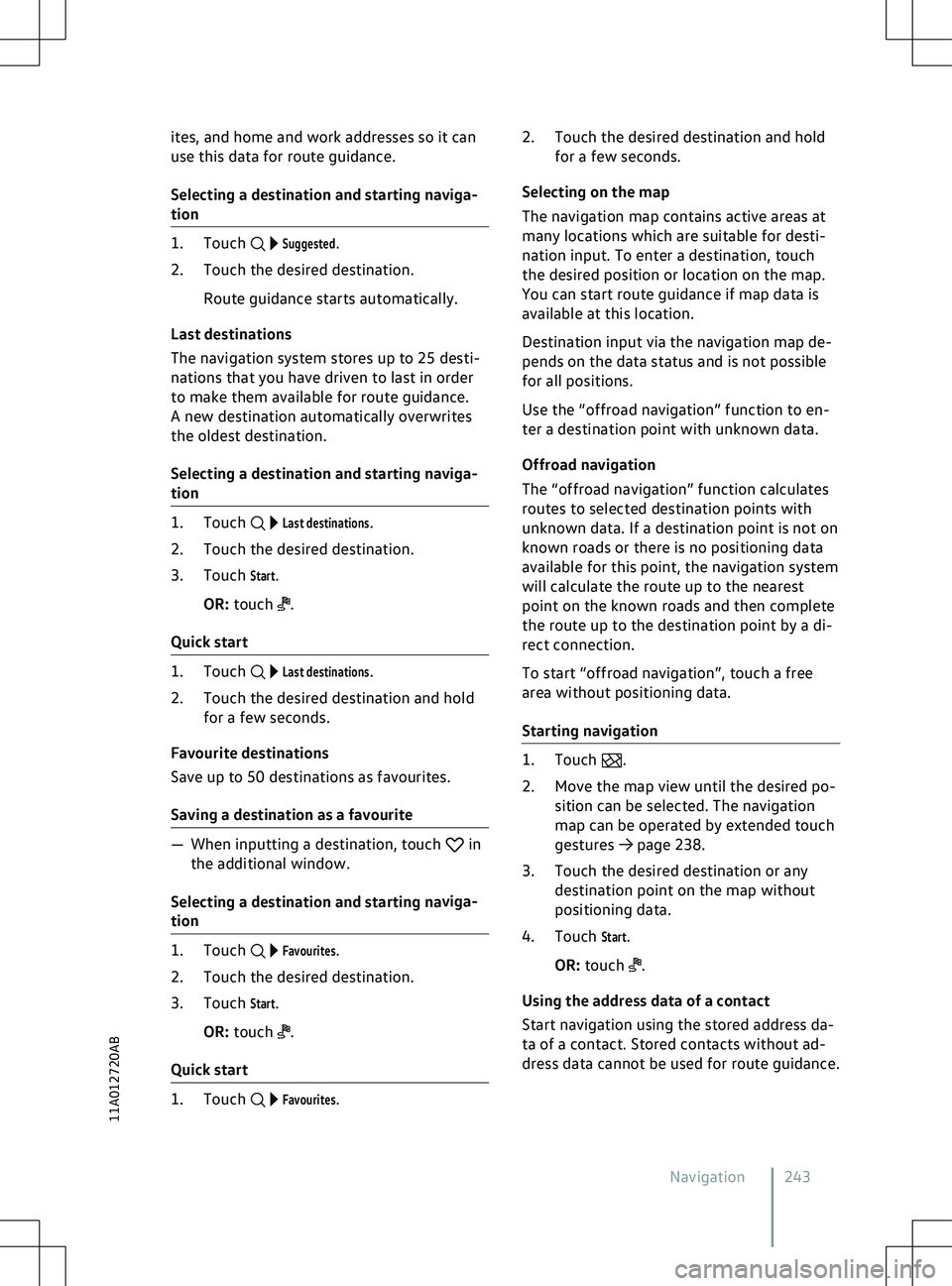
ites, and home and work addresses so it can
use this data f
or route guidance.
Selecting a destination and starting naviga-
tion 1. Touch
Suggested.
2. Touch the desired destination.
Route guidance starts automatically.
Last destinations
The navigation system stores up to 25 desti-
nations that you have driven to last in order
to make them available for route guidance.
A new destination automatically overwrites
the oldest destination.
Selecting a destination and starting naviga-
tion 1. Touch
Last destinations.
2. Touch the desired destination.
3. Touch
Start.
OR: touch .
Quick start 1. Touch
Last destinations.
2. Touch the desired destination and hold for a few seconds.
Favourite destinations
Save up to 50 destinations as favourites.
Saving a destination as a favourite
Page 246 of 417
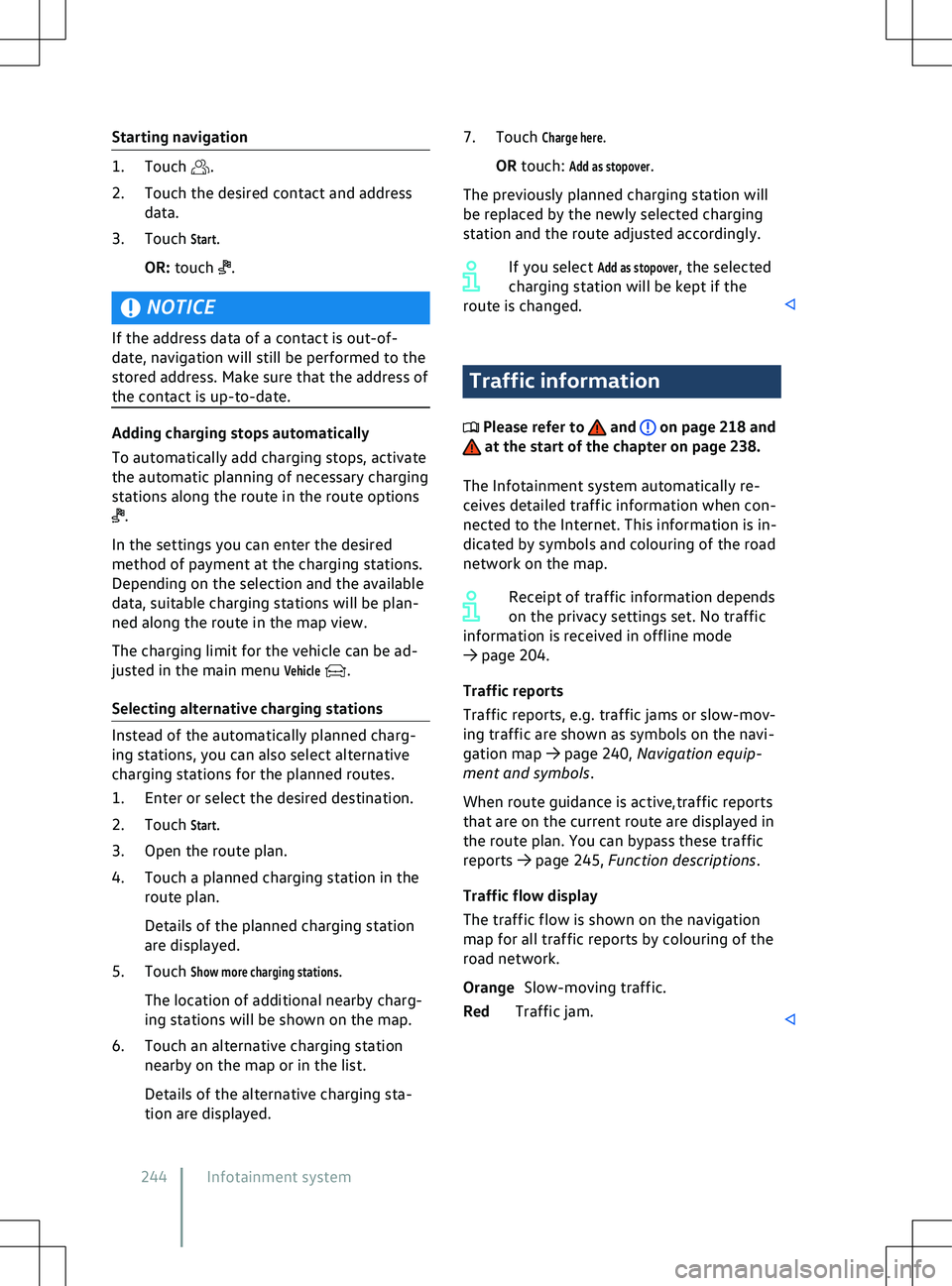
Starting navigation
1. Touch .
2.
Touch the desired contact and address
data.
3. Touch
Start.
OR: touch .
NOTICE
If the address data of a contact is out-of-
date, na
vigation will still be performed to the
stored address. Make sure that the address of
the contact is up-to-date. Adding charging stops automatically
To automatically add charging stops, activ
ate
the automatic planning of necessary charging
stations along the route in the route options .
In the settings you can enter the desired
method of payment at the charging stations.
Depending on the selection and the a
vailable
data, suitable charging stations will be plan-
ned along the route in the map view.
The charging limit for the vehicle can be ad-
justed in the main menu
Vehicle .
Selecting alternativ
e charging stations Instead of the automatically planned charg-
ing stations, you can also select alternativ
e
charging stations for the planned routes.
1. Enter or select the desired destination.
2. Touch
Start.
3. Open the route plan.
4. Touch a planned charging station in the route plan.
Details of the planned charging station
are displayed.
5. Touch
Show more charging stations.
The location of additional nearby charg-
ing stations will be shown on the map.
6. Touch an alternative charging station nearby on the map or in the list.
Details of the alternative charging sta-
tion are displayed. 7. Touch
Charge here.
OR touch:
Add as stopover.
The previously planned charging station will
be replaced by the newly selected charging
station and the route adjusted accordingly.
If you select
Add as stopover, the selected
charging station will be kept if the
route is changed. Traffic information
Please refer to and on page 218 and
at the start of the chapter on page 238.
The Inf
otainment system automatically re-
ceives detailed traffic information when con-
nected to the Internet. This information is in-
dicated by symbols and colouring of the road
network on the map.
Receipt of traffic information depends
on the privacy settings set. No traffic
information is received in offline mode
Page 247 of 417
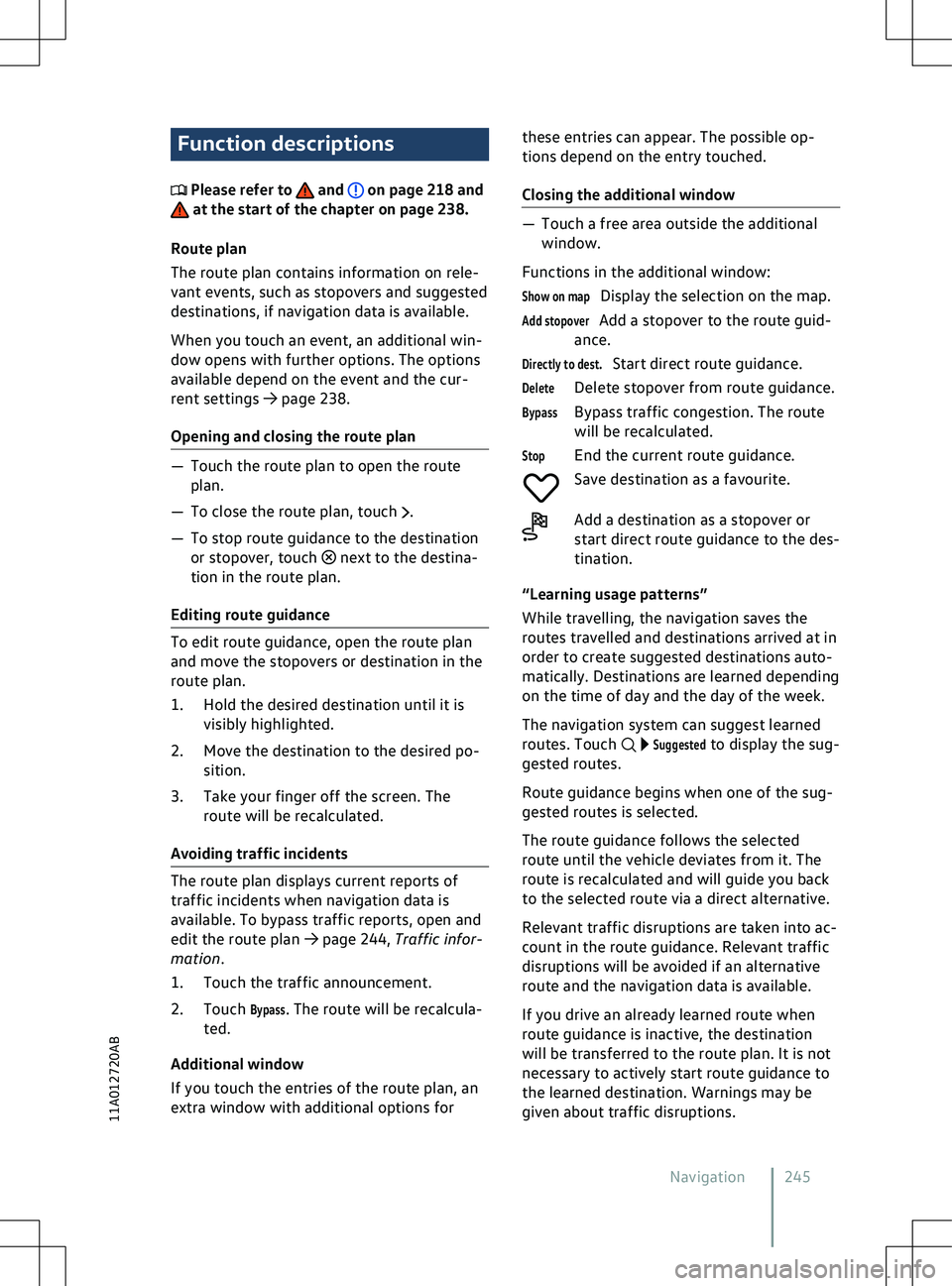
Function descriptions
Please refer to and on page 218 and
at the start of the chapter on page 238.
Route plan
The route plan contains inf
ormation on rele-
vant events, such as stopovers and suggested
destinations, if navigation data is available.
When you touch an event, an additional win-
dow opens with further options. The options
available depend on the event and the cur-
rent settings
Page 400 of 417
Anti-theft alarm
83
Central locking button 77, 79
Central locking touch control 79
Description 79
Locking and unlocking from the in- side 79
Single door unlocking 79
Central locking system SAFELOCK 81
Centre armrest 100
Changing a wheel 343
Lifting the vehicle 345
Preparations 343
Wheel bolts 344
Changing bulbs 295
Checklist 295
Preparations 295
Changing gear see Selecting a position 140
Changing lights see Changing bulbs 295
Charge level Display 19
Charging Charging process display 284
Charging station (AC) 281
Connecting the charging ca- ble 281, 283
Fast charging station 283
High-voltage battery 279
LED light unit on the charging sock- et 284
Mains socket 281
Manually releasing the charging connec- tor 286
Setting a departure time 279
Wall box 281
With alternating current (AC) 281
With direct current (DC) 283
Charging cable Charging station with alternating current(AC) 289
Cleaning 287
General information 287
Mains socket 290
Charging cable for mains sockets Fault displays 291
Operation 290
Overheating 291
Setting the charging current 291
Status indicators 290Charging connector
Current identification 281
Lever for manual release 286
Manual releasing 286
Unlocking 281
Charging infrastructure Current identification 281
Charging power 391, 392
Charging process display 284
Charging settings Overview 277
Charging socket Illumination 285
Charging stations Navigation 244
Chassis see Driving profile selection 143
Checklist Before working in the bonnetspace 311
Breakdown 66
Breakdown set 350
Changing bulbs 295
Charging the high-voltage bat- tery 279
Checks when charging 33
Driving abroad 33
Driving safety 32
Emergency 66, 67
Lifting the vehicle with the jack 346
Park Distance Control 180
Preparation for changing a wheel 343
Preparing for a journey 32
Rear view camera system 180
Releasing the charging connec- tor 286
Requirements for Android Au- to