IG light VOLKSWAGEN ID.5 2022 Owner's Guide
[x] Cancel search | Manufacturer: VOLKSWAGEN, Model Year: 2022, Model line: ID.5, Model: VOLKSWAGEN ID.5 2022Pages: 417, PDF Size: 5.39 MB
Page 195 of 417
Practical equipment
Stowage areas Introduction to the topic
WARNING
Loose objects may be flung through the ve-
hicle interior in the e vent of a sudden driv-
ing or braking manoeuvre. This can cause
serious injury and can also lead to loss of
control of the vehicle.
x Stow objects only in closed stowage
compartments.
x Always keep stowage compartments
closed while the vehicle is in motion.
x The coat hooks in the vehicle should on-
ly be used for lightweight clothing
weighing max. 2.5 kg (approx. 5.5 lbs).
Never leave any heavy, hard or sharp ob-
jects in the pockets. NOTICE
x Do not stow any temperature-sensitiv
e
objects, food or medicines inside the vehi-
cle. Hot and cold temperatures could dam-
age them or render them unusable.
x Objects stored in the vehicle that are
made from transparent materials, such as
transparent suction cups on the windows,
can concentrate the sun
Page 217 of 417
Cable and wireless con-
nections
Introduction to the topic
Some e xternal devices can be connected to
the Infotainment system by cable and wire-
less connections present in the vehicle (if in-
stalled).
The type and number of cable and wireless
connections differ according to country and
vehicle. The connections may also be differ-
ent within a model series or in special-edition
models.
In the case of cable connections, use only the
original device connecting cables or, if availa-
ble, the factory-supplied connecting cables
for your vehicle.
If the plug on the connecting cable cannot be
inserted, check the angle of insertion and the
connections. NOTICE
Use only suitable and undamaged connecting
cables f
or cable connections.
x When inserting the plugs of the connect-
ing cables into the appropriate connection,
ensure that they are correctly positioned
and apply only light pressure. Applying too
much pressure may damage both the unit
connection and the plug of the connecting
cable.
x Make sure that the connecting cable is not
pinched or sharply bent.
x Using unsuitable or damaged connecting
cables may damage devices and cause
malfunctions. If a connected device is not recog-
nised, disconnect all de
vices and con-
nect the device again. If necessary, check
that the connecting cable you are using is
working properly. If a connected device malfunctions, re-
start the de
vice. In some cases this will
remedy the fault. USB port
Please refer to at the start of the chap-
ter on page 215.
USB port types
The f
ollowing USB ports may be available in
the vehicle:
Page 262 of 417
WARNING
Elastic tensioning straps must be stretched
to attach to the fastening rings. The hooks
attached to them can cause serious injuries.
x Always protect eyes and face from injury
when attaching elastic tensioning straps.
x Always hold elastic tensioning straps se-
curely when fastening so that they can-
not slip off and rebound.
x Always fasten the elastic tensioning
straps first to the fastening rings in the
front area of the luggage compartment,
then pull them towards the loading sill
and fasten them to the fastening rings
there. If the tension straps slip off
, they
will snap away from the body. Suitable lashing, retaining or securing
straps and luggage securing systems
are a
vailable from qualified workshops.
Volkswagen recommends using a Volkswagen
dealership for this purpose. Luggage net
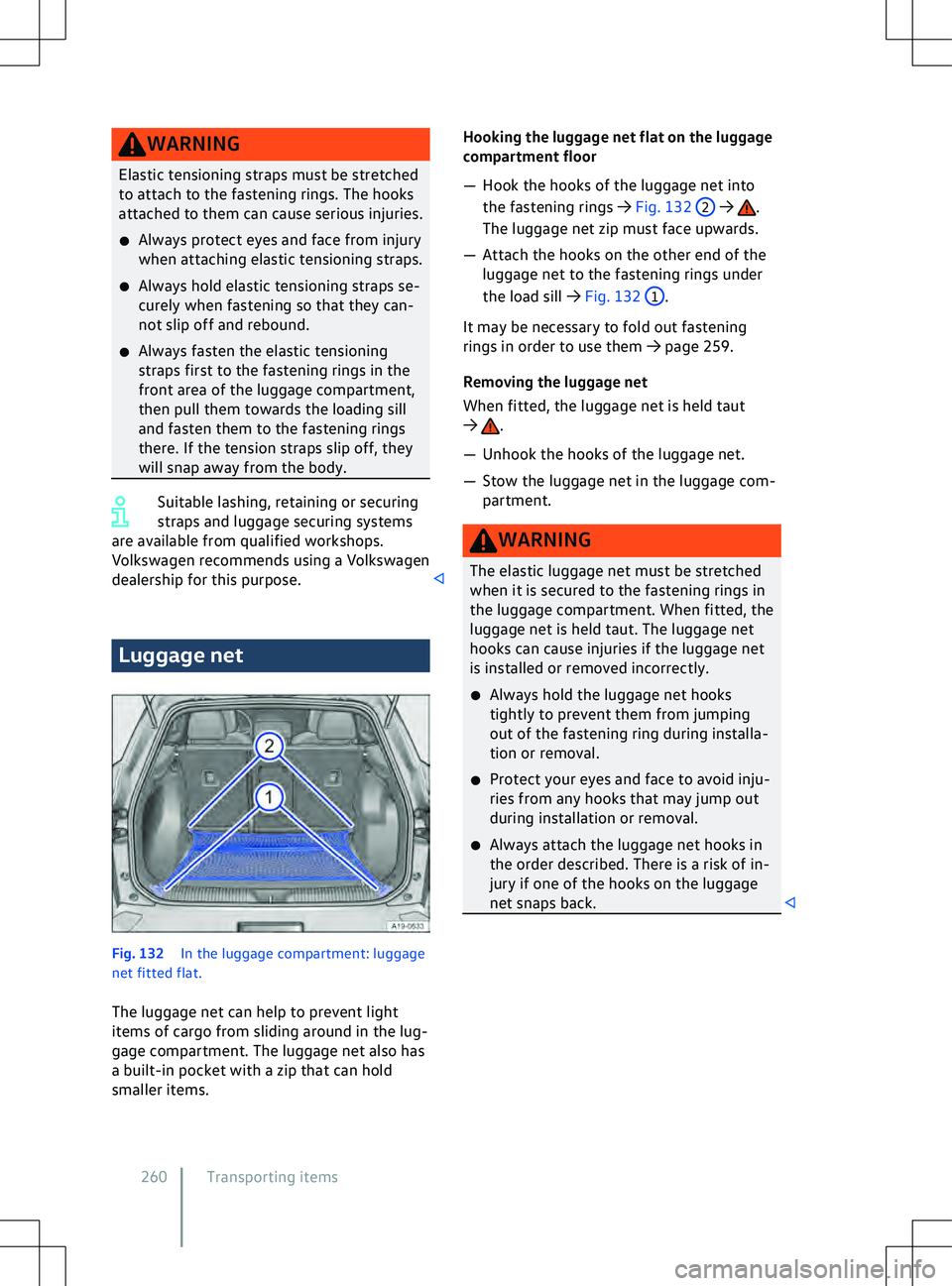
Fig. 132
In the luggage compartment: luggage
net fitted flat.
The luggage net can help to pre
vent light
items of cargo from sliding around in the lug-
gage compartment. The luggage net also has
a built-in pocket with a zip that can hold
smaller items. .
The luggage net zip must face upwards.
Page 263 of 417
Bag hook
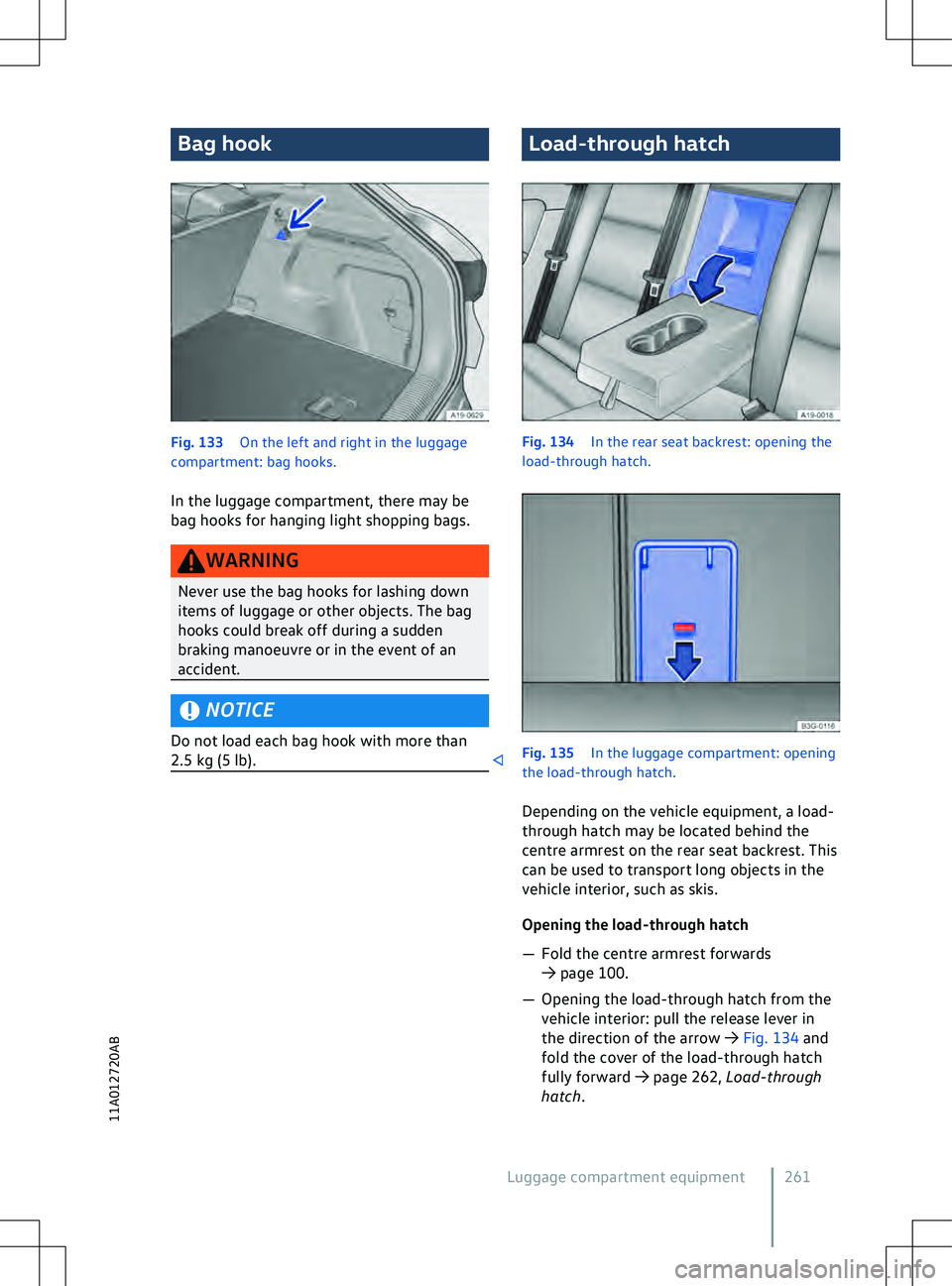
Fig. 133
On the left and right in the luggage
compartment: bag hooks.
In the luggage compartment, there may be
bag hooks f
or hanging light shopping bags. NOTICE
Do not load each bag hook with more than
2.5 kg (5 lb). Load-through hatch
Fig. 134
In the rear seat backrest: opening the
load-through hatch. 261
11A012720AB
Page 274 of 417
vehicle is equipped with the trailer stabi-
lisation system.
x Trailers with a high centre of gra
vity
might tip over before snaking starts.
x Sudden braking procedures could occur
automatically in extreme driving situa-
tions if the trailer socket is being used
without a trailer (e.g. for a bicycle carrier
with lighting). Retrofitting a towing bracket
Please refer to , and at the start
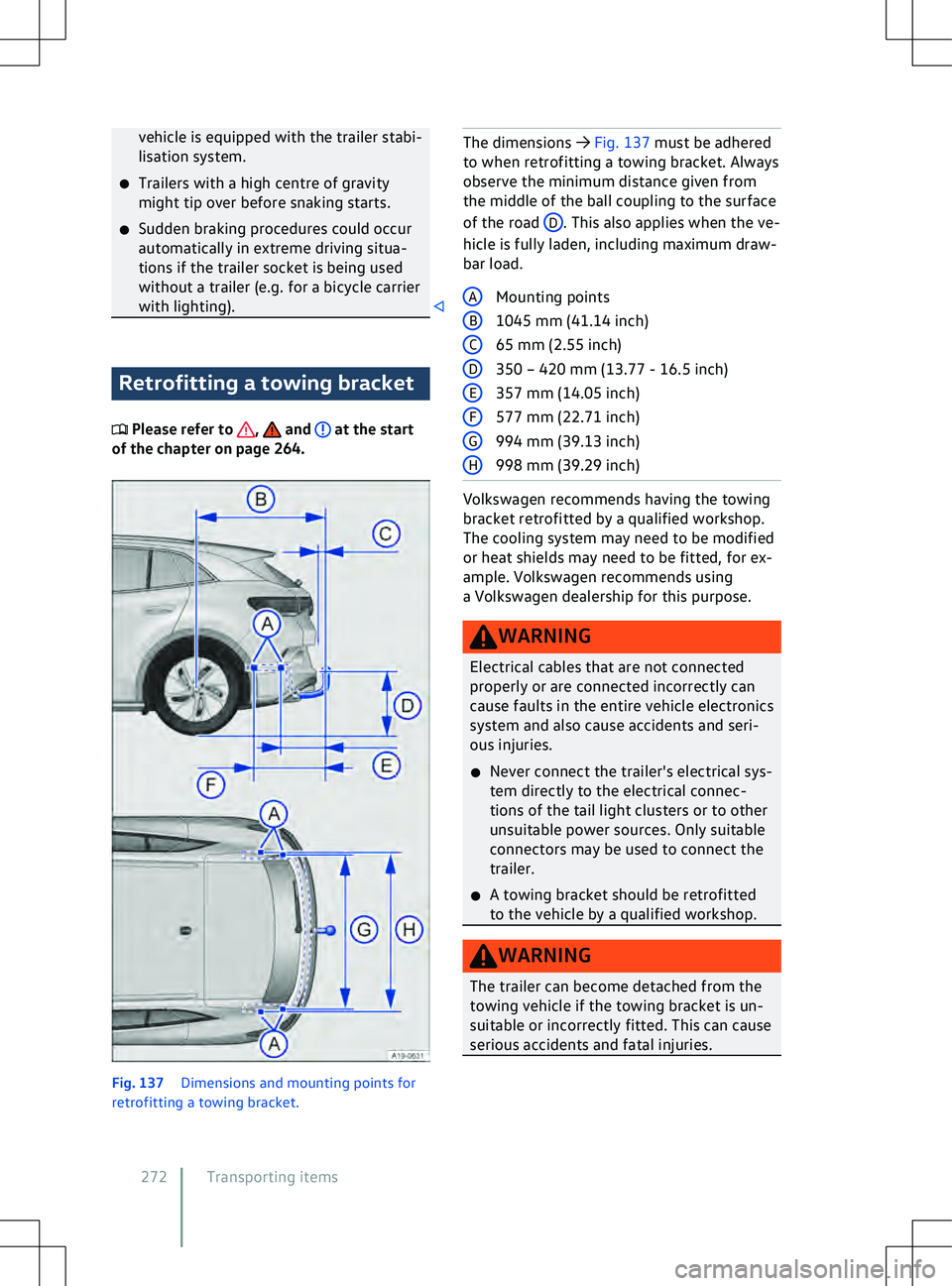
of the chapter on page 264. Fig. 137
Dimensions and mounting points f
or
retrofitting a towing bracket. The dimensions
Page 275 of 417
Only use towing brackets which have
been appro
ved by Volkswagen for your
vehicle type. Troubleshooting
Please refer to , and at the start
of the chapter on page 264. Ball head of the towing bracket is not
locked
The indicator lamp lights up yellow.
Page 288 of 417
There is a fault in range calculation. Go to
a qualified workshop.
Charging not possible or aborted
The charging process display on the charging
socket lights up red.
Bef
ore you visit a qualified workshop, you
can perform the following troubleshooting
measures:
Page 297 of 417
x
Do not use fuel, nail v arnish remover, paint
thinner or similar products to clean the
windows. Wax deposits on the windscreen and
rear window could cause the wiper
blades to rub. Remo
ve wax residue using
a special cleaning product or cleaning cloths. Exterior lighting
Introduction to the topic
Bef
ore changing a bulb, check whether a bulb
or LED light unit has failed. You can normally
change bulbs yourself. If the exterior lighting
is realised using LED technology, depending
on model and vehicle equipment, it is not
possible for you to change the LED light units
or individual LEDs yourself. If individual LEDs
fail, this may be an indication that more LEDs
are on the point of failure. In this case, have
the LED light units checked and renewed if
necessary at a qualified workshop.
It may be illegal to drive with faulty exterior
lights.
Additional bulb specifications
Some bulbs might have factory specifications
that differ from standard bulbs. The designa-
tion is inscribed on the bulb, either on the
glass part or on the base. NOTICE
Damage to the electrical system can be
caused by water entering the system if the
rubber co
ver or plastic covers on the head-
light housing are not properly mounted after
a bulb has been changed. Checklist “Information on
changing bulbs”
Please refer to and at the start of
the chapter on page 295.
Checklist 295
11A012720AB
Page 307 of 417
x
If the power supply of the towed v ehicle
fails, stop towing immediately and seek
expert assistance. NOTICE
Towing with a tow-rope or tow-bar can dam-
age the v
ehicle.
x Tow the vehicle carefully with a tow-rope
or tow-bar.
x If possible, have the broken-down vehicle
transported by a breakdown truck. NOTICE
When pushing the vehicle by hand, the tail
light clusters, side spoilers on the rear win-
dow and large panels can be damaged and
the rear spoiler may become detached.
x When pushing the v
ehicle by hand, do not
press on the tail light clusters, side spoilers
on the rear window, large panels and the
rear spoiler. NOTICE
The vehicle can be damaged, e.g. the vehicle
paintwork, when remo
ving and fitting the
cover and towing eye.
x Remove and install the cover and the tow-
ing eye carefully so as to avoid damage to
the vehicle. NOTICE
Use of a towing eye that is not suitable for
the v
ehicle can damage the vehicle.
x Always use the towing eye supplied in the
vehicle toolkit of your vehicle or a towing
eye that is suitable for the vehicle for tow-
ing. Notes on towing
Please refer to and at the start of
the chapter on page 304.
It is still possible to activ
ate the turn signals
in a vehicle that is being towed, even if the
hazard warning lights are switched on. To do
this, operate the turn signal and main beam
lever in the required direction while the igni-
tion is switched on. The hazard warning lights
will not flash while the turn signal is being
used. The hazard warning lights will start
flashing again automatically as soon as the
turn signal and main beam lever is moved
back to the neutral position.
In which situations may the vehicle not be
towed?
In the following situations, the vehicle may
not be towed for a long distance on its own
tyres:
Page 326 of 417
12-volt vehicle battery
The indicator lamp lights up yellow. The fol-
lowing messages can be displayed: