Fig 16 VOLKSWAGEN JETTA 2007 Owners Manual
[x] Cancel search | Manufacturer: VOLKSWAGEN, Model Year: 2007, Model line: JETTA, Model: VOLKSWAGEN JETTA 2007Pages: 477, PDF Size: 77.6 MB
Page 463 of 477
![VOLKSWAGEN JETTA 2007 Owners Manual Booklet 3.4 Premium Sound System
Track search Buttons
"Scroll" through the same track (Fast
Forward /Fast R ev ie w)
- Press and hold the !SEEK/TRACK ] button
page fig . 2 to scro ll](/img/18/55689/w960_55689-462.png "VOLKSWAGEN JETTA 2007 Owners Manual Booklet 3.4 Premium Sound System
Track search Buttons
\"Scroll\" through the same track (Fast
Forward /Fast R ev ie w)
- Press and hold the !SEEK/TRACK ] button
page fig . 2 to scro ll")
Booklet 3.4 Premium Sound System
Track search Buttons
"Scroll" through the same track (Fast
Forward /Fast R ev ie w)
- Press and hold the !SEEK/TRACK ] button
page fig . 2 to scro ll upwards or
downwards
trough the same track.
The track elapsed time appears in the
upper left corne r of the d isp lay.
Information displayed
Fig. 24 SCAN/ TUNE button
MP3 display selection
It is possible to select betwee n a basic MP3 dis
play and a more detailed one. If th e bas ic MP3
display is selec ted the file informat ion (such as
s ong and artist name) w ill not be displayed.
• Press and ho ld down
(SCAN/TUNE) butt on fig. 24 for longer than 2 seconds to ent er
the set up mode. You will hear a sig nal tone.
• Turn the
(SCAN/TUNE) rotary knob, un til SELEC T MP3 DISPLAY appears i n the display.
• In
low er part of the display words BASIC and DETAIL will appear. By usi ng th e s ta
tion pr eset bu tto ns © select eith er the bas ic o r
deta il di splay.
• Press the
SCAN/TUNE buu on again fo r
long er th an 2 second s to confirm the setting
you've just made . Yo u will hear a signa l tone.
28 Radio I CD
-Release t he button to stop skipp ing
through the track.
Text sc roll select ion
You can decide whether the available informa
tion in the MP3 file is scrolled or not in the di s
play.
• Press and hold down the
(SCAN/TUNE) button
for longer than 2 seconds to enter the set u p
mode. You w ill hear a signal tone.
• Turn the
(SCAN/T UNE) rotary knob,
station preset buttons © select eith er ON or OFF.
• Press the (SCAN/TUNE) button again for longer
th an 2 seco nds to confirm the settin g yo u've just
made. You'll hear a signal to ne.
• If yo u decide to scroll the fil e information
follow ing warn ing will appear in the d isplay: CAUTION! THIS MAY CAUSE DRIVER
DISTRACTION.
Page 466 of 477
Booklet 3.4 Premium Sound System
• A maxi mum n umber of 998 files (plus l file
containing the data t rack ) can be hand led by the
cha nger. If
sum is higher t han 998 files, then
p laylis t files a re ski pped. If p laylis t have to be
skipped, the n the p lay list files with the oldest
t imestamp
be skipped.
• When creat ing play li st fil es, use a program
lhat a utomatica lly creates a play list with
extens io n. Th is un it will n ot play play
lists with a no th er ex tensions or that contain
path info rmation in Un icode.
• A m aximu m of
15 play lists can be su pported.
• Using th e d rag-and-drop me thod prov ided
by W INDOWS XP to move MP3 files to a CD for
Order of tracks
L=:I Playli st
Tra ck
Fi g. 26 Typical CD Structure
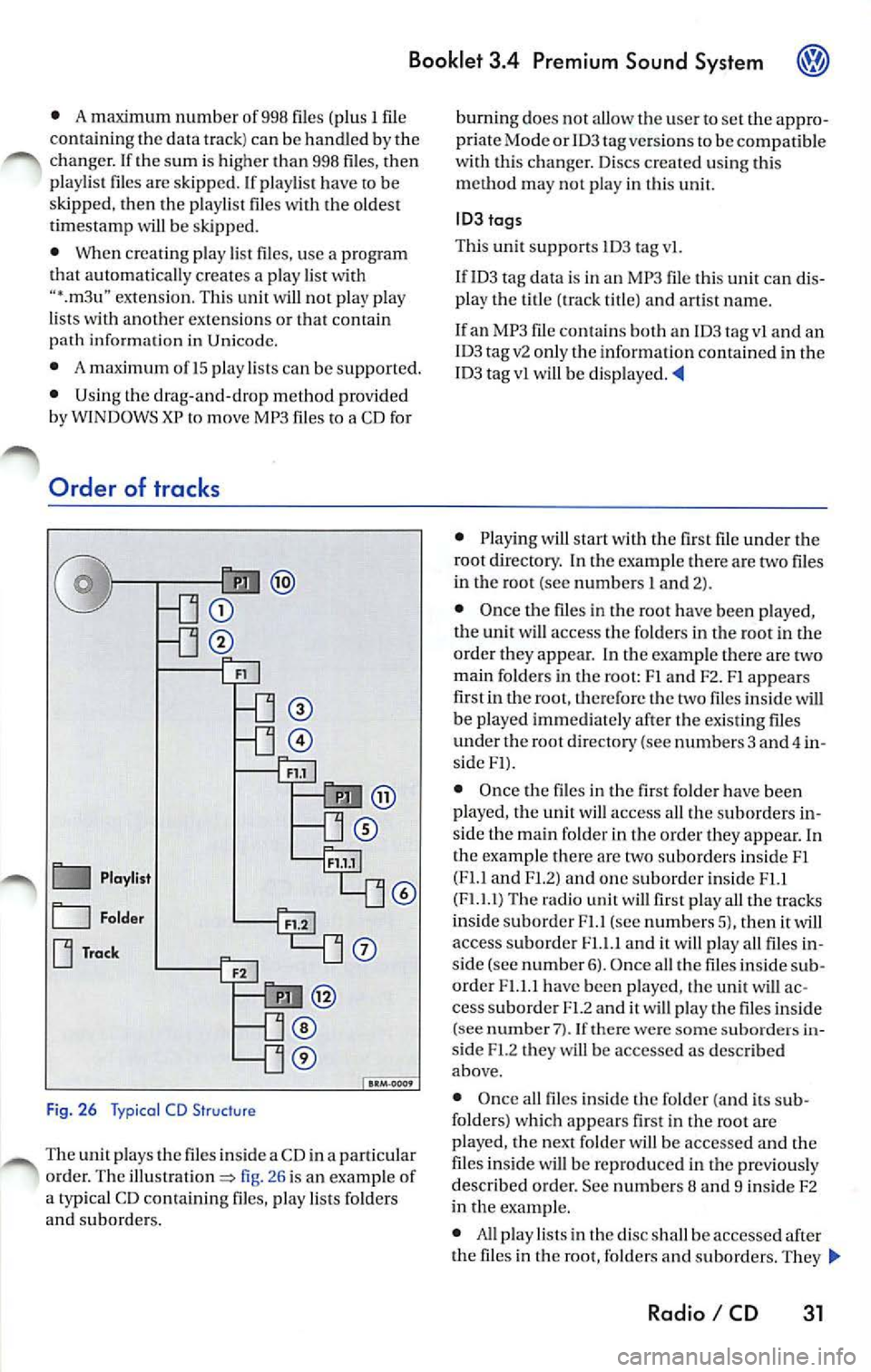
The un it plays the files inside a CD in a particu lar
o rder. The fig. 26 is an examp le of
a typ ical C D co ntaini ng file s, p lay lists folders
and s ubor der s. burn
ing doe s no t aJJow the use r to set the appro
pri ate Mode or ID3
versio ns to be compati ble
w ith thi s ch anger. Discs c reated usin g this
method may not pla y in l his unit.
ID 3 togs
Th is uni t supports ID3 tag vi.
If ID3 tag data is in an MP3 file th is unit can d is
play t he t itle (t rack title) and artist name.
If an MP3 fi le contai ns bot h an ID3 tag vl and an
ID3 tagv2 o nly th e in forma tion conta ined in t he
ID3 tag vi will be
• Playing will sta rt with the fi rs t fil e under the
root directory. In the example t here a re two files
i n the root (see number s l and 2).
• Once t he files in the root have bee n played,
the un it w ill access the folde rs in the roo t in the
orde r they appear. In the examp le th ere are two
m ain fo lders in t he root : Fl and F2. Fl appears
firs t in the root, tJ1erefore the two files inside
will be p layed immediately th e ex isting files
u nder th e root dire ctory (see numbers 3 and 4
side Fl).
• Once the files in the firs t fo lder have been
p layed, the u nit wi ll access all th e sub orders
side th e ma in fo lder in the orde r they appea r. In
the example t here are two suborders ins ide Fl
(Fl.I and Fl .2) and one su border ins ide Fl.l
(Fl.1.1) The rad io un it will first p lay all the tracks
i n side suborder Fl.I (see numbers 5). then
access suborder Fl.l.l and it w ill play a ll files side (see number 6). Once a ll the file s in side su b
order Fl.1.1 have bee n played , the un it wi ll
ces s sub order and it will p lay the file s in side
(see numb er 7). If th ere were some s uborder s side Fl.2 they be accessed as describ ed
abo ve.
• Once all files in side t he folder (and its
folde rs) which appears first in the root are
pla yed, the nex t folder w ill be accessed and the
fil es in side will be reprod uced in the pre vio usly
d esc ribed order. See nu mb ers 8 and 9 in side F2
i n the examp le.
• All play lis ts in the di sc s hall be accessed after
the files in the root, folde rs and subo rders . T hey
Radio I CD 31
Page 467 of 477
Booklet 3.4 Premium Sound System
will be played in the order th ey appear. In th e ex
ample there are three p lay lists (see numbers 10,
11 and 12).
• The number of each folder and subfo lderwill
appear in the disp lay as they a re accessed.
CD changer
Applies to vehicles: with external CD chonger
• Fo r root directo ry or folder s or play lists
w ith out any fil es in th em, the rad io unit shall ig
nor e th e folder or play list
automat ically a d
va nce to th e nex t folde r in th e
External CD changer in the front armrest
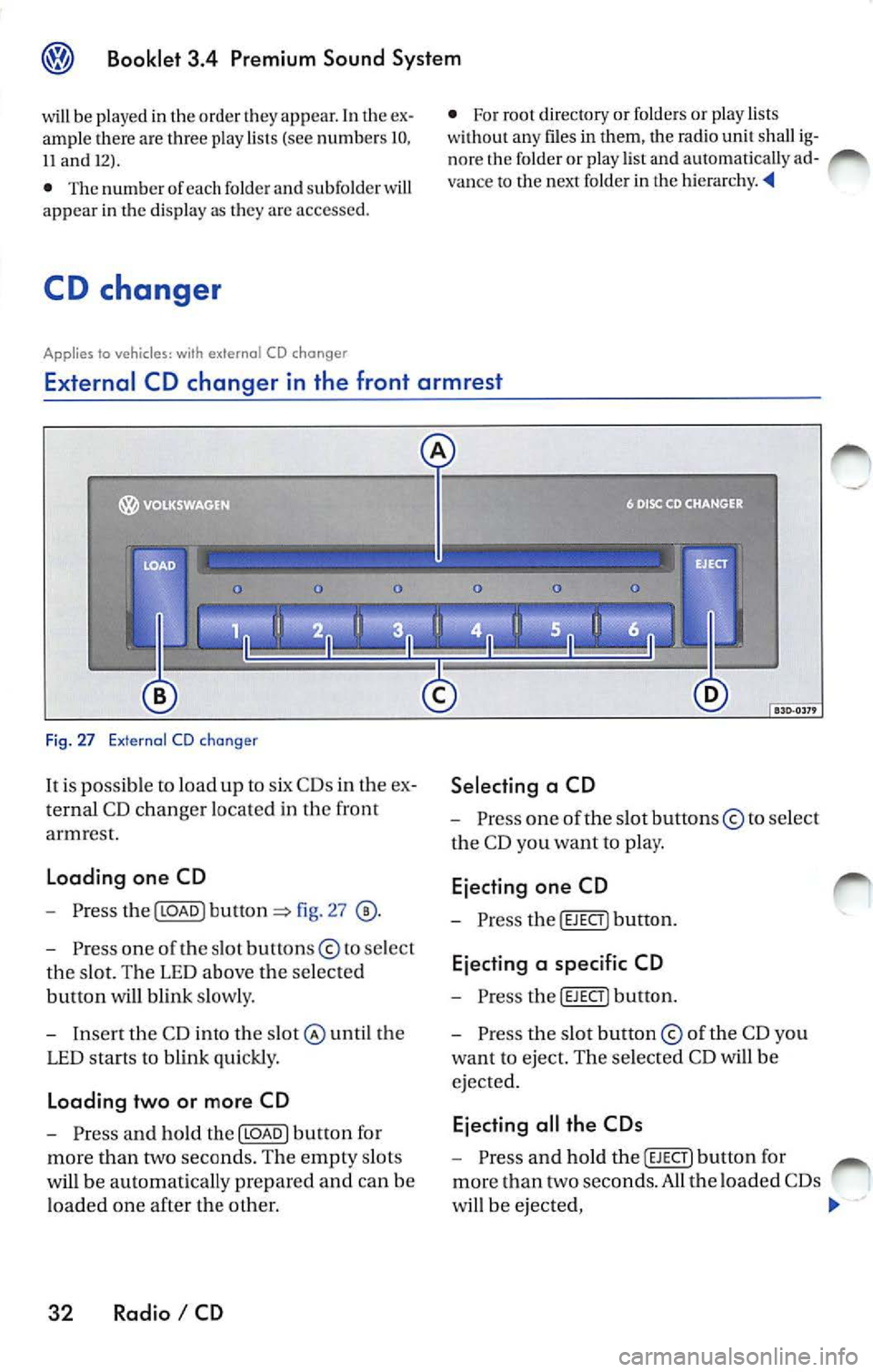
Fig. 27 External CD cha ng er
It is po ssible to loa d up to six C Ds in th e ex
ternal CD chan ger lo ca te d in the front
armrest.
Loading one CD
- Press the I LO AD I button 27
- Pre ss on e of the s lot button s© to se lect
th e s lot. The LED abo ve the se lec te d
button will blink slowly.
- Insert the CD in to the
until the
LED sta rt s to blin k qui ckly .
Loading two or more CD
- Press and hold th e I LOAD J button for
mo re than two seconds. The e mpt y slo ts
will be a utomatically pre p ared a nd can be
load ed one after the other.
32 Radio I CD Selecting a CD
-
Press one of the slot buttons © to selec t
th e CD yo u want t o pla y.
Ejecting one CD
- Press the I EJECT] button .
Ejecting a specific CD
- Pres s the I EJECT] bu tton .
- Pre ss the s lot button © of th e CD yo u
wa nt to e ject. T he se lected CD will be
e jec te d.
Ejecting all the CDs
- Press a nd hold the I EJE CT] butt on for
mor e than two seconds. All the load ed CD s
w ill b e ejec ted ,
Page 469 of 477
Booklet 3.4 Premium Sound System
Anti-Theft Coding
Convenience radio coding
For techni cal reason s, the convenience radio
coding is not a vailable for all vehicle models .
In the past , it u sed to be that you h ad to manu
ally reco de th e rad io whe neve r the unit was re
moved from the veh icle (fo r examp le, if the unit
wa s removed to be repa ired), or whenever the
vehicle battery was disconnected (for example ,
if you brought yo ur vehicle in to the dealership
for service and it was necessary to disconnect
the banery ). In either case , th e power supply to
t he unit was cut off.
That ha s all ch anged with th e new conve nien ce
radio coding function: Once the code number
has been inplll in the rad io, i t w ill then synchro
nise itself wi th "it s" veh icle!
I f th e curr ent supply has been interrupted the
radio will automaticall y ch eck to see if it is still in
Canceling the Electronic Lock
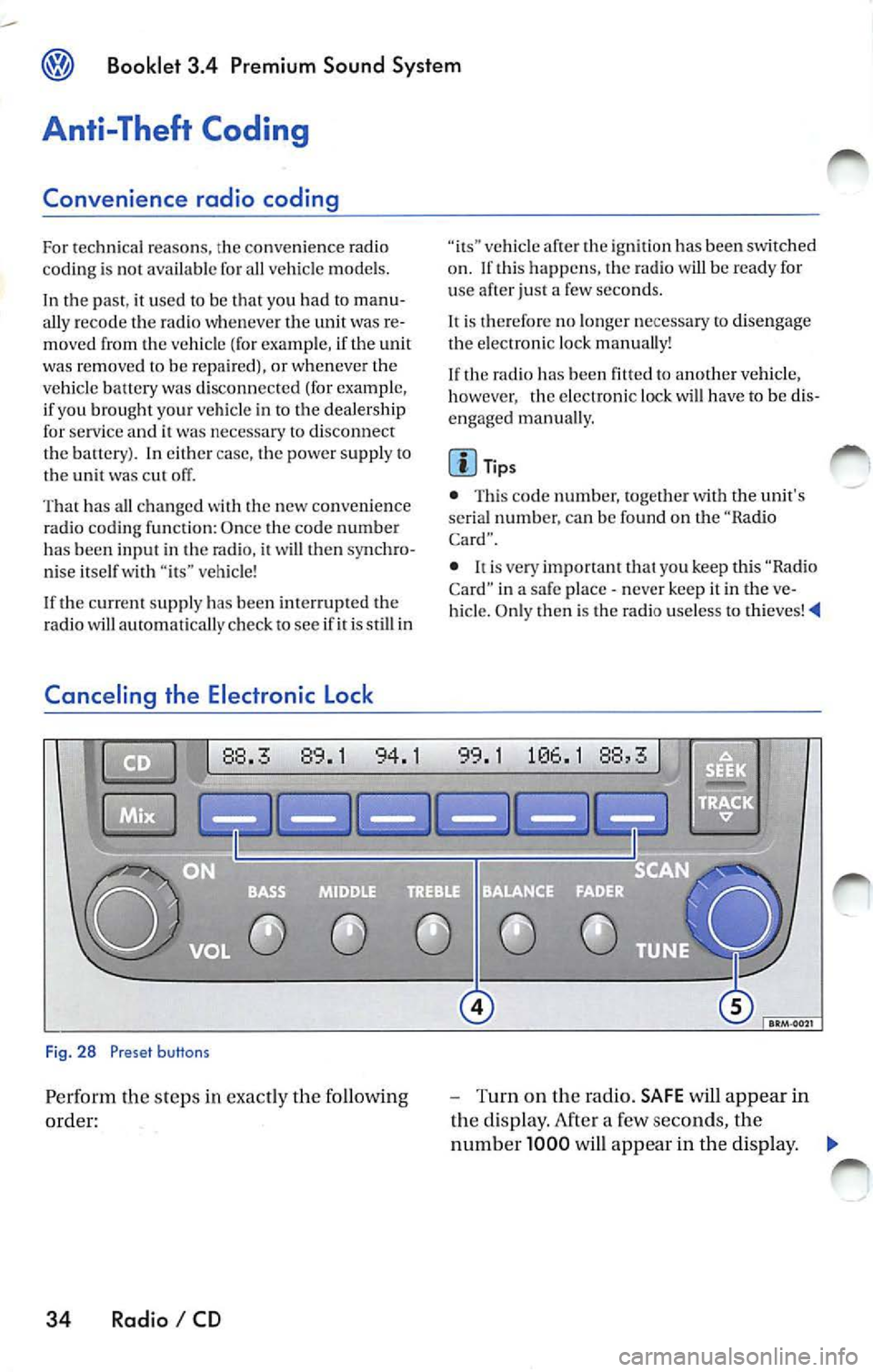
Fig. 28 Preset buttons
Pe rform th e steps in exact ly the fo llowing
order:
34 Radio I CD
vehicle af te r th e ig niti on has been switched
o n . If thi s happ ens, the radio will be read y for
u se after just a few seco nds.
It is therefore no longe r n ecess ary to disengag e
the e lectro nic lock manua lly!
If the radio has been
to another vehicle,
however , the electronic lock will have to be dis
engaged manua lly.
Tip s
• This code number, togeth er w ith the unit's
se rial numb er. ca n be found on the "Ra dio
Card".
• never keep it in the ve
hicle. Only then is th e radio use less to thieves!
-Turn on the radio. SAFE will appear in
the disp lay. After a few seconds, the
numb er 1000 will appear in the display. ._
Page 470 of 477
Booklet 3.4 Premium Sound System ®
-Use the radio stat io n pr ese t button s 1 to
4
page 34, fig. 28 to ent er the code
numb er fo un d on your R adio Card. Use
pre set button
l to ent er t he fir st digit in the
code numb er. U se button 2 to en te r the
seco nd digit , e tc. Th e valu e range for each
of the 4 di git s is O ... 9. T he digit will in
c rease by l eac h tim e you tap the pr ese t
bu tton. The number r etu rns to O afte r 9.
- After you finish ent ering th e code, press
the sta tion p reset button below
word
OK in th e di spl ay. It usual ly is th e las t sta
tion pre set button. You w ill hear a n au
dibl e signa l.
-If you have en te red t he co de number
c orr ect ly, a radio frequency will app ear in
th e d isp lay.
Wrong Code Number
lfyou have accide ntally ent ered a wrong code
number , SAFE will ap pear in th e di spl ay and
th en the number 1000 will app ear.
Yo u can re p ea t the procedu re agai n on e time .
T he num ber of attempt s will app ear in the dis
p lay. lf you acci dent all y ent er a wrong code
number a seco nd tim e
SAFE will appea r in the
d isp lay.
lfth e wrong cod e number i s enter ed aga in, th e
uni t w ill be di sab le d for about I hour. Lea ve th e
unit O N for this hour . After th e hour has
e la p se d, the numb er of att em pts will stop bei ng
displayed and you can cancel th e elec tronic lock
once again.
Remembe r, the cycle i s ...
• 2 attempt s
• one hour lo cked.
Tips
If y ou loose your Rad io Card, contact yo ur au
t ho riz ed VO LKSWAGEN
ered by a re pl ace ment pa rts warra nty. This re
pl acement serv ice w ill not b e availab le, how
eve r, it th e unit h ousing is damaged or if un au- th
oriz ed per sons have att empt ed to make re
pair s.
Antenna Care
Th e an tenna i s des ig n ed to achieve optim al per
fo rmance with the radio and is located at a pos i
tion where reception is good and su sce pti bili ty
to int erfer ence is low.
Ve hicle s equ ipped wi th antenna s emb edd ed in
t he winds hield o r backlights offer the furth er ad
vantages o f being completely pro tec te d f rom
damage and wear.
No antenna car e is r equir ed for vehicles
e quipped with roof moun te d
Radio I CD 35