Locking VOLKSWAGEN JETTA 2007 User Guide
[x] Cancel search | Manufacturer: VOLKSWAGEN, Model Year: 2007, Model line: JETTA, Model: VOLKSWAGEN JETTA 2007Pages: 477, PDF Size: 77.6 MB
Page 235 of 477
Booklet 3.1 Controls and Equipment
Remote control key
Locking and unlocking the vehicle
The remote control key can be used to lock and unlock the vehicle from a distance.
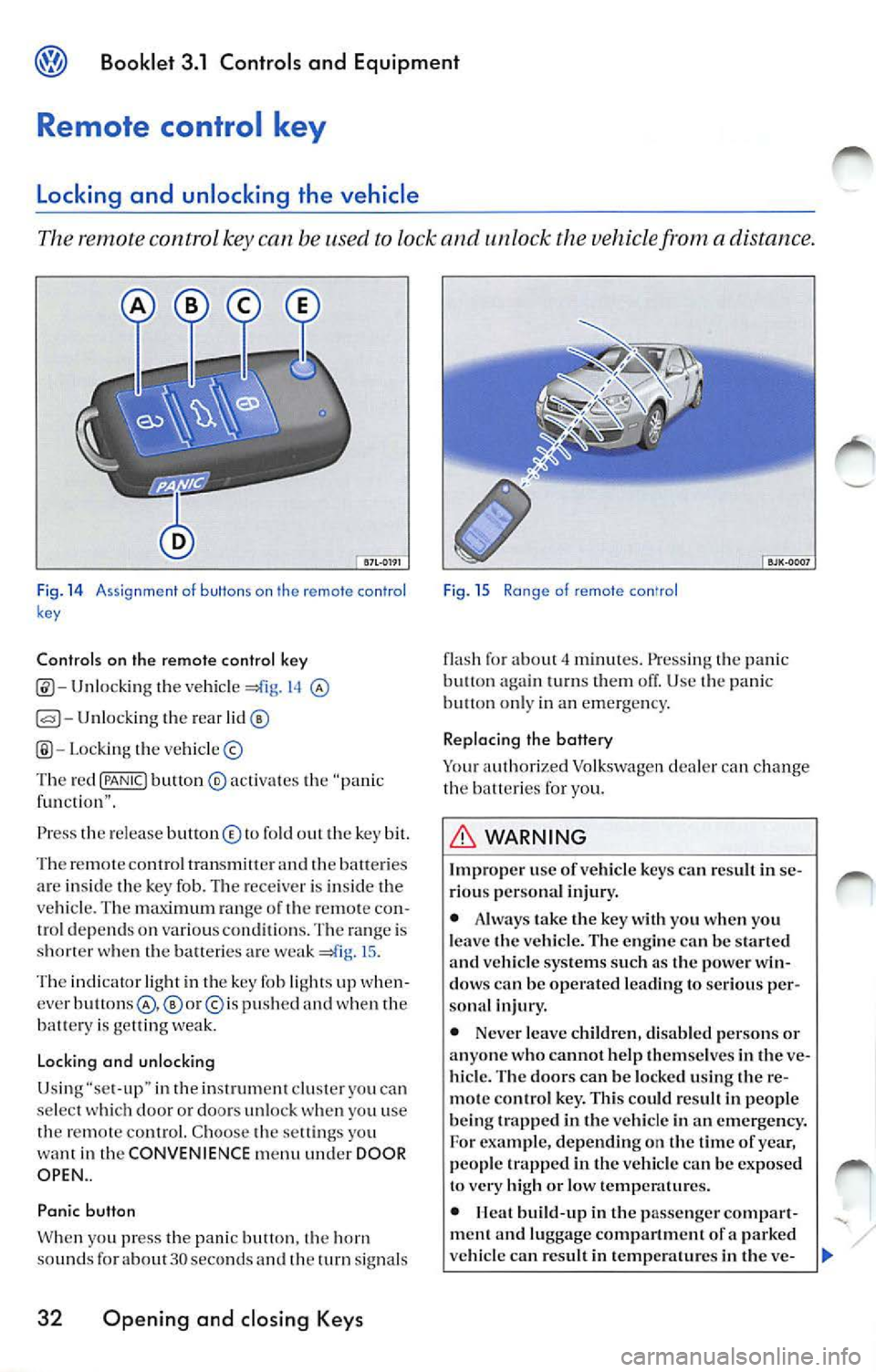
Fig. 14 A ssi gnme nt o f buttons on th e remote con tro l
k ey
Controls on the remote control key
Unlocking the vehicl e 14
Unlocking the rear
Lo cki ng the vehicle ©
Th e red
{PANIC! button ® activa tes the "pa nic
f un cti on" .
Press th e re le ase button © to fold out the key bit.
Th e re m ote contro l tran smitter and
batte ri es
ar e insid e th e key fob. The rece iver is in side the
ve hicle . T he maximum ran ge of th e remo te con
trol dep end s on various conditions. The range is
s h o rter when the balteric s are weak
15 .
The indicator light in th e key fob li ght s up when
cver
p u sh ed and when the
batt ery is ge llin g we ak.
Lo cking and unlocking
Usi ng "se t-up" in the inst rument clu ster you ca n
se lect doo r or doors un loc k you u se
th e remot e control. C hoo se th e sett ings yo u
want in the CONVENIENCE menu under DOOR
OPEN ..
Panic button
W hen yo u press t he panic butt on. horn
sou nds fo r about 30 seco nds an d th e turn signal s
32 Opening and closing Keys
Fig . 15 Ra nge of remote con'ro l
flash fo r about minut es. Press ing the pani c
butt on turn s them off. Use panic on ly in an emerge ncy.
Replacing the battery
Yo ur auth orized Volkswagen dealer can ch ange
the b atteri es for you.
WARNING
Improp er use of vehicl e key s ca n resu lt in se
ri ous per sona l injury.
• Alwa ys take the key with you when you
l e ave the vehicle. The en gine
be start ed vehicle systems such a s the power win
dow s can be operated le ading to seriou s per
sona l injur y.
• Never leave childr en, disab le d pe rsons or
anyone who cannot help them se lves in
ve
hicl e. The door s can be locked using the re
m ote con tro l ke y. This could r esult in peop le
b eing trapp ed in the vehicle in an emergency.
For exam ple, depending on the tim e of yea r,
people trapped in the vehicle can be exposed
to very high or low temp eratures.
•
build -up in the passenge r compar t
ment a nd luggage compartment of a parked
ve hicle can re sult in temp erature s in the ve-
Page 237 of 477
Booklet 3.1 Controls and Equipment
Central locking system
Description of the central locking system
The central locking system allows you to lock and unlock all the doors from one
poin t.
Ce ntral l ocking ca n be opera ted usin g any of the
fo llow ing options:
• man ually usin g yo ur key in th e dri ver's door,
• using th e re mot e control key.
• usin g centra l locki ng b utton
34.
Individual unlocking
To unlock just the drive r's doo r: turn t he key in
the driver's door lock or p ress
bu tton in
th e remote contro l k ey one time only.
Central locking button
To unlo ck all th e ve hicl e doors: turn the key in
the driver's door loc k or press the button in the
remote contro l
times.
Us ing set-u p in the main menu you can select
whe ther the driver's door or a ll door s unlo ck
whe n yo u use th e remo te con tro l. Choose the
se lling s you want in the CONVENIENCE menu
und er DOOR OPEN .
button .
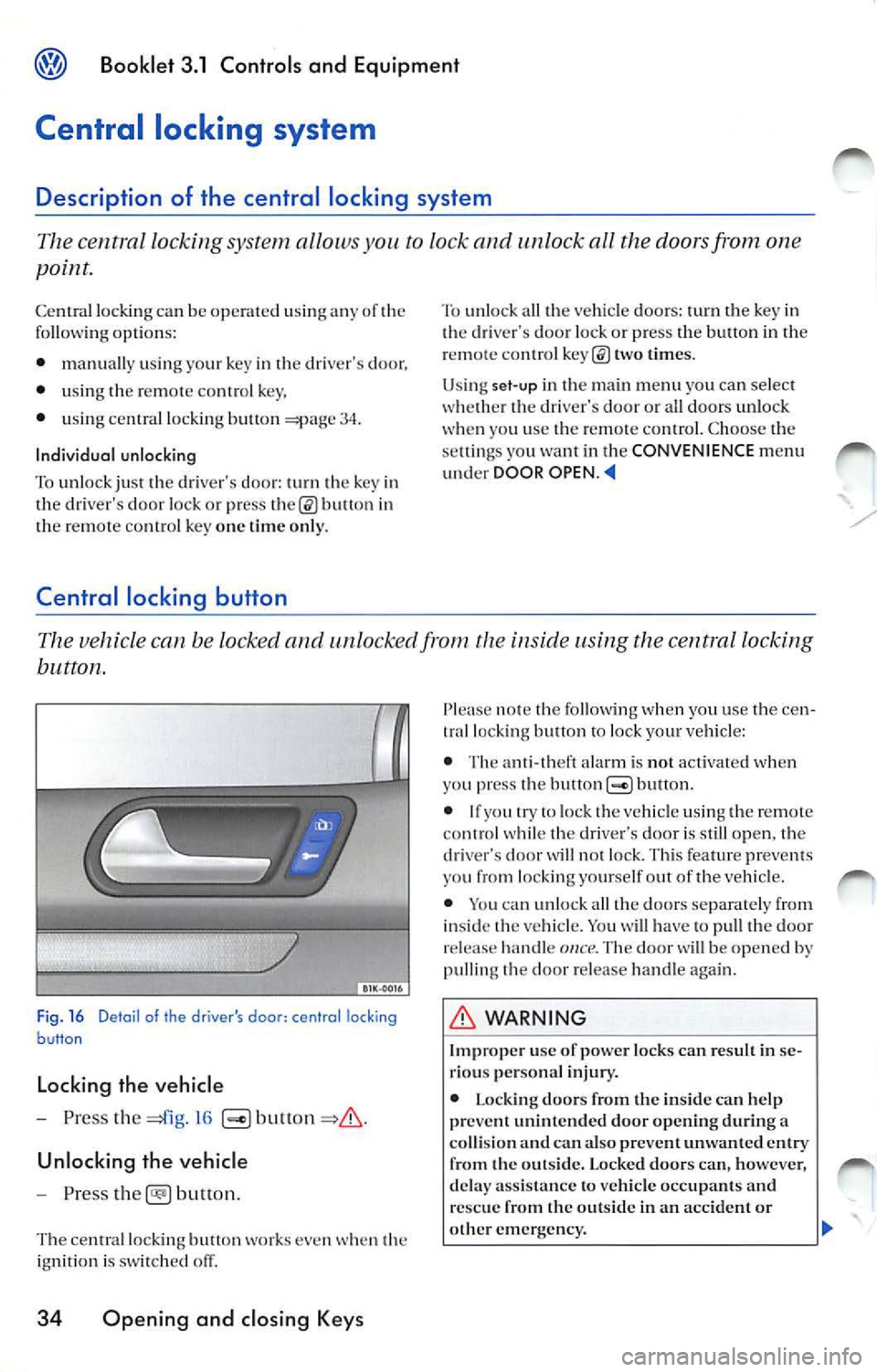
Fig. 16 Deta il of the drive r's door : central locking
button
Locking the vehicle
- Press the
16
Unlocking the vehicle
- Pr ess
button.
The ce ntral lock ing button works even when th e
i gn ition is sw itched off.
34 Opening and closing Keys
note the followi ng w hen yo u use the cen
tral locking button lock yo ur vehicle :
• The ant i- th eft ala rm is not activated when
yo u press the but ton
bullon.
• If yo u try lo lock the vehicle usin g the remote
co ntrol while the drive r·s door is still open, the
d river's door
w ill not lock. Thi s fe atur e pr eve nts
you from locking yourse lf out of the vehicl e.
• You can un loc k all th e doo rs separate ly from
i nside the vehicle. You
ha ve to pu ll the door
re lease hand le once. Th e door w ill be opened by
pulling the doo r re lease han dle again .
WARNING
I mp roper use of powe r lock s ca n res ult in se
ri ou s pe rso nal inju ry.
• L ockin g do ors from the in side can help
pr eve nt unint end ed door opening durin g a
co llision and can a lso preve nt un wanted e ntry
from the outsid e. Locked doo rs c an, ho wev er,
d ela y ass is tan ce to vehicle occupant s and
re sc ue from the o utsid e in an accident or
ot her eme rge ncy. ...
Page 238 of 477
Booklet 3.1 Cont rols and Equipment
WARNING (cont inued)
• Never leave children, disabled persons or
anyone who cannot help themselves in the ve
hicle. The doors can be lock ed with the ce ntral
locking button. This could leave peo ple
trapped in the vehicle in an emergency. People
trapped in the vehicle can be exposed lo very
high or low temperat ures.
• Heat build-up in the passenger compart
ment and luggage compartment of a parked
ve hicle can result in temperatures in the ve
hicle that are much higher than the outside
t emperatures, particularly in summer. Tem
perature s can quickly reach leve ls that can
cause unconsciousness and death, particu
l arly lo small children.
Child safety locks
WARN ING (con tinued)
• Never allow passenge rs lo remain in a
lock ed vehicle. Locked doors can delay assis
tance to vehicle occupants and rescue from
the outs ide in the event of an emergency. In an
emergency any person still in sid e th e vehicle
might not be able to get out.
Tips
Wh en you lock your ve hicle with the central
l ocking button:
• The doors and the rear lid cannot be ope ned
from the out sid e ( fo r your safety, for examp le,
when stopped at a traffic light).
• If yo u tr y to lock the vehicle using the central
l ock ing button while the driv er's doo r is still
open, the driv er's door will not lock. This feature
pr eve nts you from locking yourself out of the
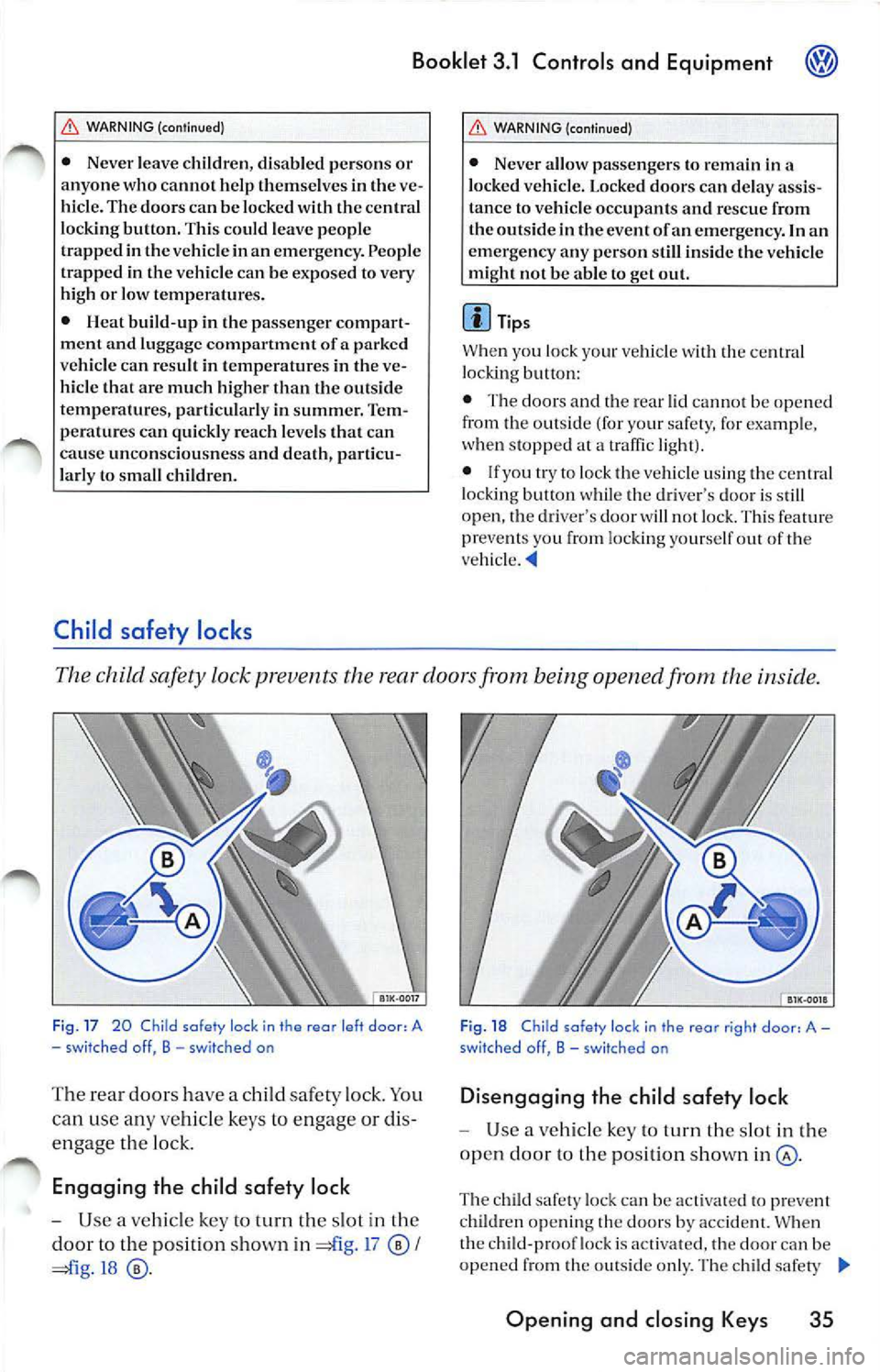
The child safety lock prevents the rear doors from being opened from the inside .
Fig . 17 20 Child safety lock in the rear left door, A
- sw it ched off, B - switched on
The rear doors have a child safety lock . You
can use any vehicle keys to engage or dis
engage the lo ck.
Engaging the child safe ty lock
- Use a vehicle key to turn the slot in the
door to the position sh own in =£l g. 1 7
I
=ii g.18
Fi g. 18 C hild safe ty loc k in the rear r ig ht doo r, A -
swit ched off, B -sw itched on
Di sengaging the child safety lock
Use a vehicle key to turn th e slot in the
open door to the position shown
The child safety loc k can be activat ed to pr eve nt
chi ldren ope ning th e doors by accident. When
the child-pro of lock is act ivated, the doo r can be
opened from the o utside only. The ch ild safe ty
Opening and closing Keys 35
Page 239 of 477
Booklet 3.1 Controls and Equipment
lock ca n be switch ed on and off using a key in th e
opened door.
Anti-theft alarm system
Applies to vehicles: with anti-theft alarm
Description of anti-theft alarm system
The anti-theft alarm triggers an alarm unauthorized movements are detected
around the vehicle.
Activating the anti-theft alarm system
- Lock the vehi cle.
Switching the alarm off
-Un lock the vehicle using the unlo ck
button in the remote control key or unlock
the veh icle by inserting the vehicle key into
the driver's door lock.
The anti-th eft alarm make s it more difficult break into the vehicle or steal You will hea r
and see the alarms if someone tri es break inlO
th e ve hicle.
Whe n yo u lock the ve hicle, the an ti-t heft alarm
syste m is aulOmat ica lly sw itched on.
Close all windows a nd doors compl etely befo re
locking the vehicle so that the ant i-t hef t system
does no t tr igger alarms unnecessar ily.
What triggers th e alarm?
With the vehicle locked, th e alarm will go
under th e fo llowing circ umstances:
• Man ually open ing of the rear lid u sing the ve
hi cle key,
36 Opening and closing Keys
• Opening a doo r,
• Ope ning th e en gine ho od,
• Opening the rea r lid.
Wh en th e alarm is triggered, th e horn
will sound
for about 30 seco nds and the turn signals wi ll
fla sh for about 4 minutes.
Ho w c an I switch off the ala rm system?
You ca n sw itch th e anti- theft alarm sys te m ei
ther by unlock ing th e veh icle using the unl ock
the remote contro l or by unlocking
the vehicle in se rting th e key into the driv er's
d oor lock.
Tips
• When the alarm stops sound ing and you
op en anothe r door or the rear lid or any other
part
th e vehicle that is monito red by the anti
th eft alarm system, the alar m will be triggered
aga in.
• The anti-t heft ala rm syste m works even if t he
battery is disconnected or not wo rking
prop erl y.
Page 240 of 477
Booklet 3.1 Controls and Equipment
Rear lid
Opening the rear lid
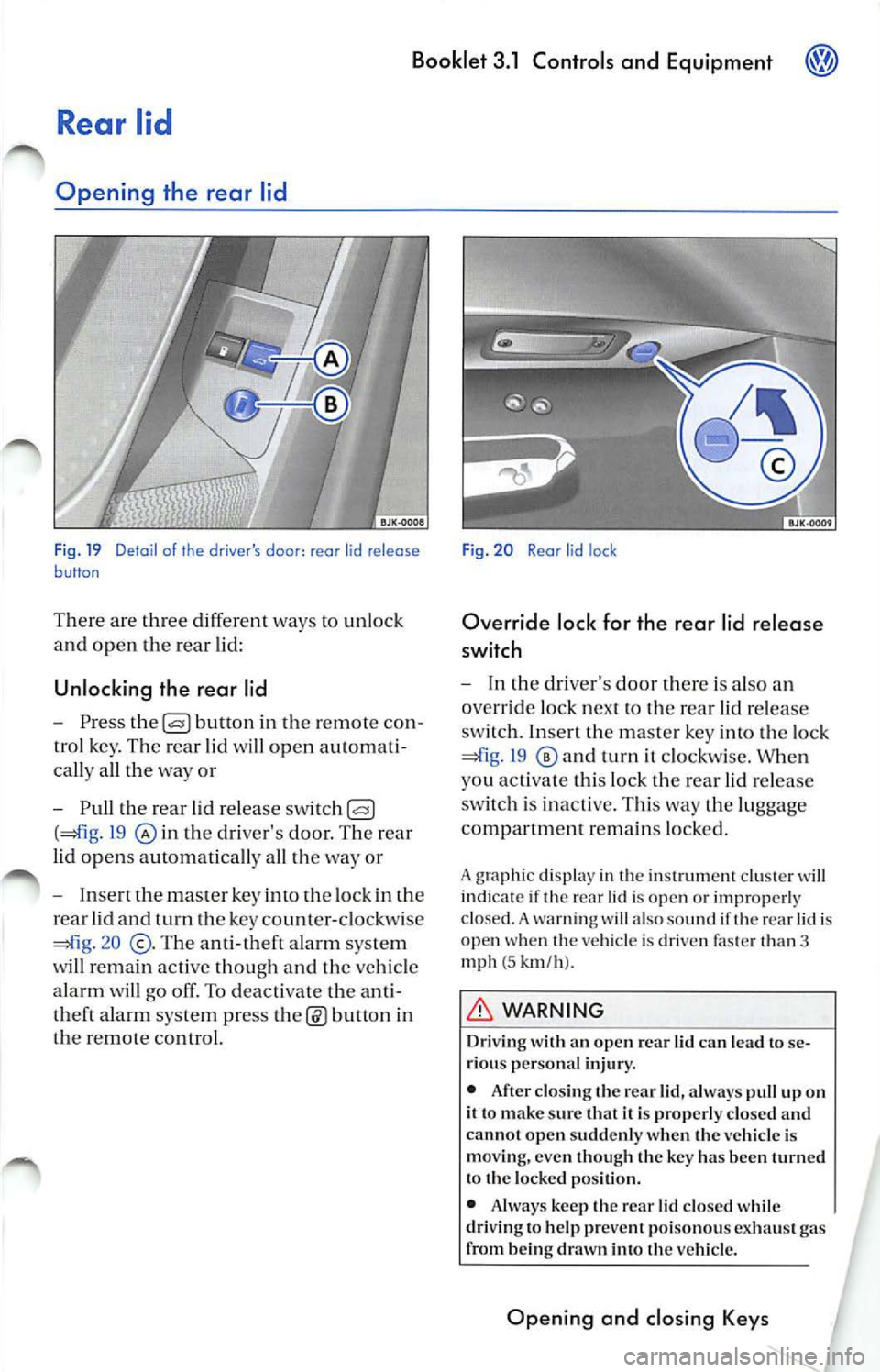
F ig. 19 Detail of the driver's door : rear lid release button
There are th ree differe nt ways to unlock
and open the rear lid:
Unlocking the rear lid
- Press the button in the remo te c on
tro l key. The rear lid wi ll open auto mat i
ca lly all the way or
-
th e rear lid r elea se sw itc h
(41 g. 19 th e driver 's do or. Th e rea r
lid op en s automaticall y all the way o r
- Insert the maste r key into th e lock in the
rear lid and
the ke y co unt er-clo ckwis e
=m g. 2 0
T he a nti-theft alarm syste m
w ill r ema in active thoug h and the veh icle
alarm
go off. To deacti vate the anti
theft a larm syste m pr ess
in
the remote control.
Fig. 20 Rear lid lock
Override lock for the rear lid release
switch
-In the d river's door there is a lso an
override loc k next to the rea r lid r elease
sw itch. Inser t th e m aste r key into the lock
19 a nd turn it clockwi se. W hen
you ac tivate thi s lock th e rear lid re lease
sw itch is inact ive. Thi s way the lu ggage
compa rtment r emain s locke d.
A grap hic di spla y in th e in strum ent clu ste r w ill
indi cate if th e re ar lid is op en or im prop erl y
clo sed. A wa rnin g will al so sound if th e r ear lid i s
open w hen th e veh icl e is dri ven fa ste r than 3
mph
( 5 km /h ).
WARNING
Dri vin g with an open re ar lid can lea d to se
ri ous personal injury.
• After closing th e rear lid, always pull up on
it t o mak e sure that it i s properl y clo sed and
ca nn ot open sudd enl y w hen the vehicl e is
mo vin g, eve n th oug h th e ke y ha s bee n turn ed
t o the locke d po siti on.
• Always keep the rea r lid closed wh ile
dri ving to h elp pre vent poiso nou s ex hau st gas
fr om b eing dr awn into the vehicle.
Opening and closing Keys
Page 242 of 477
Booklet 3.1 Controls and Equipment
other doors ea ch hav e own switch .
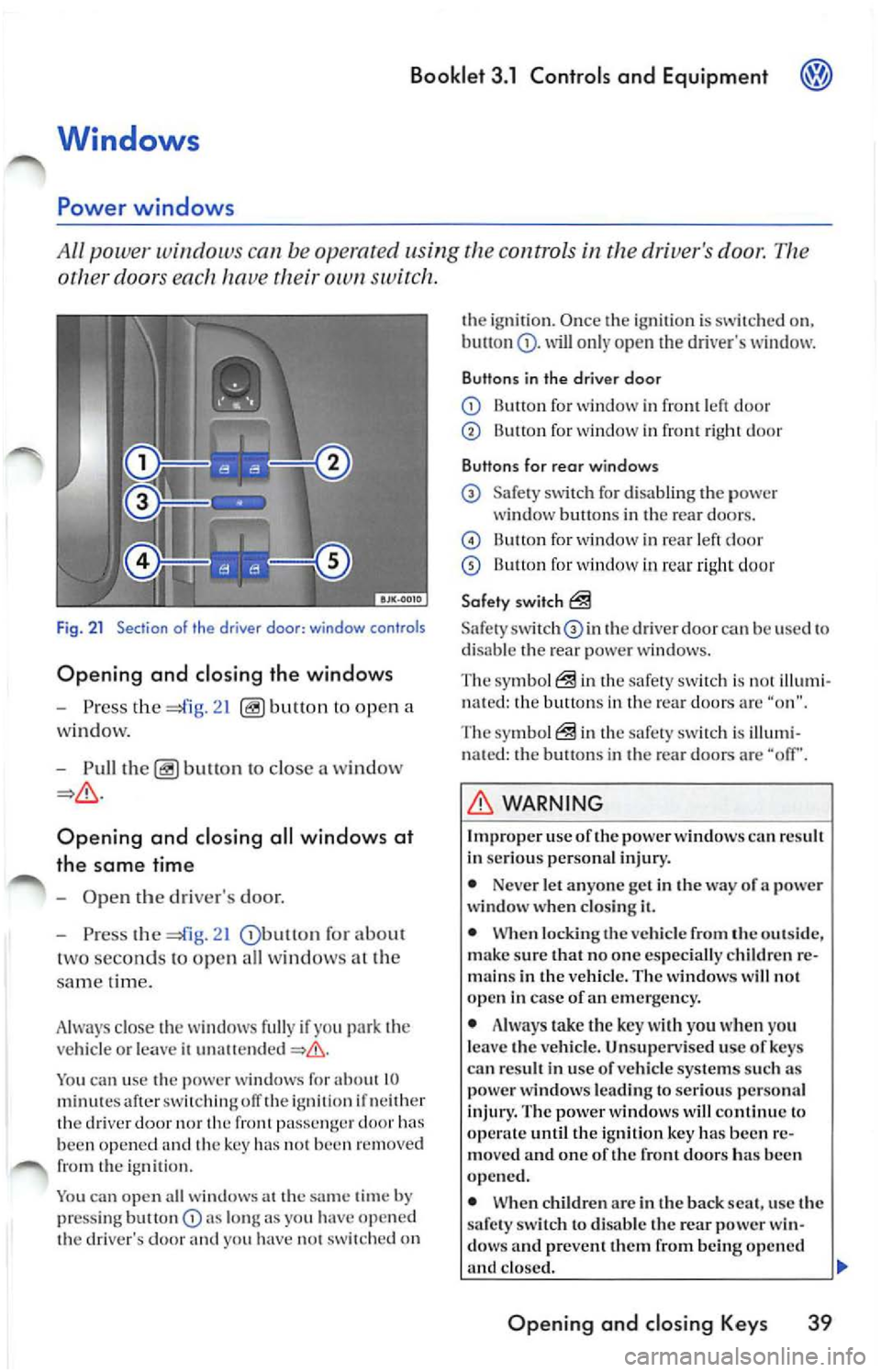
Fig . 21 Section of th e driver door: window controls
Opening and closing the windows
-Press the ope n a
w indow.
- Pull
to close a win dow
Opening and closing all wind ows at
the same time
-Ope n the driver's door.
- Press the
21 for abou t
t wo se conds to op en all wi ndows at the
s am e tim e.
A lwa ys close the w indows fully if yo u
vehicl e or le a ve ii
You ca n u se the power window s for about 10 minut es aft er ofT the ig niti on if n eith er
th e dri ver nor front pa ssenge r doo r been opened and the key has 1101 been re m ove d
from the igniti on.
You can open a ll wi ndow s at the
time by
pr ess ing but ton lo ng as you have o pe n ed
th e dri ver's door yo u ha ve 1101 switched on th
e ignirio n. Once th e ig niti on i s sw itch ed on,
will o nly open dri ver's w indow.
Buttons in the driver door
Button for window in front le ft d oo r
Button for wind ow in front right doo r
Buttons for rear windows
Safe ty sw itch for d isa bling the power
window b uttons in th e re ar door s.
B utt on for wind ow in rear le ft d oor
13u11on for window in rea r ri ght doo r
Safety switch
Safety th e driver doo r can be use d to
di sa ble th e rear p ower w in dows.
The symb ol
in the safe ty sw itch i s illum i
n ate d : the button s in th e rear doo rs a re "o n".
The symbol
in the safety s witch is illumi
n ated: the button s in th e rea r d oo rs are "off'.
WARNING
Imp roper use oft he power windows can result
In se ri ous perso nal inju ry.
• Neve r let anyo ne get in the way of a power
windo w wh en clos ing it.
• When locking the veh icle from the out sid e,
make sure that no on e especia lly c hildren re
m ain s in the vehicl e. T he w indo ws w ill not
open in case of an eme rge ncy .
• Always take the key with you when yo u
l e av e the vehicle . Un supervised u se of ke ys
ca n re sult in u se of ve hicle systems su ch as
pow er windows leading to serious perso nal
injury. The power wind ows will continu e lo
until the i gnition key has been re
mo ved and one of the fron t door s ha s be en
opened.
• When children arc in the back seat, use the
s afet y sw itch
di sa ble the rear power win
dow s and preve nt th em from being opened
clo sed. II>
Opening and closing Key s 39
Page 244 of 477
Booklet 3.1 Controls and Equipment
Pinch protection
The wind ows have a pinch protection feature. This helps re du ce the risk of inju
ries when the windows are closing.
• lfa w indow is obst ructe d w hen closing, the
w ind ow will sto p and open (go down) aga in
If this happe ns, see why the window could
n ot clo se befo re att emp ting to close aga in. If
yo u tr y to close the wind ow again wit hi n 10 sec
o nd s, th e w ind ow's closing force is a utomati
ca lly incr ease d.
• If th e wi ndow is st ill obst ructed, the wi ndow
w ill stop at this po int.
• If th ere is no obvio us reason why the w indow
ca nn ot be closed, try to close it agai n wit hin 5
seconds. T he pin ch protection is now off. The
window clo ses with maximum force.
If you wa it lo n ge r th an the lO or 5 seco nds de
sc ribed above, the w in dow will open f ully whe n
you ope rate o ne of the buttons. One-touch
closi ng is on aga in.
Th e one- tou ch functio n and pinch prot ection do
not wurk if ther e is a m alf un ction in th e power
windows. Contact yo ur authoriz ed Vo lkswage n
deal er co have the m alfunc tion corrected.
Convenience opening and closing
You can ope n or clo se the windo ws from
outside the vehicl e.
Convenience closing
-Hold th e key in th e close pos ition in th e
l oc k of the driver's door, until all windo ws
a re clo sed.
- Turn th e key the other way to interrupt
th e fun ction.
Convenience opening
-Hold th e key in the ope n position in the
l oc k of the driver' s door, until the windows
are ope n.
WARNING
Improper use of the pow er windows can result
in serious personal injury .
• Never let anyone ge t in th e way of a power
window when closing it.
• Always make sure that no one i s in th e w ay
while overriding the pinch protection to close
a w indo w!
• When locking the vehicle from the out side ,
make sur e that no one especially c hildr en re
mains in the vehicle. Th e windows will not
open in case of an emergency.
• Always take the key with you wh en you
leav e the vehicle. Unsupervised use of keys
can result in use of vehicle s ystem s such as
power windows leading to serious personal
inju ry.
• The power windows will continue to op
crntc until the igniti on ke y has bee n re mo ved
and one of the front door s ha s bee n opened.
• When children are in the b ack sea t, use the
safety switch to disable the rear power win
dows and prevent them from b eing opened
and closed.
<4
-Turn the key the oth er way to interrupt
t h e function.
Using set-up in the main menu , you can select if
yo u want the driver 's doo r w in dow. all w indows
o r n o window a t all to open whe n you unlock
your vehicle using the ma ste r key in th e driver's
doo r lock. C hoose the se ttings yo u want in the
CONVENIENCE menu.
WARNING
Improp er use of the power windows can result
in seriou s per sonal injury.
• Neve r let anyon e get in the way of a power
window when clo sing
Opening and closing Keys 41
Page 324 of 477
WARNING (continued)
systems work and reduce their
effect iveness.
Applies to vehicles: with Driver Steering Recommenda tion
Booklet 3 .2 Tips and Advice
Driver Steering Recommendation helps to the vehicle in certain sit
uations
The Driver Stee ring R ecomm endation i s a com
pl em entar y function of the ESP. This fea ture al
low s th e driv er
stabilize ve hicl e in certain
critical situati ons. Fo r example in certai n road
s ur face conditi ons ii is necessary to brake hard.
The vehicl e will then te nd to brak e awa y to the
r ig ht or t o 1h e lef t. Th e ESP reco gnizes this situ a
tion and supp ort s the drive r to steer to the oppo-
Anti -Lock Brake System {ABS)
sit e dire cti on by in crea sing th e stee rin g
s tr ength.
WARNING
The DSH only supports the driver in cri tical
dri vin g co ndition s. The ve hicl e will not s teer
by itse lf. The dr ive r is res pon sible fo r steering
the vehicle .
The Anti-Lock Brake System prevent s th e wheels from locking when the brakes are
applied.
Th e ABS is an important part of the vehicle 's ac
ti ve safety system. The Anti-Lo ck Brake Syste m
work s onl y when the en gine is run ning.
How the ABS works
If one w he el begi ns tu t urn too s low ly in r elat io n
t o ve hicl e speed an d le n ds to lock up, t he ABS
a utom ati ca ll y
brak e pres sur e lO preve nt
that whee l fr om locking. When ABS is do ing it s
job you will notice a sli ght vibrati on throu gh the
brake pedal and hea r a noise to l et yo u know tha t
yo ur speed must be adjuste d to road, traffic and
wea ther condi tion s. T his is a warn ing 1hat on e or
mor e of the whee ls is about to lock up and that
th e AB S co ntr ol function has inter vened . In thi s
s ituati on
is important to keep the brak e peda l
fully depr essed so the ABS can help to re gul ate
th e brake applica tion. Do not "pump " th e
peda l -ABS can not do its jo b if you do.
A BS helps you 10 kee p th e ve hicl e und er control
be cause i t prev ent s th e w hee ls from locking
w hen th e brak es arc ap plied. Th is m ean s th e ve
hicl e ca n still be s teer ed and is less likely
on
g rav el o r on fresh sno w cover in g a slipp ery sur
If AB S is not functioning properl y, a wa rnin g
li ght will co me on 3.1 "Co n1rol s and
E quipm ent. "
WARNING
Always ad just yo ur dri vin g to the road, traffic
and weather conditio ns. Neve r le t th e ex tra
s afe ty that ABS can provide te mpt you into
taking extra risks.
• Always drive safely .
• ABS canno t ch ange the
of ph ysics.
S lipp ery and wet roads are dangerou s ev en
wi th ABS!
• ABS ca nnot reduce th e risk of accide nts,
f or examp le if yo u drive too
for the co ndi
ti ons or if you do not keep your distance from
th e vehicle in front of you.
Smart technology 3
Page 396 of 477
Booklet 3.2 Tips and Advice
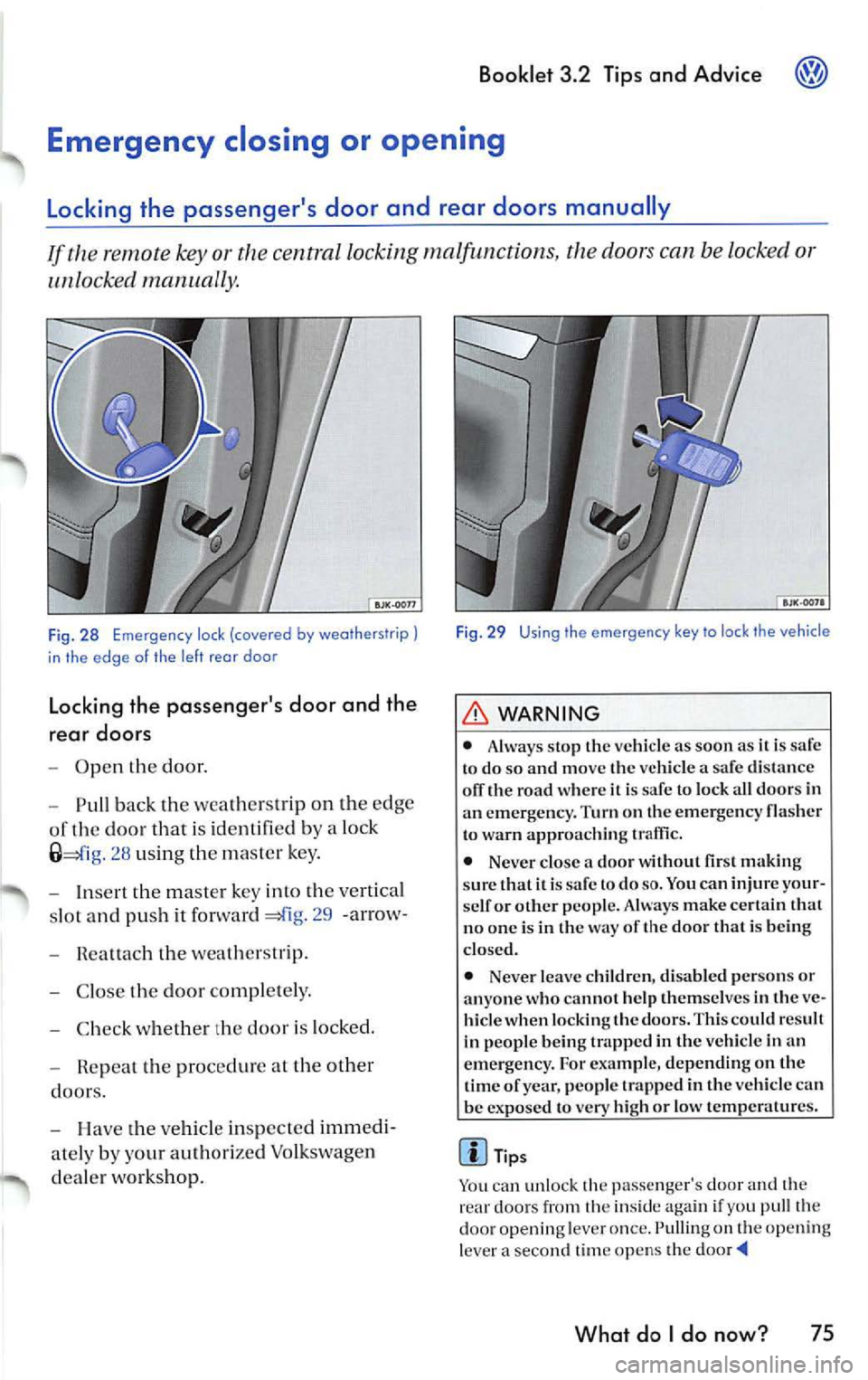
or th e centra l locking malfunctions, th e doors can be locked o r
unlocked manually.
Fig. 28 Emergen cy lock (covered by weatherstrip)
in the edge o f the left rea r doo r
Locking the passenger's door and the
rear doors
Open the door.
Pull back the wea thers trip on th e edg e
of the door th a t is id en tifi ed by a lock
2 8 us ing th e ma ster key .
Inse rt the m aster key into th e ve rtical
s lot and pus h it forward
29 -arrow-
Rea ttach t he weat hers trip.
C lose the door comp le te ly.
C hec k w hethe r the door is lock ed.
Repea t the proced ure at the other
doors.
H ave the ve hicle in sp ec ted immedi
ate ly by your auth orize d Vo lkswage n
d ea le r wo rks ho p.
Fig . 29 Using the emergency key to lock the vehicle
WARNING
• Always sto p the vehicl e as soo n as it is to do so and move the ve hicle a sa fe d is tance
olT the road w here it is sa fe to lock a ll doors in
a n eme rge ncy. Turn on the emerge ncy fla sher
t o warn a pproac hing traffic.
• Never close a door wit hout first makin g
s u re th at it is sa fe to do
so. You ca n injure your
se lf or other people. Always make certain that
n o o ne is in t he way of the door that is bein g
clo sed.
• Neve r leave c hildren, di sabled perso ns or
anyo ne who cannot help th em se lves in th e ve
hicle when lock ing th e doors. This could r esult
in p eople being trapp ed in th e vehicle in an
e mergenc y. For example, depending on the
tim e of year, peop le trapped in the vehicl e ca n
be expo sed to very high or low temperat ures.
Tips
Yo u can unlock the passenger's door and th e
rear doo rs from th e insid e aga in if you pu ll the
door opening leve r o nce. Pulling on th e openi ng
l ever a secon d time op en s th e
What do I do now? 75