clock VOLKSWAGEN JETTA 2007 User Guide
[x] Cancel search | Manufacturer: VOLKSWAGEN, Model Year: 2007, Model line: JETTA, Model: VOLKSWAGEN JETTA 2007Pages: 477, PDF Size: 77.6 MB
Page 367 of 477
Booklet 3.2 Tips and Ad vic e
Changing windshield wiper blades
Dama ged wiper blades must be rep lac ed
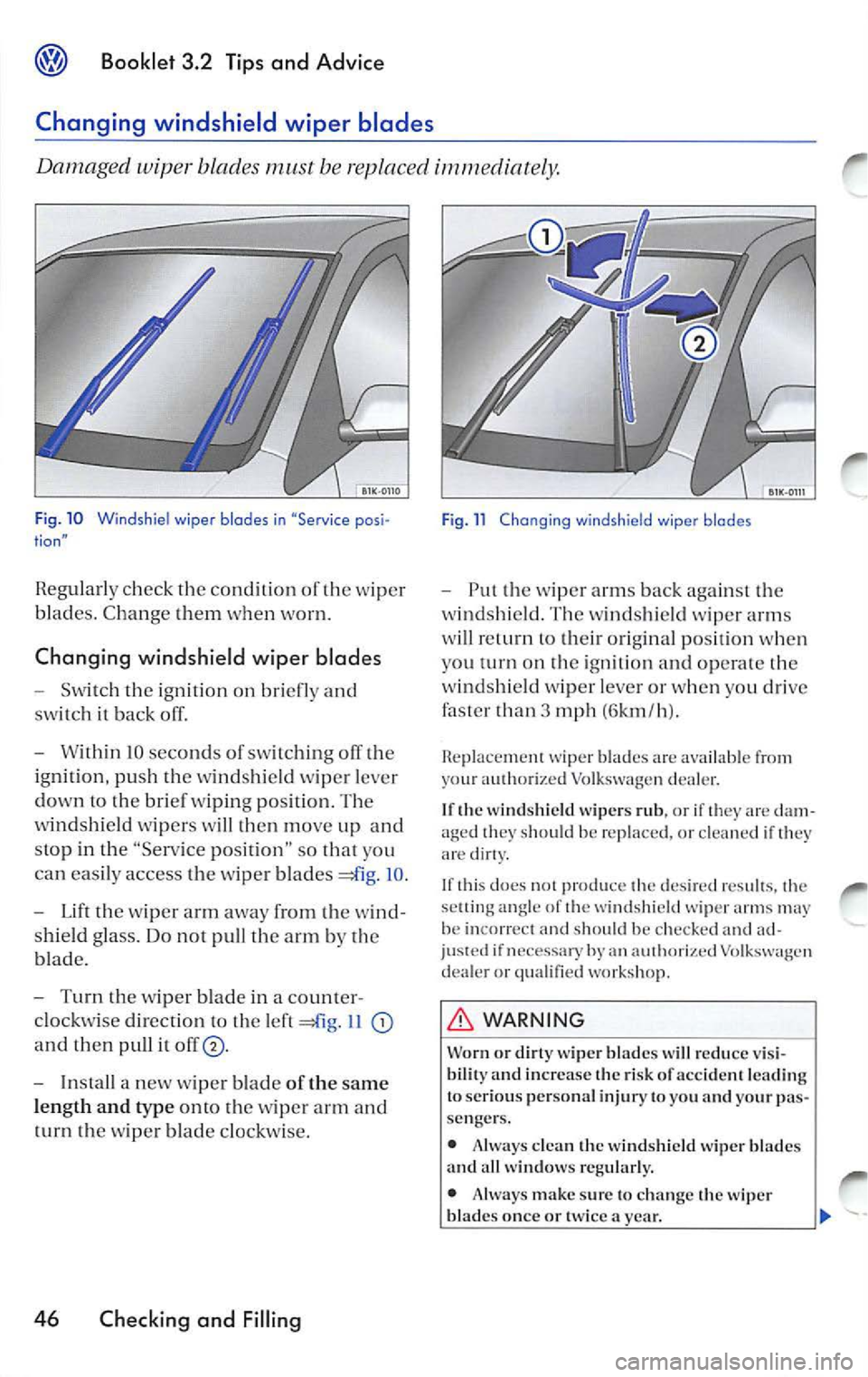
Fig . 10 Windsh iel wiper blades in "Service posi tion"
Regularl y check the co nditi on of the wipe r
blad es. Change them when worn.
Chang ing windshield wip er blades
- Switch the ignition on briefl y and
sw itch it back off.
- Wit hin IO seconds of switching
th e
i g ni tion, push the windshi eld wiper lever
down to the brie f w ipin g position. The
w indshield wip ers w ill then mo ve up and
stop in the "Service posit ion " so that you
can easily access the wipe r blade s
IO .
- Lift th e wiper arm away from the w ind
s hield glass. Do not pull th e arm by th e
bl ad e.
- Turn the wiper blade in a counter
cl oc kwise directio n to the lef t
I I
and then pull it
- In sta ll a n ew wipe r blade of the same
l eng th and type onto the w ip er arm and
t urn th e w ip er bl ade clockwi se.
46 Checking and Filling
Fig. 11 Changing windshie ld wiper blades
- Put the wip er arms back agains t the
w indshie ld. The win dsh ie ld wiper arms
wi ll re turn to their original po sition w hen
you turn on the ignit ion and opera te th e
w ind shi eld wipe r lever or w hen yo u dri ve
faster than 3 mph (6km /h ).
Replac ement wip er blad es are available from
y our au thorized Volkswage n deal er.
I f th e w ind shi eld wiper s rub , or if they are dam
ag ed
shou ld be rep laced , or clea ned if th ey
are dirty.
If th is do es
produ ce de sired re sult s, settin g angle of winds hield wiper arm s ma y
be in correct sh ould be ch eck ed an d ad if necessary by an dealer or quali fied work sh op .
WARNING
Worn or wip er b la d es w ill redu ce vis i
bilit y and increase the risk of acci dent l ead ing
to ser io us perso nal inju ry to you and your p as
se nger s.
•
clea n wind shi eld wip er blade s
and all wi ndo ws reg ular ly.
• Alw ays mak e sure to ch an ge the
blade s onc e or tw ice a yea r.
Page 378 of 477
"Tires and ve hicl e lo ad limit s" for more imporinfor mati on.
Vehicles
ha ve full hub caps have valve ex
tenders ins tead of du st caps. To ch eck tire pr es
s ur e or acid air. you do not n eed to re move the
ex te nd er. 13e s ure to rein sta ll va lve dust caps
ch eck ing or adjust ing tir e pr ess ure.
A lways use an
tir e pr ess ure gaug e w hen
c h eck ing and adju stin g i nfl atio n pr essu res .
C hec k all of the
and b e sure not l o forg et th e
s par e tire. If p ress ure in an y is too high
w hen the tire is "co ld," let o ur of the tir e
s lowly with th e of the tir e ga uge and kee p
c h eck ing th e press ure until you re ac h th e pr es
s ure that is correc t for th e loa d (pa sse nge rs and
l u gg age)
ki nd of dri ving yo u plan t o do .
I f th e pr ess ure in any tire is too low , n ote the dif
f e re n ce between the press ure in the co ld
a nd
th e pr ess ure yo u need and add air yo u
n eed to reac h th e co rrect press ure for the vehicle
load (pa sse nge rs and lu ggage) for th e tire s on
yo ur vehicle as listed o n the on yo ur vehicle a nd
in thi s man ual
th e kind of driv ing y ou p lan
t o do .
Neve r excee d th e maxi mum infl ati on pre ssure
li sted on the tir e sid ewa ll for any reason.
R em emb er th at the ve hicle manufac turer, not
t h e tir e man ufa ctur er, de te rmin es th e co rrec t
t ir e pr ess ure for th e tir es o n yo ur vehicle
I t i s imp ortant
ch ec k th e tir e pr ess ure when
the tires are cold.
Vehicle witho ut
• the re quir ed tire pressure from the tir e
pressu re lab el on the ope n edge of th e dri ver's
door .
• Place the a ir press ure gauge on the dust cap s
- th ere is no need
re m ove them.
• The tir e press ures s ho uld onl y be checked
tire s cold. The sli ghtl y pres
s ur es ofwann tires no t b e reduced.
•
th e tire press ure to the load you are
ca rrying.
Vehicle with
• the req uir ed tir e pr ess ure from the tir e
pressure label o n th e ope n edge of the dr ive r's
do or.
Booklet 3.2 Tips and Advice
• Turn th e va lve s tem cap counter-clockw ise to
r emove it from the tire valve.
•
th e ai r press ure on the valv e.
• The tir e pressures sh o uld onl y be ch ecke d
w hen th e tir es are cold. T he slig htly rai sed pres
s ur es of
tires not be redu ced.
• Adju st th e tir e pr ess ure to the load you are
carry ing.
• Reins tall the valv e ste m cap on the valve.
When should I ch eck the tire pressure?
Th e co rrec t tir e pr ess ure is especia lly import ant
a t hi gh speeds . Th e pre ssur e s ho uld th erefo re be
c h ecked at leas t once a month and alwa ys befo re
s ta rt in g a jo urn ey. D o not forget to ch eck the tire
pr ess ure on th e spare whee l
When shou ld
I adjust the tire press ures?
Ad just th e tire press ure to the loa d you are car
ry ing. After changin g
wheel or repl acing
w hee ls yo u have tu adj ust th e tir e press ures on
a ll whee ls. In ad ditio n on ve hicles wit h TPMS,
yo u sh oul d s pecify new tire pressures
=boo klet
WARNING
In co rrec t tire press ure ca n result in sudd en
ti re failur e Jo ss of co ntrol, collision , seriou s
perso nal injur y an d eve n dea th .
•
tire s to the re co mm end ed and
co rrec t tir e pre ssure before drivin g off.
• Driving with und erinfl atcd tires bend
m or e, le ttin g th em get too hot res ulting in
tr ead separatio n, s udd en tir e fai lure ti re
fa ilur e and Jo ss of control.
• Excess ive sp ee d and /or ove rload ing ca n
ca use hea t build -u p, su dden tire failure in
cludin g a bl owo ut an d su dden deflati on and
Jo ss o f co ntrol.
• If th e tire pr essure is to o low or too high,
th e tir es will wear prema turely and the ve hicl e
wi ll not handl e we ll.
Not e
Dr iv in g w ith out valve s te m caps ca n cau se
applicab le Tire pressure monitoring system)
Checking and Filling 57
Page 391 of 477
Booklet 3.2 Tips and Advice
Applies lo vehicles: wi th spore whee l
Removing the spare wheel
The spar e wheel is located und ern eath the floor covering in the luggag e compart
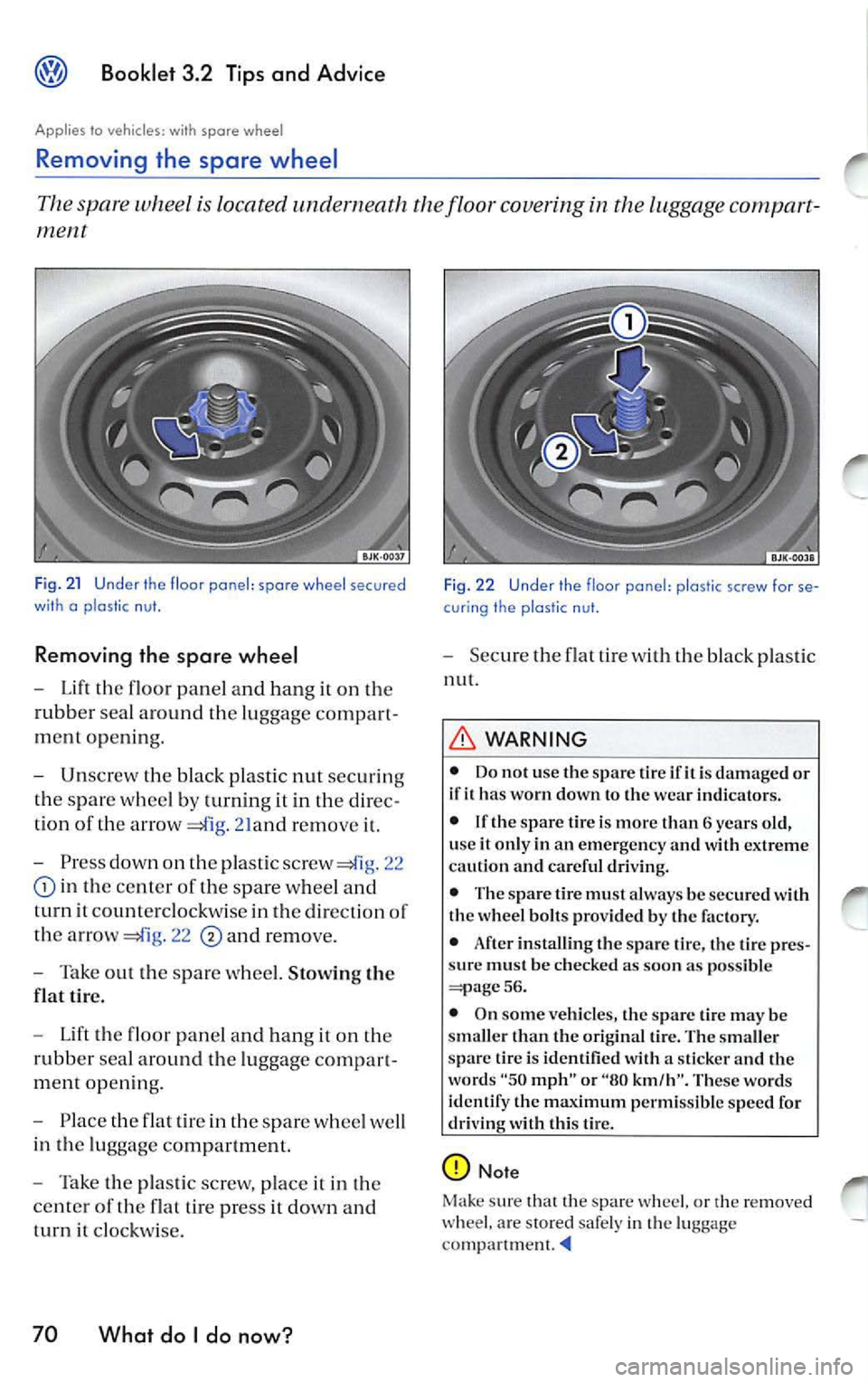
Fig. 21 Under th e floor ponel: spore wheel secured
wi th o p las tic nut.
Removing the spare wheel
-Lift floor panel and hang on
rubb er sea l aro und the luggage compart
ment openin g.
- Unscrew the black plastic nut securin g
th e s par e whee l by turning it in
direc
tion of th e arrow
21and remo ve
-Press dow n on pla stic screw 22
in the ce nter of the spare wheel and
turn it co unt erclo ckw ise in th e direction of
the arro w
22 and remove.
- Tak e out the s pare whee l. Stowing the
flat tir e.
- Lift the fl oor pan el a nd h ang i t on the
rubb er sea l around the luggage compart
m en t open ing.
- Pla ce the flat tir e in the spar e whee l we ll
in the lu ggage co mpartment.
- Take the pla stic scr ew, place it in the
c ente r of th e flat tire pre ss
dow n and
t urn
clockw ise.
70 What do I do now?
Fi g. 2 2 Under th e floor pone!: plo stic screw for se
cur ing the plostic n ut.
- Secu re the flat tire w ith bla ck pl astic
nut.
WARNING
• Do not use the spar e tir e ifit i s damaged or
if it ha s worn down to the wear indicators.
• If th e s pare lire i s more than 6 years old,
u se
it only in an em ergen cy and with extreme
cau tion and careful dri vin g.
• The spare tire mu st alwa ys be se cur ed w ith
the wheel bolt s provided b y the factory.
• After installin g the spare tire, the tire pr es
s ur e must be c hecked as soon as p ossible
56.
• On some ve hicles, the spare tire ma y be
sma ller th an th e original tire. The smaller
spar e tir e is identified with a sticker and th e
word s
"50 mph" or "80 km/h". These words
identify the max imum permissible sp ee d for
driving with this tire.
Not e
Mak e sure that the spare w heel. or
re mo ved ar e stored safe ly i n luggag e
Page 392 of 477
Booklet 3.2 Tips and Advice
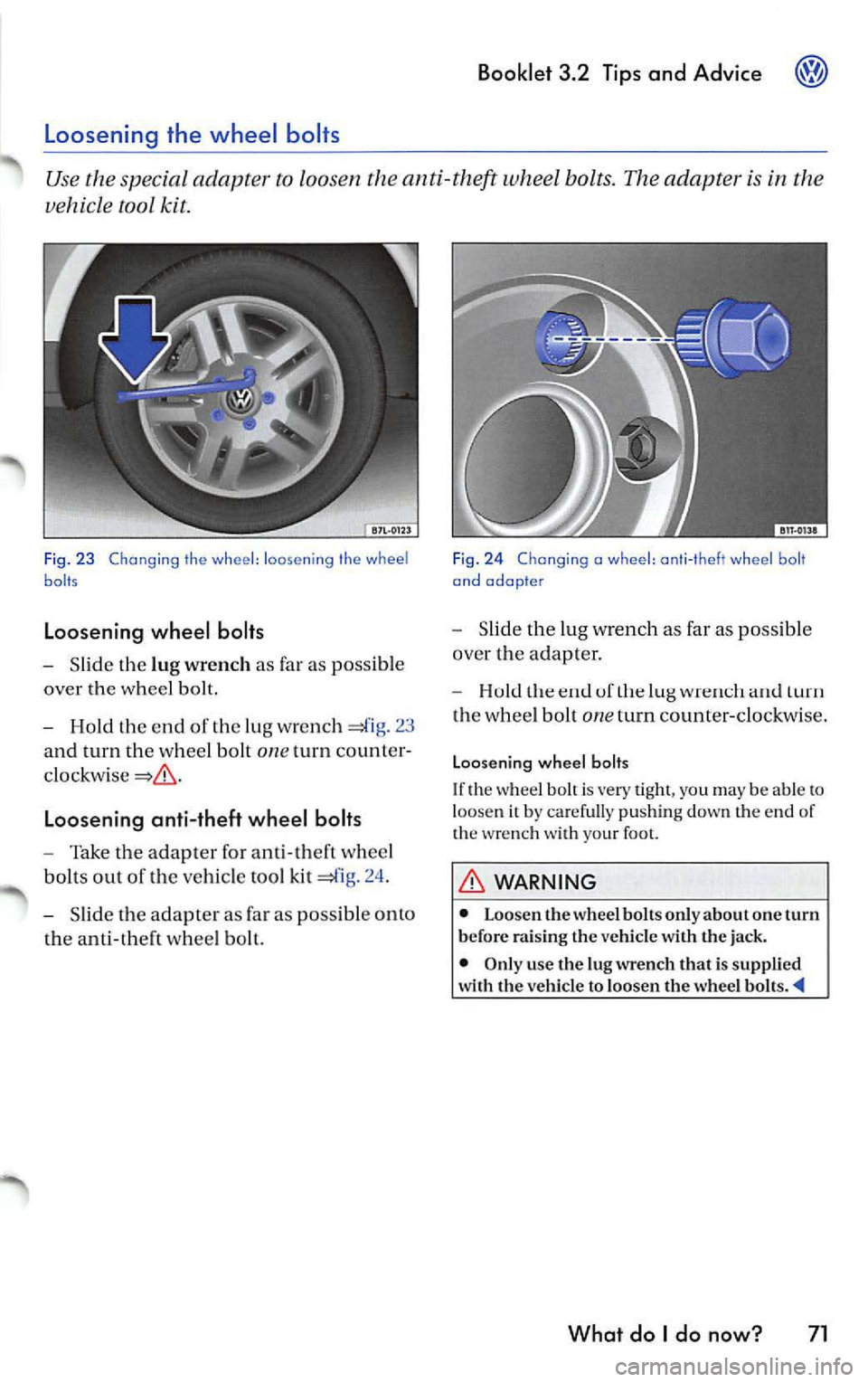
Slid e th e lu g wrench as far as possib le
over the whee l bolt.
Hold the end of the lug wre n ch 23
and turn the whee l bolt
one turn count er
Loosening anti-theft wheel bolts
Take the adapter for ant i- th eft w hee l
bol ts out of the ve hicle tool kit =£lg. 24 .
Slid e the adap ter as far as pos sib le o nto
th e a nti -theft w hee l b olt.
Fig . 2 4 Chang ing a wheel : ant i- t h eft whe el b olt
and adopte r
Slid e the lug w rench as far as possib le
ove r the adapter.
uf turn
th e whee l bolt one turn counter-clockwi se.
Loosen ing wheel bolts
If th e w hee l b olt is very tigh t, yo u may be able t o loose n it by carefu lly pu shin g down the end of
th e wre nch with your foo t.
WARNING
• Loo sen th e whee l bolt s onl y about one turn
b efor e rai sing th e vehicle w ith the jack.
• Only use the lu g wrench that is suppli ed
w ith th e ve hicl e to loosen the wheel
What do I do now? 71
Page 394 of 477
WARNING {continu ed)
• Never let anyone place any part of their
body underneath the vehicle when support ed
by the jack.
• Never support your vehicl e on cinder
blocks, bricks or other obje cts . These may not
Changing a wheel
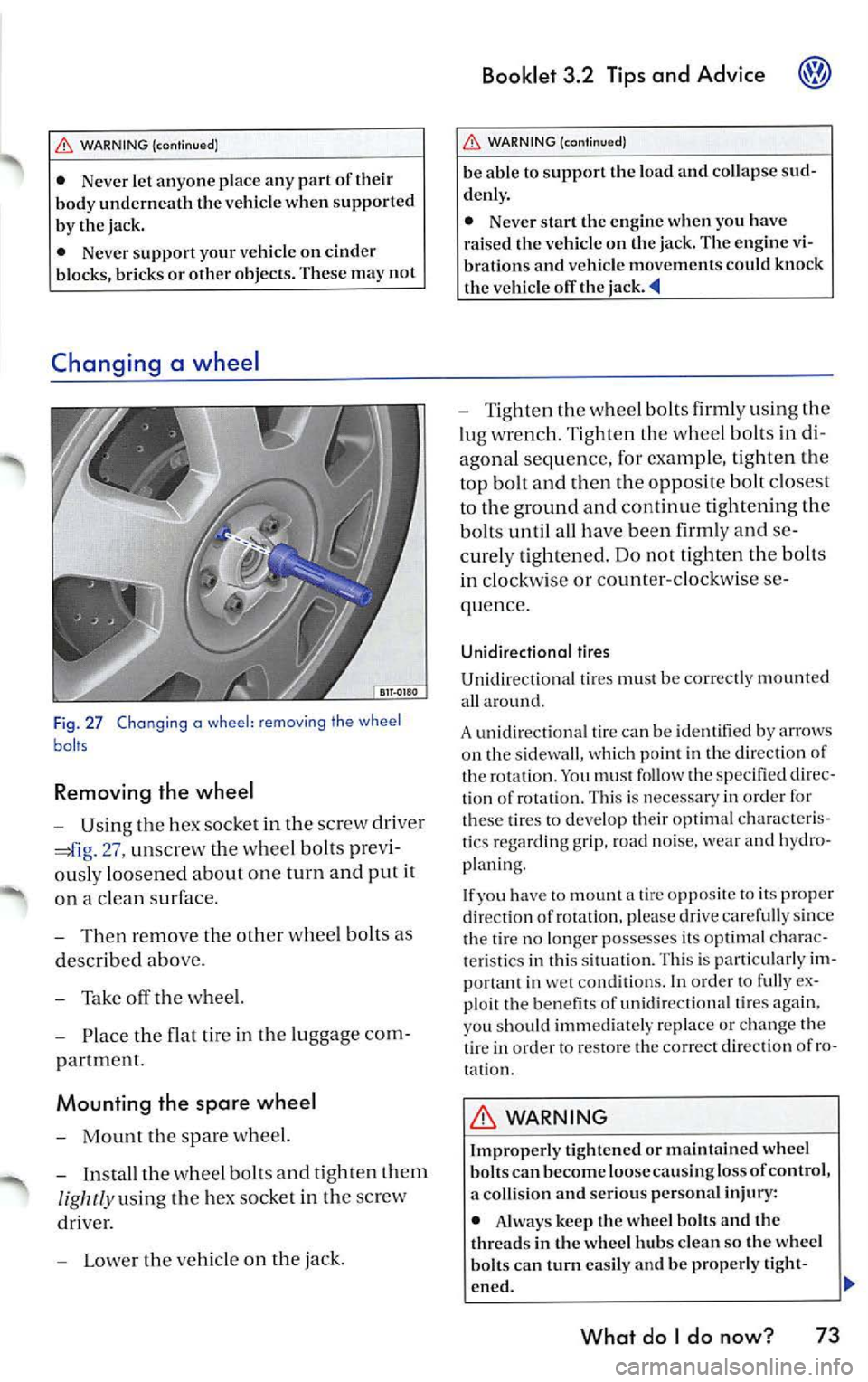
F ig . 27 Chang ing a wheel : removing the wheel
baits
Removing the wheel
-Usin g the h ex socket in th e sc rew dri ver
27, un screw t he w heel bo lts pre vi
o usly loo sen ed about on e turn and put it
o n a cl ean su rface .
- Then re mo ve the oth er whee l bolt s as
d esc ribed abo ve.
- Tak e off th e w he el.
- Place the flat ti re in the lu gg ag e co m-
p artmen t.
Mounting the spare wheel
-Mount the sp a re wh eel.
- Insta ll th e w hee l bolt s and tight en th em
lig htly u sin g th e hex so cke t in th e sc rew
dri ver.
- L ower th e ve hicle on the jack .
Booklet 3.2 Tips and Advice
WARNING {cont inu ed )
be able to support the load and collap se sud
denl y.
• Nev er start the engine when you have
raised the vehicl e on the jack. The engine vi
bration s and v ehicle movements could knock
the v ehicl e off the
- T ig ht en the wheel bolts firml y using the
lu g w re n ch. Ti gh te n th e whee l b olts in di
a gonal s equ ence , for e xampl e, tig h te n th e
top bolt and then th e oppo sit e bolt clo se st
to th e ground and continu e tight enin g the
bolt s until all have bee n firml y and se
c ur ely tight en ed. Do not tight en th e bolts
in clock wise or c ounter-cl oc kw ise se
quen ce.
Unidirectional tires
Unidir ectional tir es mu st be co rrec tly m ount ed
a ll arou nd.
A un idir ection al tir e ca n b e id en tified b y arrows
o n th e s idewa ll, w hi ch p oin t in the di rec tion of
t h e ro tation . Yo u mu st fo llow the speci fied dir ec
ti on of ro ta ti on. Thi s is necessary in orde r for
the se tires to deve lop t heir optim al cha racte ris
ti cs regar ding grip, road noise, wea r and hydro
p la ni ng .
I f y ou have
to moun t a tire opp osite to i ts pro per
dir ection of rot atio n. p lease drive caref ull y sin ce
th e tir e no lo nge r poss esses its o ptimal chara c
t e ri stic s in thi s s itu atio n. Thi s is parti cul arl y im
po rta nt in we t con ditions. In orde r to f ully ex
pl oi t th e benefi ts of unidir ectio nal tire s ag ain ,
yo u sh ou ld imm edi ate ly re place or change the
tir e in or der to resto re th e co rrect d irec tion of ro
t a ti on .
WARNING
Improp erl y tight en ed or maintain ed wheel
b olt s can b ecome loose cau sin g lo ss of control ,
a colli sio n and seriou s per son al inju ry:
• Alw ay s keep th e wheel bolt s and th e
thread s in the wh eel hub s clean so the whee l
bolt s can turn easily and be p roperl y tight-
en ed .
What do I do now? 73
Page 408 of 477
-Press the cove r together u sing both
hand s in the direc tion or th e arrows
42 and pull the cover
Booklet 3.2 Tips and Advice
-Screw th e tow ing eye into the t hread ed
ho le , turnin g
co1111t er-cl ockwi se as far as it
will go
43.
- Use the wre n ch for leverage to tighten
the towing eye.
Towing eye at the rear of the vehicle
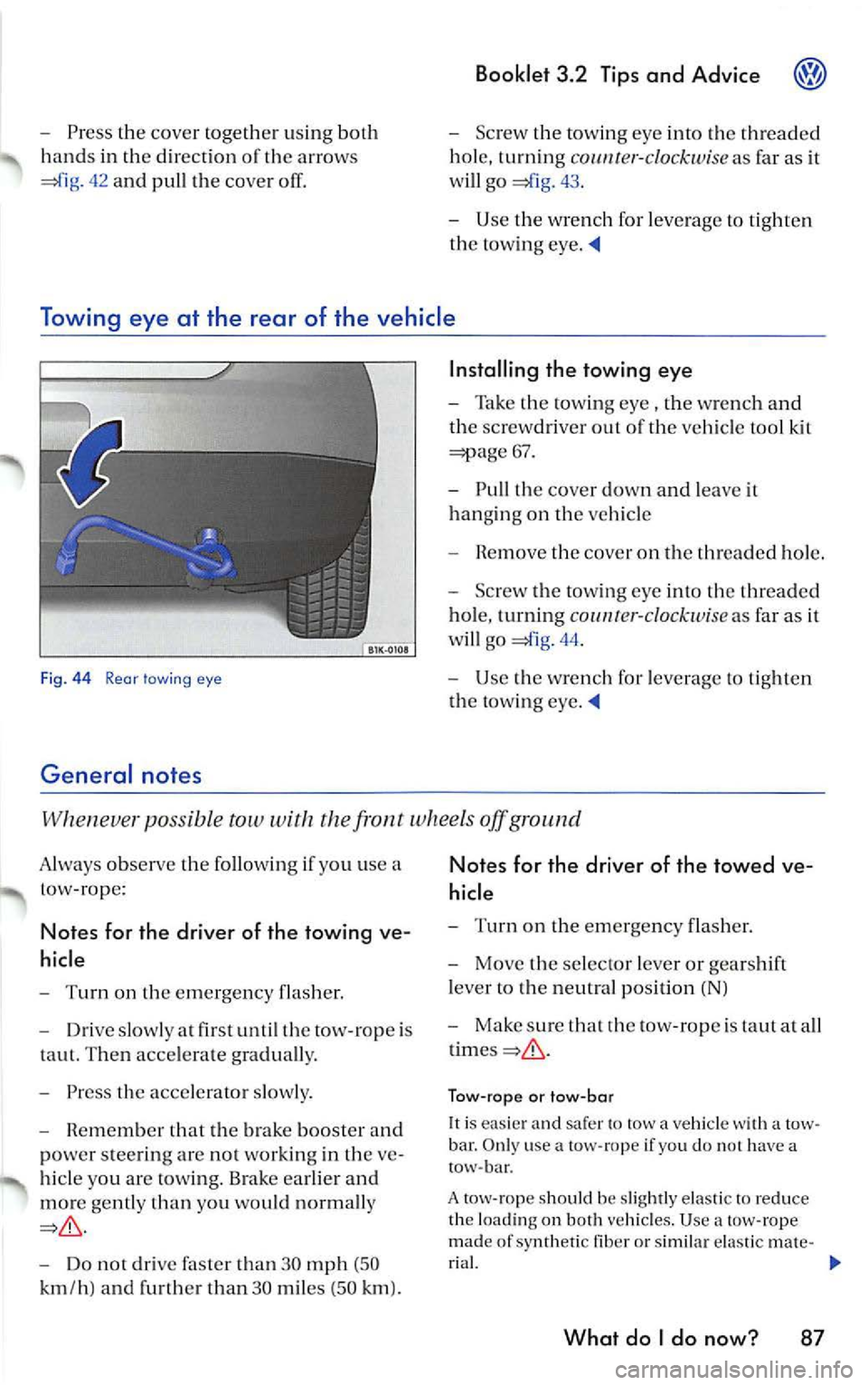
Fig. 44 Rear lawing eye
General notes
Installing the towing eye
-Take the towing eye , the wrench a nd
th e sc rew driver out of the vehicl e tool kit
=;:iage 67.
- Pull the cover down and lea ve it
hanging on the vehicl e
- R em ove the cove r on the threaded hole.
- Screw t he towin g eye into th e thr ea ded
hol e, turning
co 1111r er-clockw ise as fa r as it
w ill go
44.
- Use the wrench for leve rage to tight en
the tow ing eye.
po ssi ble tow with the fron t wheels off ground
A lways observe the following use a
t ow-rope :
Notes for the driver of the towing ve
hicle
- Turn on the emerge ncy flas her.
- Driv e slowly at fir st until th e tow-ro pe is
taut. Then acce lerate graduall y.
- Press the acce le rator slow ly .
- Remembe r that the brak e boo ster and
po we r stee rin g ar e not working in the ve
hi cle you are tow ing. Brake earlier and
mor e gently than you wo uld n orm ally
Do not drive than 30 mph (50
k m /h ) and furth er tha n 30 miles (5 0 km ).
Notes for the driver of the towed ve
hicl e
-Turn on the emergency flash er.
- Move the selecto r leve r or gears hi ft
l ever to the neutral posi tion (NJ
- Make sure tha t rh e tow -rope is taut at a ll
Tow-ro pe or tow -bar
It is easier and sa fer to tow a vehicle with a tow
bar . O nl y use a tow- rope if yo u d o no t h ave a
tow -bar.
A tow -rope s hould be sli ghtl y e las tic to re duce
th e lo adin g on both vehicl es. U se
tow-rope
mad e of sy nthetic fib er or sim ilar ela sti c m ate -
r ia l.
What do I do now? 87
Page 439 of 477
Booklet 3.4 Premium Sound System
-CD Mode: Yo u can select an indi
v idu al C D in the internal CD
chan ger trays or in the externa l
CD c hang er•
briefl y pre ssing
the corre spondin g button s
Use buttons to select a tray
in th e C D chan ger when loading
or ejecting a CD.
SCAN/TUNE button [SCAN/TUNEJ
- RadioMode:Scan func tion. Press
th is button shortly to briefly pla y
st ations . Pre ss longe r to ent er the
se tup mode ...... ... ... ..... .
- Radio Mode :Tune function. Turn
the knob to manually tune to the
n ex t numerically higher or lowe r
frequency.
- CD Mode: Press button to briefly
play tracks. . .... ...... ...... .
-CD Mode: Turn th e kno b to through the trac ks. Turn
clockwise to scro ll upward or
coun te rclockwise to sc roll down
ward .
-MP3 Mode: Press button to
briefly pla y tra cks. . .......... .
- MP3 Mode:Turn the knob "scro ll" thro ugh the within
a give n folder Turn clockw ise lo
scro ll upwa rd or counterclock
wise to scroll downward.
SEEK/TRACK bu tton !SEEK/TRACK).
-Radio Mode: Press to
seek high er freque ncy. . ...... .
- Radio Mode: Pres s to
seek lower frequ en cy.
- CD Mode: Press to
"scroll" through the tracks up
ward
or press and hold the
bullon fast forward. . ...... .
-CD Mode: Press "scroll" t hrough tracks down
wa rd or press and ho ld the
button fast rew ind.
Displ ay
- Radio mode ..... ..... ..... .. .
- CD mod e .. ....... .......... .
- MP3 mode .......... ........ .
- Satelli te Di git al Radio Service ..
4 Quick overview
II
23
27
II
23
12
24
29
13
LOAD Button Press this
button to be able load a CD i nto
tl1 e s lot. Press a nd hold fo r mo re
th an
2 sec ond s to load more one CD or all the C D's in th e ava il-
able s lots .. ......... ....... .... .
-Rad io SDRS : Press t his
button to select the CD playe r or
the externa l CD changer •. . ....
- Radio SDRS : Press this
b utt on to selec t th e CD playe r o r
the external CD changer•
or press
and hold for more than 2 seconds
to select tl1e M IX mode ...... . .
MlX Button@IB) (ra dios wi thout
SDRS)
- CD Mode: Pres s thi s butt on to se
lect the random p lay mode. . ..
- MP3 Mode: Press this button to
se lec t the random play mode
w ith in a given folder. . ...... . .
CD s lot .... ............... ... ..
EJEC T Button (EJECT): Press this eject a CD . Press lo nger eject more than one CD or all th e
CD 's inside the slots.. . .. ....... .
Radio SDRS: MP3/FLOR
Bu llon Butt on or Radio SDRS: CAT/FL OR Button
( CAT /FLOR I Button
-S DRS : Press thi s
button to select play lists or
folde rs w hen p lay ing a CD wit h
MP 3 files .... ..... ........... .
- Radio with SDRS: Press this
button to select play lists o r
fo lders w hen pl aying a CD with
MP3 files or to select the de sir ed
c at egory when using the satell ite
mode . ... ... ..... .......... .
SAT Press this button to
s elect the satellit e mode.
WARNING
20
21
2 1
2 1
26
20
20
25
25
14
Driv er di straction causes accidents , collision s
a nd serious personal injury!
• Nev er let yourse lf be distra cted by setting,
adjusting or using the Sound System .
Page 446 of 477
Booklet 3.4 Pre mium Sou nd Sy stem
pag e 10,
fig. 5
briefl y to sca n upw ard to the next
high er frequency . Scanning stop s at th e
ne xt good quality station rece ive d. After
a bout 10 seconds, the radio wi ll sca n to th e
ne xt station.
SCA N will app ear in the dis
pla y afte r you pr ess this button .
Manual Radio Station searc h (TUNE)
- Turn the knob © clockwi se to tune up
wa rds.
- Turn the knob counterclo ckwise to
tu ne downward s.
Preset scan
-Pre ss a nd ho ld down d1 e ISCAN/T UNEJ
button for longer t han 2 sec onds to enter
the set up mod e. You will hea r a s igna l
t on e.
- Turn the
ISCAN/lUNEJ rotary kn ob, until
SELECT SCAN AM /FM ap pears in the dis
p lay.
SEEK /TRACK
Use th e (S EEK /TRA CK! rock er bu tton to seek
the next h ighe r or lo wer frequen cy (radio
s tat ion) .
Automat ic se ek
-pag e 3, fig. 2 to sea rch
LO next hig h er frequenc y (rad io sta
tion ).
-
to sea rch to th e nex t low er fr e
que ncy (radio stat ion ). -
In t he lower part of the display the
words
ST ATIONS and PRESETS will appear.
B y using t he s tation p rese t
below these w ords sele ct th e type of scan
operat ion you want.
- Press the
IS CAN /TUN EJ rotary knob again
fo r lon ger than 2 seconds to confirm the
se ttin g you have just made . You will hear a
s ig n al ton e.
Automatic T uning (SCA N)
If you press the button during the 10 sec ond
" h old " p erio d, th e rad io will on lo the sta
t ion curr entl y bei ng rece ive d.
Th e sca n fun ction slop s autom aticall y after one
l oop of the e ntir e rang e of frequ en cie s.
Pr ese t sc an
ll is p oss ible fo r you to selec t betwee n a sca n op
era lion through th e entir e range of frequenci es
or just th rough the s tat ions memor ize d in th e
pr ese t buuon s.
Ma nual Radio S tation search (TUNE)
The setting s will be changed in small inc rem ents
(FM 0.2 MHz-, AM 10
-On ce a sta tion has been fo und, briefly
again w ill cause th e se ek
operat ion to b e re p eated .
Controlled seek
-Press and to tun e to a desir e d frequency.
- Simply befor e you
r eac h th e des ired fr equ enc y. T he seek
funct ion will then stop at the n ext station
that offers acceptab le
Radio I CD 11
Page 451 of 477
® Booklet 3.4 Premium Sound System
Selecting a category
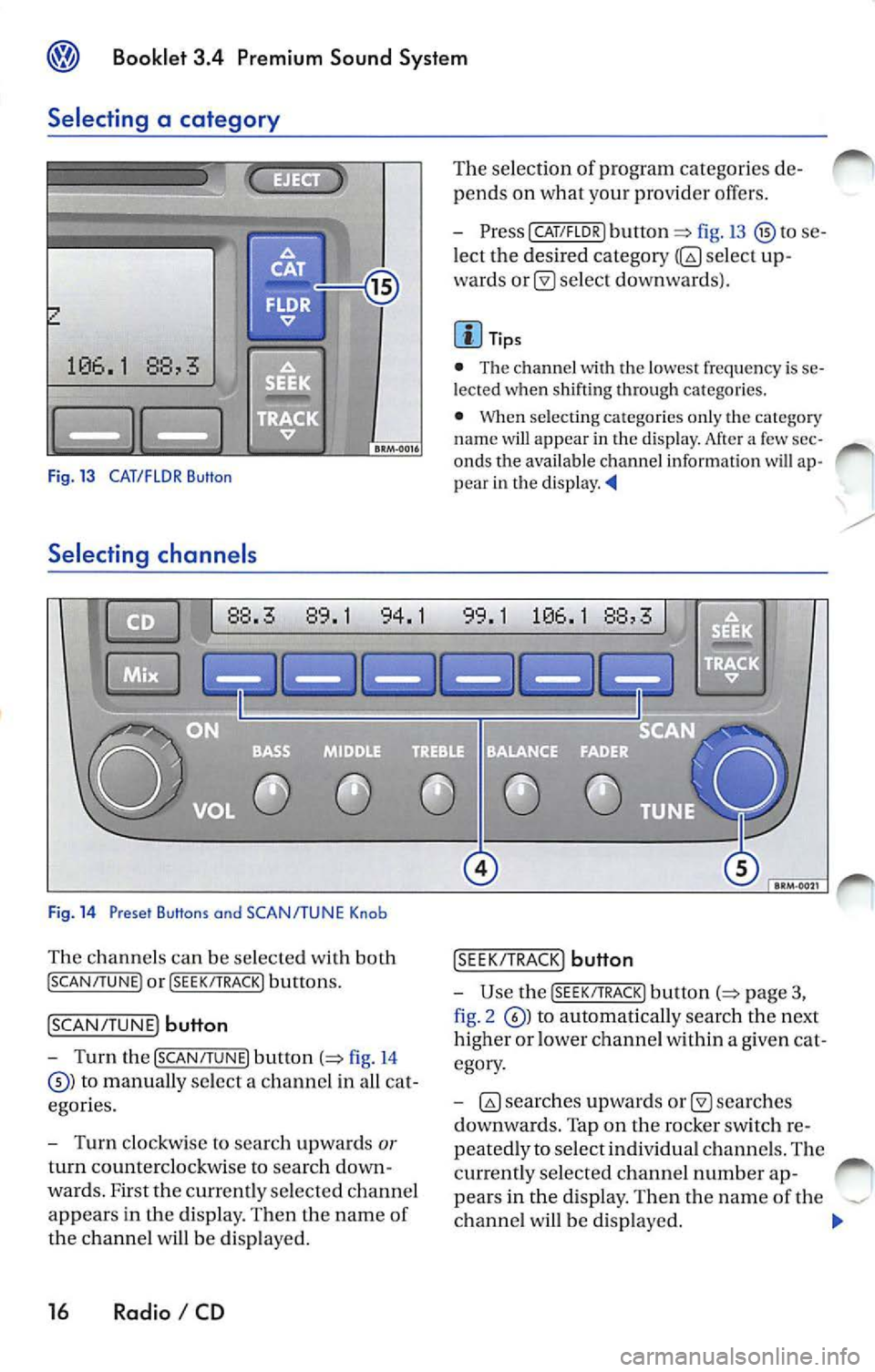
Fig. 13 CAT/FLOR Button
Selecting channe ls
Fig . 14 Preset Buttons and SCAN/TUNE Knob
Th e chan nels can be selected with both
! SCAN/TUNE ) or !SEEK/ TRACK) buttons.
!SCAN/ TUNE) button
- Turn the [SCAN /TUNE) button (=> fig. 14
to manually select a channe l in a ll ca t
egor ies.
- Turn clockwis e to sea rc h up wards
or
turn coun tercl ockwise to searc h down
wards. F irst the currently selecte d ch a nnel
appears in the di sp lay. Then the name of
the ch anne l w ill be di spla yed.
16 Radio I CD
The se lection of program categorie s de
pends on what your provid er offers.
- PresslCAT/FLDR) button
fig.13 to se
l ect the desired category
selec t up
wards
se lec t do wnwa rds).
Tips
• The chann el
th e lo wes t frequency is se
l e cted when shifti ng through ca tego ries.
•
se lecting ca tegories on ly th e category
nam e will appear in the disp lay. Af te r a few sec
onds the availa ble channel informatio n will ap
p ear in th e d is play.
!S EE K/TRA CK) button
-Use the [S EE K/TRACK ) button p age 3,
fig . 2
to autom ati ca lly sea rch the next
higher or lower ch anne l w ith in a g iven cat
egory .
-
sea rche s
d ownwa rds. Tap on the rocker switch r e
peated ly to selec t indi vidual ch anne ls. The
currently selected ch ann el numb er ap-
pea rs in the displa y. The n the nam e of the
ch anne l w ill b e disp layed.
Page 462 of 477
Booklet 3.4 Premium Sound System
Track selecting
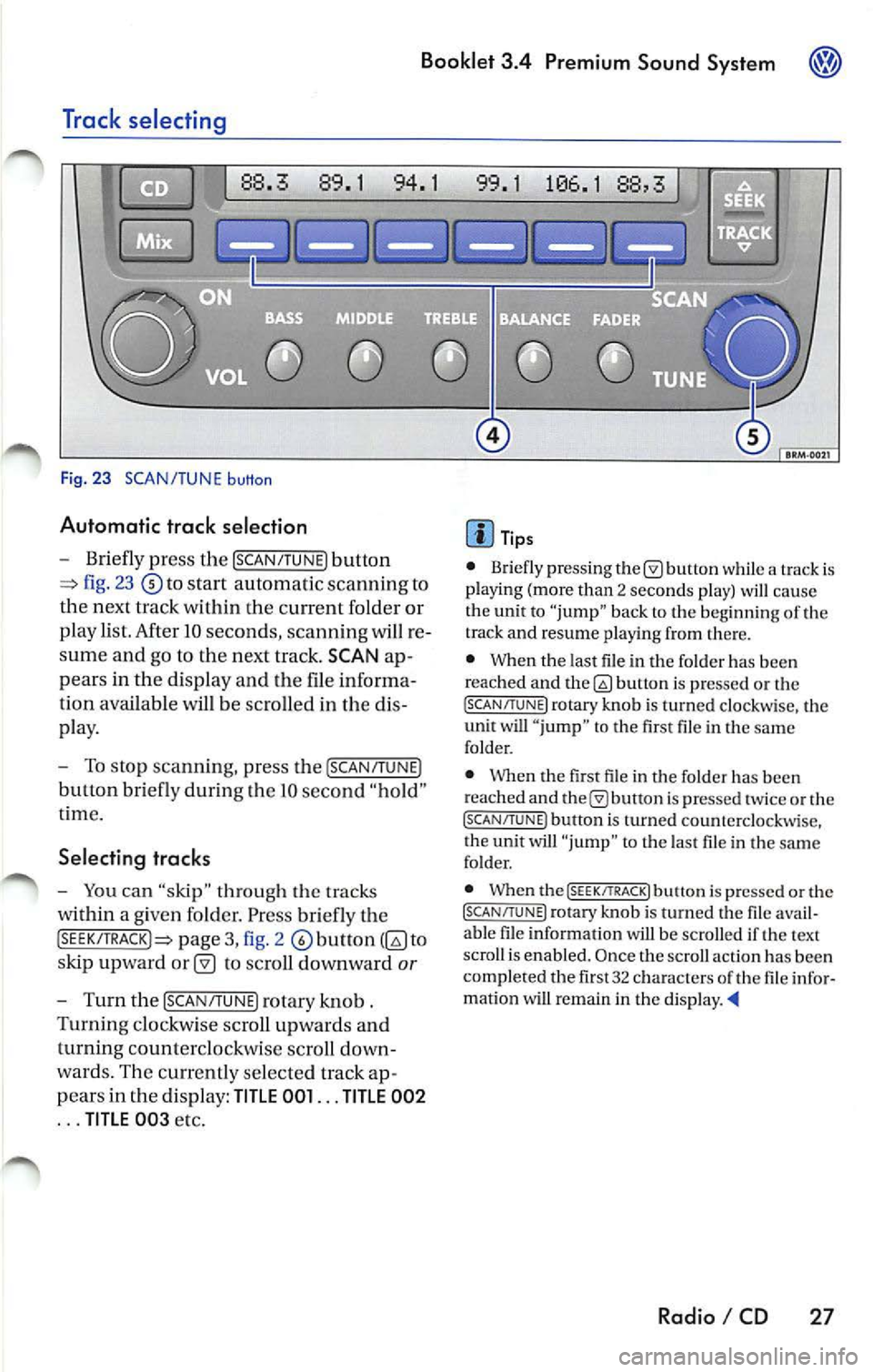
Fig. 23 SCAN/TUNE button
Automatic trac k selection
-Briefly press the !SCAN/TUNE) button
fig. 23 to sta rt automatic scannin g to
the next track within the curre nt folder or
p lay list. After 10 seconds , scannin g will re
sume and go to the next track. SCAN ap
pears in the display and the file informa
tion available
be scro lled in the dis
pla y.
- To stop scannin g, pre ss the [SCAN/T UNE)
button bri efly during Lhe IO seco nd "hold "
t ime.
Selecting tracks
-You can "skip" through th e trac ks
within a given fo lder. Pr ess briefly th e
pag e 3, fig. 2 to
s kip upward
to scroll downward or
- Turn th e !SCAN/TUNE) rotary knob .
Turnin g clo ckw ise sc roll up wards and
turning counterclockwi se scroll down
wa rds. Th e curr en tly se lected track ap
p ears in the di spl ay:
TITLE 001 ... TITLE 002
... TITLE 00 3 etc.
Tip s
• Briefly press ing butt on while a track is
pla ying (mo re than 2 seco nds play) cau se
the unit to "jump" bac k to the beginning of th e
track and resume pla yin g from there.
• When the last file in the fo lder has been
reached and
bu non is pre ssed or th e (SC AN/TUNE! rotary knob is turned clockwi se, the
unit will " jump " to th e first file in th e same
folder.
• Whe n the first fil e in t he folder has been
r eached and
is pr essed tw ice or the (SCAN/TUNE ) button is turned counterclockwise,
t he unit will "ju mp " to t he last file in the sa me
fo lder.
• When the
(SEEK/TRACK! butt on i s pre ssed or the (SCAN/TUNE) rotary kno b is turn ed the fil e avail
a bl e fil e in formation will be scro lled if th e text
scro ll is enabl ed. Once the scroll actio n ha s be en
comp le ted the fir st 32 characters
th e fil e infor
matio n wi U remain in the di sp la y. •
Radio I CD 27