reset VOLKSWAGEN JETTA 2007 User Guide
[x] Cancel search | Manufacturer: VOLKSWAGEN, Model Year: 2007, Model line: JETTA, Model: VOLKSWAGEN JETTA 2007Pages: 477, PDF Size: 77.6 MB
Page 453 of 477
Booklet 3.4 Premium Sound System
SAT display selection
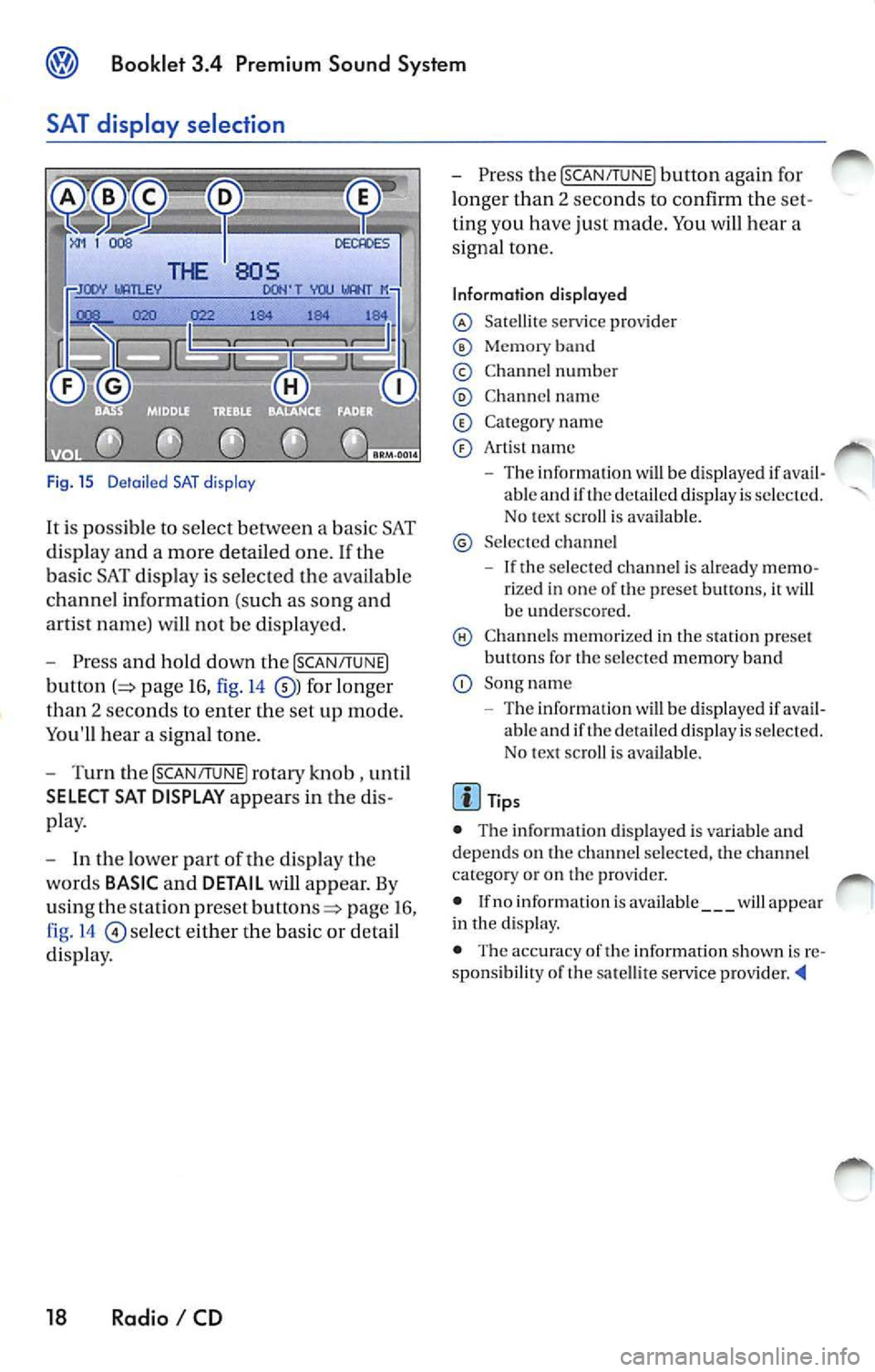
Fig. 15 D etail ed SAT disp lay
It i s possible to select between a bas ic SAT
di spl ay an d a more detailed one .
If the
ba sic SAT displa y is sel ecte d the availab le
channe l information ( such as song and
arti st nam e) will not b e displayed.
Press and hold down the [SCAN /TUNE]
button page 16, fig. 14 for longer
than 2 seco nds to enter th e se t up mode.
You'll hear a signal tone.
Turn th e [SCAN/T UNE] rotary knob , unti l
SELECT SAT DISPLAY appears in the
pla y.
In th e lo wer part of the di spl ay the
wo rds
BASIC and DETAIL will appear. By
u sing th e sta tion pre set
p age 16 ,
fig . 14
se lec t eit her the ba sic or detai l
di spla y.
18 Radio I CD
Press the [SCAN /TUN El button again for
l onger than 2 seco nds to confirm th e
ting you have just made. You will hear a
signa l ton e.
Information displayed
Satellit e service provider
Memor y band
© Chann el n um ber
C hann el name
C at egory nam e
Art is t name
The inform ation w ill be displayed if able and if the detail ed di spla y is s ele cted.
No tex t sc roll is ava ilab le.
S el ecte d ch anne l
If the se lec ted c hannel is already rize d in one of th e prese t button s, it wi ll
b e und ersco re d.
C hann els m em or ized in the sta tion preset
b utt ons fo r th e se lecte d memory band
Song name
- Th e information
will be di splayed if ava il
ab le and if th e de ta iled displa y is se lec te d.
N o tex t sc roll is av ail able.
• The inform ation d is p layed is var iable and
dep ends o n the channel sele cted, the c hann el
c ate gory or o n th e prov ider.
• If no inform ation is av ailabl e
will app ear
in th e displ ay.
• The acc ura cy of the information shown is
sponsibilit y of th e sa te llit e serv ice pro vider
Page 463 of 477
![VOLKSWAGEN JETTA 2007 User Guide Booklet 3.4 Premium Sound System
Track search Buttons
"Scroll" through the same track (Fast
Forward /Fast R ev ie w)
- Press and hold the !SEEK/TRACK ] button
page fig . 2 to scro ll](/img/18/55689/w960_55689-462.png "VOLKSWAGEN JETTA 2007 User Guide Booklet 3.4 Premium Sound System
Track search Buttons
\"Scroll\" through the same track (Fast
Forward /Fast R ev ie w)
- Press and hold the !SEEK/TRACK ] button
page fig . 2 to scro ll")
Booklet 3.4 Premium Sound System
Track search Buttons
"Scroll" through the same track (Fast
Forward /Fast R ev ie w)
- Press and hold the !SEEK/TRACK ] button
page fig . 2 to scro ll upwards or
downwards
trough the same track.
The track elapsed time appears in the
upper left corne r of the d isp lay.
Information displayed
Fig. 24 SCAN/ TUNE button
MP3 display selection
It is possible to select betwee n a basic MP3 dis
play and a more detailed one. If th e bas ic MP3
display is selec ted the file informat ion (such as
s ong and artist name) w ill not be displayed.
• Press and ho ld down
(SCAN/TUNE) butt on fig. 24 for longer than 2 seconds to ent er
the set up mode. You will hear a sig nal tone.
• Turn the
(SCAN/TUNE) rotary knob, un til SELEC T MP3 DISPLAY appears i n the display.
• In
low er part of the display words BASIC and DETAIL will appear. By usi ng th e s ta
tion pr eset bu tto ns © select eith er the bas ic o r
deta il di splay.
• Press the
SCAN/TUNE buu on again fo r
long er th an 2 second s to confirm the setting
you've just made . Yo u will hear a signa l tone.
28 Radio I CD
-Release t he button to stop skipp ing
through the track.
Text sc roll select ion
You can decide whether the available informa
tion in the MP3 file is scrolled or not in the di s
play.
• Press and hold down the
(SCAN/TUNE) button
for longer than 2 seconds to enter the set u p
mode. You w ill hear a signal tone.
• Turn the
(SCAN/T UNE) rotary knob,
station preset buttons © select eith er ON or OFF.
• Press the (SCAN/TUNE) button again for longer
th an 2 seco nds to confirm the settin g yo u've just
made. You'll hear a signal to ne.
• If yo u decide to scroll the fil e information
follow ing warn ing will appear in the d isplay: CAUTION! THIS MAY CAUSE DRIVER
DISTRACTION.
Page 464 of 477
Booklet 3.4 Premium Sound System
• By using the stati on preset buttons© select
eit her ACCEPT t o scroll the file information or
DECLINE not to scro ll th e ava ilabl e file inform a
tion.
File information
T he file informat ion which is available, will be
scro lled or will appear in the displa y if the detail
display has been selected. The type of informa
tion displayed depends on the follow ing:
• lflD3 tag data is ava ila bl e in an MP3 file this
unit can display the title (t rack title) and art is t name. If
no ID3 tag is av ailable, th e name of the
fold er an d the name of the file w ill appear in the
di sp lay.
• The fo lder and
names can be displa yed
like titles. Capital letters and/ or numerals and
(und erscores) are scro lled.
• A maximum o f32 characte rs can be dis
p layed .
• Folder a nd file nam es usin g other symbo ls
will not b e disp layed properly.
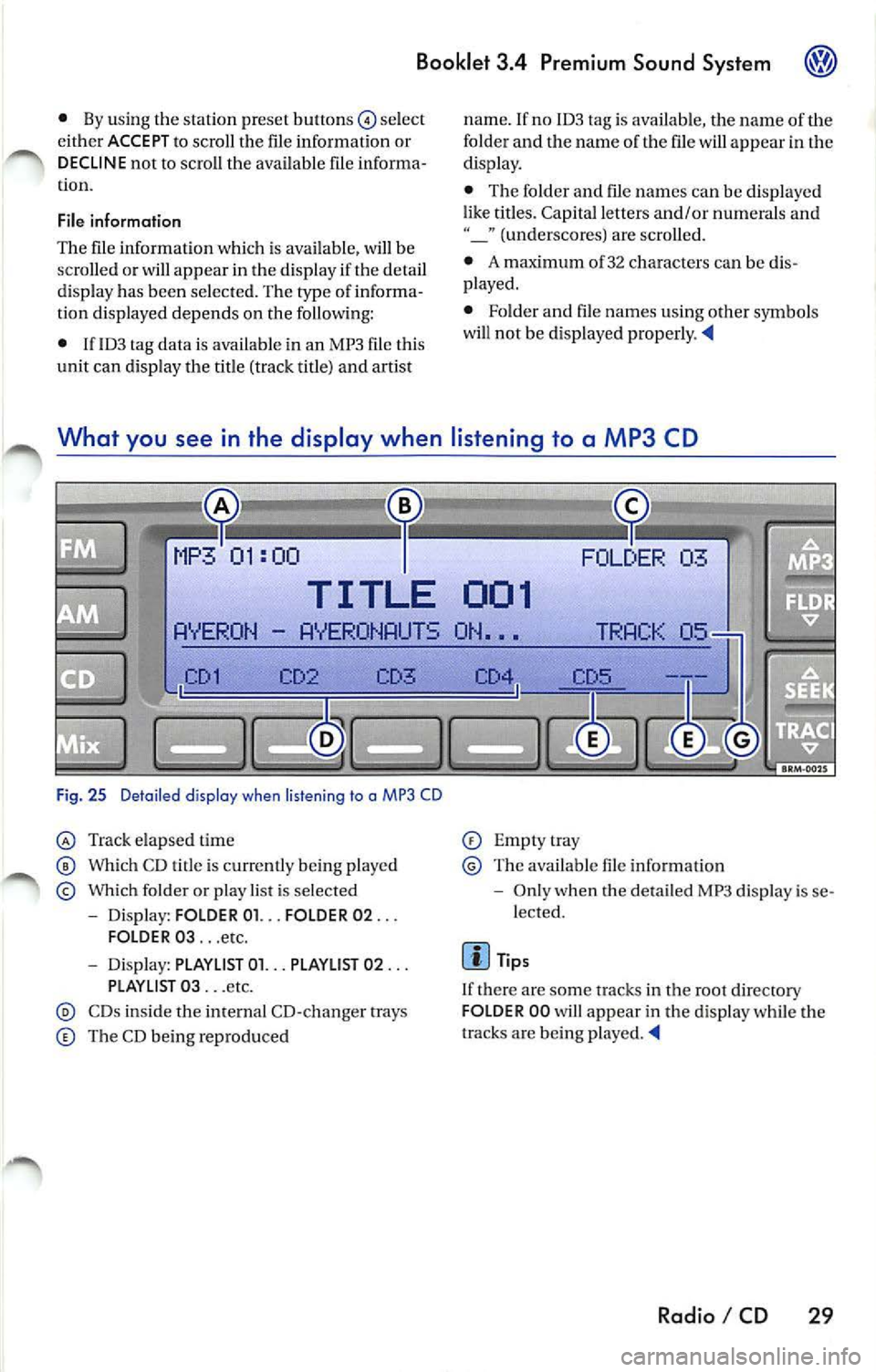
What you see in the display when listening to a MP3 CD
03
TITLE 001
AYER ON AYERONAUTS ON •••
CD3
Fi g. 25 Deta iled display when listen ing to a MP3 CD
Tra ck elapsed time
Which CD t itle is cu rrentl y being playe d
Which folder o r play list is se lected
- Dis play: FOLD ER 01. .. FOLDER 02 ...
FOLDER 03 ... etc.
- Dis pl ay: PLAYLlST 01. .. PLAYLIST 02 ...
PLAYLI ST 03 ... etc.
CDs ins ide tl1e internal CD- cha nger trays
The CD bein g repro duced
Empt ytray
Th e available file informat io n
- Onl y when the detail ed MP3 di spl ay is se
lected.
Tip s
I f there a re some tracks in the root directory
FOLD ER 00 will appear in the disp lay while the
tracks are being played.
Radio I CD 29
Page 469 of 477
Booklet 3.4 Premium Sound System
Anti-Theft Coding
Convenience radio coding
For techni cal reason s, the convenience radio
coding is not a vailable for all vehicle models .
In the past , it u sed to be that you h ad to manu
ally reco de th e rad io whe neve r the unit was re
moved from the veh icle (fo r examp le, if the unit
wa s removed to be repa ired), or whenever the
vehicle battery was disconnected (for example ,
if you brought yo ur vehicle in to the dealership
for service and it was necessary to disconnect
the banery ). In either case , th e power supply to
t he unit was cut off.
That ha s all ch anged with th e new conve nien ce
radio coding function: Once the code number
has been inplll in the rad io, i t w ill then synchro
nise itself wi th "it s" veh icle!
I f th e curr ent supply has been interrupted the
radio will automaticall y ch eck to see if it is still in
Canceling the Electronic Lock
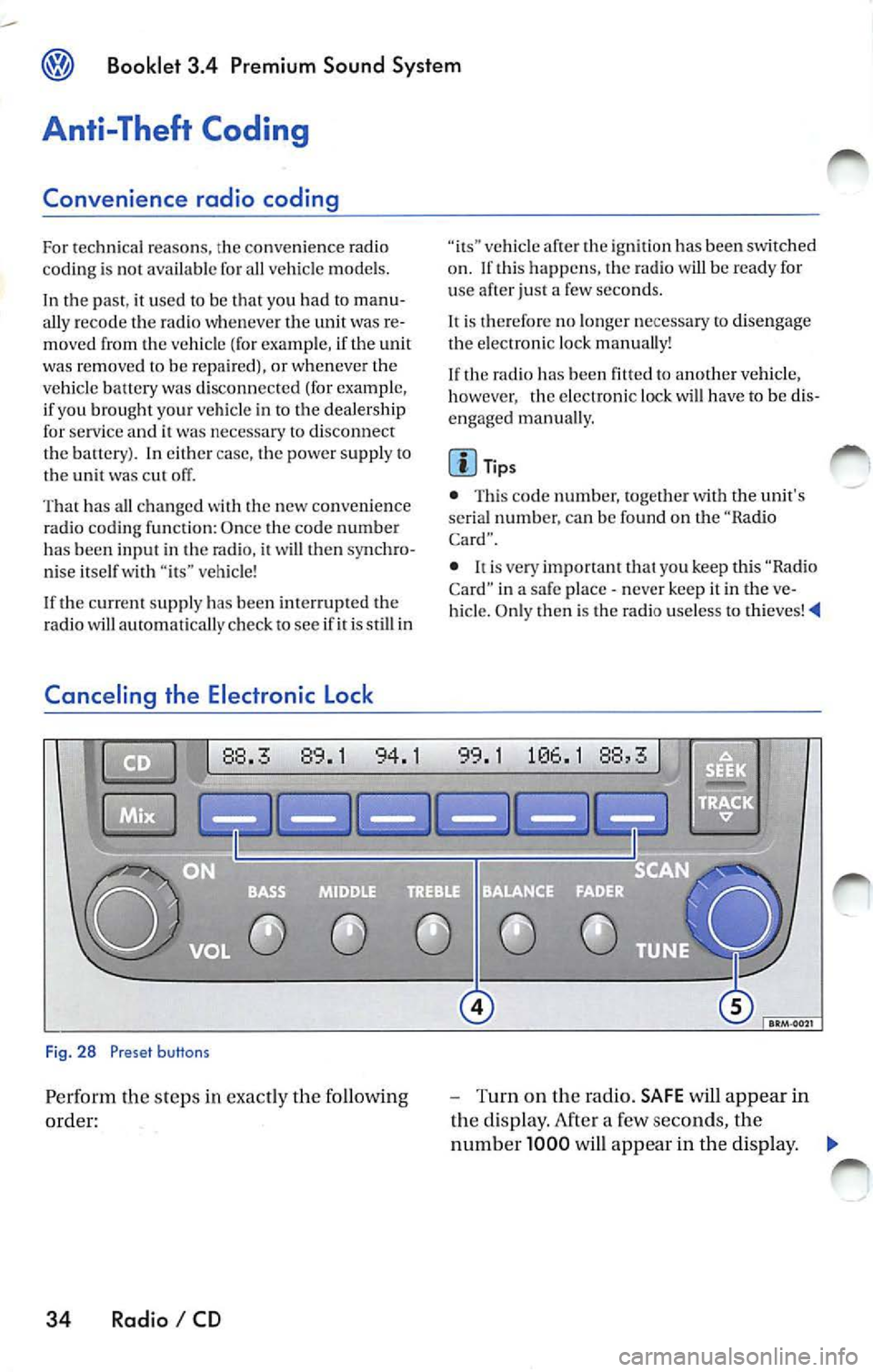
Fig. 28 Preset buttons
Pe rform th e steps in exact ly the fo llowing
order:
34 Radio I CD
vehicle af te r th e ig niti on has been switched
o n . If thi s happ ens, the radio will be read y for
u se after just a few seco nds.
It is therefore no longe r n ecess ary to disengag e
the e lectro nic lock manua lly!
If the radio has been
to another vehicle,
however , the electronic lock will have to be dis
engaged manua lly.
Tip s
• This code number, togeth er w ith the unit's
se rial numb er. ca n be found on the "Ra dio
Card".
• never keep it in the ve
hicle. Only then is th e radio use less to thieves!
-Turn on the radio. SAFE will appear in
the disp lay. After a few seconds, the
numb er 1000 will appear in the display. ._
Page 470 of 477
Booklet 3.4 Premium Sound System ®
-Use the radio stat io n pr ese t button s 1 to
4
page 34, fig. 28 to ent er the code
numb er fo un d on your R adio Card. Use
pre set button
l to ent er t he fir st digit in the
code numb er. U se button 2 to en te r the
seco nd digit , e tc. Th e valu e range for each
of the 4 di git s is O ... 9. T he digit will in
c rease by l eac h tim e you tap the pr ese t
bu tton. The number r etu rns to O afte r 9.
- After you finish ent ering th e code, press
the sta tion p reset button below
word
OK in th e di spl ay. It usual ly is th e las t sta
tion pre set button. You w ill hear a n au
dibl e signa l.
-If you have en te red t he co de number
c orr ect ly, a radio frequency will app ear in
th e d isp lay.
Wrong Code Number
lfyou have accide ntally ent ered a wrong code
number , SAFE will ap pear in th e di spl ay and
th en the number 1000 will app ear.
Yo u can re p ea t the procedu re agai n on e time .
T he num ber of attempt s will app ear in the dis
p lay. lf you acci dent all y ent er a wrong code
number a seco nd tim e
SAFE will appea r in the
d isp lay.
lfth e wrong cod e number i s enter ed aga in, th e
uni t w ill be di sab le d for about I hour. Lea ve th e
unit O N for this hour . After th e hour has
e la p se d, the numb er of att em pts will stop bei ng
displayed and you can cancel th e elec tronic lock
once again.
Remembe r, the cycle i s ...
• 2 attempt s
• one hour lo cked.
Tips
If y ou loose your Rad io Card, contact yo ur au
t ho riz ed VO LKSWAGEN
ered by a re pl ace ment pa rts warra nty. This re
pl acement serv ice w ill not b e availab le, how
eve r, it th e unit h ousing is damaged or if un au- th
oriz ed per sons have att empt ed to make re
pair s.
Antenna Care
Th e an tenna i s des ig n ed to achieve optim al per
fo rmance with the radio and is located at a pos i
tion where reception is good and su sce pti bili ty
to int erfer ence is low.
Ve hicle s equ ipped wi th antenna s emb edd ed in
t he winds hield o r backlights offer the furth er ad
vantages o f being completely pro tec te d f rom
damage and wear.
No antenna car e is r equir ed for vehicles
e quipped with roof moun te d
Radio I CD 35
Page 471 of 477
Booklet 3.4 Premium Sound System
Technical description
Anti-theft protection
T he unit is e lectro nica lly locked whenever the
power source is inte rrupted.
It can on ly be re
turned to working condition by enteri ng th e cor
rec t cod e number.
Frequ ency rang es
F M and AM.
Band selection
Mome ntary-co ntact butto ns
Displays
Fre quenc y, band, b ass, bala n ce, treb le, middle
freq ue ncies, preset button, CD functions ,
functions.
Illumination
The control s and d isp lay are illum inated glar e
fr ee from the interior (nig ht dri vin g des ign)
maximum brightn ess when drivi ng lig h ts a re off.
When the dr ivi ng lig hts are on, the intensity is
co ntr olled toget11er with th e in strument panel
i nte nsit y.
Station selectio n
In th e rad io m ode, t he unit automa tica lly plays
th e la st sta tion selecte d whe n the unit was
turn ed off (las t sta tion memo ry).
Soft Clipping• I f th e volu me is se t to maximum, you m ay notice
that the rad io outp ut
will be come distorted . The
So ft Clippin g fun ction detec ts t his di stort ion
and will au tomat ica lly adj ust
vo lum e to pro
v id e th e m ost dist orti on free output.
36 Radio I CD
Radio
A utom atic and manu al !linin g. Six sta tion
p rese t buttons each for FM !, FM2, FM AUTO.
AMI, AM A UTO, SAT!, SAT2 and SAT3 . Ma nual
t unin g is poss ible in
directions. Micropro
cesor-controlled stabiliza tion of sta tion fr e
quencies (PLL quartz tuning) .
E xternal CD changer•
Remote contro lled via radio sou nd sys te m uni t.
C han ge r ma gaz ine for 6 CDs w ith moto r-dri ven
eje ction, 6 CD selec tion button s. Mix mod e, au
t omat ic track scan
I seek.
Sound reproduction
S te reo ( rad io, sate llite radio,
ad justa ble
t r eble control, ba ss co ntrol, middl e frequ en cies,
fader control and ba la n ce co ntrol integra te d in
th e ra dio, multipl e spe ake r sys te m .
Max. power output
4 x 20 Watt (maximum).
Options
Externa l CD ch ange r. Add itiona l informa tion o n
th ese options is ava ilab le from auth ori zed
VOLKSWAGEN dealers.
Int erference suppression
Th e automatic interference supp ressio n cir
cu itry integ rated in th e unit eliminates mos t
outside interfere nce in th e FM band .
Specia lly tun ed interferenc e suppressors e lim i
n ate nea rly a ll int erf erence puls es from t he en
g ine and other part s of th e elect rical system su ch
as the heater blower, w in dshie ld wipers and ra
d ia tor fan .
Page 472 of 477
Alphabetical index
A
About MP3 30
Activate your Satell ite Radio Serv ice 14
Adjusting Speed volume contro l 8
AM presets 9
Antenna Care 35
Anti-Theft coding 5, 34
Anti-Thef t pro tec tion 36
AS (Autostore ) 9
Au dio CD 19
Automatic seek 11
Automatic tuning
11
Autostore 9
B
Balanc e contro l 13
Band setting 9
Bands received 36
Bass control 12
Broadcasting mode 7
Button
C
CD 21
CD Eject 22
Mix Mode 21, 26
SEEK 23, 28
Track selection (when playing a CD) 23
CAT Button 25
CD 19
Taking care 19
CD ca re 19
CD changer 5
Booklet 3 .4 Premium Sound Sy stem
CD player
Automat ic sc an to the next track
(SCAN) 17, 23, 27
Au tomatic track scanning 17 , 23, 27
C D button 21
Display 24, 29
E jecting a CD 22
Fa st forward to next track 23
reverse to previous track 23
How to se lect an individual CD in the
maga zin e 23
Loading CDs 20, 22
Malfunction display 24
Random Play 21, 26
SCAN (a utomatic track selection ) 17, 23,
27
Se lect ing a CD 23
Se lect ing a CD track 23
Skipping backward to the previous CD track
23
Ski pping forw ard to the next CD track 23
Tips w hen usin g 33
Track select ion
23
What does it mean when CD EHH appears
in the disp lay? 24
What does it mean when HARDWARE ER
ROH appear s in the display? 24
What does it mean when NO DISC ap
pears in the display? 21, 24
What does it mean when NO EXTERNAL
CD appear s in the disp lay? 24
What does it mean when HOM appears in
the display? 24
What i s the correct way to insert a CD into
the slot? 20, 22
Cod ing 34
Contro lled see k LL
Con trols 2
D
Digital disp lays 12, 24, 29
Disp lays 12, 24, 29, 36
E
Electronic lock 34
Alphabetical ind ex 37
Page 473 of 477
Booklet 3.4 Premium Sound System
External CD changer 32
F
Fader control 13
FLDR button 25
FM presets 9
ID number 15
Ignition lock 7
Illumination 36
Important information 5
Interference suppress ion 36
K
Key 7
L
LOAD button 20
M
Manual Radio Station search 11
Maximum power output 36
Middle control 12
MIX
does it mean when MIX appears in
the display when
I am playing a CD? 2 1
Wha t does it mean with MIX CD appears
in the disp lay when I
am playing a
CD? 26
Mix mode 21, 26
MP3 25
MP3 player operation 25
N
NO DISC 21, 24
NO MAGAZINE 21
0
ON I OFF 7
38 Alphabetical index
p
Preset button s 10
Preset scan
11
Q
Quick overvi ew 2
R
Radio 7
Radio Card Where should
I keep my Rad io Card? 5
Radio code numb er 5
Replacement 35
Roof mount ed antennas 35
s
SAFE What does it mean w hen "SAfE" ap-
pears in the display? 5
SAT button 15 Sa tellite Digital Radio Service 13
Satellite Radio D igital Serv ice
Ho w the system works?
13
Satellite radio providers 13
SCAN function 11
SCAN/TUNE button 11
SEEK/TRACK Button 11
Se lecting a category 16
Selecting a chan nel 16
Se lecting folders 25
Se lectin g tracks 27
Service 35
S iriu s
ID Numb er 15
Skip through the files in the same folder 27
S kip through the same track 23, 28
Sound setti ng 12
Speed Vo lume Co ntro l (S VC )
SVC (Speed Volume Contro l) 8
Station buttons 10
Station selection 36
Sto ring a channel 15
System information 19
Siriu s message s 19
XM messages 19