sound VOLKSWAGEN JETTA 2007 User Guide
[x] Cancel search | Manufacturer: VOLKSWAGEN, Model Year: 2007, Model line: JETTA, Model: VOLKSWAGEN JETTA 2007Pages: 477, PDF Size: 77.6 MB
Page 434 of 477
Premium Sound
System
J e tta
Page 436 of 477
Booklet 3.4 Premium Sound System
Table of contents
Quick overview . . . . . . . . . . . . . . . .. . . . . 2
Contro ls .. . . . .. . . . .. . . .. .. . . . .. . . . . . . . . .. 2
Imp ort an t information . . . . . . . . . . . . . . . . . . . 5
Radio I CD ...... .......... ... .. ... .. 7
Radio .. . .. .. . . . . .. . . .. . .. .. .. .. .. . . . . . .. 7
Satell ite Digita l Rad io Serv ice . . . . . . . . . . . . 13 CD
.. .... .. .. .... .... .. ... .... ... .. .. ... . 1 9
MP3......... ....... .. .... ..... ..... .. ... 25
CD ch anger . . . . . . . . . . . . . . . . . . . . . . . . . . . . . 32
A nti- T heft Codi ng . . . . . . . . . . . . . . . . . . . . . . . . 34
Warranty and Te ch nical des crip tion . . . . . . 35
Alphabetical inde x .. . . . . . . . . . . . .. .. 37
Tabl e of cont ents 1
Page 437 of 477
Booklet 3.4 Premium Sound System
Quick overview
Controls
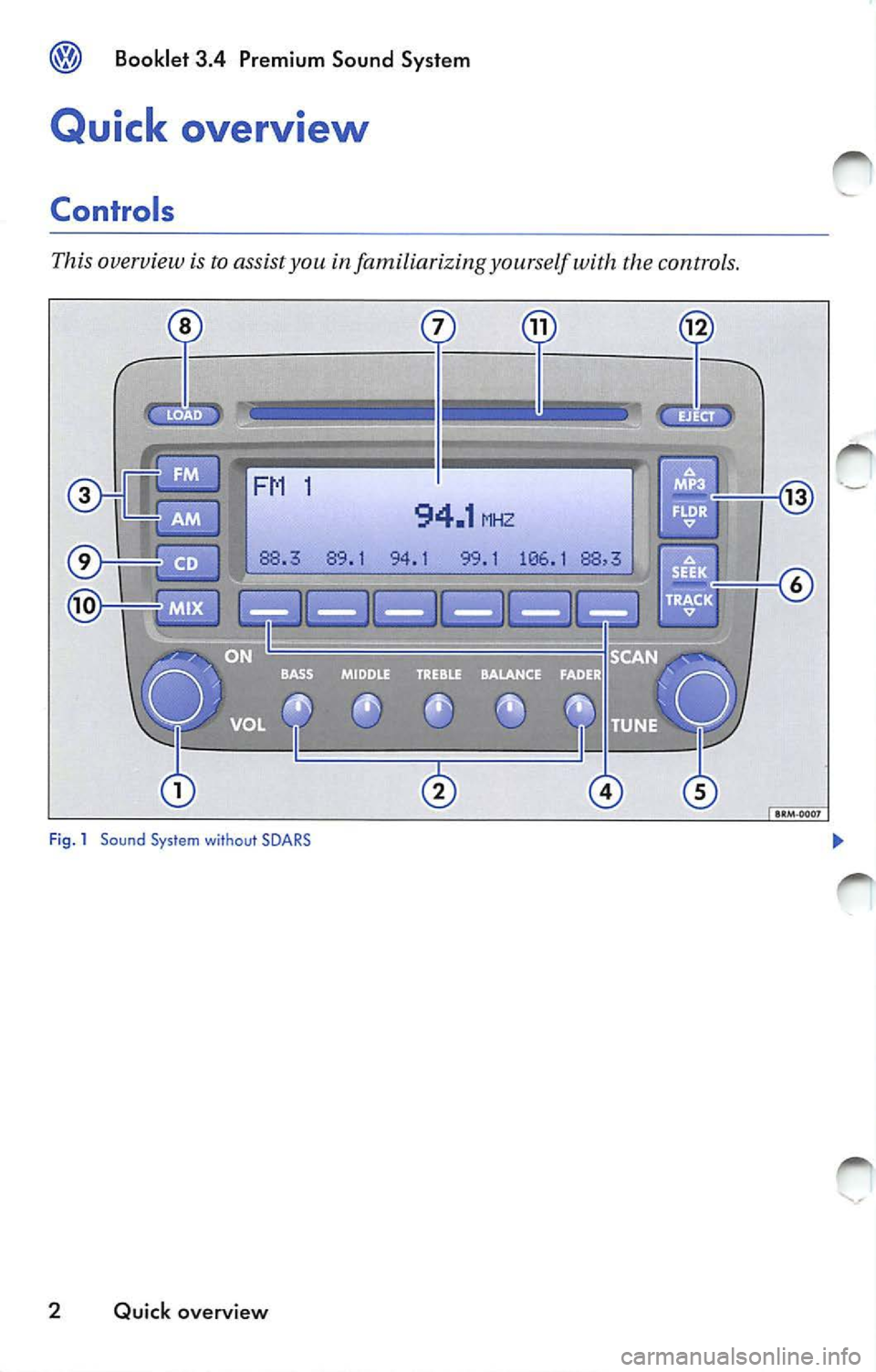
This overview is to assist you in familiarizing yourself with the controls.
·-
94.1 MHZ
94.1 99.1 106 .1
Fig . 1 Sound Sys tem without SOARS
2 Quick overview
Page 438 of 477
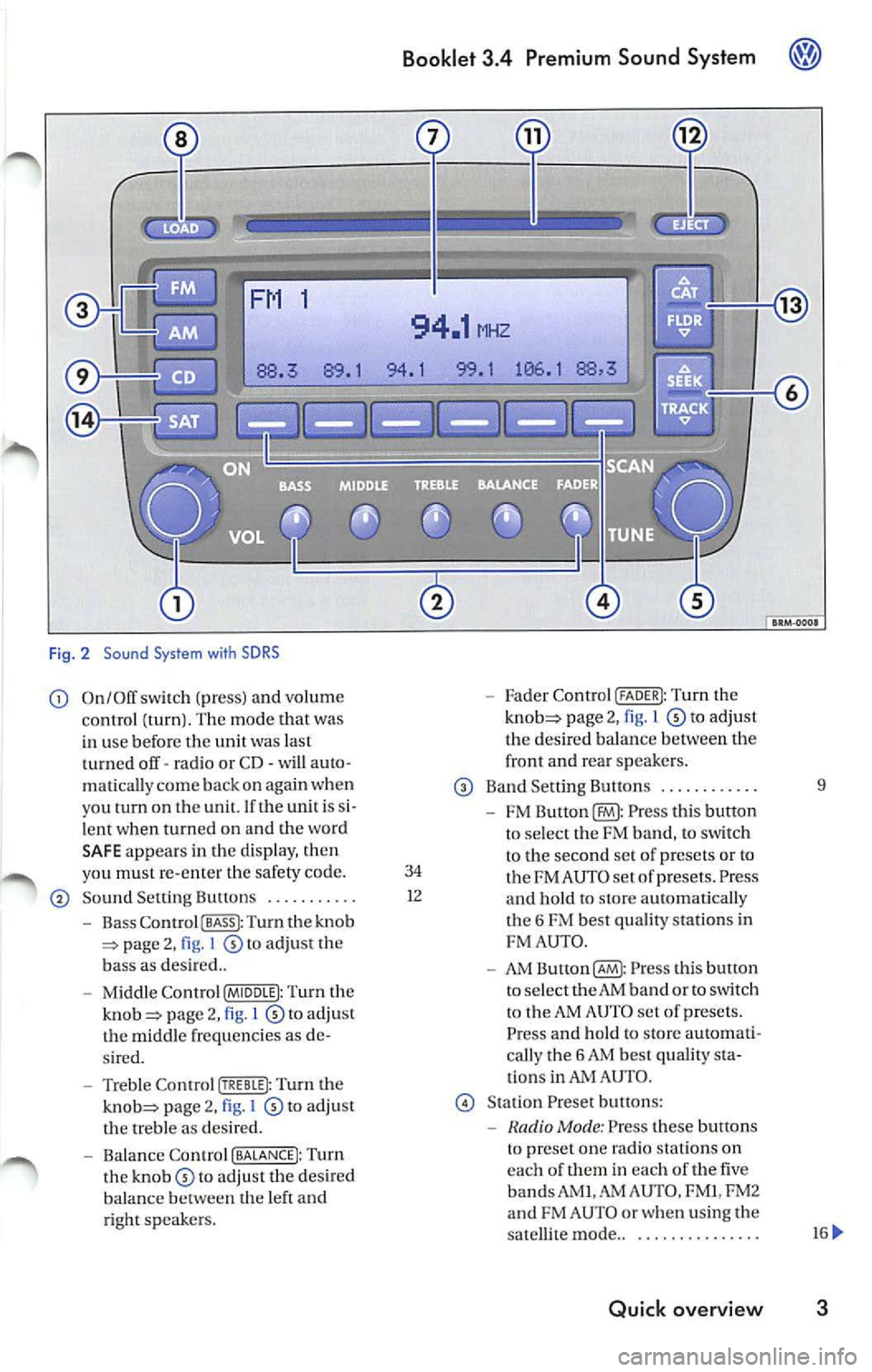
Fig . 2 Sound System with SDRS
On/Off switch (pr ess) and volume Fader Control (FADER I: Tu rn the
c ontrol (turn ). The mode that was page 2, 1 to adjust
in use befor e the unit was last th
e des ired balan ce betwee n the
t urned off· ra dio or CD· will auto · front and
rear sp eake rs .
matica lly c om e back on aga in when
Band Sett ing Button s .... ..... ... 9
you tu rn on th e un it. If th e unit i s
FM Press thi s butto n
l e nt when turn ed on and the wo rd
to se lec t the FM band, to sw itch
SA FE appear s in the d is pla y, th en
to the second set of p rese ts or to
yo u must re-en ter the safety code. 34 FM AU TO set of prese ts . Press So und Setting Bultons ........... 1
2
and hold to sLOre automati cal ly
Bass Co ntro l I BASS I: Turn the knob t
h e 6 FM best quality station s in page 2, I to adjust the FM
AUT O.
b ass as des ired ..
AM Button(§ : Pr ess this bulton
Mi ddle Contr ol (MIDDLE I: Turn the to
select the AM band or to switch page 2, l to adju st t
o the AM AUTO set of presets.
t h e m id dle frequ enci es as Press and hold to store automati-
s ir ed . call
y the 6 AM bes t quality
Treble Control Turn the ti
ons in AUTO .
page 2, I to adj ust Stat ion Preset butt ons:
th e treble as des ired.
Mode : Press these buttons
Balance Contro l (BALANCE!: Turn t
o pre set on e radio statio ns on
th e to adjust the desired eac
h of th em in eac h of the five
balance th e left and bands AM
I.AM AUTO , FM I, FM2
ri ght sp eake rs. and
FM AUTO or whe n using the
sa tellit e mode ..
............. ..
Quick overview 3
Page 439 of 477
Booklet 3.4 Premium Sound System
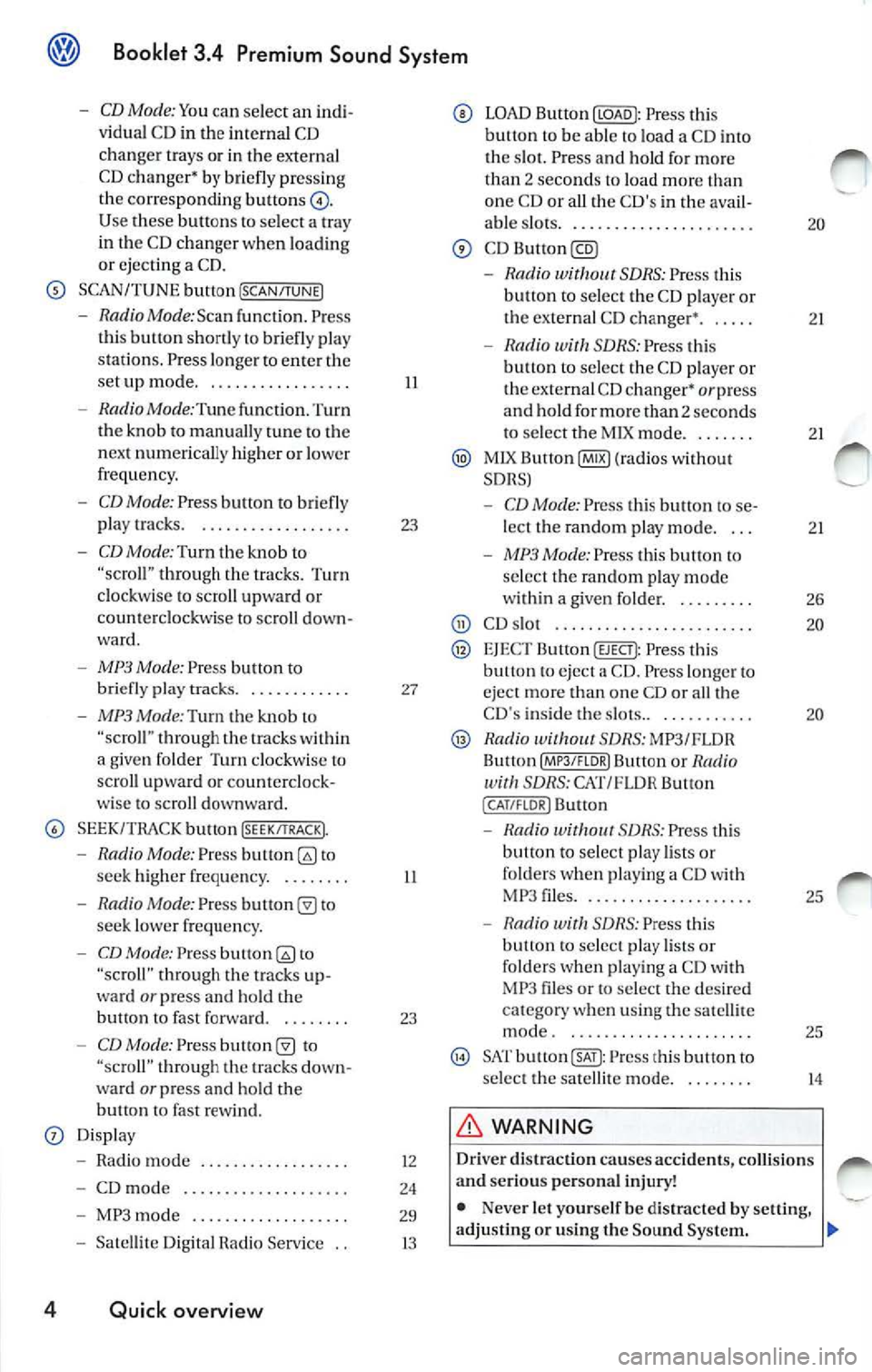
-CD Mode: Yo u can select an indi
v idu al C D in the internal CD
chan ger trays or in the externa l
CD c hang er•
briefl y pre ssing
the corre spondin g button s
Use buttons to select a tray
in th e C D chan ger when loading
or ejecting a CD.
SCAN/TUNE button [SCAN/TUNEJ
- RadioMode:Scan func tion. Press
th is button shortly to briefly pla y
st ations . Pre ss longe r to ent er the
se tup mode ...... ... ... ..... .
- Radio Mode :Tune function. Turn
the knob to manually tune to the
n ex t numerically higher or lowe r
frequency.
- CD Mode: Press button to briefly
play tracks. . .... ...... ...... .
-CD Mode: Turn th e kno b to through the trac ks. Turn
clockwise to scro ll upward or
coun te rclockwise to sc roll down
ward .
-MP3 Mode: Press button to
briefly pla y tra cks. . .......... .
- MP3 Mode:Turn the knob "scro ll" thro ugh the within
a give n folder Turn clockw ise lo
scro ll upwa rd or counterclock
wise to scroll downward.
SEEK/TRACK bu tton !SEEK/TRACK).
-Radio Mode: Press to
seek high er freque ncy. . ...... .
- Radio Mode: Pres s to
seek lower frequ en cy.
- CD Mode: Press to
"scroll" through the tracks up
ward
or press and hold the
bullon fast forward. . ...... .
-CD Mode: Press "scroll" t hrough tracks down
wa rd or press and ho ld the
button fast rew ind.
Displ ay
- Radio mode ..... ..... ..... .. .
- CD mod e .. ....... .......... .
- MP3 mode .......... ........ .
- Satelli te Di git al Radio Service ..
4 Quick overview
II
23
27
II
23
12
24
29
13
LOAD Button Press this
button to be able load a CD i nto
tl1 e s lot. Press a nd hold fo r mo re
th an
2 sec ond s to load more one CD or all the C D's in th e ava il-
able s lots .. ......... ....... .... .
-Rad io SDRS : Press t his
button to select the CD playe r or
the externa l CD changer •. . ....
- Radio SDRS : Press this
b utt on to selec t th e CD playe r o r
the external CD changer•
or press
and hold for more than 2 seconds
to select tl1e M IX mode ...... . .
MlX Button@IB) (ra dios wi thout
SDRS)
- CD Mode: Pres s thi s butt on to se
lect the random p lay mode. . ..
- MP3 Mode: Press this button to
se lec t the random play mode
w ith in a given folder. . ...... . .
CD s lot .... ............... ... ..
EJEC T Button (EJECT): Press this eject a CD . Press lo nger eject more than one CD or all th e
CD 's inside the slots.. . .. ....... .
Radio SDRS: MP3/FLOR
Bu llon Butt on or Radio SDRS: CAT/FL OR Button
( CAT /FLOR I Button
-S DRS : Press thi s
button to select play lists or
folde rs w hen p lay ing a CD wit h
MP 3 files .... ..... ........... .
- Radio with SDRS: Press this
button to select play lists o r
fo lders w hen pl aying a CD with
MP3 files or to select the de sir ed
c at egory when using the satell ite
mode . ... ... ..... .......... .
SAT Press this button to
s elect the satellit e mode.
WARNING
20
21
2 1
2 1
26
20
20
25
25
14
Driv er di straction causes accidents , collision s
a nd serious personal injury!
• Nev er let yourse lf be distra cted by setting,
adjusting or using the Sound System .
Page 440 of 477
Booklet 3.4 P remi um Sound System
.0, WARNING (conti nued )
• Us e the Sound System only if road , traffic
an d weath er cond itions permit and you will
not be distracted from your driving.
Important information
Operating the Sound System while driving
D rivi ng on today 's road s demands th e full atten
ti o n of the driver.
The w ide range of sophisti cate d eq uipm ent de
tail s of modern car radio s offer not onl y a vas t
so urce of entertainmen t, but also import ant in
form ation reg arding t raffic updates, road condi
t ions, wea ther repo rts. etc.
Bu t re mem ber, you should onl y operate the
ra di o system wit h its num erous fe atures when
th e traffic situ atio n rea lly
in "Con
tro ls" on page 2.
For examp le, c hangin g CDs o r re ading song t i
tl es on a CD case or in th e rad io display when
drivi ng is o ften the ca use of aut o acc idents .
You s hould also set th e vo lume of your radio
sys tem so that yo u ca n h ear s ig n als from other
dr iv ers at a ny tim e.
Convenience radio coding For tec hn ical reason s. the conve nience radio
c oding is not ava ila bl e for all vehicle models.
In the past, it used to be tha t yo u had to manu
a lly recode t he radio wheneve r th e uni t was re
m oved from the ve hicle (for example, if th e unit
was removed to be repaired). or whenever the
veh icle battery was disco nnected (for examp le,
if yo u brou ght yo ur v ehicl e in to t he deale rship
for service a nd it was necessary to dis con nect
t he bauery). In eith er case , the power sup ply to
th e unit was cut off.
T hat has all ch anged w ith the new conven ie n ce
radio cod ing f un cti on: Once t he co de number
ha s bee n ent ered. it
will th en sy nchro nize itse lf
w ith "its" vehicl e!
.0, WARNING (co ntinu ed)
• Always set volume leve ls so that you can
clearly hear horns , si rens and oth er warning
sounds outside the vehicle .
If the power supp ly has been interrupted , the
radio will automa tically c hec k to see if it i s s till in
vehicle after the ignition has been switched
on . If this hap pen, th e radio will be ready for use
af ter just a few seconds.
It is th erefo re no longer necessary to d isengage
th e e lect ronic lock manuall y!
If t11e rad io ha s been in s ra ile d in anot her ve hicl e,
how ever, the electronic lock ha ve to be dis
engaged manually.
If
SAFE ap pea rs i n the disp lay a fter switchin g the
rad io on , it can then only be operated aga in afte r
entering tJ1e co rrect code
=> pa ge 34.
External CD changer1l
You also have the option of installin g a Ge nuine
Vo lkswagen CD Changer. Ask your authoriz ed
Vo lkswagen dealer about thi s optio n.
The CD change r is in stalle d in the front armres t
co mp artment. It is "re mote controlled" by th e
radio unit.
It allow s you ro load up to 6 CDs. See => page 32 for furt her information.
Vo lkswage n dea ler s have a ll the informa tion
conce rning in stallin g th e CD c hange r.
Tip s
• Please note tha t it em s marked with an as
t e ri sk(*) may be standard on ce rtain m odels , op
tional on otJ1 ers or no t ava ilabl e on yo ur model.
Always ch eck with your authorized Volkswage n
deale r to see if the feat ure or item ap plies to your
mod el.
• The radio code numb er and the radio seria l
numb er ca n be found on th e "Radio Card" at the
beg inning of the
Lit erature . ._
I) Availa ble as a fa cto ry install ed opt ion, or your author ized Volkswagen dealer can install the oplional C D
c h anger for you. A lways chec k with yo ur a utho rize d Vol kswage n deale r if th is op tio n i s ava ilab le fo r yo ur
model.
Quick overview 5
Page 441 of 477
Booklet 3.4 Premium Sound System
• It is very important that you keep this "Radio
Card" in safe place neve r keep it in the ve
hicle . On ly then the ra dio is use less to
6 Quick overview
Page 442 of 477
Booklet 3.4 Premium Sound System
Radio I CD
Radio
ON /OFF Button
88.3 89.1 94.1
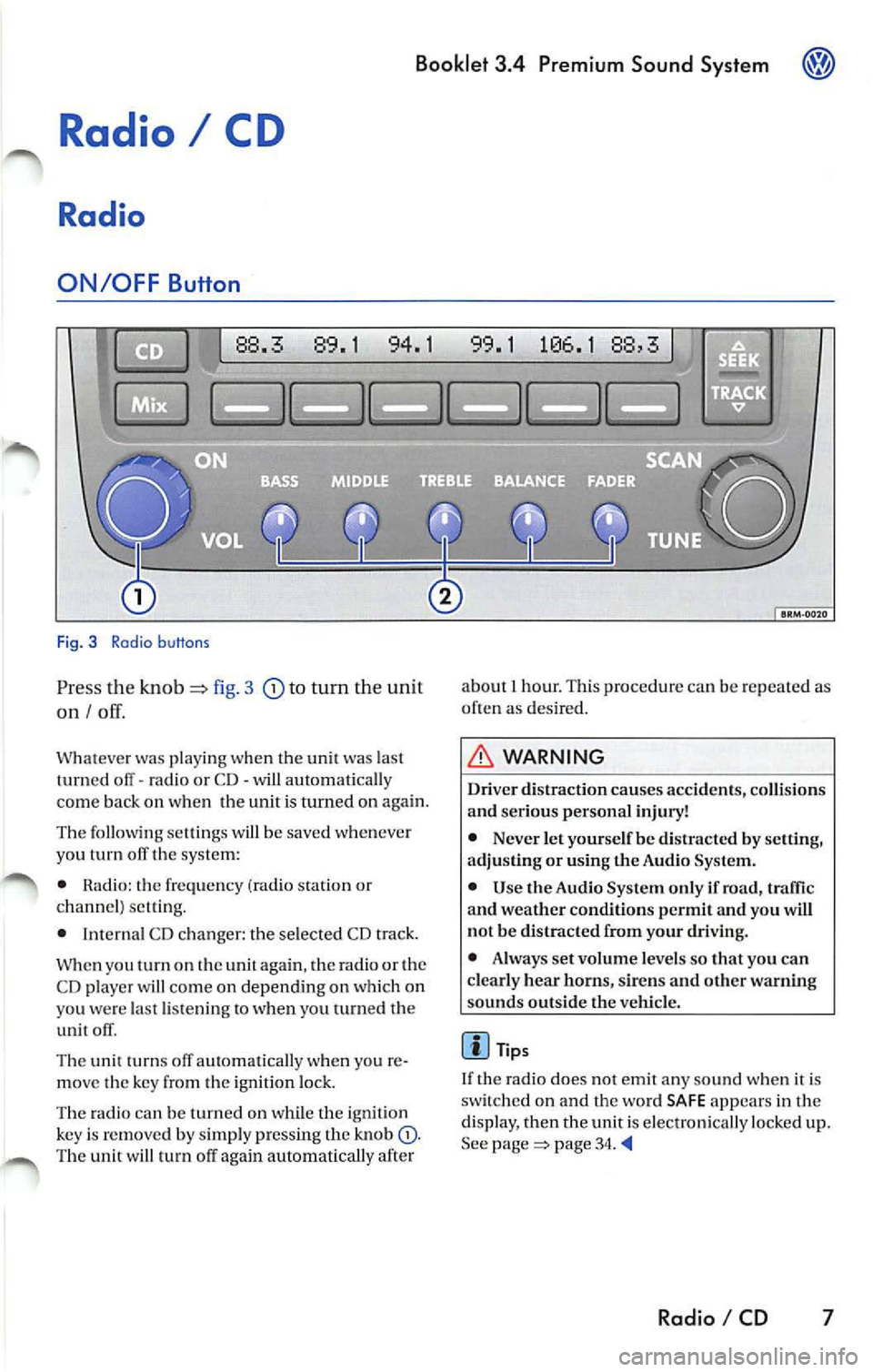
Fig. 3 Radio b uttons
Pr ess the knob fig. 3 to turn the unit
on I
Whatever was playing when the uni! was las!
turned off -radio or CD -will automaticall y
come back on when the unit is turned on again.
The foll owing se lling s will b e saved whenever
yo u tu m off the system:
• Rad io: the frequen cy (ra dio s tat ion or
c h an nel) se ttin g.
• Interna l CD c han ger : the se lected CD track.
W hen you
on the again , th e ra di o or the
CD player w ill co me on depend ing on which on
yo u wer e la st li ste nin g
when you turn ed the
unit off .
The uni! turn s off au!Omati ca lly w hen you re
m ove the key fro m the ign ition lock.
The radio can be turn ed on wh ile th e ignition
key is rem oved b y simpl y pressing the kn ob
88,3
about 1 hour. This procedure can be re p eate d as
o ften as des ired .
WARNING
Dri ver distraction causes accid ents, collision s
and ser ious personal injury!
• Never let yourse lf be distr acted by setting,
a djusting or using the Audio System.
• Use the Audio System only if road, traffic
and weather conditions p ermit and you will
not b e distracted from your driving .
• Alwa ys set vo lum e le vel s so that you can
clearly hear horns, sir ens and other warning
s ounds outside the vehicl e.
Tips
If th e radio does not emit any so un d w hen it is
sw itched on and the word SAFE appears in the
display, then the unit i s electronica lly lock ed u p.
See
page 34.
Radio I CD 7
Page 443 of 477
Booklet 3.4 Pre mium Sound System
Volume Knob
Volume Control
Turn the rotary page 7, fig. 3
to adjust the vo lum e.
Setting Custom Turn-On Volume Level
Press and hold the [SCAN/TUNE) button©
for longer than 2 seconds to enter the set
up mod e. You will hear a signal tone .
Turn the [SCAN/TUNE) button until
SELECT ON VOLUME appears in the dis
pla y.
Use the knob to set the desired turn
on volume.
Press the [SCAN /TUNE) button again for
lon ger than 2 seconds to confirm the set
ting you have just made. You will hear a
s ignal ton e.
Setting the Speed Volume Control
(SVC)
Press and hold down the [SCAN/TUNE)
button for longer than 2 seconds to ent er
th e set up mod e. You wi ll hear a sign al
ton e.
Turn the [SCA N/TUNE) button until SPEED
DEP. VOLUME
appears in the di sp lay.
8 Radio I CD
In the lower part of the display the
words OFF and the number s 1, 2 and 3
appear. By using the station preset buttons
below these words select the volume
l eve l you want. 1 for a minimum volum e
ad justme nt in accordance to spee d.2 for a
m ed ium volume adjustemtn in accor
dance to speed.3 for a maximum volum e
a djustment in accordance to spe ed.
Pre ss the [SCA N/TUNE) b utton again for
longer than 2 seconds to confirm the set
ting you ha ve just mad e. You will h ear a
s ignal tone.
Cu stom Turn-On Volume L evel
The volum e setting when the unit is tu rned on is
the same it was when the unit was turned off
(or ig inal factor y setting). However, yo u can pro-
g ram the unit for your own per sonal turn -on
vo lume level.
Speed Volume Control (SVC)
The Speed Volume Contro l automatica lly ad
justs the vol um e in accordance wit h road sp ee d.
Tips
• If you do not confirm the sellin g yo u ha ve
j u st made , th e unit automati cally return to
th e norma l operat io n m ode af te r about LS sec
onds . Your c usto m turn -on volume will no t b e
s tor ed.
• If
c u sto m turn-on volume th at you stored
is lo ud er than the t urn -off volum e leve l, the unit
wi ll use the turn-off volume th e nex t tim e it is
turn ed on.
• If the audio volume leve l is loud er than the
turn-on vo lume that you stor ed and
unit is
turn ed off, the unit will use the stor ed leve l the
next t im e it is turned on.
Page 444 of 477
Booklet 3.4 Premium Sound Sys tem
1
88. 89.1
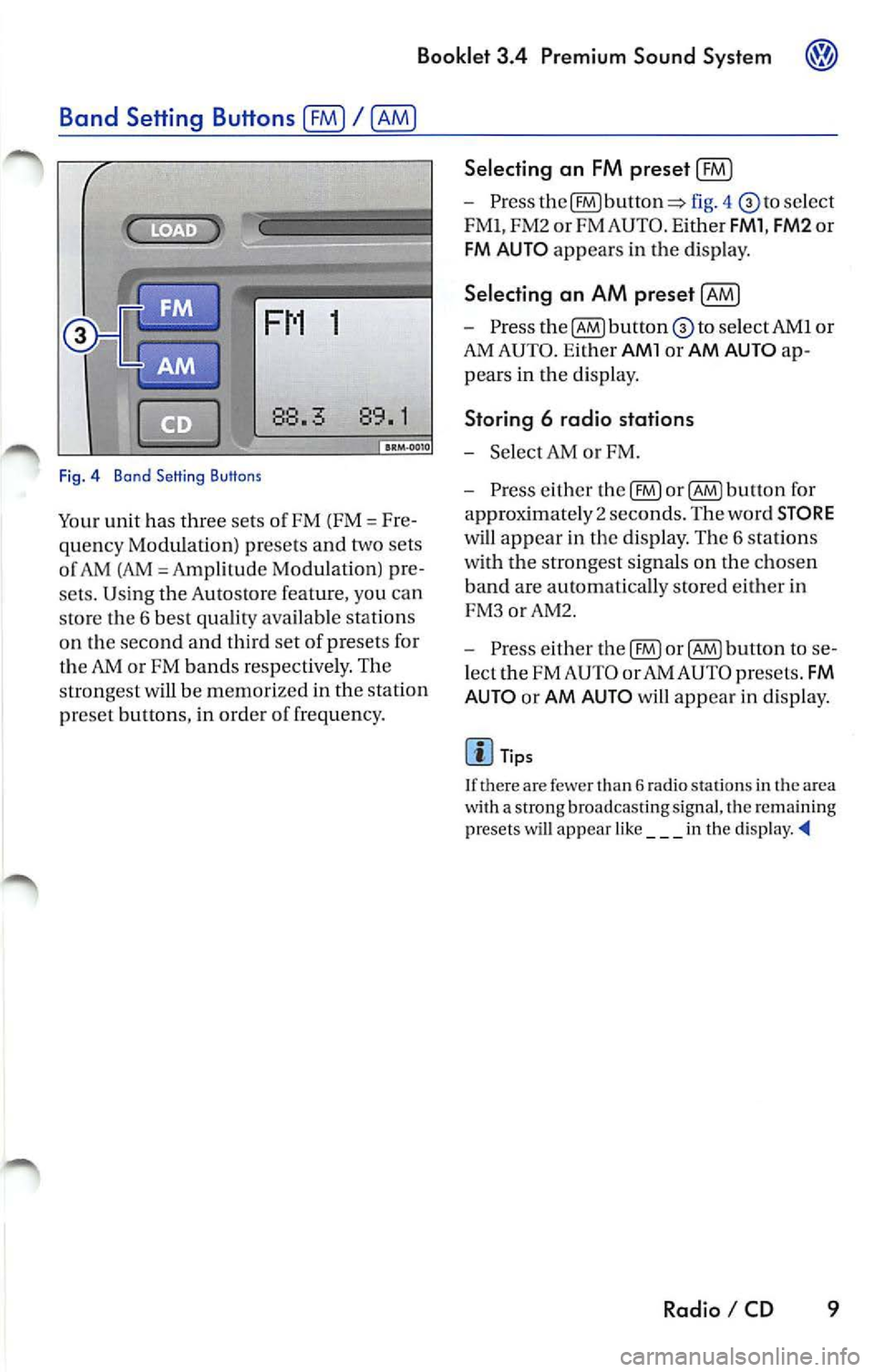
Fig . 4 Bond Setting Buttons
Your unit has three sets of FM (FM= Fre
quency Modulation) presets and two sets
o f AM (AM
Amp lilude Modula lion) pre
sets. Using the Autostore feature, you can
sto re the 6 best quality available stations
on the second and third set of presets for
the
or FM bands res pectively. The
strongest will be memor ized in the station
pr eset button s, in order o f frequency.
Selecting an FM preset (£0
-Press fig. 4 select
FMl, FM2 or FM AUTO . E ither
FMl , FM2 or
FM AU TO appears in the disp lay.
Selecting an AM preset [AM)
- Press to select AMI or
AM AUTO . Ei ther
AMl or AM AUTO ap
pears in the di sp lay.
Storing 6 radio stations
-Selec t AM or FM.
- Press either the
button fo r
approximate ly 2 seco nds. The word
STORE
will appear in the display. The 6 stations
with the strongest sig nals on the cho sen
band are automatically stored either in
FM 3orAM2.
- Press either
button to se
l ect the FM AUTO or AM AUTO presets .
FM
AUTO
or AM AUTO will appear in d isplay.
Tip s
I f there are few er than 6 radio stations in th e a rea
w ith a strong broadcasting signal, tl1e remaining
pr esets will ap pear like ___ in the
Radio I CD 9