Page 9 VOLKSWAGEN JETTA 2007 Owner's Manual
[x] Cancel search | Manufacturer: VOLKSWAGEN, Model Year: 2007, Model line: JETTA, Model: VOLKSWAGEN JETTA 2007Pages: 477, PDF Size: 77.6 MB
Page 447 of 477
@ Booklet 3.4 Premium Sound System
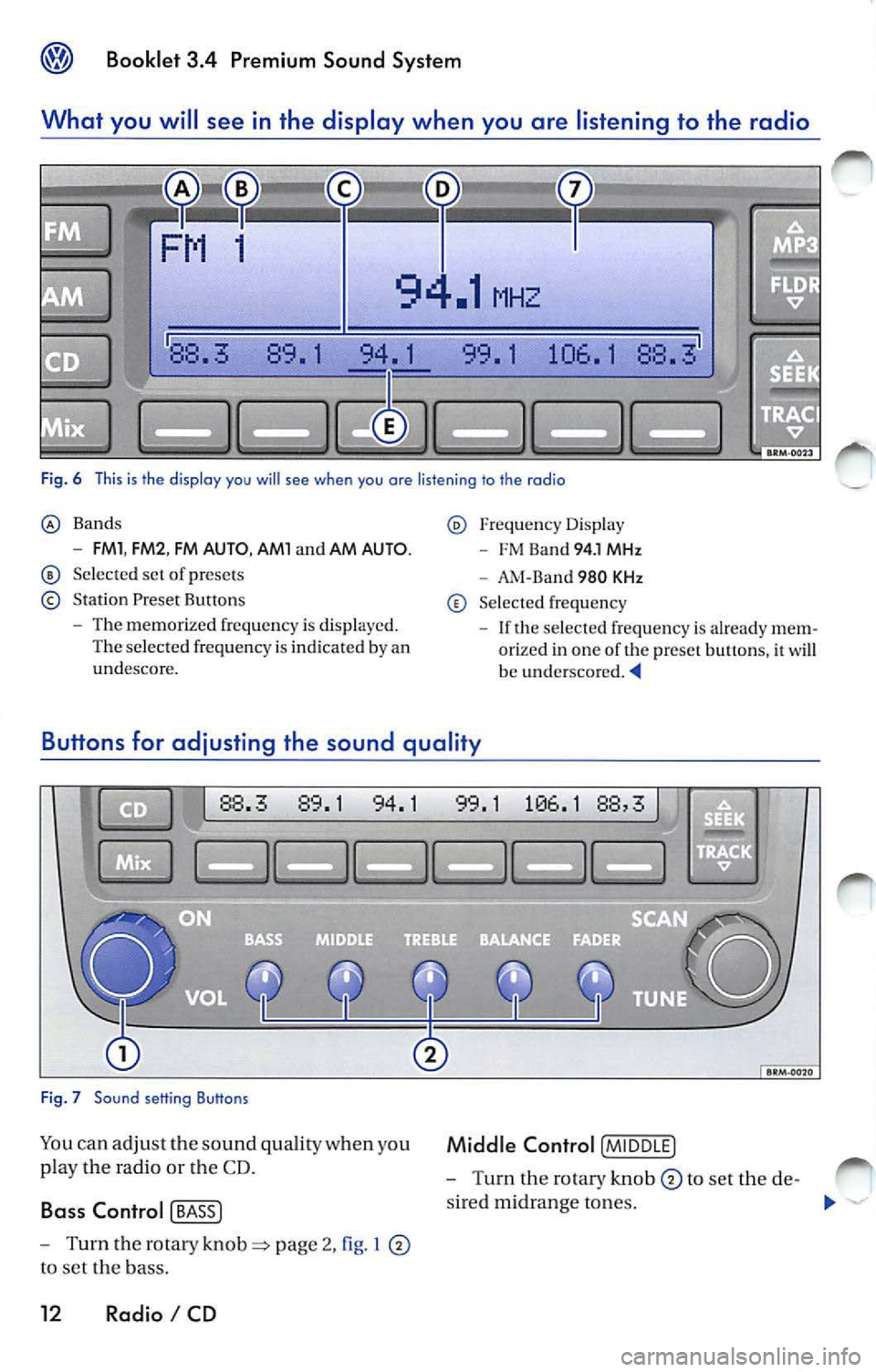
What you will se e in the di splay when you are listening to the rad io
88. 89. 1 94. 1 99. 1 106. 1 88.
Fig. 6 This is th e display you will see when you are listening to the radio
Bands
- FMl , FM2 , FM AUTO , AMl and AM AUTO.
Se lected set of presets
Station Preset Buttons
- The memorized frequ ency is displayed.
The selected frequency is indicated by an
undescore.
Freq uency Displa y
- FM Ba nd 94. 1 MHz
- AM-Ba nd 980 KHz
Selec ted frequency
- If the selec ted frequency is alrea dy m em
orized in one of the preset buttons, it
w ill be underscored.
Bu tton s for adju sting the sound qualit y
88.3 89.1 94.1
Fig . 7 Sound setting Buttons
Yo u ca n adju st th e so und quality when you
p lay the radio or the CD.
Ba ss Control [ BASS J
- Turn the rotary page 2, I
to se t the bass.
12 Radio I CD
1 1 88,
Middle Control [M IDD LE]
- Turn the rotary knob to set the de-
s ire d m idrange to nes.
"'
Page 450 of 477
Booklet 3.4 Premium Sound System
To show the ID number in the display
-Before en ab lin g, press button
pa ge 14, fig. 8 The ID number wi ll
appear in the di spla y.
- After enabling, turn the
!SCAN/TUNE !
button page 10, fig. 5 until channel
000 is di sp layed
XM ID
Thi s number i s an eight character a lphanumeri c
numb er. Firs t, th e m essage RADIO ID will appear
in the di spl ay, then the eight-c haracter
ID number. Th edis pl aywi ll alt ernat e automatically
aft er a few seco nds.
SAT button
88.3 89.1
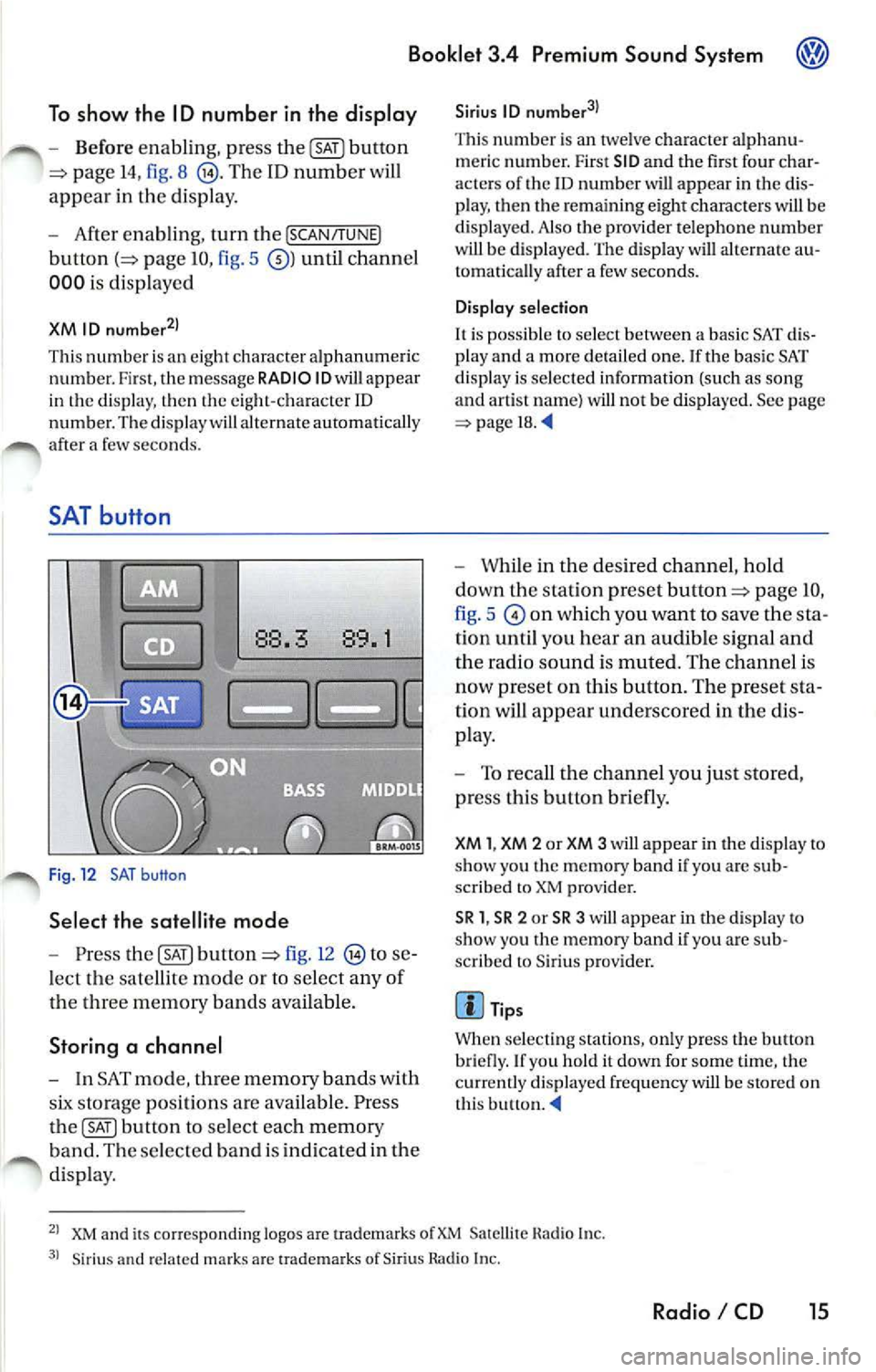
Fig. 12 SAT button
Select the satellite mode
- Press button fig. 12 to se
l ect the sate llite mode or to se lec t any o f
d 1e thr ee memory b and s ava ilab le.
Storing a channel
- In SAT mode , memo ry band s w ith
storage position s are availabl e. Pre ss
button to select each memory
b an d. Th e se lec te d b and is in dic ated in the
di spla y.
Sirius ID
Thi s numb er is an twe lve character alphanu
m er ic numb er. First SID and the fir st four char
acter s of the
ID number will app ear in the dis
p lay, then the re m ainin g eight characte rs will be
di splaye d. Also the pro vider t elephon e numb er
w ill be displ aye d. The displa y will alternate au
tomati cally af te r a few second s.
Display selection
It is po ssibl e to select betwe en a ba sic SAT dis
pl ay a nd a mor e deta il ed one. If the basi c SAT
di spla y is se lec te d information (such as song
and artis t nam e) will not be displa yed. See page
=> page 18.
- While in the desired channel , h old
down the stat ion pre set
page IO,
fig . 5
on which you want to save the sta
tion until you hear an audible sign al and
th e radio sound is muted. Th e ch annel i s
now preset on this button. The pre set sta
tion will appear underscored in the di s
p lay.
- To reca ll th e c hannel you ju st sto re d,
pr ess this button briefly.
XM 1, XM 2 or XM 3 will appear in the d isplay to
s h ow you Lhc m emo ry band if you arc sub
sc rib ed to XM provider.
SR 1 , SR 2 or SR 3 will a ppear in the disp lay to
s ho w yo u the memory band if you arc s ub
sc rib ed to Sir iu s prov ider.
Tip s
Wh en se lec ting station s, onl y press the butt on
bri efly. If yo u h old it down for some tim e, the
c ur re ntly displ ayed frequ en cy will b e stor ed on
t h is butlon.
XM and its co rr es pon ding logos are uademark s Satellite Hadi o In c.
Siriu s an d related ma rk s ar c tra dem ark s of Sir iu s Rad io In c.
Radio I CD 15
Page 453 of 477
Booklet 3.4 Premium Sound System
SAT display selection
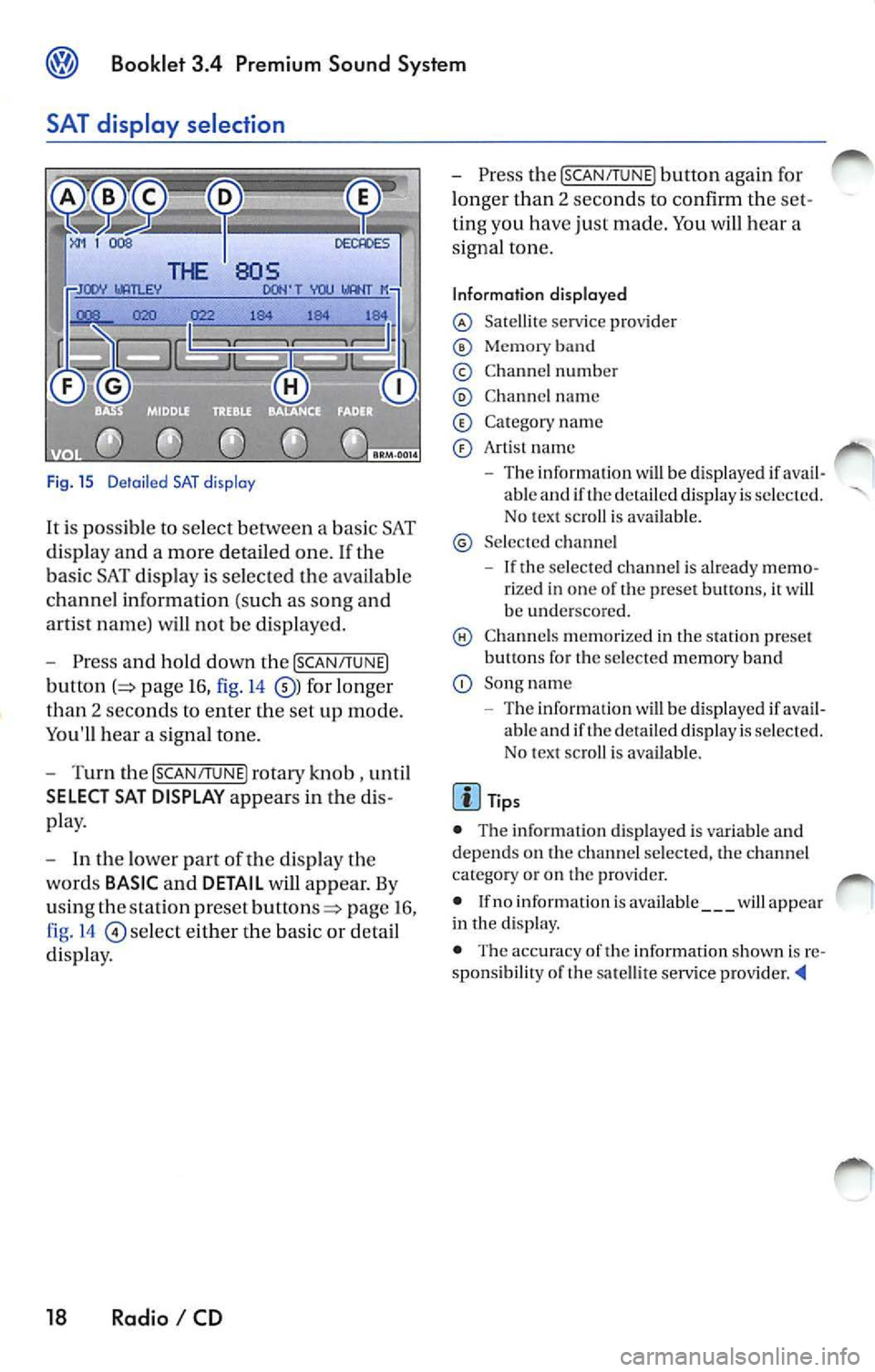
Fig. 15 D etail ed SAT disp lay
It i s possible to select between a bas ic SAT
di spl ay an d a more detailed one .
If the
ba sic SAT displa y is sel ecte d the availab le
channe l information ( such as song and
arti st nam e) will not b e displayed.
Press and hold down the [SCAN /TUNE]
button page 16, fig. 14 for longer
than 2 seco nds to enter th e se t up mode.
You'll hear a signal tone.
Turn th e [SCAN/T UNE] rotary knob , unti l
SELECT SAT DISPLAY appears in the
pla y.
In th e lo wer part of the di spl ay the
wo rds
BASIC and DETAIL will appear. By
u sing th e sta tion pre set
p age 16 ,
fig . 14
se lec t eit her the ba sic or detai l
di spla y.
18 Radio I CD
Press the [SCAN /TUN El button again for
l onger than 2 seco nds to confirm th e
ting you have just made. You will hear a
signa l ton e.
Information displayed
Satellit e service provider
Memor y band
© Chann el n um ber
C hann el name
C at egory nam e
Art is t name
The inform ation w ill be displayed if able and if the detail ed di spla y is s ele cted.
No tex t sc roll is ava ilab le.
S el ecte d ch anne l
If the se lec ted c hannel is already rize d in one of th e prese t button s, it wi ll
b e und ersco re d.
C hann els m em or ized in the sta tion preset
b utt ons fo r th e se lecte d memory band
Song name
- Th e information
will be di splayed if ava il
ab le and if th e de ta iled displa y is se lec te d.
N o tex t sc roll is av ail able.
• The inform ation d is p layed is var iable and
dep ends o n the channel sele cted, the c hann el
c ate gory or o n th e prov ider.
• If no inform ation is av ailabl e
will app ear
in th e displ ay.
• The acc ura cy of the information shown is
sponsibilit y of th e sa te llit e serv ice pro vider
Page 455 of 477
® Booklet 3.4 Premium Sound System
Tips
Always hold the CD either by the center or by the
out er edge with the print ed sid e facing up.
LOAD button
The internal CD changer is operated easily and convenient ly usin g the cont rols
on the radio.
It allows you to load up to six CD's.
FM 1
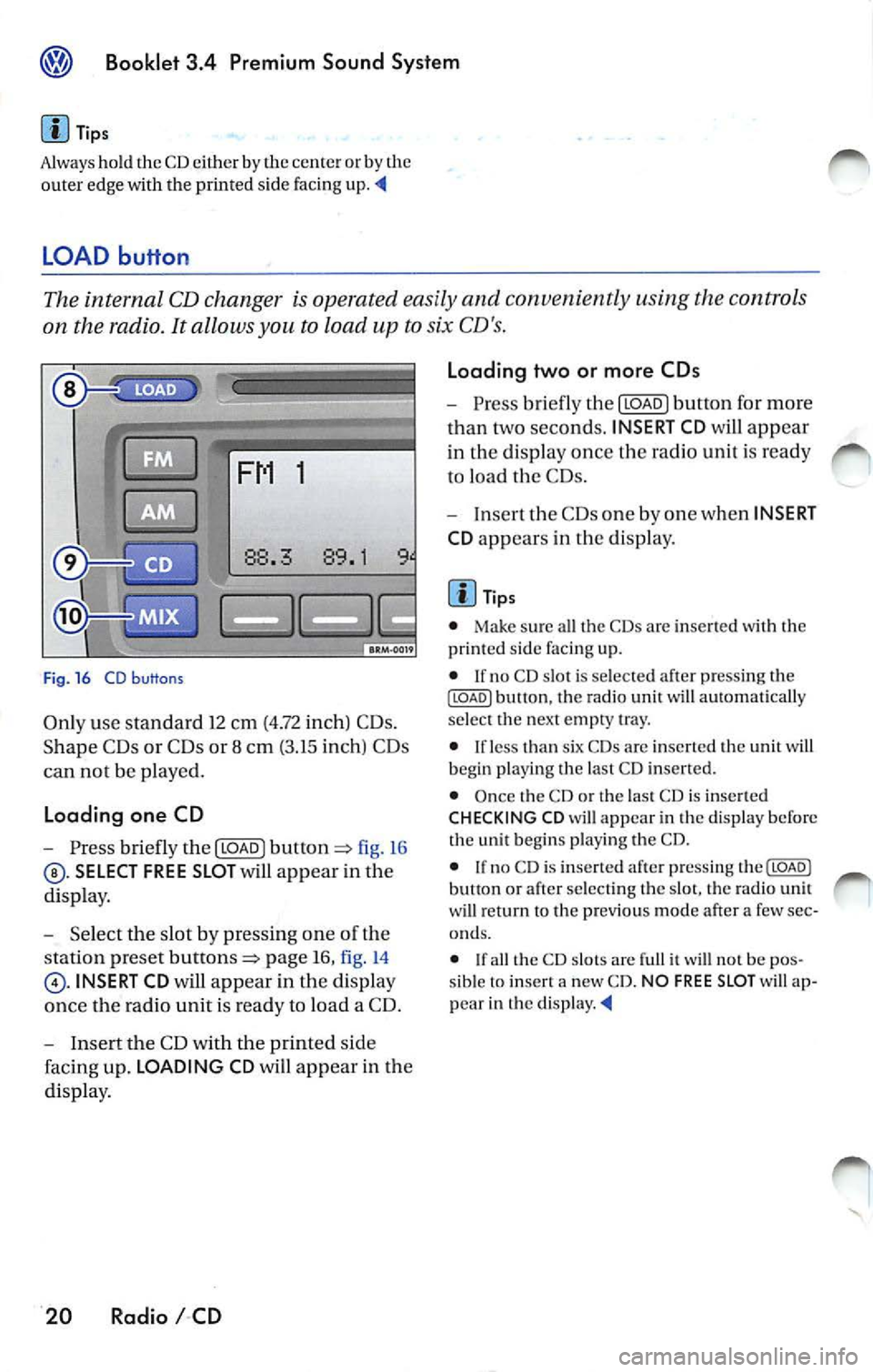
Fig . 16 CD b uttons
Only use standa rd 12 cm (4.72 inch) CD s.
Shape C Ds or CDs or 8 cm (3.15 inch) CDs
can not be played.
Loading one CD
- Press briefly the I LOAD J fi g. 16
SELECT FREE SLOT will appear in the
di spla y.
- Selec t th e slot by pressing one of t he
s tation pr eset
page 16, fig. 14
INSERT CD will app ear in the disp lay
once th e radio unit is read y to load a CD.
- I nse rt the CD with the printed side
faci ng up. LOADING CD will app ear in the
di splay .
20 Radio I CD Loading two or more CDs
-
Press briefly the I LOAD J button for more
t h an two second s. INSERT CD
will app ear
in the display once t he rad io unit i s ready
to load the CDs.
- Inse rt th e CDs one by one when INSERT
CD app ears in the di splay.
Tips
• Make sur e all the CDs arc inse rted wi th the
printed side facing up.
• If no CD slot is se lected a fter pressing th e
ILOADJ button, the rad io unit will automat ica lly
selec t the nex t empty tray.
• I f le ss than six CDs are inser te d th e uni t will
b egi n playi ng the last C D inserted.
• Once the CD or th e las t CD is inserted
CHECKING CD will appea r in the di spl ay before
the unit b egins playing the CD.
• If no C D is inserted afte r press ing th e(LOADJ
b utt on or after select ing the slot , the rad io unit
w ill r eturn to the p rev iou s m ode after a few sec
o nd s.
•
th e CD slot s are full it w ill not be pos
sib le to insert a new CD . NO FREE SLOT w ill ap
pear in th e
Page 456 of 477
Booklet 3.4 Premium Sound System
CD button
-Press the@button page 20, fig. 16
when you wan t to li ste n to the CD
pl aye r or to select an externa l CD changer •
if ava ilabl e.
Tips
• If no disc is lo aded in int ernal CD
c h anger you wi ll hear an a udibl e signal, and NO
C D
w ill app ear in th e disp lay.
M ix Mode bu tton
• If no disc is loaded in th e interna l C D
c h anger but there is a disc loaded in the ex terna l
C D changer •, t he exte rnal CD change r mode
w ill be selec ted.
• If neither a disc is loaded in internal CD
c h anger nor the external CD change r is ava ilab le
you
w ill hear an aud ible s igna l, a nd NO CD will app ear in th e display. '4
When you select MIX, the CD tracks will be played in random order.
Radios without SRDS: Playing tracks
in random order
-Press bu tton page 20, fig. 16
for more than 2 second s. MIX-CD a p
pears in the disp lay. Pr ess
again to stop the random play operat ion.
Radios with SRDS: Playing tracks in
random order
- Press the@button for more than 2
page 20, fig.16 MIX-CD
appe ars in the di splay. Press th e@button
aga in for more th an 2 seco nds agai n to
s top th e random play operat ion.
Select the type of random play mode
- Press and hold do wn the ISCA N/TU NEI
button :=> page 16, fig .14 long er than
2 seco nds to enter the set up mod e. You
w ill hear a signal tone. -
Pres s th e
!SCAN/TUN El button briefly,
until
SELECT MIX MODE appears in the
disp lay.
- In the lowe r part of the display the
words FLOR,
MAG will appear. By
u sing th e s tatio n pre set but tons=> page 16,
fig . 14
be low th ese wo rds se lect the
of scan operation you wan t.
- Press the
ISCAN/TUNEI button again for
l onge r than 2 seconds to confirm the set
t in g yo u have just made. You
will hear a
signa l tone.
Type of random play mode
• page 25
• CD -th e random play mode occ urs only
through the tracks of th e cu rrent disc , MIX-CD
ap pea rs in th e display.
• MAG -th e random play mode occ urs th rough
a ll th e i nserted discs in th e internal CD ch anger
o r in Lh e externa l C D
if availab le. MIXMAG ap pear s in th e di splay. '4
Radio I CD 21
Page 457 of 477
Booklet 3.4 Premium S ound Sy stem
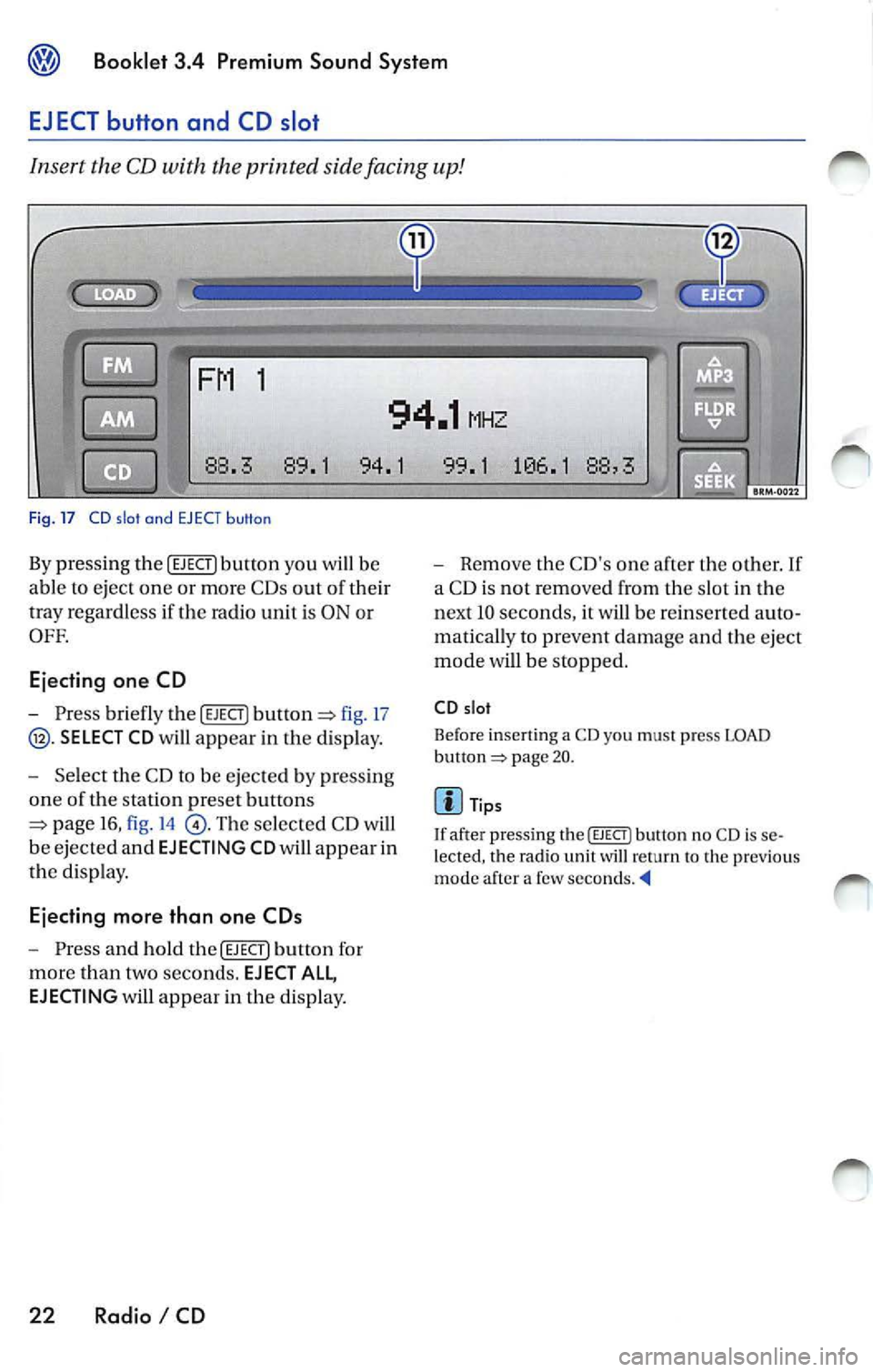
EJECT button and CD slot
Insert the CD with the printed side facing up!
1
94.1 MHZ
88 .3 89 .1 94. 1 9 9.1 1
0 6.1 88 ,3
Fi g. 17 CD slo t and EJ ECT butto n
By pressing the !EJECT) button you will be
ab le to eject one or more CDs out o f their
tray regard less if the rad io un it is ON o r
OFF.
Ejecting one CD
-Press b riefly the !EJECT] fig. 17
page 16, fig . 14
page 20.
Tip s
I f afte r pressing the
I EJECT ) button no CD is se
le cte d , th e rad io unit will return to th e pre viou s
mod e after a few seconds .
Page 458 of 477
![VOLKSWAGEN JETTA 2007 Owners Manual Booklet 3.4 Premium Sound System
Automatic track selection
-Briefl y press the !SCAN/TUNE] butt on t o
start a utom ati c sca nnin g to t he nex t track.
Af te r 10 second s, sca nning wi](/img/18/55689/w960_55689-457.png "VOLKSWAGEN JETTA 2007 Owners Manual Booklet 3.4 Premium Sound System
Automatic track selection
-Briefl y press the !SCAN/TUNE] butt on t o
start a utom ati c sca nnin g to t he nex t track.
Af te r 10 second s, sca nning wi")
Booklet 3.4 Premium Sound System
Automatic track selection
-Briefl y press the !SCAN/TUNE] butt on t o
start a utom ati c sca nnin g to t he nex t track.
Af te r 10 second s, sca nning will res um e an d
g o to th e ne xt trac k.
SCAN app ears in the
di sp lay.
- To stop sca nning, press the
ISC ANI
bu tton bri efl y durin g the 10 seco nd "h old "
tim e.
Selecting tracks
-Press briefly the !SEE K /TRACK] button
=:> page 3 , fig . 2 to s kip upw ard o r
dow nwa rd
((yj) throu gh th e trac ks or turn
th e
!SC AN/TUNE] rota ry k nob . Turni ng cloc k
w ise s kip up ward a nd turnin g counter
cl oc kwise sc roll downw ard.
"Scroll" through the same track (Fast
Forward /Fast Review)
- Press a nd hold th e (SEEK/TRACK] butto n
=> page 3, fig . 2 to sc roll up ward or
d ow nwa rd
((yj) tro ugh the sa me t rac k. The
trac k ela p se d tim e appears in the upp er
l e ft co rner of the d is pl ay.
- Release the b utton t o s top sc rolling
t h ro ug h th e trac k.
S electing on indi vidual CD
• T he curre ntly se lec ted CD w ill app ear in th e
di spl ay
CDl ... CD6.
• If there a re no CDs nei th er in th e i nternal CD
c han ger nor in the external C D ch an ger•, you
wi ll h ear a audibl e sig nal a nd
NO ap pea r
in di spl ay .
• If an ex te rnal CD ch anger is t ava ilabl e, but n o
CD is in se rted you w ill hea r a n aud ibl e sig n al a n
EXT NO CD will a ppear in the d isplay.
Automatic tra ck s ele ction
T he sca n fu nct io n sto ps a utomatica lly afte r one
l oop o f the tracks in the CD if th e operat io n is not
m anua lly stoppe d by press ing
bu tto n
aga in.
Selectin g tra ck s
• The c urrentl y se le cte d track a ppea rs in th e
di splay:
TRACK 01 ... TRACK 02 ... TRACK 03
Radio I CD 23
Page 463 of 477
![VOLKSWAGEN JETTA 2007 Owners Manual Booklet 3.4 Premium Sound System
Track search Buttons
"Scroll" through the same track (Fast
Forward /Fast R ev ie w)
- Press and hold the !SEEK/TRACK ] button
page fig . 2 to scro ll](/img/18/55689/w960_55689-462.png "VOLKSWAGEN JETTA 2007 Owners Manual Booklet 3.4 Premium Sound System
Track search Buttons
\"Scroll\" through the same track (Fast
Forward /Fast R ev ie w)
- Press and hold the !SEEK/TRACK ] button
page fig . 2 to scro ll")
Booklet 3.4 Premium Sound System
Track search Buttons
"Scroll" through the same track (Fast
Forward /Fast R ev ie w)
- Press and hold the !SEEK/TRACK ] button
page fig . 2 to scro ll upwards or
downwards
trough the same track.
The track elapsed time appears in the
upper left corne r of the d isp lay.
Information displayed
Fig. 24 SCAN/ TUNE button
MP3 display selection
It is possible to select betwee n a basic MP3 dis
play and a more detailed one. If th e bas ic MP3
display is selec ted the file informat ion (such as
s ong and artist name) w ill not be displayed.
• Press and ho ld down
(SCAN/TUNE) butt on fig. 24 for longer than 2 seconds to ent er
the set up mode. You will hear a sig nal tone.
• Turn the
(SCAN/TUNE) rotary knob, un til SELEC T MP3 DISPLAY appears i n the display.
• In
low er part of the display words BASIC and DETAIL will appear. By usi ng th e s ta
tion pr eset bu tto ns © select eith er the bas ic o r
deta il di splay.
• Press the
SCAN/TUNE buu on again fo r
long er th an 2 second s to confirm the setting
you've just made . Yo u will hear a signa l tone.
28 Radio I CD
-Release t he button to stop skipp ing
through the track.
Text sc roll select ion
You can decide whether the available informa
tion in the MP3 file is scrolled or not in the di s
play.
• Press and hold down the
(SCAN/TUNE) button
for longer than 2 seconds to enter the set u p
mode. You w ill hear a signal tone.
• Turn the
(SCAN/T UNE) rotary knob,
station preset buttons © select eith er ON or OFF.
• Press the (SCAN/TUNE) button again for longer
th an 2 seco nds to confirm the settin g yo u've just
made. You'll hear a signal to ne.
• If yo u decide to scroll the fil e information
follow ing warn ing will appear in the d isplay: CAUTION! THIS MAY CAUSE DRIVER
DISTRACTION.
Page 470 of 477
Booklet 3.4 Premium Sound System ®
-Use the radio stat io n pr ese t button s 1 to
4
page 34, fig. 28 to ent er the code
numb er fo un d on your R adio Card. Use
pre set button
l to ent er t he fir st digit in the
code numb er. U se button 2 to en te r the
seco nd digit , e tc. Th e valu e range for each
of the 4 di git s is O ... 9. T he digit will in
c rease by l eac h tim e you tap the pr ese t
bu tton. The number r etu rns to O afte r 9.
- After you finish ent ering th e code, press
the sta tion p reset button below
word
OK in th e di spl ay. It usual ly is th e las t sta
tion pre set button. You w ill hear a n au
dibl e signa l.
-If you have en te red t he co de number
c orr ect ly, a radio frequency will app ear in
th e d isp lay.
Wrong Code Number
lfyou have accide ntally ent ered a wrong code
number , SAFE will ap pear in th e di spl ay and
th en the number 1000 will app ear.
Yo u can re p ea t the procedu re agai n on e time .
T he num ber of attempt s will app ear in the dis
p lay. lf you acci dent all y ent er a wrong code
number a seco nd tim e
SAFE will appea r in the
d isp lay.
lfth e wrong cod e number i s enter ed aga in, th e
uni t w ill be di sab le d for about I hour. Lea ve th e
unit O N for this hour . After th e hour has
e la p se d, the numb er of att em pts will stop bei ng
displayed and you can cancel th e elec tronic lock
once again.
Remembe r, the cycle i s ...
• 2 attempt s
• one hour lo cked.
Tips
If y ou loose your Rad io Card, contact yo ur au
t ho riz ed VO LKSWAGEN
ered by a re pl ace ment pa rts warra nty. This re
pl acement serv ice w ill not b e availab le, how
eve r, it th e unit h ousing is damaged or if un au- th
oriz ed per sons have att empt ed to make re
pair s.
Antenna Care
Th e an tenna i s des ig n ed to achieve optim al per
fo rmance with the radio and is located at a pos i
tion where reception is good and su sce pti bili ty
to int erfer ence is low.
Ve hicle s equ ipped wi th antenna s emb edd ed in
t he winds hield o r backlights offer the furth er ad
vantages o f being completely pro tec te d f rom
damage and wear.
No antenna car e is r equir ed for vehicles
e quipped with roof moun te d
Radio I CD 35