between VOLKSWAGEN JETTA 2007 Owner's Manual
[x] Cancel search | Manufacturer: VOLKSWAGEN, Model Year: 2007, Model line: JETTA, Model: VOLKSWAGEN JETTA 2007Pages: 477, PDF Size: 77.6 MB
Page 334 of 477
WARN ING (continu ed)
• Exceed ing permi ssibl e weig ht ratings can
r es ult in ve hicl e da m age, accide nts, and per
sona l
Driving tips
For th e best handlin g of ve hicle and trailer,
p lease note th e fo llowing:
• A "bala nce d" rig is easie r
operate and con
trol. This m ean s th a t th e tow vehicl e should b e
loaded to th e extent p ossible and p ermi ssible
whil e keep ing th e trailer as light as po ssibl e
und er th e circum stanc es. Wh eneve r po ssib le,
tran sfe r som e cargo to the
co mpar tment
of the tow vehicl e w hile obs ervin g tongu e loa d
req uirem ents and vehicle loa ding consid er
a tion s.
• The high er th e s pee d, the more
it be
come s fo r the drive r to control th e rig. Do not
dr ive at the maximum permis sibl e
• Always appl y br akes earl y. When driving
d ow nhill, d ownshi ft into a lower gear to u se the
e ng in e brak in g eff ec t to slo w down the ve hicle.
U se of the brake s alo ne ca n ca use them to ove r
h ea t an d fail.
• The coo ling effect of the rad iator fan cann ot
b e in crease d by dow nsh ifti ng beca use fan sp ee d
i s ind epend ent of engine sp ee d. The re for e,
Trailer towing tips
Your vehicle handles diff ere nt ly wh en t ow in g a
t ra iler b ecause of the a ddit io na l weight and
weig ht d is tribut ion. S af ety. perform ance and
e conomy will gr ea tly depend on how car efull y
yo u load your tra iler
yo ur rig.
B efor e y ou actua lly
your tra iler, practice
t urn ing. stoppin g and backing up in an ar ea
away from
until yo u l earn the feel of your
ve hicle and trailer unit.
Backing up is
r e quir es prac tice .
S teer ing w hile backing up is generall y opposite
of th at wh en backing your vehicl e w ith out a
tra iler.
Booklet 3.2 Tip s and Advice
wh en dr iving uphill , yo u can alwa ys dri ve in the
hi gh est po ssible gea r wit h low e ngin e sp ee d. If
th e coo lant te mp erature warning light in the in
s trument cluste r start s fla shin g in red , p ull off
the road , stop and le t th e e ngin e id le for abou t
minute s to pre vent hea t bu ildup and engin e
damag e.
WARNING
• Reduce you r speed even more under unfa
vora ble load, wea ther or w ind condi tions
p artic ular ly w hen goi ng dow nhill.
• Be especia lly carefu l w hen passing o ther
veh icles. Redu ce ve hicle sp eed immediate ly if
the tra iler sh ow s the sli ghtest sig n of sway ing.
• Neve r try to stop the sway ing by acceler
ating.
• Always heed speed lim its. In some a reas
speed lim its for vehicl es tow ing tra ilers are
l ower than for reg ular
Keep more di stan ce between your vehicl e and
th e one in front of you. will nee d m ore roo m
to stop.
To compens ate fo r th e traile r, yo u w ill n eed a
l a rger than normal tu rning
When passing , reme mber that you can not acce l
erate as fast as you normall y wou ld because of
t h e added load. Make sur e yo u ha ve enough
room to pas s. After passing, allow plen ty of room
fo r yo ur tr aile r befor e changing la nes aga in.
Avoid jerk y s tart s, sharp turns or rapid lan e
c h ange s.
Driving and protecting the env ironment 13
Page 348 of 477
Booklet 3.2 Tips and Advice
Accessories, new parts, repairs and modifications
Accessories and parts
Always con sult an authori zed Volk swagen dealer before purchasing accessorie s
and parts for your vehicle.
Your vehicl e is des ign ed to offe r a hi gh stand ard
o f a cti ve an d pass ive sa fe ty.
Pl ease co nsult an author ize d Vo lkswagen deale r
for advice befo re insta llin g accessor ies, re pla ce
m en t part s or other e quipm en t.
Au thori zed Volk swage n dea le rs ha ve the la tes t
information fr om th e manuf actur er and can rec
ommend a ccessori es a nd part s
are suit abl e
fo r yo ur vehicle and perso nal r equir em ent s.
They can also help answer questions you mi ght
h ave reg arding official reg ulati ons.
We r ecommend you onl y use appro ved Volk
swage n accessories and genuine Volkswagen
part s® . Th ese part s and accessor ies have bee n
eva luate d b y Vo lkswage n for suit abilit y, reli
a bility and safet y. Th e Vo lksw age n d eal ers hip s
h ave the necess ary ex peri ence and faciliti es
ensure th at th e part s are prop erly .
Vo lkswage n ca nnot ass um e re spon sibili ty fo r
any after-ma rket n on -Vo lk swage n part s use d,
e ven if th ese parts have bee n app rove d by an of
fi ci al t es tin g age ncy or a rc cove re d by a n offici al
ce rtificat e or sea l of ap prov al.
WARNING
Improp er ve hicle equipm ent or mod ifica tions
ca n ca use damag e to th e vehicle and serious
personal injury.
fr, WARNING (continued)
• In th e intere st of safety, we urge you to u se
only authorized Volkswagen accessories and
genuine Volkswagen parts® that h ave been
designed to be used on your vehicle.
WARNING
I mp rop er ca re, servicing and repair proce
dure s can increase the risk of personal injury
and death by preventing an airbag from de
ploying when needed or deploying an airbag
unexpectedl y.
• Neve r place or attach accessories or other
objects (such as cup holders, telephone
brackets, no te pad s, large , h eavy or bul ky ob
je cts ) on the doors, on the windshield , o ve r or
near the area marked "AIRBAG" on the
s tee rin g w heel, in strum ent pane l, seat back
re sts or between those area s and your self.
• Object s on or near the surface s
air
ba gs are located can come loose and cause se
r iou s per sonal injury in a crash, especially
w hen the airbags inflate.
• Be sur e to r ead and h eed the inform ation
a nd all WA RN INGS
2.1 "Safety
fir st", chapt er "Airba g sys te m. ",..
Accessories, new parts, repairs and modifications 27
Page 374 of 477
Maximum (permissible) inflation pressure means the maximum cold inflation pressure to
which a tire may be inflated. Also called "max imum inflation pressure."
Normal occupant weight
means
150 lbs. (68 kilograms) times the number
of occupants seated in the vehicle up to the total seating capacity of your vehicle.
Outer diameter
means the overall diameter of an inflated new
tire.
Overall width means the linear distance between the exteriors
of the sidewalls of an inflated tire, including ele
vations due to labeling, decorations, or protec tive bands or ribs.
Ply
means a layer of rubber-coated parallel cords.
Radial ply tire
means a pneumatic tire in which the ply cords
that extend to the beads are laid at substantially
90 degrees to the centerline of the tread.
Recommended inflation pressure
see
52, "Cold tire inflation pressure".
Rim
means a metal support for a tire or a tire and
tube assembly upon which the tire beads are
seated.
Rim diameter
means nominal diameter of the bead seat . If you
change your wheel size, you will have to pur
chase new tires to match the new rim diameter.
Rim size designation
means rim diameter and width.
Rim width
means nominal distance between rim flanges.
Sidewall
means that portion of a tire between the tread
and bead.
Booklet 3.2 Tips and Advice
Speed rating (letter code) means the speed at which a tire is designed to be
driven for extended periods of time. The ratings range from 93 mph (150 km/h) to 186 mph
(298 km/h). These ratings are listed in the table
below 62. You may not find this informa
tion on all tires because it is not required by law.
The speed rating letter code, where applicable, is molded on the tire sidewall and indicates the
maximum permissible road speeds.
Tire pressure monitoring system
1 )
means a system that detects when one or more
of a vehicle's tires are underinflated and illumi nates a low tire pressure warning telltale.
Tread means that portion of a tire that comes into con
tact with the road.
Tread separation means pulling away of the tread from the tire
carcass.
Tread wear indicators (TWI) means the projections within the principal
grooves designed to give a visual indication of
the degrees of wear of the tread. See
59, "Tread Wear Indicator (TWI)" for more informa
tion on measuring tire wear.
Uniform Tire Quality Grading
is a tire information system developed by the United States National Highway Traffic Safety
Administration (NHTSA) that is designed to help buyers make relative comparisons among tires.
The UTQG is not a safety rating and not a guar antee that a tire
will last for a prescribed number
of miles or perform in a certain way. It simply
gives tire buyers additional information to com bine with other considerations, such as price,
brand loyalty and dealer recommendations .
Under UTQG, tires are graded by the tire manu
facturers in three areas: tread wear, traction and temperature resistance. The UTQG information
on the tires, molded into the sidewalls.
U.S. DOT Tire Identification Number (TIN)
This is the tire's "serial number."
It begins with
the letters "DOT" and indicates that the tire
meets all federal standards. The next two num-
Tire pressure monitoring system)
Checking and Filling 53
Page 378 of 477
"Tires and ve hicl e lo ad limit s" for more imporinfor mati on.
Vehicles
ha ve full hub caps have valve ex
tenders ins tead of du st caps. To ch eck tire pr es
s ur e or acid air. you do not n eed to re move the
ex te nd er. 13e s ure to rein sta ll va lve dust caps
ch eck ing or adjust ing tir e pr ess ure.
A lways use an
tir e pr ess ure gaug e w hen
c h eck ing and adju stin g i nfl atio n pr essu res .
C hec k all of the
and b e sure not l o forg et th e
s par e tire. If p ress ure in an y is too high
w hen the tire is "co ld," let o ur of the tir e
s lowly with th e of the tir e ga uge and kee p
c h eck ing th e press ure until you re ac h th e pr es
s ure that is correc t for th e loa d (pa sse nge rs and
l u gg age)
ki nd of dri ving yo u plan t o do .
I f th e pr ess ure in any tire is too low , n ote the dif
f e re n ce between the press ure in the co ld
a nd
th e pr ess ure yo u need and add air yo u
n eed to reac h th e co rrect press ure for the vehicle
load (pa sse nge rs and lu ggage) for th e tire s on
yo ur vehicle as listed o n the on yo ur vehicle a nd
in thi s man ual
th e kind of driv ing y ou p lan
t o do .
Neve r excee d th e maxi mum infl ati on pre ssure
li sted on the tir e sid ewa ll for any reason.
R em emb er th at the ve hicle manufac turer, not
t h e tir e man ufa ctur er, de te rmin es th e co rrec t
t ir e pr ess ure for th e tir es o n yo ur vehicle
I t i s imp ortant
ch ec k th e tir e pr ess ure when
the tires are cold.
Vehicle witho ut
• the re quir ed tire pressure from the tir e
pressu re lab el on the ope n edge of th e dri ver's
door .
• Place the a ir press ure gauge on the dust cap s
- th ere is no need
re m ove them.
• The tir e press ures s ho uld onl y be checked
tire s cold. The sli ghtl y pres
s ur es ofwann tires no t b e reduced.
•
th e tire press ure to the load you are
ca rrying.
Vehicle with
• the req uir ed tir e pr ess ure from the tir e
pressure label o n th e ope n edge of the dr ive r's
do or.
Booklet 3.2 Tips and Advice
• Turn th e va lve s tem cap counter-clockw ise to
r emove it from the tire valve.
•
th e ai r press ure on the valv e.
• The tir e pressures sh o uld onl y be ch ecke d
w hen th e tir es are cold. T he slig htly rai sed pres
s ur es of
tires not be redu ced.
• Adju st th e tir e pr ess ure to the load you are
carry ing.
• Reins tall the valv e ste m cap on the valve.
When should I ch eck the tire pressure?
Th e co rrec t tir e pr ess ure is especia lly import ant
a t hi gh speeds . Th e pre ssur e s ho uld th erefo re be
c h ecked at leas t once a month and alwa ys befo re
s ta rt in g a jo urn ey. D o not forget to ch eck the tire
pr ess ure on th e spare whee l
When shou ld
I adjust the tire press ures?
Ad just th e tire press ure to the loa d you are car
ry ing. After changin g
wheel or repl acing
w hee ls yo u have tu adj ust th e tir e press ures on
a ll whee ls. In ad ditio n on ve hicles wit h TPMS,
yo u sh oul d s pecify new tire pressures
=boo klet
WARNING
In co rrec t tire press ure ca n result in sudd en
ti re failur e Jo ss of co ntrol, collision , seriou s
perso nal injur y an d eve n dea th .
•
tire s to the re co mm end ed and
co rrec t tir e pre ssure before drivin g off.
• Driving with und erinfl atcd tires bend
m or e, le ttin g th em get too hot res ulting in
tr ead separatio n, s udd en tir e fai lure ti re
fa ilur e and Jo ss of control.
• Excess ive sp ee d and /or ove rload ing ca n
ca use hea t build -u p, su dden tire failure in
cludin g a bl owo ut an d su dden deflati on and
Jo ss o f co ntrol.
• If th e tire pr essure is to o low or too high,
th e tir es will wear prema turely and the ve hicl e
wi ll not handl e we ll.
Not e
Dr iv in g w ith out valve s te m caps ca n cau se
applicab le Tire pressure monitoring system)
Checking and Filling 57
Page 448 of 477
![VOLKSWAGEN JETTA 2007 Owners Manual Booklet 3.4 Premium Sound System ®
Treble Control [TR EBLE]
- Turn the ro tary knob to set th e de
s ired treb le .
Balance Control (B ALA N CE]
- Turn the rotary knob to set th](/img/18/55689/w960_55689-447.png "VOLKSWAGEN JETTA 2007 Owners Manual Booklet 3.4 Premium Sound System ®
Treble Control [TR EBLE]
- Turn the ro tary knob to set th e de
s ired treb le .
Balance Control (B ALA N CE]
- Turn the rotary knob to set th")
Booklet 3.4 Premium Sound System ®
Treble Control [TR EBLE]
- Turn the ro tary knob to set th e de
s ired treb le .
Balance Control (B ALA N CE]
- Turn the rotary knob to set the de
sired bala n ce between t he left and right
speakers.
Fade r Control !FADER !
-Turn the rotary knob to set the de
s ire d balance between the front and rear
the rad io unit.
Sat ellit e ra di o pr ovi ders
Volkswagen offers two satellite radio provider s:
• XM Satellite Radio
• Sirius Satellite Radio
Ask your authorized Volkswagen dea ler for more
information about the service each provider
Radio I CD 13
Page 452 of 477
Booklet 3.4 Premium Sound System
Automatic channel selection
-Briefly press the ISCAN/TUN EJ button to
sta rt a utom atic sca nning to the n ext
c hann el w ithin a give n category. Aft er
abou t 10 sec ond s, scan ning will resume
and go to the ne xt channel.
SCAN appears
in the displ ay and the c hann el available in
formation will be display ed.
- To stop scan ning, press the
ISCAN/T UNEJ
button bri efly during th e 10 seco nd "h old "
time.
- T he sca n function stop s automatica lly
after one loop of the available chann els in
the pr eset memori es or in the ca tego ry if
the operation is not manually stopped.
If a
diff erent cate gory i s to b e scan ned, first se
le ct that category manually and th en pr ess
[SCAN/TUNEJ.
Preset scan
-It is po ssible for you to select between a
sca n opera tion through the enti re range of
chann els w ithin a giv en category or ju st
tho se memorized in the station preset but
t o ns. Press and hold do wn the
!SCAN/T UNE )
button for l on ge r th an 2 seco nds to e nter
th e set up mod e. You'll hear a sign al ton e.
- Turn th e
!SCAN/T U NE J rotary knob , until
SELECT SCAN SAT appears in the di spl ay. -
In th e lower part of the di spla y th e
w ord s
CHANNELS and PRESETS wi ll ap
pear . By using the stat ion pr eset button s©
belo w these wor ds se lect th e type of scan
operat ion you want.
- P ress the
ISCAN/T UNEJ button again for
long er than 2 secon ds to c onfirm th e set
ting you've just m ad e. You' ll hea r a s ig nal
ton e. Th e pr ese t scan function sto ps au to
m aticall y after one loop of th e available
channels in the preset memories if the op
eration is not manuall y stopped .
Tips
• The category name to which each chan nel
b elong s w ill app ear in the displ ay.
• When se lec tin g cha nnels on ly th e ch ann el
and ca tegory names will app ear in th e di splay.
After a few second s the availab le chan nel infor
mat ion will appea r in the display.
• Non se lec ta bl e ch annel s arc automatically
p asse d over w hen search ing ch annel s and are
not shown in the display. It dep ends on your
provider wheth er the chann el is covered.
• If the channel fou nd is already saved on a sta
tion butt on , the corres pon din g chann el numb er
will be undersc ored in th e displa y.
• When category ALL is select ed the
(SEEK /TRACK) button will sea rc h chan nels in all cat egories.
• category ALL is selec ted t he next ava ilable
c h annel will be selec ted when usin g th e
(SEEK/TRACK) button, rega rdless if it belong s to different category. -'4
Radio I CD 17
Page 453 of 477
Booklet 3.4 Premium Sound System
SAT display selection
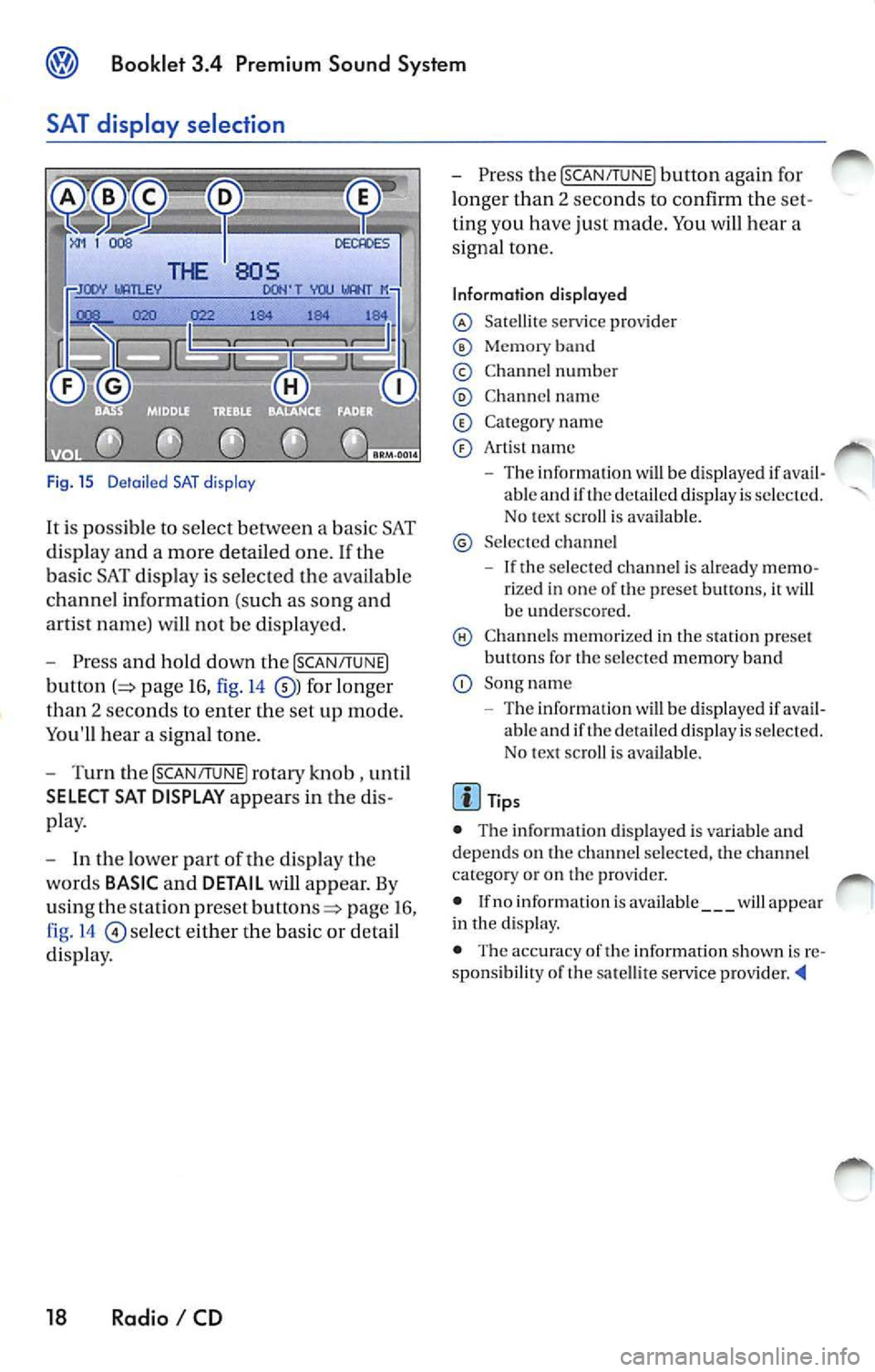
Fig. 15 D etail ed SAT disp lay
It i s possible to select between a bas ic SAT
di spl ay an d a more detailed one .
If the
ba sic SAT displa y is sel ecte d the availab le
channe l information ( such as song and
arti st nam e) will not b e displayed.
Press and hold down the [SCAN /TUNE]
button page 16, fig. 14 for longer
than 2 seco nds to enter th e se t up mode.
You'll hear a signal tone.
Turn th e [SCAN/T UNE] rotary knob , unti l
SELECT SAT DISPLAY appears in the
pla y.
In th e lo wer part of the di spl ay the
wo rds
BASIC and DETAIL will appear. By
u sing th e sta tion pre set
p age 16 ,
fig . 14
se lec t eit her the ba sic or detai l
di spla y.
18 Radio I CD
Press the [SCAN /TUN El button again for
l onger than 2 seco nds to confirm th e
ting you have just made. You will hear a
signa l ton e.
Information displayed
Satellit e service provider
Memor y band
© Chann el n um ber
C hann el name
C at egory nam e
Art is t name
The inform ation w ill be displayed if able and if the detail ed di spla y is s ele cted.
No tex t sc roll is ava ilab le.
S el ecte d ch anne l
If the se lec ted c hannel is already rize d in one of th e prese t button s, it wi ll
b e und ersco re d.
C hann els m em or ized in the sta tion preset
b utt ons fo r th e se lecte d memory band
Song name
- Th e information
will be di splayed if ava il
ab le and if th e de ta iled displa y is se lec te d.
N o tex t sc roll is av ail able.
• The inform ation d is p layed is var iable and
dep ends o n the channel sele cted, the c hann el
c ate gory or o n th e prov ider.
• If no inform ation is av ailabl e
will app ear
in th e displ ay.
• The acc ura cy of the information shown is
sponsibilit y of th e sa te llit e serv ice pro vider