lock VOLKSWAGEN JETTA 2008 Owners Manual
[x] Cancel search | Manufacturer: VOLKSWAGEN, Model Year: 2008, Model line: JETTA, Model: VOLKSWAGEN JETTA 2008Pages: 477, PDF Size: 77.6 MB
Page 406 of 477
Booklet 3.2 Tips and Advice
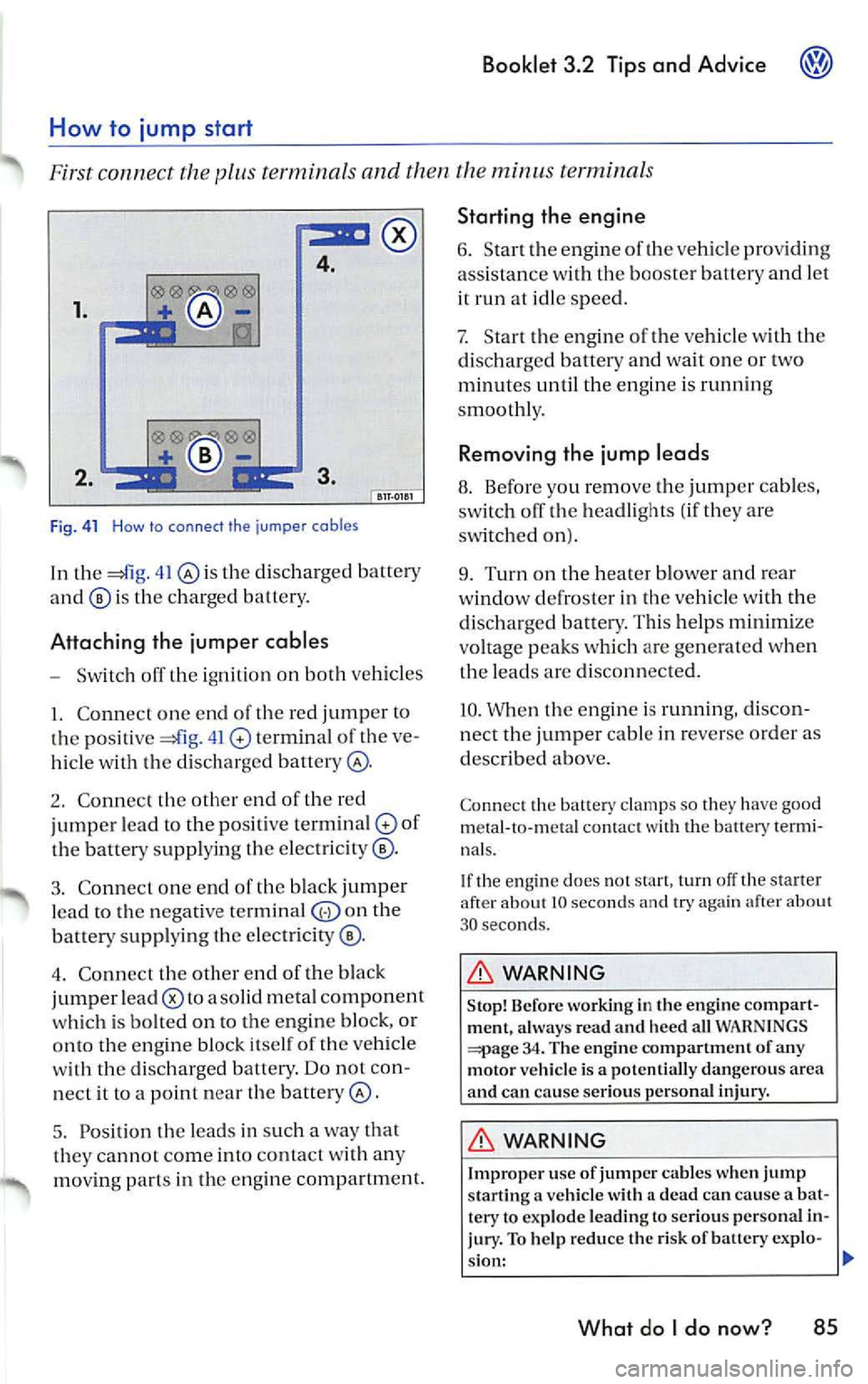
4.
1.
Fi g. 41 How to connect the jumper cables
In th e 41 th e di sc har ged batter y
is the c har ged battery.
Attaching the jumper cables
- Sw itch off th e igniti on on both vehicl es
I. Co nne ct one end of the red jump er to
po siti ve 41 termin al of the ve
hi cle w ith the disch arge d batter y@ .
2. Co nnect th e other end of the re d
jumper lea d
to the p ositive terminal of
th e batter y supp ly in g th e elec trici ty ® ·
3 . Co nne ct o n e end of the black jumper
l ea d to the neg ative terminal
the
batte ry sup plying th e elec tricity ®·
4 . Conn ect the othe r end of the black
jumper lead
a so lid m etal co mpon ent
w hich is bol te d on to the engin e block, or
onto the e ngin e bl ock itse lf of the ve hicle
wi th the d isc harg ed battery. Do nor con
n ect it to a po int n ear
batter y@ .
5. Position
leads in su ch a way that
they cannot come into conta ct w ith any
mo vin g part s in th e e ngine compa rtment.
Starting the engine
6 . Start en gine of vehicle providin g
ass ista nce with the booster batte ry and let
it run at id le speed .
7. Start the eng ine ofr he ve hicl e w ith the
di scharg ed batter y and wait o ne or two
m inut es unt il th e en gin e is runn ing
s mooth ly.
Removing the jump leads
8. Before yo u remov e th e jum per ca bles,
swi tch off the headli ghts ( if th ey are
on).
9. Turn on the hea te r blower and rea r
w ind ow defro ster in the ve hicle wi th th e
d isc ha rged battery . Thi s help s m inim iz e
v oltag e peaks w hich are ge ner ated when
t h e le ad s are disco nnect ed.
10 . W hen th e engin e is ru nnin g, d isco n
nect the jumper cable in reve rse order a s
desc ribed above.
Con nect th e battery clamps so the y ha ve good
metal- to- meta l co ntact w ith the battery termi
na ls.
If th e eng ine does not start , turn off th e s tarter
afte r about 10 seco nds and try aga in afce r ab out
30 seco nds.
WARNING
S to p! B efore wo rking in the engine comp art
ment, al ways read and he ed all WAR NIN GS
34 . The engin e compartment of any
motor v ehicl e is a pote ntially dan gero us area
and ca n ca use se rious per sonal inju ry.
WARNING
Improp er u se of jum per ca bles w hen jump
s tarting a ve hicl e with a dead can ca use a bat
tery to exp lode leading to seriou s perso nal i n
jury. To help reduce the risk of batt ery exp lo-
s ion:
What do I do now? 85
Page 408 of 477
-Press the cove r together u sing both
hand s in the direc tion or th e arrows
42 and pull the cover
Booklet 3.2 Tips and Advice
-Screw th e tow ing eye into the t hread ed
ho le , turnin g
co1111t er-cl ockwi se as far as it
will go
43.
- Use the wre n ch for leverage to tighten
the towing eye.
Towing eye at the rear of the vehicle
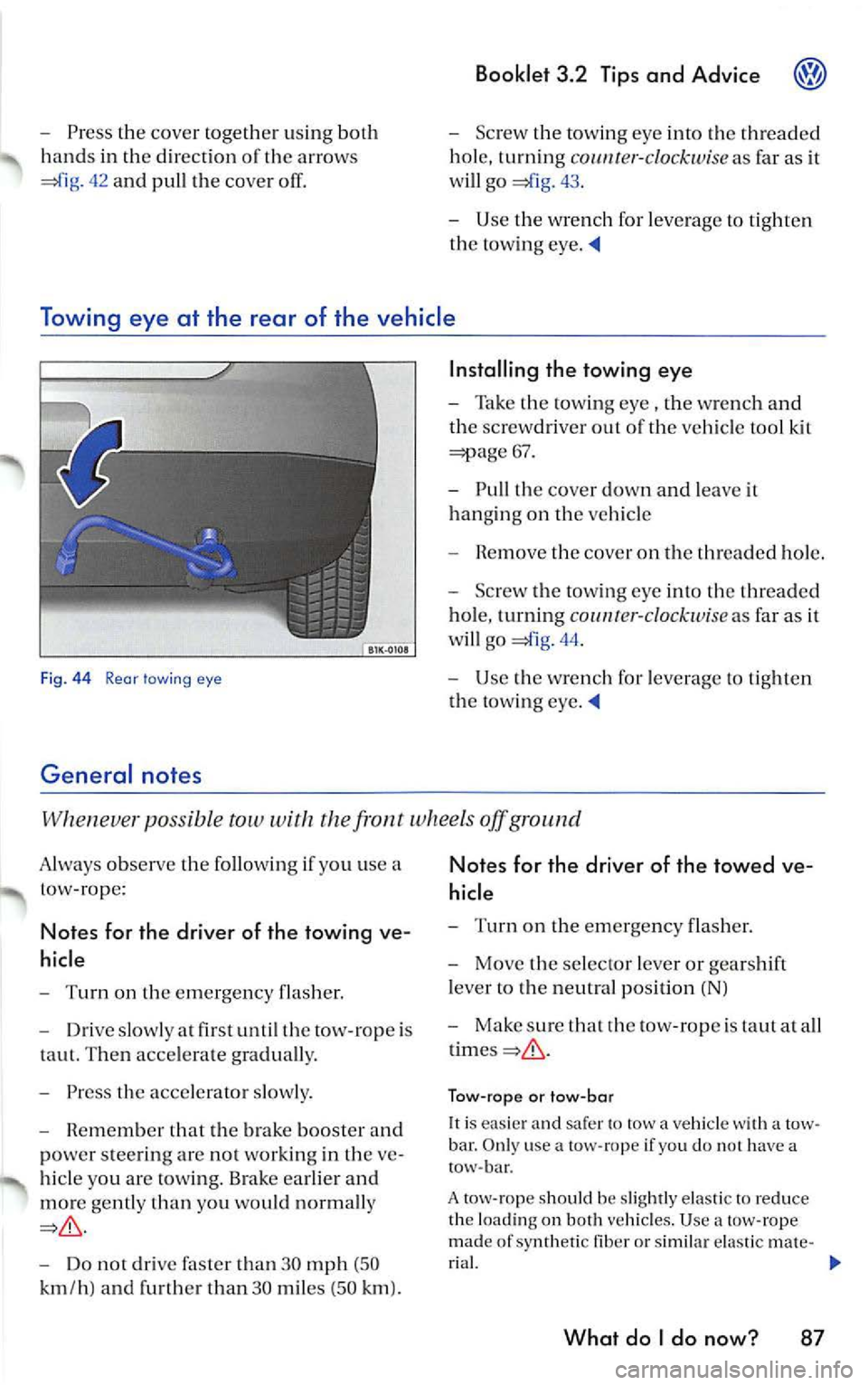
Fig. 44 Rear lawing eye
General notes
Installing the towing eye
-Take the towing eye , the wrench a nd
th e sc rew driver out of the vehicl e tool kit
=;:iage 67.
- Pull the cover down and lea ve it
hanging on the vehicl e
- R em ove the cove r on the threaded hole.
- Screw t he towin g eye into th e thr ea ded
hol e, turning
co 1111r er-clockw ise as fa r as it
w ill go
44.
- Use the wrench for leve rage to tight en
the tow ing eye.
po ssi ble tow with the fron t wheels off ground
A lways observe the following use a
t ow-rope :
Notes for the driver of the towing ve
hicle
- Turn on the emerge ncy flas her.
- Driv e slowly at fir st until th e tow-ro pe is
taut. Then acce lerate graduall y.
- Press the acce le rator slow ly .
- Remembe r that the brak e boo ster and
po we r stee rin g ar e not working in the ve
hi cle you are tow ing. Brake earlier and
mor e gently than you wo uld n orm ally
Do not drive than 30 mph (50
k m /h ) and furth er tha n 30 miles (5 0 km ).
Notes for the driver of the towed ve
hicl e
-Turn on the emergency flash er.
- Move the selecto r leve r or gears hi ft
l ever to the neutral posi tion (NJ
- Make sure tha t rh e tow -rope is taut at a ll
Tow-ro pe or tow -bar
It is easier and sa fer to tow a vehicle with a tow
bar . O nl y use a tow- rope if yo u d o no t h ave a
tow -bar.
A tow -rope s hould be sli ghtl y e las tic to re duce
th e lo adin g on both vehicl es. U se
tow-rope
mad e of sy nthetic fib er or sim ilar ela sti c m ate -
r ia l.
What do I do now? 87
Page 409 of 477
Booklet 3.2 Tips and Ad vic e
Attach the tow-rope or the tow-bar only to th e
tow ing eyes provid ed .
D riv in g s ty le
T ow ing require s some exper ie nc e, es pecia lly
when using a tow -rope. Both driv ers should be
familiar w it h th e tec hn iqu es required for tow ing.
In ex perienced drivers should not try to tow an
o th er ve hicle.
Do not pu ll to o hard w ith th e towing vehicle and
a vo id j erking the tow- rope . When tow in g on an
unpa ved road, there i s alway s
risk of over
l oad ing and damaging the an ch orage points .
T he ignition oft he ve hicle be in g towed must be
s witched on to prevent the stee ring whee l fro111
lo ck ing. Also ensur e that the turn signals, horn,
windshield wipers and wash ers work properl y.
Keep in mind that the brake b ooste r d oes not
work when th e e ngine is not running. You will
hav e to apply considerably more pressure to th e
brak e pedal than you wou ld nor111a lly.
A lso the pow er stee rin g do es not work when the
e n g in e is not running. You will n eed m ore for ce
to stee r than you would norma lly.
Tow in g ve hicl es w it h an aut om atic tran smi ssio n
• Move the se lec tor leve r to N. •
Do not drive fa ster than 30 mph (50 km/h)
wh en towing a ve hicl e.
• Do not tow further t han
3 0 111iles (50 km ).
• lfa tow tru ck i s use d, th e ve hicle must be
tow ed with a ll w heels off the ground .
WARNING
Towing a vehicle c hange s th e way yo ur vehi cle
h an dles a nd br akes. To help re du ce t he risk of
an acci den t lead ing to se rious persona l injury,
no te th e fo llow ing:
• T he dr ive r of t he ve hicle t hat is be ing
towe d:
- Will h ave to p ress th e bra ke peda l con
s id era bly harder than no rm al beca use th e
b ra ke boos te r i s not a cti ve. Always be alert
no t to rear-end the tow ing ve hicle .
- Will h ave to use cons idera bly more fo rce
t o t urn th e steerin g w hee l, b eca use th e
power steer ing is not active.
• The driver o f the ve hicle that is tow ing:
- Must accelera te grad ually a nd ge ntle,
avo id je rkin g m oveme nts.
- Must b ra ke ear lier a nd more gentle t han
yo u wo uld norm ally
When can your vehicle not be towed?
Yo ur ve hicle m ay no t be towe d un der the fo l
l ow ing con ditions:
• If th e tran sm iss ion mal fun cti o ns and there is
no tran smis sion flui d.
• I f th e veh icle e lectr ical sys tem is not func
ti o nin g beca use the s tee ring will lock up.
• If yo u ha ve to driv e fu rth er th an 30 mile s (5 0
• If the front or rea r axl e is off th e ground
because you dama ge th e gea r.
In the se cases the vehicl e mu st be transport ed
o n a car c arrie r or trailer.
WARNING
If you still tow your ve hicle un der these co ndi
tio ns, you could ca use an acci dent or ca use
d am age to th e ve hicle. Thi s w ill n ot b e covere d
by your Limit ed New Ve hicle Warra nty .
88 Wha t do I do no w?
Do no t tow your ve hicl e beh ind a re cre a tional
vehicle . The Automatic transmi ssio n can be se
ve re ly damaged. This can happ en even if these
l ec to r lever is in th e N (Ne utral) pos ition.
• If th ere is no oil in th e tra nsmi ssio n because
o f dama ge to yo ur vehicle , th e veh icl e s hould b e
mo ved with a ca r carrier .
• If th e front or rear axle is lift ed off th e grou nd,
thi s will serio us dama ge the dr ive gea r.
• If th e veh icl e ha s to be towe d more than 30
mi les (5 0
all whee ls must be rai sed to tow
t he vehicle. The vehicle should be m oved with a
car carrier .
• If vehicle has no e lec trica l po we r, th e
s te erin g will be locked. The ve hicle must
Page 413 of 477
Booklet 3.2 Tip s and Ad vice
Alphabetical index
A
ABS 3
Accesso ries
What sh o uld I d o
I w ant to add an acces-
so ry t o m y ve hicl e? 27
A dd ress ofNHT SA 90
A ddress of T ranspo rt Ca nada 90
Af te r ch an gin g a w hee l 74
A lca nta ra
C lea nin g 25
A lloy w hee ls
C lean ing
21
A ll-w hee l drive
W int er t ir es 65
A nt i- fr eeze 43
A nt i- lock brak e sys te m
W ha t d oes it m ean whe n I feel a slig ht vi-
bra tio n on the bra ke ped al? 3
A nti -th eft w hee l bo lts
71
A ut o S afe ty Hotlin e 90
A ut oma tic ca r was hes
17
B
BAS 2
B att ery
C harg ing 50
H ow ofte n sh o uld I rep lace my e ngin e
b att ery ? 50
Imp ort an t in fo rm atio n t o kn ow
disco nnect the ba ttery 49
R ep lac in g 50
What you mu st d o a fte r rec onnec t the
b ane 1y 49
W int er co nd it io ns 49, 50
Batt ery ac id leve l
C hec kin g 50
B o nn et 36
Brak e ass ist sys te m 2
Bra ke boost er 2
92 Alphabetical inde x
Brake fluid
C han gin g 48
H ow
sh ould the bra ke flu id be
c h an ge d? 48
W hat i s th e co rrec t b rak e flui d leve l? . 47
W hat k ind of br ake flui d sh ou ld I use? 48
Bra ke pa ds 8
Bra ke servo 8
Brake system 47
B ra kes 8
H ow does mois tur e o r roa d sa lt a ff ec t th e
b rake s? 8
W hat d oes it mean when I feel a slig ht vi
brat io n on th e bra ke ped al? 3
Bra kin g dis ta n ce 8
Br ea k-in p eriod
E ng in e 7
W hat is th e rig ht way to break-in m y
ve hicl e? 7
Brea king in
B ra ke pad s 7
T ires 7
Br ea kin g in tir es 7
B ulb chan ge
8 1
Bu mp er
Cl ea ning
1 8
C
Ca lifo rn ia Prop ositi on 65 Wa rning 34, 49
Car was hes
17
Ca ta ly ti c co nverte r 10
CB ra d io 29
Ce ll pho ne 29
Ce llul ar p hone 29
Chang in g a bu lb
8 1
Cha ng in g a w hee l 73
C hang in g bra ke pad s 7
C hangin g w indshie ld w iper b la des 46
C hass is 22
Chec kin g e ngin e o il leve l 39
Chec king tir e p ress ure 56
Chro me
Cl ea ni ng
21
Page 414 of 477
Cleani ng
A llo y whee ls
2 1 A ut omati c car was h 17
Bump er
18
chassis 22 C lo th sea t cove rs 23
E n gin e co mpartm ent 22
Ex ter ior 1 7
trim 23
In stru ment panel 23
L ea th er 23 Out side mir rors 19
P las tic 23
bel ls 26
W ashin g the ve hic le 1 7
W ind ows 19
Wind sh ie ld 19 W ind shie ld wip er blad es 20
W ooden trim
23
Cle an ing and pro tec tio n 16
C lot h sea t cove rs
C le an ing
23
Code number
Fo r
whee l bolt s 67
Cold tire inflation pressure 54
Coo la nt 43 Le ve l 44
Loss 44
Cra sh recorder s 6
D
Deter minin g corre ct load limil 59
D iese l e ngine
Ad din g en gi ne oil 41
C hang ing engin e oil 41
En gin e oil 4 1 Engin e oi l 37
Die se l fu el 33 Wi nte r operat io n 33
D iffe re nti al loc k 4
Drive r Stee ring Recomme ndati on 3
Dr iv in g eco nomi cally 14
Driv ing ou1 sid e o f !h e U.S. A. or Canada
P rec au1io ns
9 1
Driv ing wit h respec t for th e en vironme nt 14
Booklet 3.2 Tip s and Advice
ing in sid e 1h e e ng in e c om pa rtm en t 34
Wo rkin g in th e engin e com partmen t 34
Engin e coola nt 43
Add iti ves 43
Can I acid p la in wate r the engi ne
coo lan t?
44 Coola n! losses 45
Eng ine hoo d 36
How do I unlock !he en gin e hoo d? 36
Eng ine oil 37
Add ing 40
Addit ives 40
C he ck in g leve l 39
Consu mplion 38
Die sel e n gine 4 1
Dips!i ck 39 H ow do I kn ow how much oil m y eng in e is
co nsum ing?
38
Oi l cha nge 42
Specifica tions 37 Spec ifi ca tions Diese l eng in e 37 , 4 1
Spec ifica !io ns gaso li n e e ngi ne 37 W hal kind of e n gin e oi l s h o uld I p u ! in my
v eh icl e?
37
W hen sh o ul d I ch eck !he e ngin e oi l
l eve l? 38 W here is th e oil dip stick 3 9
E nvironm en t
Avo iding polluti on 31
C le anin g th e e ngine compa rtment 22 Driving economically 14
V ehi cle care produ cts 16
ES P 5
Eve nt Dat a Reco rde r 6
Ex terna l ae rial 29
Alphabetical index 93
Page 439 of 477
Booklet 3.4 Premium Sound System
-CD Mode: Yo u can select an indi
v idu al C D in the internal CD
chan ger trays or in the externa l
CD c hang er•
briefl y pre ssing
the corre spondin g button s
Use buttons to select a tray
in th e C D chan ger when loading
or ejecting a CD.
SCAN/TUNE button [SCAN/TUNEJ
- RadioMode:Scan func tion. Press
th is button shortly to briefly pla y
st ations . Pre ss longe r to ent er the
se tup mode ...... ... ... ..... .
- Radio Mode :Tune function. Turn
the knob to manually tune to the
n ex t numerically higher or lowe r
frequency.
- CD Mode: Press button to briefly
play tracks. . .... ...... ...... .
-CD Mode: Turn th e kno b to through the trac ks. Turn
clockwise to scro ll upward or
coun te rclockwise to sc roll down
ward .
-MP3 Mode: Press button to
briefly pla y tra cks. . .......... .
- MP3 Mode:Turn the knob "scro ll" thro ugh the within
a give n folder Turn clockw ise lo
scro ll upwa rd or counterclock
wise to scroll downward.
SEEK/TRACK bu tton !SEEK/TRACK).
-Radio Mode: Press to
seek high er freque ncy. . ...... .
- Radio Mode: Pres s to
seek lower frequ en cy.
- CD Mode: Press to
"scroll" through the tracks up
ward
or press and hold the
bullon fast forward. . ...... .
-CD Mode: Press "scroll" t hrough tracks down
wa rd or press and ho ld the
button fast rew ind.
Displ ay
- Radio mode ..... ..... ..... .. .
- CD mod e .. ....... .......... .
- MP3 mode .......... ........ .
- Satelli te Di git al Radio Service ..
4 Quick overview
II
23
27
II
23
12
24
29
13
LOAD Button Press this
button to be able load a CD i nto
tl1 e s lot. Press a nd hold fo r mo re
th an
2 sec ond s to load more one CD or all the C D's in th e ava il-
able s lots .. ......... ....... .... .
-Rad io SDRS : Press t his
button to select the CD playe r or
the externa l CD changer •. . ....
- Radio SDRS : Press this
b utt on to selec t th e CD playe r o r
the external CD changer•
or press
and hold for more than 2 seconds
to select tl1e M IX mode ...... . .
MlX Button@IB) (ra dios wi thout
SDRS)
- CD Mode: Pres s thi s butt on to se
lect the random p lay mode. . ..
- MP3 Mode: Press this button to
se lec t the random play mode
w ith in a given folder. . ...... . .
CD s lot .... ............... ... ..
EJEC T Button (EJECT): Press this eject a CD . Press lo nger eject more than one CD or all th e
CD 's inside the slots.. . .. ....... .
Radio SDRS: MP3/FLOR
Bu llon Butt on or Radio SDRS: CAT/FL OR Button
( CAT /FLOR I Button
-S DRS : Press thi s
button to select play lists or
folde rs w hen p lay ing a CD wit h
MP 3 files .... ..... ........... .
- Radio with SDRS: Press this
button to select play lists o r
fo lders w hen pl aying a CD with
MP3 files or to select the de sir ed
c at egory when using the satell ite
mode . ... ... ..... .......... .
SAT Press this button to
s elect the satellit e mode.
WARNING
20
21
2 1
2 1
26
20
20
25
25
14
Driv er di straction causes accidents , collision s
a nd serious personal injury!
• Nev er let yourse lf be distra cted by setting,
adjusting or using the Sound System .
Page 440 of 477
Booklet 3.4 P remi um Sound System
.0, WARNING (conti nued )
• Us e the Sound System only if road , traffic
an d weath er cond itions permit and you will
not be distracted from your driving.
Important information
Operating the Sound System while driving
D rivi ng on today 's road s demands th e full atten
ti o n of the driver.
The w ide range of sophisti cate d eq uipm ent de
tail s of modern car radio s offer not onl y a vas t
so urce of entertainmen t, but also import ant in
form ation reg arding t raffic updates, road condi
t ions, wea ther repo rts. etc.
Bu t re mem ber, you should onl y operate the
ra di o system wit h its num erous fe atures when
th e traffic situ atio n rea lly
in "Con
tro ls" on page 2.
For examp le, c hangin g CDs o r re ading song t i
tl es on a CD case or in th e rad io display when
drivi ng is o ften the ca use of aut o acc idents .
You s hould also set th e vo lume of your radio
sys tem so that yo u ca n h ear s ig n als from other
dr iv ers at a ny tim e.
Convenience radio coding For tec hn ical reason s. the conve nience radio
c oding is not ava ila bl e for all vehicle models.
In the past, it used to be tha t yo u had to manu
a lly recode t he radio wheneve r th e uni t was re
m oved from the ve hicle (for example, if th e unit
was removed to be repaired). or whenever the
veh icle battery was disco nnected (for examp le,
if yo u brou ght yo ur v ehicl e in to t he deale rship
for service a nd it was necessary to dis con nect
t he bauery). In eith er case , the power sup ply to
th e unit was cut off.
T hat has all ch anged w ith the new conven ie n ce
radio cod ing f un cti on: Once t he co de number
ha s bee n ent ered. it
will th en sy nchro nize itse lf
w ith "its" vehicl e!
.0, WARNING (co ntinu ed)
• Always set volume leve ls so that you can
clearly hear horns , si rens and oth er warning
sounds outside the vehicle .
If the power supp ly has been interrupted , the
radio will automa tically c hec k to see if it i s s till in
vehicle after the ignition has been switched
on . If this hap pen, th e radio will be ready for use
af ter just a few seconds.
It is th erefo re no longer necessary to d isengage
th e e lect ronic lock manuall y!
If t11e rad io ha s been in s ra ile d in anot her ve hicl e,
how ever, the electronic lock ha ve to be dis
engaged manually.
If
SAFE ap pea rs i n the disp lay a fter switchin g the
rad io on , it can then only be operated aga in afte r
entering tJ1e co rrect code
=> pa ge 34.
External CD changer1l
You also have the option of installin g a Ge nuine
Vo lkswagen CD Changer. Ask your authoriz ed
Vo lkswagen dealer about thi s optio n.
The CD change r is in stalle d in the front armres t
co mp artment. It is "re mote controlled" by th e
radio unit.
It allow s you ro load up to 6 CDs. See => page 32 for furt her information.
Vo lkswage n dea ler s have a ll the informa tion
conce rning in stallin g th e CD c hange r.
Tip s
• Please note tha t it em s marked with an as
t e ri sk(*) may be standard on ce rtain m odels , op
tional on otJ1 ers or no t ava ilabl e on yo ur model.
Always ch eck with your authorized Volkswage n
deale r to see if the feat ure or item ap plies to your
mod el.
• The radio code numb er and the radio seria l
numb er ca n be found on th e "Radio Card" at the
beg inning of the
Lit erature . ._
I) Availa ble as a fa cto ry install ed opt ion, or your author ized Volkswagen dealer can install the oplional C D
c h anger for you. A lways chec k with yo ur a utho rize d Vol kswage n deale r if th is op tio n i s ava ilab le fo r yo ur
model.
Quick overview 5
Page 442 of 477
Booklet 3.4 Premium Sound System
Radio I CD
Radio
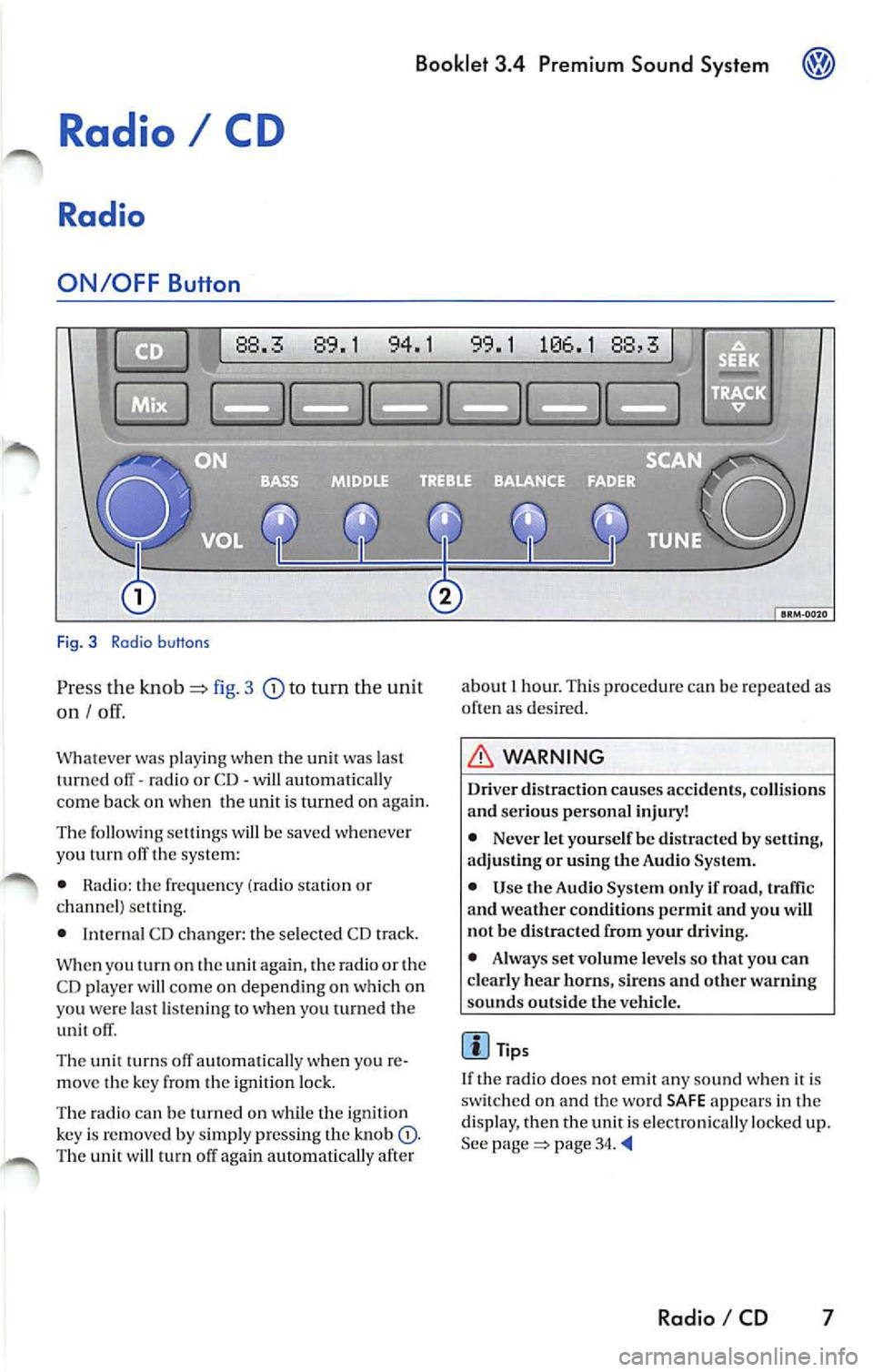
ON /OFF Button
88.3 89.1 94.1
Fig. 3 Radio b uttons
Pr ess the knob fig. 3 to turn the unit
on I
Whatever was playing when the uni! was las!
turned off -radio or CD -will automaticall y
come back on when the unit is turned on again.
The foll owing se lling s will b e saved whenever
yo u tu m off the system:
• Rad io: the frequen cy (ra dio s tat ion or
c h an nel) se ttin g.
• Interna l CD c han ger : the se lected CD track.
W hen you
on the again , th e ra di o or the
CD player w ill co me on depend ing on which on
yo u wer e la st li ste nin g
when you turn ed the
unit off .
The uni! turn s off au!Omati ca lly w hen you re
m ove the key fro m the ign ition lock.
The radio can be turn ed on wh ile th e ignition
key is rem oved b y simpl y pressing the kn ob
88,3
about 1 hour. This procedure can be re p eate d as
o ften as des ired .
WARNING
Dri ver distraction causes accid ents, collision s
and ser ious personal injury!
• Never let yourse lf be distr acted by setting,
a djusting or using the Audio System.
• Use the Audio System only if road, traffic
and weather conditions p ermit and you will
not b e distracted from your driving .
• Alwa ys set vo lum e le vel s so that you can
clearly hear horns, sir ens and other warning
s ounds outside the vehicl e.
Tips
If th e radio does not emit any so un d w hen it is
sw itched on and the word SAFE appears in the
display, then the unit i s electronica lly lock ed u p.
See
page 34.
Radio I CD 7
Page 446 of 477
Booklet 3.4 Pre mium Sou nd Sy stem
pag e 10,
fig. 5
briefl y to sca n upw ard to the next
high er frequency . Scanning stop s at th e
ne xt good quality station rece ive d. After
a bout 10 seconds, the radio wi ll sca n to th e
ne xt station.
SCA N will app ear in the dis
pla y afte r you pr ess this button .
Manual Radio Station searc h (TUNE)
- Turn the knob © clockwi se to tune up
wa rds.
- Turn the knob counterclo ckwise to
tu ne downward s.
Preset scan
-Pre ss a nd ho ld down d1 e ISCAN/T UNEJ
button for longer t han 2 sec onds to enter
the set up mod e. You will hea r a s igna l
t on e.
- Turn the
ISCAN/lUNEJ rotary kn ob, until
SELECT SCAN AM /FM ap pears in the dis
p lay.
SEEK /TRACK
Use th e (S EEK /TRA CK! rock er bu tton to seek
the next h ighe r or lo wer frequen cy (radio
s tat ion) .
Automat ic se ek
-pag e 3, fig. 2 to sea rch
LO next hig h er frequenc y (rad io sta
tion ).
-
to sea rch to th e nex t low er fr e
que ncy (radio stat ion ). -
In t he lower part of the display the
words
ST ATIONS and PRESETS will appear.
B y using t he s tation p rese t
below these w ords sele ct th e type of scan
operat ion you want.
- Press the
IS CAN /TUN EJ rotary knob again
fo r lon ger than 2 seconds to confirm the
se ttin g you have just made . You will hear a
s ig n al ton e.
Automatic T uning (SCA N)
If you press the button during the 10 sec ond
" h old " p erio d, th e rad io will on lo the sta
t ion curr entl y bei ng rece ive d.
Th e sca n fun ction slop s autom aticall y after one
l oop of the e ntir e rang e of frequ en cie s.
Pr ese t sc an
ll is p oss ible fo r you to selec t betwee n a sca n op
era lion through th e entir e range of frequenci es
or just th rough the s tat ions memor ize d in th e
pr ese t buuon s.
Ma nual Radio S tation search (TUNE)
The setting s will be changed in small inc rem ents
(FM 0.2 MHz-, AM 10
-On ce a sta tion has been fo und, briefly
again w ill cause th e se ek
operat ion to b e re p eated .
Controlled seek
-Press and to tun e to a desir e d frequency.
- Simply befor e you
r eac h th e des ired fr equ enc y. T he seek
funct ion will then stop at the n ext station
that offers acceptab le
Radio I CD 11
Page 451 of 477
® Booklet 3.4 Premium Sound System
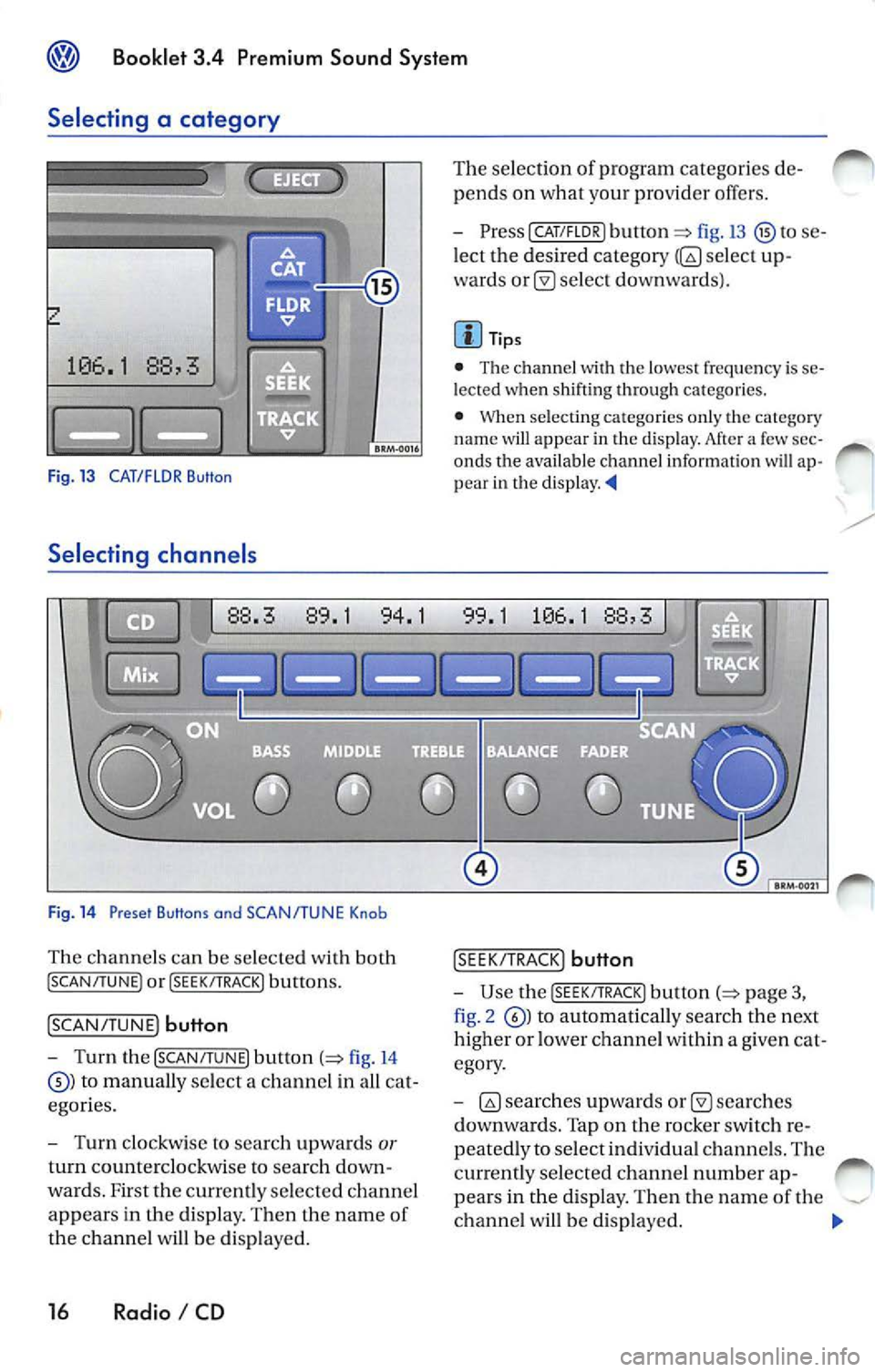
Selecting a category
Fig. 13 CAT/FLOR Button
Selecting channe ls
Fig . 14 Preset Buttons and SCAN/TUNE Knob
Th e chan nels can be selected with both
! SCAN/TUNE ) or !SEEK/ TRACK) buttons.
!SCAN/ TUNE) button
- Turn the [SCAN /TUNE) button (=> fig. 14
to manually select a channe l in a ll ca t
egor ies.
- Turn clockwis e to sea rc h up wards
or
turn coun tercl ockwise to searc h down
wards. F irst the currently selecte d ch a nnel
appears in the di sp lay. Then the name of
the ch anne l w ill be di spla yed.
16 Radio I CD
The se lection of program categorie s de
pends on what your provid er offers.
- PresslCAT/FLDR) button
fig.13 to se
l ect the desired category
selec t up
wards
se lec t do wnwa rds).
Tips
• The chann el
th e lo wes t frequency is se
l e cted when shifti ng through ca tego ries.
•
se lecting ca tegories on ly th e category
nam e will appear in the disp lay. Af te r a few sec
onds the availa ble channel informatio n will ap
p ear in th e d is play.
!S EE K/TRA CK) button
-Use the [S EE K/TRACK ) button p age 3,
fig . 2
to autom ati ca lly sea rch the next
higher or lower ch anne l w ith in a g iven cat
egory .
-
sea rche s
d ownwa rds. Tap on the rocker switch r e
peated ly to selec t indi vidual ch anne ls. The
currently selected ch ann el numb er ap-
pea rs in the displa y. The n the nam e of the
ch anne l w ill b e disp layed.