Radio VOLKSWAGEN JETTA 2009 Owner's Manual
[x] Cancel search | Manufacturer: VOLKSWAGEN, Model Year: 2009, Model line: JETTA, Model: VOLKSWAGEN JETTA 2009Pages: 477, PDF Size: 77.6 MB
Page 453 of 477
Booklet 3.4 Premium Sound System
SAT display selection
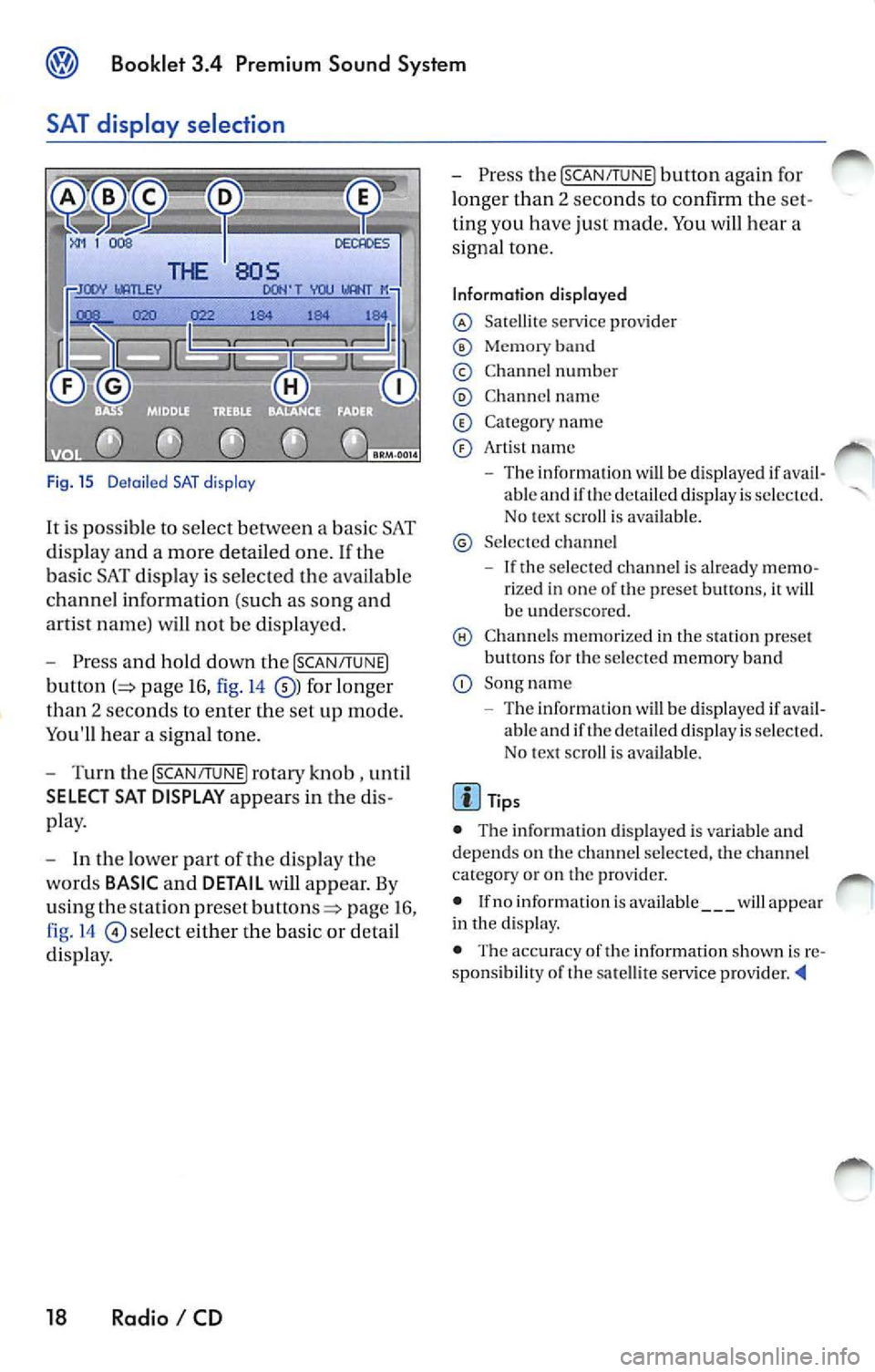
Fig. 15 D etail ed SAT disp lay
It i s possible to select between a bas ic SAT
di spl ay an d a more detailed one .
If the
ba sic SAT displa y is sel ecte d the availab le
channe l information ( such as song and
arti st nam e) will not b e displayed.
Press and hold down the [SCAN /TUNE]
button page 16, fig. 14 for longer
than 2 seco nds to enter th e se t up mode.
You'll hear a signal tone.
Turn th e [SCAN/T UNE] rotary knob , unti l
SELECT SAT DISPLAY appears in the
pla y.
In th e lo wer part of the di spl ay the
wo rds
BASIC and DETAIL will appear. By
u sing th e sta tion pre set
p age 16 ,
fig . 14
se lec t eit her the ba sic or detai l
di spla y.
18 Radio I CD
Press the [SCAN /TUN El button again for
l onger than 2 seco nds to confirm th e
ting you have just made. You will hear a
signa l ton e.
Information displayed
Satellit e service provider
Memor y band
© Chann el n um ber
C hann el name
C at egory nam e
Art is t name
The inform ation w ill be displayed if able and if the detail ed di spla y is s ele cted.
No tex t sc roll is ava ilab le.
S el ecte d ch anne l
If the se lec ted c hannel is already rize d in one of th e prese t button s, it wi ll
b e und ersco re d.
C hann els m em or ized in the sta tion preset
b utt ons fo r th e se lecte d memory band
Song name
- Th e information
will be di splayed if ava il
ab le and if th e de ta iled displa y is se lec te d.
N o tex t sc roll is av ail able.
• The inform ation d is p layed is var iable and
dep ends o n the channel sele cted, the c hann el
c ate gory or o n th e prov ider.
• If no inform ation is av ailabl e
will app ear
in th e displ ay.
• The acc ura cy of the information shown is
sponsibilit y of th e sa te llit e serv ice pro vider
Page 454 of 477
Booklet 3.4 Premium Sound System ®
System information
The follow ing sys tem messages can be di s
pla yed:
XM Messages
System messages
ANTENNA
UPDATING
N O SIGNA L
LOADING
OFF AIR
NO SA T
Sirius Messages
AN TENNA
LI NKING
CD
Taking care of your audio CDs
To assure a so und repro ducti on of the hi gh est
qu alit y, qu alit y, m ake su re you r CDs are clean
and fr ee of scratc hes o r any other type of
da mage.
Cleaning yo ur CD s
For routine cleaning, w ipe the playing surf ace
w ith a clea n, soft, lint-free cloth from th e ce nter
of the disc
to th e out er ed ge. If the surfa ce is
h eav ily soiled, dam pe n a clean soft cloth in a so
l ution of mild neutr al commercia l d eterge nt be
fore clea ning th e disc .
Note
• Never use fluid s su ch as benze ne, pa int
thinner or re cord cle aner s, otherw ise yo u may
dama ge the CD surfac e! Preventa tive meas ures
for lase r uni rs .
Meaning
No antenna is connected to tuner, or there
a re loos e plug contac ts on the antenna cable
Your syste m is being updated
The SAT tuner is present ly not receiv ing an y sa t-
e llite signa l
Your provider is se ndin g info rm ation w hich th e
sys tem is cur rentl y storing
Th e station selected h as shut down its program
(e.g. c hildren 's channel at night)
No conne ction can be establish ed to the SAT
tune r No SAT tuner exists
No anten na is co nnected t o th e tuner, or there
are loose plug contacts on the a ntenn a ca ble
You r sys tem is receivi ng s ig n al
• Whe n inse rtin g a CD into the slo t, make sure
th e printed side is facing T hen , gen tly in sert
th e CD into the s lo t until it is pu lled in au tomat
i cally by tl1 e pla yer. Never force the CD into
CD s lot!
• If you are going to ma ke yo ur own CD s, do
not stick an a dhesive lab el on the CD itse lf. The
h eat generat ed by th e CD player can l oosen the
adhesive labe l, w hi ch th en co ud come
and
jam up the unit. This could res ult in a costly re
pa ir. Use a marker to labe l yo ur CDs instead.
• Alwa ys sto re CDs in their cases w hen you ar c
n o t li ste nin g to th em.
• Keep the CD away fro m heat or o ut of dire ct
s un light.
• Avo id getti ng fin gerpr in ts on the CD .
Radio I CD 19
Page 455 of 477
® Booklet 3.4 Premium Sound System
Tips
Always hold the CD either by the center or by the
out er edge with the print ed sid e facing up.
LOAD button
The internal CD changer is operated easily and convenient ly usin g the cont rols
on the radio.
It allows you to load up to six CD's.
FM 1
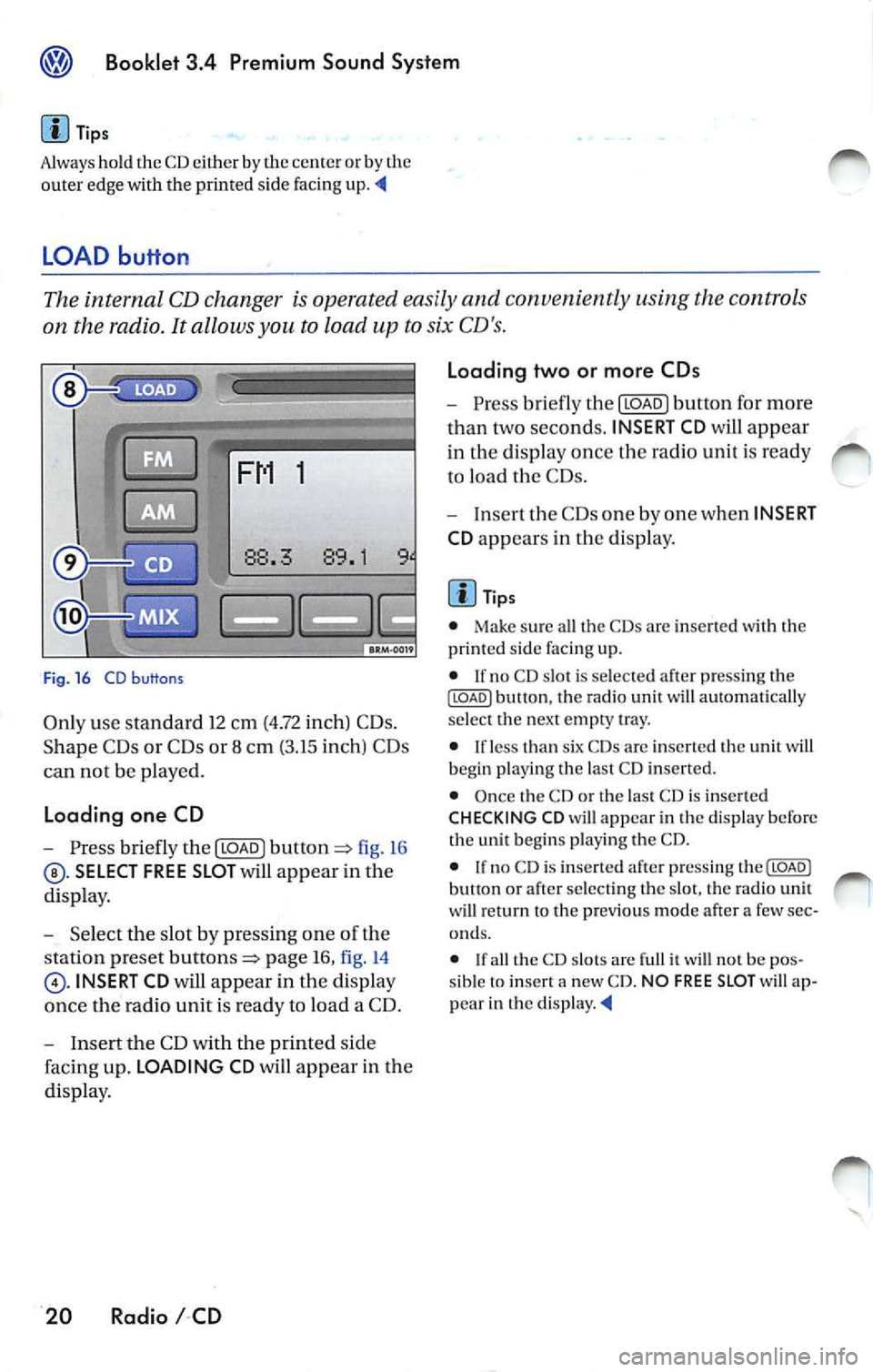
Fig . 16 CD b uttons
Only use standa rd 12 cm (4.72 inch) CD s.
Shape C Ds or CDs or 8 cm (3.15 inch) CDs
can not be played.
Loading one CD
- Press briefly the I LOAD J fi g. 16
SELECT FREE SLOT will appear in the
di spla y.
- Selec t th e slot by pressing one of t he
s tation pr eset
page 16, fig. 14
INSERT CD will app ear in the disp lay
once th e radio unit is read y to load a CD.
- I nse rt the CD with the printed side
faci ng up. LOADING CD will app ear in the
di splay .
20 Radio I CD Loading two or more CDs
-
Press briefly the I LOAD J button for more
t h an two second s. INSERT CD
will app ear
in the display once t he rad io unit i s ready
to load the CDs.
- Inse rt th e CDs one by one when INSERT
CD app ears in the di splay.
Tips
• Make sur e all the CDs arc inse rted wi th the
printed side facing up.
• If no CD slot is se lected a fter pressing th e
ILOADJ button, the rad io unit will automat ica lly
selec t the nex t empty tray.
• I f le ss than six CDs are inser te d th e uni t will
b egi n playi ng the last C D inserted.
• Once the CD or th e las t CD is inserted
CHECKING CD will appea r in the di spl ay before
the unit b egins playing the CD.
• If no C D is inserted afte r press ing th e(LOADJ
b utt on or after select ing the slot , the rad io unit
w ill r eturn to the p rev iou s m ode after a few sec
o nd s.
•
th e CD slot s are full it w ill not be pos
sib le to insert a new CD . NO FREE SLOT w ill ap
pear in th e
Page 456 of 477
Booklet 3.4 Premium Sound System
CD button
-Press the@button page 20, fig. 16
when you wan t to li ste n to the CD
pl aye r or to select an externa l CD changer •
if ava ilabl e.
Tips
• If no disc is lo aded in int ernal CD
c h anger you wi ll hear an a udibl e signal, and NO
C D
w ill app ear in th e disp lay.
M ix Mode bu tton
• If no disc is loaded in th e interna l C D
c h anger but there is a disc loaded in the ex terna l
C D changer •, t he exte rnal CD change r mode
w ill be selec ted.
• If neither a disc is loaded in internal CD
c h anger nor the external CD change r is ava ilab le
you
w ill hear an aud ible s igna l, a nd NO CD will app ear in th e display. '4
When you select MIX, the CD tracks will be played in random order.
Radios without SRDS: Playing tracks
in random order
-Press bu tton page 20, fig. 16
for more than 2 second s. MIX-CD a p
pears in the disp lay. Pr ess
again to stop the random play operat ion.
Radios with SRDS: Playing tracks in
random order
- Press the@button for more than 2
page 20, fig.16 MIX-CD
appe ars in the di splay. Press th e@button
aga in for more th an 2 seco nds agai n to
s top th e random play operat ion.
Select the type of random play mode
- Press and hold do wn the ISCA N/TU NEI
button :=> page 16, fig .14 long er than
2 seco nds to enter the set up mod e. You
w ill hear a signal tone. -
Pres s th e
!SCAN/TUN El button briefly,
until
SELECT MIX MODE appears in the
disp lay.
- In the lowe r part of the display the
words FLOR,
MAG will appear. By
u sing th e s tatio n pre set but tons=> page 16,
fig . 14
be low th ese wo rds se lect the
of scan operation you wan t.
- Press the
ISCAN/TUNEI button again for
l onge r than 2 seconds to confirm the set
t in g yo u have just made. You
will hear a
signa l tone.
Type of random play mode
• page 25
• CD -th e random play mode occ urs only
through the tracks of th e cu rrent disc , MIX-CD
ap pea rs in th e display.
• MAG -th e random play mode occ urs th rough
a ll th e i nserted discs in th e internal CD ch anger
o r in Lh e externa l C D
if availab le. MIXMAG ap pear s in th e di splay. '4
Radio I CD 21
Page 458 of 477
![VOLKSWAGEN JETTA 2009 Owners Manual Booklet 3.4 Premium Sound System
Automatic track selection
-Briefl y press the !SCAN/TUNE] butt on t o
start a utom ati c sca nnin g to t he nex t track.
Af te r 10 second s, sca nning wi](/img/18/55687/w960_55687-457.png "VOLKSWAGEN JETTA 2009 Owners Manual Booklet 3.4 Premium Sound System
Automatic track selection
-Briefl y press the !SCAN/TUNE] butt on t o
start a utom ati c sca nnin g to t he nex t track.
Af te r 10 second s, sca nning wi")
Booklet 3.4 Premium Sound System
Automatic track selection
-Briefl y press the !SCAN/TUNE] butt on t o
start a utom ati c sca nnin g to t he nex t track.
Af te r 10 second s, sca nning will res um e an d
g o to th e ne xt trac k.
SCAN app ears in the
di sp lay.
- To stop sca nning, press the
ISC ANI
bu tton bri efl y durin g the 10 seco nd "h old "
tim e.
Selecting tracks
-Press briefly the !SEE K /TRACK] button
=:> page 3 , fig . 2 to s kip upw ard o r
dow nwa rd
((yj) throu gh th e trac ks or turn
th e
!SC AN/TUNE] rota ry k nob . Turni ng cloc k
w ise s kip up ward a nd turnin g counter
cl oc kwise sc roll downw ard.
"Scroll" through the same track (Fast
Forward /Fast Review)
- Press a nd hold th e (SEEK/TRACK] butto n
=> page 3, fig . 2 to sc roll up ward or
d ow nwa rd
((yj) tro ugh the sa me t rac k. The
trac k ela p se d tim e appears in the upp er
l e ft co rner of the d is pl ay.
- Release the b utton t o s top sc rolling
t h ro ug h th e trac k.
S electing on indi vidual CD
• T he curre ntly se lec ted CD w ill app ear in th e
di spl ay
CDl ... CD6.
• If there a re no CDs nei th er in th e i nternal CD
c han ger nor in the external C D ch an ger•, you
wi ll h ear a audibl e sig nal a nd
NO ap pea r
in di spl ay .
• If an ex te rnal CD ch anger is t ava ilabl e, but n o
CD is in se rted you w ill hea r a n aud ibl e sig n al a n
EXT NO CD will a ppear in the d isplay.
Automatic tra ck s ele ction
T he sca n fu nct io n sto ps a utomatica lly afte r one
l oop o f the tracks in the CD if th e operat io n is not
m anua lly stoppe d by press ing
bu tto n
aga in.
Selectin g tra ck s
• The c urrentl y se le cte d track a ppea rs in th e
di splay:
TRACK 01 ... TRACK 02 ... TRACK 03
Radio I CD 23
Page 459 of 477
Booklet 3.4 Premium Sound System
• Briefly press ing butto n wh ile a track is
pl ayi ng (more than 2 seconds play) will cause the u
nit to ''j um p" back to the beginning of the
track and resume playing from there.
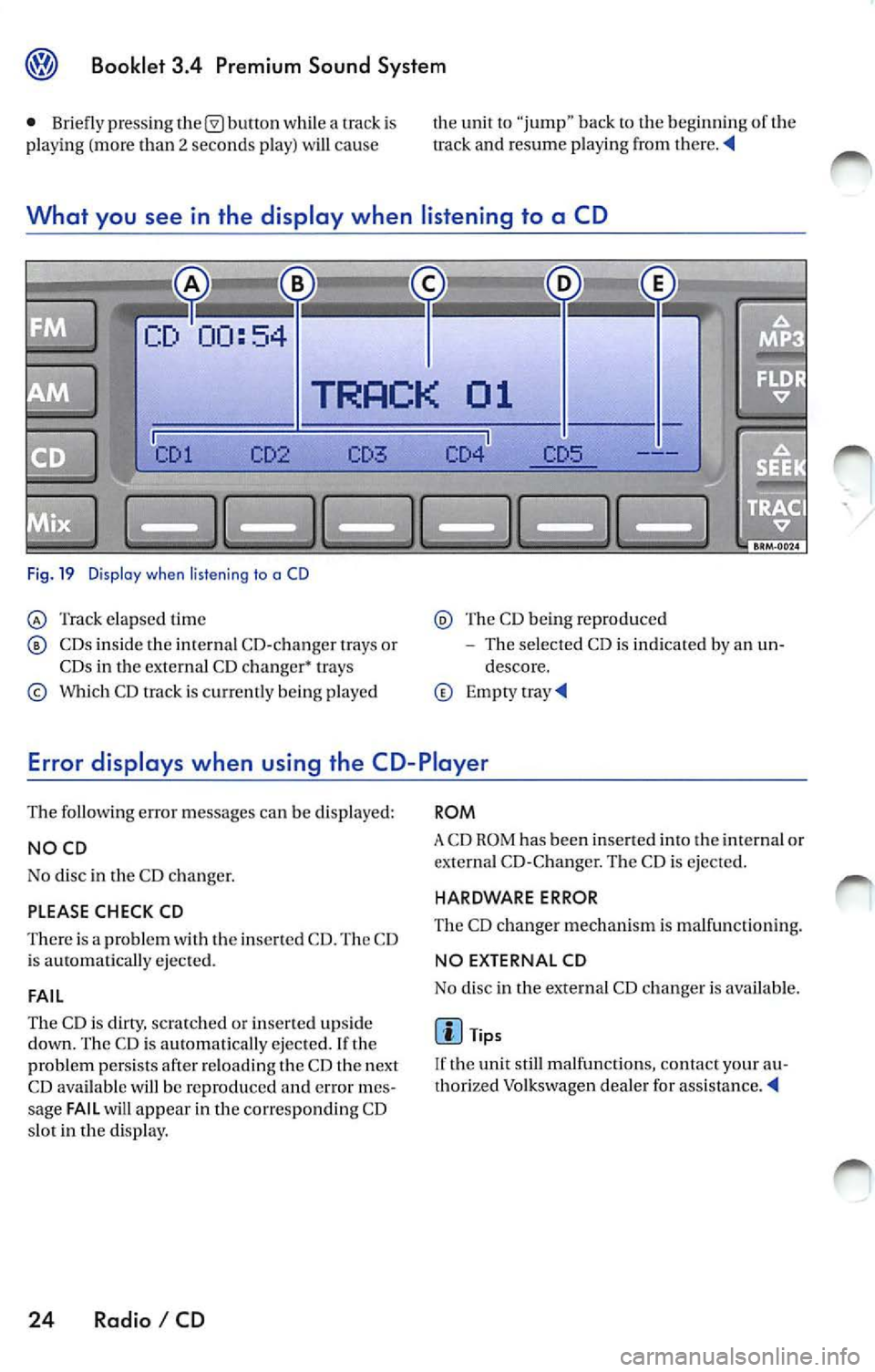
What you see in the display when listening to a CD
Fig. 19 Dis pla y w he n liste ning to a CD
Track elap sed time
CDs inside the in te rnal CD-c hanger trays or
CDs in the external CD changer• trays
Which CD track is c urr ent ly being p layed
Th e CD being reproduced
The selected CD is indicated by an un
descore.
Error displays when using the CD-Player
The following error messages can be displayed:
NOCD
No disc in the CD c hanger.
PLEASE CHECK CD
There is a problem with the inserted CD. The CD
i s ejected.
FAIL
The CD is clirry, scratc hed or inserte d upside
down. The CD is au tomatically ejected. If th e
problem persists afte r reloading t he CD th e next
CD available will be reproduced
error mes
sage FAIL will appear in the corresponding CD
s lot in the display.
24 Radio I CD
ROM
A CD ROM has been inse rted into the int ernal or
externa l CD-C hange r. The CD is ejected.
HARDWARE ERROR
The CD ch anger mechanis m is ma lfunc tion ing.
NO EX TERNAL CD
No disc in the external CD changer i s available .
Tips
If the unit still malfunctions, contact your au
thorized Volkswagen dea ler for
Page 460 of 477
Booklet 3.4 Premium Sound System ®
MP3
MP3 player operation
The interna l CD-C hanger also allows you to play
CD-Rs co ntaining MP3 data. Howeve r, t he re
flectivity rate must be 60
% or high er.
D iff ere nt kind s of info rmation (e.g. name of the
so ng and artist) may appear in th e di sp lay
during MP3 player operation
On ly use s tandar d 12 cm (4.72 in ch) CDs. The
s h ape d CDs or 8 cm (3.15 inch ) CDs can not b e
p layed.
Tips
• The u nit ca n only play either discs con
taining audio or MP 3 data. If a CD co ntaining
both audio and M P3 data is inserted, an error
message will appear in the display and the CD
will be automatica lly ejected ..
• The ex terna l CD changer • can not play dis cs
co ntainin g MP3 files.
<4
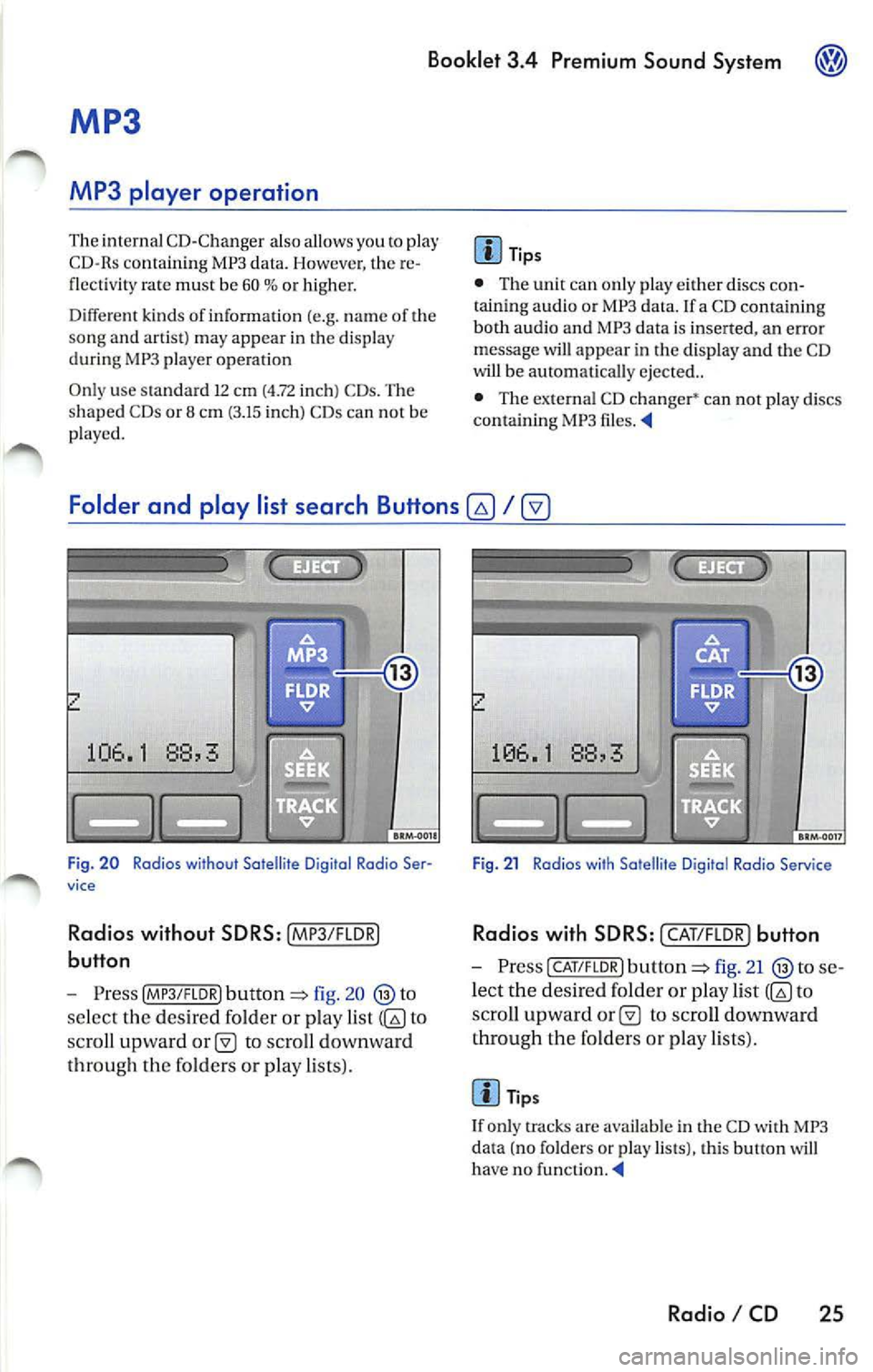
Folder and play list search Buttons
fig. 20
se lect the des ired folder or play list to
sc ro ll upward
to scro ll downward
th roug h th e fo lders or pla y lists).
Fig . 21 Radios with Satellite D igital Rodia Service
Rad ios with SD RS: I CAT/F LOR) button
- Press CAT/FLOR l fig. 21 se
l ec t the desired folder or p lay list
to
s cro ll upward
to scro ll downward
th rough the fo lder s or p lay lists) .
Tips
I f only tracks are availab le in the CD with MP3
da ta (no folders or play lists), this button will
ha ve no funct ion . ._
Radio I CD 25
Page 461 of 477
Booklet 3.4 Premium Sound System
Mix Mode button
The MIX mode causes the tracks the disc to b e played random order .
1
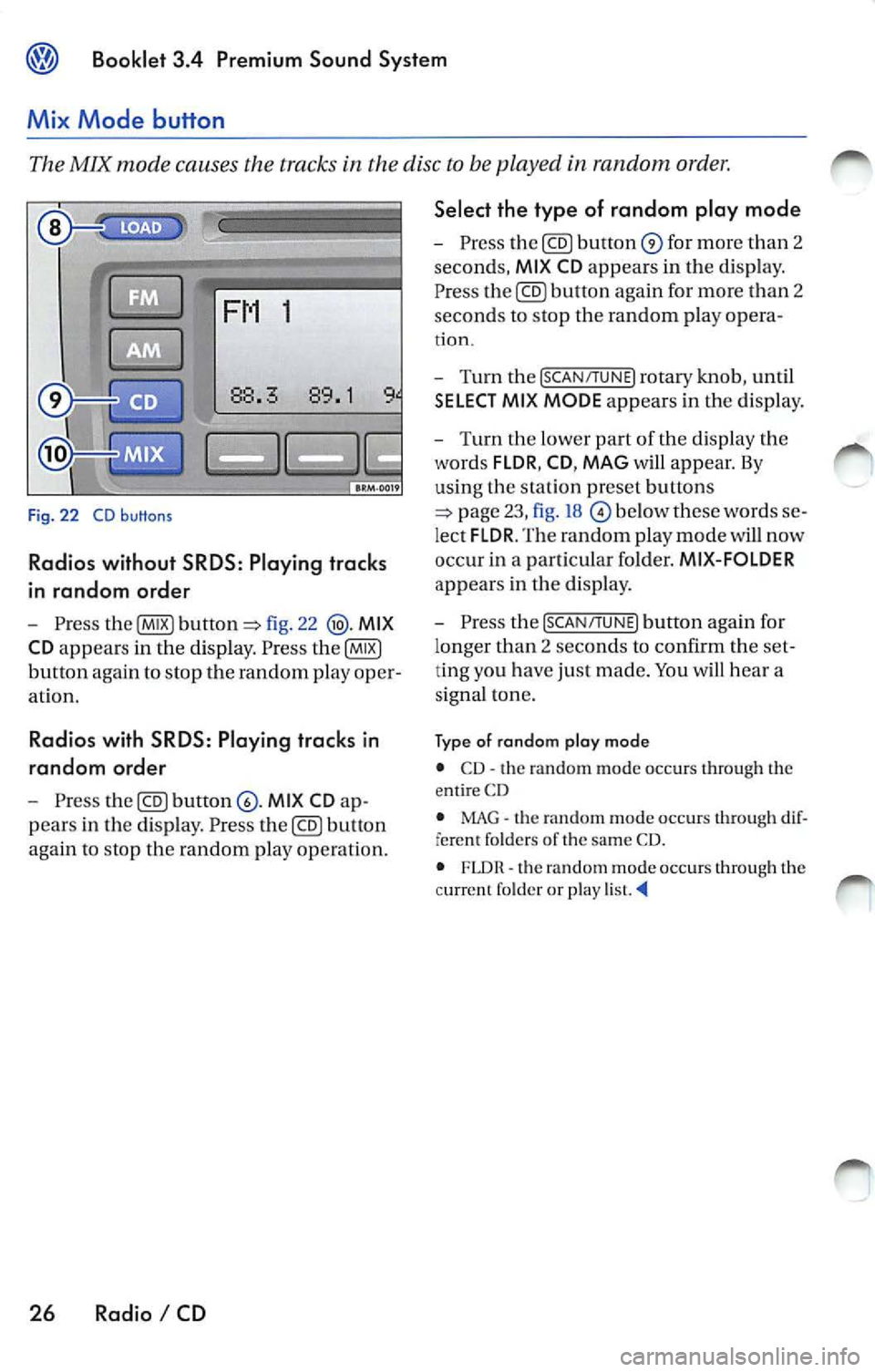
Fig. 22 CD buttons
Radios without SRDS: Play ing tracks
in random order
Pre ss fig. 22 MIX
CD
appears in the dis pl ay . P ress
button again to stop th e random play oper
at io n .
Radio s with SRDS : Playing tracks in
random ord er
Press MI X CD
pears in the disp lay . Pre ss button
again to stop the random play op eration.
26 Radio I CD Select the type of random play mode
-
Press for mor e than 2
seconds,
MI X CD appears in th e d is p lay.
P re ss
again for more than 2
sec ond s to stop th e random play opera -
tion.
- Turn the [SCAN/TUNE] rotary knob , u ntil
SELECT MI X MODE appears in the dis play.
- T urn the lower part of th e dis p la y the
words
FLDR , CD , MAG w ill appear. By
us in g th e s ta tion pr eset buttons
below th ese words
lec t FLDR . The random play mode will now
occ ur in a part ic u la r fo lder.
MIX-FOLDER
appears in the disp lay .
- Pres s the
[SCAN/TUNE] button aga in for
l onger than 2 se conds to confirm the
ting you h ave just made. You hea r a
s igna l ton e.
Ty p e of rando m plo y mod e
• CD· th e random mode oc cur s through th e
e ntir e CD
• MAG
the random mode oc cur s through fere nt folder s of the sa me CD.
• FLDR th e rando m mode occurs throug h the
c urrent f older or play
Page 462 of 477
Booklet 3.4 Premium Sound System
Track selecting
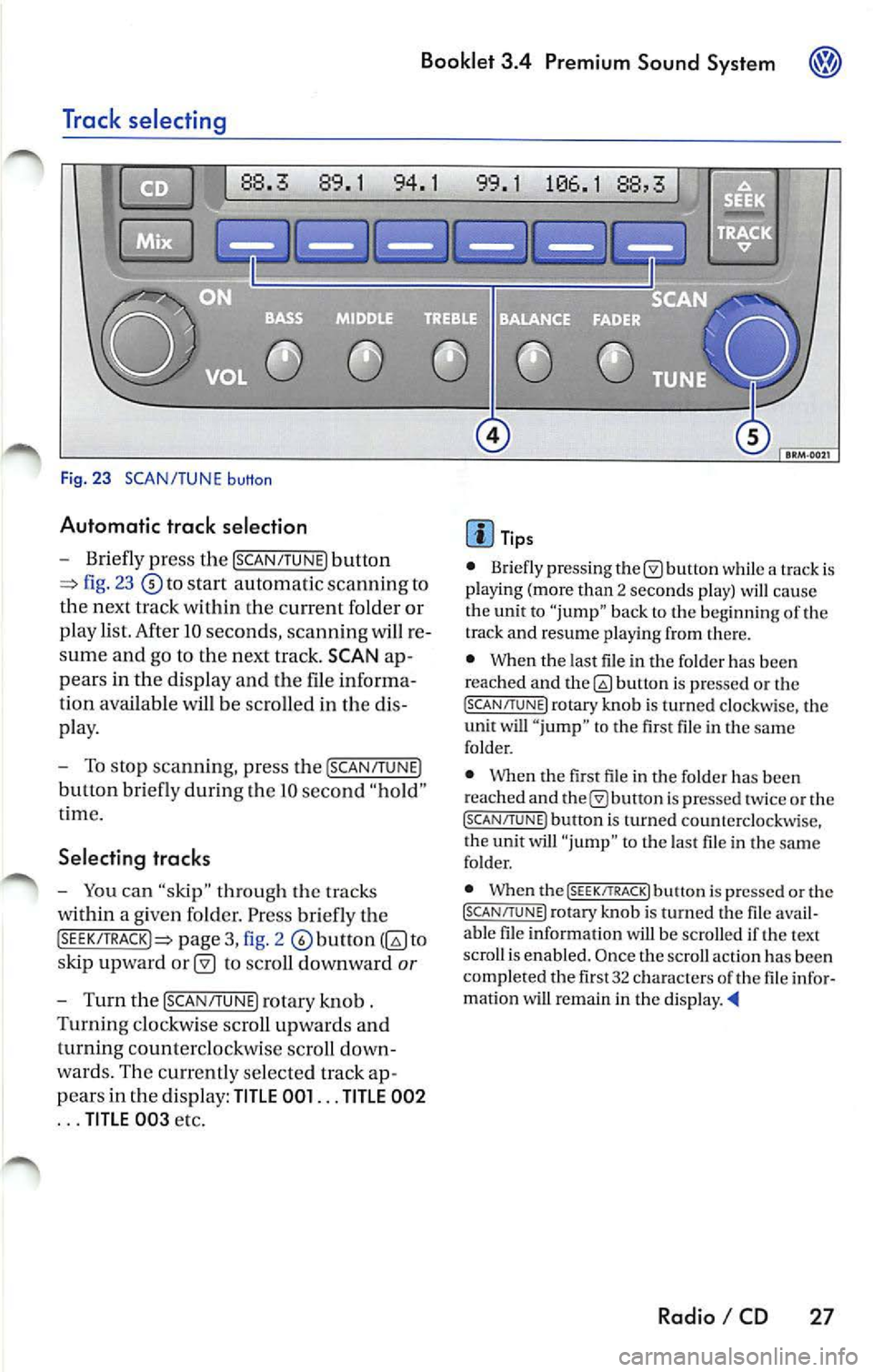
Fig. 23 SCAN/TUNE button
Automatic trac k selection
-Briefly press the !SCAN/TUNE) button
fig. 23 to sta rt automatic scannin g to
the next track within the curre nt folder or
p lay list. After 10 seconds , scannin g will re
sume and go to the next track. SCAN ap
pears in the display and the file informa
tion available
be scro lled in the dis
pla y.
- To stop scannin g, pre ss the [SCAN/T UNE)
button bri efly during Lhe IO seco nd "hold "
t ime.
Selecting tracks
-You can "skip" through th e trac ks
within a given fo lder. Pr ess briefly th e
pag e 3, fig. 2 to
s kip upward
to scroll downward or
- Turn th e !SCAN/TUNE) rotary knob .
Turnin g clo ckw ise sc roll up wards and
turning counterclockwi se scroll down
wa rds. Th e curr en tly se lected track ap
p ears in the di spl ay:
TITLE 001 ... TITLE 002
... TITLE 00 3 etc.
Tip s
• Briefly press ing butt on while a track is
pla ying (mo re than 2 seco nds play) cau se
the unit to "jump" bac k to the beginning of th e
track and resume pla yin g from there.
• When the last file in the fo lder has been
reached and
bu non is pre ssed or th e (SC AN/TUNE! rotary knob is turned clockwi se, the
unit will " jump " to th e first file in th e same
folder.
• Whe n the first fil e in t he folder has been
r eached and
is pr essed tw ice or the (SCAN/TUNE ) button is turned counterclockwise,
t he unit will "ju mp " to t he last file in the sa me
fo lder.
• When the
(SEEK/TRACK! butt on i s pre ssed or the (SCAN/TUNE) rotary kno b is turn ed the fil e avail
a bl e fil e in formation will be scro lled if th e text
scro ll is enabl ed. Once the scroll actio n ha s be en
comp le ted the fir st 32 characters
th e fil e infor
matio n wi U remain in the di sp la y. •
Radio I CD 27
Page 463 of 477
![VOLKSWAGEN JETTA 2009 Owners Manual Booklet 3.4 Premium Sound System
Track search Buttons
"Scroll" through the same track (Fast
Forward /Fast R ev ie w)
- Press and hold the !SEEK/TRACK ] button
page fig . 2 to scro ll](/img/18/55687/w960_55687-462.png "VOLKSWAGEN JETTA 2009 Owners Manual Booklet 3.4 Premium Sound System
Track search Buttons
\"Scroll\" through the same track (Fast
Forward /Fast R ev ie w)
- Press and hold the !SEEK/TRACK ] button
page fig . 2 to scro ll")
Booklet 3.4 Premium Sound System
Track search Buttons
"Scroll" through the same track (Fast
Forward /Fast R ev ie w)
- Press and hold the !SEEK/TRACK ] button
page fig . 2 to scro ll upwards or
downwards
trough the same track.
The track elapsed time appears in the
upper left corne r of the d isp lay.
Information displayed
Fig. 24 SCAN/ TUNE button
MP3 display selection
It is possible to select betwee n a basic MP3 dis
play and a more detailed one. If th e bas ic MP3
display is selec ted the file informat ion (such as
s ong and artist name) w ill not be displayed.
• Press and ho ld down
(SCAN/TUNE) butt on fig. 24 for longer than 2 seconds to ent er
the set up mode. You will hear a sig nal tone.
• Turn the
(SCAN/TUNE) rotary knob, un til SELEC T MP3 DISPLAY appears i n the display.
• In
low er part of the display words BASIC and DETAIL will appear. By usi ng th e s ta
tion pr eset bu tto ns © select eith er the bas ic o r
deta il di splay.
• Press the
SCAN/TUNE buu on again fo r
long er th an 2 second s to confirm the setting
you've just made . Yo u will hear a signa l tone.
28 Radio I CD
-Release t he button to stop skipp ing
through the track.
Text sc roll select ion
You can decide whether the available informa
tion in the MP3 file is scrolled or not in the di s
play.
• Press and hold down the
(SCAN/TUNE) button
for longer than 2 seconds to enter the set u p
mode. You w ill hear a signal tone.
• Turn the
(SCAN/T UNE) rotary knob,
station preset buttons © select eith er ON or OFF.
• Press the (SCAN/TUNE) button again for longer
th an 2 seco nds to confirm the settin g yo u've just
made. You'll hear a signal to ne.
• If yo u decide to scroll the fil e information
follow ing warn ing will appear in the d isplay: CAUTION! THIS MAY CAUSE DRIVER
DISTRACTION.