set up menu VOLKSWAGEN JETTA 2009 Owners Manual
[x] Cancel search | Manufacturer: VOLKSWAGEN, Model Year: 2009, Model line: JETTA, Model: VOLKSWAGEN JETTA 2009Pages: 477, PDF Size: 77.6 MB
Page 204 of 477
Booklet 3.1 Controls and Equipm ent ®
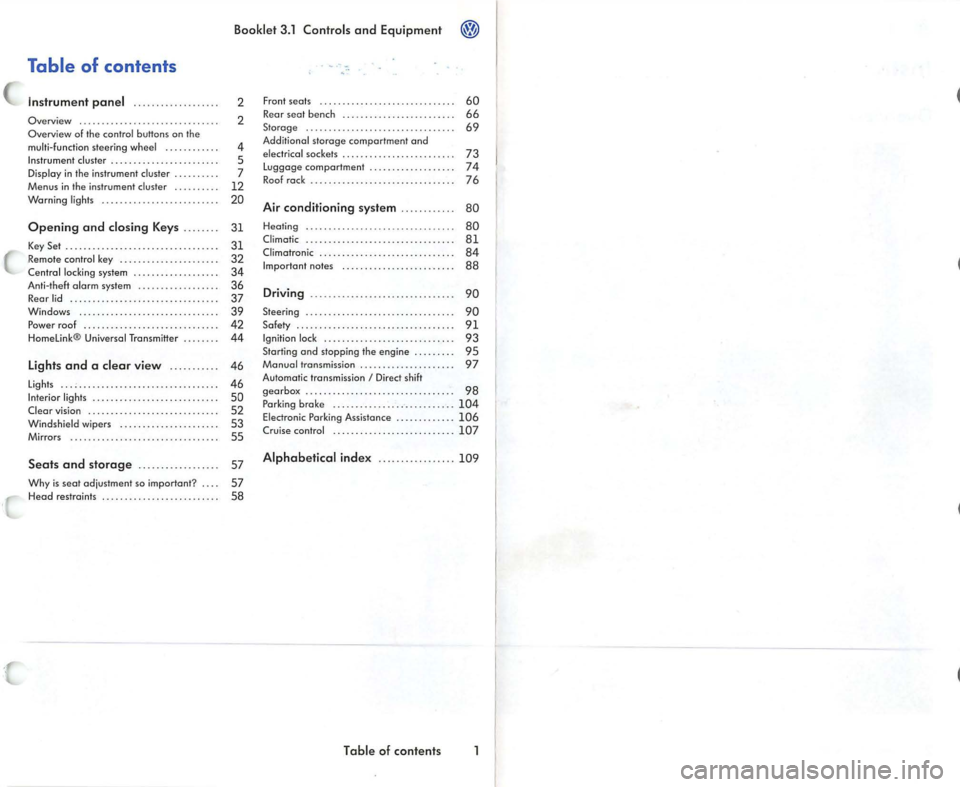
Table of contents
Instrument panel ........... .. .. ... .
Overview .............................. .
Overview of the contro l butto ns on the
mu lti- function steering w heel ..... .... . . .
Instrument cluster ...... ............. ... . .
Display in the in strument cluster ......... .
Menus in the instrument cluster ..... •.. ..
Warning lights .... ....... ........ ..... . .
2
2
4
5
7
12
20
Op ening and closing Keys . . . . . . . .
31
K ey Set . . . . . . . . . . . . . . . . . . . . . . . . . . . . . . . . . . 31
Remo te cont rol key . . . . . . . . . . . . • . . . . . . • . . 32 C ent ral locking system . . . . . . . . . . . . . . . . . . . 34
Anti-the ft o lorm system . . . . . . . . . . . . . . . • . . 36
Rear lid . . . . . . . . . . . . . . . . . . • . . . . . . . . . . . . . . 37
Windows .... .. . . .. .... ... . .... . .. .. .. . .
39 Po wer roof . . . . . . . . . . . . . . . . . . . . . . . . . . . • . . 42
H ome link® Universal Transm itter . . . . . . . . 44
Lights and a clear view . . . . . . . . . . . 46
Lights . . . . . . . . . . . . . . . . . . . . . . . . . . . . . . . . . . . 46
Interior lights . . . . . . . . . . . . . . . . . . . . . . . . . . . . 50
Clear vision . . . . . . . . . . . . . . . . . . . . . . . . . . . . . 52
Windshie ld wi pers . . . . . • . . . . . . . . . . . . . . . . 53
Mirrors . . . . . . . . . . . . . . . . • . . . . . . . . . . . . . . . . 55
Seat s and storag e . . . . . . . . . . . . . . . . . . 57
Why is seat adjust ment so im portant ? . . . . 57
H ead restraints . . . . . . . . . . . . . . . . . . . . . . . . . . 58 Front seats .
..... .... ... •..... .• .... .....
Rear seat bench . ... ...... ....... •.. .... .
Sto rage ......... ................... .... .
Additiona l storage comportmen t ond
elec trica l sockets .... ... .... .... ... ...... .
Luggage comportment ........... ....... .
R oo f rock . .......... ......•.... .. •.......
Air conditioning system ...... ... .. . 60
66
69
73
74
76
80
Heal
ing . . . . . . . . . . . . . . . . . . . . . . . . . . .. . . . . . 80
Cl imatic . . . . . . . . . . . . . . . . . . . . . . . . . . . • . . . . . 8 1 Climotronic . . . . . . . . . . . . . . . . . . . . . . . . . . . . . . 84
Im portan t no tes . . . . . . . . . . . . . . . . . . . . . . . . . 88
Driving ................... ............. 90
Steering . . . . . . . . . . . . . . . . . . . . . . . . . . . . . . . . . 90
Safety . . . . . . . . . . . . . . . . . . . . . . . . . . . . . . . . . . . 91
Igniti on lock . . . . . . . . . . . . . . . . . . . . . . . . . . . . . 93
Starting ond stopping the engine . . . . . . . . . 95
Monuol transmission . . . . . . . . . . . . . . . . . . . . . 97
Automatic transmissio n
I Direct sh ift
gea rbox . . . . . . . . . . . . . . . . . . . . . . . . . . . . . . . . . 98
P arking brok e . ...... .... .... .. .. .. . .. ...
104 Electronic Parking Assistance . ........ •.. . 10 6
Crui se co ntrol ......... ........ .... ...... 107
Alphabetical inde x .... ...... .... ... 10 9
T ab le of contents
Page 211 of 477
Booklet 3.1 Controls and Equipment
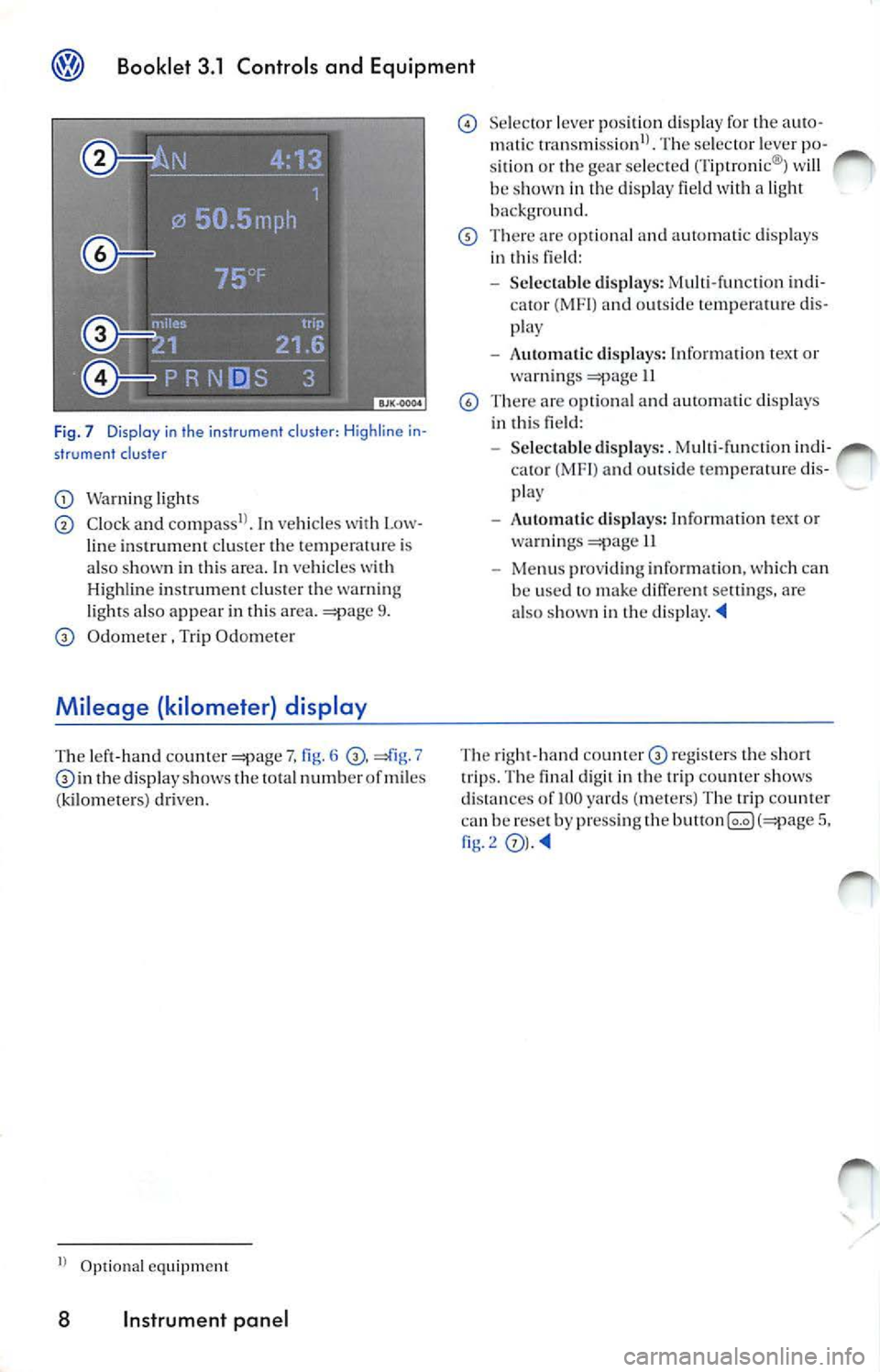
Fig. 7 Display i n the instrument cluster : Hig hli n e i n·
str um ent clus ter
Wa rnin g light s
Clock a nd In vehicl es wit h Low
li ne in strum en t cl uster the temp erature is
a lso sh ow n in this area . In ve hicl es with
Hi ghline instru ment clu ster the warning
l ights also app ear in thi s area.
9.
O dome te r , Trip Odometer
Mileage (kilometer ) display
T he lef t-hand counter 7, fig . 6 7 in the di sp lay sh ows the tota l numb er of miles
( k il om ete rs) dri ven .
Optio nal equipment
8 Instrument panel
Sele cto r lever posit ion disp lay for th e auto
m atic tran smi ssion1
l . Th e se lec tor lever po
s it ion or the gea r se le cte d (Ti ptro nic ®l w ill
b e sh ow n in the dis p lay field w ith a ligh t
ba ck gro und .
There o pti onal an d au toma tic di sp lays
i n thi s field:
- Selec tab le di spla ys: M ulti-fun ctio n indi
(MF I) and outs id e te mp erature dis
p lay
- Automati c di sp lays: In form ation t ext o r
wa rnings
11
There are opti ona l an d auto matic di spla ys
i n thi s field:
- Selec tabl e dis p lays: . M ulti -fun ctio n in d i
ca to r (MFI ) an d out sid e te mperat ure d is
pla y
- Aut om atic d is p lays: Inform atio n tex t or
wa rning s
II
-Menu s pro vid in g in formation, whi ch can
b e use d t o make d iffere nt settin gs, a re
a lso s how n in th e
The rig ht -h and cou nter regis ters th e sh ort
trip s. Th e fin al d igi t in t he trip count er sh ows
d is ta nces of
100 yard s (meters) T he tr ip count er
ca n be rese t b y pr ess ing th e 5, fig.2
Page 216 of 477
Booklet 3.1 Controls and Equipment
Applies to vehicles: H ighline instrumen t cluster and multi-function steering wheel
Example of using the menus with the mult i- function steering wheel
All menus in the i nstrwnen t cluster can be used following the steps described here.
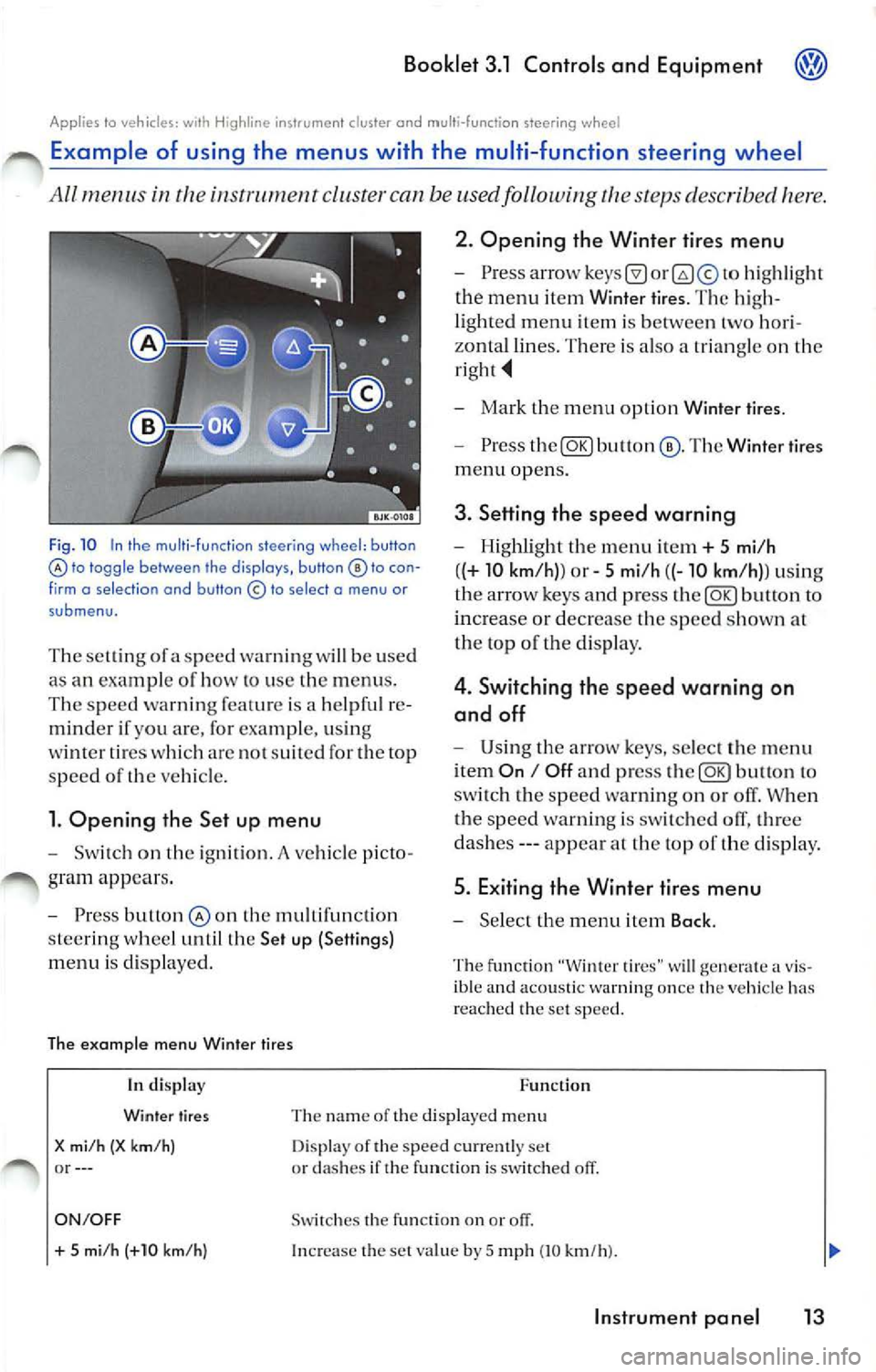
Fig . 10 In the multi -fu nction steering wh eel: button lo toggle between the disp lays, button to con
f irm o se lect ion and button © to select o menu or
submenu.
T he se lling of a speed warning w ill be used
as an exam pie of how lo use the menus .
The speed warn ing feat ure is a helpfu l re
minder if you are, for example, usi ng
wi nter ti res whi ch arc no t suit ed for th e top
s p ee d of
ve hicle.
l. Opening the Set up menu
Switch on the ignition. A ve hicle p icto
gram appea rs .
Press butlon the mult ifunct io n
s tee rin g whee l until the Set up (Settings)
menu is disp layed.
The example menu Winter tires 2. Opening the Winter
tires menu
hig hli ght
the menu item Winier tires. The hig h
li ghted menu item is between two hori
zonta l lines. Th ere is also a trian gle on the
Mark the m enu opt ion Wint er tire s.
Press The Winter tires
menu opens.
3. Setting th e speed warning
Highlight th e menu it em+ 5 mi/h
( (+
10 km /h )) or 5 mi /h ((-10 km /h)) usi ng
th e ar row keys and p ress
butto n to
increa se or decrease the speed s how n at
th e top of t he di sp lay.
4 . Switching the speed warning on
and off
U sing th e arrow keys , select th e menu
i tem
On I Off a nd press to
sw itch the sp ee d wa rnin g on o r off. When
t h e s peed warnin g is swi tched olT, three
da she s --- appea r at the top of the disp lay .
5. Exiting the Winter tires menu
Se lect the m enu item Back .
The fu nction "Winter tires" w ill generate a v is
ible and acoustic warn ing once the ve hicl e has
r eac hed th e set speed .
In di splay
Winter tires
X mi /h (X km/ h) or--- Function
Th e na m e of the displaye d m enu
D isp lay of the speed cur ren tly set
or dashes if the function is switched off.
ON/OFF Swi tc h es the fu nction on or
+ 5 mi /h (+10 km/h ) In crease the set va lue by 5 mp h (10 km/h ).
Instrument pan el 13
Page 217 of 477
Booklet 3.1 Controls and Equipment
Function
In di splay
5 mi /h (-10 km/h)
Bock Dec reases t he se t va lue by 5 mph (10 km /h }.
Th e
Winter tires men u is close d and th e las t d is pla yed menu is
o pene d.
Tips
The m en us s ho wn in t he di spl ay dep end s on th e
veh icle elec tronic s an d th e o ption leve l of your
App lies lo ve hicles: wi th H igh line i nstr u ment cluster
ve hi cle. If you a re not s ure, as k yo ur authori zed
Vo lkswage n dea ler for as sis ta nce.
Example of using the menus with the windshield wiper lever
All menus in the cluste r can be used following the steps described here.
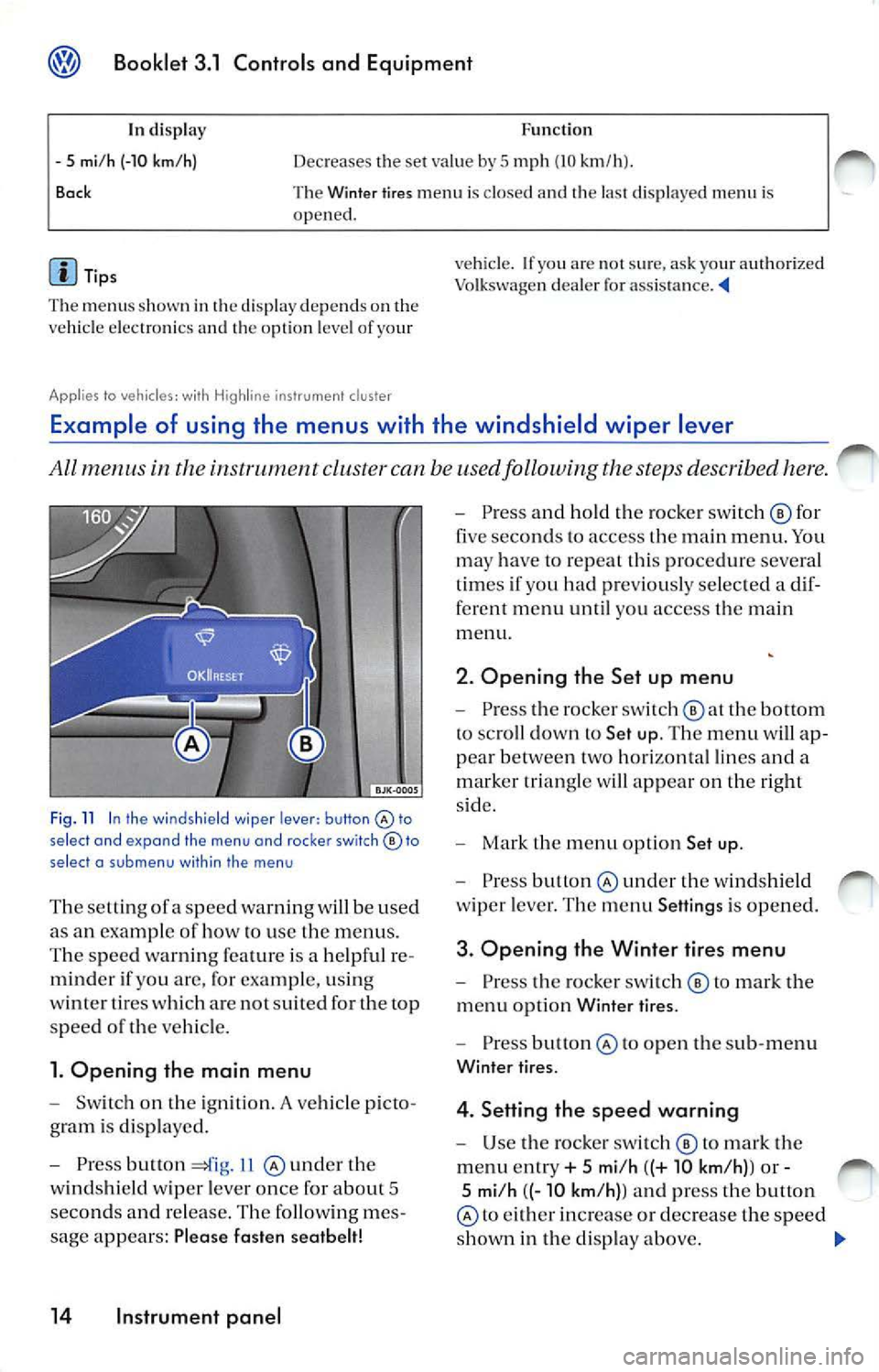
Fig . 11 In the wind shield wiper lever: button select and expand the menu and roc ker switch© to
select a su b m enu with in the men u
The se tting ofa sp eed warnin g will be used
as an examp le of how to use the menu s.
T he s pee d wa rnin g fe atu re is a help ful re
mind er if yo u are, for exa mpl e, u sin g
w int er tires w hich are not suit ed for the top
spee d
the ve hicl e.
1. Opening the main menu
Switch on the ig ni tion. A vehicle p icto
g ram is di spl aye d.
Press button 11 und er th e
w in ds hield wiper leve r o nce for abou t 5
seco nds and re lease . The followin g me s
sage appears: Plea se fasten seatbelt!
14 Instrument panel
Press an d hold the ro cke r sw itch © for
five seco nds to access the m ain men u. Yo u
ma y have to repeat this pro cedur e severa l
t im es if you had pr eviously se lec ted a dif
ferent me nu until you access the main
m enu.
2. Opening the Set up menu
Press the rocker switch the bottom
to sc roll dow n to Set up. The menu will ap
p ea r betwee n two hori zon ta l lin es and a
m arker tr ia n gle w ill app ear on the right
s id e.
Mark the m en u opt io n Set up .
Press under the w indshi eld
w ip er leve r. Th e m enu Setting s is opened.
3. Opening the Winter tires menu
Pr ess the ro cke r swi tc h © to m ark the
m enu opti on Wint er ti res.
Pre ss to o pen th e sub-m enu
Winter tir es.
4. Setting the speed warning
U se the ro cker sw itch © to mark the
m enu ent ry + 5 mi/h ((+ 10 km /h) ) or -
5 mi/h ((- 10 km /h) ) a nd press the button
to eith er in crease or de crease the spe ed
s h ow n in th e di sp lay above.
Page 218 of 477
Booklet 3.1 Controls and Equipment
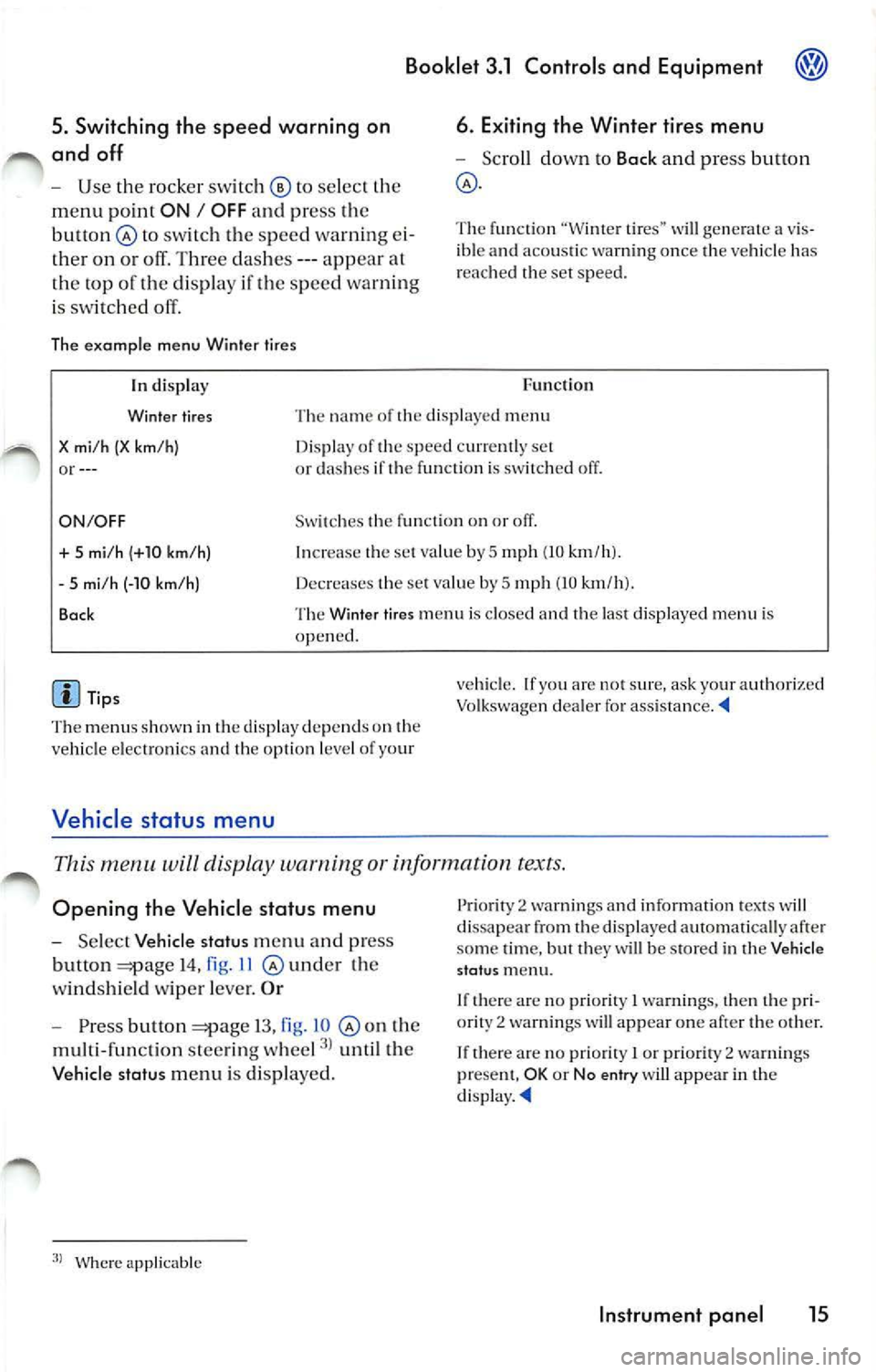
5. Switching th e spee d warning on
and off
U se the ro cker switc h © to select
m enu point ON I OFF an d pr ess th e
bu tton @
sw itc h th e spe ed warnin g ei
on o r off. Thr ee das hes ---app ear al
t h e top of th e di sp lay if th e sp ee d wa rning
is sw itch ed off.
Th e ex amp le menu Winter tires
6. E xiting the Winter t ires menu
Sc roll dow n to Back and pre ss butt on
The function "Wi nter tire s" w ill gen erate a vis
ib le an d aco ustic wa rning on ce the ve hicle has
r eac hed the set sp eed.
In disp lay
Wi nter tires
X mi /h (X km /h )
or --- Func
tio n
Th e name of th e di sp layed men u
D is pl ay of th e s pee d curr entl y se t
o r clas hes if th e function is sw itc h ed off.
ON/ OFF Swit c h es th e fun ctio n on or off.
+ 5 mi/ h (+1 0 km /h )
- 5 mi/h (-10 km /h )
B ock I
n crease the set va lu e by
5 mph (10 km /h ).
Decreases the set va lue by
5 mp h (10 km /h ).
T he W inter tires m en u is cl osed a nd the las t di spl aye d menu i s
ope ned.
d is p la y depe nds o n th e
ve hicl e e lectro nics and th e op tio n leve l o f yo ur
Vehicle status menu
vehicle. If yo u are not sur e, ask your Vo lkswagen dea le r fo r ass is ta nce . ._
Thi s m enu will disp lay warning or information text s.
Op eni ng the Veh icl e status m enu
Se lec t Vehicle statu s men u and press
b u tto n
14 , fig . 11 @ und er th e
w indshie ld wipe r leve r.
O r
Pr ess but ton 13 , fi g. 10 th e
mul ti-func tion stee rin g w hee l
unt il th e
Veh icl e s tatu s menu i s di sp laye d.
Where applicabl e P
ri ori ty
2 warning s and i nformatio n tex ts w ill
d issa pea r from the disp la yed automatica lly af te r
so me time, but the y w ill be s tored in th e Vehi cle
s ta tu s m enu .
I f th ere are no priorit y
I warnin gs, then the pri
or ity 2 wa rnin gs will appear one af ter th e oth er.
If th ere are no prio rit y
I or priority 2 wa rnin gs
p rese nt, OK or N o en try w ill appea r in th e
d is pl ay . ._
Instrument panel 15
Page 219 of 477
Bookle t 3.1 Controls and Equipm ent
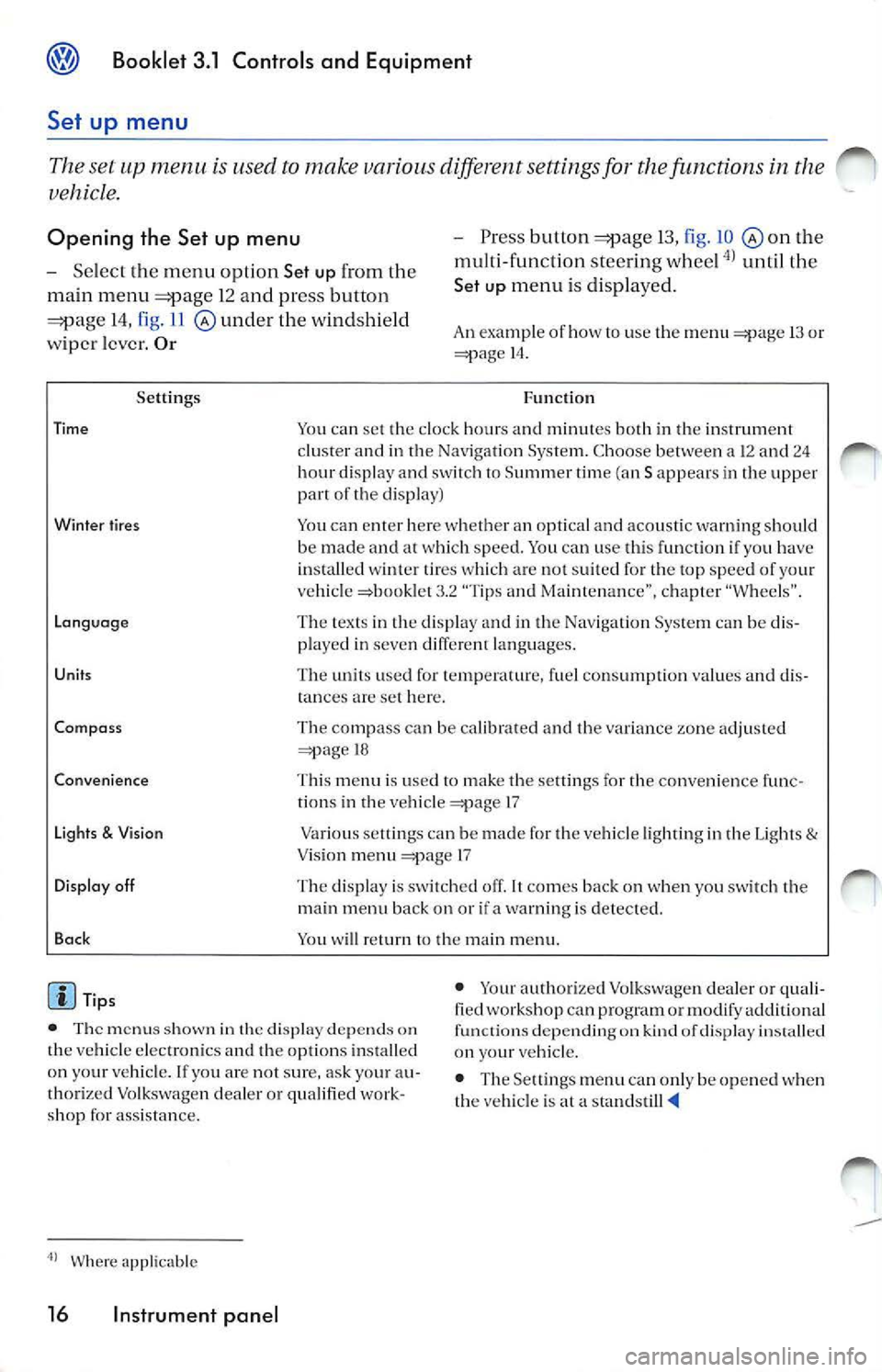
Set up menu
Th e se t up m enu u se d to mak e variou s diff ere nt setting s fo r th e function s in th e
ve hicl e.
Opening th e Set up menu - Press butto n 13, fig . 10 th e
m ult i- fun cti on stee ring w hee l
unti l th e
Set
u p m en u i s dis p la ye d.
- Se
lect th e m enu opti on Set up fr om th e
ma in menu
1 2 a nd press button
14, fig . 11 und er th e wi ndshie ld
w ipe r le ver. Or An examp le of how use the m enu 13 or 14 .
Se ttings
Tim e
Wint er tire s
L ang uag e
Unit s
Co mpa ss
Co nve nience
Li ght s
& Vis io n
D isplay off
Ba ck
Tip s F
un cti on
Yo u can set the clock hou rs a nd min utes both in th e in strum ent
cl uster a nd in t he Navig ation Sys te m . C hoose be twee n a 12 a nd 2 4
h ou r d is p lay a nd switc h
Summ er tim e (an S ap pears in th e up per of the d isp lay)
Yo u ca n en te r h ere w hether an opt ica l an d aco usti c warn ing s hould
be made an d at w hic h speed. You can use th is fun ctio n if yo u have
i n sta lled wi nte r tir es w hic h a re not su ited fo r th e to p spe ed of your
ve hicl e =>boo klet 3 .2 "Tips a nd Ma inten an ce", ch ap ter "W hee ls" .
T he tex ts in th e dis pl ay a nd in th e Nav igat io n Sys tem ca n be di s
p layed in seven diffe rent lan guages.
T he unit s use d for te m perature, fue l co nsu mpt io n va lues an d dis
t ances
set here .
Th e co mpass c an be calib ra te d and th e va ria nce zo ne adj uste d
18
T hi s m en u is use d
to make t he se ttin gs fo r the convenience f unc
ti o ns in t he ve hicle 17
Va rious se tlings can be m ade f or th e ve hicle ligh ti ng in th e Lig hts
& Vis io n m enu 17
T he dis play is sw itc hed off .
co mes bac k on when yo u sw itch th e
m ain men u back on or if a wa rning is detec ted.
You w ill ret urn
th e m ain m enu.
• T he m enu s shown in th e display dep ends on
th e ve hicle elec tro nics and th e op tio ns in stall ed
o n yo ur ve hicl e. lfyo u are no t sur e, ask yo ur au
th ori ze d Vo lk swage n dea ler o r qu alifi ed wo rk
s h op fo r ass is ta n ce . •
Your autho rize d Vo lkswage n dea le r or qu ali
fied works hop can p rogra m or mo dify ad dition al
fu nct ions depen ding o n kin d of dis play
on your ve hicl e.
• The Settings men u ca n onl y be o pened when
th e veh icl e is at a sta nd still
Wher e app licable
16 Instrument panel
Page 220 of 477
Booklet 3.1 Controls and Equipment
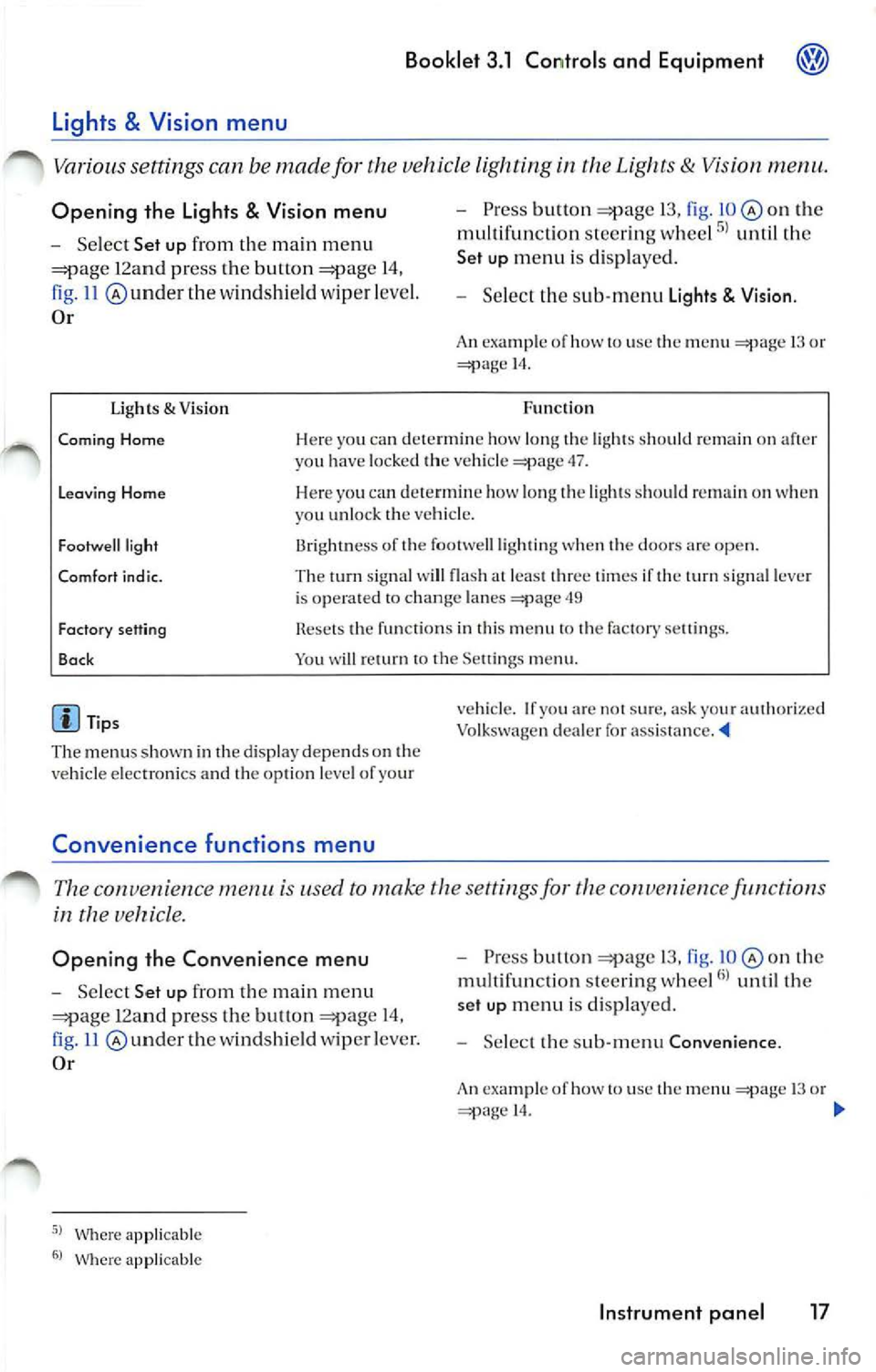
Opening the Lights & Vision menu
Select Set up from the main m enu
12a nd pr ess the button 14,
ll @ underthe wind shi eld wip er leve l.
Or
Ugh ts & Visio n
Pre ss button 13, fig . on the
multi fun cti on stee ring whee l
until th e
Set up menu i s dis pl aye d.
Selec t th e sub -m enu Lights Visio n.
An ex ampl e of how to use th e menu 13 o r 14.
Fun cti on
Coming Home Her e yo u ca n dete rmi ne how long the light s should remain on aft er
yo u h ave loc ked th e ve hicle 47.
Leavin g Home Here yo u ca n dete rmin e how l ong th e lig ht s s ho uld on when
y o u unlo ck th e veh icl e.
Fo otwe ll light
Comfort i nd ic. 13rightn ess of th e footwell ligh ting when t he doo rs are op en.
Th e tum sig nal w ill fla sh at leas t thr ee tim es if the turn sign al lever
i s o pera ted to chan ge lan es
49
Fact ory sett ing
Bac k Rese ts th e funct io ns in thi s m enu to th e fa cto ry se tting s.
Yo u will return to th e Se ttings m enu .
Tip s
The menu s shown in the dis pla y depend s on the
ve hicl e elec tron ics and th e opti on l evel of yo ur
Convenience functions m enu
ve hicle. If yo u ar e no t sur e. ask your aut ho ri ze d
Vo lkswagen deal er fo r ass is ta nce. '4
The con venien ce is used to make th e sett ings fo r the conve 11 ie n ce function s
in the
Opening the Convenience menu
Select Set up from the m ain m enu
12an d pr ess the but ton 14,
11 und er th e w indsh ie ld wipe r leve r.
Or
Where ap plicable
Wher e app licable
P ress bu lion 13, fig. o n th e
mu lt ifun ctio n stee rin g w hee l
unt il th e
set up m enu i s di spl ayed .
Selec t th e sub-m enu Convenience .
An exa mpl e of h ow to use th e 13 o r 14.
Instrument panel 17
Page 221 of 477
Booklet 3.1 Controls and Equipment
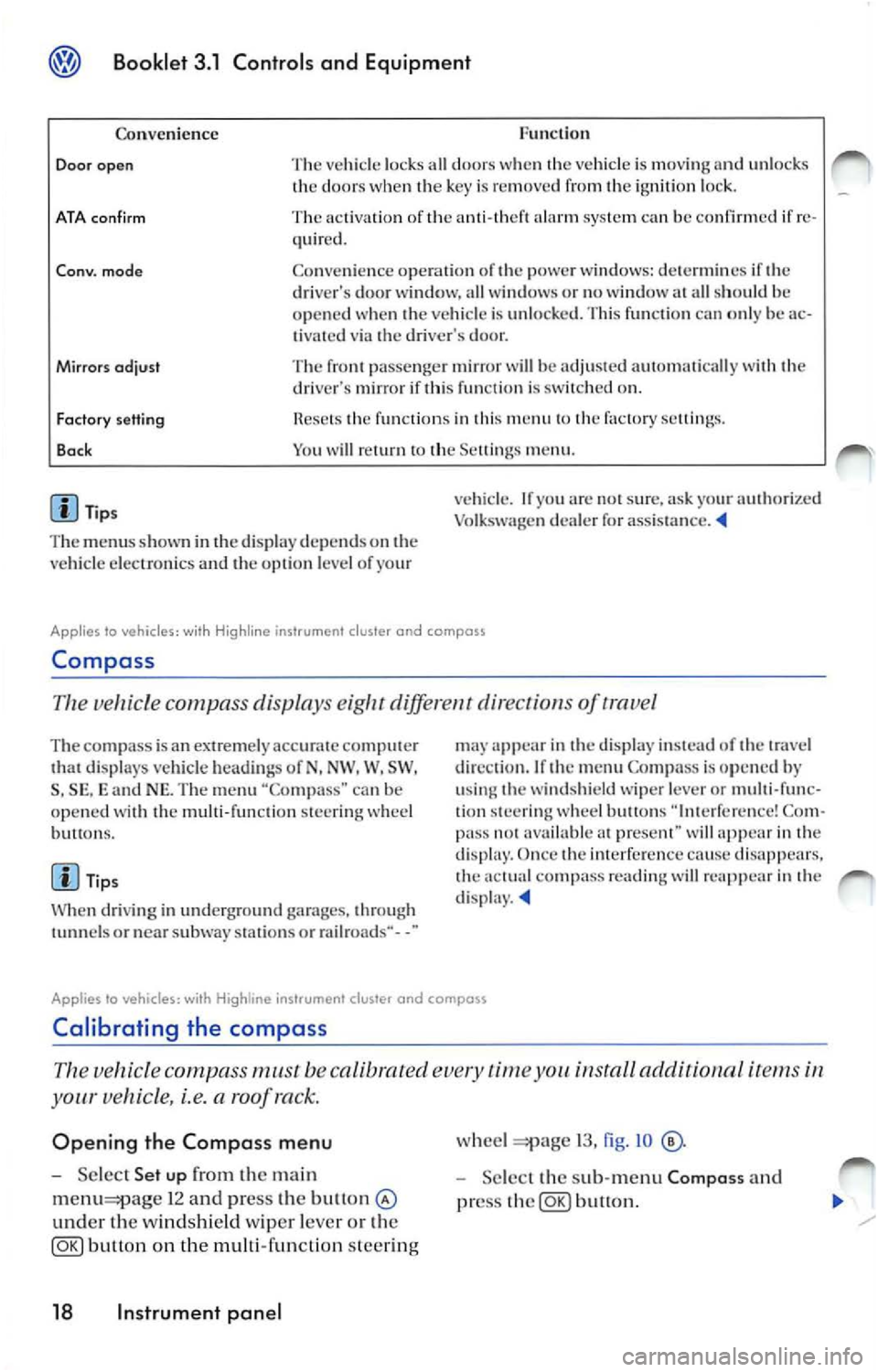
Func tion
Co nven ience
Door open The vehicl e lock s all door s w he n th e vehicle is mov ing and unl ocks
th e door s w hen key is re mo ved fr om ignition loc k.
ATA con firm The activati on of ala rm sys te m ca n be confirmed if re
quir ed .
Co nv. mode Co nve nien ce opera tio n of powe r w ind ows: dete rm in es if dri ver's door wi ndow, all w indows o r no window all sh ould h e
o p en ed when ve hicle is unlo cked. Thi s fun ctio n ca n o nly be ac
t ivated via dr iver's door.
Mirrors odjust The pa sse nger mir ror will be adju ste d au to mati cally wit h dri ve r's mirror if thi s fun cti o n is on.
Factory setting
Bo ck fun ctio n s in thi s m en u factory sellin gs.
Y o u w ill
m enu .
Tip s
T he m enu s show n in
displ ay depends on ve hicl e elec troni cs and o pti on l eve l of yo ur v
ehicl e. If
arc s ur e, ask yo ur authori zed
Vo lk sw age n dealer for assis ta nce .
Applies lo vehicles: wi th Hig hline ins trument cluster and compass
Compa ss
Th e ve hicle c ompa ss displa ys diff ere nt dir ect of trave l
The com pass is a n extremely ac curat e comput er di spl ays veh icle hea di ng s of N, NW . W, SW ,
S , SE , and NE. Th e m enu "Co mpa ss" can b e
op en ed wit h th e mu lti-fun cti on stee ring w hee l
bu H ons.
Ti ps
W hen dri vi ng in und erg round garages, throug h
or nea r subwa y stat ions o r rail roads·· - -"
app ear in displa y in stead of tr ave l
di rec tio n. If
m enu Compa ss is op en ed by
u sing w ind shi eld wipe r lever or multi-func
tion stee rin g w hee l butto ns Co m
pa ss avai lable prese nt" wi ll in dis p lay. Once imerfer cn ce cause dis appears. co mp ass rea ding will re app ear in d isp lay.
Applies to vehicles: with instrument cluster and compass
Calibrating the compass
vehicle compass must be calibrated time install aclditionnl i te m s
your vehicle, i.e. a roof ra ck.
Opening the Compass menu
Se lec t Set up the ma in
1 2 and press the bu11on
und er th e windsh ie ld wiper leve r o r th e
button on the multi-func tion steer ing
18 Instrument panel
wheel 13, fig . IO
Selec t th e sub-m enu Composs and
pr ess
button.
Page 222 of 477
Booklet 3.1 Controls and Equipm ent
Calibrat ing the compas s
-Ma rk the m enu ent ry Calibra tion and
pr ess
butt on. The fo llow ing m es
sage will be di sp layed To calib rate drive
round a comp lete circle.
- Drive t he ve hicle in circl es a t 5 mph (10
km/h) or less until th e disp lay indica tes
th at th e ca libra tio n process has bee n com
pl eted. • Durin g th e ca libration process or the cali
b ra tio n process is not su ccess rully accom
pli sh ed th e word "CA I."
will ap pear in the dis
p la y in stead or the directio n.
• 1r "CAL" ap pea rs in the dis p lay instead of the trave l di rectio n th e co mpa ss mu st be ca librat ed.
• While calib ratin g th e co mpass do no t drive
w ith the rea r lid ope n or the rea r seatback un
l o ck ed to avoid ina ccurate
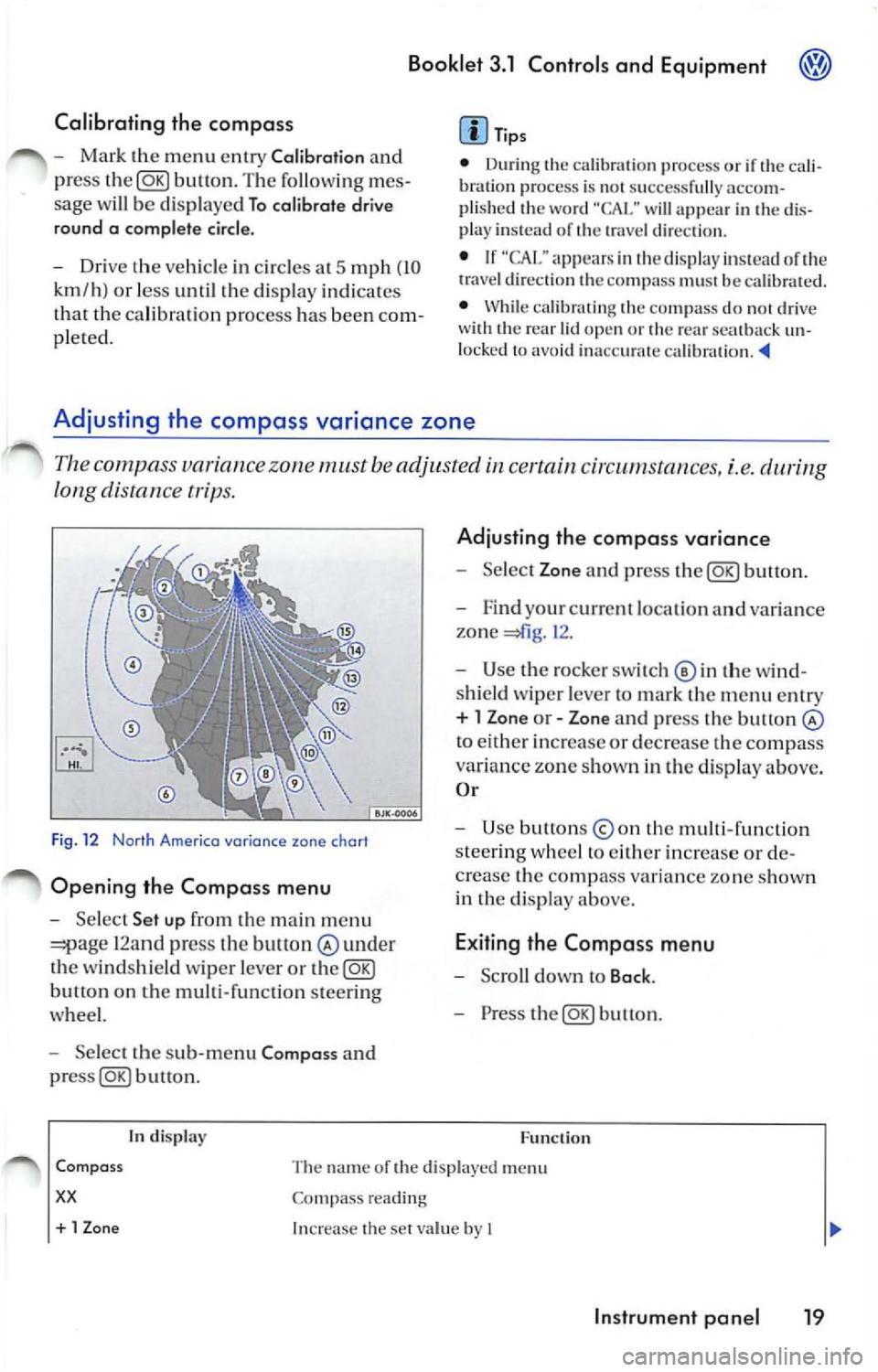
Adjusting the compass variance zone
Th e c ompa ss variance zone must be adjusted certain cir cums tances, i.e.
long distance tr ips.
F ig . 12 Norlh Americo variance zone chort
Opening the Compa ss menu
- Se lec t Set up fr om the main m enu
12and press the bult on under
th e winds hield wiper leve r or the@g)
butt on on the multi-function steer ing
whee l.
- Select the sub -m enu Compa ss and
buu on .
tn disp lay
Adju sting th e compass variance
- Select Zone and press button.
- F ind your cur rent loca tio n an d varia nce
zone
1 2 .
- Use the rock er switch© in th e wi nd
s hi eld wiper leve r to ma rk th e m enu entr y
+ l Zon e or - Zone and press the button
to eith er in crease or decrease the compass
variance zone sh own in th e d isplay above.
O r
- Use button s
the multi -fun ction
s tee rin g w hee l to eith er increase o r de
c rea se the comp ass va ria n ce zone s how n
in th e di sp lay above.
E xiting the Compa ss menu
- Scro ll down to Back .
- Press the@g)button.
F u nc tion
Com pass
xx
The name or the di sp layed menu
Co mpass reading
+ 1 Zon e Increase the se t va lue by I
In strument pan el 19
Page 235 of 477
Booklet 3.1 Controls and Equipment
Remote control key
Locking and unlocking the vehicle
The remote control key can be used to lock and unlock the vehicle from a distance.
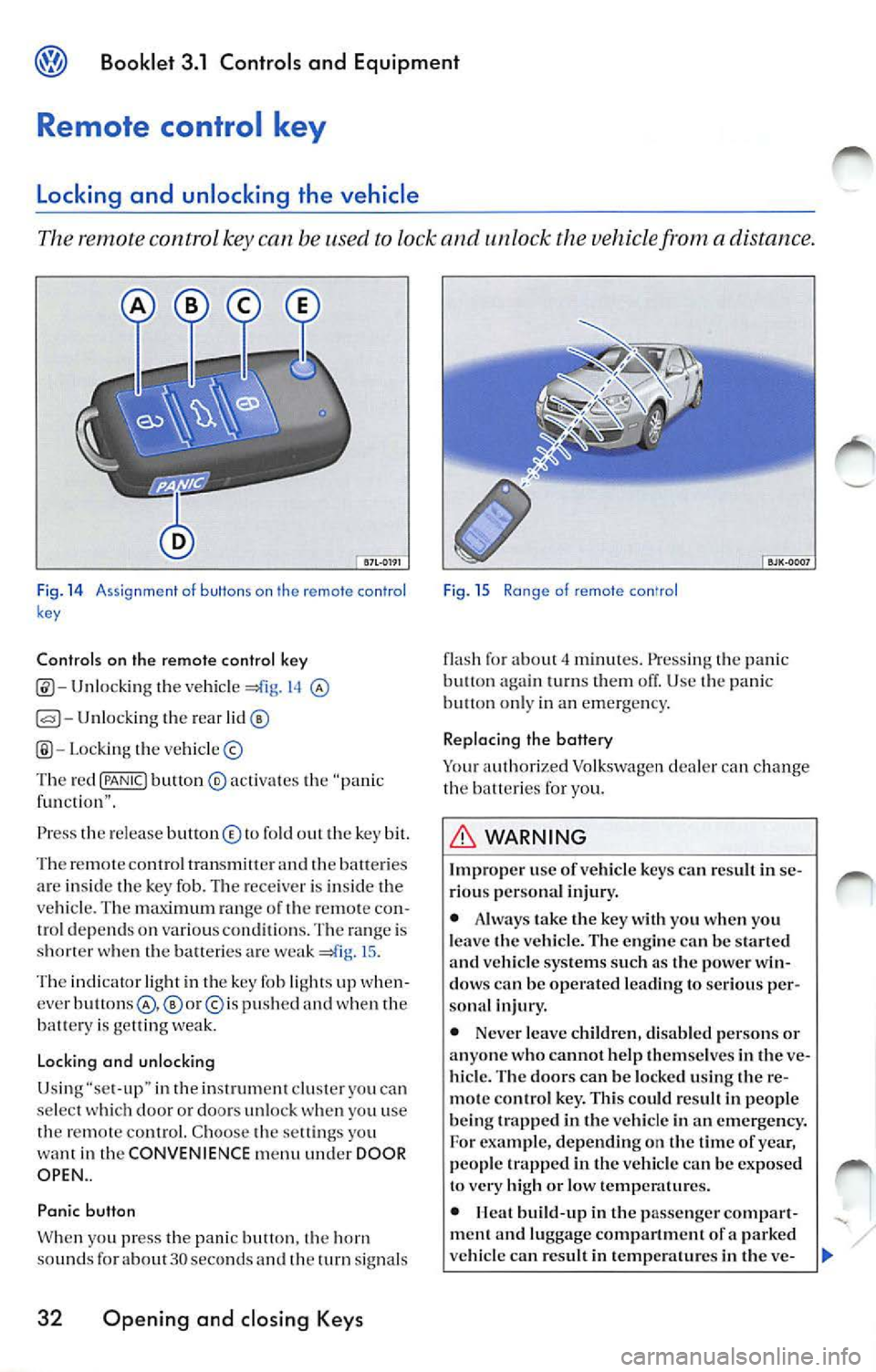
Fig. 14 A ssi gnme nt o f buttons on th e remote con tro l
k ey
Controls on the remote control key
Unlocking the vehicl e 14
Unlocking the rear
Lo cki ng the vehicle ©
Th e red
{PANIC! button ® activa tes the "pa nic
f un cti on" .
Press th e re le ase button © to fold out the key bit.
Th e re m ote contro l tran smitter and
batte ri es
ar e insid e th e key fob. The rece iver is in side the
ve hicle . T he maximum ran ge of th e remo te con
trol dep end s on various conditions. The range is
s h o rter when the balteric s are weak
15 .
The indicator light in th e key fob li ght s up when
cver
p u sh ed and when the
batt ery is ge llin g we ak.
Lo cking and unlocking
Usi ng "se t-up" in the inst rument clu ster you ca n
se lect doo r or doors un loc k you u se
th e remot e control. C hoo se th e sett ings yo u
want in the CONVENIENCE menu under DOOR
OPEN ..
Panic button
W hen yo u press t he panic butt on. horn
sou nds fo r about 30 seco nds an d th e turn signal s
32 Opening and closing Keys
Fig . 15 Ra nge of remote con'ro l
flash fo r about minut es. Press ing the pani c
butt on turn s them off. Use panic on ly in an emerge ncy.
Replacing the battery
Yo ur auth orized Volkswagen dealer can ch ange
the b atteri es for you.
WARNING
Improp er use of vehicl e key s ca n resu lt in se
ri ous per sona l injury.
• Alwa ys take the key with you when you
l e ave the vehicle. The en gine
be start ed vehicle systems such a s the power win
dow s can be operated le ading to seriou s per
sona l injur y.
• Never leave childr en, disab le d pe rsons or
anyone who cannot help them se lves in
ve
hicl e. The door s can be locked using the re
m ote con tro l ke y. This could r esult in peop le
b eing trapp ed in the vehicle in an emergency.
For exam ple, depending on the tim e of yea r,
people trapped in the vehicle can be exposed
to very high or low temp eratures.
•
build -up in the passenge r compar t
ment a nd luggage compartment of a parked
ve hicle can re sult in temp erature s in the ve-