key VOLKSWAGEN JETTA 2010 Workshop Manual
[x] Cancel search | Manufacturer: VOLKSWAGEN, Model Year: 2010, Model line: JETTA, Model: VOLKSWAGEN JETTA 2010Pages: 477, PDF Size: 77.6 MB
Page 396 of 477
Booklet 3.2 Tips and Advice
or th e centra l locking malfunctions, th e doors can be locked o r
unlocked manually.
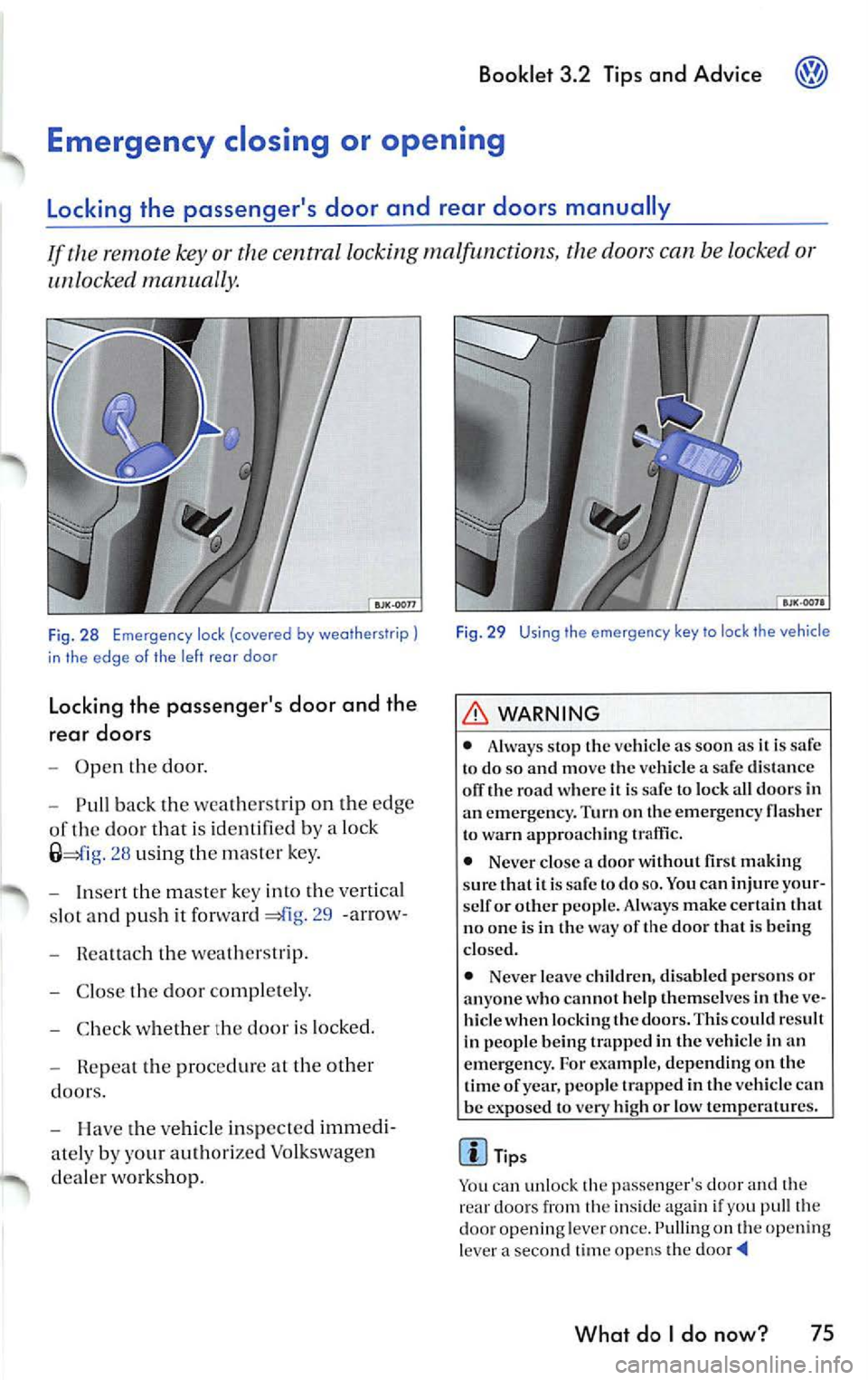
Fig. 28 Emergen cy lock (covered by weatherstrip)
in the edge o f the left rea r doo r
Locking the passenger's door and the
rear doors
Open the door.
Pull back the wea thers trip on th e edg e
of the door th a t is id en tifi ed by a lock
2 8 us ing th e ma ster key .
Inse rt the m aster key into th e ve rtical
s lot and pus h it forward
29 -arrow-
Rea ttach t he weat hers trip.
C lose the door comp le te ly.
C hec k w hethe r the door is lock ed.
Repea t the proced ure at the other
doors.
H ave the ve hicle in sp ec ted immedi
ate ly by your auth orize d Vo lkswage n
d ea le r wo rks ho p.
Fig . 29 Using the emergency key to lock the vehicle
WARNING
• Always sto p the vehicl e as soo n as it is to do so and move the ve hicle a sa fe d is tance
olT the road w here it is sa fe to lock a ll doors in
a n eme rge ncy. Turn on the emerge ncy fla sher
t o warn a pproac hing traffic.
• Never close a door wit hout first makin g
s u re th at it is sa fe to do
so. You ca n injure your
se lf or other people. Always make certain that
n o o ne is in t he way of the door that is bein g
clo sed.
• Neve r leave c hildren, di sabled perso ns or
anyo ne who cannot help th em se lves in th e ve
hicle when lock ing th e doors. This could r esult
in p eople being trapp ed in th e vehicle in an
e mergenc y. For example, depending on the
tim e of year, peop le trapped in the vehicl e ca n
be expo sed to very high or low temperat ures.
Tips
Yo u can unlock the passenger's door and th e
rear doo rs from th e insid e aga in if you pu ll the
door opening leve r o nce. Pulling on th e openi ng
l ever a secon d time op en s th e
What do I do now? 75
Page 398 of 477
WARNING (continued )
hide. The doors can be lock ed using the re
mote control key or the powe r lock button.
Th is co uld res ult in peop le bein g trapped in
th e ve hicl e.
•
build -up in th e passenger com part
ment an d lu ggage compartmen t o f a parked
Fuses
Changing a fu se
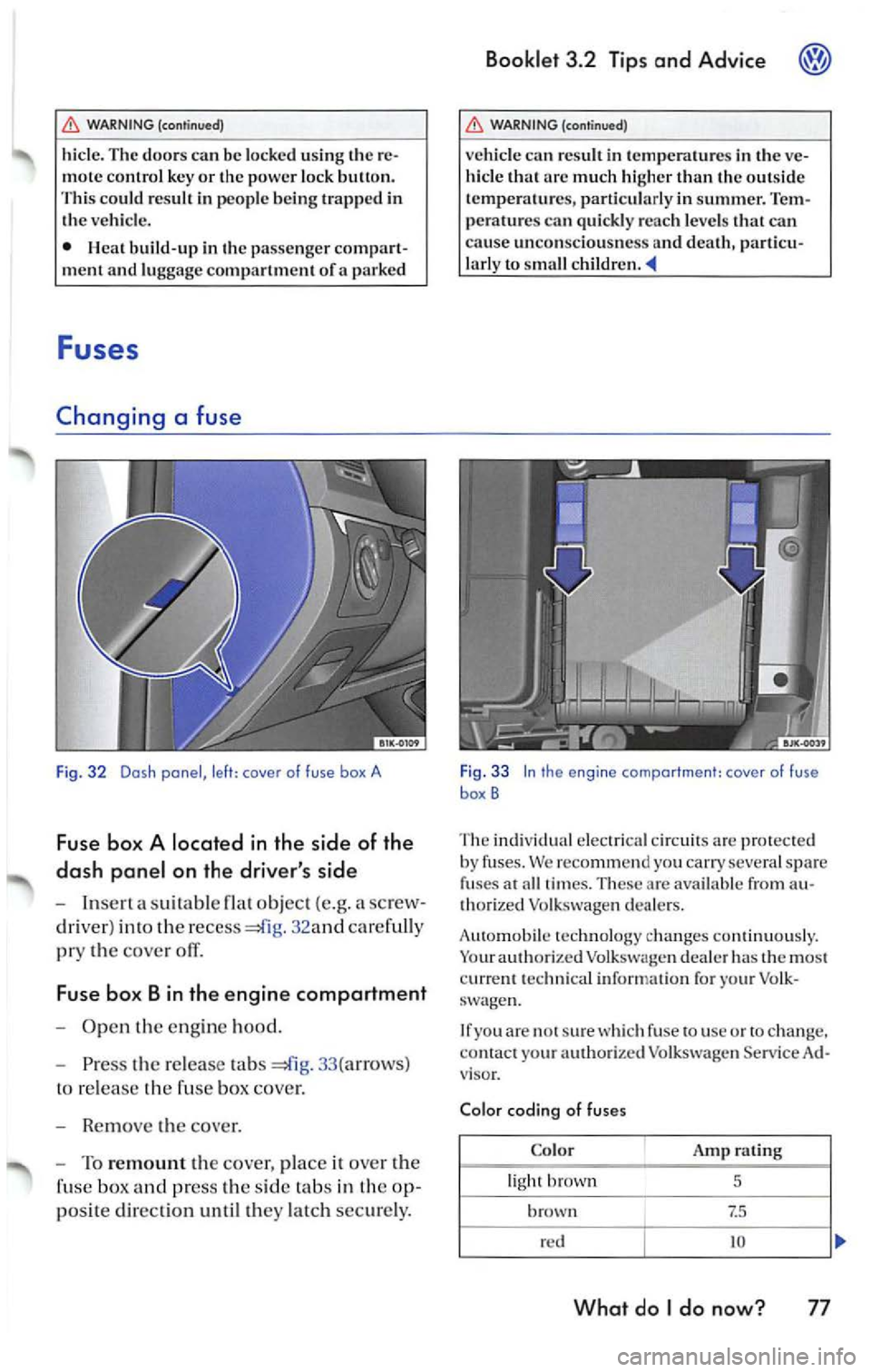
Fig. 32 Dosh panel, le fl: cover of fuse box A
Fuse bo x A locat ed in th e side of the
da sh pan el on th e driver' s side
In se rt a suit abl e obj ect (e .g. a sc rew
dr iver) into th e
32 and car efull y
pry the cove r oil
Fu se box B in the engine compartment
Open the en gin e hood .
Press the release tabs 33 (arrow s)
to re lease the fuse box cove r.
R e mo ve the cover .
To re mount the cover, place it ove r th e
fu se box
press the sid e tab s in the op
po sit e direct ion until they latch sec ure ly.
Bookl et 3.2 Tip s and Advice
WARNING (continu ed)
vehicle can re sult in tem peratur es in the ve
hicle that arc much higher than the out sid e
tem peratu res, p arti cularl y in su mmer. Tem
p era tures ca n quickl y reac h levels that can
cause unco nscio usne ss and death, particu
l ar ly to sma ll childre n. _.
Fig . 33 In the engine compa rtment: caver of fuse
box B
The indiv idu al el ec trica l ci rcu its are prot ecte d
b y fu se s. We reco mm end y ou sev eral spar e
fu ses at all tim es. T hese are availab le from a u
th ori ze d Vo lk sw agen dea le rs.
A ut omob ile te chnol ogy chan ges co ntinuously.
Your a uthori ze d Volkswage n deal er h as the mo st
curr ent t echn ica l in format io n for your Vo lk
sw agen.
I f yo u ar e
sur e w hich fu se to use or to ch an ge ,
co ntact your authori zed Vol kswage n Se rv ice
viso r.
Co lar cod ing o f fu ses
C olor
rating
li ght
5
brow n t 7.5
reel I 10
What do I do now? 77
Page 442 of 477
Booklet 3.4 Premium Sound System
Radio I CD
Radio
ON /OFF Button
88.3 89.1 94.1
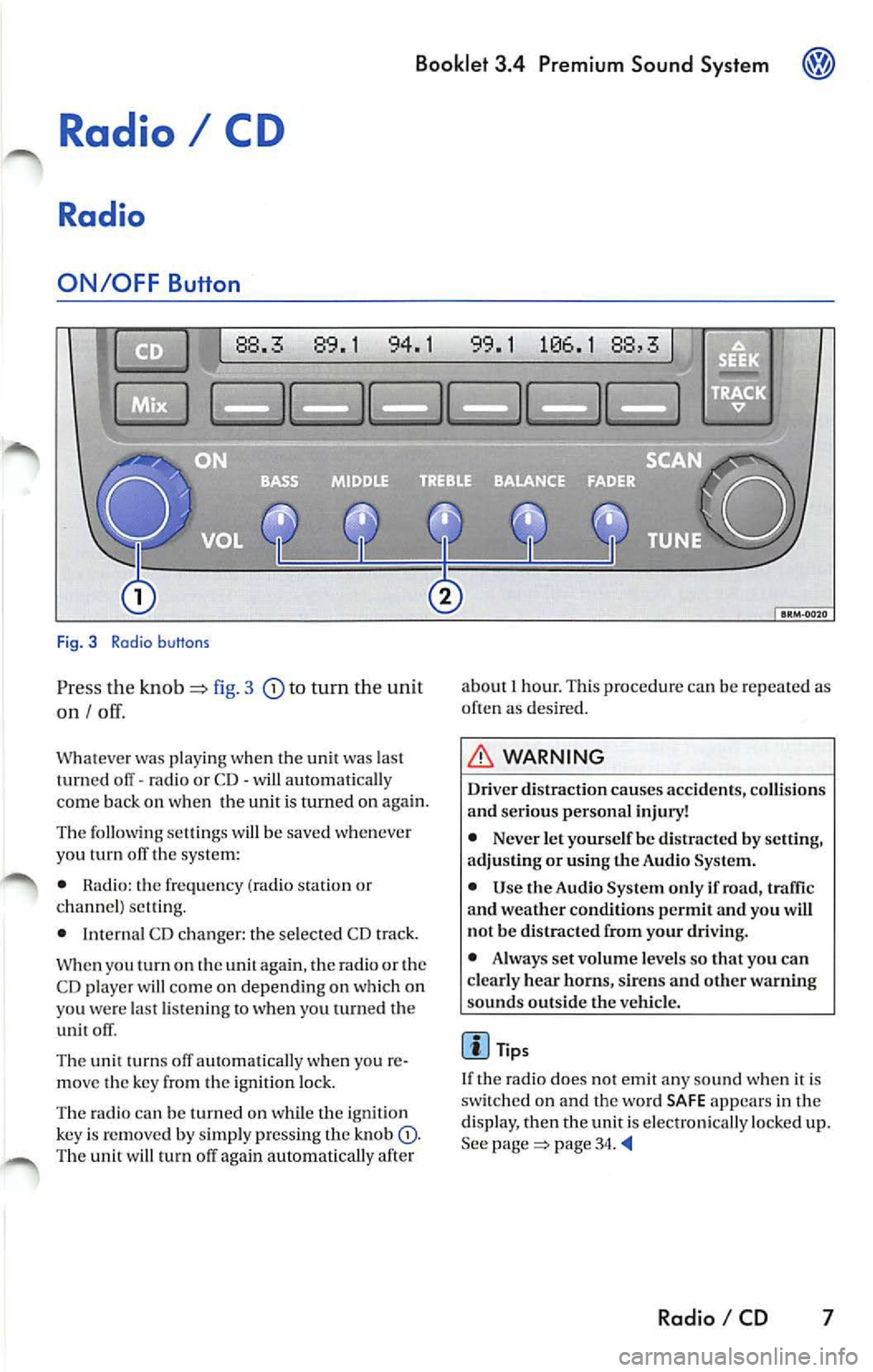
Fig. 3 Radio b uttons
Pr ess the knob fig. 3 to turn the unit
on I
Whatever was playing when the uni! was las!
turned off -radio or CD -will automaticall y
come back on when the unit is turned on again.
The foll owing se lling s will b e saved whenever
yo u tu m off the system:
• Rad io: the frequen cy (ra dio s tat ion or
c h an nel) se ttin g.
• Interna l CD c han ger : the se lected CD track.
W hen you
on the again , th e ra di o or the
CD player w ill co me on depend ing on which on
yo u wer e la st li ste nin g
when you turn ed the
unit off .
The uni! turn s off au!Omati ca lly w hen you re
m ove the key fro m the ign ition lock.
The radio can be turn ed on wh ile th e ignition
key is rem oved b y simpl y pressing the kn ob
88,3
about 1 hour. This procedure can be re p eate d as
o ften as des ired .
WARNING
Dri ver distraction causes accid ents, collision s
and ser ious personal injury!
• Never let yourse lf be distr acted by setting,
a djusting or using the Audio System.
• Use the Audio System only if road, traffic
and weather conditions p ermit and you will
not b e distracted from your driving .
• Alwa ys set vo lum e le vel s so that you can
clearly hear horns, sir ens and other warning
s ounds outside the vehicl e.
Tips
If th e radio does not emit any so un d w hen it is
sw itched on and the word SAFE appears in the
display, then the unit i s electronica lly lock ed u p.
See
page 34.
Radio I CD 7
Page 473 of 477
Booklet 3.4 Premium Sound System
External CD changer 32
F
Fader control 13
FLDR button 25
FM presets 9
ID number 15
Ignition lock 7
Illumination 36
Important information 5
Interference suppress ion 36
K
Key 7
L
LOAD button 20
M
Manual Radio Station search 11
Maximum power output 36
Middle control 12
MIX
does it mean when MIX appears in
the display when
I am playing a CD? 2 1
Wha t does it mean with MIX CD appears
in the disp lay when I
am playing a
CD? 26
Mix mode 21, 26
MP3 25
MP3 player operation 25
N
NO DISC 21, 24
NO MAGAZINE 21
0
ON I OFF 7
38 Alphabetical index
p
Preset button s 10
Preset scan
11
Q
Quick overvi ew 2
R
Radio 7
Radio Card Where should
I keep my Rad io Card? 5
Radio code numb er 5
Replacement 35
Roof mount ed antennas 35
s
SAFE What does it mean w hen "SAfE" ap-
pears in the display? 5
SAT button 15 Sa tellite Digital Radio Service 13
Satellite Radio D igital Serv ice
Ho w the system works?
13
Satellite radio providers 13
SCAN function 11
SCAN/TUNE button 11
SEEK/TRACK Button 11
Se lecting a category 16
Selecting a chan nel 16
Se lecting folders 25
Se lectin g tracks 27
Service 35
S iriu s
ID Numb er 15
Skip through the files in the same folder 27
S kip through the same track 23, 28
Sound setti ng 12
Speed Vo lume Co ntro l (S VC )
SVC (Speed Volume Contro l) 8
Station buttons 10
Station selection 36
Sto ring a channel 15
System information 19
Siriu s message s 19
XM messages 19