Check VOLKSWAGEN JETTA 2010 Repair Manual
[x] Cancel search | Manufacturer: VOLKSWAGEN, Model Year: 2010, Model line: JETTA, Model: VOLKSWAGEN JETTA 2010Pages: 477, PDF Size: 77.6 MB
Page 427 of 477
Booklet 3.3 Technical Data
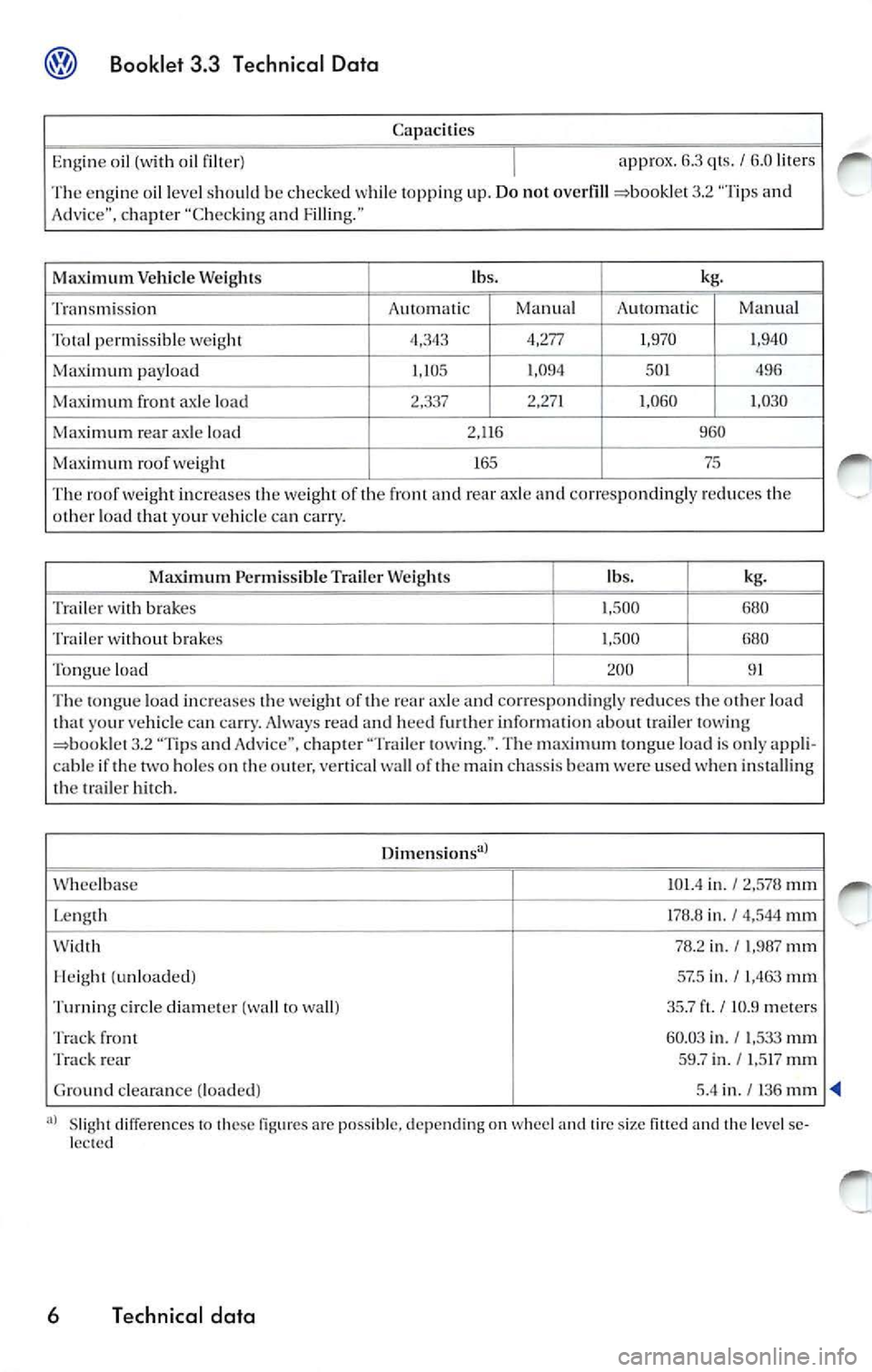
Capaci ties
Engi ne oil (with oil filter)
I approx. 6.3 qt s. I 6.0 liter s
The engin e oil level sh ould be c hec ked while top pin g up . Do not overfill
3.2 "Ti ps a nd
A dvice", chapter "Check ing a nd Fillin g."
Maximum Ve hicle Weights lb
s. kg.
Transmission A
utomati c Manual Automa tic Manua l
permiss ibl e weight 4,343 4,277
1,970 1
,940
Max imum pa ylo ad 1,105 1
,094
501 496
Maxi
mum front axle load 2,3 37 2,2
71 1,060 1,0 30
Max imum rear axle loa d 2,11 6 960
Maxim um roof weig ht 165 75
Th
e roof weig h t in creases weight of a nd rear axle and corres pondingl y re du ces o th er loa d th at yo ur vehicl e can car ry.
Maximum Pe rmissib le T ra iler W eig h ts lbs.
kg.
T rai le r wi th brake s
1,500
680
Tra iler wi thout brak es 1,500 680
Tongue load 200 91
Th e load incre a se s weig ht of 1he ax le a nd co rrespondingly redu ces loa d
1ha1 your vehicl e can ca rry. A lways read and hee d furth er inform ation about t ra ile r lowing
3 .2 "T ips and A dvic e", c hap te r "T rail er lowi ng.". T he m aximum tongu e loa d is onl y a ppli-
cab le if th e two hole s on out er, wa ll of1h e main chas sis beam we re use d when in sta lli ng tr ai ler hit ch .
Dimension s">
Wheelba se
101.4 in. I 2,578 111111
Le ng th 178.8 in. I 4,544 111111
78 .2 in ./ 1,987 mm
(un load ed ) 57.5 in . I 1,4 63 111111
Tu rnin g circle diam ete r (wa ll to w all) 35.7 I I0.9 meters
Tr ack fr ont
60.03 in. / l,533 111111 Tra ck rea r 59 .7 i n ./ l,5 17 mm
Gro und clea ra nce (load ed )
5.4 in. I 136
Sl ig h t differe nce s to the se a rc poss ible, dep endin g on wheel tire size the level se
le cted
6 T echnical data
Page 430 of 477
1. 9L diesel engine
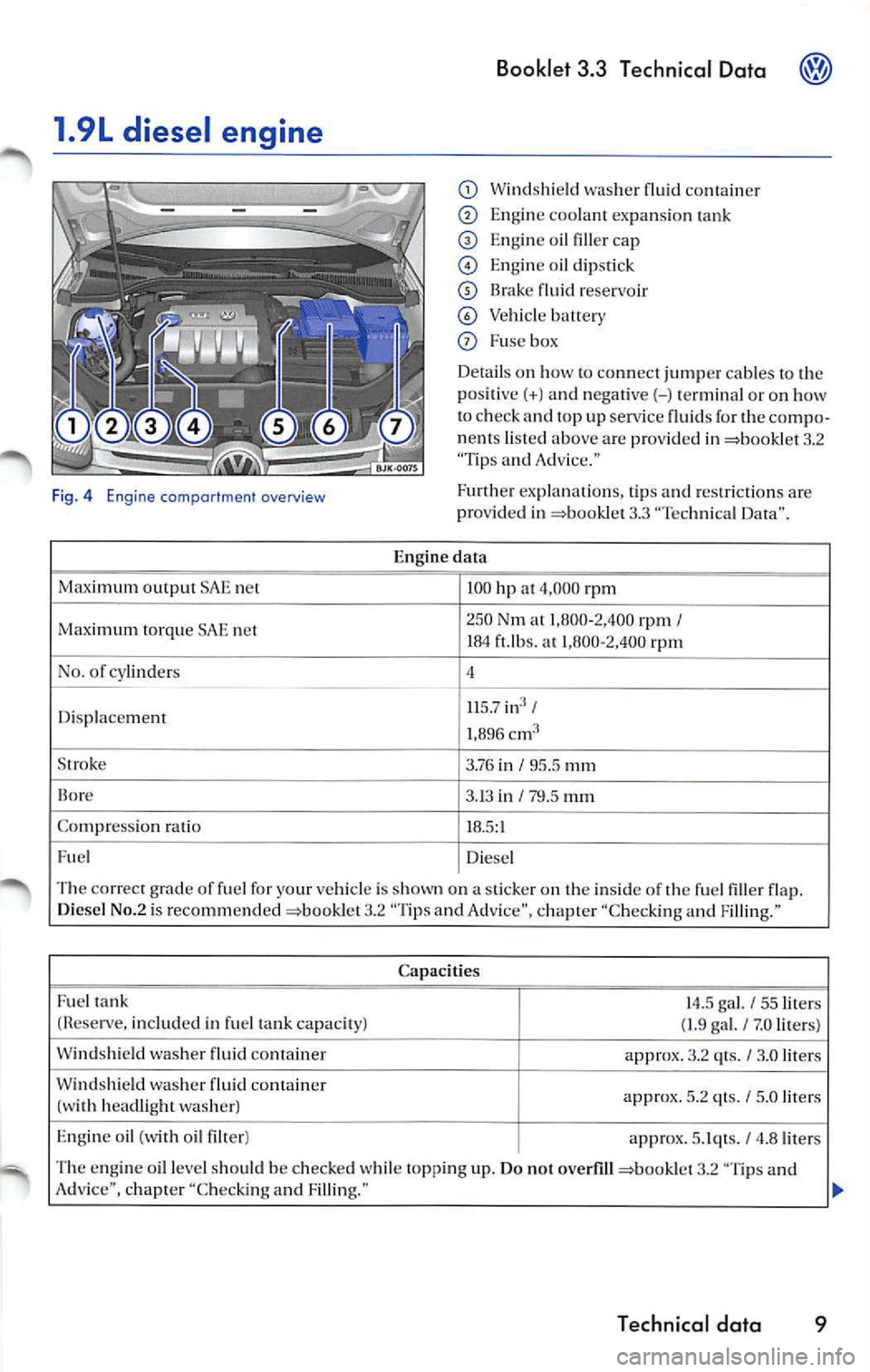
Fig. 4 Engine comportment overview
Maximum output SAE net
Ma ximum tor que S AE net
No. of cylinders
D isp lace ment
S troke
Co mpr essio n ra tio
Fue l
Booklet 3.3 Technical Data
Wind shi eld was her flui d co nta in er
Engine coolant expans io n t ank
Engine oil filler ca p
En gin e oi l di psti ck
flu id rese rvo ir
Vehicl e batte ry
Fu se box
De tails o n how to con nec t jum per ca bles to th e
po sit ive(+) and nega tive(- ) term in al or on how
t o ch eck a nd top up serv ice fluid s fo r th e com po·
n en ts liste d above are pro vid ed in
3.2 "Tip s and Adv ice."
Furthe r exp lanations, t ip s and restr iction s are
prov id ed in
3.3 "Tec hni ca l Data".
E ngin e data
100 hp a t 4,000 rp m
250 Nm at 1,0 00-2, 400 rpm I 104 ft.lb s. at 1,800·2,400 rpm
4
11 5.7 in3 I
1,896
3.76 i n I 95.5 mm
3. 13 in I 79.5 mm
18.5: 1
Diesel
T he co rrect grade of fuel for your vehicl e is s hown on a stic ker on the in side o f the fu el fi ller flap.
D iese l N o. 2 is rec omm end ed
3.2 "Tips and Adv ice ", chapter ''C hec king a nd Fi lling ."
Ca paci ties
F u el tank
14.5 gal. I 55 lit ers
(Re serve , includ ed in fu el ta n k capaci ty) ( 1.9 ga l. I 7.0 lite rs)
W ind shi eld washer fluid co nta iner
approx.
3.2 qts. I 3.0 liter s
Windshie ld wash er flui d con ta in er
ap prox.
5.2 qt s. I 5.0 liters
(w ith h ead lig h t washer)
Eng in e oil (w ith oil filter )
approx.
5. Iqts. I 4 .8 lit ers
T he e ngin e o il leve l shou ld b e checked w hile top pin g up . Do no t over fill
3.2 "T ip s and
Adv ice", c hapter "Chec kin g an d Filli ng."
Technical data 9
Page 455 of 477
® Booklet 3.4 Premium Sound System
Tips
Always hold the CD either by the center or by the
out er edge with the print ed sid e facing up.
LOAD button
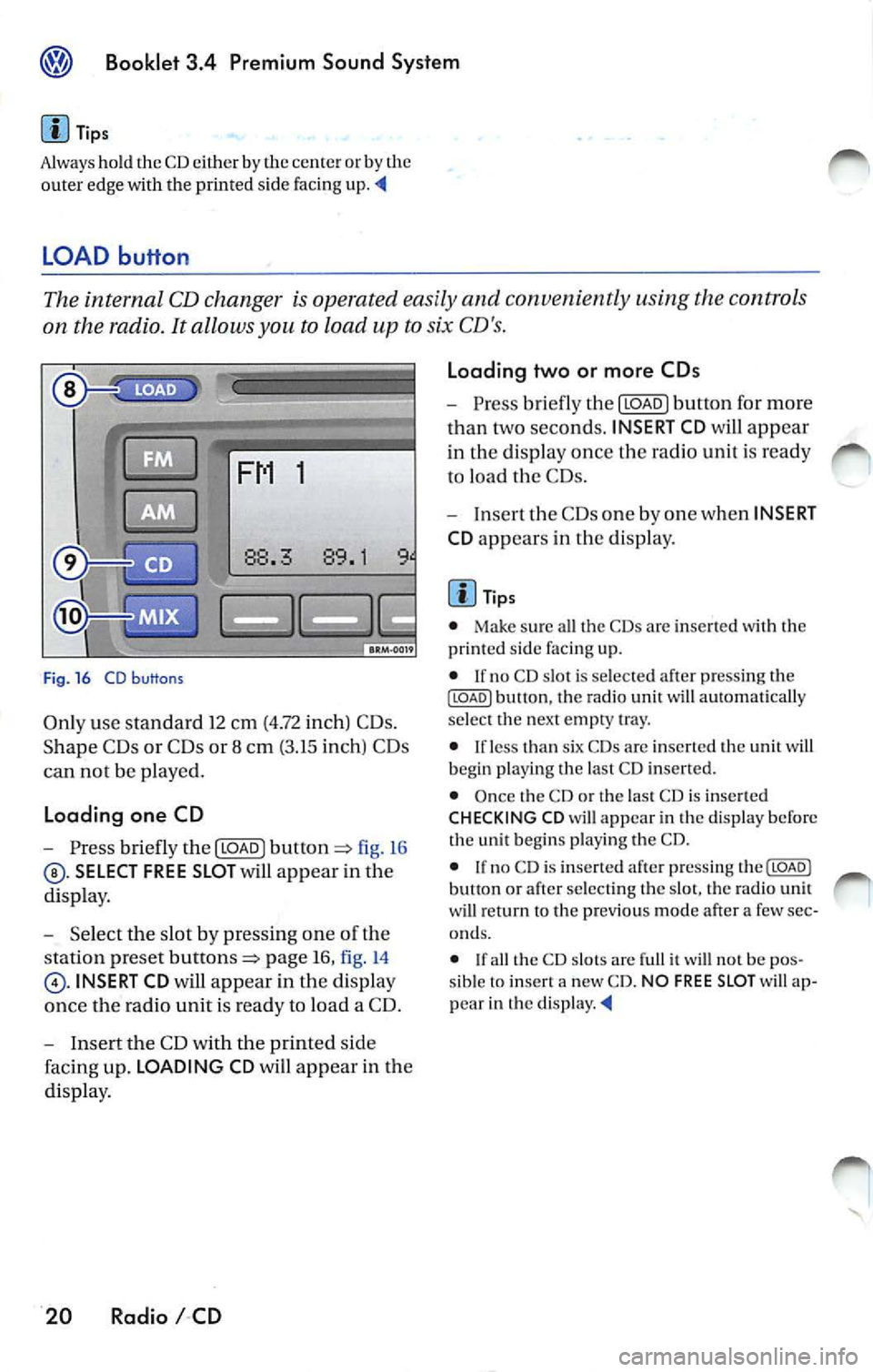
The internal CD changer is operated easily and convenient ly usin g the cont rols
on the radio.
It allows you to load up to six CD's.
FM 1
Fig . 16 CD b uttons
Only use standa rd 12 cm (4.72 inch) CD s.
Shape C Ds or CDs or 8 cm (3.15 inch) CDs
can not be played.
Loading one CD
- Press briefly the I LOAD J fi g. 16
SELECT FREE SLOT will appear in the
di spla y.
- Selec t th e slot by pressing one of t he
s tation pr eset
page 16, fig. 14
INSERT CD will app ear in the disp lay
once th e radio unit is read y to load a CD.
- I nse rt the CD with the printed side
faci ng up. LOADING CD will app ear in the
di splay .
20 Radio I CD Loading two or more CDs
-
Press briefly the I LOAD J button for more
t h an two second s. INSERT CD
will app ear
in the display once t he rad io unit i s ready
to load the CDs.
- Inse rt th e CDs one by one when INSERT
CD app ears in the di splay.
Tips
• Make sur e all the CDs arc inse rted wi th the
printed side facing up.
• If no CD slot is se lected a fter pressing th e
ILOADJ button, the rad io unit will automat ica lly
selec t the nex t empty tray.
• I f le ss than six CDs are inser te d th e uni t will
b egi n playi ng the last C D inserted.
• Once the CD or th e las t CD is inserted
CHECKING CD will appea r in the di spl ay before
the unit b egins playing the CD.
• If no C D is inserted afte r press ing th e(LOADJ
b utt on or after select ing the slot , the rad io unit
w ill r eturn to the p rev iou s m ode after a few sec
o nd s.
•
th e CD slot s are full it w ill not be pos
sib le to insert a new CD . NO FREE SLOT w ill ap
pear in th e
Page 459 of 477
Booklet 3.4 Premium Sound System
• Briefly press ing butto n wh ile a track is
pl ayi ng (more than 2 seconds play) will cause the u
nit to ''j um p" back to the beginning of the
track and resume playing from there.
What you see in the display when listening to a CD
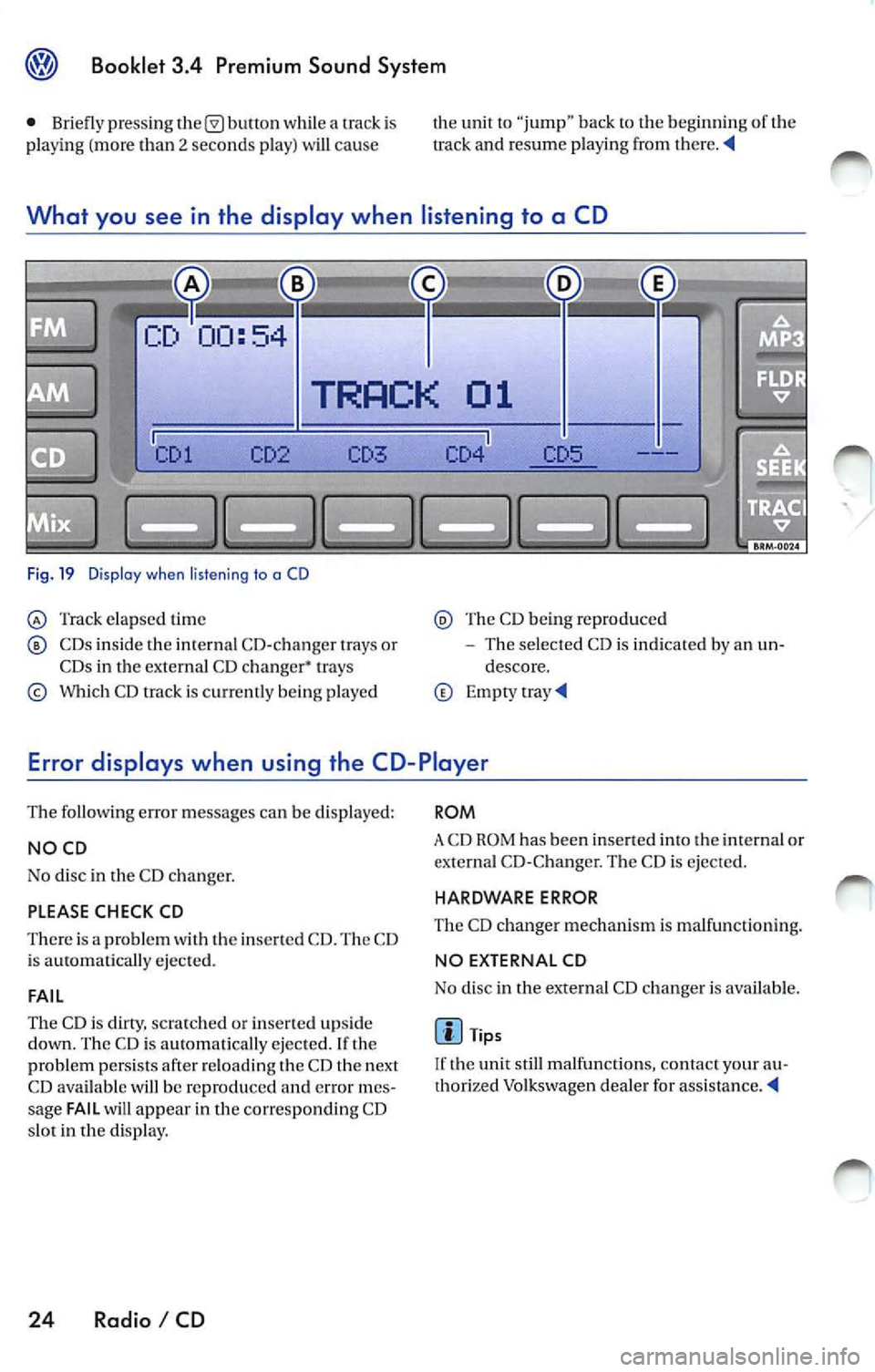
Fig. 19 Dis pla y w he n liste ning to a CD
Track elap sed time
CDs inside the in te rnal CD-c hanger trays or
CDs in the external CD changer• trays
Which CD track is c urr ent ly being p layed
Th e CD being reproduced
The selected CD is indicated by an un
descore.
Error displays when using the CD-Player
The following error messages can be displayed:
NOCD
No disc in the CD c hanger.
PLEASE CHECK CD
There is a problem with the inserted CD. The CD
i s ejected.
FAIL
The CD is clirry, scratc hed or inserte d upside
down. The CD is au tomatically ejected. If th e
problem persists afte r reloading t he CD th e next
CD available will be reproduced
error mes
sage FAIL will appear in the corresponding CD
s lot in the display.
24 Radio I CD
ROM
A CD ROM has been inse rted into the int ernal or
externa l CD-C hange r. The CD is ejected.
HARDWARE ERROR
The CD ch anger mechanis m is ma lfunc tion ing.
NO EX TERNAL CD
No disc in the external CD changer i s available .
Tips
If the unit still malfunctions, contact your au
thorized Volkswagen dea ler for
Page 465 of 477
Booklet 3.4 Premium Sound System
Error displays when playing MP3 music with the CD player
The following err or messages can b e displayed:
NOCD
No disc in the CD ch an ge r.
PLEASE CHECK CD
There is a problem with the in serted CD. The CD
i s automatica lly ejec te d .
ROM
A CD ROM has bee n in serte d into the ch anger.
The CD is automatic ally ejected.
About MP3
Except for personal enjoyment, duplicati ng
data or distributing, transferring or copying it, whether for free or for a fee , withou t the permis
sion of the copyright holder i s strict ly prohib
i t ed by the Copyright Act and by internationa l
treaty.
What is
MP3
MP3 (MPEG audio layer 3) is a compress ion
stan dard prescribed by the ISO and MEG.
MP3 files contain compressed audio data. MP3
encoding is capable of compress ing the audio
da ta at extremely hi gh ratios , shrinki ng mu sic
file s by as mu ch as one-tent h their original size.
The MP3 forma t rea lizes su ch high compre ssion
ratios by elimi nating th e sounds that are either
in audible to t he hum an ear or ma sked b y other
sounds.
How to create
MP3 files
The soft wa re use d to create MP3 files is wide ly
so ld from var ious sourc es. For d etail s on cre
atin g MP3 files, re fer to the owner's manual for
t hat so ftwa re.
The MP 3 files that can be played by this device
ha ve the file extension "MP3". Files wit h no ex
tension can not be played back .
Cor respon ding File Syste ms
T hi s unit support s discs formatted
ISO
9660. It a lso can p lay back d iscs in Jolie t standard
30 Radio I CD
FAIL
Th e CD is dirty, scratc hed or inserted upside
down. T he CD is auto mati cally ejected. If the
p roblem pers ist s after reload ing the CD the next
CD avai lable will be reproduced and error mes
s age FAIL will appea r in the correspo nding CD
s lo t in
display.
HARDWARE ERROR
The CD chan ger mechanism is malfunctioning.
Tips
If the unit still malfunctions, contact your au
thori zed Vo lkswagen dealer for assistance.
which conforms to ISO 9660. However , some
time s the file names, fo lder nam es, etc. are not
displayed correct ly.
P lease
in to account the follow ing points:
• When creati ng a CD the burner software
mu st be set up to burn a Mode
1 CD ROM type
disc. Mode 2 CD ROM XA can not b e pla yed
back.
• Multi-session discs can not be played back
by this unit.
• Remembe r tha t th e audio quality depends
o n th e
rate" used to create the MP3
file .
• Make sure the crea ted disc is finalized. Your
CD burner softwar e has an option to fina lize the
disc.
• Whe n nam ing you r MP3 file s, use short file
nam es (no more than 64 char acters).
• We recommend th at you use onl y one word
to name t he folde rs (i.e. Fold er_A) and t hat yo u
do not repeat the same fold er name throughout
the CD. This cou ld cause t he rad io un it not
to recognize the file path .
• When creat ing an MP3 disc, use no more
than 99 fo lder s. Altho ugh thi s unit can support
up
to 255 folders , finding the files yo u wa nt t o
p lay w ill be mor e difficult if you have used man y