display VOLKSWAGEN JETTA 2017 User Guide
[x] Cancel search | Manufacturer: VOLKSWAGEN, Model Year: 2017, Model line: JETTA, Model: VOLKSWAGEN JETTA 2017Pages: 412, PDF Size: 4.04 MB
Page 26 of 412

Lights & Vision menu Function
Coming Home Set how long the headlights and inside lights stay on after locking or unlocking the vehicle. Feature can also be switched on or off
Leaving Home
Back The display returns to the Settings menu.
Page 54 of 412

To use the convenience closing feature to close all power windows and the sunroof, hold your finger on the lock sensor surface on the outside of the door handle for a few seconds until the windows and sunroof close.
Remove your finger from the lock sensor surface ⇒ fig. 28 (B) to stop the function. If you touch the unlock sensor surface (A) on the inside of the door handle immediately after releasing the lock sensor surface (B), all of the windows will open (safety function).
Pinch protection is active during convenience closing of the windows and the power sunroof.
NOTICE
The door handle sensor surfaces can be activated by a strong stream of water or steam if a valid vehicle key is within range of the vehicle.
x All windows may open if you turn the spray of water or steam away from and then back onto the door handle sensor surface in quick succession. If at least one power window is opened and the sensor is continuously activated, convenience closing is started.
The door may not open if the outside and inside door handles are used at the same time.
If the vehicle battery or the battery in the remote control vehicle key is weak or dead, it might not be possible to unlock and lock the vehicle using Keyless Access. The vehicle can still be manually
locked or unlocked with the key bit ⇒ Manually unlocking and locking the driver door.
A driver message appears in the instrument cluster display if there is no remote control vehicle key inside the vehicle or if the system does not recognize the remote control vehicle key. The key may not be recognized, for example, if it is covered by something that interferes with the signal (such as a briefcase), or if the remote control vehicle key battery is weak. Electronic devices such as mobile phones can also interfere with the signal.
Dirt on the door handles that contains a lot of salt (especially in winter) can affect the way the
door handle sensors work. Cleaning the door handles can help with this problem ⇒ Exterior care and cleaning.
If the automatic transmission is not in Park (P) position, the electronic steering column lock will not lock and the vehicle will not lock via sensors in the front door handles or the remote control vehicle key.
Anti-theft alarm system
Page 57 of 412
When the ignition is switched on, several warning and indicator lights come on briefly for a function check. They go out after a few seconds.
If a door is not closed properly, the red s warning light comes on in the instrument cluster or the vehicle icon appears in the instrument cluster display showing an open door.
Depending on your vehicle's equipment and options, the red warning light or icon may still be dis-played even after the ignition is switched off as long as the key has not been taken out of the ignition. The icon in the instrument cluster display goes out about 15 seconds after the vehicle has been locked.
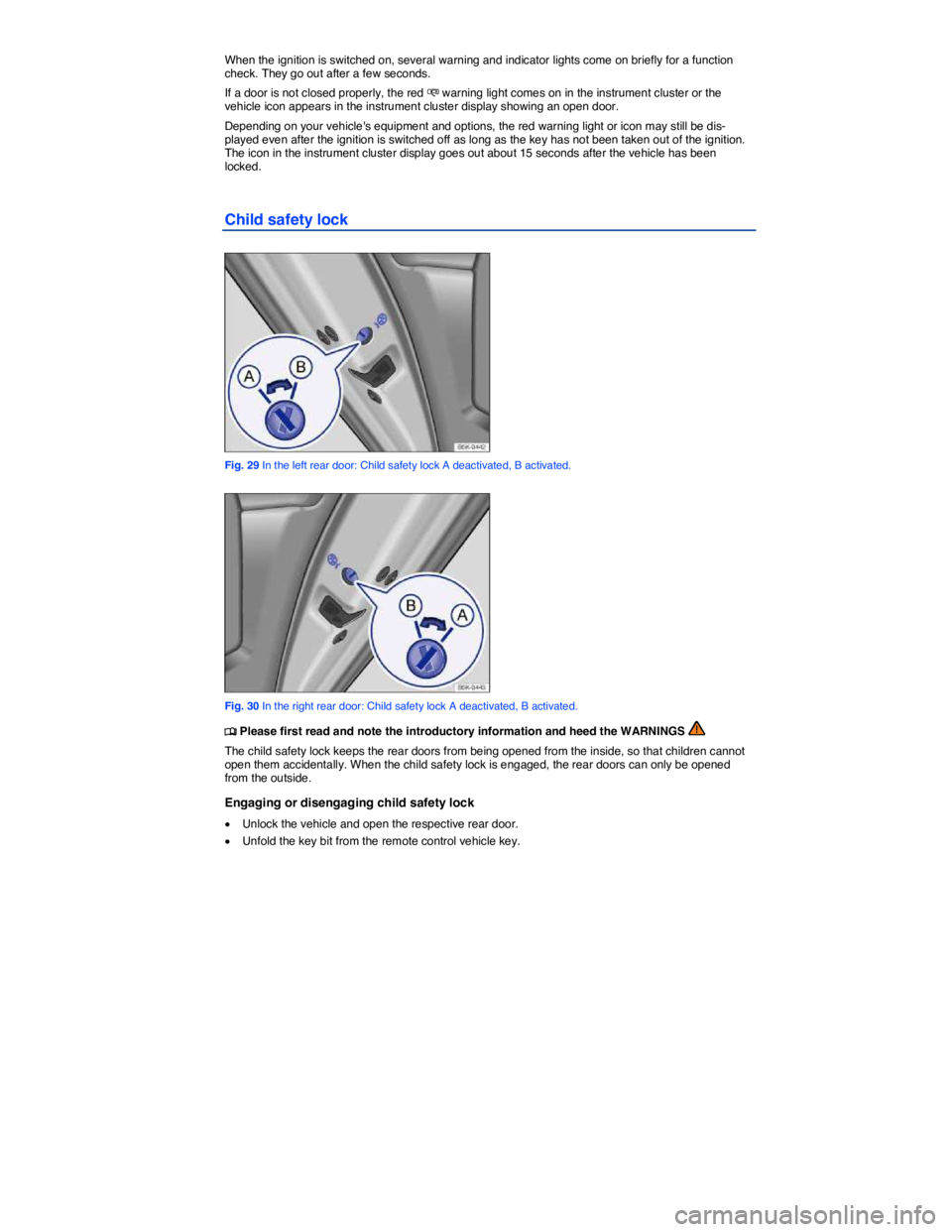
Child safety lock
Fig. 29 In the left rear door: Child safety lock A deactivated, B activated.
Fig. 30 In the right rear door: Child safety lock A deactivated, B activated.
Page 60 of 412
NOTICE
Never use the gas strut to hold or clamp a load in place. This can damage the luggage com-partment lid and make it impossible to close.
Display
Page 117 of 412

Adaptive Front Lighting System (AFS)
The Adaptive Front Lighting System (AFS) works only with the low beams switched on and only at speeds above about 6 mph (10 km/h). The swivel-mounted lamps automatically improve road illumina-tion during cornering.
In some models, the headlights will turn independently, even when driving straight ahead. They can adjust according to the weather conditions and the speed of the vehicle to better light up the road ahead. The bulbs return to their original position after a short period of time, depending on the vehicle speed.
On vehicles equipped with the Adaptive Front Lighting System, the feature is switched on and off via
the Assistants menu in the instrument cluster display ⇒ page 16, Volkswagen Information System.
WARNING
Crashes and other accidents can happen when you cannot see the road ahead and when you cannot be seen by other motorists.
x Never use daytime running lights (DRL) to see where you are going. DRL are not bright enough to light up the roadway and be seen by other motorists. You will not be able to see far enough ahead for safety, especially at dusk or when it is dark. Always switch on the low-beam headlights at dusk or when it is dark.
x The taillights do not come on when the daytime running lights are switched on. A vehicle without taillights on cannot be seen by others in bad weather, at dusk, or when it is dark.
x If automatic headlights (!54/) are switched on, the low-beam headlights still may not be switched on in fog or heavy rain. You have to switch on the low-beam headlights yourself.
In cool or humid weather, the insides of the headlights, the rear lights, and turn signals can temporarily fog up. This is normal and does not affect the service life of the vehicle's lighting system.
Coming Home/Leaving Home features (orientation lighting)
Page 132 of 412
The self-dimming feature can be switched on and off with the switch on the inside mirror (2) A or (2) B. When self-dimming is activated, the indicator light (1) is on.
There are two sensors in the interior mirror housing:
x One sensor on the side facing the interior to measure light from the rear of the vehicle ⇒ fig. 89 A
(3) or ⇒ fig. 89 B (3).
x One sensor on the side facing the windshield to measure light from the front of the vehicle ⇒ fig. 89 C (4).
If the ignition is switched on, the mirror automatically darkens depending on the amount of light shining into the vehicle from the rear.
The self-dimming feature is deactivated when you shift the transmission into reverse or switch on the interior lights or the reading light.
Do not attach external navigation devices to the windshield or in the vicinity of the self-dimming inside
mirror ⇒ .
WARNING
The illuminated display on an external navigation device can cause the self-dimming inside mirror to malfunction, which can result in crashes and serious injuries.
x Malfunctions in the self-dimming function can result in the inside mirror being unable to evaluate the exact distance of vehicles in the rear or other objects.
If the light striking the sensor is filtered or blocked (such as by a sunshade), the self-dimming inside mirror will not work properly or may not work at all.
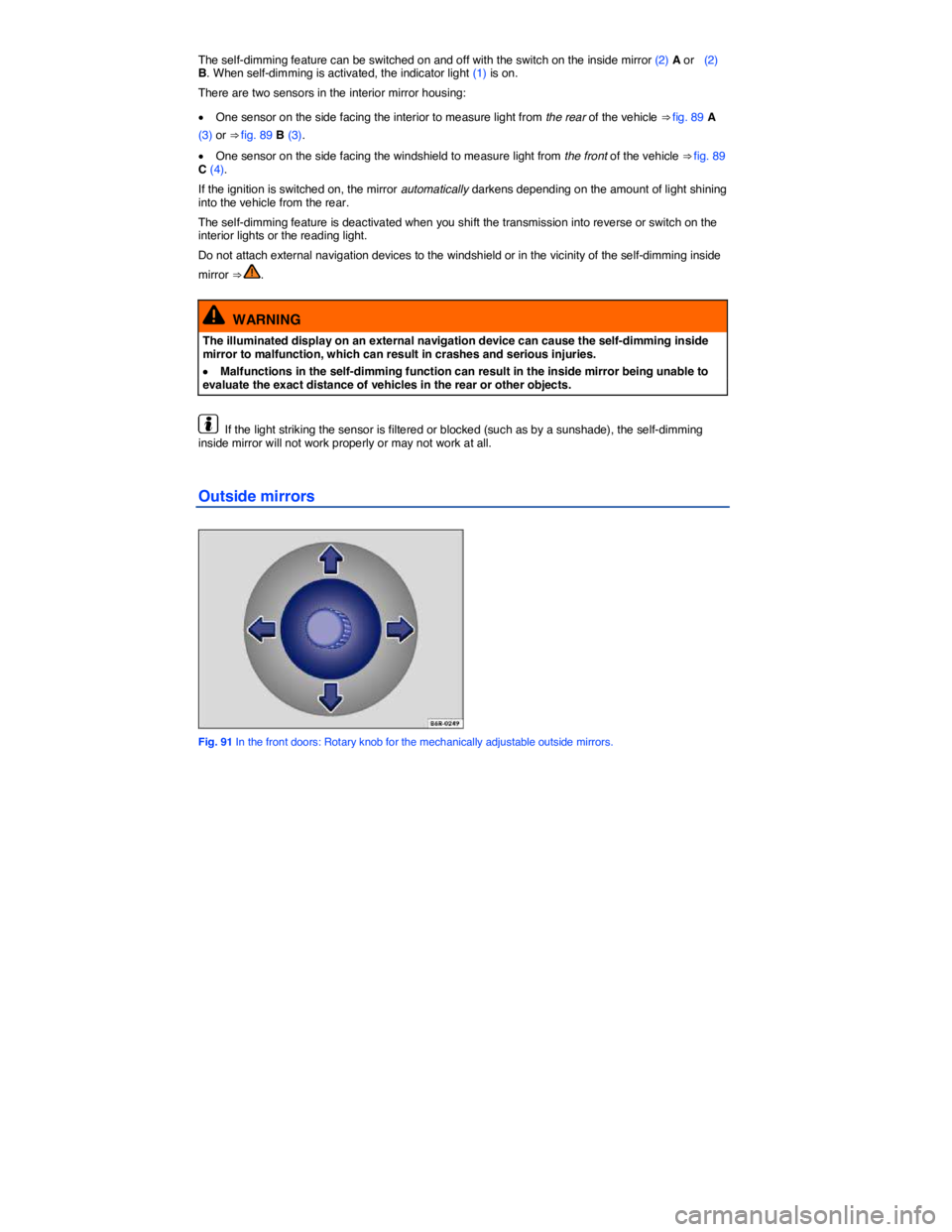
Outside mirrors
Fig. 91 In the front doors: Rotary knob for the mechanically adjustable outside mirrors.
Page 178 of 412

In some vehicle models it is possible to set a speed warning in the menu in the instrument cluster
display ⇒ Volkswagen Information System.
Top speed rating and tire inflation pressure for V winter tires depend on the engine installed in your vehicle. Be sure to ask you authorized Volkswagen dealer or authorized Volkswagen Service Facility about the maximum permissible speed and the required tire inflation pressure for the winter tires that you plan to use.
WARNING
Driving faster than the maximum speed for which the winter tires on your vehicle were de-signed can cause sudden tire failure including a blowout and sudden deflation, loss of con-trol, crashes and serious personal injuries.
x Winter tires have a maximum speed rating that may be lower than your vehicle's maximum speed.
x Never drive faster than the maximum speed for which the winter tires installed on your vehicle are rated because tires that are driven faster than their rated speed can fail suddenly.
x Never exceed the maximum load rating for the winter tires installed on your vehicle.
Install summer tires promptly in the spring. Summer tires offer better handling characteristics for temperatures above +45 °F (+7 °C). They are quieter, do not wear as quickly, and reduce fuel con-sumption.
The Tire Pressure Monitoring System must be recalibrated using the SET button whenever you remove and remount or change any wheel or tire on the vehicle, even if the reinstalled or replacement wheels and tires are identical to those that were removed and even if the tire pressure does not
change ⇒ Tire Pressure Monitoring System (TPMS) and recalibration with the SET button.
If necessary, ask your authorized Volkswagen dealer or authorized Volkswagen Service Facility about permissible winter tire dimensions.
Snow chains
Page 224 of 412
Automatic Shift Lock (ASL)
The Automatic Shift Lock (ASL) in Park (P) and Neutral (N) prevents drive positions from being en-gaged inadvertently, which would cause the vehicle to move.
To release the ASL, depress and hold the brake pedal with the ignition switched on. Press the release button on the selector lever at the same time.
The ASL is not engaged if the selector lever is moved quickly through Neutral (N) (e.g., when shifting from Reverse (R) to Drive (D)). This makes it possible to “rock” the vehicle backwards and forwards if it is stuck in snow or mud. The ASL engages automatically if the brake pedal is not depressed and the lever is in Neutral (N) for more than about 1 second and the vehicle is traveling no faster than about 3 mph (5 km/h).
In rare cases, the ASL may not engage on vehicles with a DSG® automated transmission. If this happens, power to the drive wheels will be interrupted to prevent the vehicle from moving unexpected-ly. The green indicator light K will blink and a text message will be displayed. To engage the Automat-ic Shift Lock (ASL):
x Depress and then release the brake pedal. Try to engage the ASL again.
WARNING
Moving the selector lever to the wrong position can cause loss of vehicle control, a collision, and serious personal injury.
x Never accelerate when moving the selector lever.
x When the engine is running and a drive position is engaged, the vehicle will start to move as soon as the brake pedal is released.
x Never shift into Reverse (R) or Park (P) when the vehicle is moving.
WARNING
Unintended vehicle movement can cause serious personal injury.
x Never get out of the driver's seat while the engine is running, especially when the trans-mission is in a drive gear. If you must leave your vehicle while the engine is running, always set the parking brake and shift the transmission into Park (P).
x Never leave the vehicle in Neutral (N). It will roll down hills, whether the engine is running or not.
x When the engine is running and a drive gear - Drive (D), Sport Drive (S), or Reverse (R) - has been selected, press and hold the brake pedal to keep the vehicle from moving. The ve-hicle may “creep” and move forward or backward even if the engine is idling slowly.
x Never shift into Reverse (R) or Park (P) when the vehicle is moving.
NOTICE
Even though the transmission is in Park (P), the vehicle may move a couple of inches (a few centimeters) forwards or backwards if you take your foot off the brake pedal after stopping the vehicle without first setting the parking brake.
If the selector lever is moved into Neutral (N) by mistake when the vehicle is moving, take your foot off the accelerator pedal. Wait until the engine speed has dropped to idle speed before moving the selector lever into a drive gear.
Page 236 of 412
Setting the parking brake
x Pull the parking brake lever up firmly.
x When the ignition is on, the indicator light G or 0!2+ appears in the instrument cluster display to
show that the parking brake is engaged ⇒ Warning and indicator lights.
Releasing the parking brake
x Pull the lever up slightly and press the release button ⇒ fig. 133 (arrow).
x While holding the release button down, move the lever all the way down.
WARNING
Improper use of the parking brake can cause accidents and severe injuries.
x Never use the parking brake to slow down the vehicle when it is moving, except in an emergency. Braking distance is much longer, since only the rear wheels are braked. Always use the foot brake.
x Never drive with the parking brake partially engaged. This can cause the brake to overheat and negatively affect the brake system. It will also cause the rear brake pads to wear prema-turely.
x Never activate the throttle manually from the engine compartment when the engine is running and the automatic transmission is in gear. The vehicle will start to move even if the parking brake is engaged.
NOTICE
Even though the transmission is in Park (P), the vehicle may move a couple of inches (a few centimeters) forwards or backwards if you take your foot off the brake pedal after stopping the vehicle without first firmly setting the parking brake.
A warning signal sounds if you drive faster than about 4 mph (6 km/h) with the parking brake engaged.
Parking
Page 237 of 412
x Make sure all passengers and especially children leave the vehicle.
x Take all vehicle keys with you when leaving your vehicle.
x Lock the vehicle.
On hills
Before stopping the engine, turn the steering wheel so that, if the vehicle starts to roll, its front wheels will roll into the curb:
x Facing downhill, turn the front wheels so that they point toward the curb.
x Facing uphill, turn the front wheels so that they point away from the curb.
WARNING
The vehicle exhaust system and the catalytic converter or diesel particulate filter get very hot. They can cause fires and serious personal injury.
x Never park where the hot exhaust system could ignite flammable materials, such as brush, leaves, dry grass, spilled fuel, etc.
WARNING
Leaving the vehicle when the selector lever is not in Park (P) (automatic transmissions) can cause the vehicle to roll away. This can cause accidents and serious personal injuries.
x When leaving the vehicle, always move the selector lever to Park (P), engage the parking brake, and pay attention to the warning messages on the instrument cluster display at all times.
NOTICE
x Always be careful when you park in areas with parking barriers or high curbs. These vary in height and could damage your bumper and related parts if the front of your vehicle hits a barri-er or curb that is too high while you are getting into or out of a parking spot. To help prevent damage, stop before the tires of your vehicle touch a parking barrier or curb.
x Always be careful when you enter a driveway or drive up or down steep ramps or over curbs or other obstacles. Parts of the vehicle close to the ground may be damaged (such as bumper covers, spoilers, and parts of the engine, suspension, and exhaust systems).
About the brakes