display VOLKSWAGEN JETTA SPORTWAGEN 2013 1B / 6.G User Guide
[x] Cancel search | Manufacturer: VOLKSWAGEN, Model Year: 2013, Model line: JETTA SPORTWAGEN, Model: VOLKSWAGEN JETTA SPORTWAGEN 2013 1B / 6.GPages: 324, PDF Size: 5.37 MB
Page 28 of 324

Convenience
menu Function
Factory
setting Resets the features in the Convenience submenu back to the factory settings.
Back The display returns to the Settings menu.
Lights & Vision submenu
Page 46 of 324
Convenience features
To use the convenience closing feature to close all power windows and the sunroof, hold your finger
on the lock sensor surface on the outside of the door handle for a few seconds until the windows and
sunroof close.
Remove your finger from the lock sensor surface ⇒ fig. 27 (B) to stop the function. If you touch the
unlock sensor surface (A) on the inside of the door handle immediately after releasing the lock sensor
surface (B) (arrow), all of the windows will open (safety function).
Pinch protection is active during convenience closing of the windows and the power sunroof.
The settings in the Settings – Convenience menu determine which doors open when the door
handle unlocking surface is grasped.
NOTICE
The door handle sensor surfaces can be activated by a strong stream of water or steam if a
valid vehicle key is within range of the vehicle.
x All windows may open if you turn the spray of water or steam away from and then back onto
the door handle sensor surface in quick succession. If at least one power window is opened
and the sensor is continuously activated, convenience closing is started.
The door may not open if the outside and inside door handles are used at the same time.
If the vehicle battery or the battery in the remote control vehicle key is weak or dead, it might not
be possible to unlock and lock the vehicle using Keyless Access. The vehicle can still be manually
locked or unlocked with the key bit .
The driver message Key not in range appears in the instrument cluster display if there is no
remote control vehicle key inside the vehicle or if the system does not recognize the remote control
vehicle key. The key may not be recognized, for example, if it is covered by something that interferes
with the signal (such as a briefcase), or if the remote control vehicle key battery is weak. Electronic
devices such as cell phones can also interfere with the signal.
Dirt on the door handles that contains a lot of salt (especially in winter) can affect the way the
door handle sensors work. Cleaning the door handles can help with this problem .
If the automatic transmission is not in Park (P) position, the electronic steering column lock will
not lock and the vehicle will not lock via sensors in the front door handles or the remote control vehicle
key.
Anti-theft alarm system
Page 174 of 324

Selector
lever
position
Designation Meaning ⇒
R Reverse The reverse gear is engaged.
Shift into Reverse only when the vehicle is not moving.
N Neutral Transmission is in Neutral position. No power is transmitted to
the wheels and no engine braking is available.
D Drive (standard
driving position)
All forward gears shift up and down automatically. The
transmission shifts as needed depending on engine load,
individual driving style, and vehicle speed.
S Sport Drive (Sport
driving position)
All forward gears automatically upshift later and downshift
earlier than in the D (Drive) position, to take full advantage of
the engine's power reserves. The transmission shifts as needed
depending on engine load, individual driving style, and vehicle
speed.
Automatic Shift Lock (ASL)
The Automatic Shift Lock (ASL) in Park (P) and Neutral (N) prevents drive positions from being
engaged inadvertently, which would cause the vehicle to move.
To release the ASL, depress and hold the brake pedal with the ignition switched on. Press the release
button on the selector lever at the same time.
The ASL is not engaged if the selector lever is moved quickly through Neutral (N) (e.g., when shifting
from Reverse (R) to Drive (D)). This makes it possible to “rock” the vehicle backwards and forwards if
it is stuck in snow or mud. The ASL engages automatically if the brake pedal is not depressed and the
lever is in Neutral (N) for more than about 1 second and the vehicle is traveling no faster than about
3 mph (5 km/h).
In rare cases, the ASL may not engage on vehicles with DSG® Direct Shift Gearbox. If this happens,
power to the drive wheels will be interrupted to prevent the vehicle from moving unexpectedly. The
green indicator light k will blink and a text message will be displayed. To engage the Automatic Shift
Lock (ASL):
x Depress and then release the brake pedal. Try to engage the ASL again.
WARNING
Moving the selector lever to the wrong position can cause loss of vehicle control, a collision,
and serious personal injury.
x Never accelerate when moving the selector lever.
x When the engine is running and a drive position is engaged, the vehicle will start to move
as soon as the brake pedal is released.
x Never shift into Reverse or Park when the vehicle is moving.
Page 183 of 324
Setting the parking brake
x Pull the parking brake lever up firmly.
x When the ignition is on, the indicator light g or PARK appears in the instrument cluster display to
show that the parking brake is engaged .
Releasing the parking brake
x Pull the lever up slightly and press the release button ⇒ fig. 136 (arrow).
x While holding the release button down, move the lever all the way down.
WARNING
Improper use of the parking brake can cause accidents and severe injuries.
x Never use the parking brake to slow down the vehicle when it is moving, except in an
emergency. Braking distance is much longer, since only the rear wheels are braked. Always
use the foot brake.
x Never drive with the parking brake partially engaged. This can cause the brake to overheat
and negatively affect the brake system. It will also cause the rear brake pads to wear
prematurely.
x Never activate the throttle manually from the engine compartment when the engine is
running and the automatic transmission is in gear. The vehicle will start to move even if the
parking brake is engaged.
NOTICE
Even though the transmission is in Park (P), the vehicle may move a couple of inches (a few
centimeters) forwards or backwards if you take your foot off the brake pedal after stopping the
vehicle without first firmly setting the parking brake.
A warning signal sounds if you drive faster than about 4 mph (6 km/h) with the parking brake
engaged.
Parking
Page 185 of 324
Brake disc corrosion (rust) and dirt build-up on the brake pads are more likely to occur if the vehicle
is not driven much or is driven only for short distances with little braking. If the brakes have not been
used and there is some rust on the discs, clean the brake discs and pads once in a while by carefully
braking a couple of times while driving at relatively high speed to help clean the brake discs and pads.
Make sure nobody is behind you and that you do not endanger yourself or others ⇒ .
Brake system malfunction
If you brake and find that the vehicle doesn't brake nearly as well as it used to (sudden increase in
stopping distance), a brake circuit may have failed. The brake warning light h or BRAKE will come on
and a message may appear in the instrument cluster display. If you believe the vehicle is safe to drive,
immediately take it to the nearest authorized Volkswagen dealer or authorized Volkswagen Service
Facility for repair. Drive slowly and very carefully, allow for the longer stopping distance, and be ready
to push longer and harder on the brake pedal to slow the vehicle down.
Brake booster
The brake booster works only when the engine is running. It increases the force on the brakes above
and beyond the pressure put on the brake pedal by the driver.
If the brake booster is not working, or if the vehicle has to be towed, you will have to push the brake
pedal harder to make up for the lack of booster assistance and the resulting longer stopping distance
⇒ .
WARNING
New brake pads do not provide maximum braking performance.
x New brake pads do not have the best stopping power for the first 200 miles (320 km) and
must be “broken in.” You can compensate for the slightly reduced braking force by putting
more pressure on the brake pedal.
x Drive with extra care while the new brake pads are being broken in. This reduces the risk
of collisions and serious personal injuries due to a loss of control over the vehicle.
x Never follow other vehicles too closely or put yourself into other situations that might
require sudden, hard braking, especially when the brake pads have not been broken in.
WARNING
Overheated brakes will reduce the vehicle's stopping power and increase stopping distances
considerably.
x When driving downhill, the brakes have to work especially hard and heat up quickly.
x Before driving downhill, especially on hills that are long or steep, always reduce speed
and shift into lower gear (manual or automatic transmission). This will let the vehicle use
engine braking and reduce the load on the brakes. Otherwise, the brake system could
overheat and possibly fail. Only use the brakes when you need them to slow the vehicle down
more or to stop.
x A damaged front spoiler or a non-standard spoiler can reduce airflow to the brakes and
make them overheat.
Page 203 of 324
Display
Different cruise control versions are available. The stored speed is shown in the instrument cluster
display on some equipment versions.
Status fig. 142
(A) Cruise control temporarily deactivated. Stored speed in small numbers.
(B) System malfunction. See an authorized Volkswagen dealer or an authorized Volkswagen
Service Facility.
(C) Cruise control activated. No speed stored in memory.
(D) Cruise control is active. Stored speed in large numbers.
Indicator lights
Lights up Possible cause
% Cruise control is regulating the speed.
#25)3%
When the ignition is switched on, several warning and indicator lights come on briefly for a function
check. They go out after a few seconds.
WARNING
Failure to heed warning lights and instrument cluster text messages can cause the vehicle to
break down in traffic and result in a collision and serious personal injury.
x Never ignore warning lights or text WARNINGS.
x Always stop the vehicle as soon as it is safe to do so.
NOTICE
Failure to heed warning lights or text WARNINGS can result in vehicle damage.
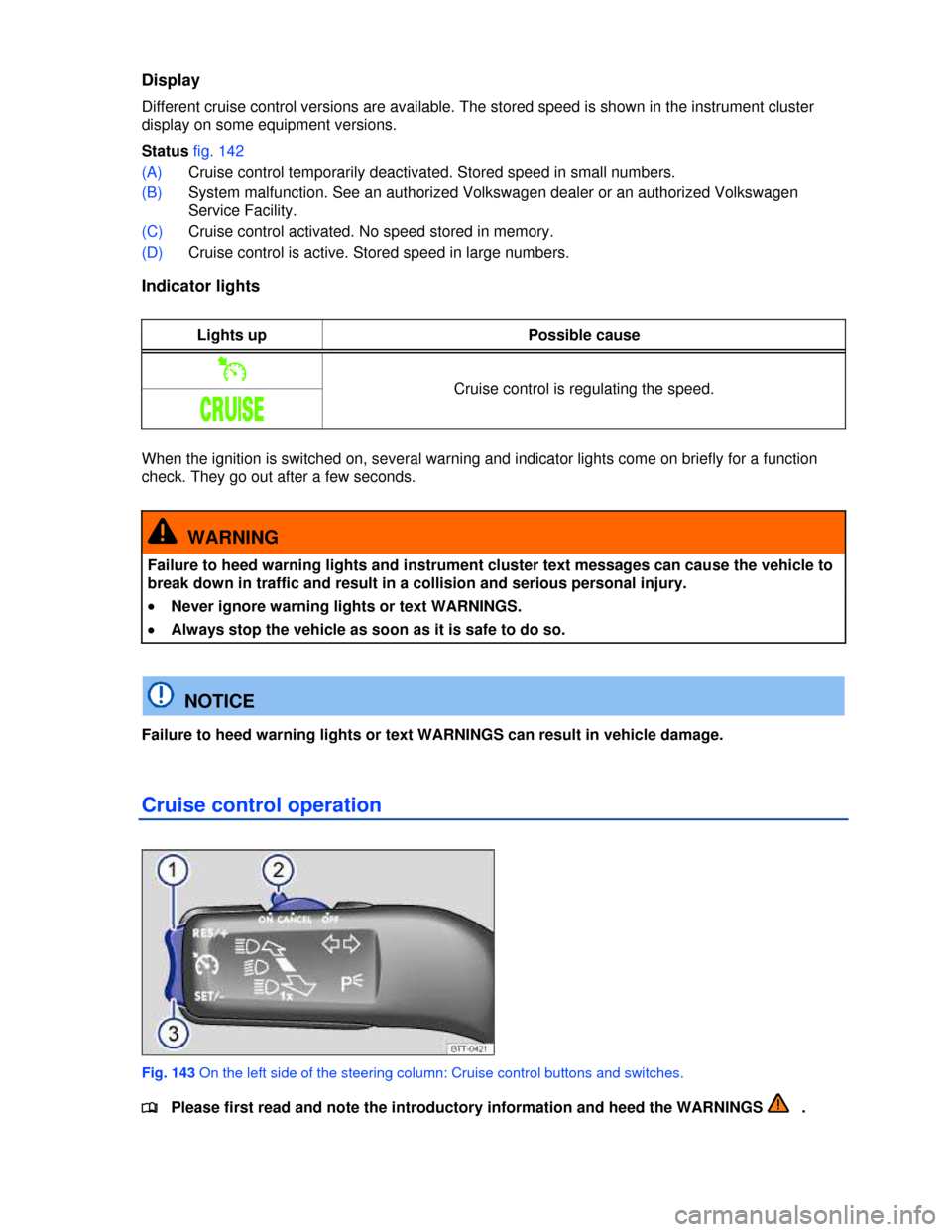
Cruise control operation
Fig. 143 On the left side of the steering column: Cruise control buttons and switches.