ECU VOLKSWAGEN PASSAT 2002 User Guide
[x] Cancel search | Manufacturer: VOLKSWAGEN, Model Year: 2002, Model line: PASSAT, Model: VOLKSWAGEN PASSAT 2002Pages: 483, PDF Size: 78.54 MB
Page 223 of 483
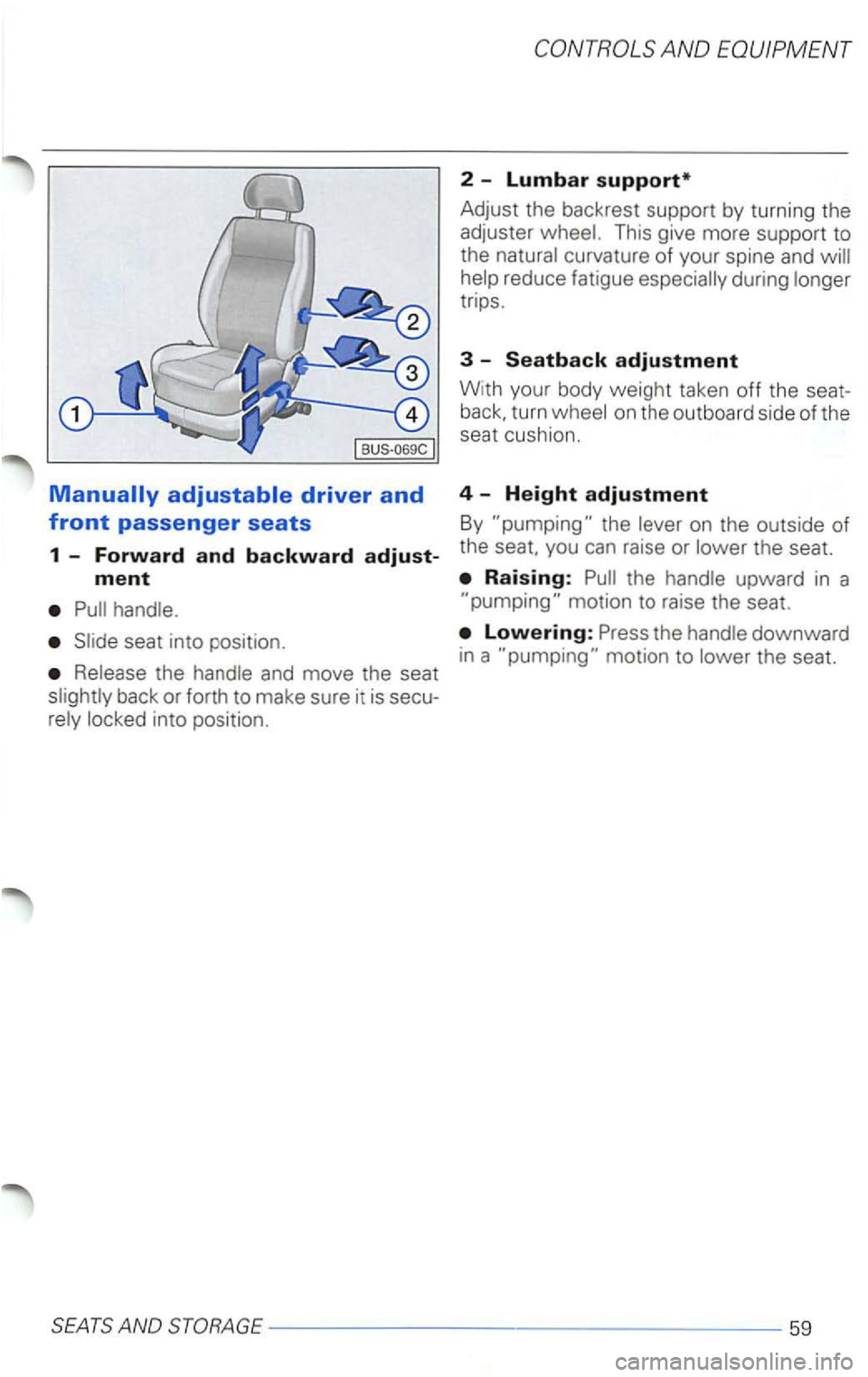
back or forth to make sure it is secu
2 -Lumbar support*
Adjust the backrest support by turn ing the
adjuster
This give more support to
the
reduce fatigue trips.
3 -Seatback adjustment
With your body weight taken off the seat
turn
the seat.
SEATS AND STORAGE-----------------59
Page 236 of 483
as
of the windows
-turn off the air recirculation switch
-turn on the fan to the highest speed
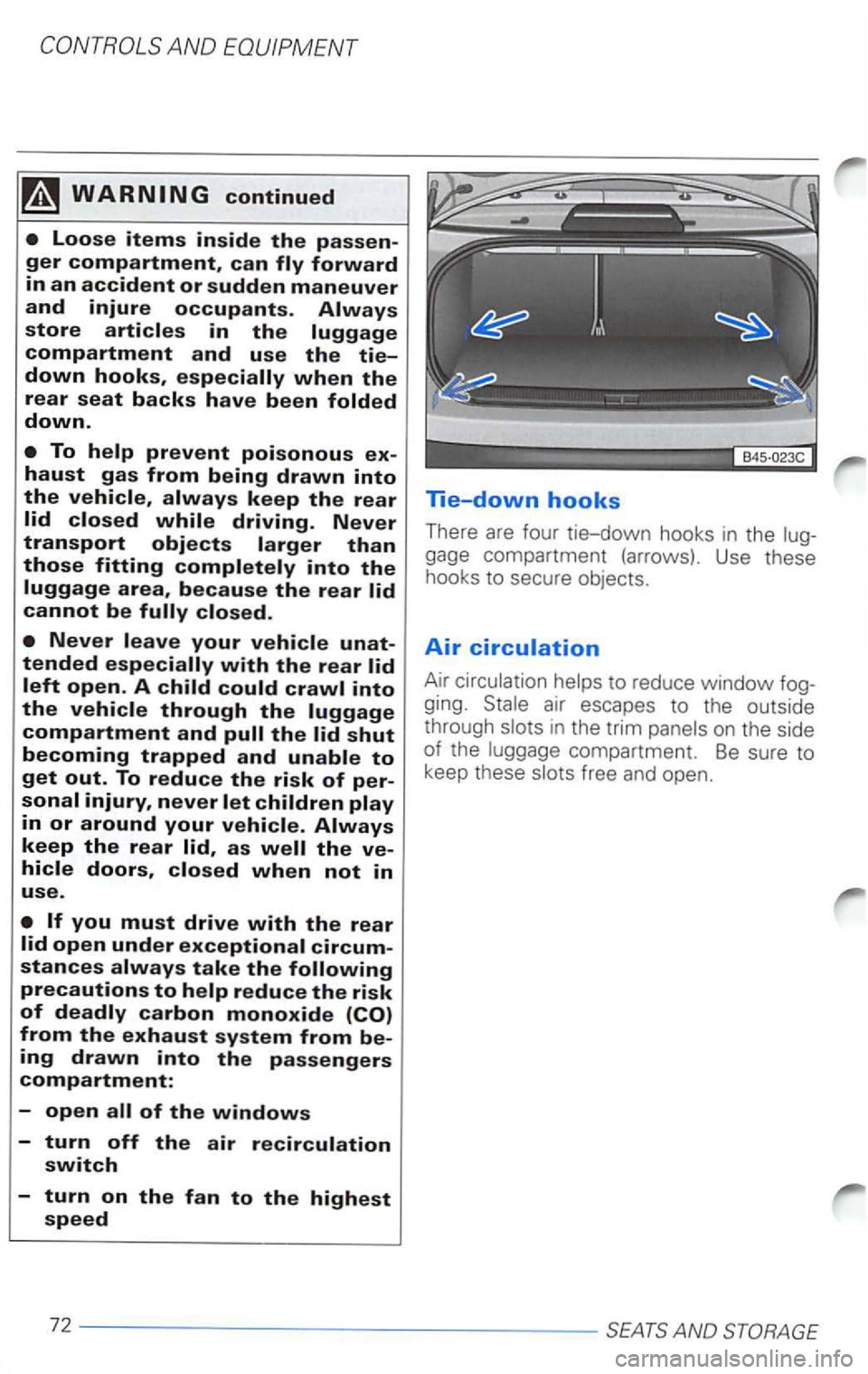
lie-down hooks
There are four tie-down hooks in the
gage compartment (arrows). Use these
hooks to secure objects.
Air
Air to reduce window
ging. in the trim
Page 239 of 483
Rear cup
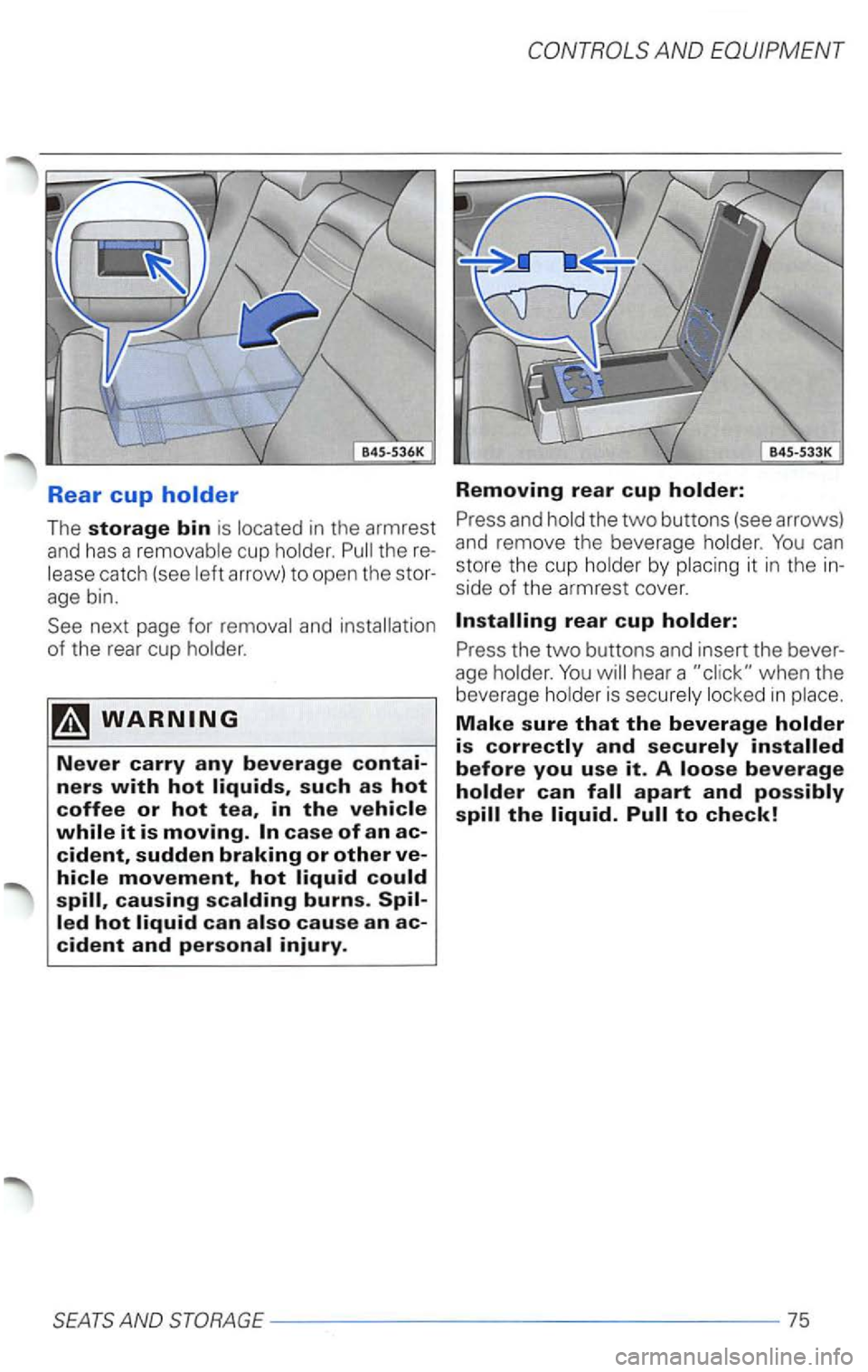
The storage bin is located in the armrest
and has a removable cup holder.
when the
beverage holder is securely locked in place.
Make sure that the beverage holder is correctly and securely installed
before you use it. A loose beverage
holder can fall apart and possibly spill the liquid. Pull to check!
Page 290 of 483
3.2 b y OnStor
your vehicles location if s uch a n obstruction
of th e satellit es occ urs.
Even if yo ur posit ional data was trans
m itted, there
is no guarantee that your ve
h icle
can always be loca ted.
The pesonalized MyOnStar web site offers a wide rang e of infor
mation and individual settings.
perso nalized webs ite will
prov ide you with easy access to pe rsonalize d
acc
ount i n fo rmati on and help with your
sys te m , in cl udi ng you r V irtual
and Pe rsonal will also be able to
p l
an yo ur travel. rece ive location based or personal weat her informatio n, a n d in terac t
w it h
subscrib er, yo u have access to
the Subscriber Website. The
can also custo m ize your
all ows you t o
c us to mi ze the depth and brea dth of th e in
f o r
mation you will have access to auto m ati-
System limitations
cally when you sig n on t o th e V irtua l A dviso r
f ro m you r ve hicl e.
T o access th e S ubsc
riber Webs ite, sim ply go
to:
www .vw
.com
T he S ubscr iber sit e is secured. Access re
q uires your
account n umber and personal
ident ifica tion number if you do not
k n ow
your account n umber or at
An On Star Servi ce Subscription Agreem ent is re quir ed in ord er
to re ceive On Sta r s ervi ces.
Th is manu al conta ins the latest informat ion at the lim e it was printed. reserves the rig ht to make ch anges to th e services withou t
prior not ificatio n .
In
order t o provide you w it h excellent service,
any call to the ca ll
models on ly
4 Introduct ion
atl-
(l-888-466-7827).
(
Page 301 of 483
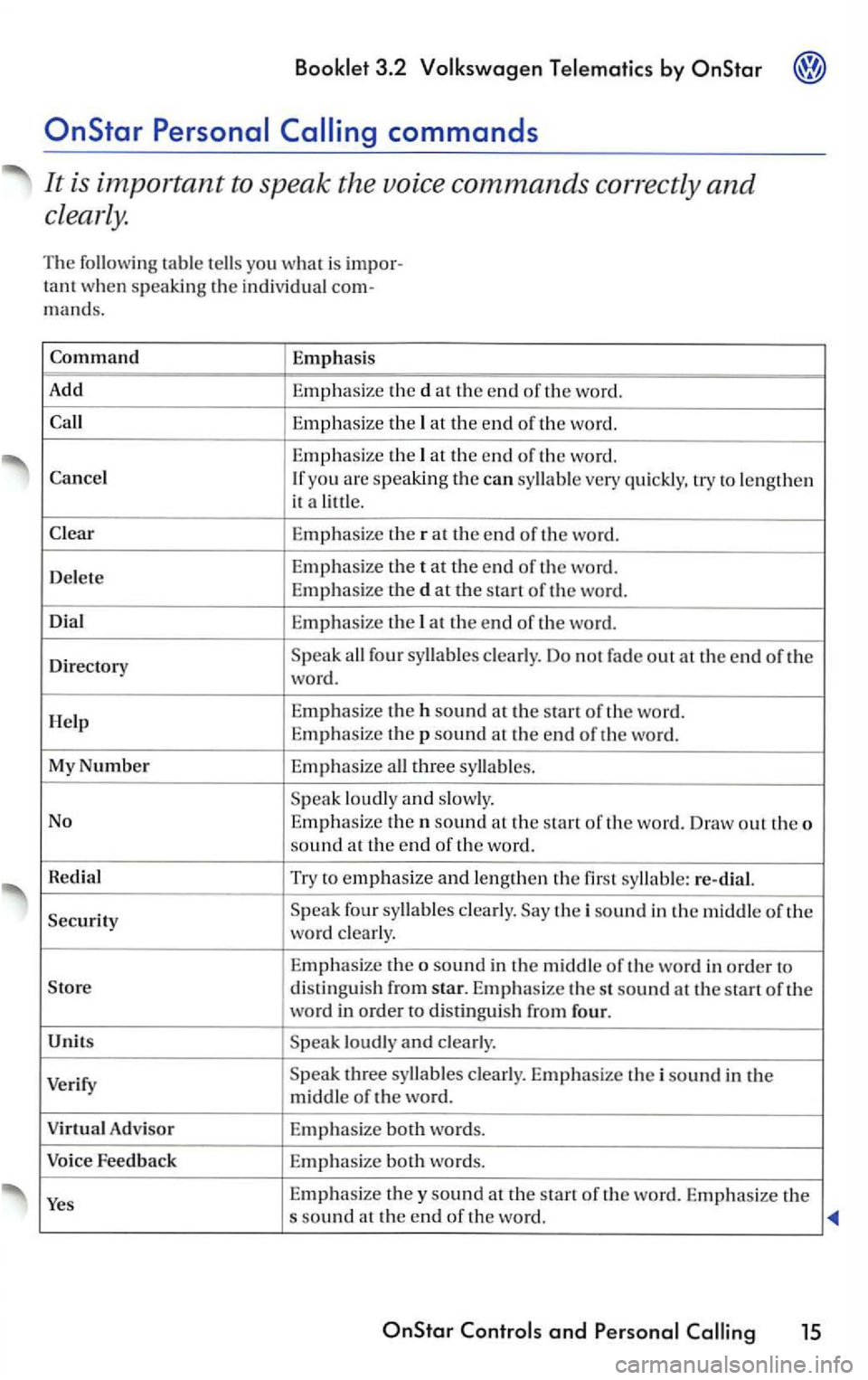
3.2 by
at the end of th e word.
Directory
Speak all four syllables clearly. Do not fade out at the end of the
word.
H
elp E mphasize the h sound at the of the word.
Emp hasize the p sound at the end of the wo rd.
My
Number Emp hasize all three syllables.
Spea k loudly a
nd slowly.
No
Emphasize then sound at th e start of th e word. Draw out the o
sound at the e nd of th e wo rd.
Redial Try to e
mphasize and lengthen the first syllable: re-dial.
Security S
peak four syllables clearly. Say the i sound in the middle of the wo rd clearly.
E
mphas ize the o sound in the middle of th e wo rd in order to
Store distinguish from star. Emphasize the st sound at the s tart of the
word in order to distingu is h from four.
Units Speak loudly
and clearly.
Verify
Speak three sy llables clearly. Emphasize the i sound in the middle of the word.
Adv isor Emphasize both words.
Voice Feedback Emp
hasize both words.
Yes Emphasize they sound at the start of the wo rd. Emphas ize the s sound at the en d of th e word.
and 15
Page 309 of 483
Booklet 3.2 Volkswagen Telematics by
syste m comes from the factory with
vo ice r
espo nses to your com mands to
firm tha t the sys te m correctl y understood the
command o r number yo u i nte nded . F or ex-
Retrieving your number
Perso nal
yo u ch a nge to tone response, a di git tone
w
ill resp ond in stead of th e vo ice. All othe r
-butto n or contac t
at 1-888-4 -0nStar (1-888-
466-7827).
-
Ask your Adv iso r to pro
v id e yo u
the telephon e number f or
yo
ur
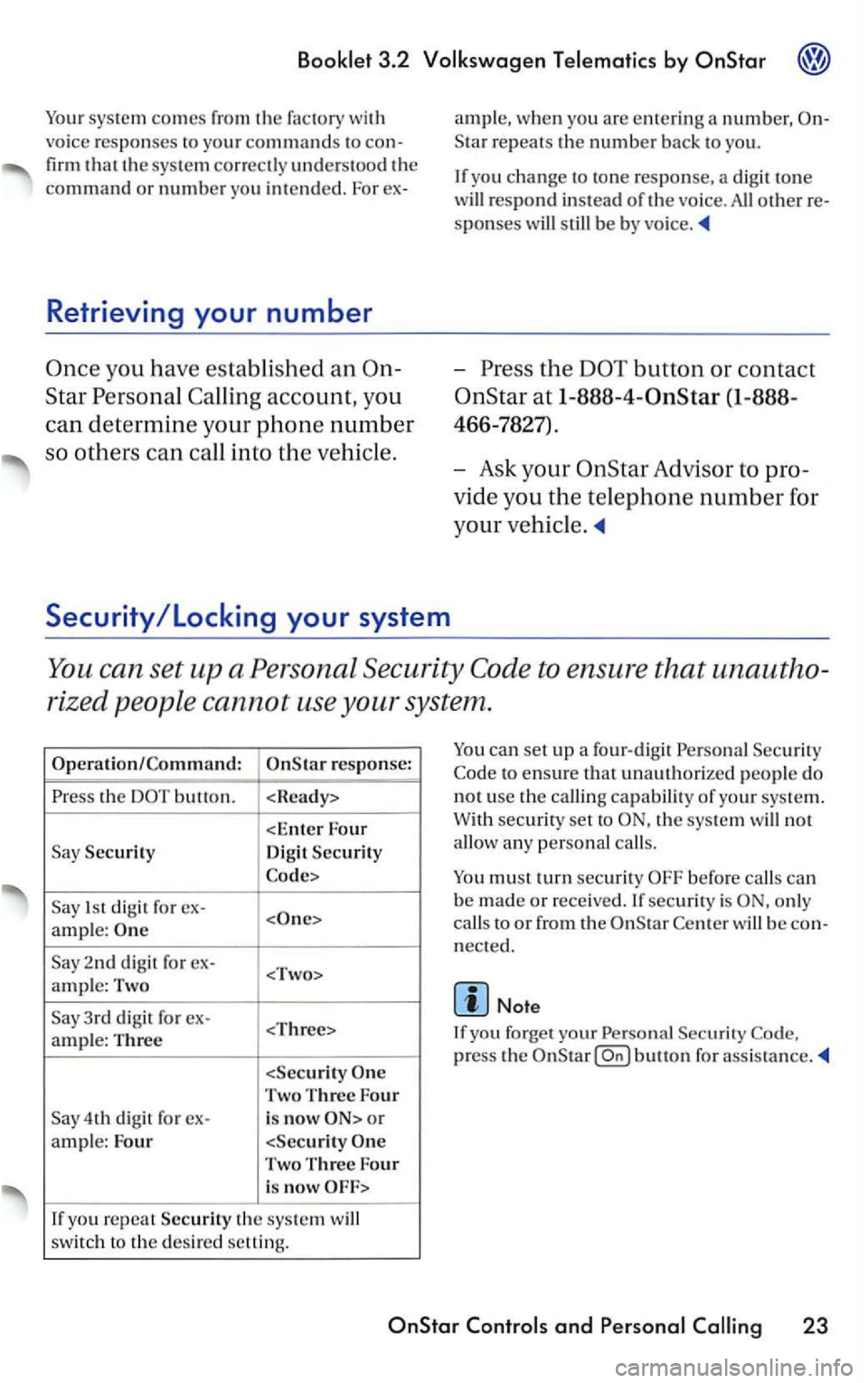
You can se t up a Perso na l Sec urity to en sure t hat una utho
ri
zed p eople cann ot u se your system .
th e
Security
Dig it Security
1s t d igit f o r ex-
ample:
2nd di git fo r ex-
Two Three Four
4th digit fo r ex-is now o r
a m ple: Four
you re p ea t Security th e sys te m will
sw itc h t o the desir e d setting.
can set up a fo ur-d ig it Persona l Sec urit y
to ensure that unauthorize d p eople do
n o t u
se the c alli ng capabilit y o f yo ur sys te m.
W ith
secu rity set to th e sys te m will no t
allo w a ny person al calls.
o nl y
c a
lls to o r from th e w ill be nect ed.
Note
If yo u f orget your Pe rsonal
press the
and Per sonal 23
Page 312 of 483
3.2
Star
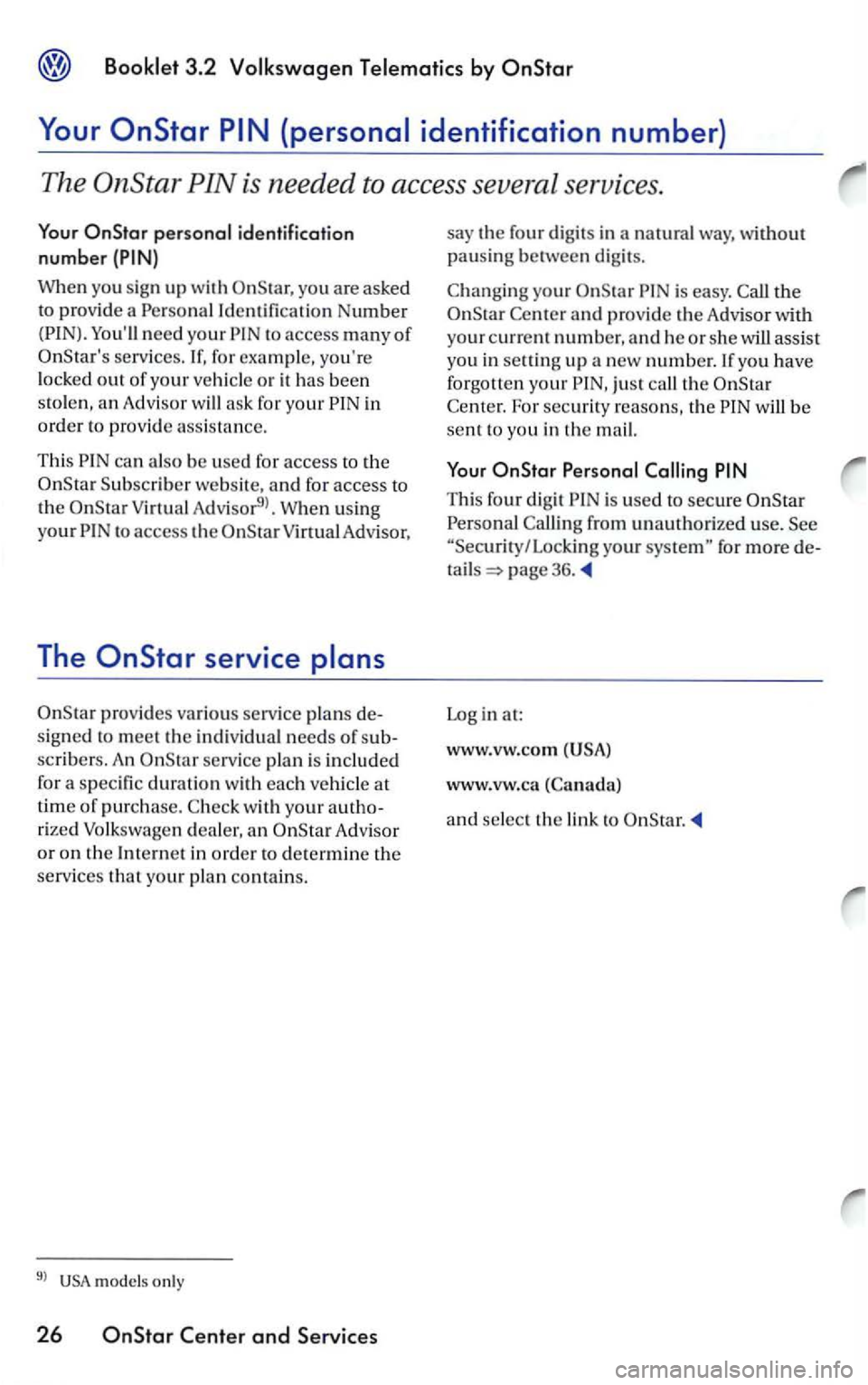
When you sign up with
You'll need your
in
order to provid e assis tanc e.
This can also be used for access to the
Subscrib er website, and for access to
V irtu al Ad visor9>. W hen u sing
y
our t o access the O nStarV irtual Advisor,
The
prov ides vario us service pl ans
signed to meet th e in div idual need s of
scribers. An servi ce plan is included
for a specific duration with each ve hicle at
time of purc h ase.
rized Volkswage n dealer, an Advisor
or on the Internet in order to determine the
services
that your pl an contain s.
9l USA m ode ls only
26 and Services
say the four digits in a natural way, without
pausing between dig its.
your is easy.
Star and provid e the Advisor with
your current number, and h e or sh e w ill assist you in selling up a new number.lfyou have
forgott en yo ur just call the w ill be
sent to yo u in the mail.
Thi s four digit is used to secure
from unauthorize d u se. you r for more
page 36.
Log in at:
www.vw .co m
(USA)
www .vw.ca
and select the link to
Page 315 of 483
Bookle t 3.2
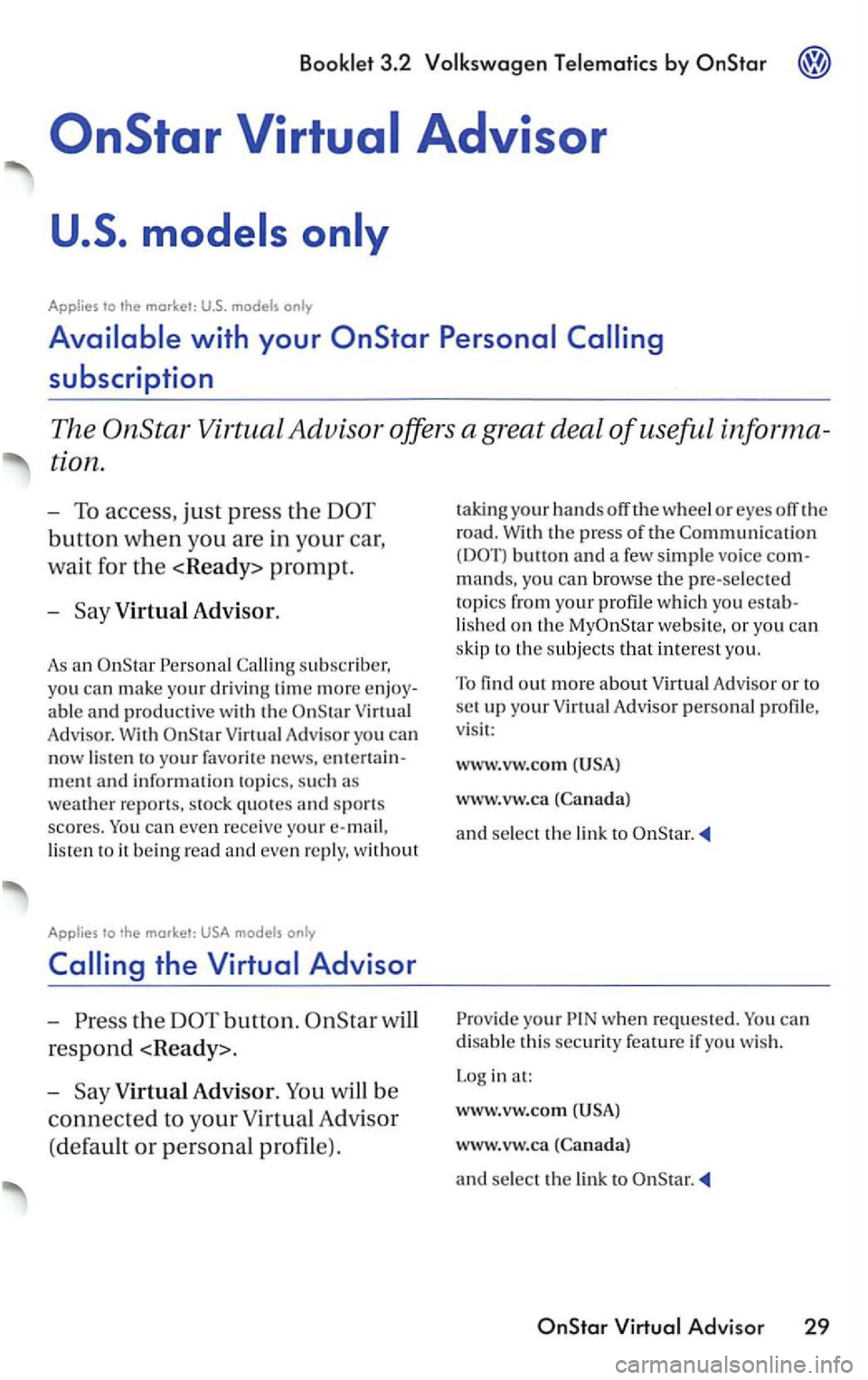
Applies to
Virtual Advisor.
As an
Adv isor. With
lis te n to it b ein g read and even re ply, without
Applies to only
the button.
respond
-
V irtual Advisor.
w heel or eyes off the
road.
With the press of the butto n and a few simple vo ice com
mands, yo u can browse the pre-selec te d
topi
cs from your profile whic h you establis h e d on the we bsit e, or you can
s kip to
the subjects that interes t yo u.
To
find out more about Virtu al Adv isor or to set up your Virtual Advisor person al profile,
v isi t:
www.vw.com
www.vw.ca
and select the link to
your when reques ted. You can
disable this securi ty feature if yo u wis h .
L og in at:
www.v w.com
www.vw.ca
and select the lin k to
Page 325 of 483
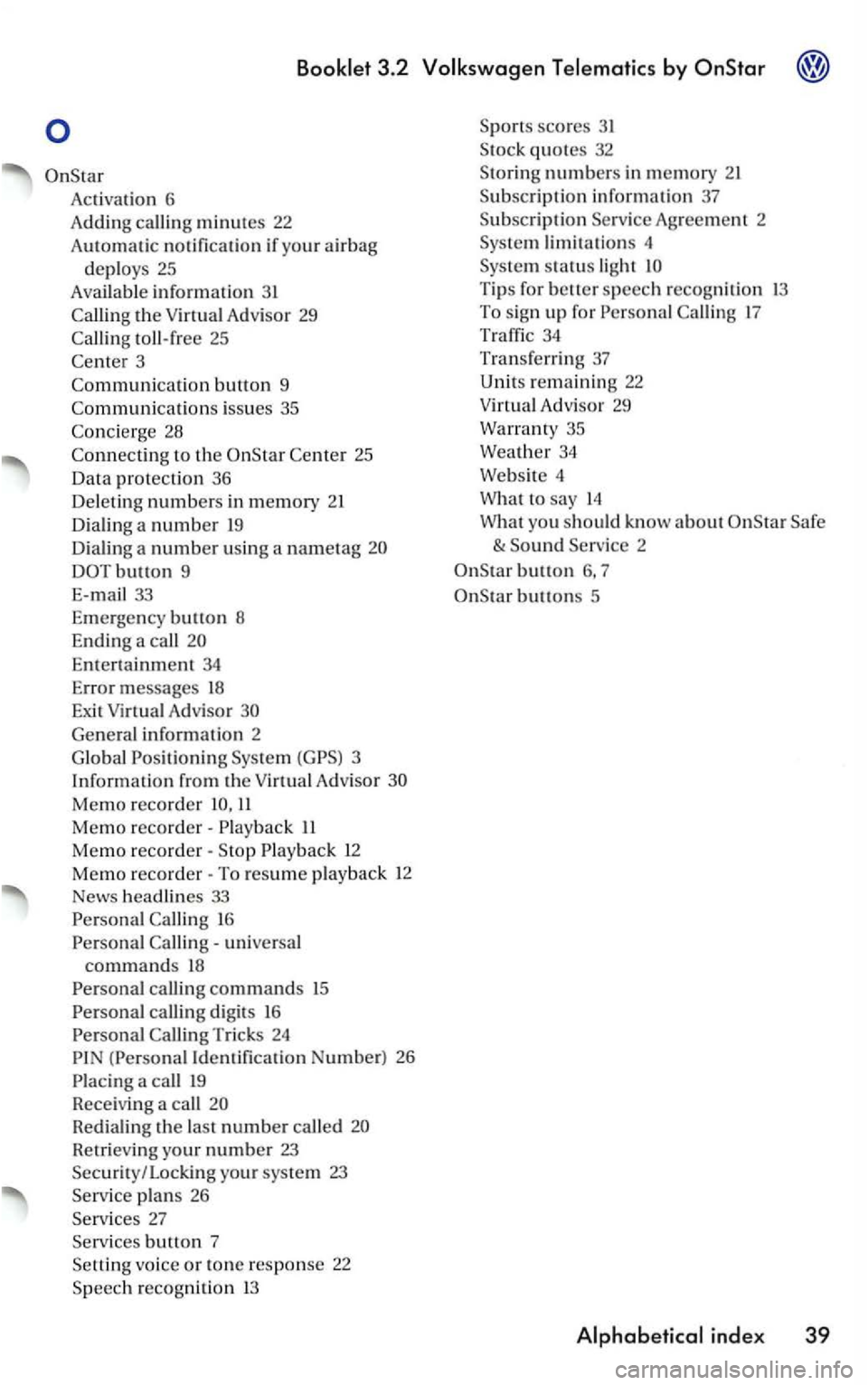
Activatio n 6
A ddin g call i
ng minutes 22
Au t
omatic notification if yo ur air bag
deploys 25
Available information 3 1
toll-free 25
3
Co mmuni
catio n button 9
Co
mmunicati o ns iss ues 35
to the 25
Da ta pro tection 36
De le ti
ng n umbers in memory 21
D ia lin g a num be r
19
D ia li n g a number using a nametag
DOTbutton 9
E-ma
il 33
E m erge ncy bu
tton 8
End ing a
call
En te rt ai nment 34
Error messages 18
Exit Virtual Advisor
Ge nera l informatio n 2
G lo bal Positio n
ing Virtu a l A d visor
Memo recorder 11
Memo reco rder· II
Memo reco rder· 12
Memo reco rder· To resume play back 12
News headlines 33
16
universa l commands 18
calling digits 16
(Personal Iden tifica tion Number) 26
Redialing the last n umber called
Ret rievi ng you r number 23 Security / Locking your system 23
plans 26
b utto n 7
vo ice or tone response 22
scores 31
numbers in mem ory
Agreement 2
li m it a tions 4
Tip s for better speech recogniti on 13 To sig n up for 17
34
Tr an sferri ng 37
Unit s rem aining 22
Virtua l Adv isor 29
Warran ty 35
Weat h
er 34
Webs ite 4
What
to say 14
W hat you
should know a bout
button 6, 7
buttons 5
Page 326 of 483
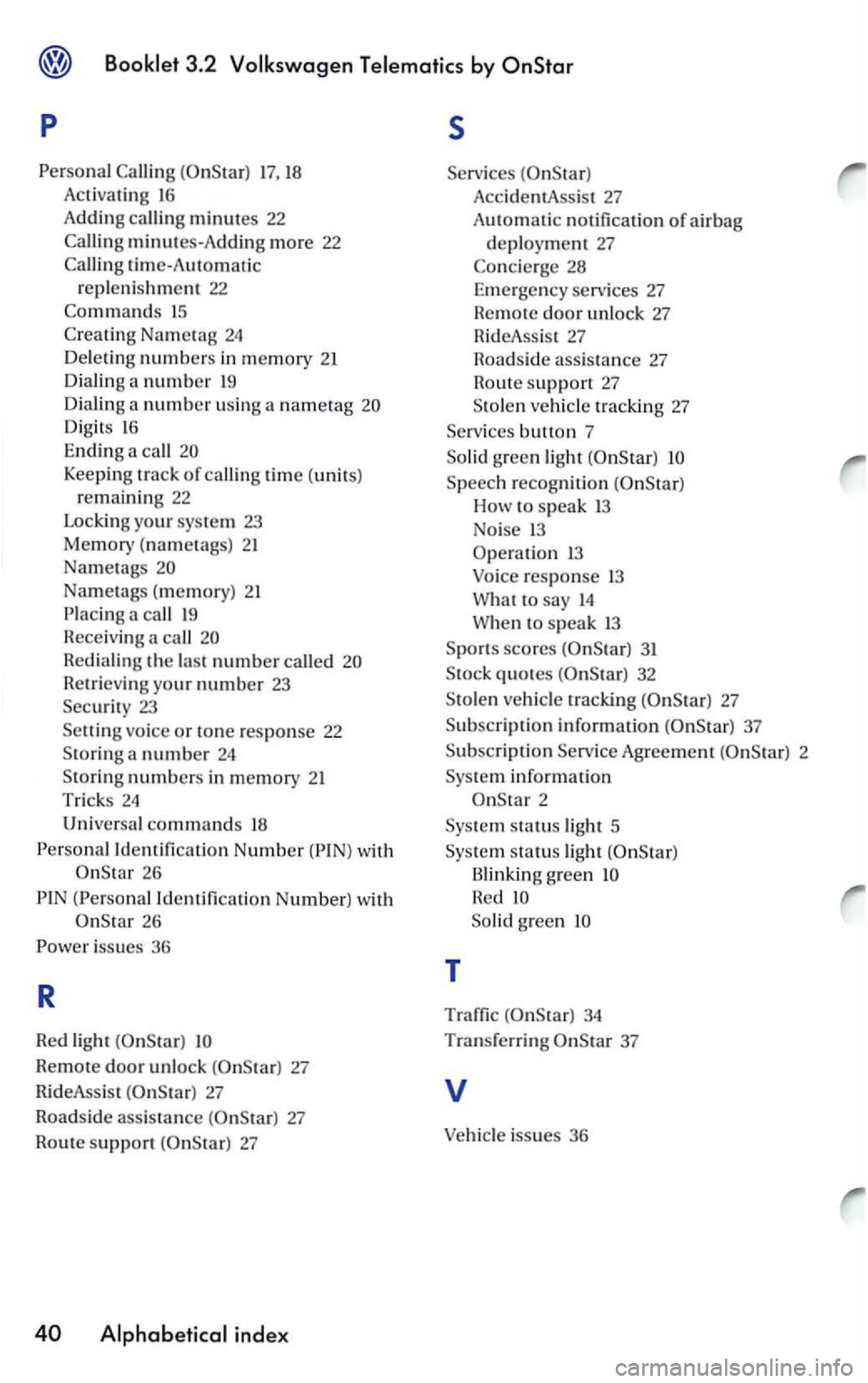
p s
17, 18 Acti va tin g 16
Adding calli ng minutes 22
minutes-A dd in g m ore 22
tim e-Automatic
r e pl eni shmen t 22
15
Digits 16
Ending a call
Keeping track of callin g time (units)
r e m ain ing 22
Lockin g your sys te m 23
Memory (nametags) 21
Na met
ags
Na metags ( memory) 21
call
R edi aling the la st numbe r called
R etrieving yo ur numbe r 23
Securi t y 23
vo ice or tone response 22
S toring a number 24
Sto rin g numbers in memory 21
Trick s 24
Univers al commands 18
Id entification Number 26
(Persona l I dentificatio n Number) w ith
26
Remote door unlock 27
Rid eAss is t
27
Roadside assis ta nce 27
Rout e support
Acc identA ssis t 27
AutOmatic no tificatio n of ai r bag
d epl oy ment 27
Speech recogniti on
How speak 13
No i
se 13
Operati o n 1 3
Voice r
esponse 13
What to say 14
W he n to speak 13
S p o rt s
scores 31
S tock quotes
Agreem ent 2
Sys te m i
nformation
2
Sys te m st
atus light 5
Sys
tem s tatu s light
Blinking g reen
So lid green
T
Traffic 34
Tra n sferri n g 37
v
Vehicle issues 36