service VOLKSWAGEN PASSAT 2002 Owner's Guide
[x] Cancel search | Manufacturer: VOLKSWAGEN, Model Year: 2002, Model line: PASSAT, Model: VOLKSWAGEN PASSAT 2002Pages: 483, PDF Size: 78.54 MB
Page 134 of 483
Care, Service and Disposal of
Airbags
Parts of the airbag system have been
installed at different
wagen. Servicing or repairing in an area of
the impair airbag
performance.
not be impaire d
and that dis carded compone nts do not
cause injury or th e environment.
ment
strument use
paired immediately by an
pairing, or any work on the
it must be replaced.
AIR BAG 29
Page 268 of 483
Engine compartment
ry,
ensure that they are poured into the proper con
tainer or
For early leak detection, regular
ly inspect the vehicle floor panel
from underneath the vehicle. If you see spots from oil or other vehicle fluids, have your vehicle inspected by a service center.
104---------------------------------------0NTHEROAD
Page 288 of 483
Booklet 3.2 Volk swagen Telematics by
Dear Volkswagen Driver,
Thi s
manual gives you all the inform at ion
you need to get s tarted using Volkswage n
Telematics by
serv ices, includin g
keep this booklet in your ve hicle for
easy re fe rence. If you need information
must activate immediat e ly to en sure that
yo u rec eive your full year of service, as the prepaid sub scription begin s w hen the
hicl e is delive red. page 6.
If yo u d o no t activa te your sys te m or if yo u
a ll
ow your service contrac t cannot g uarantee that serv ices can be
models o nly
2 Introduction
Note
can obtain additional services by callin g (1-888-466-7827) .
you sig n an contract, yo u are given a to access different
serv ices.
Page 289 of 483
3.2
service is onl y availabl e throughout the Unit ed States (including Hawaii and
Alaska ) an d If a request for service
occurs out side of these areas, communica
tion s
may not be avai labl e, and the
24 hour service.
The is th e heart of your serv ice
-staff ed 2 4 hours a day, 7 days a week wit h
knowl ed gea ble
Adv iso rs. Eve n on
weeke nds a nd holidays there is alwa ys
someo ne ready to help. For further d etails
25.
uses sophisticate d G lobal Positionin g
Sy ste m
satellit es to locate your vehicle,
w ireless technology to provide the commu
nicati
ons link , a n d seamless integration into your ve hicl e. I
f
you make an em erg ency or serv ice call, the
System uses the Global Pos itioni ng
Sys te m
to determine your locati o n au
page 3.
Thi s sys te m allo ws the
vice page 26, the Adv iso rs can access
a n ext en sive
databas e to ass is t yo u with di
rect ions, making reservat io ns, a nd other
conve nient serv ices .
pos itioning in for mation is re laye d to
th e during Button or
Em erge ncy Serv ice Button requests from the
veh icle. Location in for mation w ill be tracked and give n onl y to th e prop er authoriti es in
th e eve nt o f a veh icle th e
ft notifi cation.
How GPS works:
The sig nal bein g sent from the
If th e s ig nal s are obstructe d, the sys te m
will operate but th e co uld
h ave di
fficulty id entifyin g your current loca
ti on. The last
Advisor m ay depend on
yo u to prov id e verba l inform ation regard ing
Introduction 3
Page 290 of 483
3.2 b y OnStor
your vehicles location if s uch a n obstruction
of th e satellit es occ urs.
Even if yo ur posit ional data was trans
m itted, there
is no guarantee that your ve
h icle
can always be loca ted.
The pesonalized MyOnStar web site offers a wide rang e of infor
mation and individual settings.
perso nalized webs ite will
prov ide you with easy access to pe rsonalize d
acc
ount i n fo rmati on and help with your
sys te m , in cl udi ng you r V irtual
and Pe rsonal will also be able to
p l
an yo ur travel. rece ive location based or personal weat her informatio n, a n d in terac t
w it h
subscrib er, yo u have access to
the Subscriber Website. The
can also custo m ize your
all ows you t o
c us to mi ze the depth and brea dth of th e in
f o r
mation you will have access to auto m ati-
System limitations
cally when you sig n on t o th e V irtua l A dviso r
f ro m you r ve hicl e.
T o access th e S ubsc
riber Webs ite, sim ply go
to:
www .vw
.com
T he S ubscr iber sit e is secured. Access re
q uires your
account n umber and personal
ident ifica tion number if you do not
k n ow
your account n umber or at
An On Star Servi ce Subscription Agreem ent is re quir ed in ord er
to re ceive On Sta r s ervi ces.
Th is manu al conta ins the latest informat ion at the lim e it was printed. reserves the rig ht to make ch anges to th e services withou t
prior not ificatio n .
In
order t o provide you w it h excellent service,
any call to the ca ll
models on ly
4 Introduct ion
atl-
(l-888-466-7827).
(
Page 292 of 483
Booklet 3 .2 Vol ksw agen Tele matic s by
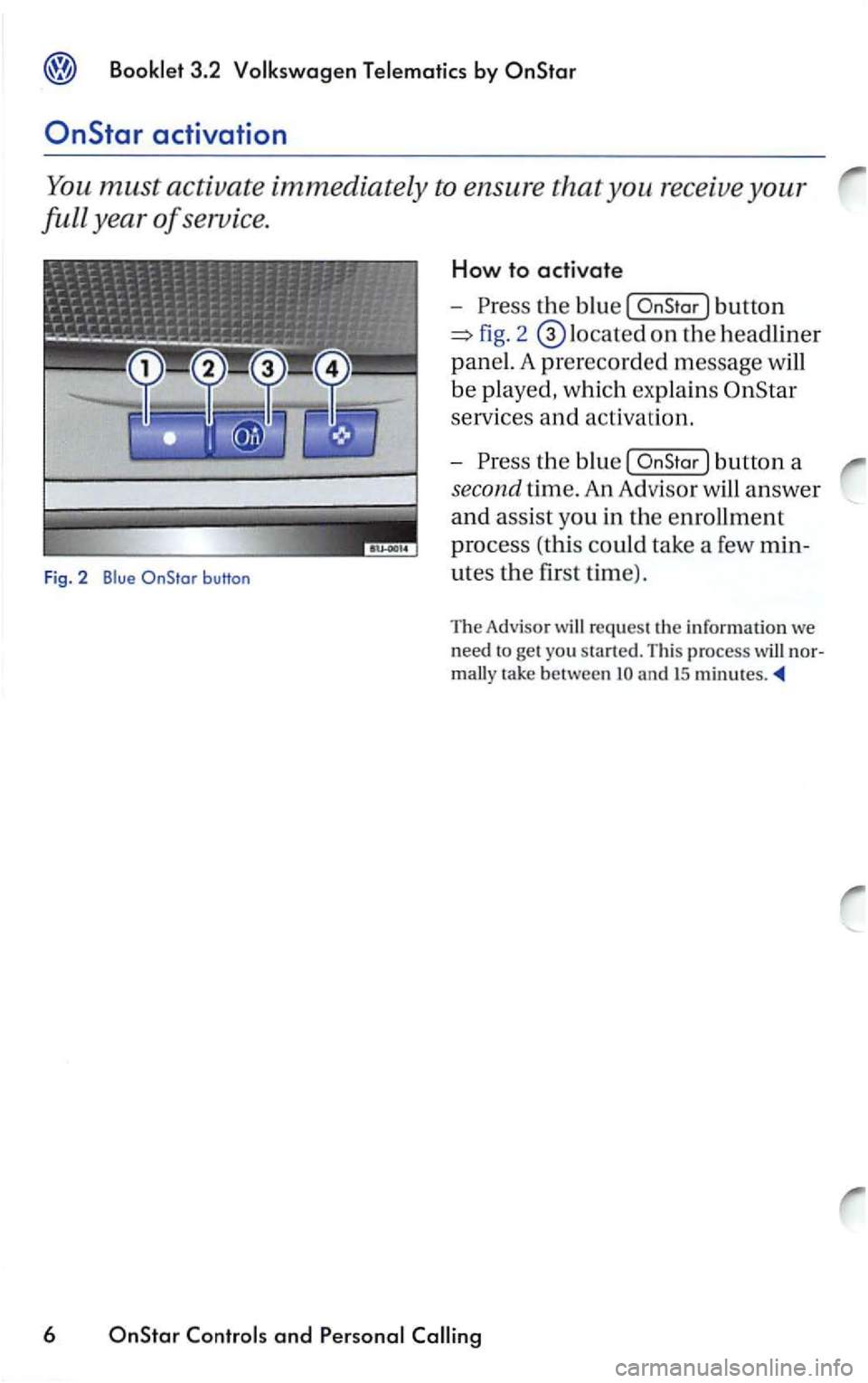
the blu e [
service s and activ a ri on.
-
th e blu e [
re qu est th e inrormatio n we
n
eed t o get you
tak e between an d IS
6 and
Page 293 of 483
Booklet 3.2 Volkswagen Telematics by
button, you are connected to an OnStar
Advisor.
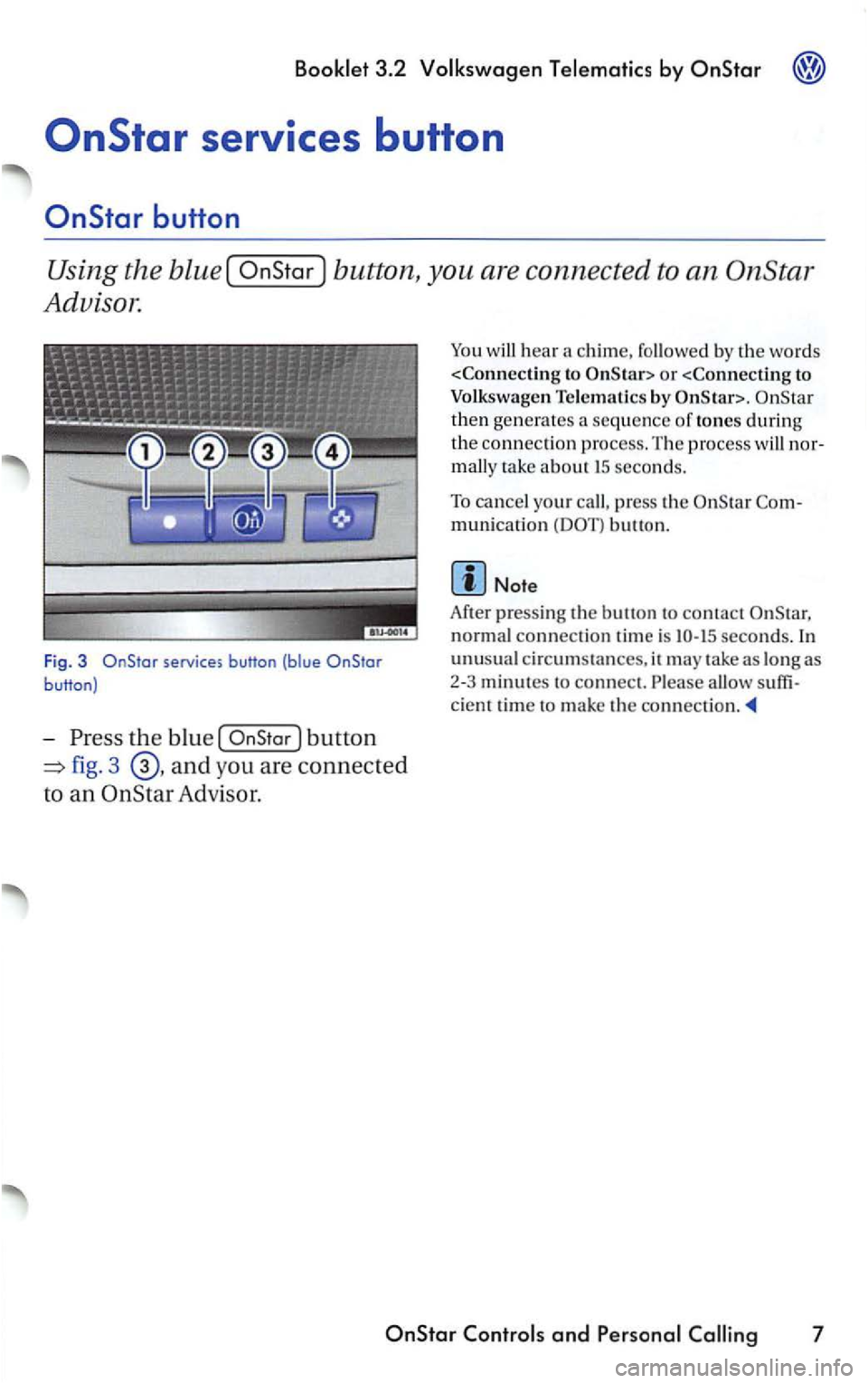
F ig. 3 services button (blue
the blue [
fig. 3 and you are connec ted
to an Advisor.
You will hear a chime,
or
Telematics by
then generates a sequence of tones during
the connection proce ss. T he proce ss
press the munication button.
normal connection tim e is seconds.
unusu al circumstan ces, it may take as long as
2
-3 minutes to connect.
c ient tim e to mak e th e
7
Page 294 of 483
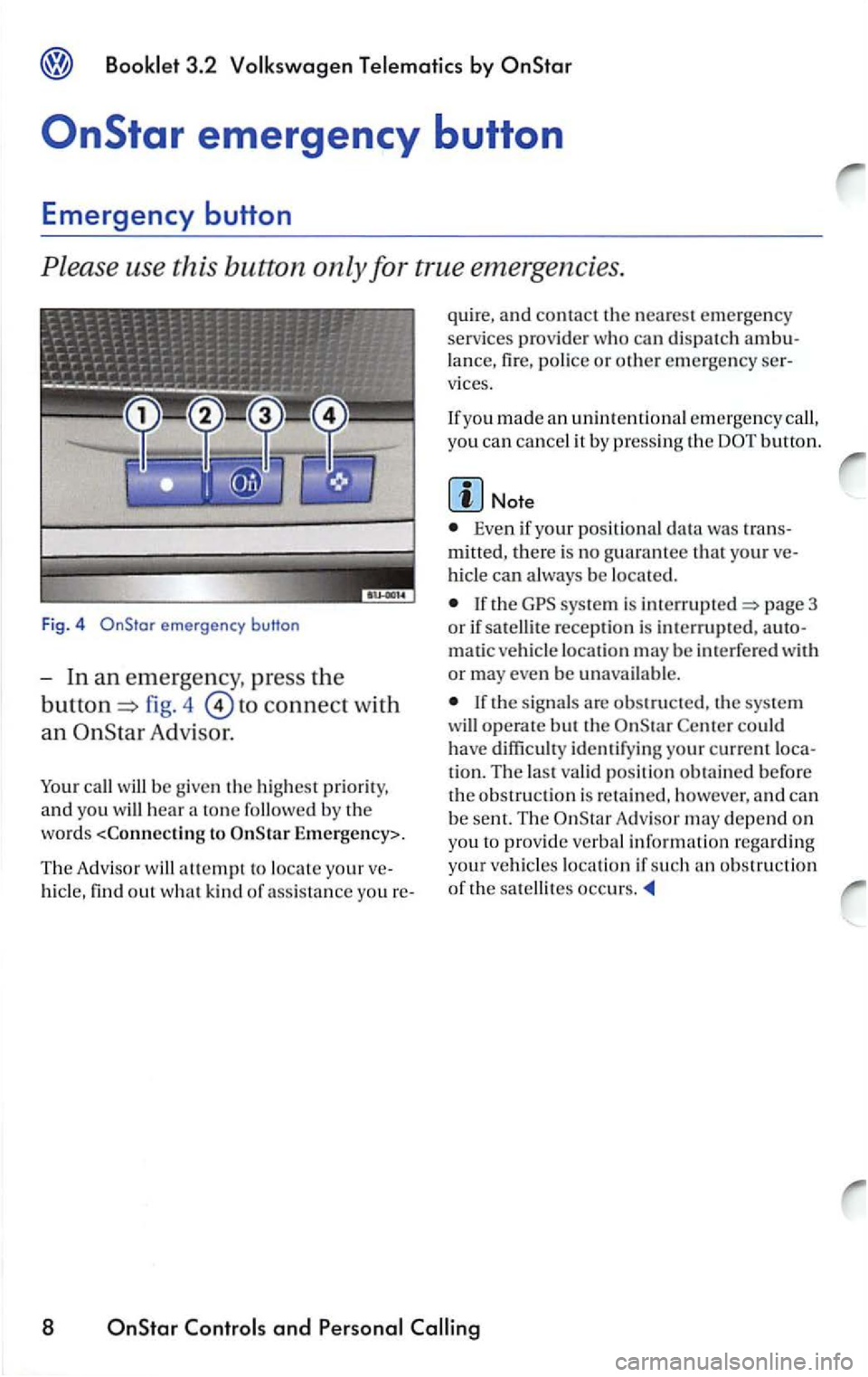
emergency button
fig. 4 to connect with
an Adv is or.
call w ill be g ive n the hi ghest prior ity,
and yo u will hea r a ton e followed b y the
word s
Th e Adv i
sor w ill attempt to locate your
hi cle, find out w hat kin d of a ss ista n ce you re- quire,
a
nd contact th e nearest emerge ncy
services prov id er who ca n di spatch lance , fire , police or other emerg en cy vices.
If yo u made an unintenti onal emergency call,
yo u
can cancel it by p ressin g the
Even if your posit ional data was
mitted, the re is no g uarantee that your
hicl e can always be located.
If the sys te m is page 3
o r if sat ellite reception is interrupted ,
matic ve hicl e location may be int erfe red with
or may even b e unavailable.
Center could have diffi cult y identifyin g your current
tion. The last valid posi tion obtai ned b efore the obs tru ction is re ta in ed , however, a nd can
be sent. The Adv is o r m ay depend on
yo u
to provid e ve rba l informatio n rega rding
your vehicl
es location if such an ob stru cti o n
of th e satellites occurs.
8 OnStar and
Page 296 of 483
Booklet 3 .2 Volk swagen Te lemati cs by
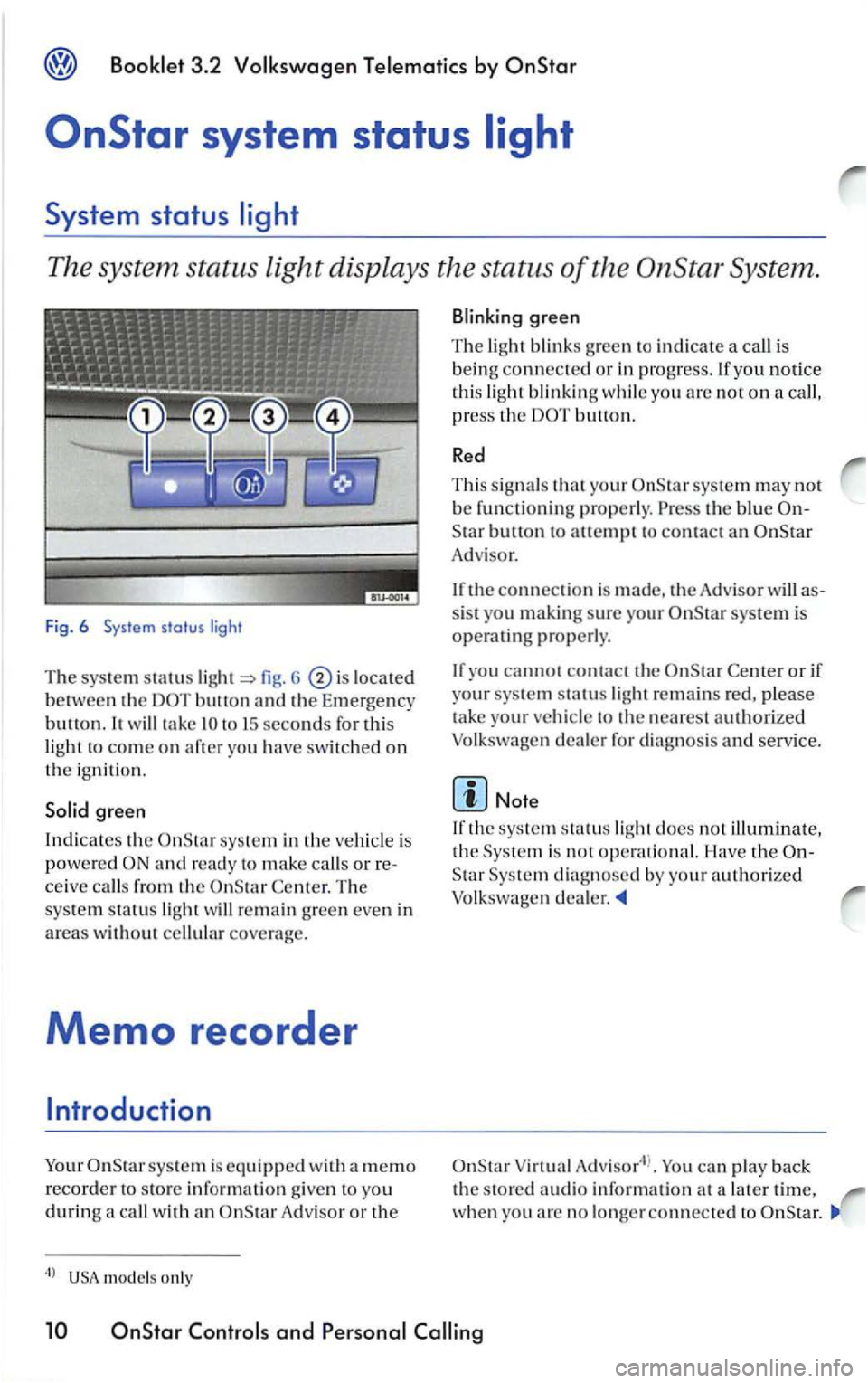
The system status light displays the status of the System .
Fig. 6 System status light
The syste m statu s fig . 6 located
between the button th e Em ergency
b u u
on. will take
sys te m in the vehicl e is
p
ower e d and ready to make calls o r re
ceive call s from th e Cente r. T he
sys te m sta tu s lig ht w
ill re main green even in
areas w ith out cellular covera ge.
Memo recorder
sys tem is equi pp ed wit h a m em o
r e
corder s tore informatio n give n t o yo u durin g call wi th A d visor or the
m od els o nly
yo u notice
thi s lig h t blinkin g while yo u are not on a call,
p re
ss the button.
Re d
T hi s s ig nal s your system may nor be func tioning properly. the blue
Adv isor.
the connection is made, the Adv isor will as
sis t you making sure your system is operatin g properly.
you canno t contact th e
de a ler for diagnosis and service.
the sys te m sta tu s lig ht does no t illuminate,
the
Virtua l can play back
th e s to re d aud io information at a later time, wh en yo u arc no longer connec ted to
and P e rso nal
Page 302 of 483
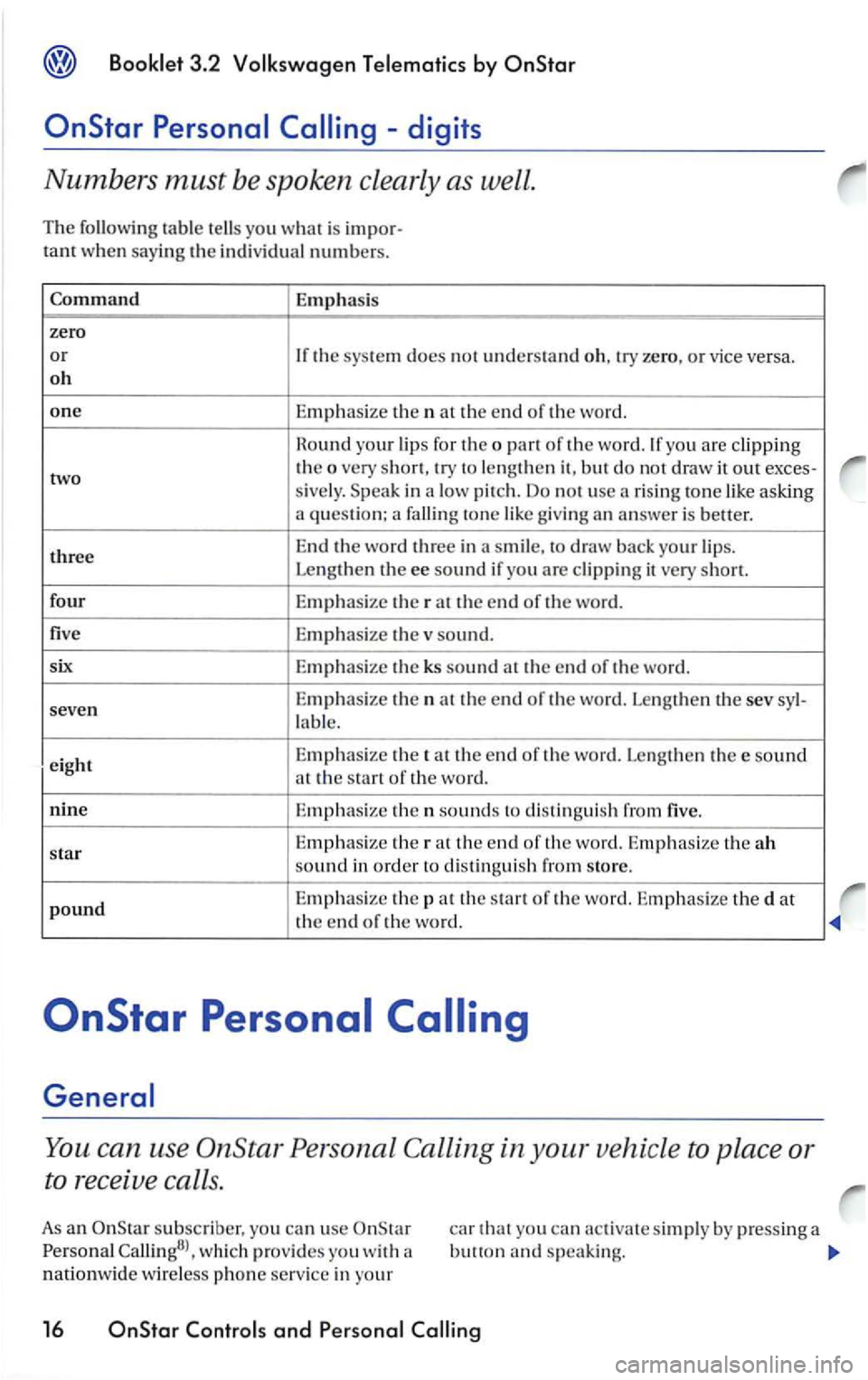
Booklet 3 .2 Volk swagen Tele matic s by
Emphasis
zero
or If the system does no t understand o h, try zero, or vice versa.
o h
one Emphasize th e n at the end of the word.
R o
und your lip s for the o part of the word.lfyou are clipp ing
two the o very short, try to lengthen it, but do not draw it out
sive ly. in a pitch. Do not use a ris in g to ne like asking a question: a falling ton e lik e g iv in g an answer is better.
t h
ree End the word three in a smile, to draw back your lips.
Leng then the ee sound if you are clipping it very short.
fo ur
Em
phasize the rat the end of the word.
five E
mphasize the sound.
six E
mphasize the ks sound at the end of the word.
seven Emphasize t
h e n at the end of the word. Lengthen the sev
la bl e.
e ig h t E
mphas
ize th e tat th e e nd of th e word. Leng th en thee sound
at the s tart of the word.
nine
Emphasize th en sounds to distin guish from five.
star Emphasi
ze the rat the end of th e word. Emphasize th e ah sound in order to distingui sh from store.
p o
und Emphasize the pat the start of th e word. Emphasize the d at
the end of the word.
You ca n use OnStar Persona l Calling in your vehicle to place or
to receive calls.
As an subscriber, yo u can use wh ic h provides you with
nationwide wireless ph o n e service in your
car that yo u can activa te simply by pressing a button and sp eaki ng.
16