menu VOLKSWAGEN PASSAT 2007 Owners Manual
[x] Cancel search | Manufacturer: VOLKSWAGEN, Model Year: 2007, Model line: PASSAT, Model: VOLKSWAGEN PASSAT 2007Pages: 392, PDF Size: 4.1 MB
Page 19 of 392
WARNING
Driving on today's roads demands the full attention of the driver at all times. Driver distrac-tion causes accidents, collisions and serious personal injury!
x Never access menus when the vehicle is moving.
Emergency starting and starting the engine with a very weak vehicle battery or after the vehicle battery has been replaced may change or delete settings (including time, date, personal convenience settings and programming). Check the settings and correct as necessary once the vehicle battery has built up a sufficient charge.
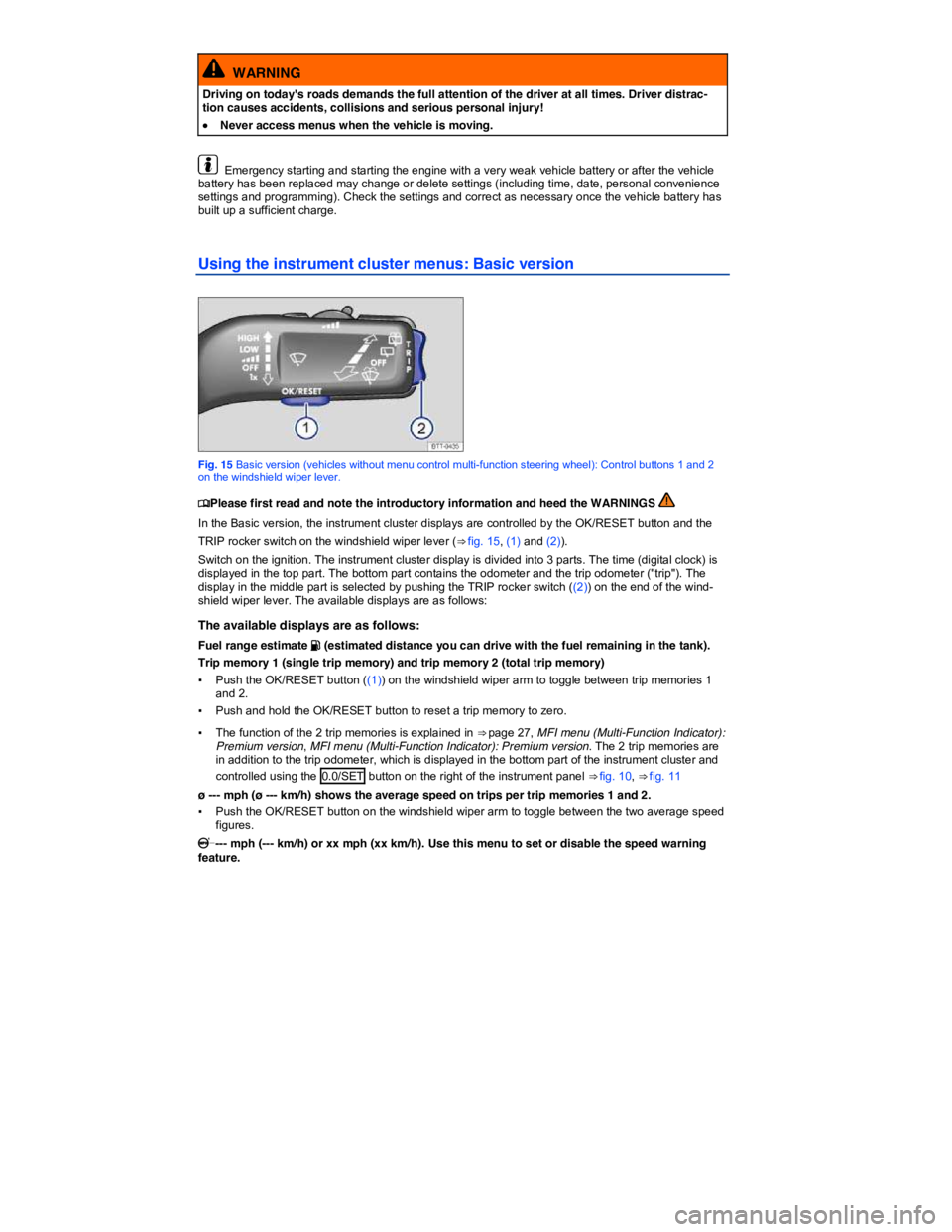
Using the instrument cluster menus: Basic version
Fig. 15 Basic version (vehicles without menu control multi-function steering wheel): Control buttons 1 and 2 on the windshield wiper lever.
Page 20 of 392
▪ Push the OK/RESET button to toggle between --- mph (--- km/h) (speed warning disabled) and xx mph (xx km/h).
▪ A warning chime will sound you if you reach the set speed; there may also be a visual message.
▪ The set speed will blink for a few seconds after you toggle to xx mph (xx km/h).
▪ Press the TRIP rocker switch ((2)) while the set speed is blinking to increase or decrease the speed.
Outside temperature
Travel time since last reset of trip memories 1 and 2.
▪ Push the OK/RESET button to toggle between the two time figures.
--- mpg (l/100 km) current fuel consumption.
ø --- mpg (ø l/100 km) average fuel consumption of trips per trip memories 1 and 2.
▪ Push the OK/RESET button to toggle between the two figures.
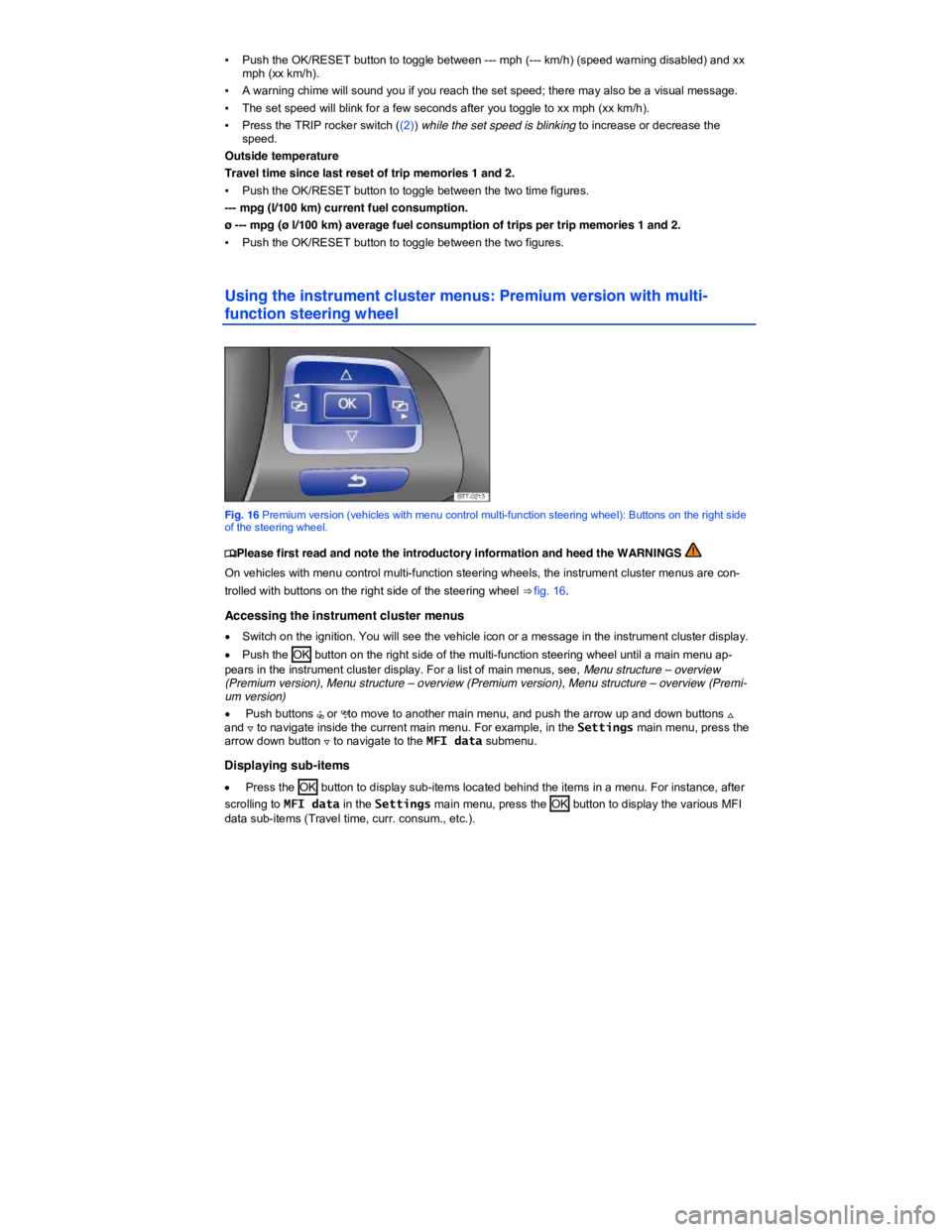
Using the instrument cluster menus: Premium version with multi-
function steering wheel
Fig. 16 Premium version (vehicles with menu control multi-function steering wheel): Buttons on the right side of the steering wheel.
Page 21 of 392
Selecting a setting
Some menus are used to select settings for certain features:
x Push the OK button to select a setting. For example, the 2 settings under Mirror adjust (Settings > Convenience > Mirror adjust) are Individually and Both mirrors. After navigating to these items, use the arrow up and down buttons to highlight one and then push the OK button to select this setting.
Returning to the higher menu level
x Use the arrow down button + to select Back and then press the OK button or use the back arrow button.
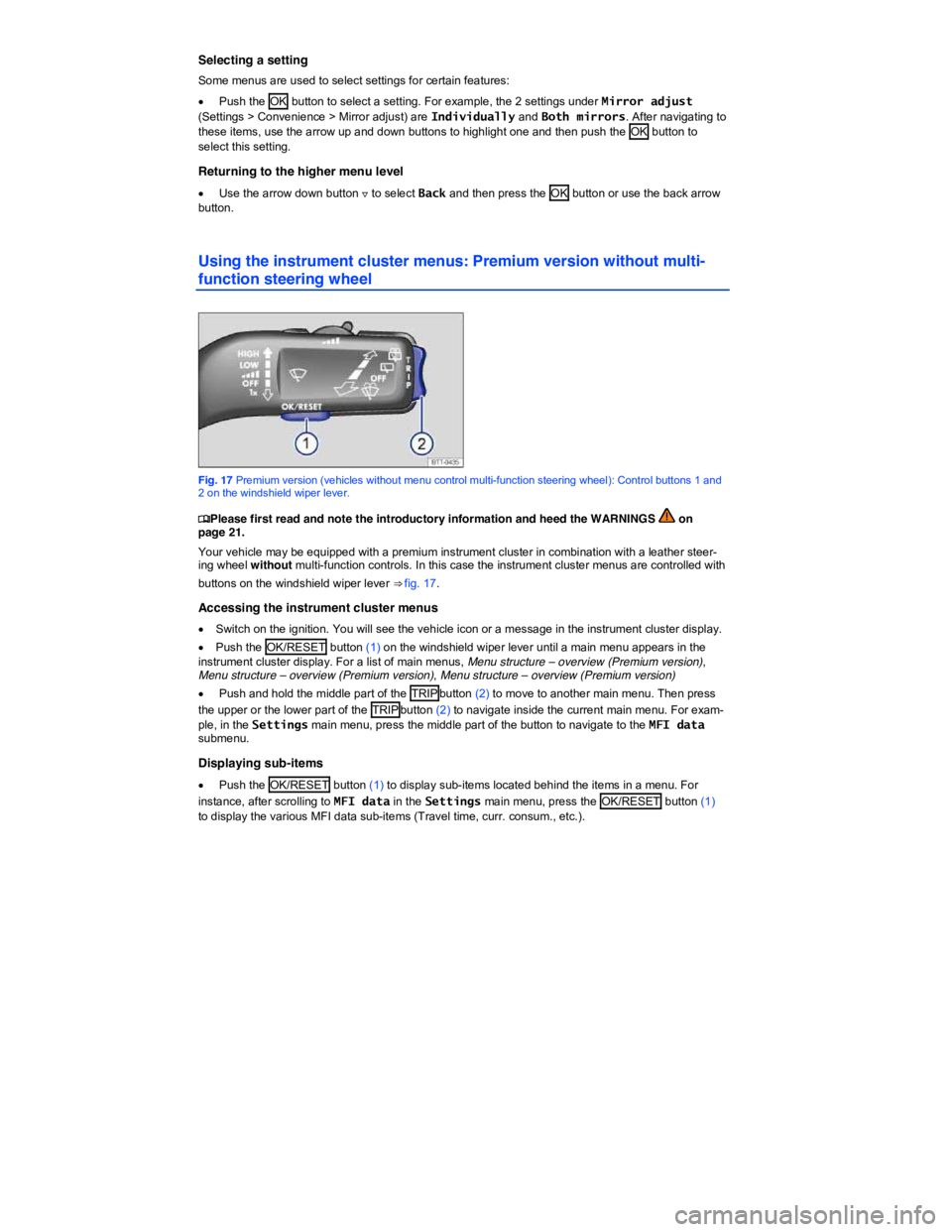
Using the instrument cluster menus: Premium version without multi-
function steering wheel
Fig. 17 Premium version (vehicles without menu control multi-function steering wheel): Control buttons 1 and 2 on the windshield wiper lever.
Page 22 of 392
Selecting a setting
Some menus are used to select settings for certain features:
x Push the OK/RESET button (1) to select a setting. For example, the 2 settings under Mirror adjust (Settings > Convenience > Mirror adjust) are Individually and Both mirrors. After navigating to one of these items, push the OK/RESET button (1) to select this setting.
Returning to the higher menu level
x Push and hold the middle part of the TRIP button (2) .
Menu structure – overview (Basic version)
Page 23 of 392

Vehicle status, Main menus: Premium version
Settings, Settings menu
▪ Language
▪ MFI data
– Travel time
– Curr. consum. (current fuel consumption)
– Av. consum. (average fuel consumption)
– Range
– Route
– Av. speed
– Digit. speed (digital speed display)
– Oil temp. (oil temperature; 3.6 liter engine only)
– Speed warn. (speed warning)
– Back
▪ Convenience, Convenience submenu
– ATA confirm
– Central locking
Auto unlock
Unlock doors
Back
– Window op. (window operation)
Off
All
Driver
Back
– Mirror down (vehicles with memory seats)
– Mirror adjust
Individually
Both mirrors
Factory setting
Back
▪ Lights & Vision, Lights & Vision submenu
– Coming home
– Leaving home
– Conv. turn sig. (convenience turn signal)
– Factory setting
– Back
▪ Time
– Hours
– Minutes
– 24 hr. mode
– Daylight save
– Back
▪ Snow tires (winter tires)
– On
– + 5 mph
– - 5 mph
Page 24 of 392
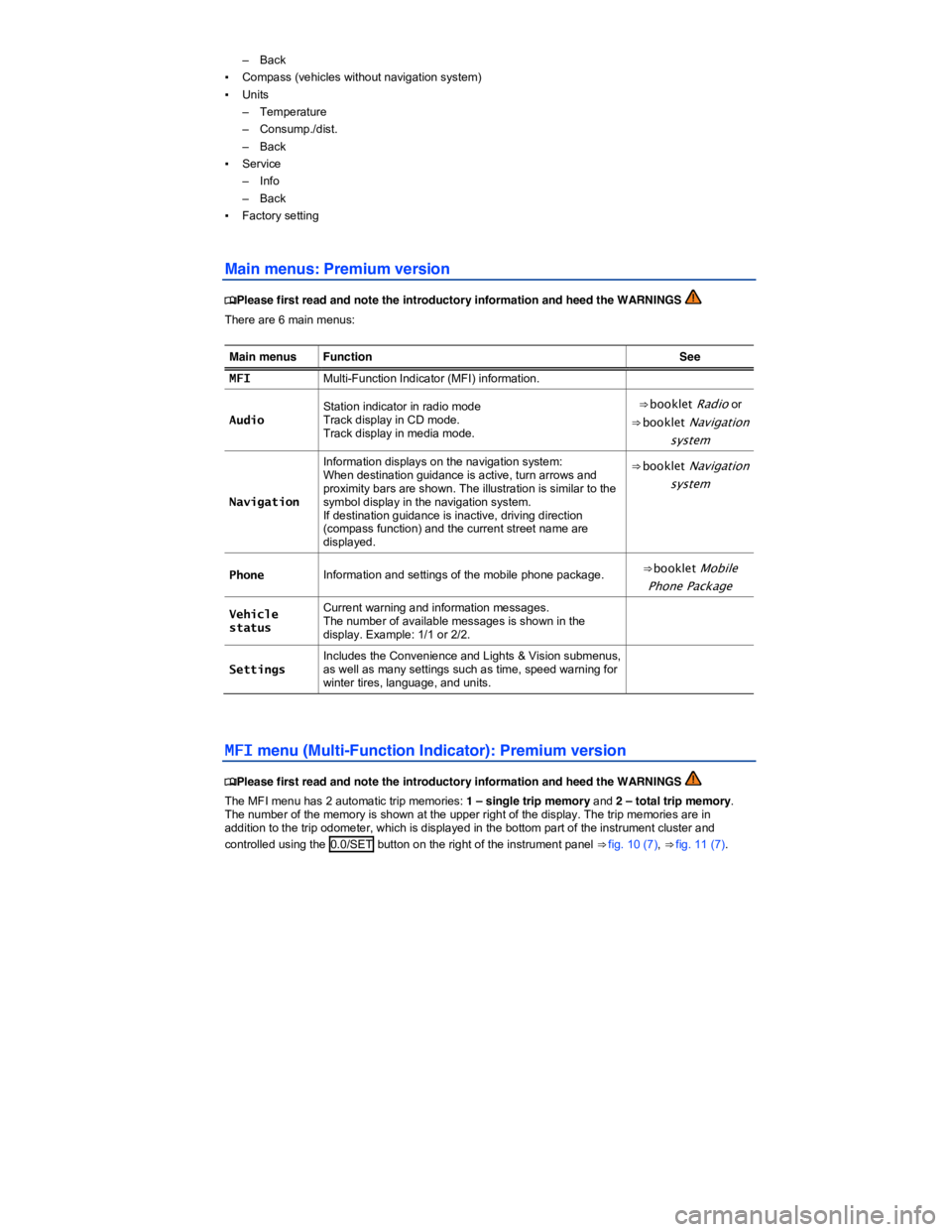
– Back
▪ Compass (vehicles without navigation system)
▪ Units
– Temperature
– Consump./dist.
– Back
▪ Service
– Info
– Back
▪ Factory setting
Main menus: Premium version
Page 25 of 392

To display the distance driven on trips 1 and 2, select the Route item in the MFI menu (MFI >
Route). Press the OK button (⇒ fig. 16) to toggle between Route 1 and Route 2 (trip 1 and trip 2).
Push and hold the OK button to manually reset a trip memory to zero.
1 Single trip memory
The memory accumulates and stores information about distance driven and fuel used from the time the ignition was switched on until the time it was switched off. If the ignition stays off for 2 hours or more, stored information is automatically deleted. If the trip is continued within 2 hours after the ignition was switched off, the new values are added.
2 Total trip memory
The memory displays and stores the accumulated driving and fuel consumption data of any number of single trips up to a total driving time of 99 hours and 59 minutes, and up to a total distance of 9,999 miles (9,999 km), depending on the instrument cluster version. If one of the maximum values is exceeded, then the memory is automatically cleared and starts again from 0.
Possible MFI menu displays
The following displays can be accessed in the MFI menu if enabled under Settings > MFI data. Displays that are not enabled will not appear.
Display Function
Travel time Driving time in hours (h) and minutes (min) corresponding to trip memories 1 and 2 (toggle).
Consumption --.- mpg Current fuel consumption in miles per gallon (l/100 km) while driving. When units are set to miles, dashes appear instead of a number when the engine is running and the vehicle is standing still. When units are set to kilometers, the display shows liters consumed per hour when the engine is running and the vehicle is standing still.
Consumption --.- l/100 km
Av. consumption --.- mpg Average fuel consumption in miles per gallon (l/100 km) on trips per trip memories 1 and 2 (toggle) is displayed once the vehicle has been driven about 330 feet (100 m). Until then, dashes appear instead of a number. The value displayed is updated every 5 seconds. Av. consumption --.- l/100 km
Range Estimated distance in miles (km) that the vehicle can go with the fuel left in the tank the way you are currently driving. Takes account of the current fuel consumption, among other things.
Range b Diesel engines only: Estimated distance in miles (km) that the vehicle can go with the AdBlue left in the tank. Visible only when the AdBlue range has fallen to less than 1500 mi or 2400 km.
Route Distance driven in miles (km) per trip memories 1 and 2 (toggle).
Average speed
Average speed on trips per trip memories 1 and 2 (toggle). Displayed once the vehicle has been once the vehicle has been driven about 300 feet (100 m). Until then, dashes appear instead of a number. The value displayed is updated every 5 seconds.
0 speed Digital display of current vehicle speed.
Oil temp. Current engine oil temperature (digital display; 3.6 liter engine only).
Speed warning --- mph When the set speed (from 20–155 mph or 30–250 km/h) is exceeded, an acoustic warning sounds, and a visual message may also appear in the
Page 26 of 392
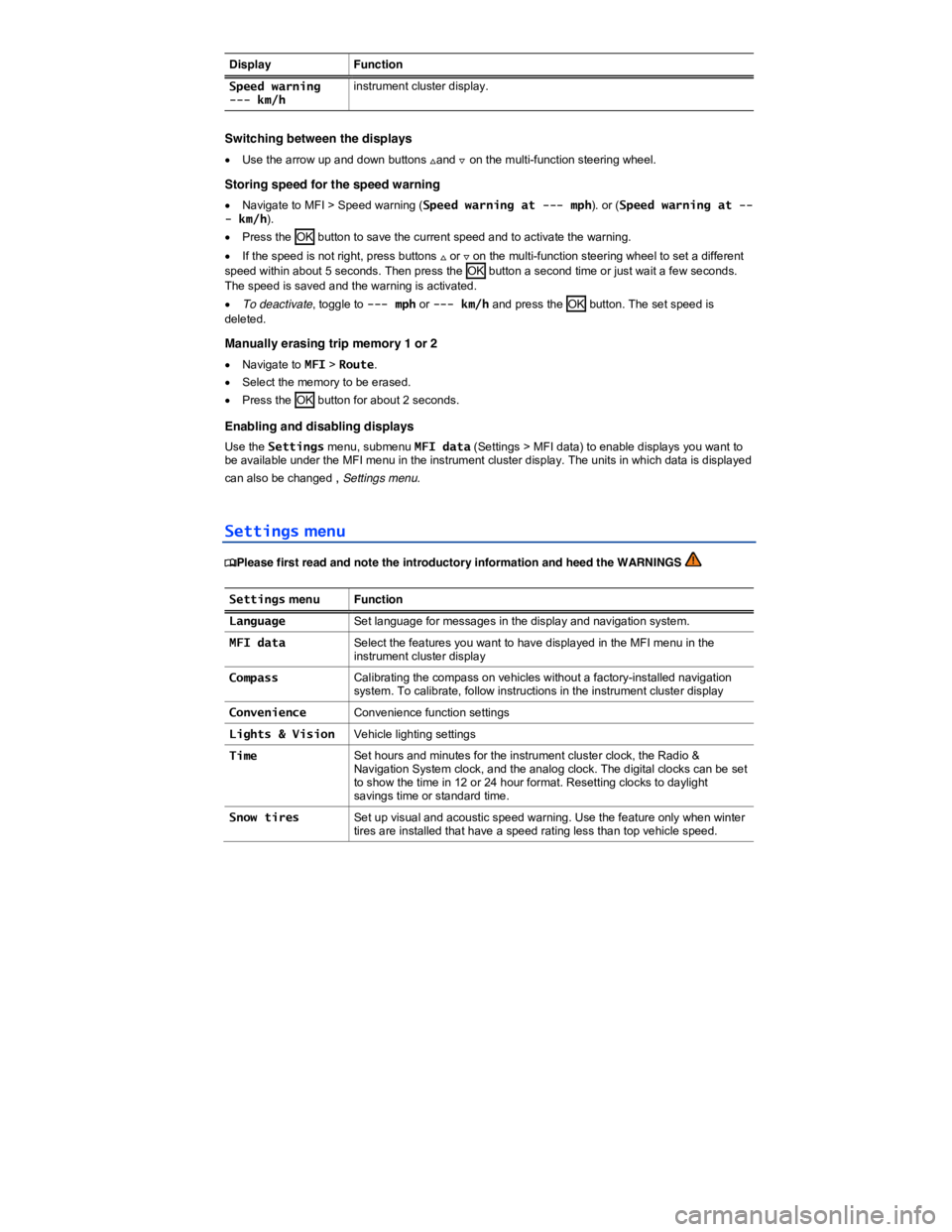
Display Function
Speed warning --- km/h instrument cluster display.
Switching between the displays
x Use the arrow up and down buttons *and + on the multi-function steering wheel.
Storing speed for the speed warning
x Navigate to MFI > Speed warning (Speed warning at --- mph). or (Speed warning at --- km/h).
x Press the OK button to save the current speed and to activate the warning.
x If the speed is not right, press buttons * or + on the multi-function steering wheel to set a different speed within about 5 seconds. Then press the OK button a second time or just wait a few seconds. The speed is saved and the warning is activated.
x To deactivate, toggle to --- mph or --- km/h and press the OK button. The set speed is deleted.
Manually erasing trip memory 1 or 2
x Navigate to MFI > Route.
x Select the memory to be erased.
x Press the OK button for about 2 seconds.
Enabling and disabling displays
Use the Settings menu, submenu MFI data (Settings > MFI data) to enable displays you want to be available under the MFI menu in the instrument cluster display. The units in which data is displayed
can also be changed , Settings menu.
Settings menu
Page 27 of 392
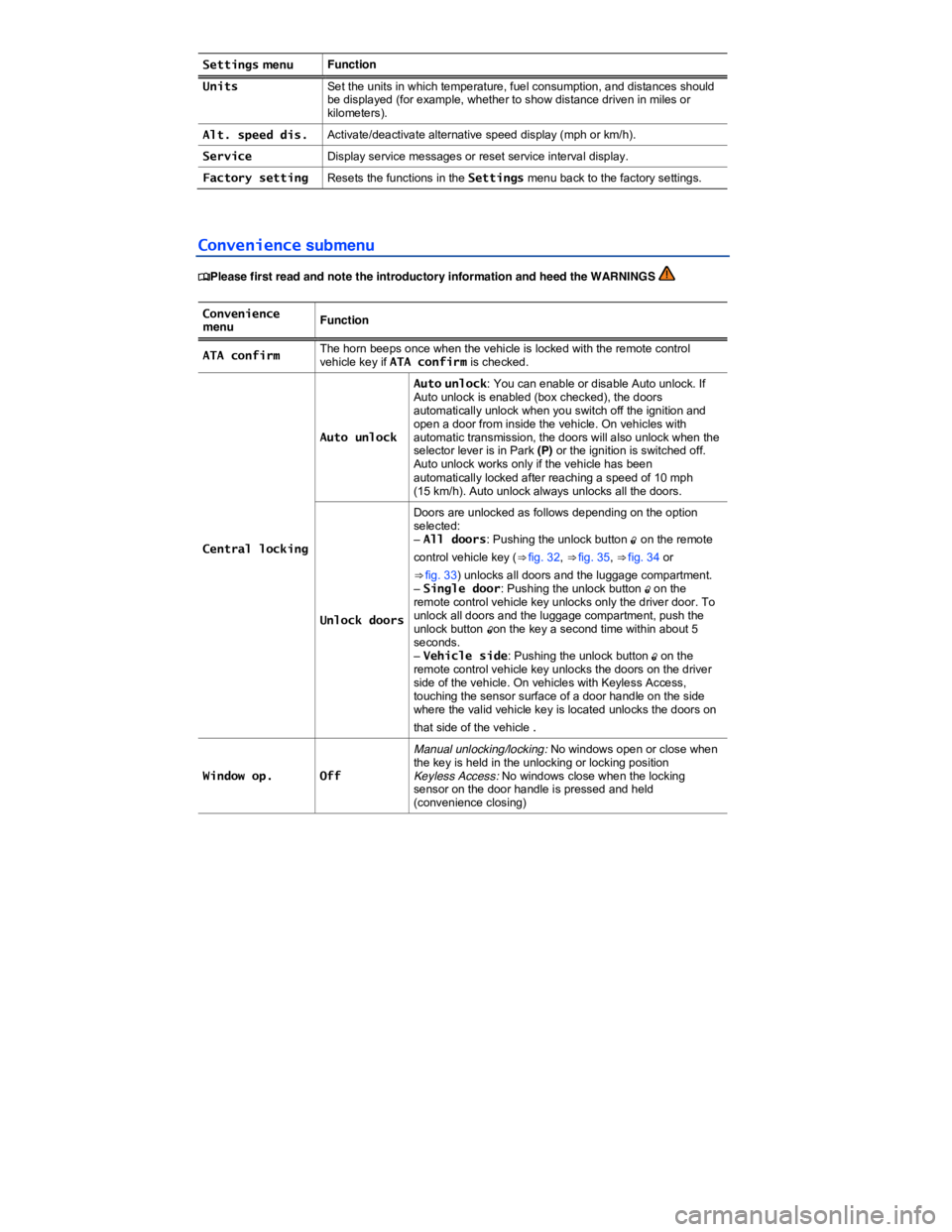
Settings menu Function
Units Set the units in which temperature, fuel consumption, and distances should be displayed (for example, whether to show distance driven in miles or kilometers).
Alt. speed dis. Activate/deactivate alternative speed display (mph or km/h).
Service Display service messages or reset service interval display.
Factory setting Resets the functions in the Settings menu back to the factory settings.
Convenience submenu
Page 28 of 392
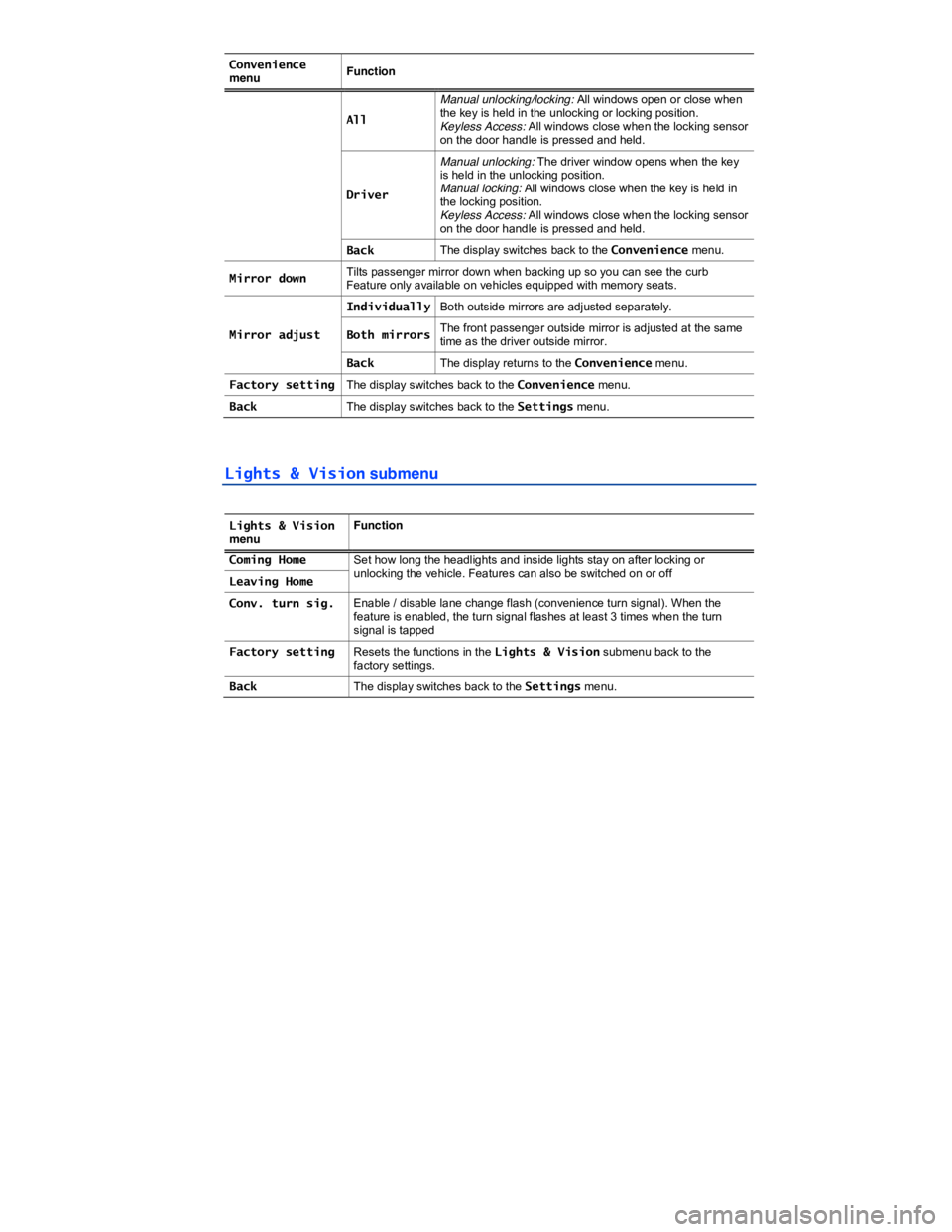
Convenience menu Function
All
Manual unlocking/locking: All windows open or close when the key is held in the unlocking or locking position. Keyless Access: All windows close when the locking sensor on the door handle is pressed and held.
Driver
Manual unlocking: The driver window opens when the key is held in the unlocking position. Manual locking: All windows close when the key is held in the locking position. Keyless Access: All windows close when the locking sensor on the door handle is pressed and held.
Back The display switches back to the Convenience menu.
Mirror down Tilts passenger mirror down when backing up so you can see the curb Feature only available on vehicles equipped with memory seats.
Mirror adjust
IndividuallyBoth outside mirrors are adjusted separately.
Both mirrorsThe front passenger outside mirror is adjusted at the same time as the driver outside mirror.
Back The display returns to the Convenience menu.
Factory setting The display switches back to the Convenience menu.
Back The display switches back to the Settings menu.
Lights & Vision submenu
Lights & Vision menu Function
Coming Home Set how long the headlights and inside lights stay on after locking or unlocking the vehicle. Features can also be switched on or off Leaving Home
Conv. turn sig. Enable / disable lane change flash (convenience turn signal). When the feature is enabled, the turn signal flashes at least 3 times when the turn signal is tapped
Factory setting Resets the functions in the Lights & Vision submenu back to the factory settings.
Back The display switches back to the Settings menu.