media VOLKSWAGEN PASSAT 2013 B8 / 6.G Owners Manual
[x] Cancel search | Manufacturer: VOLKSWAGEN, Model Year: 2013, Model line: PASSAT, Model: VOLKSWAGEN PASSAT 2013 B8 / 6.GPages: 379, PDF Size: 5.56 MB
Page 8 of 379
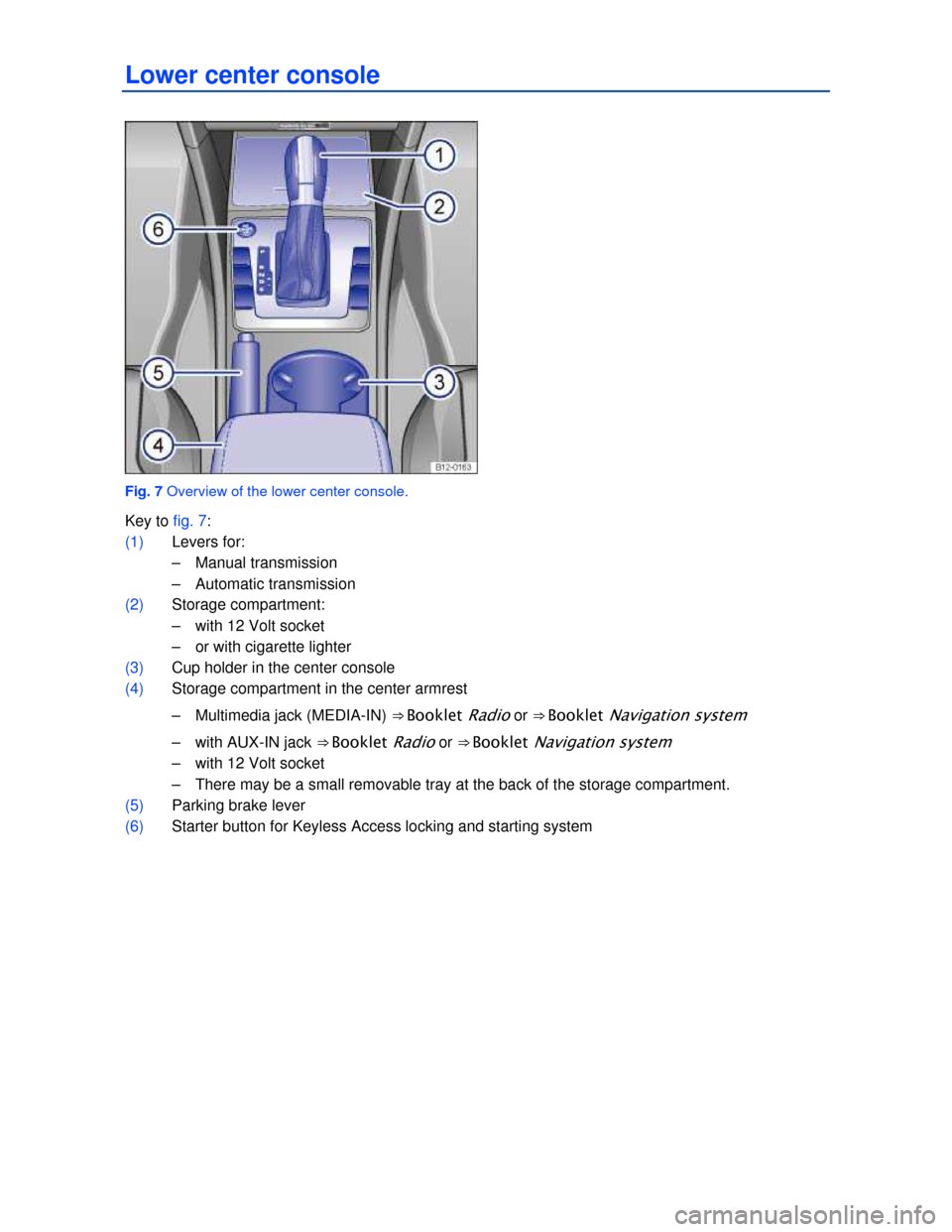
Lower center console
Fig. 7 Overview of the lower center console.
Key to fig. 7:
(1) Levers for:
– Manual transmission
– Automatic transmission
(2) Storage compartment:
– with 12 Volt socket
– or with cigarette lighter
(3) Cup holder in the center console
(4) Storage compartment in the center armrest
– Multimedia jack (MEDIA-IN) ⇒ Booklet Radio or ⇒ Booklet Navigation system
– with AUX-IN jack ⇒ Booklet Radio or ⇒ Booklet Navigation system
– with 12 Volt socket
– There may be a small removable tray at the back of the storage compartment.
(5) Parking brake lever
(6) Starter button for Keyless Access locking and starting system
Page 31 of 379
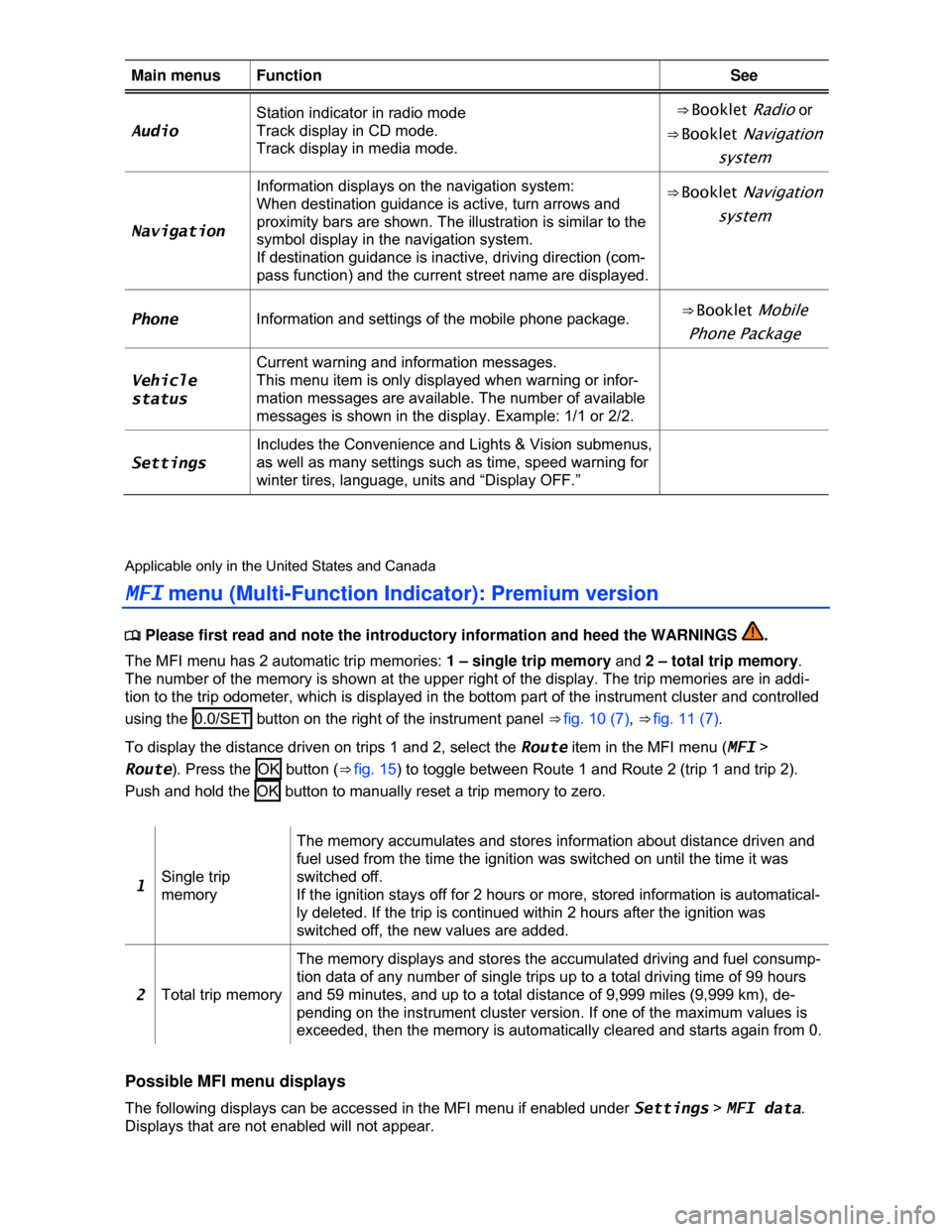
Main menus Function See
Audio
Station indicator in radio mode
Track display in CD mode.
Track display in media mode.
⇒ Booklet Radio or
⇒ Booklet Navigation
system
Navigation
Information displays on the navigation system:
When destination guidance is active, turn arrows and
proximity bars are shown. The illustration is similar to the
symbol display in the navigation system.
If destination guidance is inactive, driving direction (com-
pass function) and the current street name are displayed.
⇒ Booklet Navigation
system
Phone Information and settings of the mobile phone package. ⇒ Booklet Mobile
Phone Package
Vehicle
status
Current warning and information messages.
This menu item is only displayed when warning or infor-
mation messages are available. The number of available
messages is shown in the display. Example: 1/1 or 2/2.
Settings
Includes the Convenience and Lights & Vision submenus,
as well as many settings such as time, speed warning for
winter tires, language, units and “Display OFF.”
Applicable only in the United States and Canada
MFI menu (Multi-Function Indicator): Premium version
Page 87 of 379

Please carry out each step only in the order specified:
5.
At the garage door opener receiver (overhead unit) in the garage, locate the “learn” or
“training” button. The name and color of the button may vary by manufacturer. This button
is usually located near the hanging antenna wire attachment point on the unit. If you cannot
locate the “training” button, refer to the garage door opener’s user manual.
6. Press and release the “training” button.
Once the button is pressed, you have 30 seconds to initiate the next step.
7. Return to the vehicle. Firmly press and hold the programmed garage door opener button
on the sun visor keypad for 2 seconds and release.
8. Repeat the “press/hold/release” sequence up to 3 times to complete the programming
process for that button.
Repeat the steps to program the other garage door opener buttons on the sun visor keypad to control
other devices.
Deleting programming for all buttons
Be sure to delete programming on all buttons on the sun visor keypad before selling the vehicle or
turning it over to people you do not know.
x Complete the programming preparation steps described above.
x Press and hold buttons 1 and 3 at the same time, for about 20 seconds.
x When the indicator light above button 2 begins to flash, immediately release buttons 1 and 3 .
This step deletes all old settings.
After programming
Test the garage door opener, Operating the garage door opener.
Applicable only in Mexico and the AGCC
Operating the garage door opener
Page 88 of 379
DANGER
20 mm button cells and other lithium batteries will cause serious personal injury and even
death within a short time if swallowed.
x Always keep hand-held remote control devices with batteries, all spare batteries, and all
dead button cell and larger 20 mm batteries out of the reach of children.
x Get medical attention immediately if you suspect that a battery has been swallowed.
WARNING
Improper use of the garage door opener can cause severe or fatal injuries.
x Only use the garage door opener when you are within range and no one is in the way.
NOTICE
The wrong batteries can damage the hand-held remote control. Replace a dead battery with
one that has the same voltage, size, and specifications.
Please dispose of old batteries properly and in an environmentally responsible manner. Always
keep them out of the reach of children.
Certain batteries used in hand-held remote controls are classified as Perchlorate Material.
Special handling may apply – see http://www.dtsc.ca.gov/hazardouswaste/perchlorate. Obey all legal
requirements regarding proper disposal. Authorized Volkswagen dealers and authorized Volkswagen
Service Facilities are familiar with the requirements, and we recommend that you have them perform
this service for you.
Page 92 of 379
Please carry out each step only in the order specified:
5.
At the garage door opener receiver (overhead unit) in the garage, locate the “learn” or
“training” button. The name and color of the button may vary by manufacturer. This button
is usually located near the hanging antenna wire attachment point on the unit. If you cannot
locate the “training” button, refer to the garage door opener’s user manual.
6. Press and release the “training” button.
Once the button is pressed, you have 30 seconds to initiate the next step.
7. Return to the vehicle. Firmly press and hold the programmed HomeLink button for 2 se-
conds and release.
8. Repeat the “press/hold/release” sequence up to 3 times to complete the programming
process for that button.
Repeat the steps to program the other buttons for the HomeLink® Universal Transmitter on the sun
visor keypad to control other devices.
Deleting programming for all buttons
Be sure to delete programming on all buttons on the sun visor keypad before selling the vehicle or
turning it over to people you do not know.
x Complete the programming preparation steps described above.
x Press and hold buttons 1 and 3 at the same time, for about 20 seconds.
x When the indicator light above button 2 begins to flash, immediately release buttons 1 and 3 .
This step deletes all old settings.
After programming
Test the garage door opener, Operating the HomeLink® Universal Transmitter.
Applicable only in the United States and Canada
Operating the HomeLink® Universal Transmitter
Page 93 of 379
DANGER
20 mm button cells and other lithium batteries will cause serious personal injury and even
death within a short time if swallowed.
x Always keep hand-held remote control devices with batteries, spare batteries, as well as
dead button cell and larger 20 mm batteries out of the reach of children.
x Get medical attention immediately if you suspect that a battery has been swallowed.
WARNING
Improper use of the HomeLink® Universal Transmitter can cause serious or even fatal per-
sonal injury.
x Garage doors operate with enough force to cause serious personal injury.
x Never let anyone get in the way of a garage door when it is opening or closing.
x When programming the HomeLink® Universal Transmitter, you may be operating a garage
door or estate gate. Always make sure that people and objects are out of the way to help
prevent serious personal injury or property damage.
x When operating the “training” button on a garage door opener with a rolling code, you will
need to stand on a ladder or step-stool. Always take extra precautions to prevent falls and
serious injury.
x Never use the HomeLink® Universal Transmitter with any garage door opener that does
not have the safety stop-and-reverse feature, as required by federal safety standards. This
includes any garage door opener model manufactured before April 1, 1982.
x A garage door opener that cannot detect an object, signaling the door to stop and reverse,
does not meet current federal safety standards. Using a garage door opener without these
features increases the risk of serious injury or death.
x Follow the installation manual and the included safety information from the manufacturer
when using the remote-controlled garage door opener or electrical drive.
NOTICE
The wrong batteries can damage the hand-held remote control. Replace a dead battery with
one that has the same voltage, size, and specifications.
Please dispose of old batteries properly and in an environmentally responsible manner. Always
keep them out of the reach of children.
Certain batteries used in hand-held remote controls are classified as Perchlorate Material.
Special handling may apply – see http://www.dtsc.ca.gov/hazardouswaste/perchlorate. Obey all legal
requirements regarding proper disposal. Authorized Volkswagen dealers and authorized Volkswagen
Service Facilities are familiar with the requirements, and we recommend that you have them perform
this service for you.
Page 110 of 379
x Liquids, sharp objects and things that do not let the heat in the seat escape into the air,
including, for example, a child restraint, a blanket, or seat covers on the seat can damage seat
heating.
x If you smell an odor, immediately shut off seat heating and have it checked by an authorized
Volkswagen dealer or authorized Volkswagen Service Facility.
x Never install leather upholstery on a vehicle with seat heating that originally had cloth
upholstery. The seat heating elements for seats with cloth seats will overheat if the cloth up-
holstery is replaced with leather upholstery.
Switch off seat heating when it is not needed to help reduce unnecessary fuel consumption.
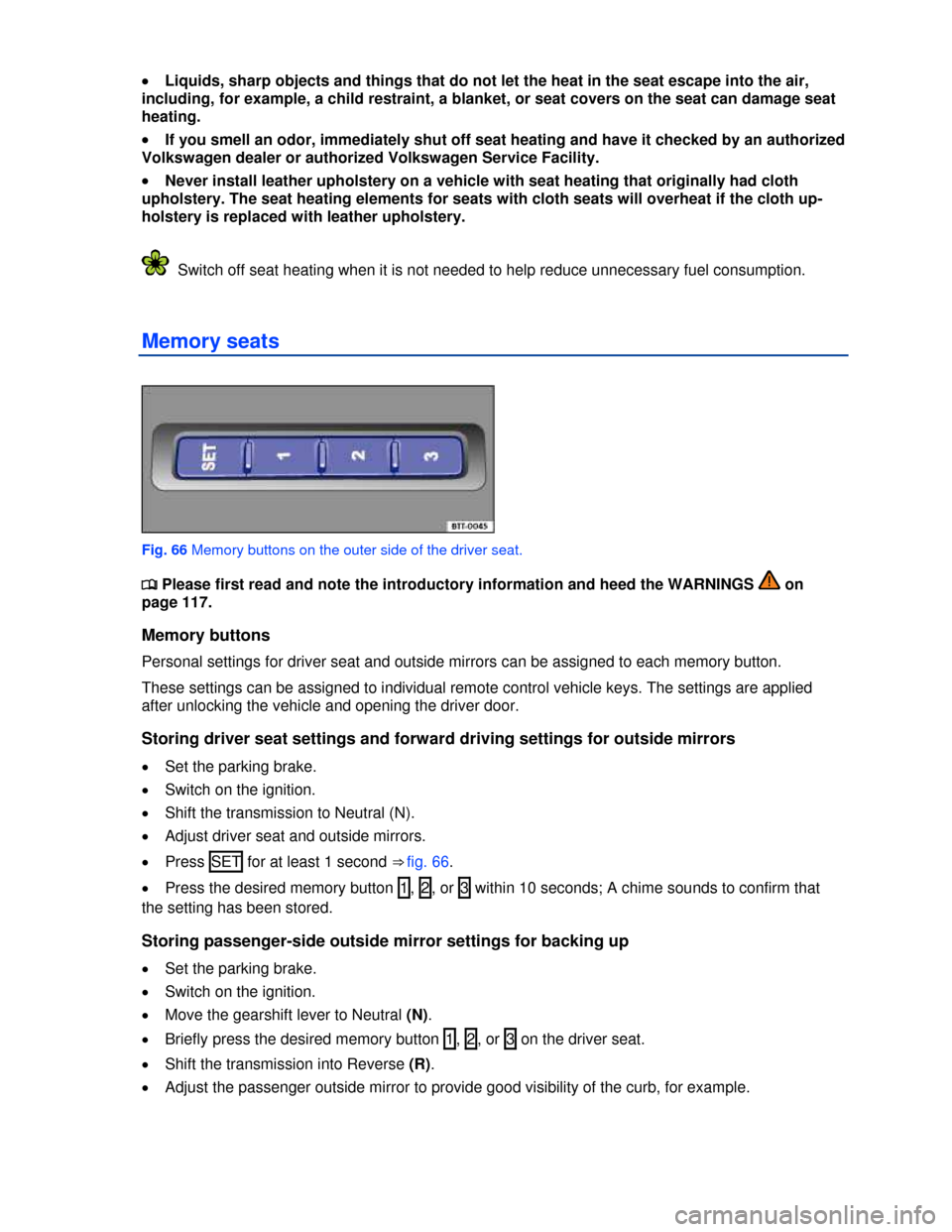
Memory seats
Fig. 66 Memory buttons on the outer side of the driver seat.
Page 115 of 379
WARNING
Damage to safety belts reduces their overall effectiveness and increases the risk of serious
personal injury and death whenever the vehicle is being used.
x Never let safety belts become damaged by being caught in the door or seat hardware.
x Torn or frayed safety belts can tear, and damaged safety belt hardware can break in an
accident.
x Inspect belts regularly for damage. If webbing, bindings, buckles, or retractors are dam-
aged, have the belts replaced immediately with the correct replacement belts approved by
Volkswagen for your vehicle, model, and model year.
x Safety belts that were subject to stress in an accident and stretched must be replaced with
a correct, new safety belt, preferably by an authorized Volkswagen dealer or authorized
Volkswagen Service Facility.
x Replacement after a crash may be necessary even if a safety belt shows no visible dam-
age. Anchorages that have been loaded must also be inspected.
x Damaged safety belts must be replaced; they cannot be repaired.
x Never try to repair a damaged safety belt yourself. Never remove or modify the safety belts
in any way.
x Have safety belts, bindings, retractors and buckles replaced by an authorized Volkswagen
dealer or authorized Volkswagen Service Facility.
x Always keep the belts clean. Dirty belts may not work correctly and can impair the func-
tion of the inertia reel.
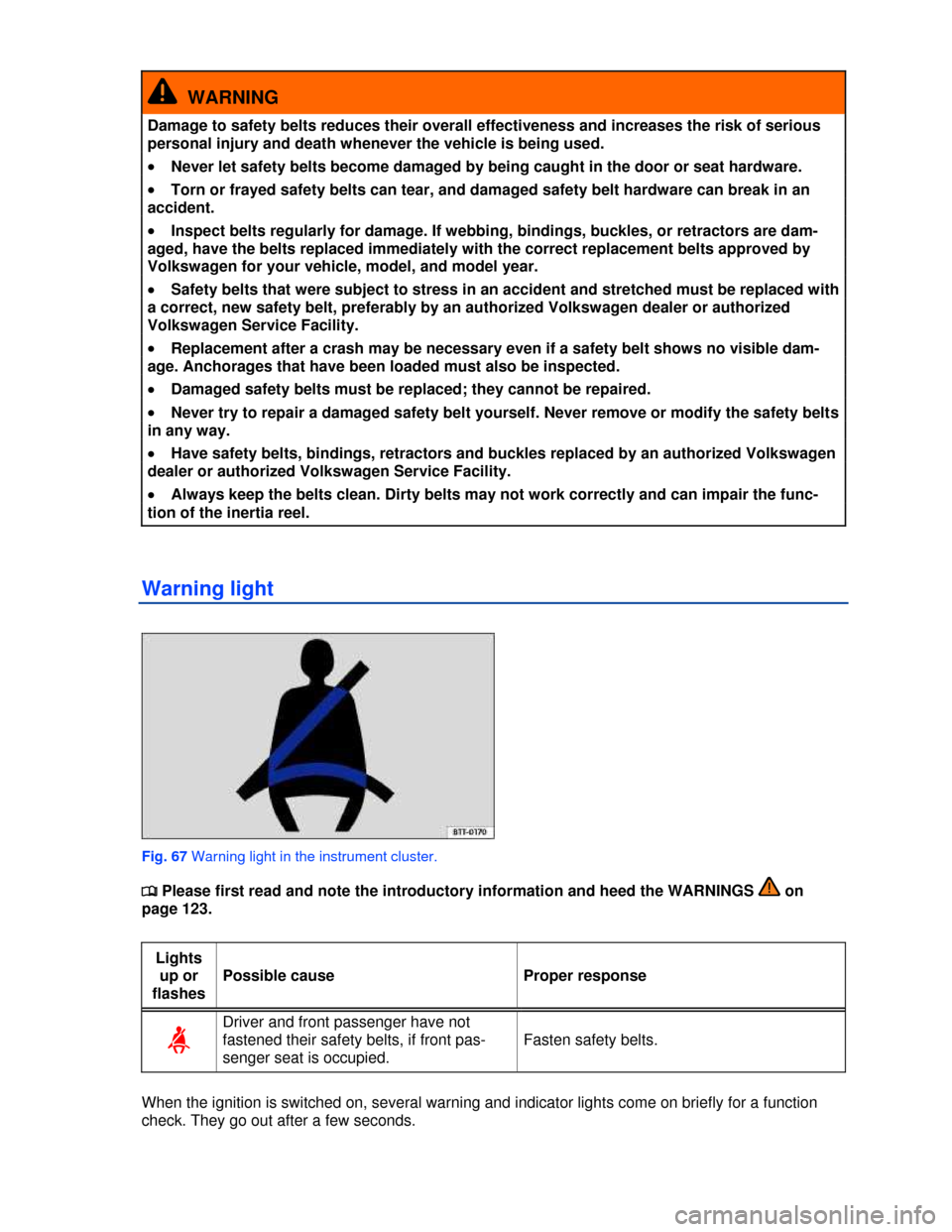
Warning light
Fig. 67 Warning light in the instrument cluster.
Page 154 of 379
NOTICE
Broken glass in the auto-dimming mirrors can cause electrolyte fluid leakage. Liquid electro-
lyte leaked from a broken mirror glass will damage any plastic surfaces it comes in contact
with. Clean up spilled electrolyte fluid immediately with clear water and a sponge.
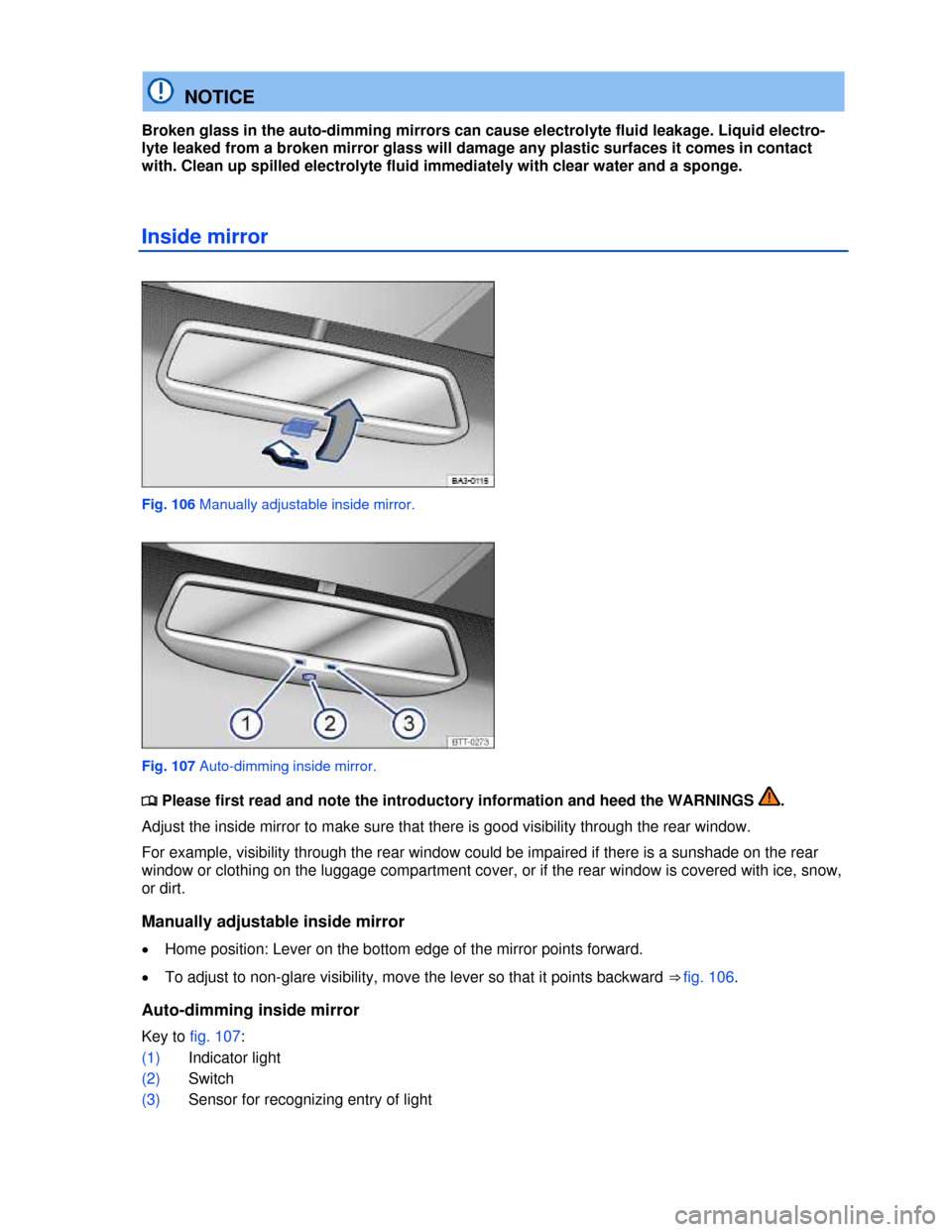
Inside mirror
Fig. 106 Manually adjustable inside mirror.
Fig. 107 Auto-dimming inside mirror.
Page 176 of 379
WARNING
Improper use of the trailer hitch can cause accidents and injuries. An improperly installed,
incorrect, or damaged trailer hitch can cause the trailer to separate from the towing vehicle
and cause serious personal injuries.
x Only use an undamaged, properly mounted trailer hitch.
x Never repair or modify the trailer hitch.
x To reduce the risk of injury in rear-end collisions, and the risk to pedestrians and cyclists
when the vehicle is parked, always remove the ball mount when you are not towing a trailer.
x Never install a “weight distributing” or “load equalizing” trailer hitch on your vehicle. The
vehicle was not designed for these kinds of trailer hitches. The trailer hitch attachment can
fail, causing the trailer to tear loose from the vehicle.
WARNING
Improper trailer towing can cause loss of vehicle control and serious personal injury.
x Driving with a trailer and carrying heavy or large things can change the way the vehicle
handles, increase the distance it needs to stop safely, and cause accidents.
x Always secure the load properly with suitable and undamaged straps so that the load will
not shift.
x Always adapt your speed and driving to the heavier load and the weight distribution in the
vehicle. Take road, weather, traffic, and visibility conditions into account as well.
x Reduce your speed even more than you otherwise would when going downhill and under
unfavorable load, weather, or wind conditions.
x Trailers with a high center of gravity tip more easily than trailers with a low center of gravi-
ty.
x Always avoid sudden maneuvers and hard braking.
x Be especially careful when passing other vehicles.
x Reduce speed immediately if the trailer shows the slightest sign of swaying.
x Never try to stop the swaying by accelerating.
x Always obey speed limits. In some areas, the speed limits for vehicles towing trailers are
lower than for vehicles without trailers. Never drive faster than 50 mph (80 km/h; under ex-
ceptional circumstances 60 mph - 100 km/h) when towing a trailer. This applies even if the
local speed limit is higher.
If you are driving a new vehicle or a vehicle with a new or rebuilt engine, do not tow a trailer
during the break-in period, about 600 miles (1000 km).
If you tow a trailer, your vehicle may need maintenance more often because of the extra load it
has to move.
When you are not towing, remove the trailer hitch ball. This helps keep the trailer hitch from
causing damage to your vehicle and to others if your vehicle is hit from behind.
Some models need a trailer hitch to tow or tow-start other vehicles. You may want to always
carry the ball mount in the vehicle after it has been removed. Be sure to stow it securely.