change time VOLKSWAGEN POLO 2015 Owner´s Manual
[x] Cancel search | Manufacturer: VOLKSWAGEN, Model Year: 2015, Model line: POLO, Model: VOLKSWAGEN POLO 2015Pages: 100, PDF Size: 4.14 MB
Page 33 of 100
Downloaded from www.Manualslib.com manuals search engine 12/29/2015Bedienungsanleitung < Service & Zubehör < Volkswagen Deutschland
30/32
Time and date–– Time format (12h, 24h),
– Set summer time automatically,
– Time zone,
– Date,
– Date format.
–
Units–
The following functions can be set:
– Distance,
– Speed,
– Temperature,
– Volumes,
– Consumption,
– Pressure.
–
Service–
The following data are displayed:
– Vehicle identification number,
– Date of next inspection,
– Date of next oil change service.
→ Instruments
Factory settings–
The following settings can be reset:
– All settings,
– Driver assistance,
– Parking/manoeuvring,
– Lights,
– Mirror and wipers,
– Opening/closing,
– Multifunction display.
–
Think Blue. Trainer.
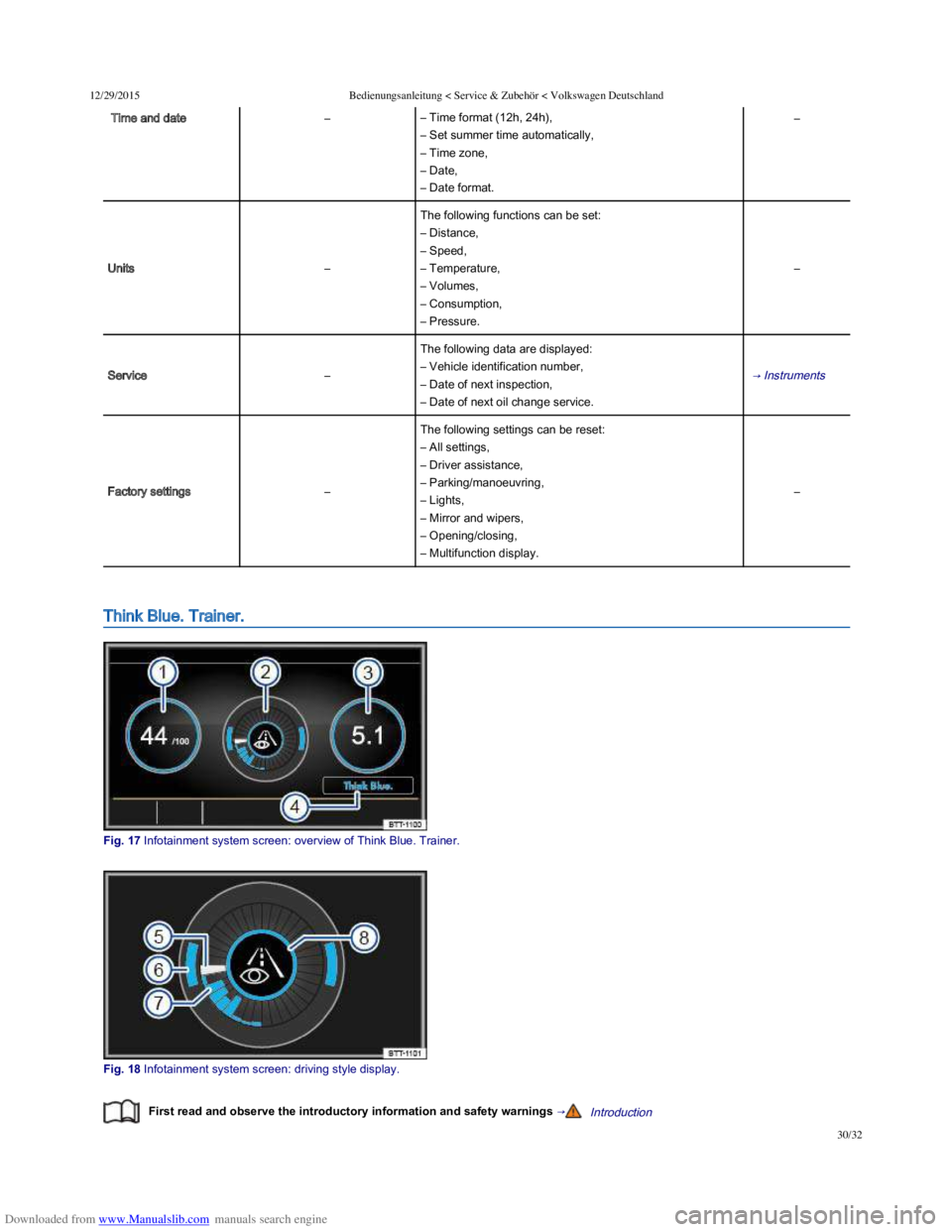
Fig. 17 Infotainment system screen: overview of Think Blue. Trainer.
Fig. 18 Infotainment system screen: driving style display.
First read and observe the introductory information and safety warnings →Introduction
Page 34 of 100
Downloaded from www.Manualslib.com manuals search engine 12/29/2015Bedienungsanleitung < Service & Zubehör < Volkswagen Deutschland
31/32
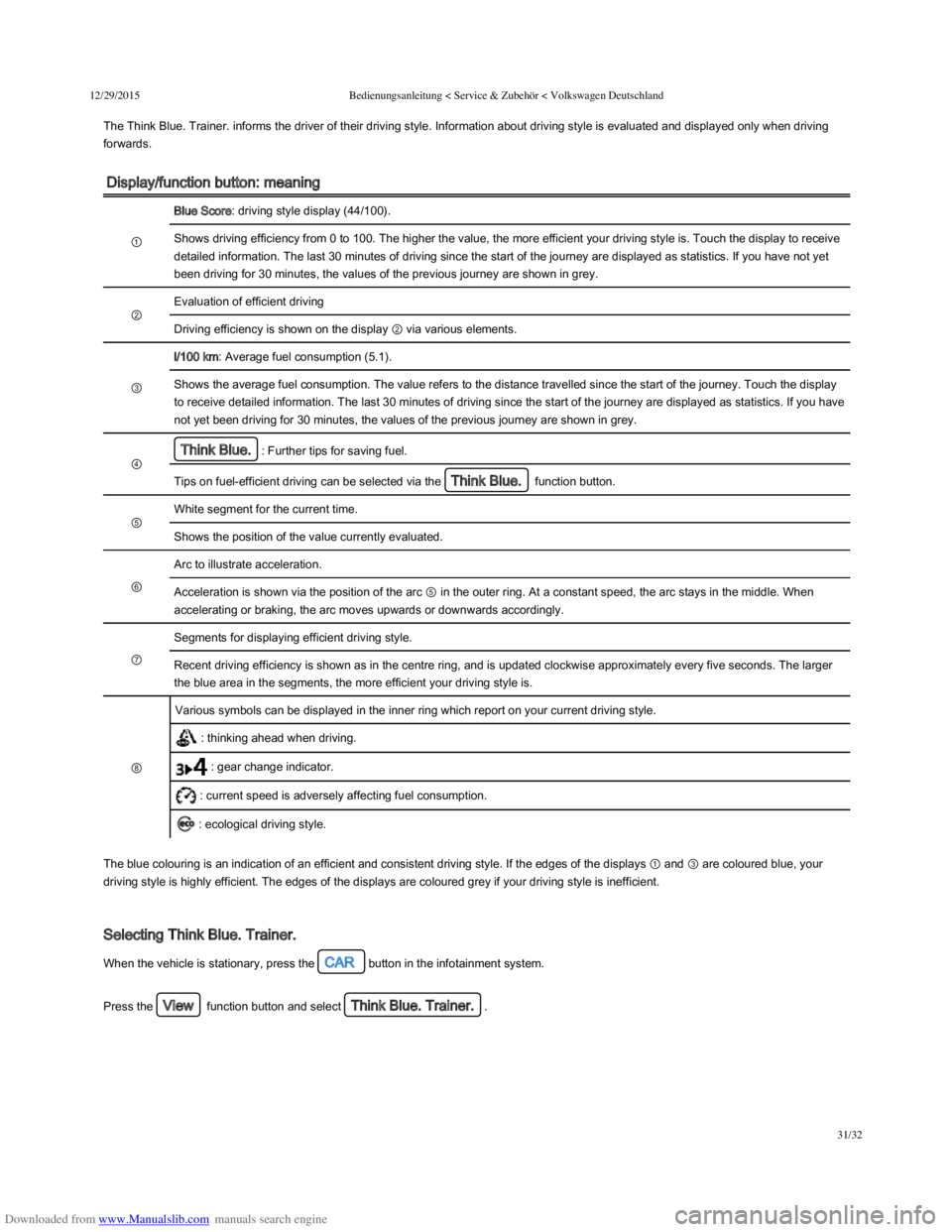
The Think Blue. Trainer. informs the driver of their driving style. Information about driving style is evaluated and displayed only when driving
forwards.
Display/function button: meaning
①
Blue Score: driving style display (44/100).
Shows driving efficiency from 0 to 100. The higher the value, the more efficient your driving style is. Touch the display to receive
detailed information. The last 30 minutes of driving since the start of the journey are displayed as statistics. If you have not yet
been driving for 30 minutes, the values of the previous journey are shown in grey.
②
Evaluation of efficient driving
Driving efficiency is shown on the display ② via various elements.
③
l/100 km: Average fuel consumption (5.1).
Shows the average fuel consumption. The value refers to the distance travelled since the start of the journey. Touch the display
to receive detailed information. The last 30 minutes of driving since the start of the journey are displayed as statistics. If you have
not yet been driving for 30 minutes, the values of the previous journey are shown in grey.
④
Think Blue.: Further tips for saving fuel.
Tips on fuel-efficient driving can be selected via the Think Blue. function button.
⑤
White segment for the current time.
Shows the position of the value currently evaluated.
⑥
Arc to illustrate acceleration.
Acceleration is shown via the position of the arc ⑤ in the outer ring. At a constant speed, the arc stays in the middle. When
accelerating or braking, the arc moves upwards or downwards accordingly.
⑦
Segments for displaying efficient driving style.
Recent driving efficiency is shown as in the centre ring, and is updated clockwise approximately every five seconds. The larger
the blue area in the segments, the more efficient your driving style is.
⑧
Various symbols can be displayed in the inner ring which report on your current driving style.
: thinking ahead when driving.
: gear change indicator.
: current speed is adversely affecting fuel consumption.
: ecological driving style.
The blue colouring is an indication of an efficient and consistent driving style. If the edges of the displays ① and ③ are coloured blue, your
driving style is highly efficient. The edges of the displays are coloured grey if your driving style is inefficient.
Selecting Think Blue. Trainer.
When the vehicle is stationary, press the CAR button in the infotainment system.
Press the View function button and select Think Blue. Trainer..
Page 46 of 100
Downloaded from www.Manualslib.com manuals search engine 12/29/2015Bedienungsanleitung < Service & Zubehör < Volkswagen Deutschland
11/136
Indicator lamp in the vehicle key
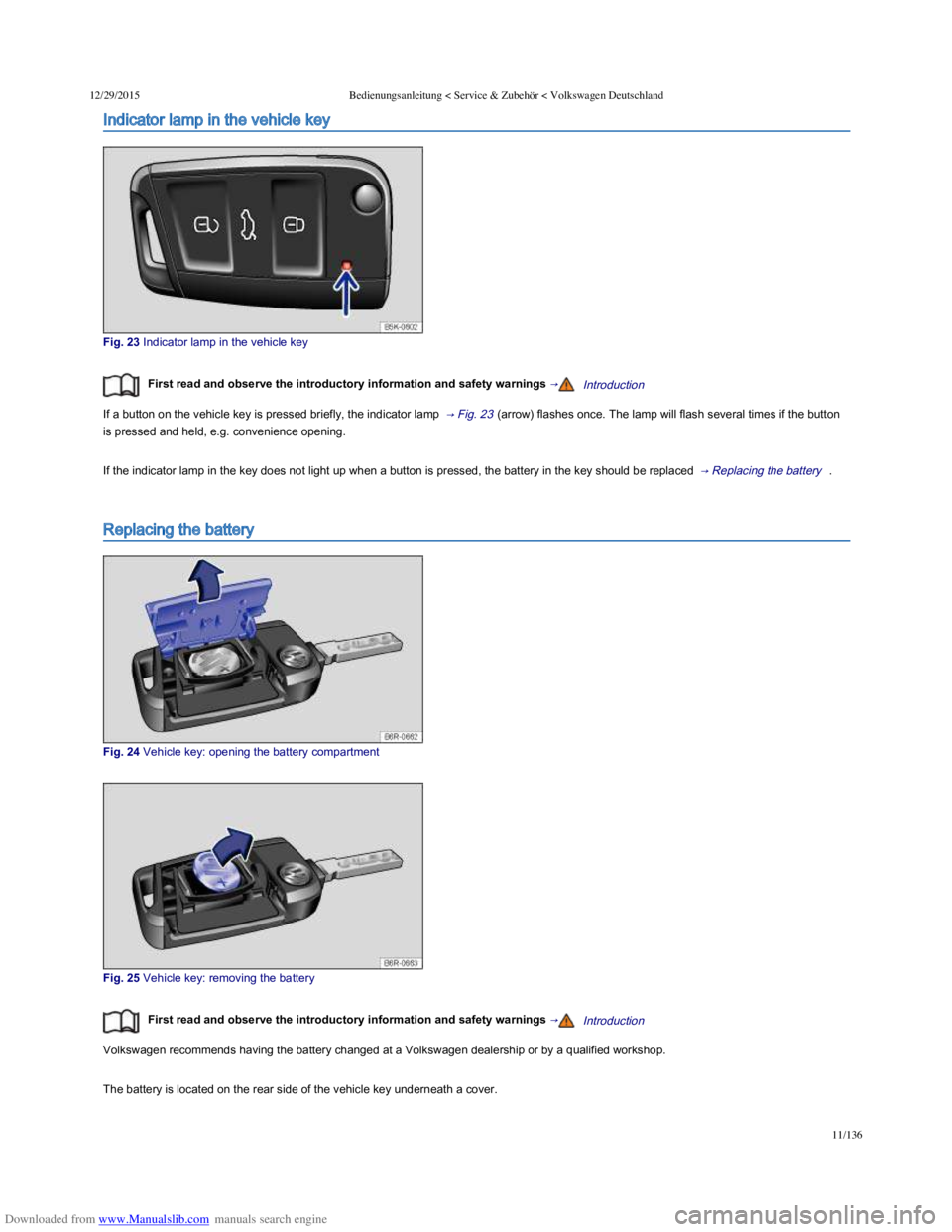
Fig. 23 Indicator lamp in the vehicle key
First read and observe the introductory information and safety warnings →Introduction
If a button on the vehicle key is pressed briefly, the indicator lamp → Fig. 23 (arrow) flashes once. The lamp will flash several times if the button
is pressed and held, e.g. convenience opening.
If the indicator lamp in the key does not light up when a button is pressed, the battery in the key should be replaced → Replacing the battery .
Replacing the battery
Fig. 24 Vehicle key: opening the battery compartment
Fig. 25 Vehicle key: removing the battery
First read and observe the introductory information and safety warnings →Introduction
Volkswagen recommends having the battery changed at a Volkswagen dealership or by a qualified workshop.
The battery is located on the rear side of the vehicle key underneath a cover.
Replacing the battery
Page 47 of 100
Downloaded from www.Manualslib.com manuals search engine 12/29/2015Bedienungsanleitung < Service & Zubehör < Volkswagen Deutschland
12/136
Replacing the battery
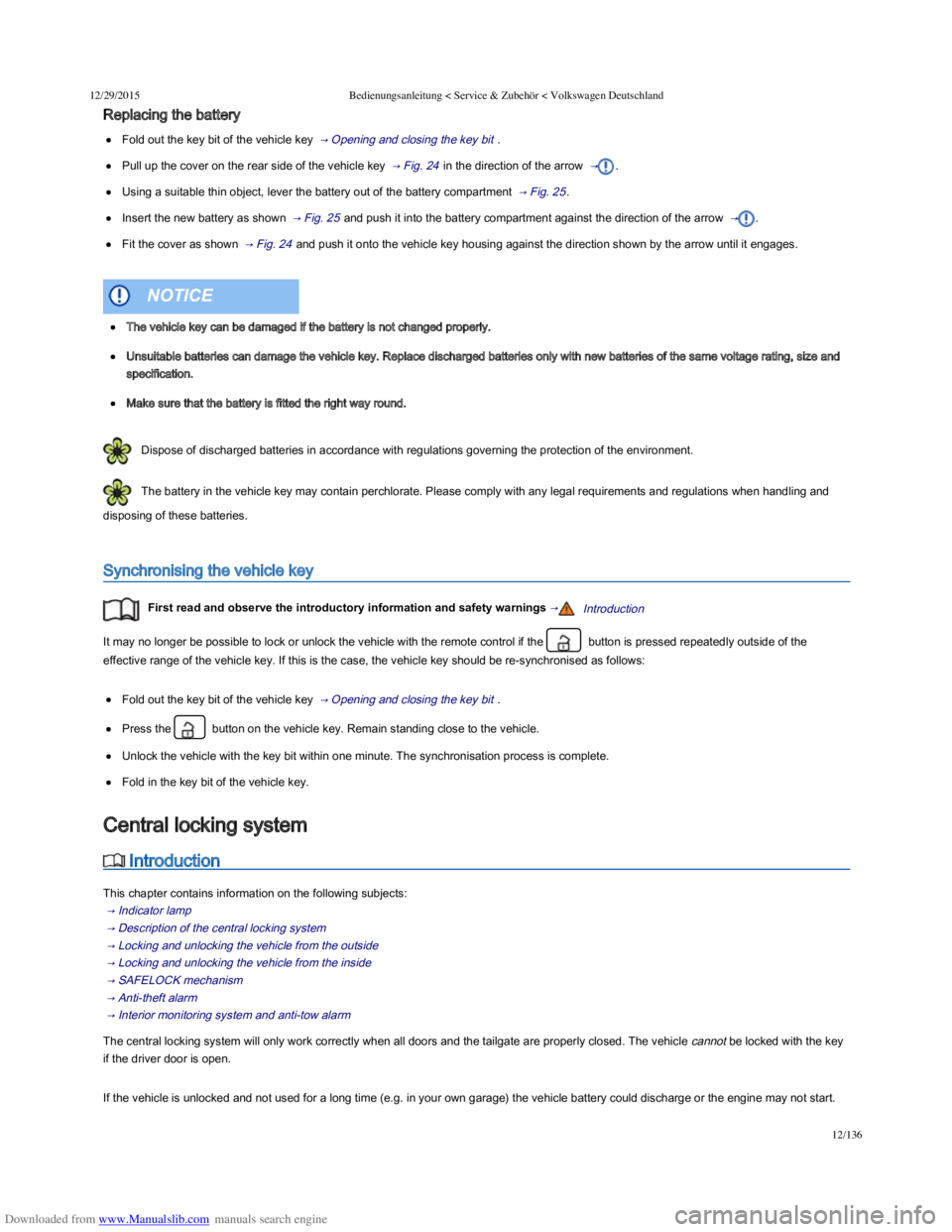
Fold out the key bit of the vehicle key → Opening and closing the key bit .
Pull up the cover on the rear side of the vehicle key → Fig. 24 in the direction of the arrow → .
Using a suitable thin object, lever the battery out of the battery compartment → Fig. 25 .
Insert the new battery as shown → Fig. 25 and push it into the battery compartment against the direction of the arrow → .
Fit the cover as shown → Fig. 24 and push it onto the vehicle key housing against the direction shown by the arrow until it engages.
Dispose of discharged batteries in accordance with regulations governing the protection of the environment.
The battery in the vehicle key may contain perchlorate. Please comply with any legal requirements and regulations when handling and
disposing of these batteries.
Synchronising the vehicle key
First read and observe the introductory information and safety warnings →Introduction
It may no longer be possible to lock or unlock the vehicle with the remote control if the button is pressed repeatedly outside of the
effective range of the vehicle key. If this is the case, the vehicle key should be re-synchronised as follows:
Fold out the key bit of the vehicle key → Opening and closing the key bit .
Press the button on the vehicle key. Remain standing close to the vehicle.
Unlock the vehicle with the key bit within one minute. The synchronisation process is complete.
Fold in the key bit of the vehicle key.
Introduction
This chapter contains information on the following subjects:
→ Indicator lamp
→ Description of the central locking system
→ Locking and unlocking the vehicle from the outside
→ Locking and unlocking the vehicle from the inside
→ SAFELOCK mechanism
→ Anti-theft alarm
→ Interior monitoring system and anti-tow alarm
The central locking system will only work correctly when all doors and the tailgate are properly closed. The vehicle cannot be locked with the key
if the driver door is open.
If the vehicle is unlocked and not used for a long time (e.g. in your own garage) the vehicle battery could discharge or the engine may not start.
The vehicle key can be damaged if the battery is not changed properly.
Unsuitable batteries can damage the vehicle key. Replace discharged batteries only with new batteries of the same voltage rating, size and
specification.
Make sure that the battery is fitted the right way round.
NOTICE
Central locking system