display VOLKSWAGEN POLO 2015 Owner´s Manual
[x] Cancel search | Manufacturer: VOLKSWAGEN, Model Year: 2015, Model line: POLO, Model: VOLKSWAGEN POLO 2015Pages: 100, PDF Size: 4.14 MB
Page 32 of 100
Downloaded from www.Manualslib.com manuals search engine 12/29/2015Bedienungsanleitung < Service & Zubehör < Volkswagen Deutschland
29/32
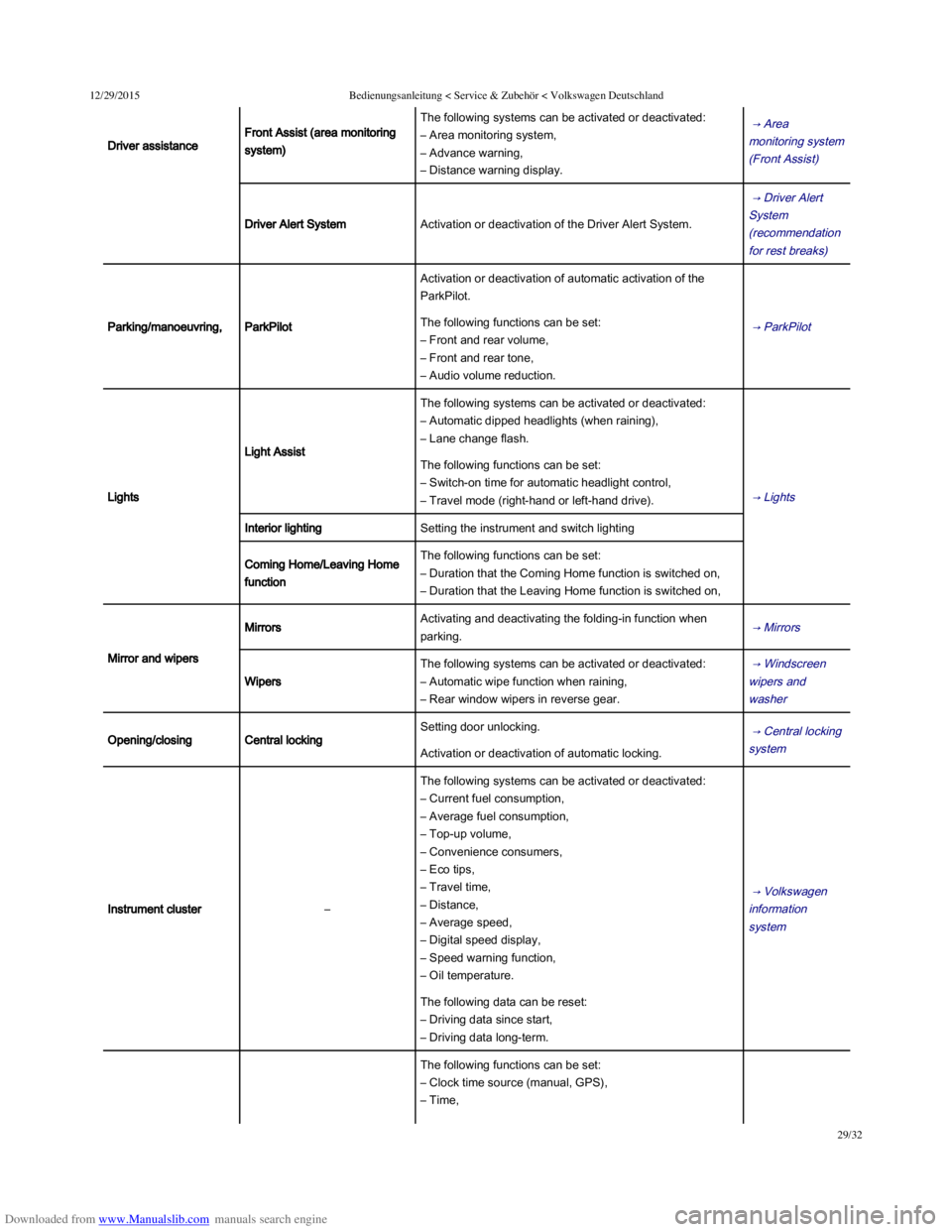
Driver assistance
Front Assist (area monitoring
system)
The following systems can be activated or deactivated:
– Area monitoring system,
– Advance warning,
– Distance warning display.
→ Area
monitoring system
(Front Assist)
Driver Alert SystemActivation or deactivation of the Driver Alert System.
→ Driver Alert
System
(recommendation
for rest breaks)
Parking/manoeuvring,ParkPilot
Activation or deactivation of automatic activation of the
ParkPilot.
→ ParkPilot The following functions can be set:
– Front and rear volume,
– Front and rear tone,
– Audio volume reduction.
Lights
Light Assist
The following systems can be activated or deactivated:
– Automatic dipped headlights (when raining),
– Lane change flash.
→ Lights
The following functions can be set:
– Switch-on time for automatic headlight control,
– Travel mode (right-hand or left-hand drive).
Interior lightingSetting the instrument and switch lighting
Coming Home/Leaving Home
function
The following functions can be set:
– Duration that the Coming Home function is switched on,
– Duration that the Leaving Home function is switched on,
Mirror and wipers
MirrorsActivating and deactivating the folding-in function when
parking. → Mirrors
Wipers
The following systems can be activated or deactivated:
– Automatic wipe function when raining,
– Rear window wipers in reverse gear.
→ Windscreen
wipers and
washer
Opening/closingCentral locking
Setting door unlocking. → Central locking
system Activation or deactivation of automatic locking.
Instrument cluster–
The following systems can be activated or deactivated:
– Current fuel consumption,
– Average fuel consumption,
– Top-up volume,
– Convenience consumers,
– Eco tips,
– Travel time,
– Distance,
– Average speed,
– Digital speed display,
– Speed warning function,
– Oil temperature.
→ Volkswagen
information
system
The following data can be reset:
– Driving data since start,
– Driving data long-term.
The following functions can be set:
– Clock time source (manual, GPS),
– Time,
Page 33 of 100
Downloaded from www.Manualslib.com manuals search engine 12/29/2015Bedienungsanleitung < Service & Zubehör < Volkswagen Deutschland
30/32
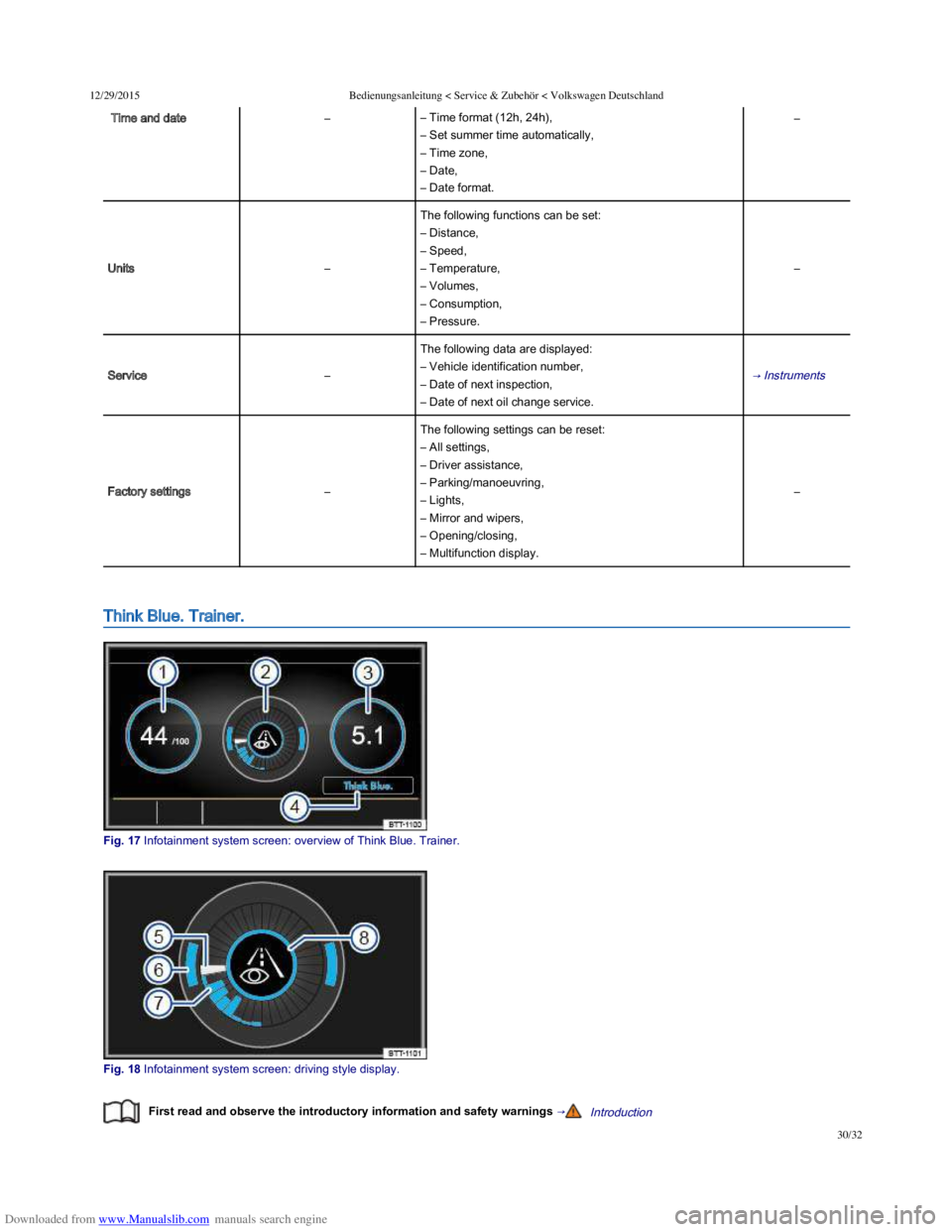
Time and date–– Time format (12h, 24h),
– Set summer time automatically,
– Time zone,
– Date,
– Date format.
–
Units–
The following functions can be set:
– Distance,
– Speed,
– Temperature,
– Volumes,
– Consumption,
– Pressure.
–
Service–
The following data are displayed:
– Vehicle identification number,
– Date of next inspection,
– Date of next oil change service.
→ Instruments
Factory settings–
The following settings can be reset:
– All settings,
– Driver assistance,
– Parking/manoeuvring,
– Lights,
– Mirror and wipers,
– Opening/closing,
– Multifunction display.
–
Think Blue. Trainer.
Fig. 17 Infotainment system screen: overview of Think Blue. Trainer.
Fig. 18 Infotainment system screen: driving style display.
First read and observe the introductory information and safety warnings →Introduction
Page 34 of 100
Downloaded from www.Manualslib.com manuals search engine 12/29/2015Bedienungsanleitung < Service & Zubehör < Volkswagen Deutschland
31/32
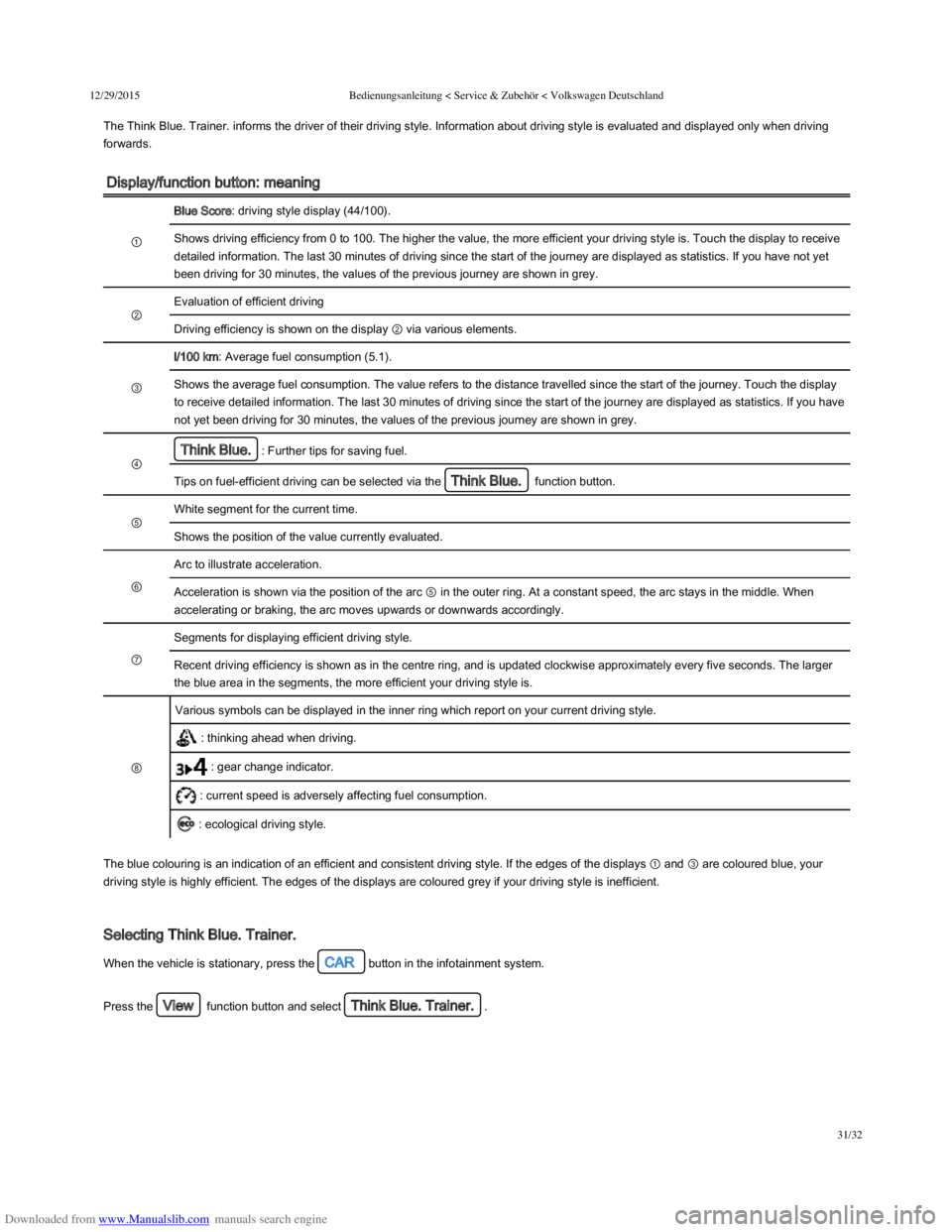
The Think Blue. Trainer. informs the driver of their driving style. Information about driving style is evaluated and displayed only when driving
forwards.
Display/function button: meaning
①
Blue Score: driving style display (44/100).
Shows driving efficiency from 0 to 100. The higher the value, the more efficient your driving style is. Touch the display to receive
detailed information. The last 30 minutes of driving since the start of the journey are displayed as statistics. If you have not yet
been driving for 30 minutes, the values of the previous journey are shown in grey.
②
Evaluation of efficient driving
Driving efficiency is shown on the display ② via various elements.
③
l/100 km: Average fuel consumption (5.1).
Shows the average fuel consumption. The value refers to the distance travelled since the start of the journey. Touch the display
to receive detailed information. The last 30 minutes of driving since the start of the journey are displayed as statistics. If you have
not yet been driving for 30 minutes, the values of the previous journey are shown in grey.
④
Think Blue.: Further tips for saving fuel.
Tips on fuel-efficient driving can be selected via the Think Blue. function button.
⑤
White segment for the current time.
Shows the position of the value currently evaluated.
⑥
Arc to illustrate acceleration.
Acceleration is shown via the position of the arc ⑤ in the outer ring. At a constant speed, the arc stays in the middle. When
accelerating or braking, the arc moves upwards or downwards accordingly.
⑦
Segments for displaying efficient driving style.
Recent driving efficiency is shown as in the centre ring, and is updated clockwise approximately every five seconds. The larger
the blue area in the segments, the more efficient your driving style is.
⑧
Various symbols can be displayed in the inner ring which report on your current driving style.
: thinking ahead when driving.
: gear change indicator.
: current speed is adversely affecting fuel consumption.
: ecological driving style.
The blue colouring is an indication of an efficient and consistent driving style. If the edges of the displays ① and ③ are coloured blue, your
driving style is highly efficient. The edges of the displays are coloured grey if your driving style is inefficient.
Selecting Think Blue. Trainer.
When the vehicle is stationary, press the CAR button in the infotainment system.
Press the View function button and select Think Blue. Trainer..
Page 40 of 100
Downloaded from www.Manualslib.com manuals search engine 12/29/2015Bedienungsanleitung < Service & Zubehör < Volkswagen Deutschland
5/136
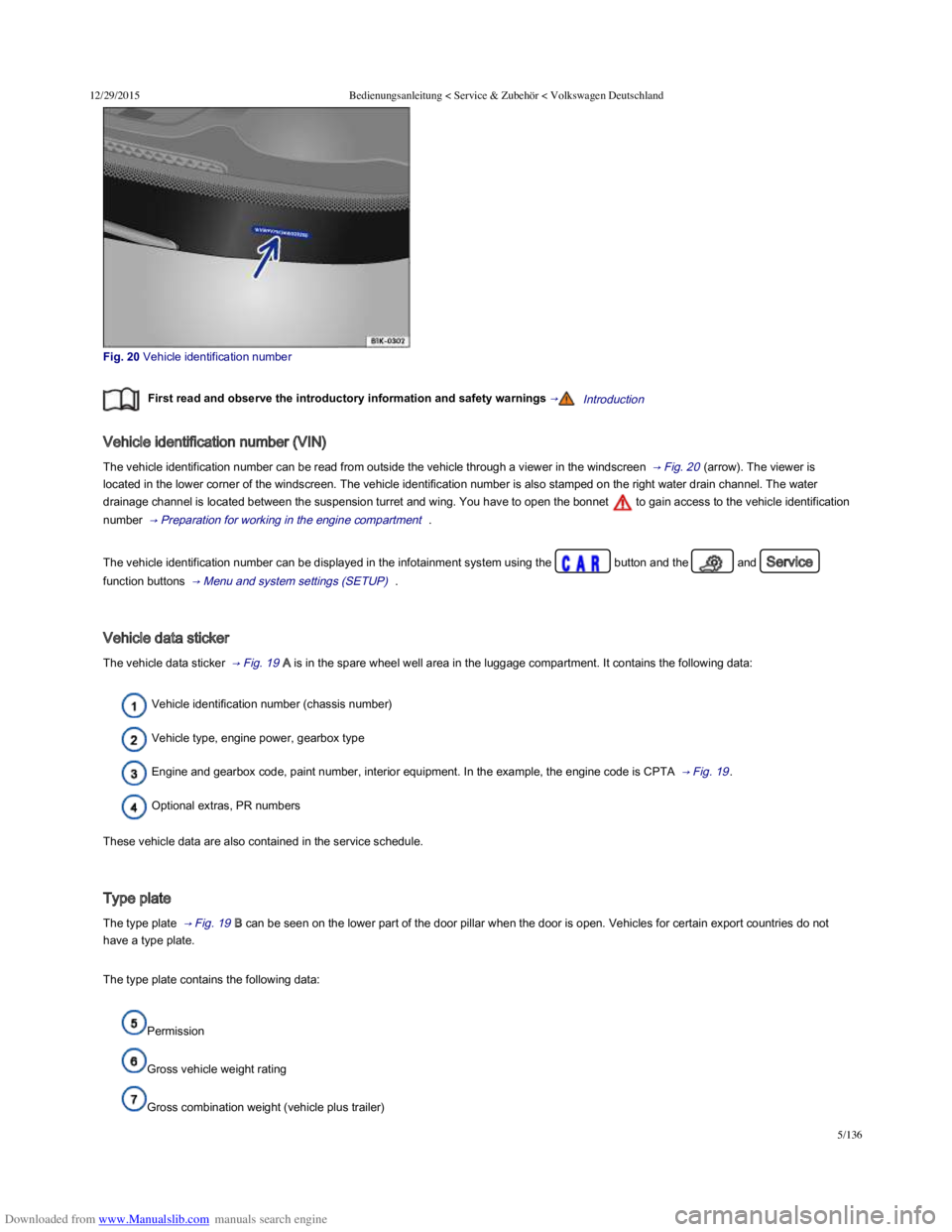
Fig. 20 Vehicle identification number
First read and observe the introductory information and safety warnings →Introduction
Vehicle identification number (VIN)
The vehicle identification number can be read from outside the vehicle through a viewer in the windscreen → Fig. 20 (arrow). The viewer is
located in the lower corner of the windscreen. The vehicle identification number is also stamped on the right water drain channel. The water
drainage channel is located between the suspension turret and wing. You have to open the bonnet to gain access to the vehicle identification
number → Preparation for working in the engine compartment .
The vehicle identification number can be displayed in the infotainment system using the button and the and Service
function buttons → Menu and system settings (SETUP) .
Vehicle data sticker
The vehicle data sticker → Fig. 19 A is in the spare wheel well area in the luggage compartment. It contains the following data:
Vehicle identification number (chassis number)
Vehicle type, engine power, gearbox type
Engine and gearbox code, paint number, interior equipment. In the example, the engine code is CPTA → Fig. 19 .
Optional extras, PR numbers
These vehicle data are also contained in the service schedule.
Type plate
The type plate → Fig. 19 B can be seen on the lower part of the door pillar when the door is open. Vehicles for certain export countries do not
have a type plate.
The type plate contains the following data:
Permission
Gross vehicle weight rating
Gross combination weight (vehicle plus trailer)
Page 52 of 100
Downloaded from www.Manualslib.com manuals search engine 12/29/2015Bedienungsanleitung < Service & Zubehör < Volkswagen Deutschland
17/136
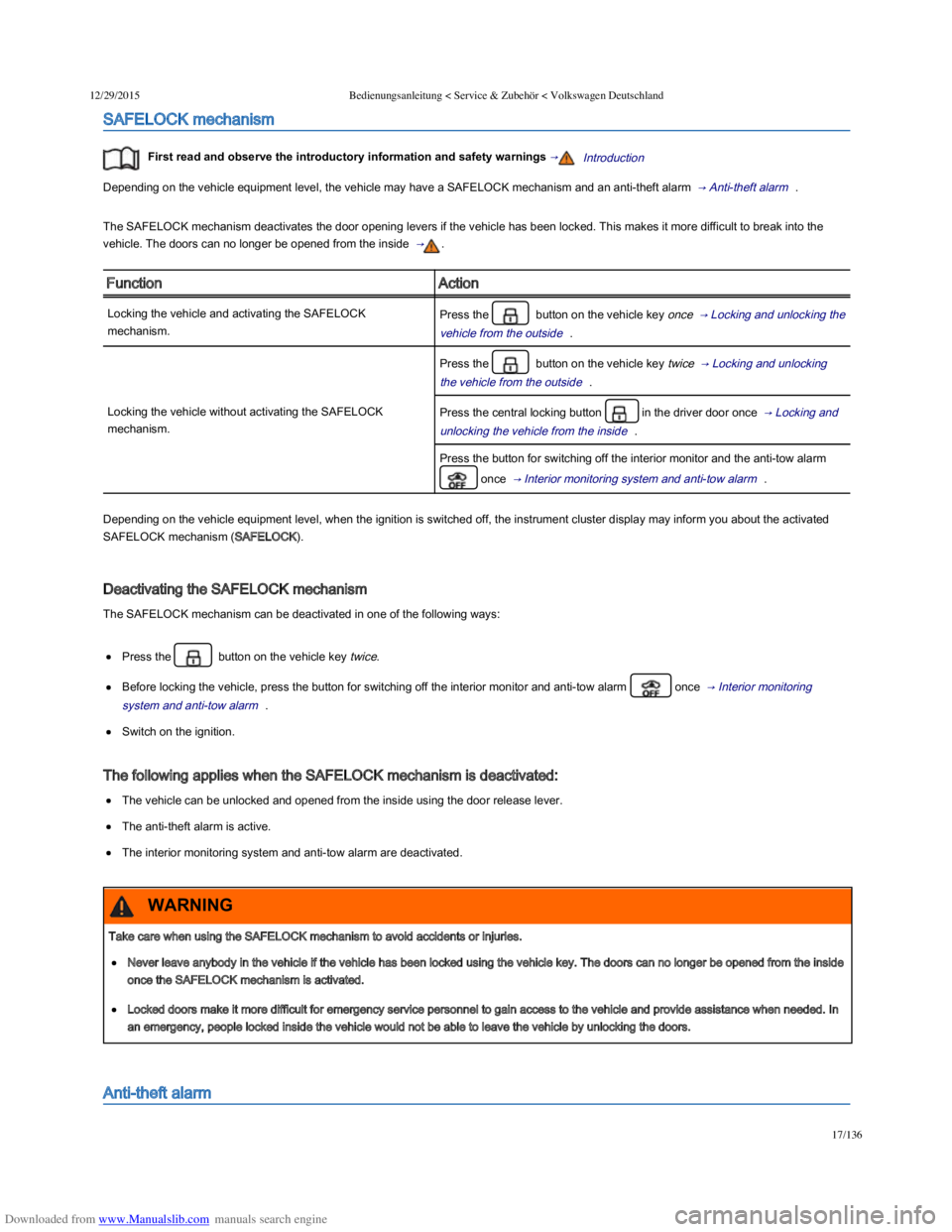
SAFELOCK mechanism
First read and observe the introductory information and safety warnings →Introduction
Depending on the vehicle equipment level, the vehicle may have a SAFELOCK mechanism and an anti-theft alarm → Anti-theft alarm .
The SAFELOCK mechanism deactivates the door opening levers if the vehicle has been locked. This makes it more difficult to break into the
vehicle. The doors can no longer be opened from the inside → .
FunctionAction
Locking the vehicle and activating the SAFELOCK
mechanism.
Press the button on the vehicle key once → Locking and unlocking the
vehicle from the outside .
Locking the vehicle without activating the SAFELOCK
mechanism.
Press the button on the vehicle key twice → Locking and unlocking
the vehicle from the outside .
Press the central locking button in the driver door once → Locking and
unlocking the vehicle from the inside .
Press the button for switching off the interior monitor and the anti-tow alarm
once → Interior monitoring system and anti-tow alarm .
Depending on the vehicle equipment level, when the ignition is switched off, the instrument cluster display may inform you about the activated
SAFELOCK mechanism (SAFELOCK).
Deactivating the SAFELOCK mechanism
The SAFELOCK mechanism can be deactivated in one of the following ways:
Press the button on the vehicle key twice.
Before locking the vehicle, press the button for switching off the interior monitor and anti-tow alarm once → Interior monitoring
system and anti-tow alarm .
Switch on the ignition.
The following applies when the SAFELOCK mechanism is deactivated:
The vehicle can be unlocked and opened from the inside using the door release lever.
The anti-theft alarm is active.
The interior monitoring system and anti-tow alarm are deactivated.
Anti-theft alarm
Take care when using the SAFELOCK mechanism to avoid accidents or injuries.
Never leave anybody in the vehicle if the vehicle has been locked using the vehicle key. The doors can no longer be opened from the inside
once the SAFELOCK mechanism is activated.
Locked doors make it more difficult for emergency service personnel to gain access to the vehicle and provide assistance when needed. In
an emergency, people locked inside the vehicle would not be able to leave the vehicle by unlocking the doors.
WARNING
Page 56 of 100
Downloaded from www.Manualslib.com manuals search engine 12/29/2015Bedienungsanleitung < Service & Zubehör < Volkswagen Deutschland
21/136
Warning lamp
First read and observe the introductory information and safety warnings →Introduction
Lit upPossible causeAction
At least one vehicle door is opened or not properly closed.
Do not drive on!
Open the appropriate vehicle door and then close it again.
Several warning and indicator lamps will light up briefly as a functional check when the ignition is switched on. They will go out after a few
seconds.
A warning lamp appears in the instrument cluster display if a door is open or not properly closed.
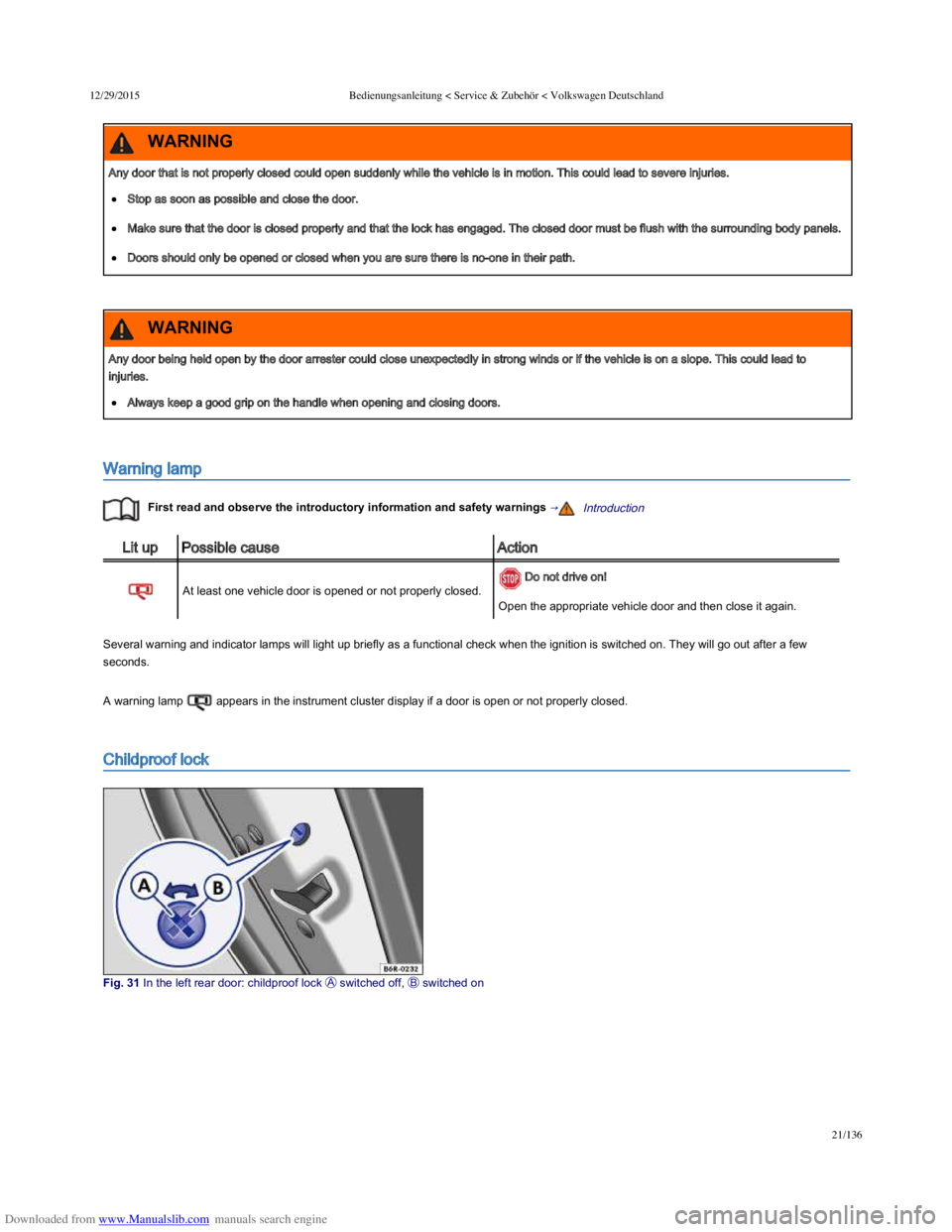
Childproof lock
Fig. 31 In the left rear door: childproof lock switched off, switched on
Any door that is not properly closed could open suddenly while the vehicle is in motion. This could lead to severe injuries.
Stop as soon as possible and close the door.
Make sure that the door is closed properly and that the lock has engaged. The closed door must be flush with the surrounding body panels.
Doors should only be opened or closed when you are sure there is no-one in their path.
WARNING
Any door being held open by the door arrester could close unexpectedly in strong winds or if the vehicle is on a slope. This could lead to
injuries.
Always keep a good grip on the handle when opening and closing doors.
WARNING
Page 58 of 100
Downloaded from www.Manualslib.com manuals search engine 12/29/2015Bedienungsanleitung < Service & Zubehör < Volkswagen Deutschland
23/136
Transporting → Driving tips
Manual opening and closing → Manual opening and closing
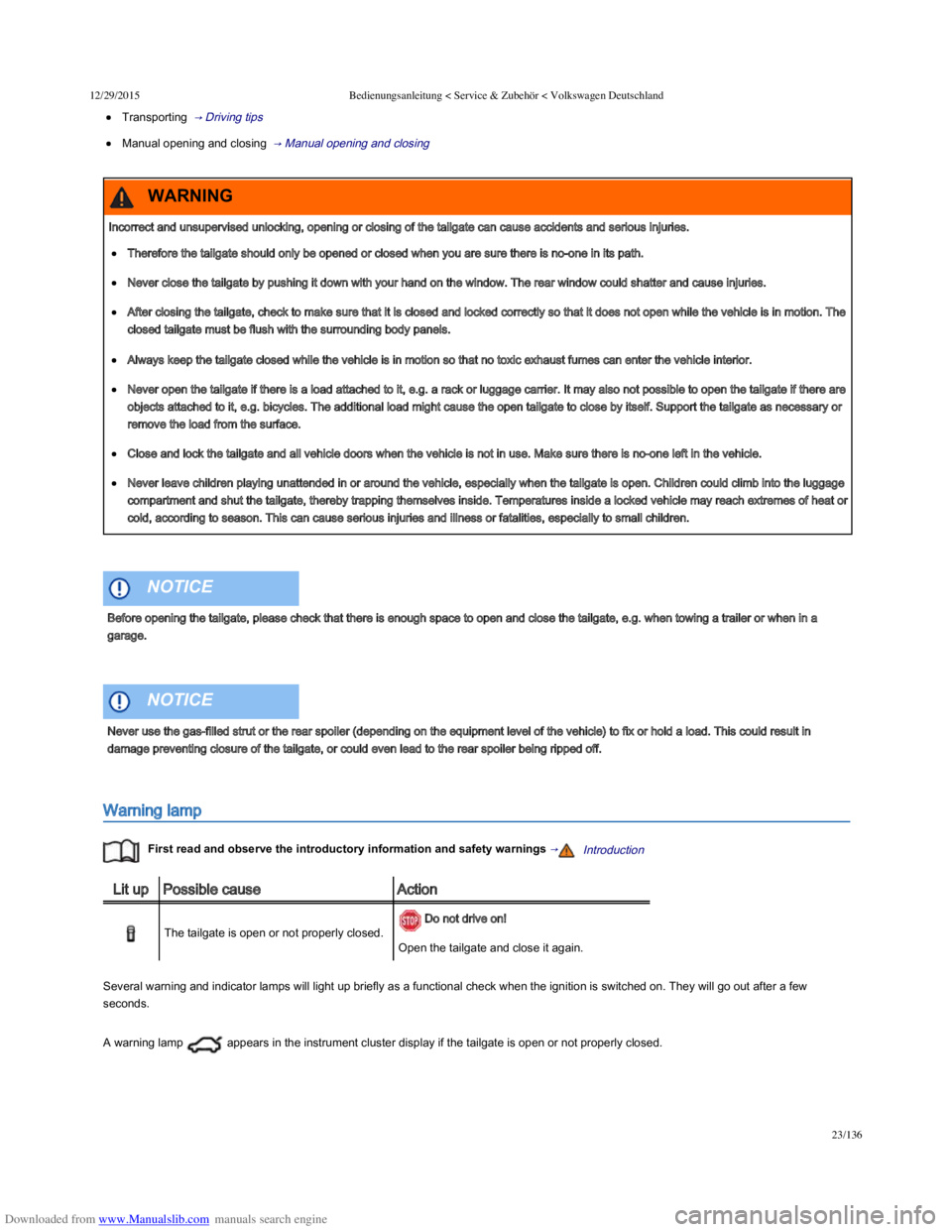
Warning lamp
First read and observe the introductory information and safety warnings →Introduction
Lit upPossible causeAction
The tailgate is open or not properly closed.
Do not drive on!
Open the tailgate and close it again.
Several warning and indicator lamps will light up briefly as a functional check when the ignition is switched on. They will go out after a few
seconds.
A warning lamp appears in the instrument cluster display if the tailgate is open or not properly closed.
Incorrect and unsupervised unlocking, opening or closing of the tailgate can cause accidents and serious injuries.
Therefore the tailgate should only be opened or closed when you are sure there is no-one in its path.
Never close the tailgate by pushing it down with your hand on the window. The rear window could shatter and cause injuries.
After closing the tailgate, check to make sure that it is closed and locked correctly so that it does not open while the vehicle is in motion. The
closed tailgate must be flush with the surrounding body panels.
Always keep the tailgate closed while the vehicle is in motion so that no toxic exhaust fumes can enter the vehicle interior.
Never open the tailgate if there is a load attached to it, e.g. a rack or luggage carrier. It may also not possible to open the tailgate if there are
objects attached to it, e.g. bicycles. The additional load might cause the open tailgate to close by itself. Support the tailgate as necessary or
remove the load from the surface.
Close and lock the tailgate and all vehicle doors when the vehicle is not in use. Make sure there is no-one left in the vehicle.
Never leave children playing unattended in or around the vehicle, especially when the tailgate is open. Children could climb into the luggage
compartment and shut the tailgate, thereby trapping themselves inside. Temperatures inside a locked vehicle may reach extremes of heat or
cold, according to season. This can cause serious injuries and illness or fatalities, especially to small children.
WARNING
Before opening the tailgate, please check that there is enough space to open and close the tailgate, e.g. when towing a trailer or when in a
garage.
NOTICE
Never use the gas-filled strut or the rear spoiler (depending on the equipment level of the vehicle) to fix or hold a load. This could result in
damage preventing closure of the tailgate, or could even lead to the rear spoiler being ripped off.
NOTICE
Page 96 of 100

Downloaded from www.Manualslib.com manuals search engine 12/29/2015Bedienungsanleitung < Service & Zubehör < Volkswagen Deutschland
61/136
Fold the key bit of the vehicle key all the way out → Vehicle key set .
Insert the open key bit into the key switch in the stowage compartment → Fig. 62 to the second point of resistance. Around three quarters of
the key bit should be inserted in the key switch at this point → .
Turn the vehicle key, without applying force, to the position.
Remove the vehicle key from the key switch → and fold the key bit away.
Close the stowage compartment on the front passenger side.
When the ignition is switched on, the indicator lamp PASSENGER AIRBAG will light up steadily in the upper section of the centre
console → Indicator lamps .
Enabling the front passenger front airbag
Switch off the ignition.
Open the stowage compartment on the front passenger side.
Fold the key bit of the vehicle key all the way out → Vehicle key set .
Insert the open key bit into the key switch in the stowage compartment → Fig. 62 to the second point of resistance. Around three quarters of
the key bit should be inserted in the key switch at this point → .
Turn the vehicle key, without applying force, to the position.
Remove the vehicle key from the key switch → and fold the key bit away.
Close the stowage compartment on the front passenger side.
Check that the PASSENGER AIRBAG indicator lamp in the upper section of the centre console does not light up when the
ignition is switched on → Indicator lamps .
Ensuring that the front passenger front airbag has been deactivated
The only sure sign that the front passenger front airbag has been deactivated is when the PASSENGER AIRBAG indicator lamp is
displayed in the upper section of the centre console ( lights up yellow steadily) → Indicator lamps .
If the indicator lamp PASSENGER AIR BAG in the upper section of the centre console is not lit up steadily, or if it lights up at the
same time as indicator lamp in the instrument cluster, do not attach any child restraint system to the front passenger seat for safety reasons.
The front passenger front airbag may trigger during an accident.
Do not leave the vehicle key in the key switch while driving.
Strong vibration may cause the vehicle key to turn in the key switch, which could cause the front passenger front airbag to be activated.
Untimely inflation of the front passenger front airbag could lead to serious or fatal injuries.
WARNING