tow VOLKSWAGEN SCIROCCO 2011 Owner´s Manual
[x] Cancel search | Manufacturer: VOLKSWAGEN, Model Year: 2011, Model line: SCIROCCO, Model: VOLKSWAGEN SCIROCCO 2011Pages: 138, PDF Size: 49.24 MB
Page 43 of 138
Downloaded from www.Manualslib.com manuals search engine Interior monitoring system and anti-tow alarm
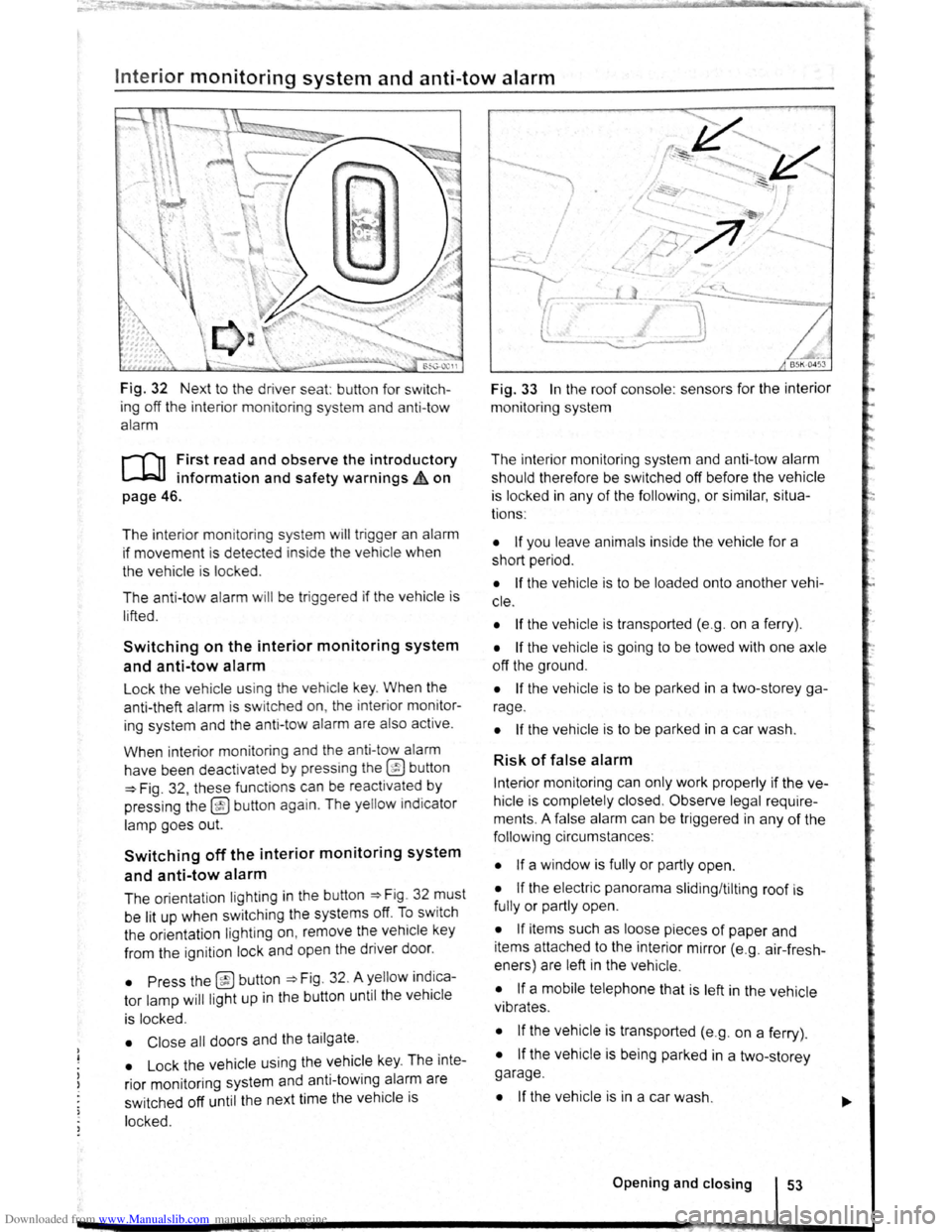
Fig. 32 Next to the driver seat: button for switch
ing off the interior moni
toring system and anti-tow
alarm
r-T'n First read and observe the introductory
L-l=JJ information and safety warnings Lh on
page 46.
The interior monitoring system will trigge r an alarm
if movement is dete cted inside the vehicle when
the vehicle is locked .
The anti-tow alarm
will be trig gered if the vehicle is
l ifted .
Switching on the interior monitoring system
and anti-tow alarm
Lock the vehicle using th e veh icle key . When the
anti-theft alarm is sw itched on, the inter ior monitor
ing system and th e anti-tow alarm are also active .
When interior monitoring and the anti-tow alarm
have been deactivated
by press ing the @ button
=>Fig . 32 , these functions can be reactivated by
pressing the
@ button again . The yellow indicator
lamp goe s out.
Switching off the interior monitoring system
and anti-tow alarm
The orientation lighting in the button ~Fig. 32 must
be lit up when swit ching the systems off.
To sw itch
the orientation lighting
on , remove the vehicle key
from the ignition lock and open the driver door.
• Press the @button =>Fig. 32. A yellow indica
tor lamp
will ligh t up in the button until the veh icle
is locked.
• Close all doors and the tailgate .
• Lock the vehicle using the vehicle key. The inte
rior mon itoring system and anti-towing alarm are
sw itched off until the next time the
vehicle is
locked.
~
I
I
Fig. 33 In the roof console : sensors for the interior
monitoring system
The interior monitoring system and anti-tow alarm
should therefore be switched off before the
vehicle
is locked in any of the following , or similar, situa
tions :
• If you leave animals inside the vehicle for a
short period .
• If the vehicle is to be loaded onto another vehi
c le .
• If the vehicle is transported (e.g . on a ferry) .
• If the vehicle is going to be towed with one axle
off the ground .
• If the vehicle is to be parked in a two-storey ga
rage .
• If the vehicle is to be parked in a car wash.
Risk of false alarm
Interior monitoring can only work properly if the ve
hicle is completely closed.
Observe legal require
ments . A false alarm can be triggered in any
of the
foll owi ng circumstances :
• If a window is fully or partly open.
• If the electric panorama sliding/tilting roof is
fully or partly open.
• If items such as loose pieces of paper and
items attached to the interior mirror (e.g . air-fresh
eners) are left in the vehicle .
• If a mobile telephone that is left in the vehicle
vibrates .
• If the vehicle is transported (e.g. on a ferry) .
• If the vehicle is being parked in a two-storey
garage .
• If the vehicle is in a car wash .
Opening and closing 53
Page 53 of 138
Downloaded from www.Manualslib.com manuals search engine -
When removing or fitting head restraints, make
sure that they do not hit the roof or other parts
of the vehicle. The roof and other vehicle parts
could otherwise be damaged.
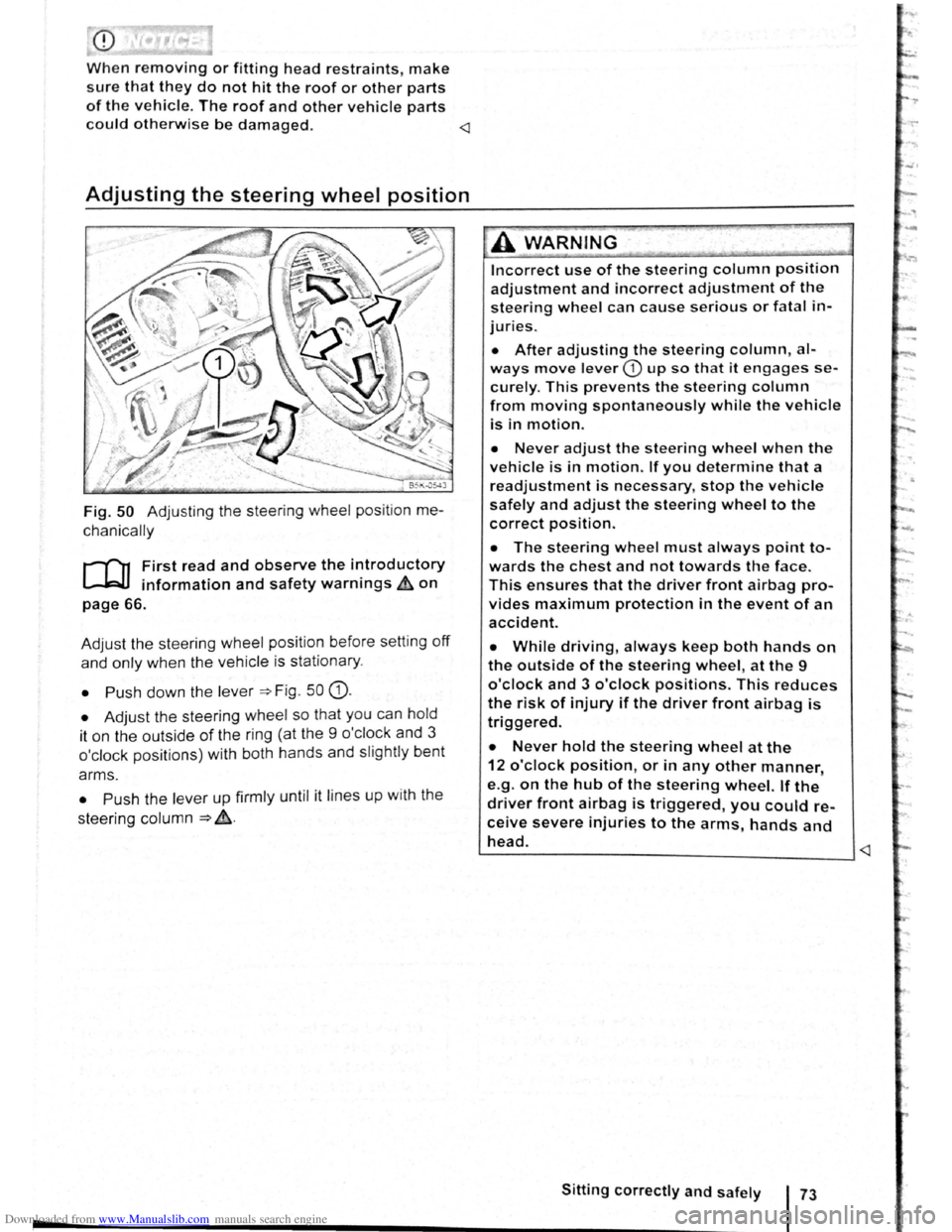
Fig. 50 Adjusting the steering wheel position me
chanically
r-f"'n First read and observe the i~troductory
~ information and safety warnmgs ~on
page 66.
Adjust the steering wheel position before setting
off
and only when the vehicle is sta tionary.
• Push down the lever =>Fig . 50 G).
• Adjust the steering wheel so that you can hold
it on the outside
of the ring (at the 9 o'cl ock and 3
o'clock positions) with both hands and slightly bent
arms.
• Push the lever up firmly until it lines up with the
steering column
=> ~-
Incorrect use of the steering column position
adjustment and incorrect adjustment of the
steering wheel can cause serious or fatal in
juries.
• After adjusting the steering column, al
ways move lever CD up so that it engages se
curely. This prevents the steering column
from moving spontaneously while the vehicle
is in motion.
• Never adjust the steering wheel when the
vehicle is in motion. If you determine that a
readjustment is necessary, stop the vehicle
safely and adjust the steering wheel to the
correct position.
• The steering wheel must always point to
wards the chest and not towards the face.
This ensures that the driver front airbag pro
vides maximum protection in the event of an
accident.
• While driving, always keep both hands on
the outside of the steering wheel, at the 9
o'clock and 3 o'clock positions. This reduces
the risk of injury if the driver front airbag is
triggered.
• Never hold the steering wheel at the
12 o'clock position, or in any other manner,
e.g .
on the hub of the steering wheel. If the
driver front airbag is triggered, you could re
ceive severe injuries to the arms, hands and
head. ~--------------------------____ _j
Page 54 of 138
Downloaded from www.Manualslib.com manuals search engine Centre armrest
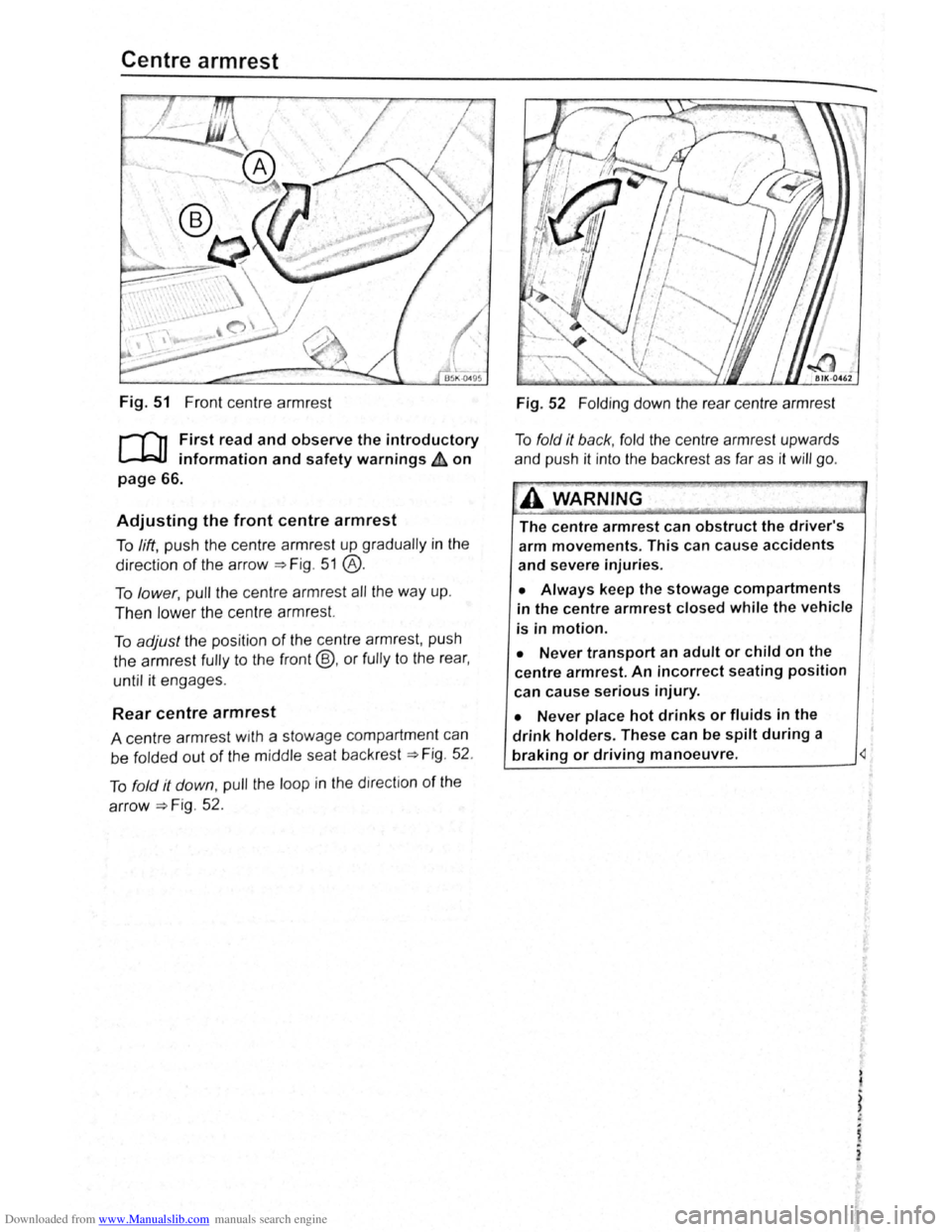
Fig. 51 Front centre armr est
r-T'n First read and observe the introductory
L-.!::J.I information and safety warnings & on
page 66.
Adjusting the front centre armrest
To lift , pu sh th e ce ntr e a rmres t up grad ua lly in the
directio n of th e arrow~ Fig . 5 1 @ .
To lower, pull th e ce ntre armr est all the way up .
Then low er th e ce ntr e a rmr est.
To adjust the posi tio n of the ce ntr e a rmr est, pu sh
th e
armrest fully to the front@, or fully to the rea r,
until it engages .
Rear centre armrest
A centre armr est w1th a stowage compartmen t can
be
f o lded out of the m idd le sea t back rest~ Fig . 52 .
T o
fo ld it down , pull the loop in t he direc tio n of the
arrow~ F ig. 52 .
Fig . 52 Folding d o wn the rea r cen tre a rmr est
T o
fo ld it back , fo ld the ce ntr e a rmr est upw ards
a nd pu sh it int o
the bac kres t as fa r as it will go .
A WARNING~
The centre armrest can obstruct the driver's
arm movements. This can cause accidents
and severe injuries.
• Always keep the stowage compartments
in the centre armrest closed while the vehicle
is in motion.
• Never transport an adult or child on the
centre armrest. An incorrect seating position
can
cause serious injury.
• Never place hot drinks or fluids in the
drink holders. These can be spilt during a
braking or driving manoeuvre.
)
i
,.
2
Page 59 of 138
Downloaded from www.Manualslib.com manuals search engine ..,
of turn signals, a failure to use
r f rg tting to switch off a turn
nfuse other road users. This can
nt and serious Injuries.
• lw. y activate the turn signal In good
tim wh n ch anging lanes and performing
'lt king or turning manoeuvres.
• Alw ys switch off the turn signal once the
le ne change or overtaking or turning ma-
n euvre has been completed.
A W~RNING
In correct use of the main beam headlights
ca n lead to accidents and serious injuries as
the main beam headlights can distract and
dazzle other road users.
Switching lights on and off
m The turn signal will only work when the igni
W tion is switched on. The hazard warning lights
a ls o work
when the ignition is switched off
=>page 336.
m If one turn signal fails, the indicator lamp will
W start flashing twice as fast.
m The main beam headlights can only be
W switched on if the dipped beam headlights
are already on.
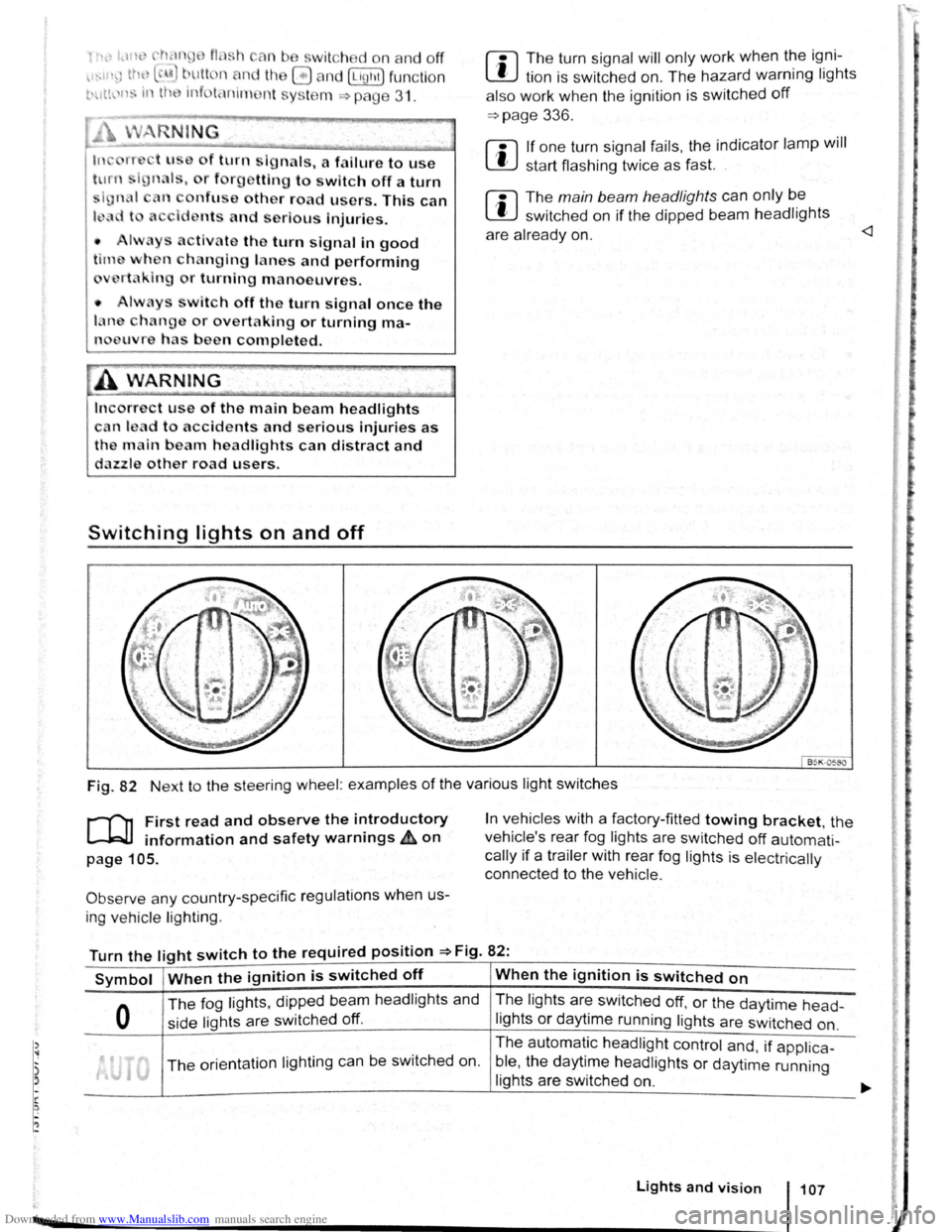
Fig. 82 Next to the steering wheel: examples of the various light switches
r-("n First read and observe the introductory
L-.W1 information and safety warnings ~on
page 105.
Observe any country-specific regulations when us
ing ve hic le lighting .
In vehicles with a factory-fitted towing bracket, the
vehicle's rear fog lights are switched
off automati
cally if a trailer with rear fog lights is electrically
connected to the vehicle .
Turn the light switch to the required position =>Fig. 82:
Symbol When the ignition is switched off When the ignition is switched on
0
The fog lights, dipped bea m headlights and
side lights are switched
off.
The lights are switched off, or the daytime head-
lights or daytime running lights are switched on.
The orientation lighting ca n be switched on. The
automatic
headlight control and, if applica -
ble ,
the daytime headlights or daytime running
lights are switched
on.
Lights and vision 107
Page 65 of 138
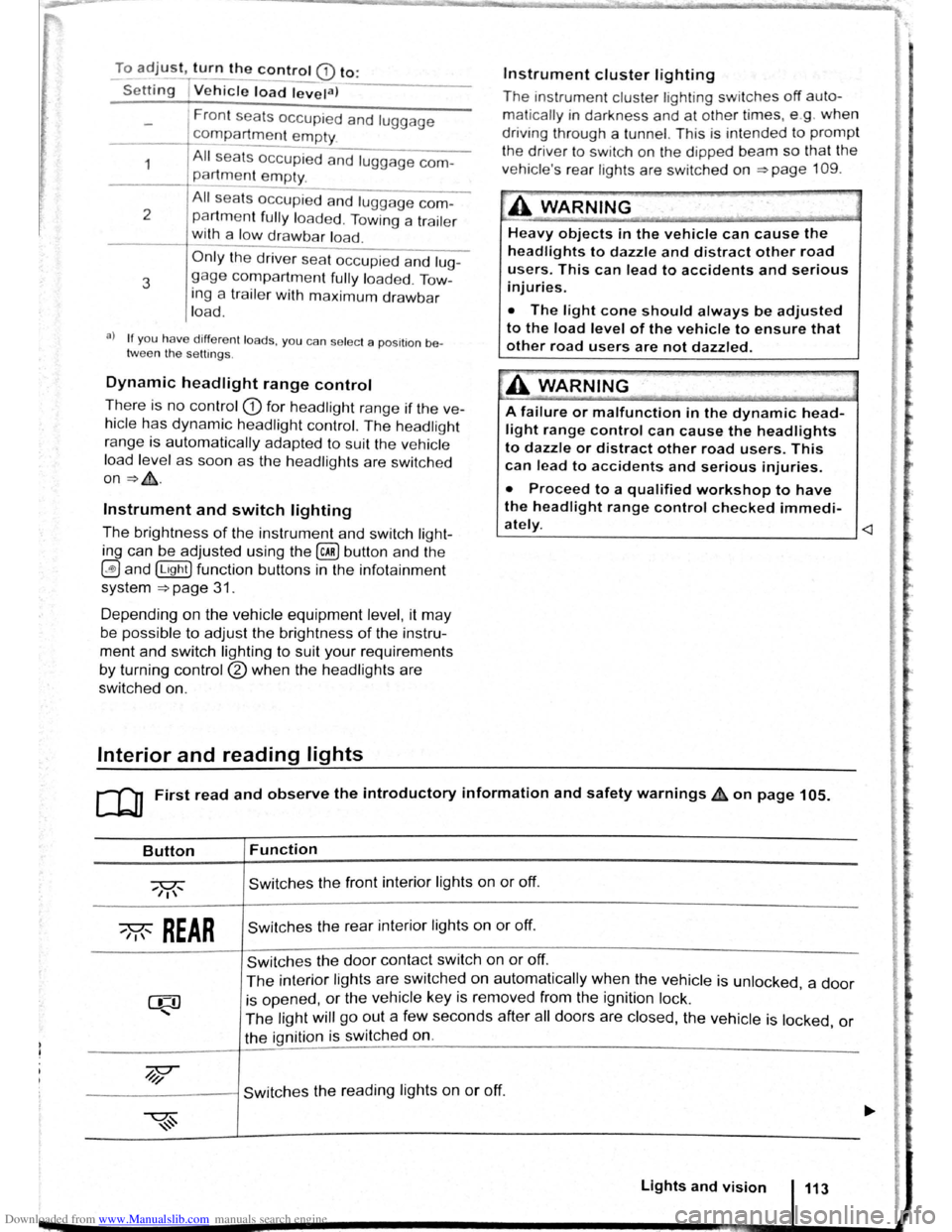
Downloaded from www.Manualslib.com manuals search engine To adjust, turn the control CD to:
-Set~ng I Vehicle load lev~la) -------
1
2
3
Fron t seats occupied and luggage
compa rtment
empty.
All seats occupied and luggage com
partment empty.
All sea ts occ upi ed and luggage com
partm ent fully loaded . Towing a trai le r
wit h a
lo w drawbar load .
Only the driver sea t occupi ed and lug
ga ge compartm ent fully load ed . Tow
ing a trai le r w ith maximum drawbar
l
oad.
a) If you have diff ere nt loads. you can select a positi on be
tween th e settings.
Dynamic headlight range control
Th ere is no control CD for headlight range if the ve
hicle
has dynamic headli ght control. The head light
r ange is
automatically adapted to suit the ve hicle
load level as soon as the headli ghts are switched
on~&.
Instrument and switch lighting
The brightness of the in strument and switch li gh t
ing can be adjusted using the @ill button and the
~and !Ltght] function buttons in the infot ainm ent
system
~page 31 .
Depending on the vehicle equipment level, it may
be possible to adjust the brightness of the instru
ment and switch lighting to suit your requirements
by turning control® when the headlights are
switched on.
Interior and reading lights
Instrument cluster lighting
The instrumen t cl uste r ligh ting sw it c hes off auto
mati cally
in darkness and at other times, e.g . when
driving through a tunnel. This is in tended to prompt
the driver to switch on the dipped beam so that the
v e hi cle' s rea r l
ights are swit c hed on ~page 109.
.A WARNING
-
Heavy objects in the vehicle can cause the
headlights to dazzle and distract other road
users. This can lead to accidents and serious
injuries.
• The light cone should always be adjusted
to the load level of the vehicle to ensure that
other road users are not dazzled.
A WARNING
A failure or malfunction in the dynamic head
light range control can cause the headlights
to dazzle or distract other road users. This
can lead to accidents and serious injuries.
• Proceed to a qualified workshop to have
the headlight range control checked immedi
I
ately. ~--------------- --------------------~
ClJ] First read and observe the introductory information and safety warnings & on page 105.
Button
~REAR
Function
Switches the front interior lights on or off.
Switches the rear interior lights on or off.
Switches the door contact switch on or off.
The interior lights are switche d on automatically when the vehicle is unlocked , a door
is opened, or the ve hicle key is removed from the ignition lock.
The light will go out a few seconds after all doors are closed, the vehicle is locked, or
the ignition is switched on.
/q'j/
---------j Switches the reading lights on or off.
Lights and vision 113
Page 71 of 138
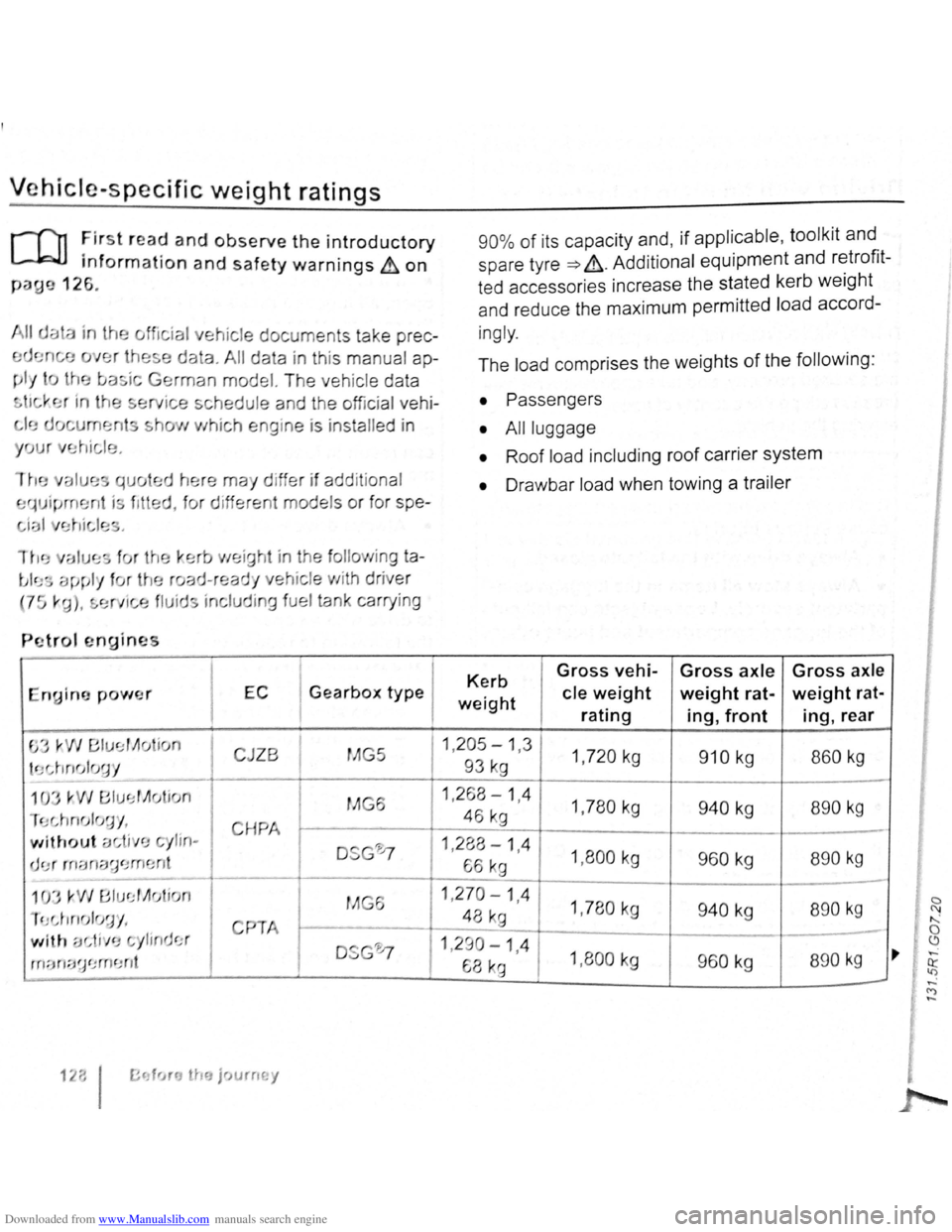
Downloaded from www.Manualslib.com manuals search engine Vehicle·specific weight ratings
r-f11 First r ea d and observe the introductory
L.J,:JJ information and safety warnings & on
paue 126.
ial vehicle document s tak e
prec
data. All data in this manu al ap
man model. T he veh ic le data
ted h
, f
ng ine is inst alled in
may d iffer if add it ional
d ifferent models
or for spe-
a
EC I Gearbox type I
90
% of its capacity and, if applicable , tool kit and
spare tyre
=> &. Addit ional equipment and retrofit
ted accessories increase the stated kerb
weight
and reduce the maximum permitted load accord-
ingly .
The load comprises the weights
of the following :
• Passengers
•
Al l luggage
• Roof load including roof carrier system
• Drawbar load when towing a trailer
Kerb Gross vehi-Gross axle Gross axle
weight cle weight weight rat-weight rat-
rating ing, front ing, rear
JZB I MG5 11 .29~ ~ 1 ,3 1 1 ,720 kg 910 kg I 860 kg
1 ,780 kg 940 kg I 890 kg
H I - -_r.~-I 1 ?P.R -1 Ll. I
1,8 00 kg I 960 kg 890 kg
1,780kg 940 kg 890 kg
I
"', , , 9
I
-ylimJc.:r DSG'0 11,290-1,4 rn ::m:;~~ '.J rn CJ nt 68 ka 1,800 kg 960 kg 890 k g
1 2;; I fr~rcJ tha jr> u rm. y
0 (\1
" 0 ~ ,.. ,...;
~
-<"')
-
Page 72 of 138
Downloaded from www.Manualslib.com manuals search engine . -~~~Q§@~~iC!~;a--................................................................ ~~~~--~--~~~~.a.-.. __ .... ~.c .. ~~~~ ~ .. ~h:;;;;;;..,-~= I n 70 a M= ,..._ ~;e,--~· ... - - -v· --.. iiA.ir ...
...
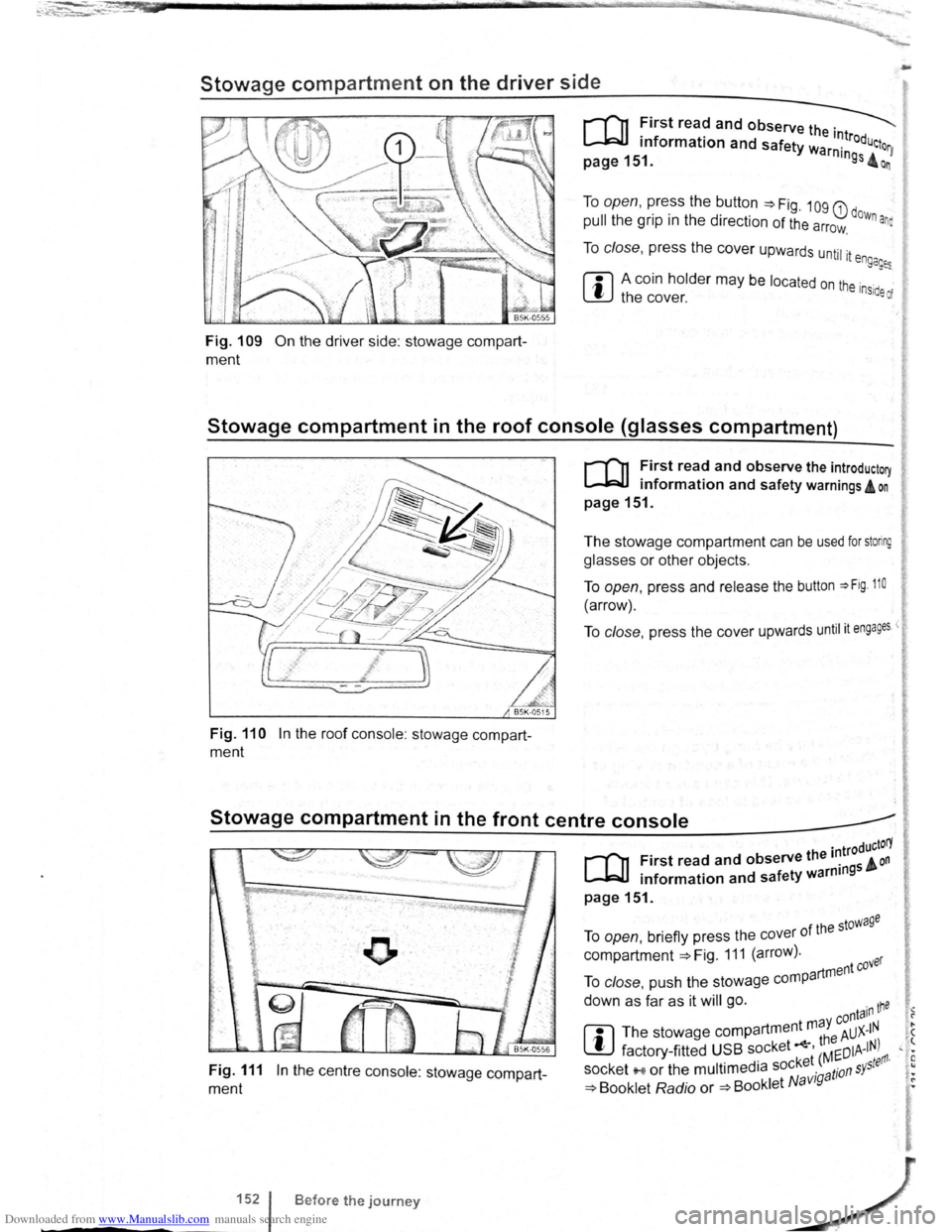
Stowage compartment on the driver side
Fig. 109 On the driver side: stowage compart
ment
To open, press the button ~Fig. 109 G) dow .
pull the grip in the direction of the arrow. n ana
To close, press the cover upwards until it e ngages
ffi A coin holder may be located on the inside of W the cover.
Stowage compartment in the roof console (glasses compartment)
Fig. 110 In the roof console : stowage compart
ment
r-('n First read and observe the introductory
~ information and safety warnings A on
page 151.
The stowage compartment can be used for storing
glasses or other objects.
To open, press and release the button ~Fig. 110
(arrow).
To close, press the cover upwards until it engages <
Stowage compartment in the front centre console _____.
Fig. 111 In the centre console: stowage compart
ment
1521
-----
B efore the journey
. troductorY
[Q] First read and observe the 1~ 5 & on . f ty warnm9 • information and sa e
page151.
f the stowage To open, briefly press the cover 0
compartment ~Fig. 111 (arrow). ver
artment eo To close, push the stowage comp
down as far as it will go. ·n tne • -y conta1 1 ?
rn
The stowage compartment m a AUX-IN . ( ~ th8 ' t factory -fitted USB socket ' Mr:DIA-IN) , • · ket ( ~ tefl'l· E socket '"'' or the multimedia soc ·g a tion s Y5
, •
~ Booklet Radio or ~Booklet N avt • ~
Page 73 of 138
Downloaded from www.Manualslib.com manuals search engine ~
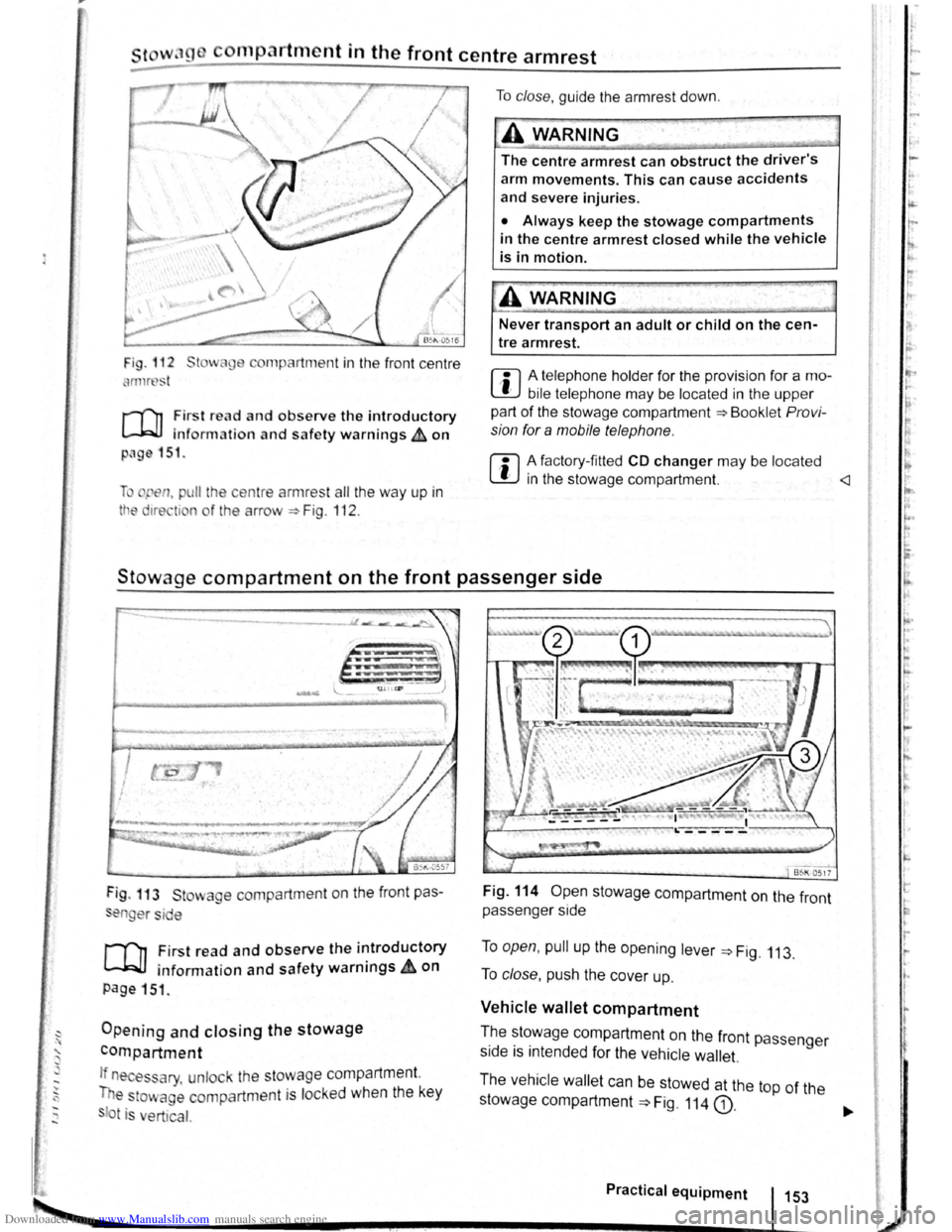
cornp~rtment in the front centre armrest
r-('n First read and observe the introductory
l.-J,r::JJ information and safety warnings th on
png 151.
li pen, pu ll the ce ntre armres t all the way up in
tt e 1re ti n o f the arrow ::. Fig . 112 .
To clo se, guide the a rmr est down .
A WARNING
The centre armrest can obstruct the driver's
arm movements. This can cause accidents
and severe injuries.
• Always keep the stowage compartments
in the centre armrest closed while the vehicle
is in motion.
Never transport an adult or child on the cen
tre armrest.
m A telephone holder for the provision for a mo
L!J bile telephone may be located in the upper
part of the stowage compartment ::.Bookl et Pro vi
sion for a mobile telephone .
m A factory-fi tted CD changer may be located
W in the stowage compartment.
Stowage compartment on the front passenger side
Fig . 113 St wage compartment on the front pas
en er si e
,.....-('n First read and observe the introductory
~ information and safety warnings.&. on
page 151 .
Opening and closing the stowage
compartment
If n es ary, unlock the stowage compartment.
T e
to~ age compartm ent is locked when the key
t is ert ical.
Fig. 114 Open stowage compartment on the front
passenger side
To open, pull up the opening lever ::. Fig. 113.
To close , push the cover up.
Vehicle wallet compartment
T.he ~~~wage compartment on the front passenger
s1de IS mtended for the vehicle wallet.
The vehicle wallet can be stowed at the top of the
stowage compartment
==>Fig. 114 G).
Practical equipment 153
~--------------------~~----------~--~.~! ~--.J-------~
I ,.
~·
~
I
t
r
r r I.
t·
'
Page 77 of 138
Downloaded from www.Manualslib.com manuals search engine rfl If tho lo vo r Is move d accid entally to N when
L!J dr iving , take yo ur foot off the accele rato r.
WiJil fo r tile e ng in e ~~v s in t~e ne utral po sitio n be-
fo re solo ctin g a pos1!1o n agam.
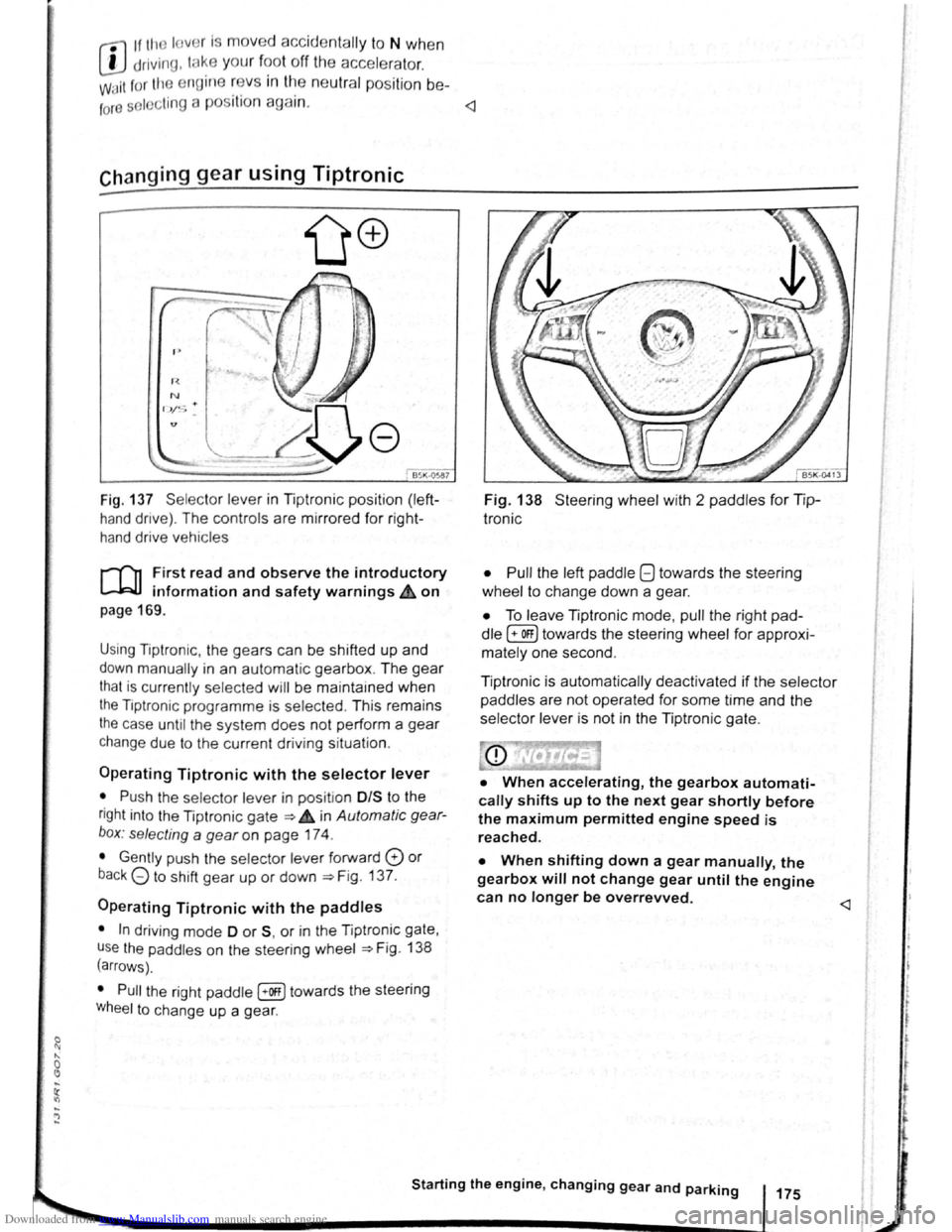
Fig. 137 Se lecto r leve r in Tiptronic position (left
hand drive) . The controls are mirrored for right
hand drive vehicles
rT'n F irst read and observe the introductory
L-.W.I information and safety warnings.& on
page 169 .
Using Tiptronic , the ge ars can be shifted up and
down manually in an automat ic gearbox . The gear
that is currently selected will be maintained when
the Tiptronic programme is selected . This remains
the case until the system does not perform a gear
change due to the current driv ing situation .
Operating Tiptronic with the selector lever
• Push the selector lever in pos it ion 0/S t o the
right into the Tiptronic gate ~ 4 in Automatic gear
b o x: selecting a
gear on page 174 .
• Gently push the selecto r lever forward 0 or
back G to shift gear up or down ~Fig. 137.
Operating Tiptronic with the paddles
• In driving mode 0 or S, or in the Tiptronic gate,
u se
the paddles o n the steering wheel ~Fig. 138
(arrows) .
• Pull the right paddle [+Off] towards the steering
Wheel to change up a gea r.
Fig. 138 Steer ing wheel with 2 padd les for Tip
Ironic
• Pull
the left paddle 8 towards the stee ring
whe el to cha nge down a gea r.
• To leave Tiptronic mode, pull the right pad
dle (+OFF) towa rds the steering whee l for approxi
mat ely one second .
Tiptronic is
automatically deactivated if the selector
paddles
are not operated for some time and the
selector lever is not in the Tiptronic gate.
• When accelerating, the gearbox automati
cally shifts up to the next gear shortly before
the maximum permitted engine speed is
reached.
• When shifting down a gear manually, the
gearbox will not change gear until the engine
can no longer be overrevved.
l t t
t
r
Page 78 of 138
Downloaded from www.Manualslib.com manuals search engine riving with an automatic gearbox
r-T'n First read and observe t h e introductory
L-..kJJ information and safety warnings~ on
page 169.
The gearbox changes th e forwa rd gears up and
down automat ic a lly .
Driving down hills
The steeper the gradi ent, the lower the gear you
will need . Lower gears increase the braking effect
of the engine . Never allow the vehicle to roll down
mountains or hills in the neutral position N.
• Reduce your speed.
• Push the selector lever from posit ion D t o the
r i
ght into the Tiptron ic gate ~page 175.
• Gently push the selector le ver to the rear to
change down gear.
• OR: shift down a gear using the padd les on the
s te
erin g wheel ~page 175 .
Stopping the vehicle and pulling away when
driving uphill
The steeper the incline, the lower the gear you will
need.
If you wish to stop the vehic le or pu ll away when
driv ing uphill you should use the Auto -Ho
ld func
tion
~page 196.
When you stop the vehicle on an incl ine and the
vehicle remains in gear , the vehicle must always
be prevented fro m rolling by depress ing the brake
pedal or
by applying the electron ic park ing brake .
The brake pedal or the electronic parking brake
should
not be released until you pull away ~CD.
Freewheel driving with dual clutch gearbox
DSG®
In
freewheel mode, the momentum of the vehicle is
used to save fuel with a foresighted driving style.
The engine is declutched and no longer brakes the
vehicle -the vehicle can
roll out over a longer dis
t a nce.
Switch-on condit io n: the selector lever must be in
positio n D.
Triggering freewheel driving
• Select the Eco driving mode from the Driving
Mode Selection menu ~page 248 .
• Remove foot from accelerator pedal. The en
gine
w ill be disengaged and run in freewheel
mode. The vehicle rolls without the braking effect
of the eng ine .
Cancelling freewheel mode
• Press the bra e pedal brieny or pull the 1 ft.
hand paddle G towards the stee ring wh 1.
Kick-down
The kickdown function enab~~s ma imum accelera.
tion in the selec tor lever pos1t1ons D and S, or in
th e Tiptron ic posi tio n.
If the acce lerator pedal is d epre ssed fully. the gear.
box will automat ically sh ift to a lower gear, depend
ing on the speed and engine revs. This will make
use of the full veh icle acceleration ~ Lt.
The gearbox does not shift up to the next gear until
the engine reaches the maximum engine s
peed for
the gear.
When the
Eco driving mode is sel ected in vehicles
with Driving Mode Selection ~page 248 and the
accelerator is depressed
fully beyond the pressure
point, the engine output is automatically regulated
to ensure maximum vehicl e acceleration .
Launch control programme
The launch control programme enables maximum
accelerat ion from a stand ing start .
• Switch off TCS ~page 179.
• Depress and hold the brake pedal with your left
foot.
• Move the selector lever to position S, or into the
Tiptronic position. Alte rnatively , select the Sport
driving mode in vehi cles with Driv ing Mode Selec
tion ~page 248 .
• With your right foot, depress the accelerator un
til the engines speed reaches approximately
3,200 rpm.
• Take your left foot off the brake ~ ~. The vehi
cle will start with maximum acceleration.
• Switch the TCS back on after accelerat ion.
A WARNING
Rapid acceleration can cause loss of traction
and skidding, particularly on slippery roads .
This can cause you to lose control of the ~e
hicle, which can lead to accidents and sen·
ous injuries.
• Always adjust your driving style in ac·
cordance with the flow of traffic.
• Only use kickdown or fast acceleration if
visibility, weather road and traffic conditions ' t permit, and other road users are not put a
risk due to the acceleration and the driving
style.
,