changing light VOLKSWAGEN T-ROC 2018 User Guide
[x] Cancel search | Manufacturer: VOLKSWAGEN, Model Year: 2018, Model line: T-ROC, Model: VOLKSWAGEN T-ROC 2018Pages: 502, PDF Size: 8.58 MB
Page 225 of 502
conditions.
Driving on sand and mud
First read and observe the introductoryinformation and safety warnings
Always drive at a steady speed through sand or mud and, do not carry out any manual gear changes
or stop the vehicle.
Check whether ESC is active. The indicator lamp or in the instrument cluster display must not
light up Brake support systems
Keep the vehicle moving constantly.
Use the Offroad driving profile S
Select a suitable gear and remain in this gear until you have reached more solid ground Changing
gear correctly
If the tyres have lost their grip, turn the steering wheel to and fro quickly. This can briefly give the
tyres on the front wheels better grip for these ground conditions.
Driving through sand
Do not under any circumstances reduce the tyre pressure to drive through sand
pressure has been reduced for driving through sand, the correct tyre pressure must always be
restored before driving on. Driving with reduced tyre pressure can lead to a loss of control over the
vehicle and increase the risk of serious and fatal injuries.
Driving through mud
Do not change speed or direction. The tyres can lose their traction when driving through mud. If the
vehicle slides, steer in the direction needed to get the vehicle under control.
WARNING
Driving through mud and sand can be dangerous. The vehicle can slide uncontrollably. This increases
the risk of injury. Always drive carefully through sand and mud.
Never choose an unsafe route or take a risk which could endanger you or your passengers. If you are
in any doubt about the safety of the route, turn round and choose another way.
WARNING
Incorrect tyre pressure can cause severe or even fatal accidents.
Incorrect tyre pressures will increase the levels of wear on the tyres and will negatively affect the
vehicle's handling.
Page 239 of 502

121 Left-hand side of the multifunction steering wheel: buttons for operating ACC.
First read and observe the introductoryinformation and safety warnings
Switching on ACC
Press the button.
The indicator lamp lights up grey, ACC does not regulate.
Starting control
Press the button while driving forwards.
ACC stores the current speed and maintains the set distance. If the current speed is outside the
defined speed range, ACC will set the minimum speed (when driving more slowly than the limit) or
maximum speed (when driving faster than the limit).
The following indicator lamps light up, depending on the driving situation:
ACC regulating.No vehicle has been detected ahead.Vehicle detected ahead (white).
Interrupting control
Briefly press the button or press the brake pedal.
The indicator lights up grey, the speed and distance remain stored.
Control is automatically interrupted if the traction control system (TCS) is deactivated.
Resuming control
Press the button.
ACC adopts the last set speed and last set distance. The instrument cluster display shows the set
speed and the indicator lamp lights up green.
Switching off ACC
Press and hold the button.
The set speed is deleted.
Changing to the speed limiter
Press the button.
ACC is switched off.
Setting ACC
Page 256 of 502

When switched on, the Blind Spot Monitor is active from a speed of approx. 15 km/h (9 mph).
In the following driving situations, the yellow indicator lamp will light up in the corresponding
exterior mirror: Fig. 124
If your vehicle is being overtaken.
When overtaking another vehicle with a speed difference of up to approximately 10 km/h (6 mph).
No display will be shown if the takeover manoeuvre is much faster.
If a vehicle is detected in the blind spot and the turn signal is additionally activated in the direction
of the detected vehicle
In vehicles with the lane keeping system, the yellow indicator lamp will flash even if you do not
activate the turn signal when leaving your lane, provided that the lane keeping system is switched on
(Blind Spot Monitor Plus). The driver is warned by a corrective steering intervention when changing
lanes during a possible critical situation (information level, warning level). This also occurs when the
turn signal is activated for the corresponding direction. If the steering intervention is overridden by
the driver, the steering wheel vibrates to give an additional warning.
The quicker another vehicle approaches, the earlier there is a corresponding display in the exterior
mirror.
Automatic deactivation
The radar sensors for the Blind Spot Monitor will switch off automatically if, for example, the system
detects that a radar sensor is continuously covered. This can be caused by a layer of ice or snow in
front of the radar sensor, for example.
A text message will be shown on the instrument cluster display.
If the Blind Spot Monitor has been automatically deactivated, the system cannot be activated until
the ignition has been switched off and back on again.
The Blind Spot Monitor is automatically deactivated and cannot be activated when the factory-fitted
towing bracket is electrically connected to a trailer or similar Trailer towing
electrically connected to the vehicle and the driver pulls away, a text message appears in the
instrument cluster display to inform the driver that the Blind Spot Monitor has been deactivated.
The Blind Spot Monitor will be automatically activated again when the trailer has been unhitched
from the vehicle. This applies if the function was previously activated. The Blind Spot Monitor must
be deactivated manually if you tow a trailer using a towing bracket that was not fitted at the factory.
Troubleshooting
First read and observe the introductoryinformation and safety warnings
Blind Spot Monitor is not working
The indicator lamp lights up yellow.
Go to a qualified workshop.
Page 338 of 502

Damaged or dirty wiper blades can scratch the window glass.
can damage the graphite coating of the wiper blades during cleaning.
Wax deposits from car washes on the windscreen and rear window can cause the wiper blades to
rub. Remove wax residue using a special cleaning product or cleaning cloths.
Changing bulbs
Introduction
This chapter contains information on the followingsubjects:
Checklist
Changing bulbs in the front headlights (halogen bulbs)
Changing the bulbs in the headlights (lights with LED technology)
Changing the front turn signal bulbs
Changing bulbs in the front bumper
Changing bulbs in the tail light clusters (LED l
Changing bulbs in the number plate light (LED lights)
Troubleshooting
Changing the vehicle bulbs requires a certain amount of technical skill. Volkswagen therefore
recommends having bulbs replaced by a qualified workshop if you are uncertain. The work must be
performed by an expert if other vehicle parts around the affected bulbs need to be removed.
Volkswagen recommends having bulbs replaced by a Volkswagen dealership.
You should keep a box with spare light bulbs for the lights that ensure the vehicle is roadworthy in
the vehicle at all times. Spare bulbs are available from Volkswagen dealerships. In some countries it
is a legal requirement to have these spare bulbs in the vehicle.
It may be illegal to drive with defective lights of the exterior lighting.
Information on indicator and warning lamps can be found in the troubleshooting section at the end
of the chapter Troubleshooting
LED lights on the vehicle
The exterior lighting may feature LEDs: Owners cannot replace the LEDs themselves. If some LEDs
fail, this may be an indication that more elements are on the point of failure. In this case, have the
lights checked and replaced if necessary at a qualified workshop.
Page 339 of 502

Additional bulb specifications
Some bulbs in headlights or in tail light clusters might have factory specifications that are different to
standard bulbs. The designation is inscribed on the bulb, either on the glass part or on the base.
WARNING
Accidents can occur if roads are not sufficiently illuminated and other road users have difficulty
seeing the vehicle, or cannot see it at all.
WARNING
Changing bulbs incorrectly can cause accidents and serious injuries.
In the
engine compa
injuries can be sustained here.
change a bulb unless you are familiar with the procedure. If you are uncertain of what to
do, the work should be carried out by a qualified workshop.
heat will cause fingerprints to evaporate on the bulb, which in turn will cause the reflector to go
blind.
-edged parts in the headlight housing in the engine compartment and on the tail
light cluster housing. Protect your hands when changing bulbs.
NOTICE
Damage to the electrical system can be caused by water entering the system if the rubber cover or
plastic covers on the headlight housing are not properly mounted after a bulb has been changed.
Checklist Information on changing bulbs
Page 340 of 502

t read and observe the introductoryinformation and safety warnings
Checklist
Always carry out the following actions for changing a bulb in the given order
Park the vehicle on a firm and level surface at a safe distance from the flow of traffic.
Switch on the electronic parking brake Electronic parking brake.
Turn the light switch to position 0 Switching lights on and off.
Move the turn signal and main beam lever to neutral position Switching turn signals on and off.
Automatic gearbox: move the selector lever to position P DSG
Page 341 of 502
bulb would cause the remaining fingerprint to evaporate and be deposited on the reflector. This will
impair the light output of the headlight.
After changing a bulb, check to ensure that the bulb is working properly. If the bulb is not working
properly, the bulb may not have been inserted properly, may have failed again, or the connector
may have been fitted incorrectly.
Any time you change a bulb at the front of the vehicle, the headlight settings should be checked by a
qualified workshop.
WARNING
Ignoring any of the items on this important safety checklist can lead to accidents and severe injuries.
NOTICE
Always take care when removing or fitting lights to prevent damage to the paintwork or to other
vehicle parts.
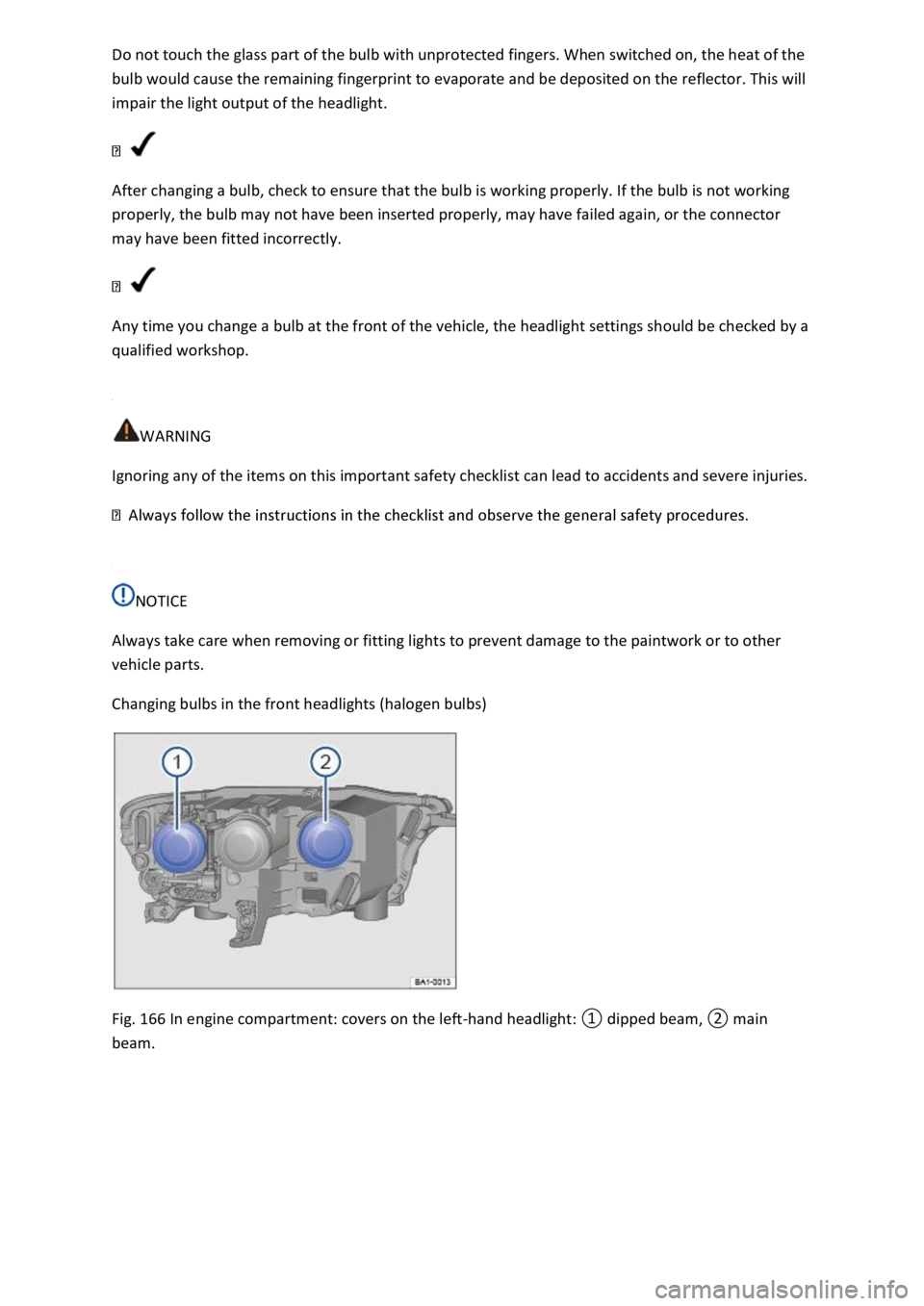
Changing bulbs in the front headlights (halogen bulbs)
Fig. 166 In engine compartment: covers on the left-
Page 342 of 502
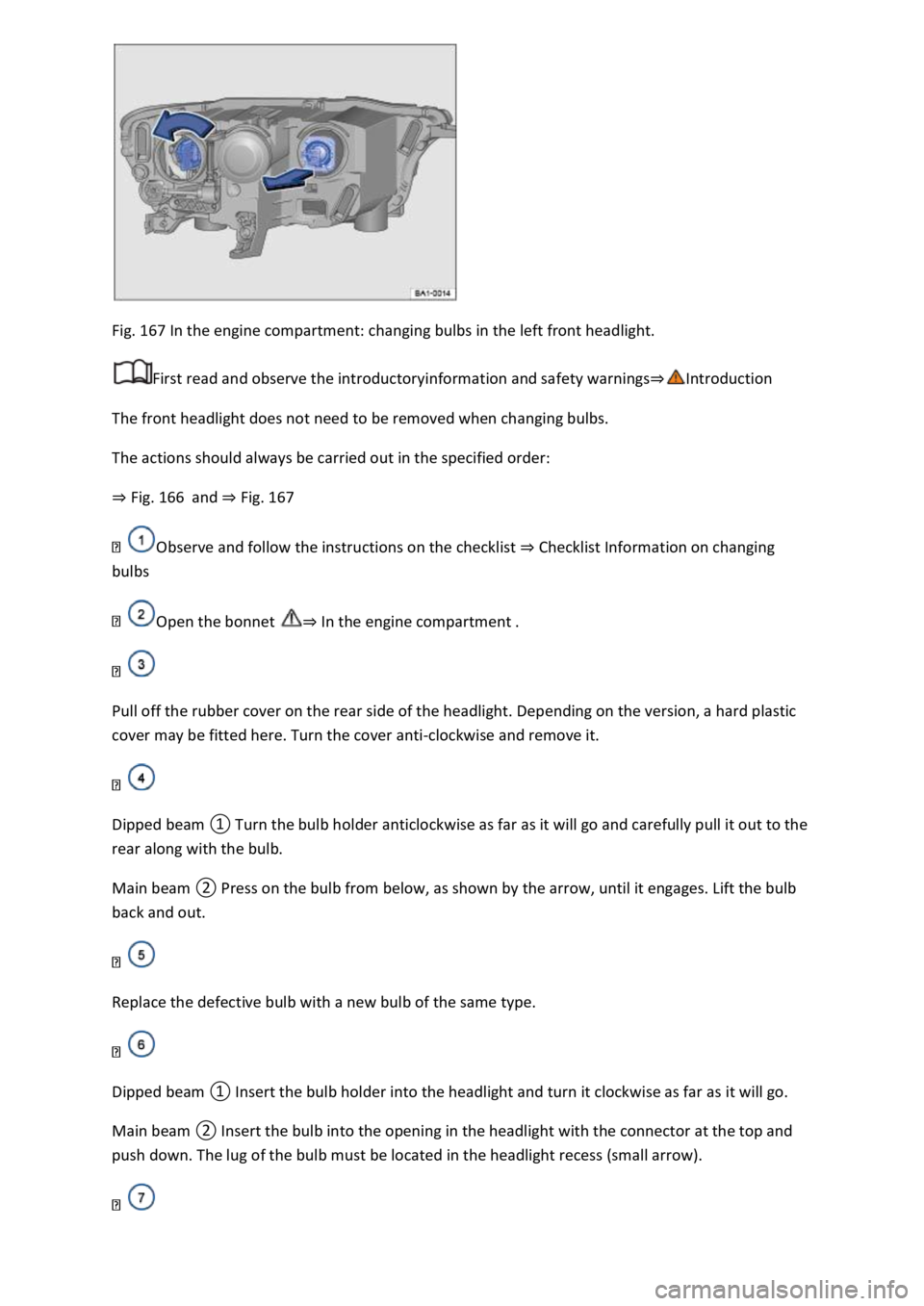
Fig. 167 In the engine compartment: changing bulbs in the left front headlight.
First read and observe the introductoryinformation and safety warnings
The front headlight does not need to be removed when changing bulbs.
The actions should always be carried out in the specified order:
Fig. 166and Fig. 167
Observe and follow the instructions on the checklist Checklist Information on changing
bulbs
Open the bonnet In the engine compartment
Pull off the rubber cover on the rear side of the headlight. Depending on the version, a hard plastic
cover may be fitted here. Turn the cover anti-clockwise and remove it.
Dipped beam
Main beam
back and out.
Replace the defective bulb with a new bulb of the same type.
Dipped beam it will go.
Main beam
Page 343 of 502
t clockwise as far as it will go.
Close the bonnet In the engine compartment
Changing the bulbs in the headlights (lights with LED technology)
First read and observe the introductoryinformation and safety warnings
These lamps use LED technology. The LEDs cannot be replaced by customers. If some LEDs fail, this
may be an indication that more elements are on the point of failure. In this case, have the lights
checked and renewed if necessary at a qualified workshop.
Changing the front turn signal bulbs
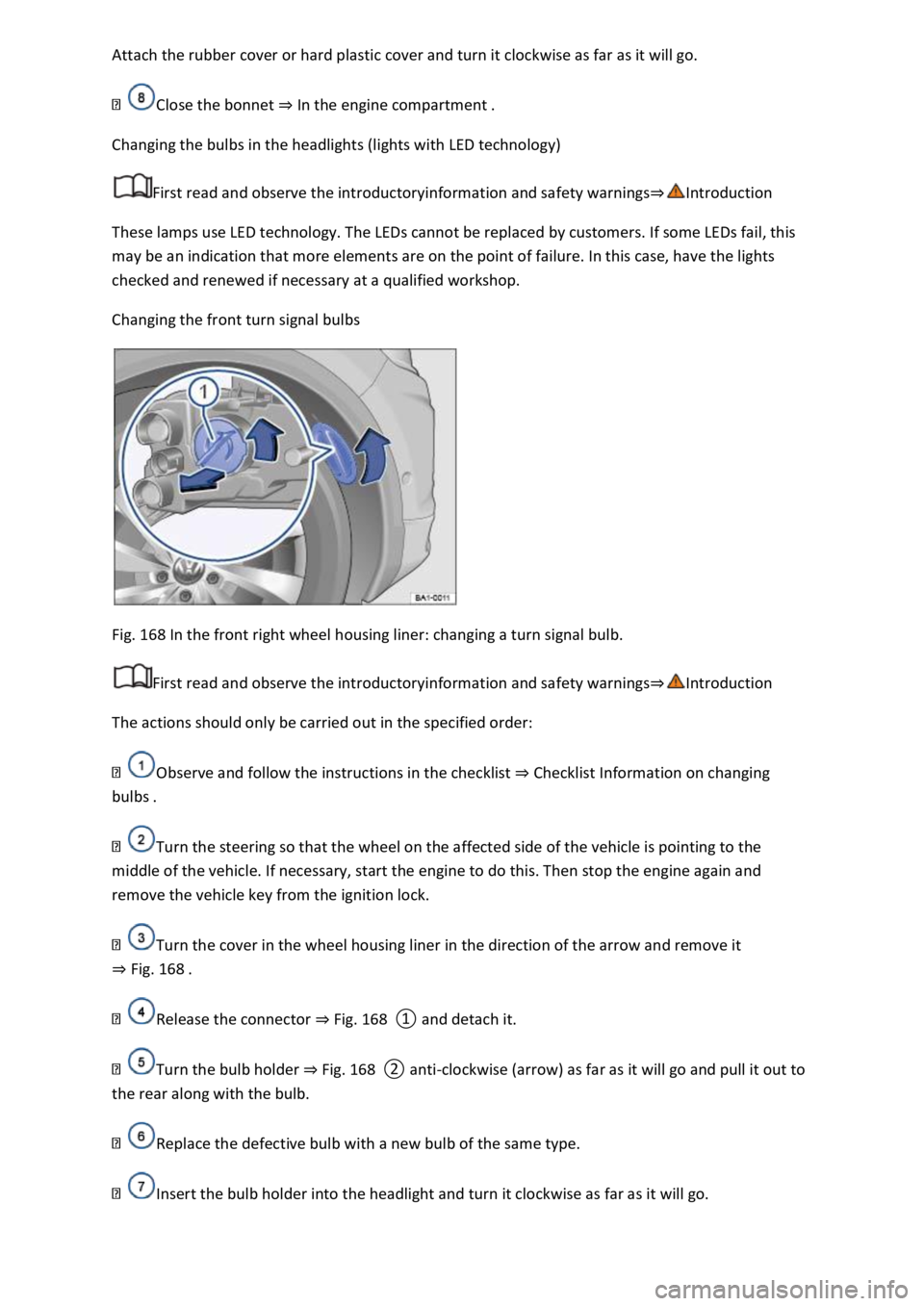
Fig. 168 In the front right wheel housing liner: changing a turn signal bulb.
First read and observe the introductoryinformation and safety warnings
The actions should only be carried out in the specified order:
Observe and follow the instructions in the checklist Checklist Information on changing
bulbs
Turn the steering so that the wheel on the affected side of the vehicle is pointing to the
middle of the vehicle. If necessary, start the engine to do this. Then stop the engine again and
remove the vehicle key from the ignition lock.
Turn the cover in the wheel housing liner in the direction of the arrow and remove it
Fig. 168
Release the connector Fig. 168
Turn the bulb holder Fig. 168clockwise (arrow) as far as it will go and pull it out to
the rear along with the bulb.
Replace the defective bulb with a new bulb of the same type.
Insert the bulb holder into the headlight and turn it clockwise as far as it will go.
Page 344 of 502
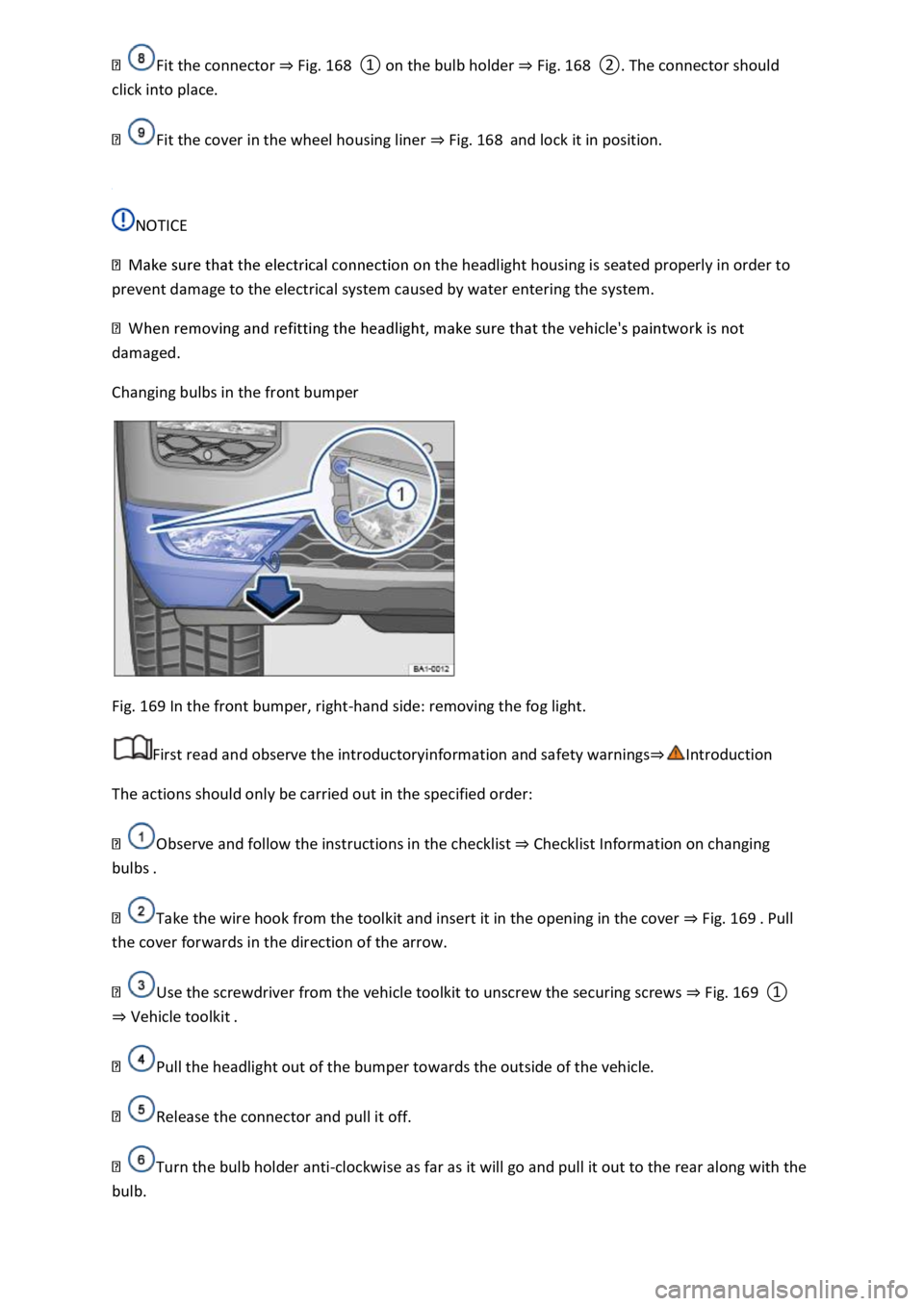
Fig. 168Fig. 168
Fit the cover in the wheel housing liner Fig. 168and lock it in position.
NOTICE
the headlight housing is seated properly in order to
prevent damage to the electrical system caused by water entering the system.
damaged.
Changing bulbs in the front bumper
Fig. 169 In the front bumper, right-hand side: removing the fog light.
First read and observe the introductoryinformation and safety warnings
The actions should only be carried out in the specified order:
Observe and follow the instructions in the checklist Checklist Information on changing
bulbs
Take the wire hook from the toolkit and insert it in the opening in the cover Fig. 169
the cover forwards in the direction of the arrow.
Use the screwdriver from the vehicle toolkit to unscrew the securing screws Fig. 169
Vehicle toolkit
Pull the headlight out of the bumper towards the outside of the vehicle.
Release the connector and pull it off.
Turn the bulb holder anti-clockwise as far as it will go and pull it out to the rear along with the
bulb.