engine VOLKSWAGEN T-ROC 2018 User Guide
[x] Cancel search | Manufacturer: VOLKSWAGEN, Model Year: 2018, Model line: T-ROC, Model: VOLKSWAGEN T-ROC 2018Pages: 502, PDF Size: 8.58 MB
Page 32 of 502
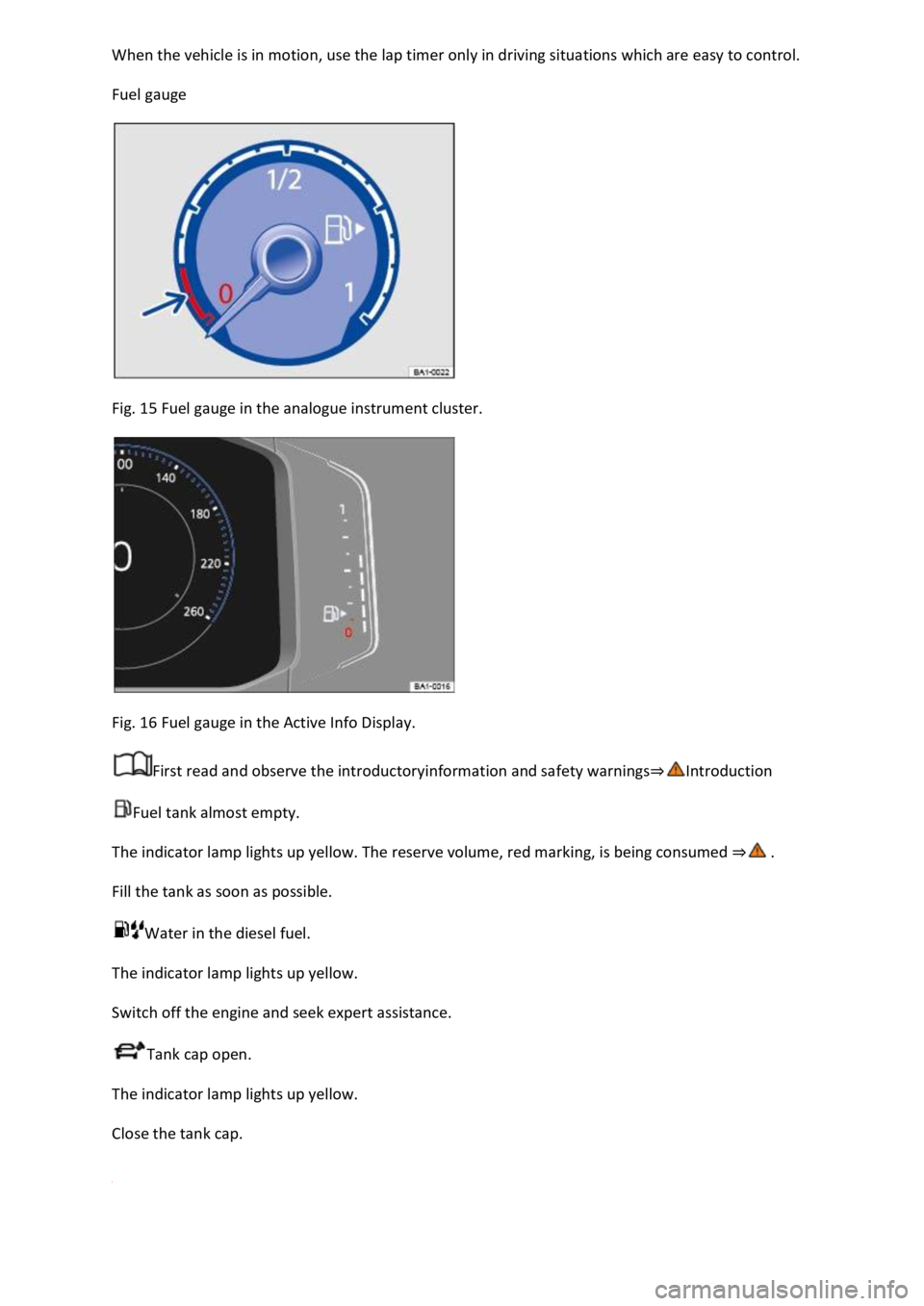
Fuel gauge
Fig. 15 Fuel gauge in the analogue instrument cluster.
Fig. 16 Fuel gauge in the Active Info Display.
First read and observe the introductoryinformation and safety warnings
Fuel tank almost empty.
The indicator lamp lights up yellow. The reserve volume, red marking, is being consumed
Fill the tank as soon as possible.
Water in the diesel fuel.
The indicator lamp lights up yellow.
Switch off the engine and seek expert assistance.
Tank cap open.
The indicator lamp lights up yellow.
Close the tank cap.
Page 33 of 502
RNING
Driving when the fuel level is too low can lead to the vehicle coming to a standstill in traffic,
potentially causing accidents and serious injuries.
When the fuel level is too low, the fuel supply to the engine could be irregular, especially when
driving up or down hills and inclines.
The steering, all driver assist systems and brake support systems stop working if the engine sputters
or goes off due to fuel shortage or irregular fuel supply.
Always fill the tank when it is still 1/4 full. This reduces the risk of running out of fuel and breaking
down.
NOTICE
Do not run the tank empty. The irregular fuel supply can cause misfiring and allow unburnt fuel to
enter the exhaust system. The catalytic converter or particulate filter could be damaged as a result.
The small arrow next to the petrol pump symbol in the fuel gauge shows you the side of the vehicle
on which the tank flap is located.
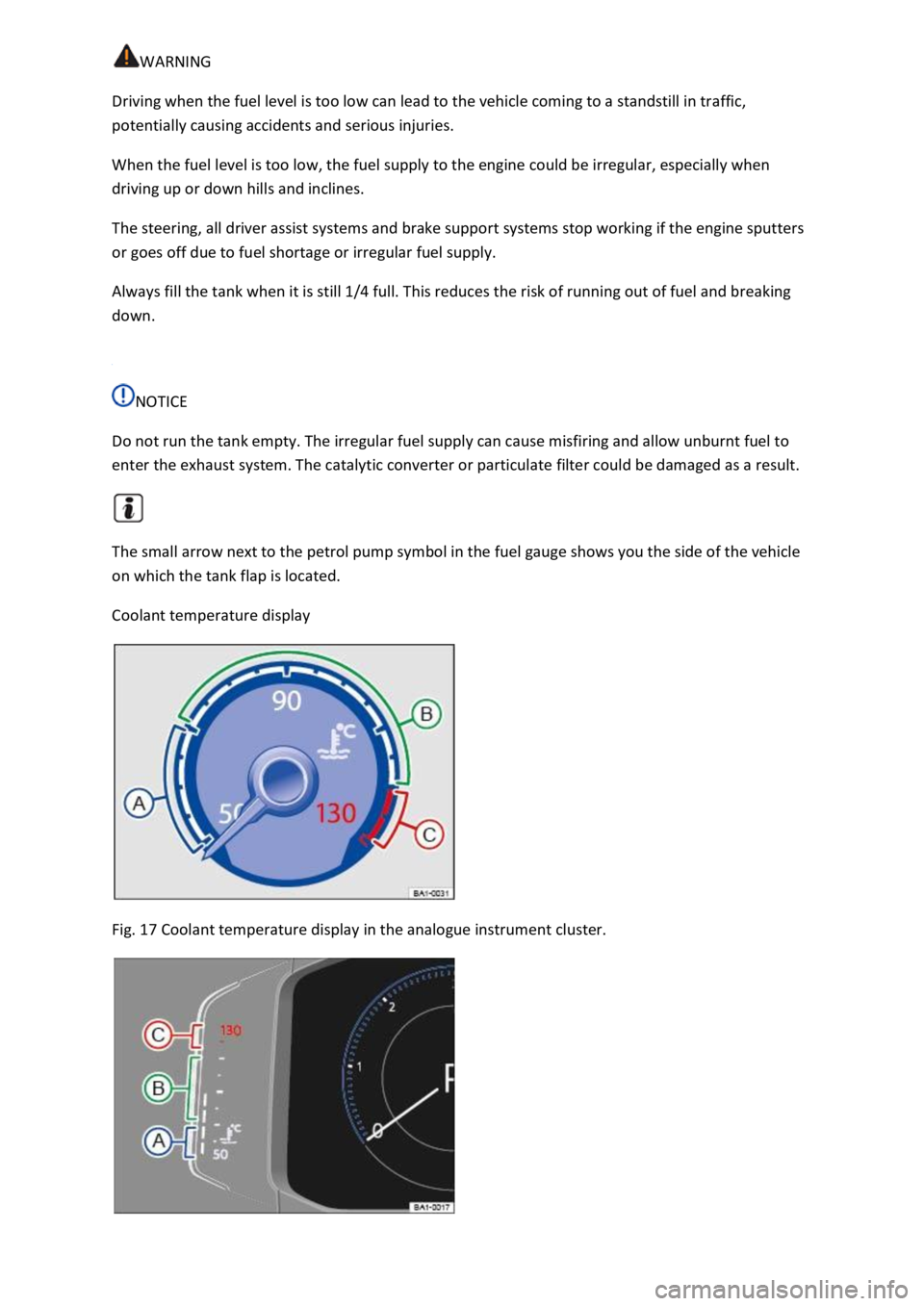
Coolant temperature display
Fig. 17 Coolant temperature display in the analogue instrument cluster.
Page 34 of 502
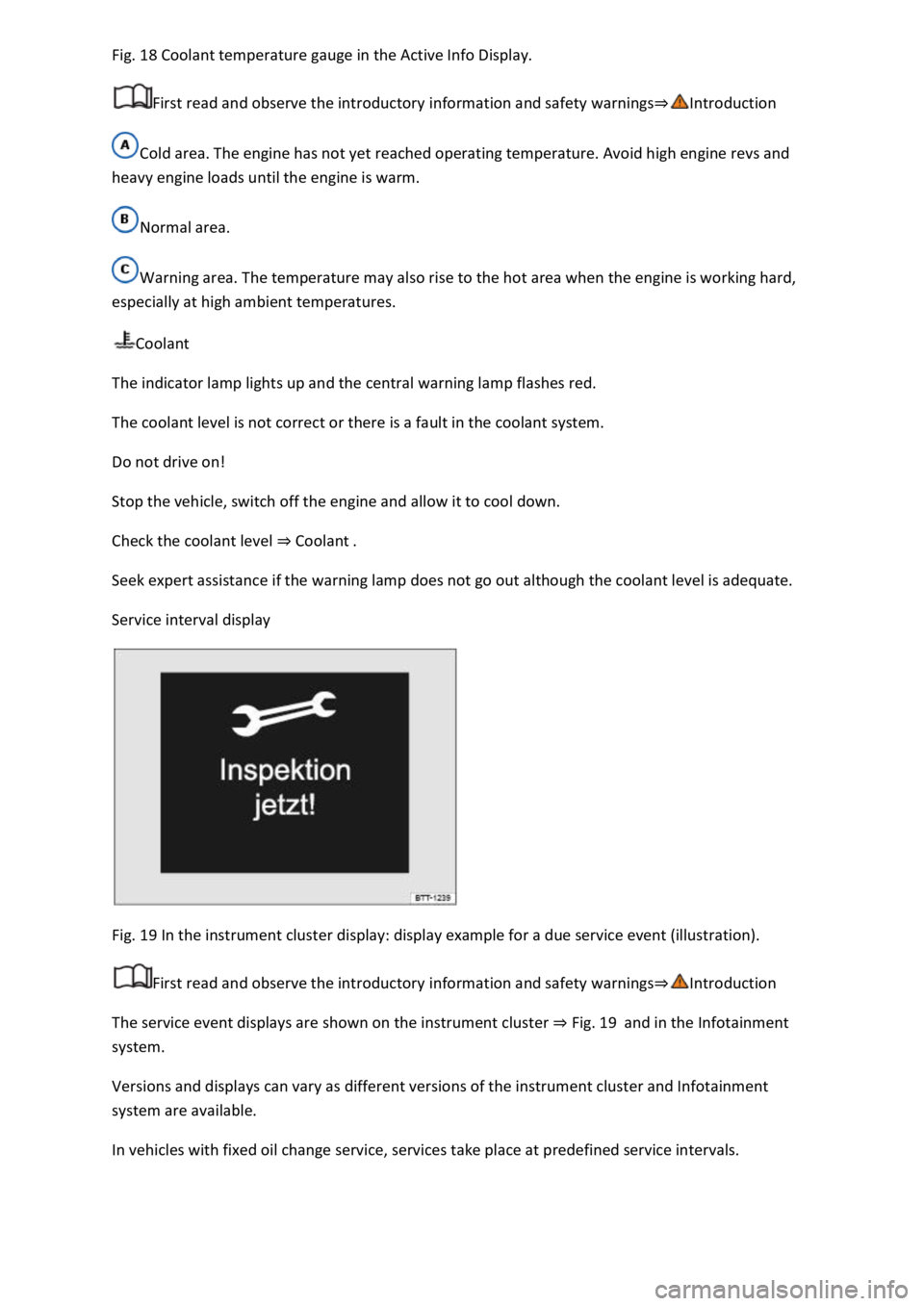
18 Coolant temperature gauge in the Active Info Display.
First read and observe the introductory information and safety warnings
Cold area. The engine has not yet reached operating temperature. Avoid high engine revs and
heavy engine loads until the engine is warm.
Normal area.
Warning area. The temperature may also rise to the hot area when the engine is working hard,
especially at high ambient temperatures.
Coolant
The indicator lamp lights up and the central warning lamp flashes red.
The coolant level is not correct or there is a fault in the coolant system.
Do not drive on!
Stop the vehicle, switch off the engine and allow it to cool down.
Check the coolant level Coolant
Seek expert assistance if the warning lamp does not go out although the coolant level is adequate.
Service interval display
Fig. 19 In the instrument cluster display: display example for a due service event (illustration).
First read and observe the introductory information and safety warnings
The service event displays are shown on the instrument cluster Fig. 19and in the Infotainment
system.
Versions and displays can vary as different versions of the instrument cluster and Infotainment
system are available.
In vehicles with fixed oil change service, services take place at predefined service intervals.
Page 35 of 502

Technical progress has made it possible to considerably reduce servicing requirements. An oil change
service must only be carried out when required by the vehicle. The individual conditions in which the
vehicle is used and the driver's personal driving style are taken into account. The service reminder is
displayed 30 days before the service is due. The distance is rounded to the nearest 100 km and the
remaining time is rounded to full days.
Service alert
If a service or inspection is due soon, a service alert will appear the next time the ignition is switched
on.
The number of kilometres or amount of time shown correspond to the maximum number of
kilometres or maximum time that can still be driven before the next service.
Service event
In the event of a due service or a due inspection, a signal tone will be given when the ignition is
switched on and the spanner symbol will be displayed for several seconds on the instrument
cluster display. One of the following displays will also appear Fig. 19
Inspection now!
Oil service now!
Oil service and inspection now!
Checking service schedules
You can access the current scheduled service information when the ignition is switched on, the
engine is not running, and the vehicle is stationary:
Accessing the service schedule in the Infotainment system.
Press the button or function button.
Press the Vehicle and function buttons Infotainment system controls and displays
Select the Service menu option to display the service information.
Vehicles with analogue instrument cluster.
Press and hold the button in the instrument cluster Instrument clusteruntil the text Service
appears in the display.
Release the button. The current scheduled service will be shown in the display.
Vehicles with digital instrument cluster.
Information on the scheduled service can be accessed only via the Service menu Service menu
Resetting the service interval display
Page 36 of 502

reset as follows:
Vehicles with analogue instrument cluster.
Switch off the ignition.
Press and hold the button in the instrument cluster Instrument cluster
Switch on the ignition again.
Release the button when one of the following messages appears on the instrument cluster
display: Reset oil service? or Reset inspection?.
Press the button on the instrument cluster Instrument clusterto confirm.
Vehicles with digital instrument cluster.
The service interval display can be reset only via the Service menu Service menu
Do not reset the service interval display between service intervals otherwise incorrect data will be
shown.
If the oil change service was manually reset, the service interval display then also changes to a fixed
service interval in vehicles with flexible oil change service.
The service message will disappear after a few seconds when the engine is running, or when the
button on the wiper lever or the button on the multifunction steering wheel is pressed
Operating the instrum
If the 12-volt vehicle battery was disconnected for long periods in vehicles with flexible service, the
system cannot calculate the time at which the next service is due. The information shown in the
service interval display may therefore be incorrect. In this case, please observe the maximum
permissible service intervals Service
Operating the instrument cluster
Introduction
This chapter contains information on the followingsubjects:
Operating using the wiper lever
Operating using the multifunction steering wheel
Button for driver assist systems
Some menu options can be accessed only when the vehicle is stationary.
Page 41 of 502
When you start the engine after the 12-volt vehicle battery has been totally discharged or changed,
you may find that system settings (time, date, personal convenience settings and programming) and
user accounts have been changed or deleted. Check and correct the settings as necessary once the
12-volt vehicle battery has been sufficiently charged.
Vehicle settings menu
First read and observe the introductoryinformation and safety warnings
You can switch individual functions and systems on and off and make settings in the vehicle settings
of the Infotainment system.
Opening the Vehicle settings menu
Switch on the ignition.
Switch on Infotainment system if necessary.
Press the button or function button.
Touch the Vehicle and function buttons to open the Vehicle settings menu.
Touch the corresponding function buttons to open additional menus in the Vehicle settings menu or
to make settings in the menu options.
If the checkbox in the function button is ticked , the respective function is switched on.
Touch the function button to return to the previous menu.
Performance monitor
First read and observe the introductoryinformation and safety warnings
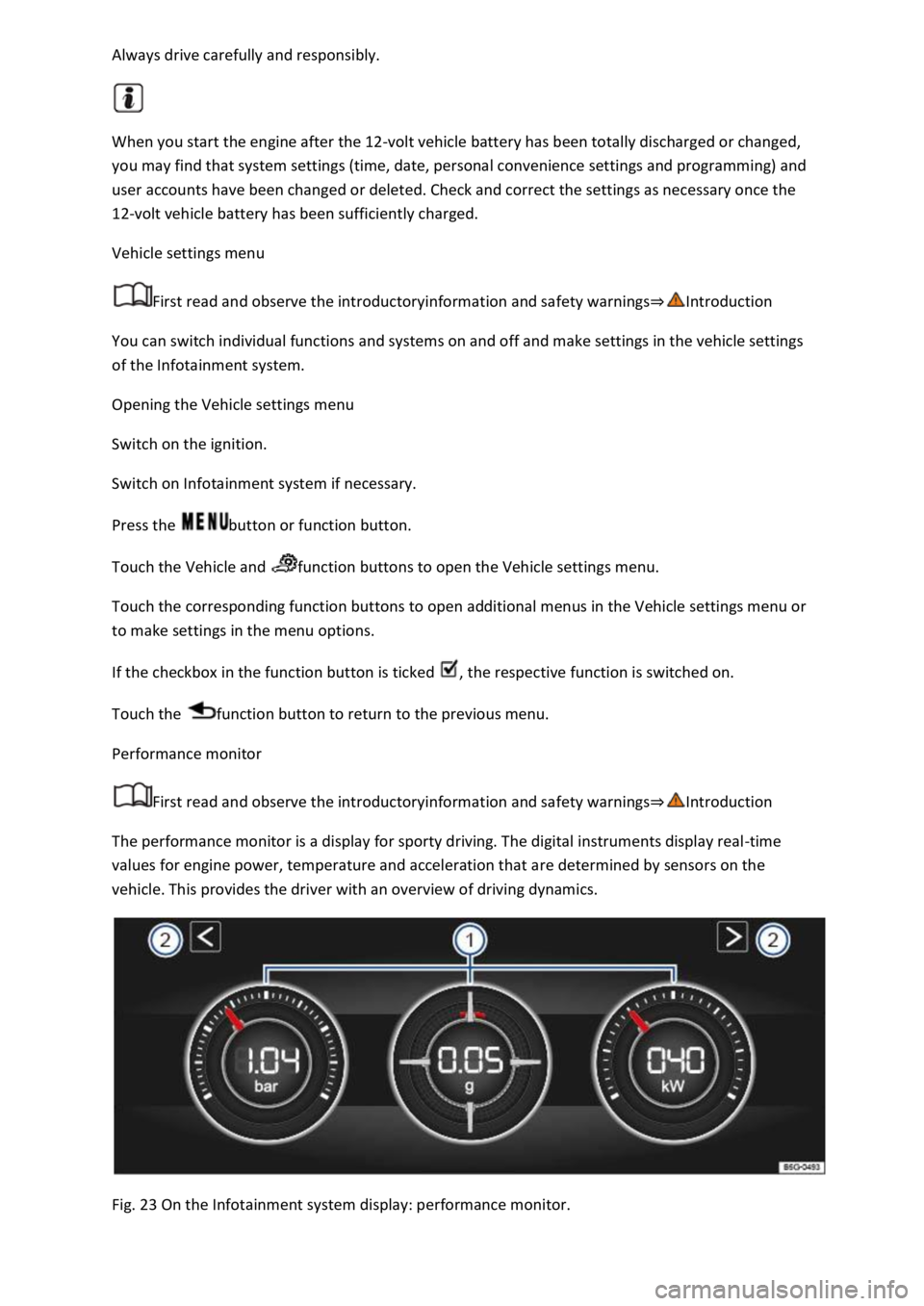
The performance monitor is a display for sporty driving. The digital instruments display real-time
values for engine power, temperature and acceleration that are determined by sensors on the
vehicle. This provides the driver with an overview of driving dynamics.
Fig. 23 On the Infotainment system display: performance monitor.
Page 42 of 502

Fig. 23
Display areas.
Arrow buttons for changing to the lap timer.
Opening the performance monitor
Press the MENU button or function button on the Infotainment system.
Touch the Vehicle function button.
Touch the Selection function button.
Touch the Sport function button.
If you would like to switch between the performance monitor and the lap timer Lap timer
one of the arrow buttons on the left and right above the instruments Fig. 23
Selecting instruments and setting units
The display can show a maximum of three instruments at the same time. Each instrument can be
selected for each display area Fig. 23
To change between instruments, swipe vertically over the display. The currently selected instrument
will then disappear and a new instrument will appear.
The units can be adjusted for some instruments in the Infotainment system Vehicle settings
menu
The following instruments can be displayed:
Charge pressure display: the charge pressure display Fig. 23
ar). The further to the right the
needle on the scale, the higher the engine power output.
Accelerometer (G-meter): the accelerometer (G-meter) Fig. 23
-type area shows the
acceleration level and the direction of the acting force (in the opposite direction according to
physical laws). If you drive to the left, for example, the red marking will move in the right area of the
instrument (and vice versa). If you accelerate, the red marking will move down. If you brake, the red
marking will move up. The level of acceleration is indicated by the position of the red marking which
moves outwards. If the acceleration increases, the red marking will move away from the centre area.
Power display: the power display Fig. 23
Coolant temperature display: the needle may move further in a clockwise direction under high
engine loads and with high outside temperatures. This is no cause for concern unless the
indicator lamp in the instrument cluster display is lit up or flashing Coolant temperature display
Oil temperature display: the needle is in the middle area under normal driving conditions. If the
needle is in the bottom left area, this means that the engine has not yet reached its operating
temperature. Avoid excessively high speeds and acceleration when the engine has not yet reached
Page 43 of 502
needle may move further in a clockwise direction under high engine
loads and at high outside temperatures. This is no cause for concern unless the indicator lamp
in the instrument cluster display is lit up or flashing Engine oil
Adapting the display areas to the driving situation
Choose the three possible instruments corresponding to your individual driving style and the driving
situation.
WARNING
Accidents and injuries can occur if the driver is distracted. Operating the Infotainment system can
distract you from the road.
Always drive carefully and responsibly.
NOTICE
When starting from cold, avoid high engine speeds, driving at full throttle and over-loading the
engine.
Due to the principle of performance determination used in the vehicle, the physical accuracy of the
displayed values is not guaranteed.
Lap timer
First read and observe the introductoryinformation and safety warnings
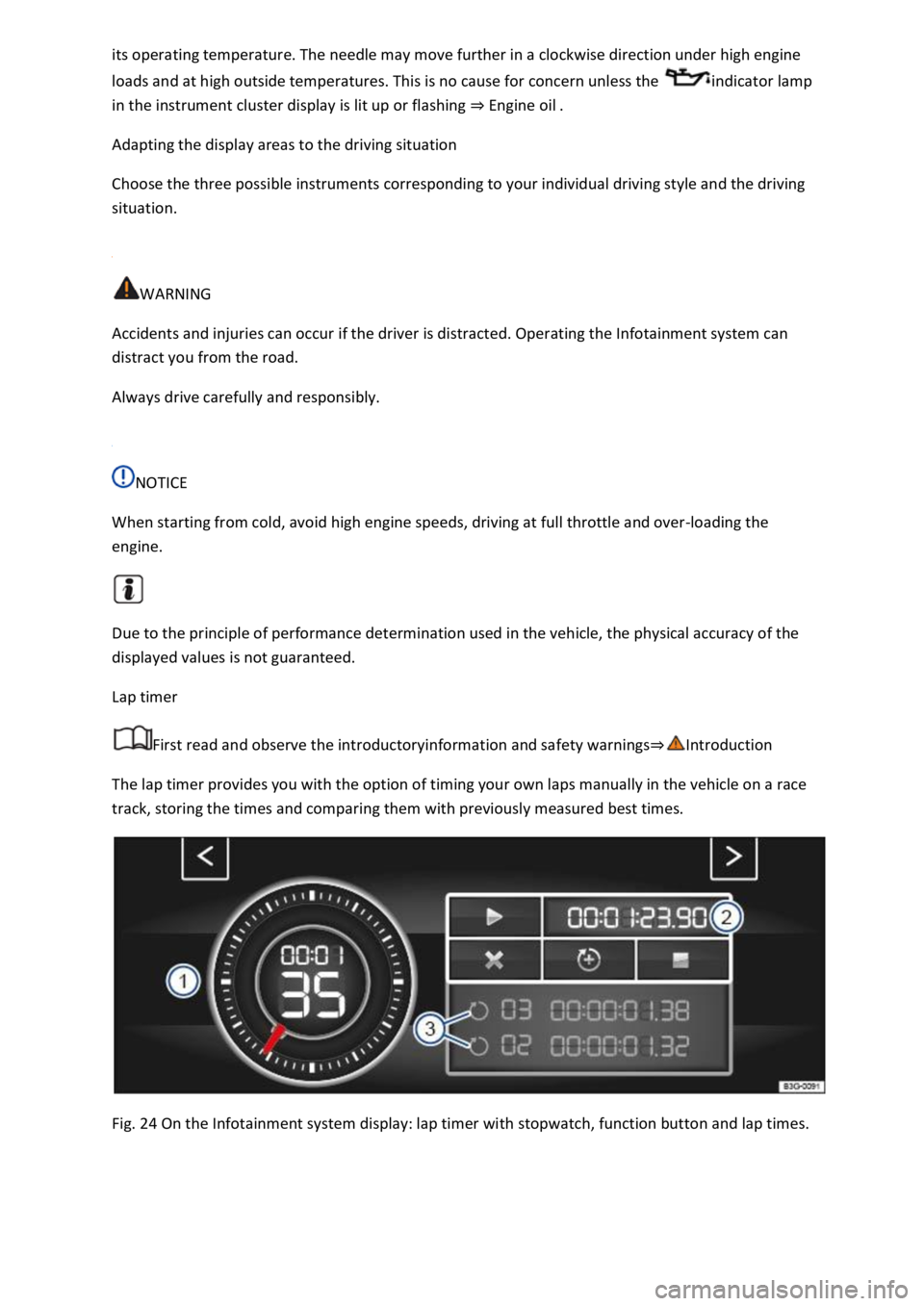
The lap timer provides you with the option of timing your own laps manually in the vehicle on a race
track, storing the times and comparing them with previously measured best times.
Fig. 24 On the Infotainment system display: lap timer with stopwatch, function button and lap times.
Page 49 of 502

Is fuel in the adequate quality available Fuel and emission control?
Are the correct service fluids that comply with Volkswagen specifications available in the destination
country Service fluids and consumables?
Will the navigation function in the factory-fitted Infotainment system work with the available
navigation data in the destination country?
Are special tyres necessary for travelling in the destination country?
Is a fire extinguisher a requirement in your destination country?
Which requirements must be observed regarding high-visibility waistcoats?
Checklist
Do not work on the engine and in the engine compartment unless you are familiar with the task, are
aware of the general safety procedures and have the correct equipment, service fluids and suitable
tools In the engine compartment
are uncertain. Make sure you check the following on a regular basis:
Washer fluid level Washer fluid
Engine oil level Engine oil
Coolant level Coolant
Brake fluid level Brake fluid
Tyre pressure Wheels and tyres
Page 89 of 502
-Net Mobile online services
Opening and closing
Vehicle key
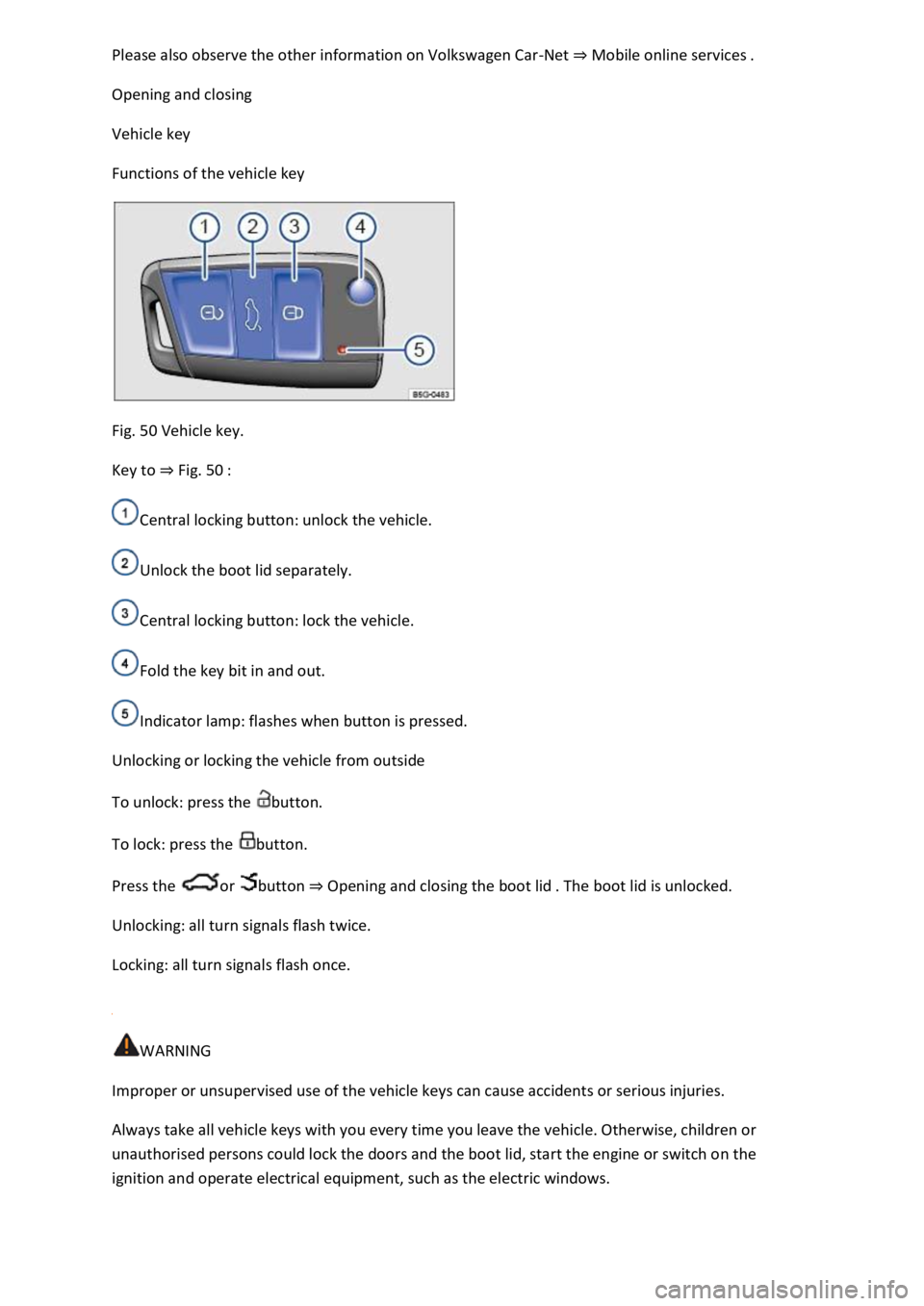
Functions of the vehicle key
Fig. 50 Vehicle key.
Key to Fig. 50
Central locking button: unlock the vehicle.
Unlock the boot lid separately.
Central locking button: lock the vehicle.
Fold the key bit in and out.
Indicator lamp: flashes when button is pressed.
Unlocking or locking the vehicle from outside
To unlock: press the button.
To lock: press the button.
Press the or button Opening and closing the boot lid
Unlocking: all turn signals flash twice.
Locking: all turn signals flash once.
WARNING
Improper or unsupervised use of the vehicle keys can cause accidents or serious injuries.
Always take all vehicle keys with you every time you leave the vehicle. Otherwise, children or
unauthorised persons could lock the doors and the boot lid, start the engine or switch on the
ignition and operate electrical equipment, such as the electric windows.