timing VOLKSWAGEN T-ROC 2018 Owners Manual
[x] Cancel search | Manufacturer: VOLKSWAGEN, Model Year: 2018, Model line: T-ROC, Model: VOLKSWAGEN T-ROC 2018Pages: 502, PDF Size: 8.58 MB
Page 30 of 502

Time
First read and observe the introductory information and safety warnings
Press the button or function button.
Press the Vehicle and function buttons.
Select the Time and date menu option to set the time Vehicle settings menu
To set the time (on all vehicle clocks), press and hold the button in the instrument cluster until
the word Time appears in the display Analogue instrument cluster
Release the button. The time is shown in the instrument cluster display and the hour setting is
marked.
Then press the button repeatedly until the required hour value is displayed. Press and hold the
button to scroll through quickly.
Once you have set the hour, wait until the minutes display is marked in the instrument cluster
display.
Then press the button repeatedly until the required minute value is displayed. Press and hold the
button to scroll through quickly.
Release the button to finish setting the clock.
Select the Range information profile.
Press and hold the button on the multifunction steering wheel until the Service menu is available
on the instrument cluster display Service menu
Select the Time menu.
Set the correct time with the arrow buttons or .
Lap timer
First read and observe the introductory information and safety warnings
With the appropriate equipment the lap timer can be shown on the instrument cluster display
Instrument cluster menus
The lap timer has the option of timing your own laps manually in the vehicle on a race track, to store
the times and to compare them with best times.
Page 31 of 502

-level menus can be displayed:
Lap timer
Lap (with the current lap number)
Statistics
Switching between the menus
Vehicles without multifunction steering wheel:
Press the rocker switch on the wiper lever Operating the instrument cluster
Vehicles with multifunction steering wheel:
Press the or button Operating the instrument cluster
The following list shows an example of how the menus in the instrument cluster display are
structured. The actual scope of the menus and the names of the individual menu options vary
according to the instrument cluster design and the vehicle electronics.
Menu displays and functions
Lap timer menu
StartStarts the lap timer.Since startTiming starts when the vehicle drives off. If the vehicle is already
in motion, timing will begin when the vehicle has come to a temporary standstill.StatisticsAn
overview of the laps driven until now are displayed.
Lap menu
Stop!Active timing is interrupted. This will not end the lap.ContinuePaused timing resumes.Split
time:A split time will be displayed for approximately five seconds. Active timing continues parallel to
this.New lapTiming of the current lap will then be interrupted and a new lap will begin. The time of
the completed lap will be carried over to the statistics.Abort lapThe timing is ended and disregarded.
The current lap is not entered into the statistics.EndTiming is ended. The lap is entered into the
statistics.
Statistics menu
BackIt will be reset to the previous menu.ResetAll stored statistics data will be reset.
In the Statistics menu, the lap times most recently achieved are shown. If the maximum number of
99 laps or the maximum time of 99 hours, 59 minutes and 59 seconds has been reached, a new
timing can only be started after the statistics have been reset.
WARNING
Accidents and injuries can occur if the driver is distracted.
Make lap timer settings and access statistics only when the vehicle is stationary.
Page 43 of 502
needle may move further in a clockwise direction under high engine
loads and at high outside temperatures. This is no cause for concern unless the indicator lamp
in the instrument cluster display is lit up or flashing Engine oil
Adapting the display areas to the driving situation
Choose the three possible instruments corresponding to your individual driving style and the driving
situation.
WARNING
Accidents and injuries can occur if the driver is distracted. Operating the Infotainment system can
distract you from the road.
Always drive carefully and responsibly.
NOTICE
When starting from cold, avoid high engine speeds, driving at full throttle and over-loading the
engine.
Due to the principle of performance determination used in the vehicle, the physical accuracy of the
displayed values is not guaranteed.
Lap timer
First read and observe the introductoryinformation and safety warnings
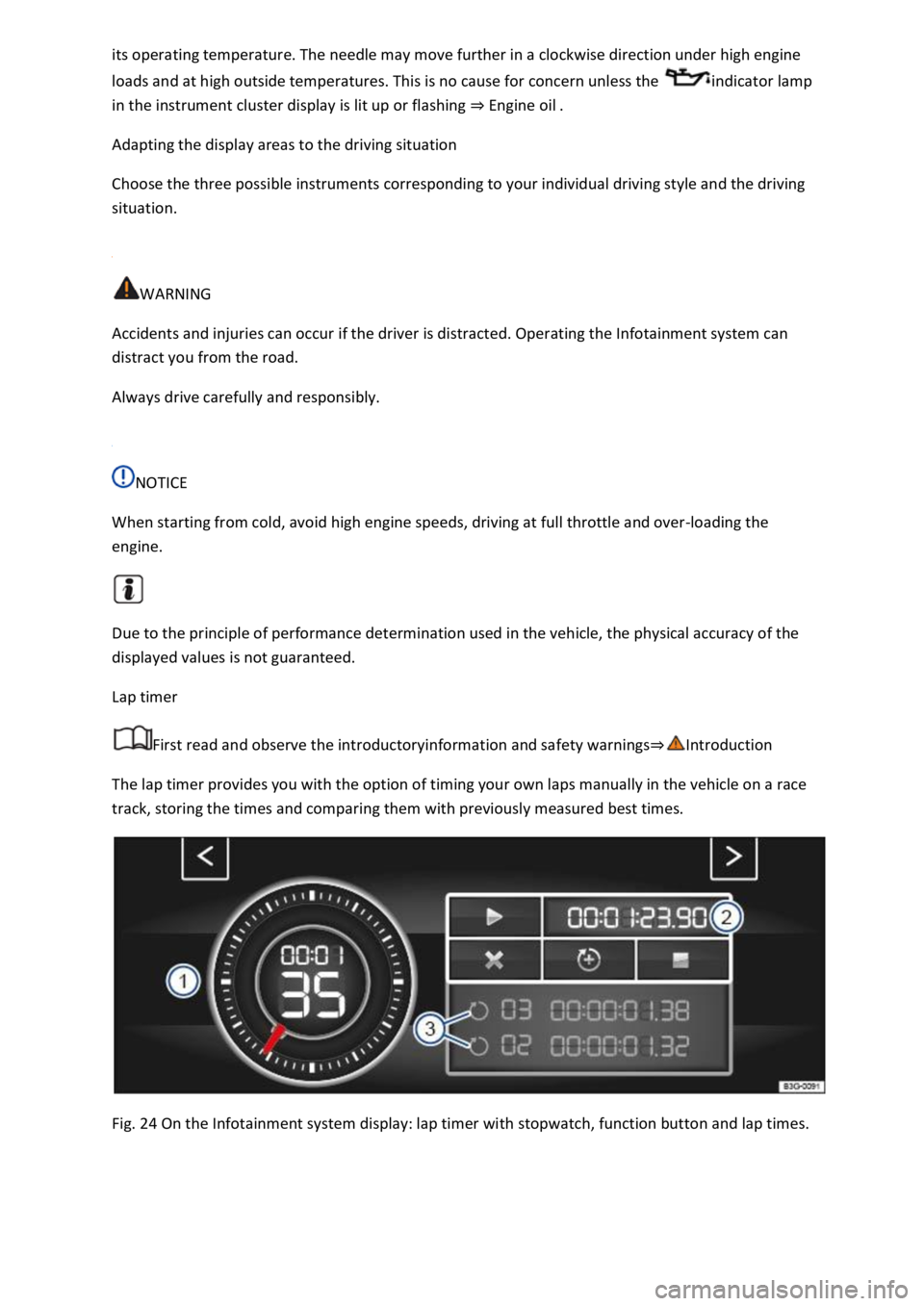
The lap timer provides you with the option of timing your own laps manually in the vehicle on a race
track, storing the times and comparing them with previously measured best times.
Fig. 24 On the Infotainment system display: lap timer with stopwatch, function button and lap times.
Page 198 of 502

Reverse gear
Reverse gear is selected. May be selected only when the vehicle is stationary.
Neutral
The gearbox is in the neutral position. No force is transmitted to the wheels and the braking effect of
the engine is not available.
Standard forward driving position
Position : Normal programme.
All forward gears are shifted up and down automatically. The timing of the gear shift is determined
by the engine load, your individual driving style and the speed of the vehicle.
Position : Sport programme.
The forward gears are automatically changed up later and down earlier than in selector lever
by the engine load, your individual driving style and the speed of the vehicle.
To change between positions D and S, move the selector lever to the rear Fig. 105
The selector lever will always return to selector lever position D/S. That also works in the Tiptronic
gate Changing gear using Tiptronic
Selector lever lock
P
N
To release the selector lever lock, switch on the ignition and depress the brake pedal. Then press the
lock button in the selector lever handle in the direction of the arrow Fig. 105
The selector lever lock is not engaged if the selector lever is moved quickly through position N, e.g.
when shifting from reverse to D/S. This makes it possible, for instance, to rock the vehicle backwards
and forwards if it is stuck in snow or mud. The selector lever lock engages automatically if the lever is
in position N for more than approximately one second without the brake being pressed and when
the vehicle is travelling no faster than approximately 5 km/h (3 mph).
WARNING
Selecting the wrong position can cause you to lose control of the vehicle, which can lead to accidents
and serious injuries.
Never depress the accelerator when selecting a position.
When the engine is running and a position is engaged, the vehicle will start moving as soon as the
brake pedal is released.
Never shift to reverse or selector lever position P while the vehicle is moving.