boot VOLKSWAGEN T-ROC 2019 Owner's Manual
[x] Cancel search | Manufacturer: VOLKSWAGEN, Model Year: 2019, Model line: T-ROC, Model: VOLKSWAGEN T-ROC 2019Pages: 502, PDF Size: 8.58 MB
Page 138 of 502
Switch off the ignition.
The Coming Home lighting is switched on when the light switch is in position and the
rain/light sensor detects that it is dark.
The switch-off delay starts when the last vehicle door or the boot lid has been closed.
Deactivating the Coming Home function
Automatically after the selected switch-off delay has elapsed.
OR: automatically if a door or the boot lid is still open approximately 30 seconds after switching on.
OR: turn light switch to position .
OR: switch on the ignition.
Activating the Leaving Home function
Unlock the vehicle when the light switch is in position and the rain/light sensor detects that it
is dark.
Deactivating the Leaving Home function
Automatically after the switch-off delay.
OR: lock the vehicle.
OR: turn light switch to position .
OR: switch on the ignition.
Some settings can be stored in the user accounts of the personalisation function and therefore
change automatically when the user account changes Personalisation
Headlights
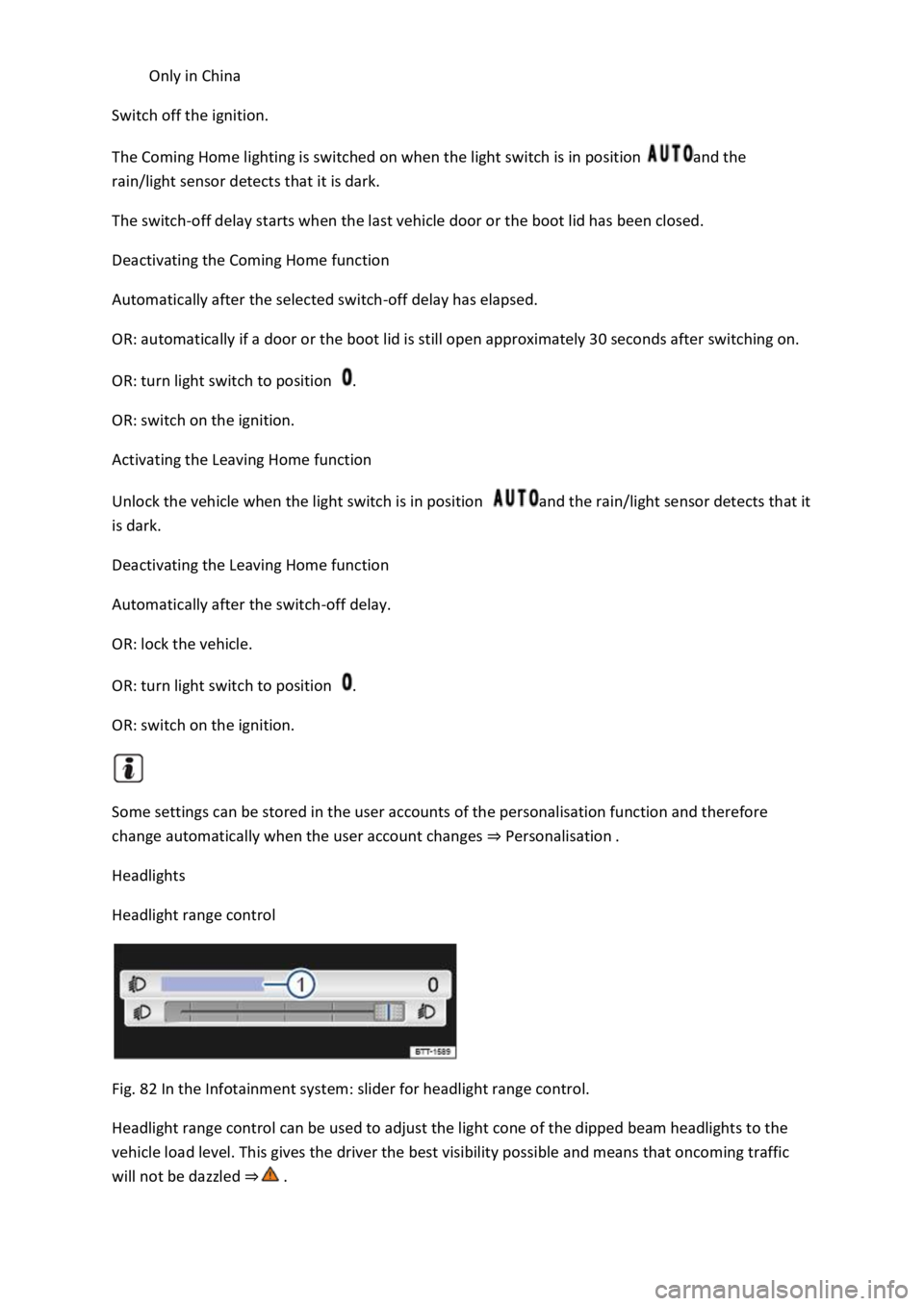
Headlight range control
Fig. 82 In the Infotainment system: slider for headlight range control.
Headlight range control can be used to adjust the light cone of the dipped beam headlights to the
vehicle load level. This gives the driver the best visibility possible and means that oncoming traffic
will not be dazzled
Page 140 of 502

If you have to drive a right-hand drive vehicle in a left-hand drive country, or vice versa, the
asymmetric dipped beam headlights may dazzle oncoming traffic. The headlights must therefore be
switched over when you travel to these countries.
With some equipment levels, the headlight alignment can be adjusted in the Infotainment system in
the Vehicle settings menu Infotainment system controls and displays
In vehicles in which the headlights cannot be switched over in the menu, masking stickers should be
applied to certain parts of the headlight lenses, or the headlights should be adjusted by a qualified
workshop. A qualified workshop can provide you with further information. Volkswagen recommends
using a Volkswagen dealership for this purpose.
Travel mode may be used only for a short period. Please contact a qualified workshop for a
permanent conversion. Volkswagen recommends using a Volkswagen dealership for this purpose.
Interior lighting
Instrument and switch lighting
The brightness of the instrument and switch lighting can be adjusted in the Infotainment system in
the Vehicle settings menu Infotainment system controls and displays
The brightness setting is automatically adjusted to the changing light conditions in the vehicle.
When the light switch is in position , a sensor will switch the dipped beam and the lighting in
the instruments and switches on and off automatically depending on the ambient brightness level.
When the light is switched off and the ignition switched on, the instrument and switch lighting
(needles and scales) is switched on. As the ambient light becomes lower, the illumination of the
scales is automatically reduced and may be switched off entirely. This function is intended to remind
the driver to switch on the dipped beam in good time, i.e. when driving through tunnels.
Interior and reading lights
Press the appropriate button or move the switch to the appropriate position:
Switch off the interior light.Switch on the interior lights.The interior lights are switched on
automatically when the vehicle is unlocked, a door is opened or the vehicle key is removed from the
ignition.Switch the reading light on or off.
Stowage compartment and luggage compartment lights
A light will be switched on and off when the stowage compartment on the front passenger side or
the boot lid is opened or closed.
Background lighting
Page 141 of 502
pending on the equipment level, the background lighting provides indirect light in various areas of
the vehicle interior.
The front footwell may also be illuminated.
The brightness of the background lighting can be adjusted in the Infotainment system in the Vehicle
settings menu Infotainment system controls and displays
The lights go out when the vehicle is locked or after a delay of a few minutes when the vehicle key is
removed from the ignition lock. This prevents the 12-volt vehicle battery from discharging.
Some settings can be stored in the user accounts of the personalisation function and therefore
change automatically when the user account changes Personalisation
Visibility
Wipers
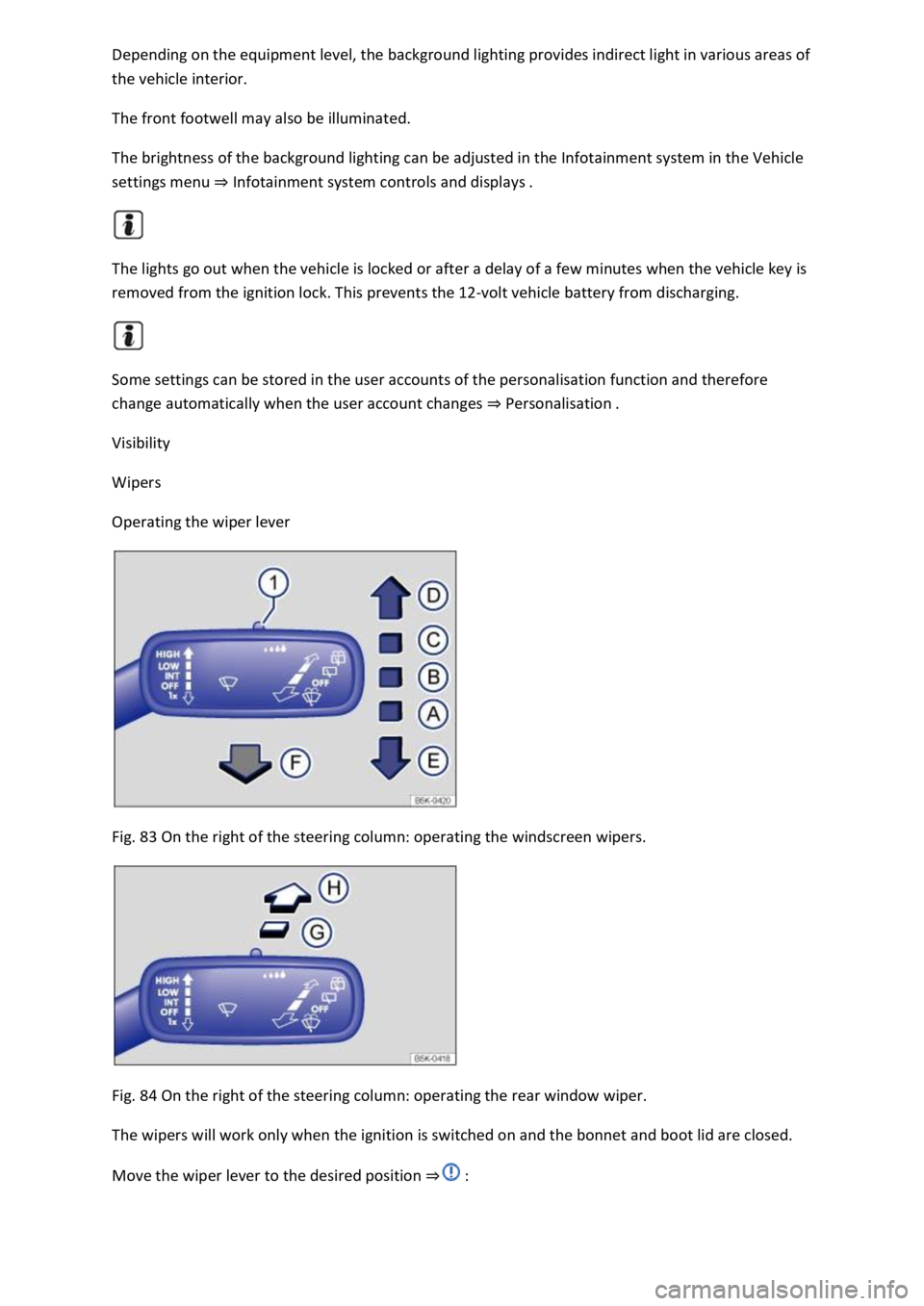
Operating the wiper lever
Fig. 83 On the right of the steering column: operating the windscreen wipers.
Fig. 84 On the right of the steering column: operating the rear window wiper.
The wipers will work only when the ignition is switched on and the bonnet and boot lid are closed.
Move the wiper lever to the desired position
Page 177 of 502

If the front brake pads are checked, the rear brake pads should be checked at the same time. A
visual check of the thickness of all brake pads should be carried out regularly by checking the brake
pads through the openings in the rims or from the underside of the vehicle. If necessary, remove the
wheels to carry out a comprehensive check. Volkswagen recommends using a Volkswagen
dealership for this purpose.
Driving a loaded vehicle
For good vehicle handling when driving a loaded vehicle, please observe the following:
Stow all items of luggage securely Stowing luggage and loads
Accelerate particularly cautiously and carefully.
Avoid sudden braking and driving manoeuvres.
Brake earlier than in normal driving.
If applicable, observe the information concerning the roof carrier Roof carrier
WARNING
Moving loads can severely impair the vehicle's stability and driving safety which could cause
accidents and serious injuries.
Secure items properly so they cannot slide about.
Use suitable lashing or securing straps when securing heavy objects.
Securely engage the rear seat backrests.
Driving with an open boot lid
Driving with an open boot lid is particularly dangerous. All objects and the open boot lid must be
secured properly. Take the appropriate measures to reduce the amount of poisonous exhaust fumes
that could enter into the vehicle.
WARNING
Driving with an unlocked or open boot lid can cause serious injuries.
Always drive with the boot lid closed.
Always stow all items in the luggage compartment securely. Loose objects can fall out of the luggage
compartment and injure other road users.
Always drive especially carefully and think ahead.
Page 178 of 502

move unpredictably.
Any objects protruding from the luggage compartment must be marked to ensure that they are
visible to other road users. Comply with legal regulations.
If items protrude out of the luggage compartment, never use the boot lid to wedge them into place
or hold them in position.
If you have to drive with the boot lid open, you must remove any carriers and the loads attached to
them from the boot lid.
WARNING
Poisonous exhaust fumes could enter the vehicle interior when the boot lid is open. This could result
in loss of consciousness, carbon monoxide poisoning, serious injury and accidents.
You should always drive with the boot lid closed in order to prevent poisonous exhaust fumes from
entering the vehicle.
If exceptional circumstances require you to drive with an open boot lid, you must do the following to
reduce the amount of poisonous exhaust fumes that could enter into the vehicle:
Close all windows and the glass roof.
Switch off the air recirculation mode of the heating and fresh air system or air conditioning system.
Open all vents in the dash panel.
Switch the blower for the heating and fresh air system or for the air conditioning system to the
highest setting.
NOTICE
The vehicle height, and possibly the length, are different when the boot lid is open.
Driving through water
Please follow these points in order to prevent damage to your vehicle when driving through water,
for example on flooded streets:
Check how deep the water is before driving through it. The water may be no higher than the lower
edge of the body
Do not drive faster than walking speed.
Never stop the vehicle, reverse or switch off the engine while in water.
Oncoming vehicles will create waves that could increase the water level for your vehicle to such an
extent that it is not safe to drive through the water.
Always deactivate the start/stop system manually when driving through water Start/stop system
Page 222 of 502

ot on the clutch when driving offroad. When travelling over
uneven ground, you could press the clutch by mistake and lose control of the vehicle. This also
prevents power being transferred between the engine and the gearbox. In addition, driving with the
clutch partially engaged causes premature wear to the clutch lining.
Useful accessories for offroad driving
First read and observe the introductoryinformation and safety warnings
The checklist contains just a few items of equipment that can be very useful for offroad driving. If
you have an instruction manual or fitting instructions for these accessories, you should always take
them with you and observe them as necessary when driving offroad.
Checklist
Useful items when driving offroad:
Water, compass, maps and torch with spare batteries.
Winch, tow bar or rope with sufficient strength.
Mobile telephone, shovel, blankets and rubber boots.
Electrical air compressor for connection to the 12-volt sockets in the vehicle to inflate the tyres.
A wooden board approx. 4 cm thick and approx. 1 metre long or an aluminium frame of similar size:
this can be used to free a vehicle stuck in the mud and provide a platform for a vehicle jack.
Snow chains, additional spare wheels, a breakdown set, jack and box spanner.
Changing gear correctly
First read and observe the introductoryinformation and safety warnings
The correct choice of gear depends on the offroad terrain.
Before attempting to drive through difficult terrain it can be helpful to stop and consider which gear
you should select. After several trips offroad, you will learn which gear to select in conjunction with
the step-down ratio and differential locks for different types of terrain.
General rules
Page 263 of 502

Rear view camera system (Rear View)
Park Assist Park Assist
The available systems vary according to the vehicle equipment level.
Limits of the parking systems
The sensors or cameras may not always be able to detect objects such as thin rails, fences, posts,
trees, very low or high obstacles and open or opening boot lids.
In some cases, dirt and ice on the sensors or cameras could be registered as an obstacle.
Limits of the rear view camera system
The rear view camera system shows only two-dimensional images on the screen. The lack of depth
of field means that potholes and protruding objects on the ground may only be detected with
difficulty, or may not be detected at all.
The system displays the orientation lines irrespective of the area surrounding the vehicle. There is no
automatic obstacle detection. Drivers must judge for themselves whether the vehicle will fit into the
parking space.
WARNING
The intelligent technology used in the parking systems cannot overcome the laws of physics, and
functions only within the limits of the system. Never let the extra convenience afforded by the
parking systems tempt you into taking any risks when driving. The parking systems cannot replace
the full concentration of the driver.
Always adapt your speed and driving style to suit visibility, weather, road and traffic conditions.
Unintentional vehicle movements can cause serious injury.
Keep looking in the direction in which you are parking and at the relevant area surrounding the
vehicle.
Do not allow the displays in the instrument cluster and the images shown in the Infotainment
system to distract you from the traffic.
Always monitor the area around the vehicle as the parking systems will not always detect infants,
animals and objects.
The parking systems have blind spots in which obstacles and people are not registered.
External sources of sound and certain surfaces on objects and clothing may influence the signals of
the sensors. In certain circumstances, the systems will be unable to detect or properly detect people
and objects.
Certain objects, for example narrow posts or railings, may be difficult or impossible to see on the
screen because of its resolution or poor light conditions.
Page 268 of 502
First read and observe the introductoryinformation and safety warnings
Switching on the rear view camera system
Select reverse gear.
OR: press the button.
Switching off the rear view camera system
Drive forwards at a speed of at least 10 km/h (6 mph).
Display representation
First read and observe the introductoryinformation and safety warnings
The functions and displays of the rear view camera system image vary according to the equipment
level and may differ from each other.
The display of the reversing camera picture varies if the factory-fitted towing bracket is electrically
connected to the trailer Notes on towing a trailer
Functions and symbols of the rear view camera system
You can make settings by means of the function buttons when the rear view camera system is
switched on. Some setting options depend on the vehicle equipment.
xClose current display.Adjust display: brightness, contrast, colour.Switch to Park
Distance Control Park Distance ControlShow Park Distance Control display.Hide Park
Distance Control display.
Orientation lines
Red line: safety distance to the rear.
Green lateral lines: extension of the vehicle.
Prerequisites
First read and observe the introductoryinformation and safety warnings
The prerequisites for parking using the rear view camera system must be met.
Do not exceed a speed of approximately 15 km/h (9 mph).
Width of the parking space: vehicle width + 0.2 m.
The following conditions must be met in order to display a correct image:
The boot lid is closed.
The surrounding area has a flat surface.
Vehicle does not have a heavy load at the rear.
Page 298 of 502
the load in
the vehicle will have an effect on the handling and braking distance of the vehicle.
Transporting heavy objects changes the vehicle's handling and the centre of gravity.
The load should be distributed as evenly as possible in the vehicle.
Always secure heavy objects in the luggage compartment as far in front of the rear axle as possible.
Loose objects in the luggage compartment can suddenly slide and change the way the vehicle
handles.
Always adapt your speed and driving style to suit visibility, weather, road and traffic conditions.
Accelerate very carefully and gently.
Avoid sudden braking and driving manoeuvres.
Brake earlier than in normal driving.
NOTICE
Objects rubbing against the rear windows may damage or destroy the heating wires or, depending
on the vehicle equipment, also the aerial.
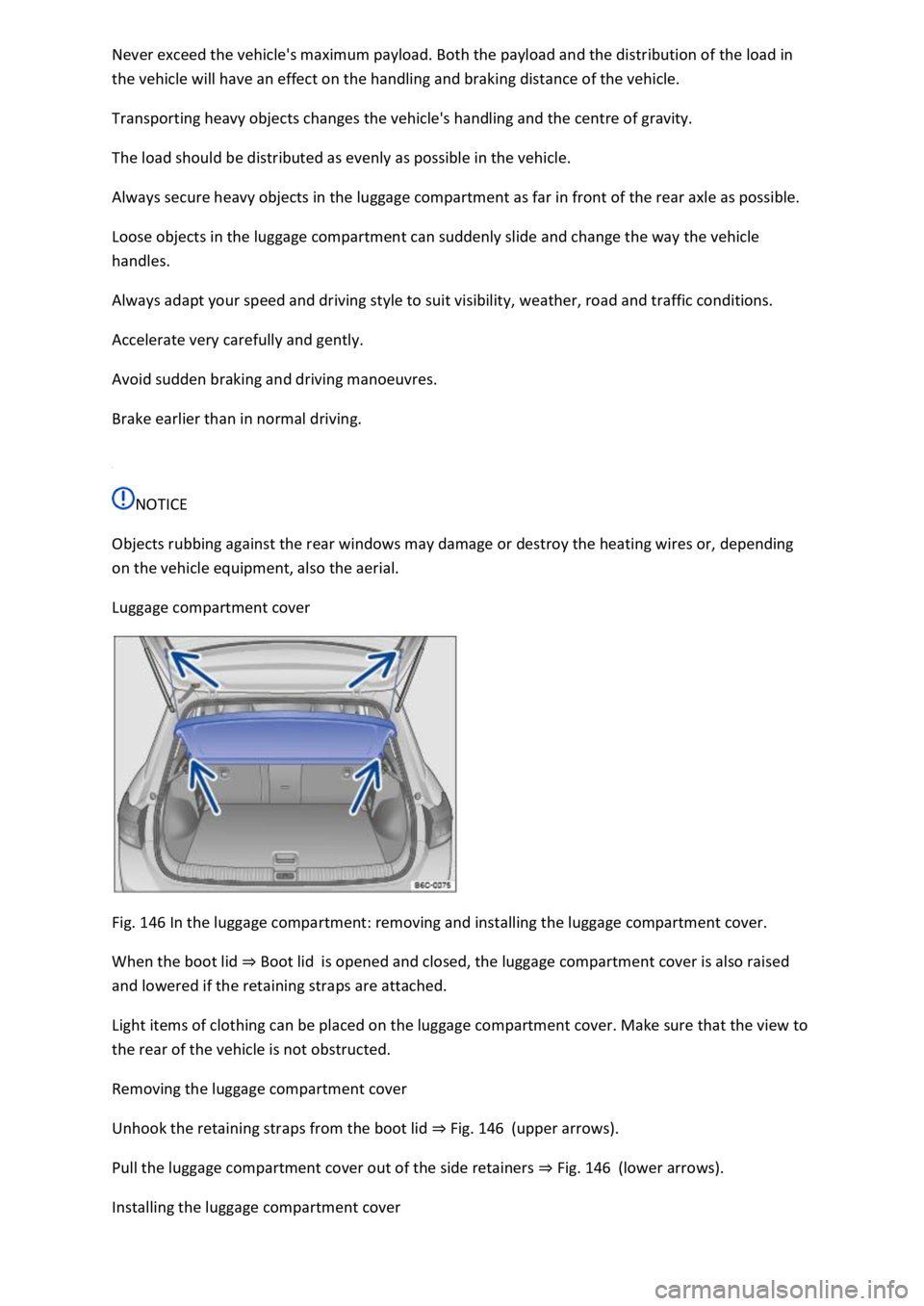
Luggage compartment cover
Fig. 146 In the luggage compartment: removing and installing the luggage compartment cover.
When the boot lid Boot lidis opened and closed, the luggage compartment cover is also raised
and lowered if the retaining straps are attached.
Light items of clothing can be placed on the luggage compartment cover. Make sure that the view to
the rear of the vehicle is not obstructed.
Removing the luggage compartment cover
Unhook the retaining straps from the boot lid Fig. 146(upper arrows).
Pull the luggage compartment cover out of the side retainers Fig. 146(lower arrows).
Installing the luggage compartment cover
Page 299 of 502
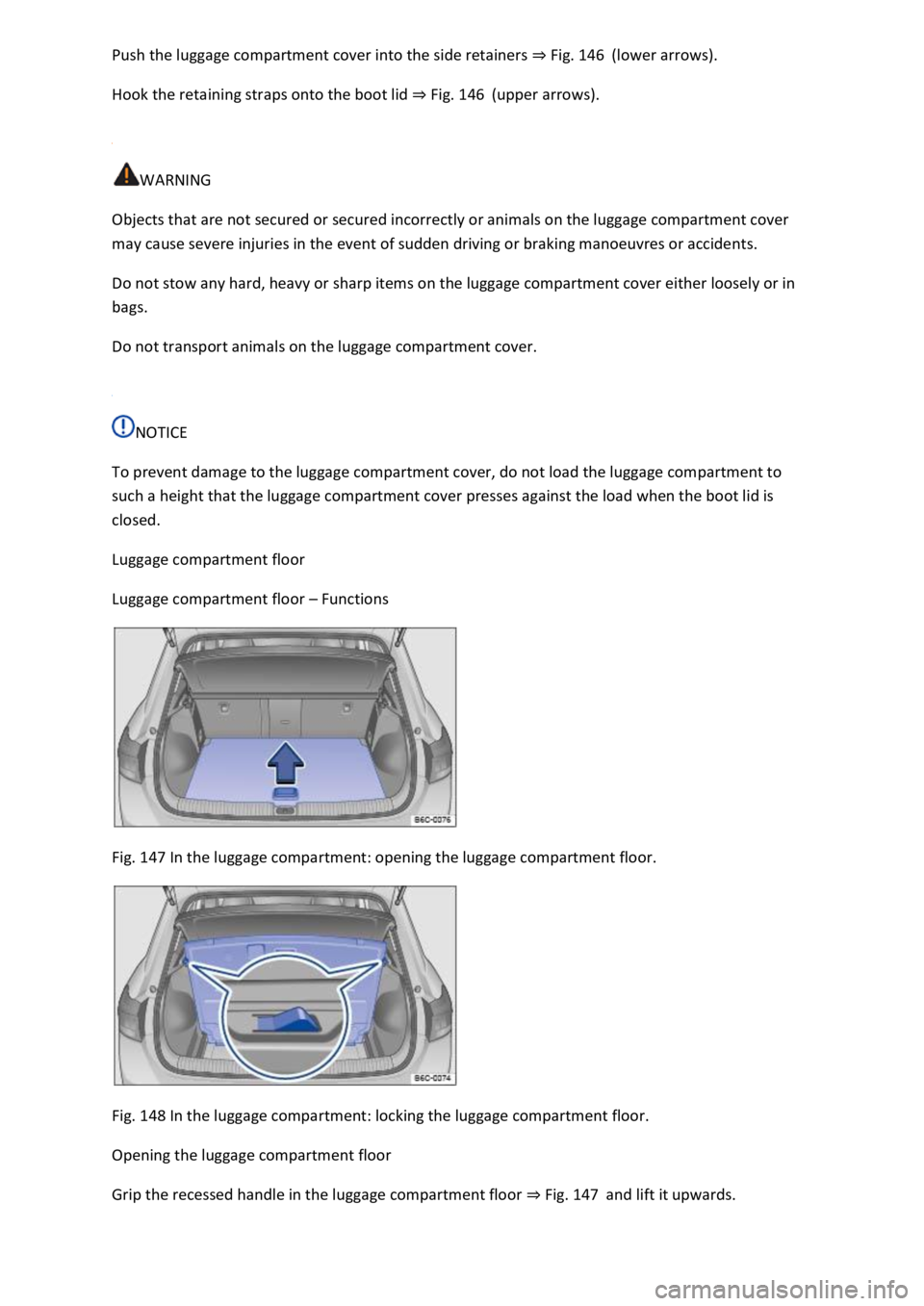
Fig. 146(lower arrows).
Hook the retaining straps onto the boot lid Fig. 146(upper arrows).
WARNING
Objects that are not secured or secured incorrectly or animals on the luggage compartment cover
may cause severe injuries in the event of sudden driving or braking manoeuvres or accidents.
Do not stow any hard, heavy or sharp items on the luggage compartment cover either loosely or in
bags.
Do not transport animals on the luggage compartment cover.
NOTICE
To prevent damage to the luggage compartment cover, do not load the luggage compartment to
such a height that the luggage compartment cover presses against the load when the boot lid is
closed.
Luggage compartment floor
Luggage compartment floor Functions
Fig. 147 In the luggage compartment: opening the luggage compartment floor.
Fig. 148 In the luggage compartment: locking the luggage compartment floor.
Opening the luggage compartment floor
Grip the recessed handle in the luggage compartment floor Fig. 147and lift it upwards.