change time VOLKSWAGEN T-ROC 2019 Owner's Manual
[x] Cancel search | Manufacturer: VOLKSWAGEN, Model Year: 2019, Model line: T-ROC, Model: VOLKSWAGEN T-ROC 2019Pages: 502, PDF Size: 8.58 MB
Page 214 of 502
Go to a qualified workshop and have the system checked.
Fault in Hill Start Assist
Go to a qualified workshop and have the system checked.
Offroad display
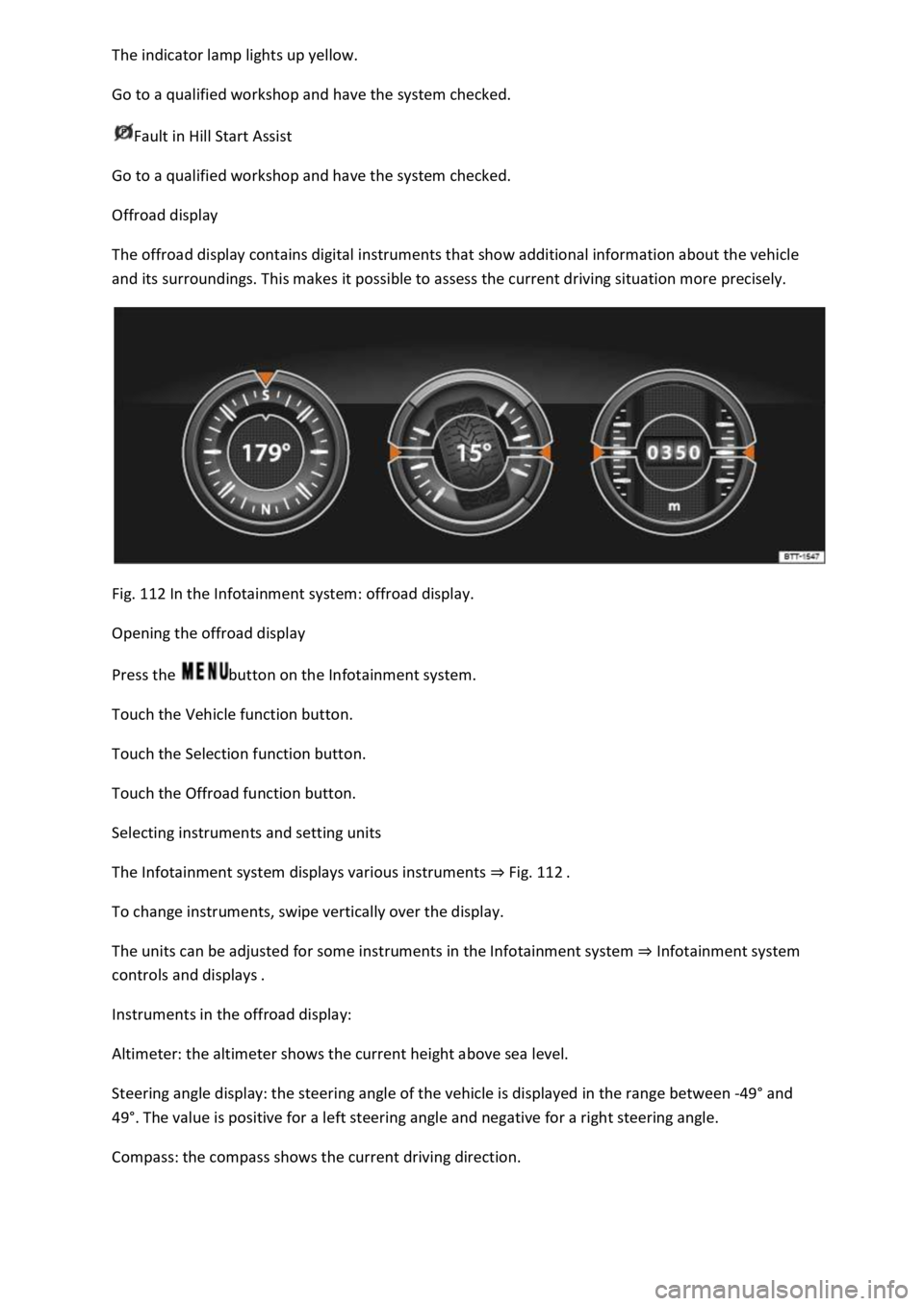
The offroad display contains digital instruments that show additional information about the vehicle
and its surroundings. This makes it possible to assess the current driving situation more precisely.
Fig. 112 In the Infotainment system: offroad display.
Opening the offroad display
Press the button on the Infotainment system.
Touch the Vehicle function button.
Touch the Selection function button.
Touch the Offroad function button.
Selecting instruments and setting units
The Infotainment system displays various instruments Fig. 112
To change instruments, swipe vertically over the display.
The units can be adjusted for some instruments in the Infotainment system Infotainment system
controls and displays
Instruments in the offroad display:
Altimeter: the altimeter shows the current height above sea level.
Steering angle display: the steering angle of the vehicle is displayed in the range between -49
Page 232 of 502

Operating the speed limiter with the multifunction steering wheel
Troubleshooting
The speed limiter helps you to stop exceeding a stored speed.
Speed range
The speed limiter is available when driving forwards at speeds from approx. 30 km/h (20 mph).
Driving with the speed limiter
You can interrupt the speed limiter at any time by depressing the accelerator all the way down past
the point of resistance. As soon as the stored speed is exceeded, the green indicator lamp will
flash and an acoustic warning may sound. The speed remains stored in the memory.
The speed limiter function switches back on automatically as soon as the speed drops back below
the stored speed.
Displays
When the speed limiter is switched on, the instrument cluster display shows the stored speed and
the status of the speed limiter:
Shown small or grey: speed limiter not active.Shown large or white: speed limiter active.
Driving downhill
Driving downhill may cause the set speed to be exceeded.
Apply the foot brake to slow the vehicle down, and change down a gear as required.
WARNING
Always switch off the speed limiter after use to avoid unintentional speed control.
The speed limiter does not relieve the driver of their responsibility for the speed of the vehicle. Do
not drive at full throttle if this is not required.
Use of the speed limiter in adverse weather conditions is dangerous and can cause serious injury,
e.g. through aquaplaning, snow, ice, or leaves. Use the speed limiter only when the road and
weather conditions allow it to be used safely.
The speed limiter cannot limit the vehicle speed when travelling downhill. The vehicle speed can
increase under its own weight. Select a lower gear or use the foot brake to slow the vehicle down.
Operating the speed limiter with the multifunction steering wheel
Page 238 of 502
adar sensor is exposed to environmental conditions that impair sensor functioning, the
system may detect this only after a certain time. For this reason, possible functional restrictions may
be displayed only after a delay at the start of the journey and when driving
Objects that cannot be detected
Persons.
Animals.
Stationary vehicles.
Crossing or oncoming vehicles.
Other stationary obstacles.
If a stationary vehicle is hidden behind a vehicle that has been detected by the adaptive cruise
control and this vehicle turns off the road or changes lane, the ACC will not react to the stationary
vehicle Fig. 120.
Bends
The radar sensor always measures straight ahead. For this reason, vehicles may be incorrectly
detected or vehicles driving ahead not detected in tight bends Fig. 119.
Vehicles outside the sensor range
Vehicles that are driving outside the sensor range in close proximity to your vehicle, e.g. motorbikes
Fig. 119.
Vehicles that change into your lane directly in front of your vehicle Fig. 120.
Vehicles with bodies or attachments that project beyond the vehicle.
WARNING
If you use ACC in the above situations, this can result in accidents and serious injuries as well as
violation of legal regulations.
Switching ACC on and off
Page 243 of 502

Radar sensor
Front Assist detects driving situations by means of the radar sensor at the front of the vehicle
Front view m.
Functions included in the system
The City Emergency Braking System and Pedestrian Monitoring (depending on vehicle equipment)
are part of Front Assist and are automatically active when Front Assist is switched on.
WARNING
The intelligent technology used in Front Assist cannot overcome the laws of physics, and functions
only within the limits of the system. Never let the extra convenience afforded by Front Assist tempt
you into taking safety risks when driving. The driver is always responsible for braking in time.
If Front Assist issues a warning, brake your vehicle immediately depending on the traffic situation or
avoid the obstacle.
Adapt your speed and distance from the vehicles ahead to suit visibility, weather, road and traffic
conditions.
Front Assist cannot prevent accidents and serious injuries on its own.
Front Assist can issue unnecessary warnings and carry out unwanted braking interventions in certain
complex driving situations, e.g. at traffic islands.
Front Assist can issue unnecessary warnings and carry out unwanted braking interventions when its
function is impaired, e.g. if the radar sensor is dirty or its position has been changed.
Front Assist without Pedestrian Monitoring does not react to persons. In addition, the system does
not react to animals or to vehicles that are crossing or approaching in the same lane.
If you are unsure whether your vehicle possesses Pedestrian Monitoring, please enquire about this
at a qualified workshop before starting your journey.
Be prepared to take over control of the vehicle yourself at all times.
Warning levels and braking intervention
First read and observe the introductoryinformation and safety warnings
Distance warning
The system detects when safety is endangered by driving too close to the vehicle in front. The
warning lamp lights up. Increase the distance.
Speed range: around 65 km/h (40 mph) to 250 km/h (155 mph).
Advance warning
Page 246 of 502
Failure to switch off Front Assist in the situations mentioned can result in accidents and serious
injuries.
Pedestrian Monitoring
First read and observe the introductoryinformation and safety warnings
Pedestrian Monitoring can help to avoid accidents with pedestrians crossing the vehicle's path or to
mitigate the consequences of an accident.
The system gives a warning when there is a risk of collision, prepares the vehicle for emergency
braking, helps to brake the vehicle or performs an automatic brake intervention. In the event of an
advance warning, the warning lamp lights up in the instrument cluster
When Front Assist is switched on, Pedestrian Monitoring is active as part of Front Assist in a vehicle
speed range from approx. 5 km/h (3 mph) to 65 km/h (40 mph).
Pedestrian Monitoring is not available in all countries, depending on the vehicle equipment level.
WARNING
The intelligent Pedestrian Monitoring technology cannot overcome the laws of physics, and
functions only within the limits of the system. Never let the extra convenience afforded by the
Pedestrian Monitoring system tempt you into taking any safety risks when driving. The driver is
always responsible for braking in time.
If Pedestrian Monitoring issues a warning, brake your vehicle immediately depending on the traffic
situation or avoid the pedestrian.
Pedestrian Monitoring cannot prevent accidents and serious injuries on its own.
Pedestrian Monitoring can issue unnecessary warnings and carry out unwanted braking
interventions in complex driving situations, e.g. on a main road that turns sharply.
Pedestrian Monitoring can issue unnecessary warnings and carry out unwanted braking
interventions when its function is impaired, e.g. if the radar sensor is covered or its position has
been changed.
Be prepared to take over control of the vehicle yourself at all times.
Operating the area monitoring system (Front Assist)
First read and observe the introductoryinformation and safety warnings
Front Assist and the advance warning (in some countries) are automatically switched on when you
switch on the ignition.
However, the system is not available or its functions are restricted for a period of around 30 seconds
(also longer, depending on the driving situation).
Page 247 of 502
on at all times. Exceptions Limits of Front Assist
Switching on and off
Switch Front Assist on and off in the vehicle settings of the Infotainment system Vehicle settings
menu
Or: switch Front Assist on and off in the instrument cluster menus Instrument cluster menus
If you switch off Front Assist, the advance warning and distance warning will also be switched off.
The yellow indicator lamp lights up in the instrument cluster display. .
Setting the distance and advance warnings
Switch on Front Assist.
Switch the desired function on and off in the vehicle settings of the Infotainment system Vehicle
settings menu
Depending on the vehicle equipment, you can also set the warning time for the advance warning.
Some settings can be stored in the user accounts of the personalisation function and therefore
change automatically when the user account changes Personalisation
Troubleshooting
First read and observe the introductoryinformation and safety warnings
Front Assist is not available, the radar sensor does not have sufficient visibility.
The radar sensor is dirty. Clean the radar sensor Vehicle care
The visibility of the radar sensor is impaired due to the weather conditions, e.g. snow, or due to
detergent deposits or coatings. Clean the radar sensor Vehicle care
The visibility of the radar sensor is impaired by add-on parts, the trim frames of number plate
holders or stickers. Keep the area around the radar sensor free.
The radar sensor has been displaced or damaged, e.g. due to damage to the front of the vehicle.
Check whether damage is visible Repairs and technical modifications
Structural modifications have been made to the front of the vehicle.
The genuine Volkswagen badge is not used.
If the problem persists, switch off Front Assist and go to a qualified workshop.
Front Assist does not function as expected or is triggered unnecessarily several times.
The radar sensor is dirty. Clean the radar sensor Vehicle care
The system limits are not met Limits of Front Assist
Page 255 of 502
the Blind Spot Monitor can cause accidents and serious injuries. The system is not a substitute for
the full concentration of the driver.
Adapt your speed and distance from the vehicles ahead to suit visibility, weather, road and traffic
conditions.
Your hands should always be on the steering wheel so that you can steer at any time.
Pay attention to the indicator lamps in the exterior mirrors and in the instrument cluster display and
respond according to the commands.
Always pay close attention to the surroundings of the vehicle.
Never use the Blind Spot Monitor if the radar sensors are dirty, covered or damaged. These
conditions can impair the proper functioning of the system.
It may be hard to see the indicator lamp in the exterior mirror in direct sunlight.
Some settings can be saved in the user accounts of the personalisation function and can therefore
change automatically when the user account is changed Personalisation
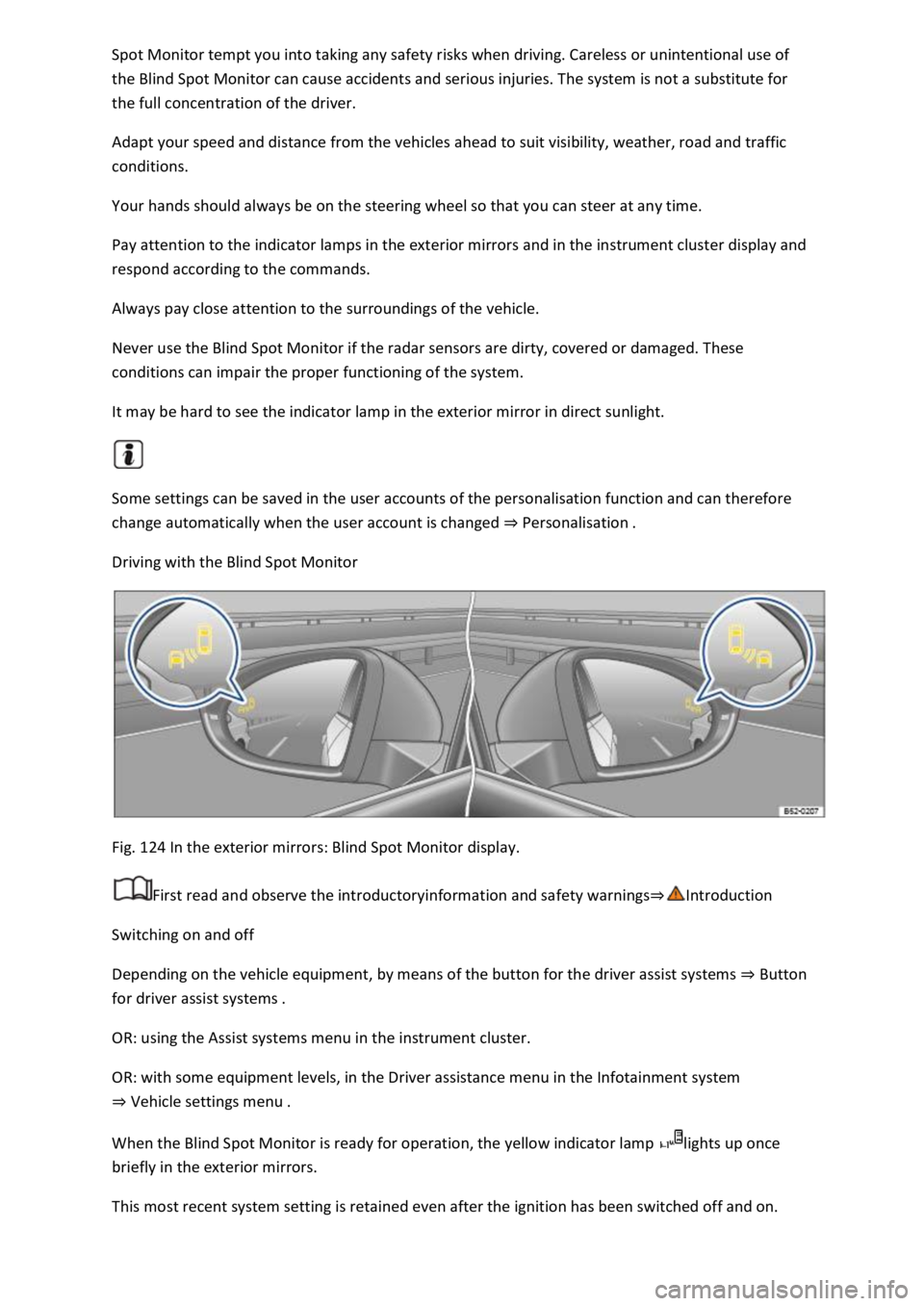
Driving with the Blind Spot Monitor
Fig. 124 In the exterior mirrors: Blind Spot Monitor display.
First read and observe the introductoryinformation and safety warnings
Switching on and off
Depending on the vehicle equipment, by means of the button for the driver assist systems Button
for driver assist systems
OR: using the Assist systems menu in the instrument cluster.
OR: with some equipment levels, in the Driver assistance menu in the Infotainment system
Vehicle settings menu
When the Blind Spot Monitor is ready for operation, the yellow indicator lamp lights up once
briefly in the exterior mirrors.
This most recent system setting is retained even after the ignition has been switched off and on.
Page 341 of 502
bulb would cause the remaining fingerprint to evaporate and be deposited on the reflector. This will
impair the light output of the headlight.
After changing a bulb, check to ensure that the bulb is working properly. If the bulb is not working
properly, the bulb may not have been inserted properly, may have failed again, or the connector
may have been fitted incorrectly.
Any time you change a bulb at the front of the vehicle, the headlight settings should be checked by a
qualified workshop.
WARNING
Ignoring any of the items on this important safety checklist can lead to accidents and severe injuries.
NOTICE
Always take care when removing or fitting lights to prevent damage to the paintwork or to other
vehicle parts.
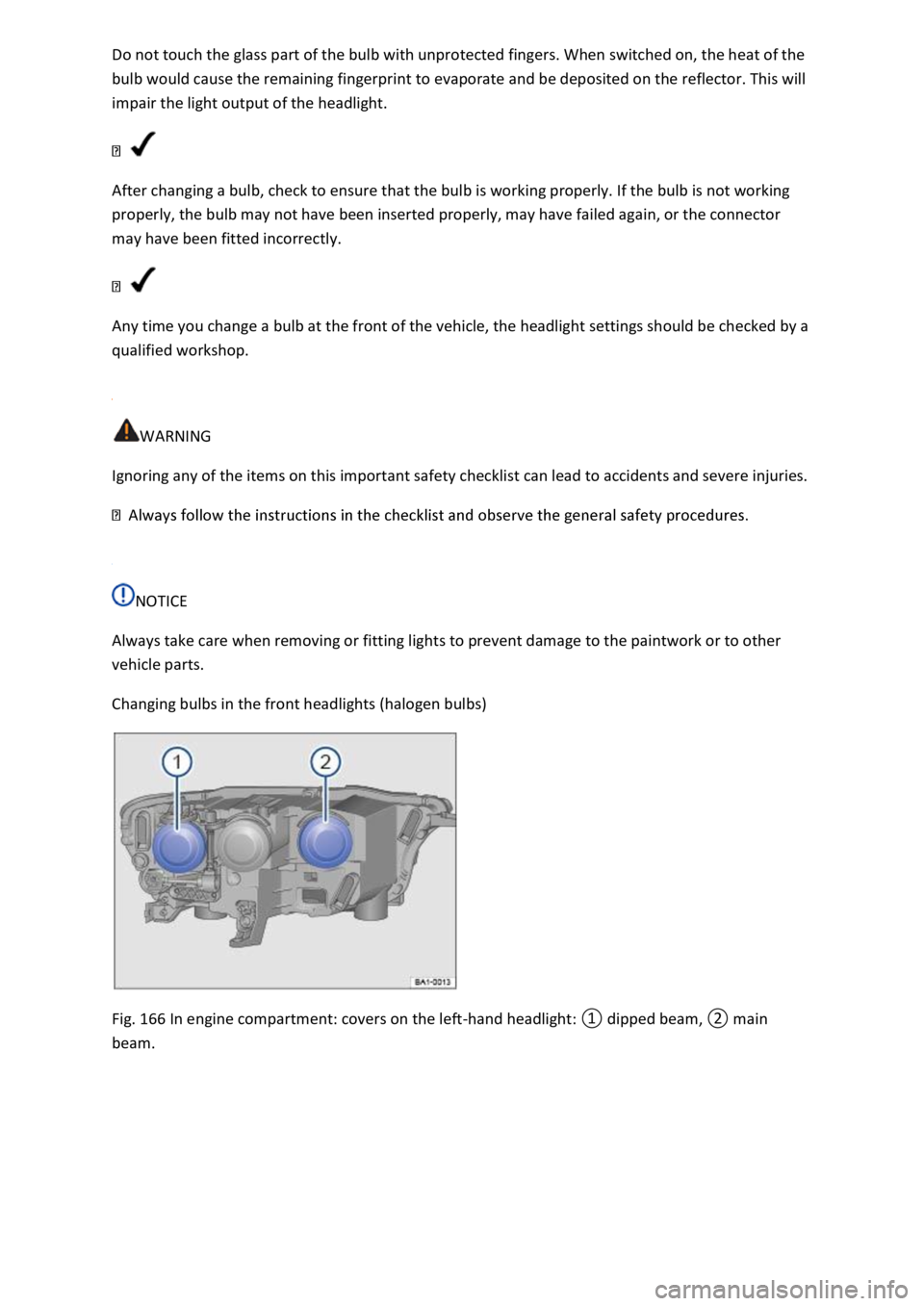
Changing bulbs in the front headlights (halogen bulbs)
Fig. 166 In engine compartment: covers on the left-
Page 372 of 502

You can check whether your vehicle is equipped for the Flexible Service QI6 (Longlife) or Fixed
Service QI1, QI2, QI3, QI4, QI7 (dependent on time or mileage) in the vehicle data Technical data
or on the inside cover of this owner's manual.
Permitted engine oil standards
Petrol engineswith particulate filter1)
Flexible ServiceVW 508 00 or alternatively VW 504 002)Fixed ServiceVW 502 00
Petrol engineswithout particulate filter
Flexible ServiceVW 508 00 or alternatively VW 504 00Fixed ServiceVW 502 00
Diesel engineswith particulate filter1)
Flexible ServiceVW 507 00Fixed ServiceVW 507 00
Diesel engineswithout particulate filter
Flexible ServiceVW 507 00Fixed ServiceVW 505 01
Volkswagen recommends engine oils.
NOTICE
additives is not covered by the warranty.
Using other engine oils can cause engine damage.
d engine oils are not
available. To avoid damaging the engine, a maximum quantity of 0.5 litres of the following engine oil
may be used only once until the next oil change:
SN (API SM).
ards ACEA C3 or API CJ-4.
1) Check with a qualified workshop if you are unsure whether your vehicle is equipped with a
particulate filter. Volkswagen recommends using a Volkswagen dealership for this purpose.
2) Using VW 504 00 instead of VW 508 00 may cause the vehicle's emissions values to increase
slightly.
Changing engine oil
First read and observe the introductoryinformation and safety warnings
Page 373 of 502

cable to
your vehicle Service
The engine oil and filter change should be carried out by a qualified workshop due to the special
tools and knowledge required, this also applies to the disposal of used oil. Volkswagen recommends
using a Volkswagen dealership for this purpose.
More details on the service intervals can be found in the chapter on service Service
Additives in the engine oil can cause new engine oil to discolour quickly. This is normal and does not
mean that the engine oil should be changed more frequently.
WARNING
If, in exceptional cases, you have to carry out an oil change yourself, please observe the following:
al when removing the oil drain plug with your fingers to help prevent oil
from running down your arm.
engine filling quantity.
l in empty food containers, bottles or any other non-original containers as
people finding these containers may not know that they contain engine oil.
Before changing the engine oil, first find out where old oil can be disposed of properly near you.
Used oil must be disposed of in accordance with regulations governing the protection of the
environment. Never dispose of used oil in locations such as gardens, woods, sewerage systems, on
streets and roads, or in rivers and waterways.
Engine oil consumption
First read and observe the introductoryinformation and safety warnings
Engine oil consumption can vary from engine to engine and can change during the service life of an
engine.
The vehicle may consume up to 1.0 litre of engine oil per 2,000 km, depending on your driving style
and the conditions in which the car is used. In new vehicles, consumption may be higher for the first
5,000 km. The engine oil level must therefore be checked at regular intervals, preferably each time
the vehicle is refuelled and before long journeys.