key VOLKSWAGEN T-ROC 2020 User Guide
[x] Cancel search | Manufacturer: VOLKSWAGEN, Model Year: 2020, Model line: T-ROC, Model: VOLKSWAGEN T-ROC 2020Pages: 502, PDF Size: 8.58 MB
Page 45 of 502

Press the MENU button or function button, depending on the version of the Infotainment system.
Touch the Vehicle function button.
Touch the Selection function button.
Touch the Sport function button. The performance monitor is displayed.
Touch one of the arrow buttons Fig. 23
You can change between the lap timer and performance monitor at any time using the arrow
buttons Fig. 23Fig. 24
Measuring lap times
The stopwatch measures the lap time in two areas:
The red needle and the numerical value in the centre show the running time in seconds. The smaller
display in the inner area shows minutes and hours.
The display on the right side shows the current lap time with an accuracy of 1/100 seconds. There is
no difference between the stopwatch and lap times if there are not yet any laps with split times
stored in the lap timer.
WARNING
Avoid operating the lap timer when the vehicle is in motion if possible.
Make lap timer settings and access statistics only when the vehicle is stationary.
When the vehicle is in motion, use the lap timer only in driving situations which are easy to control.
Personalisation
First read and observe the introductoryinformation and safety warnings
The personalisation function allows personalised vehicle settings, such as air conditioning system,
instrument cluster or lighting settings, to be saved in a user account. Four user accounts are
available. Users are identified by the vehicle keys upon unlocking the vehicle. A user account is
assigned to each vehicle key.
Changes to the settings will be assigned to the active user account and saved upon locking the
vehicle or changing the user account.
Welcome and user account selection
When personalisation is activated, the name of the current user account appears on the instrument
cluster display for approximately ten seconds after you switch on the ignition.
During this time, you can select a user account using the buttons on the wiper lever or multifunction
steering wheel Infotainment system controls and displays
Page 46 of 502

User management and settings
When the ignition is switched on, you can use the Personalisation menu in the Infotainment system
for user management and to make settings. The menu can be accessed via the vehicle settings in the
Infotainment system.
Changing the user account
You can select the user account either via the Personalisation menu or via the Vehicle status menu.
Manually assigning vehicle keys to user accounts
You can assign a vehicle key to the currently active user account. For this purpose, select Manual key
assignment.
Automatically assigning vehicle keys to user accounts
If you have selected Automatic key assignment, the following vehicle key is assigned to the user
account upon changing the user account:
Vehicles without Keyless Access: vehicle key used to unlock the vehicle.
Vehicles with Keyless Access: vehicle key that is identified first by the personalisation function
when you open the driver door.
Personalised vehicle settings
Opening and closing (single door unlocking, window convenience opening etc.)
Light and vision (daytime running lights, cornering light, lane change flash etc.)
Settings for air conditioning system
Active driver assist systems
Driving profile selection
Multifunction display and instrument cluster (selection of displays)
Infotainment system (display brightness and station sorting)
A new vehicle key will be assigned to the current user account. To assign the vehicle key to a
different user account, select the required user account and manually assign it to the vehicle key.
Safety
Page 63 of 502

neck, over or under the arm or behind the back.
The lap part of the seat belt must always lie across the pelvis, never across the stomach.
The seat belt must always lie flat and snugly on the body. Tighten the belt slightly if necessary.
For pregnant women, the seat belt must be positioned evenly over the chest and as low as possible
over the pelvis. It must also lie flat so that no pressure is exerted on the abdomen this applies in
every stage of pregnancy Fig. 37
Adjusting seat belt routing to body size
The following equipment can be used to adjust the seat belt routing:
Seat belt height adjuster for the front seats Seat belt height adjuster
Height-adjustable front seats Sitting position
WARNING
Incorrect seat belt routing can cause severe injuries in the event of an accident or a sudden braking
or driving manoeuvre.
The seat belts offer best protection only when the backrests are in an upright position and the seat
belts have been fastened properly.
The seat belt itself or a loose seat belt can cause serious injuries if the seat belt shifts from harder
body parts in the direction of softer body parts (e.g. stomach).
The shoulder part of the seat belt must lie on the centre of the shoulder and never under the arm or
across the neck.
The seat belt must lie flat and snugly on the upper body.
The lap part of the seat belt must lie across the pelvis and never across the stomach. The seat belt
must lie flat and snugly on the pelvis. Tighten the belt slightly if necessary.
For pregnant women, the lap part of the seat belt must be as low as possible over the pelvis and lie
flat around the round stomach.
Do not twist the belt webbing while the seat belt is being worn.
Never hold the seat belt away from the body by hand.
The belt webbing should not lie over hard or fragile objects, such as glasses, pens or keys.
Never use seat belt clips, retaining rings or similar items to alter the seat belt routing.
If a person's physical build prevents them from routing the seat belt properly, contact a qualified
workshop to find out about any special modifications so that the seat belts and airbags can provide
Page 69 of 502
does not
mean there is a fire in the vehicle.
The fine dust can cause irritation to the skin and eye membranes as well as cause breathing
difficulties, particularly for those people suffering from asthma or other respiratory health problems.
In order to reduce breathing difficulties, get out of the vehicle or open the windows or doors in
order to breathe fresh air.
If you should come into contact with the dust, you should wash your hands and face with a mild
soap and water before eating.
Do not rub the dust into your eyes or into open wounds.
If dust has entered your eyes, rinse them with water.
WARNING
Cleaning agents that contain solvents cause the surface of the airbag modules to become porous. In
an accident that triggers the airbag, loose plastic parts can cause serious injury.
Never clean the dash panel or the airbag covers with cleaning agents that contain solvents.
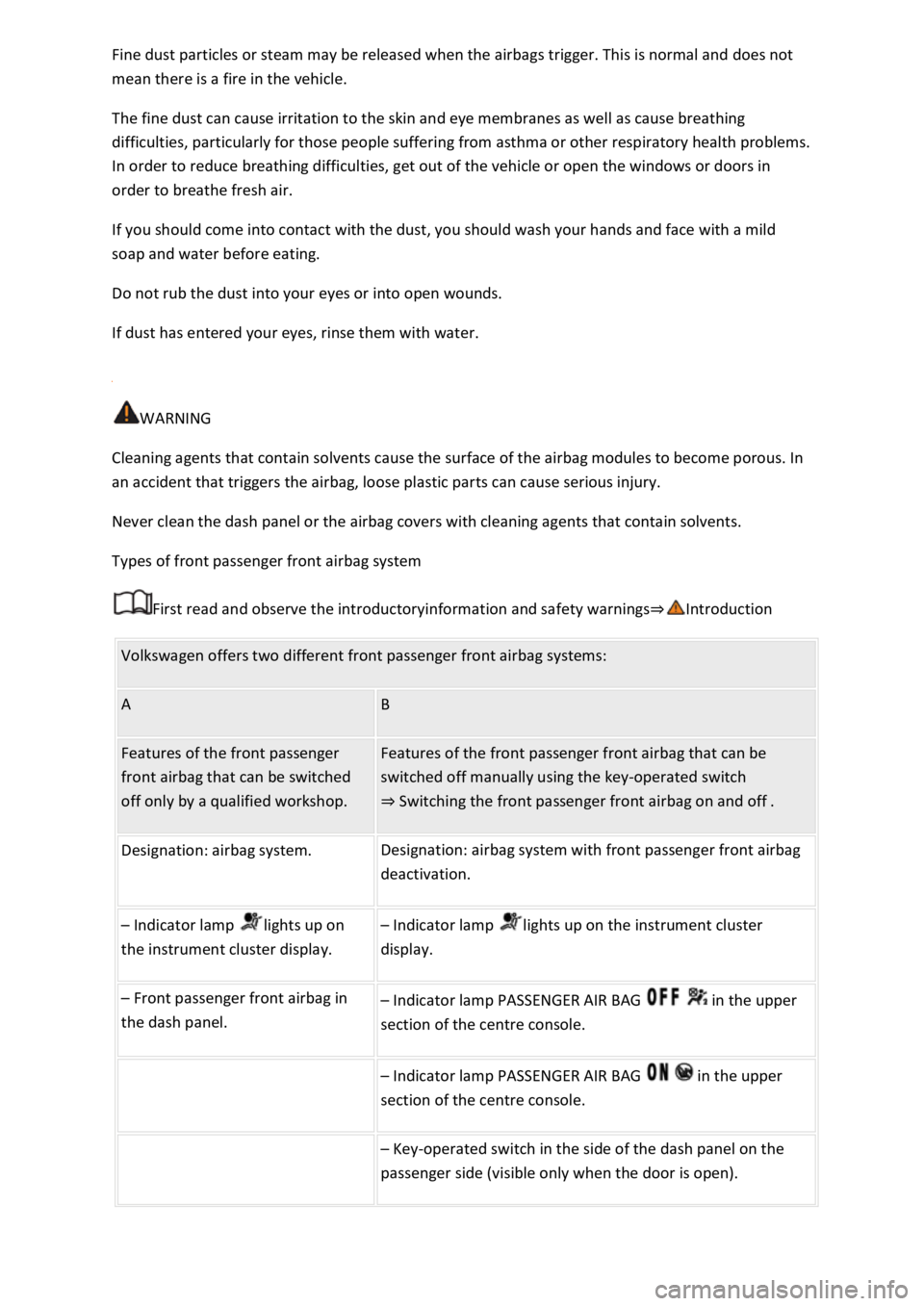
Types of front passenger front airbag system
First read and observe the introductoryinformation and safety warnings
Volkswagen offers two different front passenger front airbag systems:
A B
Features of the front passenger
front airbag that can be switched
off only by a qualified workshop.
Features of the front passenger front airbag that can be
switched off manually using the key-operated switch
Switching the front passenger front airbag on and off.
Designation: airbag system. Designation: airbag system with front passenger front airbag
deactivation.
Indicator lamp lights up on
the instrument cluster display.
Indicator lamp lights up on the instrument cluster
display.
Front passenger front airbag in
the dash panel.
Indicator lamp PASSENGER AIR BAG in the upper
section of the centre console.
Indicator lamp PASSENGER AIR BAG in the upper
section of the centre console.
Key-operated switch in the side of the dash panel on the
passenger side (visible only when the door is open).
Page 73 of 502
anywhere in the airbag deployment zone.
No other people, animals or objects may be carried between the occupants of the front seats and
the airbag deployment zone. Make sure that children and passengers also keep to this rule.
Do not attach any objects, e.g. mobile navigation devices, to the windscreen above the front airbag
on the front passenger side.
Do not cover or stick anything on the steering wheel hub or the soft plastic surface of the airbag unit
on the front passenger side, and do not obstruct or modify them in any way.
WARNING
The front airbags are deployed in front of the steering wheel Fig. 40and dash panelFig. 41
When driving, always hold the steering wheel with both hands on the outside of the rim at the 9
o'clock and 3 o'clock positions.
Adjust the driver seat so that there is at least 25 cm between your breastbone and the hub of the
steering wheel. Contact a qualified workshop if your physical build makes this impracticable.
Adjust the front passenger seat so that the distance between the front passenger and the dash panel
is as large as possible.
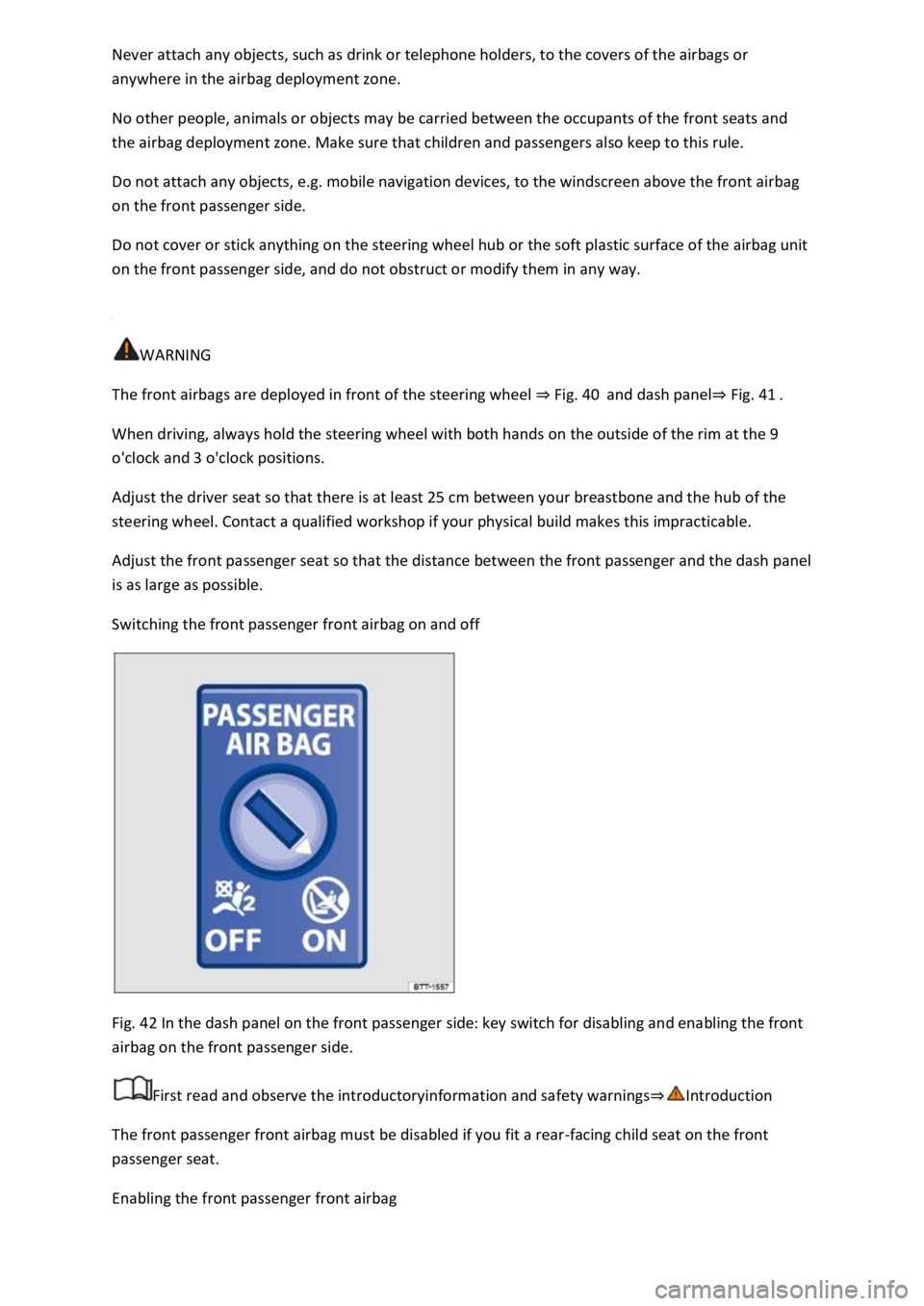
Switching the front passenger front airbag on and off
Fig. 42 In the dash panel on the front passenger side: key switch for disabling and enabling the front
airbag on the front passenger side.
First read and observe the introductoryinformation and safety warnings
The front passenger front airbag must be disabled if you fit a rear-facing child seat on the front
passenger seat.
Enabling the front passenger front airbag
Page 74 of 502

Open the door on the front passenger side.
Fold the key bit of the vehicle key all the way out Vehicle key
Insert the key bit into the key-operated switch on the dash panel Fig. 42until you feel the second
point of resistance. Around three quarters of the key bit should be inserted in the key switch at this
point
Turn the vehicle key, without using force, to the position .
Remove the vehicle key from the key-operated switch and fold away the key bit
The PASSENGER AIR BAG indicator lamp in the upper section of the centre console lights up
and goes out after approximately 60 seconds Indicator lamp
Close the door on the front passenger side.
Check that the PASSENGER AIR BAG indicator lamp in the upper section of the centre
console does not light up when the ignition is switched on Indicator lamp
Disabling the front passenger front airbag
Switch off the ignition.
Open the door on the front passenger side.
Fold the key bit of the vehicle key all the way out Vehicle key
Insert the fully folded-out key bit of the vehicle key into the key-operated switch in the dash panel
Fig. 42up to the second point of resistance. Around three quarters of the key bit should be
inserted in the key switch at this point
Turn the vehicle key, without using force, to the position .
Remove the vehicle key from the key-operated switch and fold away the key bit
Close the door on the front passenger side.
The PASSENGER AIR BAG indicator lamp in the upper section of the centre console lights
up continuously when the ignition is switched on Indicator lamp
Indication that front passenger front airbag is disabled
A deactivated front passenger front airbag is indicated only by the continuously lit
PASSENGER AIR BAG indicator lamp in the upper section of the centre console (
lights up yellow continuously) Indicator lamp
If the PASSENGER AIR BAG indicator lamp in the upper section of the centre console does
not light up continuously or lights up together with the indicator lamp in the instrument cluster
display, do not fit a child restraint system on the front passenger seat for safety reasons. The front
passenger front airbag could trigger during an accident.
Page 75 of 502

The front passenger front airbag should be switched off only in exceptional circumstances.
To prevent damage to the airbag system, switch the front passenger front airbag on and off only
when the ignition is switched off.
It is the driver's responsibility to ensure that the key-operated switch is set to the correct position.
Switch off the front passenger front airbag only if in exceptional circumstances a child seat is fitted
on the front passenger seat.
Switch the front passenger front airbag back on again as soon as the child seat on the front
passenger seat is no longer being used.
WARNING
Do not leave the vehicle key in the key switch while driving.
Strong vibrations may cause the vehicle key to turn in the key switch, which could cause the front
passenger front airbag to be activated.
Untimely inflation of the front passenger front airbag could lead to serious or fatal injuries.
NOTICE
If the key bit is not inserted far enough, the key switch could be damaged when the key is turned.
NOTICE
Do not leave the vehicle key in the key switch, as this could result in damage to the interior door
trim, dash panel, key switch or vehicle key when the front passenger door is closed.
Safe transport of children
Introduction
This chapter contains information on the followingsubjects:
Types of child seat
Fitting and using child seats
Securing systems
Securing a child seat with ISOFIX
Securing child seats with a seat belt
Page 89 of 502
-Net Mobile online services
Opening and closing
Vehicle key
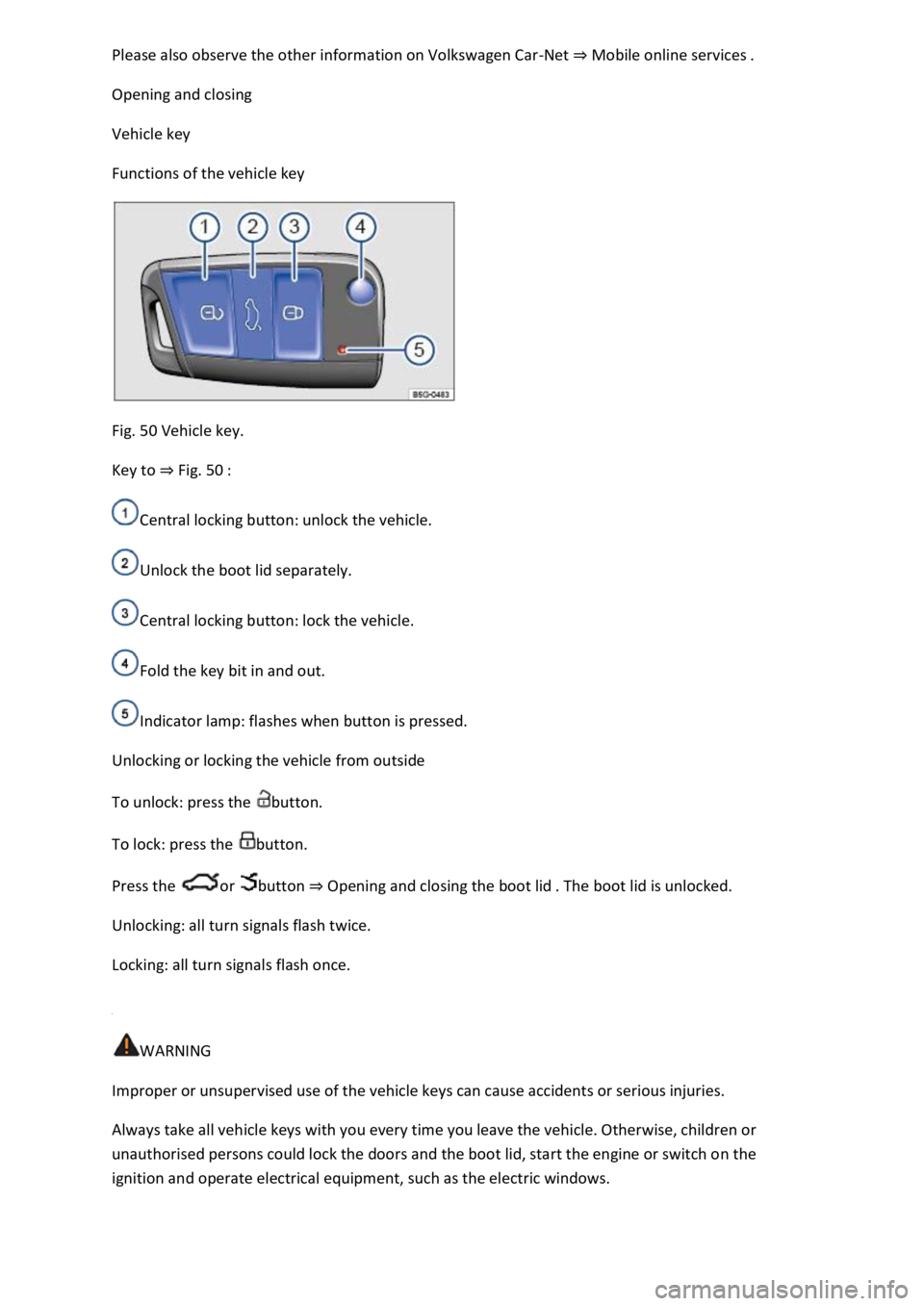
Functions of the vehicle key
Fig. 50 Vehicle key.
Key to Fig. 50
Central locking button: unlock the vehicle.
Unlock the boot lid separately.
Central locking button: lock the vehicle.
Fold the key bit in and out.
Indicator lamp: flashes when button is pressed.
Unlocking or locking the vehicle from outside
To unlock: press the button.
To lock: press the button.
Press the or button Opening and closing the boot lid
Unlocking: all turn signals flash twice.
Locking: all turn signals flash once.
WARNING
Improper or unsupervised use of the vehicle keys can cause accidents or serious injuries.
Always take all vehicle keys with you every time you leave the vehicle. Otherwise, children or
unauthorised persons could lock the doors and the boot lid, start the engine or switch on the
ignition and operate electrical equipment, such as the electric windows.
Page 90 of 502
in the vehicle in an emergency and may not be able to get themselves to safety. For example, locked
vehicles may be subjected to very high or very low temperatures depending on the season. This can
cause serious injuries and illness or fatalities, especially in the case of small children.
Never switch off the ignition while the vehicle is in motion. The steering column lock or steering lock
mechanism may be activated and you will no longer be able to steer the vehicle.
NOTICE
Every electric vehicle key contains electronic components. Protect the key from damage, moisture
and excessive vibration.
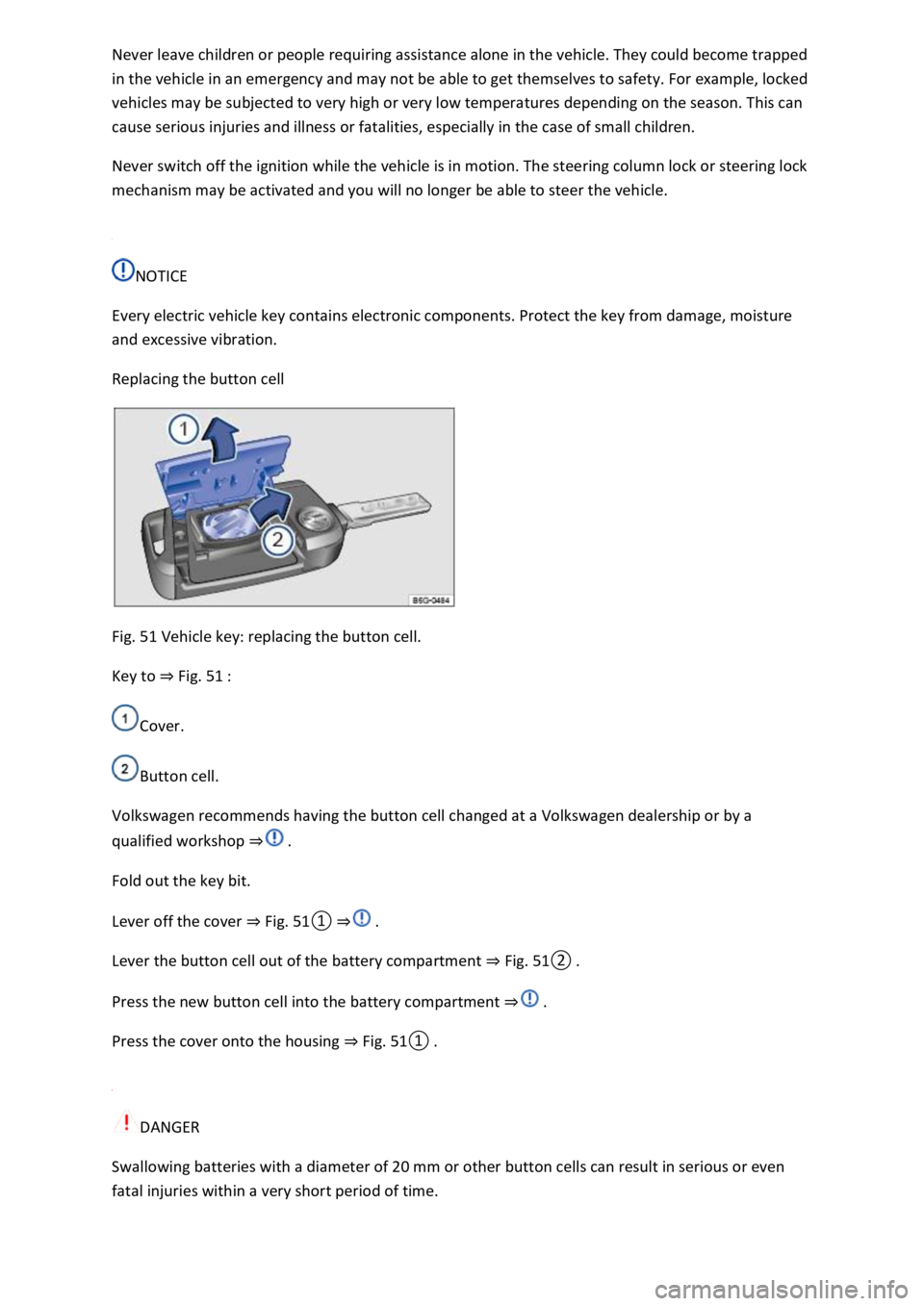
Replacing the button cell
Fig. 51 Vehicle key: replacing the button cell.
Key to Fig. 51
Cover.
Button cell.
Volkswagen recommends having the button cell changed at a Volkswagen dealership or by a
qualified workshop
Fold out the key bit.
Lever off the cover Fig.
0
Lever the button cell out of the battery compartment Fig.
0
Press the new button cell into the battery compartment
Press the cover onto the housing Fig.
0
DANGER
Swallowing batteries with a diameter of 20 mm or other button cells can result in serious or even
fatal injuries within a very short period of time.
Page 91 of 502

that are larger than 20 mm out of the reach of children.
Call for medical help immediately you suspect that someone has swallowed a battery.
NOTICE
The vehicle key can be damaged if the button cell is not changed properly.
Unsuitable batteries can damage the vehicle key. Replace discharged batteries only with new
batteries of the same voltage rating, size and specification.
Make sure the polarity is correct when inserting the battery.
Dispose of discharged batteries in accordance with environmental regulations.
Synchronising the vehicle key
If you cannot lock or unlock the vehicle with the vehicle key, synchronise the vehicle key or replace
the button cell Replacing the button cell
Fold out the key bit.
Remove the cap on the driver door handle Opening and closing the driver door manually
Stand beside the vehicle.
Press the button on the vehicle key.
Unlock the vehicle using the key bit.
Fit the cap Opening and closing the driver door manually
The synchronisation process is complete.
Troubleshooting
Vehicle cannot be locked or unlocked
The remote control is subject to interference caused by obstacles, adverse weather conditions or
other transmitters operating in the same frequency range in the vicinity of the vehicle, e.g. mobile
devices.
OR: the central locking switches off briefly to protect it from overloading.
Close the driver door.
OR: synchronise the vehicle key Synchronising the vehicle key
Indicator lamp does not flash
If the indicator lamp in the vehicle key does not flash when a button is pressed, the button cell in the
vehicle key must be changed Replacing the button cell