towing VOLKSWAGEN T-ROC 2020 User Guide
[x] Cancel search | Manufacturer: VOLKSWAGEN, Model Year: 2020, Model line: T-ROC, Model: VOLKSWAGEN T-ROC 2020Pages: 502, PDF Size: 8.58 MB
Page 220 of 502

To ensure your own safety and the safety of your passengers, observe the following points before
driving offroad:
Obtain sufficient information before driving into offroad terrain with the vehicle.
Do not plan day stages that are too long. Take increased fuel consumption for offroad driving into
account.
Fill up the tank. Fuel consumption is considerably higher offroad.
Check that your tyres are suitable for the offroad journey you have planned. Recommendation for
difficult offroad terrain: always have offroad tyres fitted to your vehicle.
Check the tyre pressure on all tyres and correct if necessary. This includes the temporary spare
wheel, if present.
Check engine oil level and refill engine oil as necessary. The engine will be supplied with engine oil
when it is driven on or across a slope only if the engine oil level is sufficient.
Completely refill the washer fluid reservoir with water and washer fluid.
Fit the towing eye at the front or rear. It is not always possible to fit the towing eye when the vehicle
is stuck.
Check the vehicle toolkit and add tools according to individual requirements Useful accessories for
offroad driving.
Stow luggage in the vehicle as evenly and as low as possible. Secure all loose items.
Before driving offroad, Volkswagen recommends attending an offroad driving course, particularly if
you have no or very little experience.
Page 234 of 502

daptive Cruise Control (ACC)
Press the button.
The speed limiter is switched off.
Troubleshooting
First read and observe the introductoryinformation and safety warnings
Control is automatically interrupted.
Malfunction. Switch off the speed limiter and go to a qualified workshop.
For safety reasons, the speed limiter does not fully deactivate itself until you release the accelerator
once or switch the system off manually.
Adaptive Cruise Control (ACC)
Introduction
This chapter contains information on the followingsubjects:
Special driving situations
Limits of ACC
Switching ACC on and off
Setting ACC
Troubleshooting
The Adaptive Cruise Control (ACC) maintains a speed selected by the driver. If the vehicle
approaches a vehicle in front, the ACC automatically adapts the speed so that a distance you have
selected is maintained.
Speed range
ACC controls the vehicle in the speed range between 30 km/h (20 mph) and 160 km/h (100 mph)
or 210 km/h (130 mph). This speed range may differ in certain markets.
Driving with ACC
You can override the ACC at any time. Control will be interrupted when you brake. If you accelerate,
control will be interrupted for the duration of the acceleration process and will then continue again.
Control by ACC is less dynamic when towing a trailer
if the trailer's brake lights are faulty.
Does the vehicle have ACC?
The vehicle is equipped with ACC if you can make settings for ACC in the vehicle settings of the
Infotainment system Vehicle settings menu
Brake request
Page 256 of 502

When switched on, the Blind Spot Monitor is active from a speed of approx. 15 km/h (9 mph).
In the following driving situations, the yellow indicator lamp will light up in the corresponding
exterior mirror: Fig. 124
If your vehicle is being overtaken.
When overtaking another vehicle with a speed difference of up to approximately 10 km/h (6 mph).
No display will be shown if the takeover manoeuvre is much faster.
If a vehicle is detected in the blind spot and the turn signal is additionally activated in the direction
of the detected vehicle
In vehicles with the lane keeping system, the yellow indicator lamp will flash even if you do not
activate the turn signal when leaving your lane, provided that the lane keeping system is switched on
(Blind Spot Monitor Plus). The driver is warned by a corrective steering intervention when changing
lanes during a possible critical situation (information level, warning level). This also occurs when the
turn signal is activated for the corresponding direction. If the steering intervention is overridden by
the driver, the steering wheel vibrates to give an additional warning.
The quicker another vehicle approaches, the earlier there is a corresponding display in the exterior
mirror.
Automatic deactivation
The radar sensors for the Blind Spot Monitor will switch off automatically if, for example, the system
detects that a radar sensor is continuously covered. This can be caused by a layer of ice or snow in
front of the radar sensor, for example.
A text message will be shown on the instrument cluster display.
If the Blind Spot Monitor has been automatically deactivated, the system cannot be activated until
the ignition has been switched off and back on again.
The Blind Spot Monitor is automatically deactivated and cannot be activated when the factory-fitted
towing bracket is electrically connected to a trailer or similar Trailer towing
electrically connected to the vehicle and the driver pulls away, a text message appears in the
instrument cluster display to inform the driver that the Blind Spot Monitor has been deactivated.
The Blind Spot Monitor will be automatically activated again when the trailer has been unhitched
from the vehicle. This applies if the function was previously activated. The Blind Spot Monitor must
be deactivated manually if you tow a trailer using a towing bracket that was not fitted at the factory.
Troubleshooting
First read and observe the introductoryinformation and safety warnings
Blind Spot Monitor is not working
The indicator lamp lights up yellow.
Go to a qualified workshop.
Page 259 of 502
-lying vehicle components such as the bumper, spoiler and parts of the running gear, engine or
exhaust system could be damaged. Drive carefully through dips in the road and over drive entrances,
ramps, kerbstones and other objects.
Please adhere to relevant legislation when stopping and parking your vehicle.
Electronic parking brake
Operating the electronic parking brake
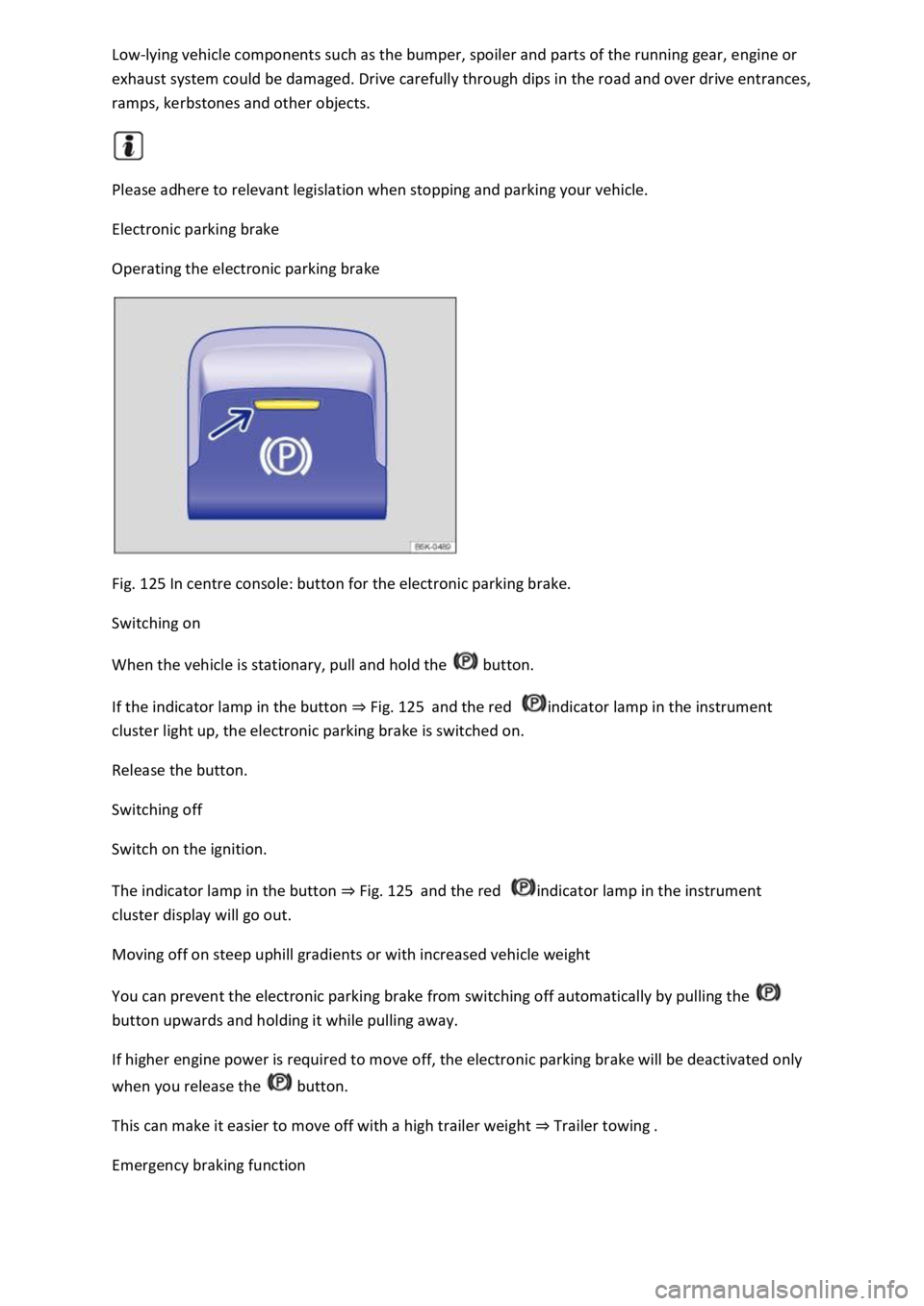
Fig. 125 In centre console: button for the electronic parking brake.
Switching on
When the vehicle is stationary, pull and hold the button.
If the indicator lamp in the button Fig. 125and the red indicator lamp in the instrument
cluster light up, the electronic parking brake is switched on.
Release the button.
Switching off
Switch on the ignition.
The indicator lamp in the button Fig. 125and the red indicator lamp in the instrument
cluster display will go out.
Moving off on steep uphill gradients or with increased vehicle weight
You can prevent the electronic parking brake from switching off automatically by pulling the
button upwards and holding it while pulling away.
If higher engine power is required to move off, the electronic parking brake will be deactivated only
when you release the button.
This can make it easier to move off with a high trailer weight Trailer towing
Emergency braking function
Page 266 of 502
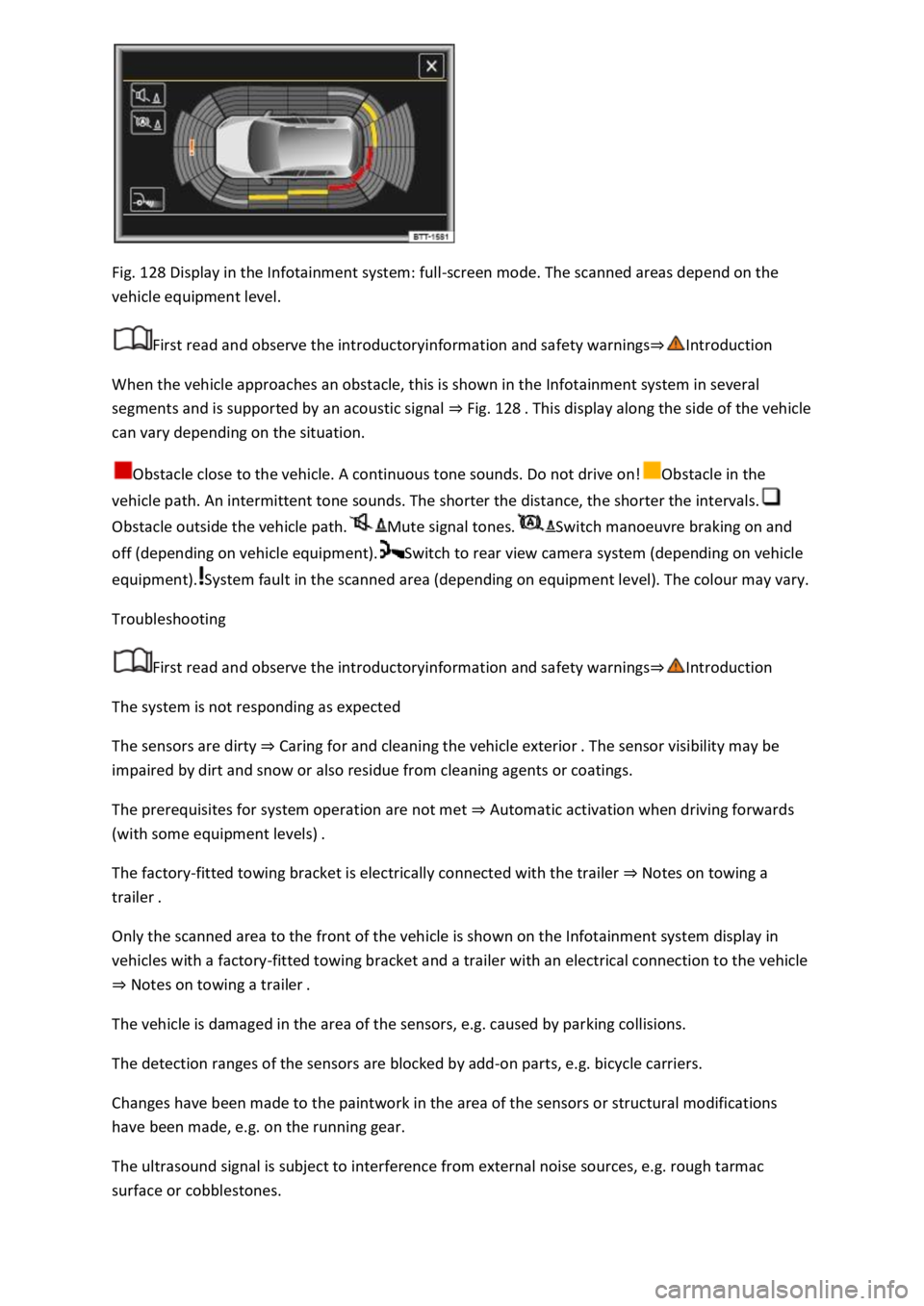
Fig. 128 Display in the Infotainment system: full-screen mode. The scanned areas depend on the
vehicle equipment level.
First read and observe the introductoryinformation and safety warnings
When the vehicle approaches an obstacle, this is shown in the Infotainment system in several
segments and is supported by an acoustic signal Fig. 128
can vary depending on the situation.
Obstacle close to the vehicle. A continuous tone sounds. Do not drive on!Obstacle in the
vehicle path. An intermittent tone sounds. The shorter the distance, the shorter the intervals.
Obstacle outside the vehicle path.Mute signal tones.Switch manoeuvre braking on and
off (depending on vehicle equipment).Switch to rear view camera system (depending on vehicle
equipment).System fault in the scanned area (depending on equipment level). The colour may vary.
Troubleshooting
First read and observe the introductoryinformation and safety warnings
The system is not responding as expected
The sensors are dirty Caring for and cleaning the vehicle exterior
impaired by dirt and snow or also residue from cleaning agents or coatings.
The prerequisites for system operation are not met Automatic activation when driving forwards
(with some equipment levels)
The factory-fitted towing bracket is electrically connected with the trailer Notes on towing a
trailer
Only the scanned area to the front of the vehicle is shown on the Infotainment system display in
vehicles with a factory-fitted towing bracket and a trailer with an electrical connection to the vehicle
Notes on towing a trailer
The vehicle is damaged in the area of the sensors, e.g. caused by parking collisions.
The detection ranges of the sensors are blocked by add-on parts, e.g. bicycle carriers.
Changes have been made to the paintwork in the area of the sensors or structural modifications
have been made, e.g. on the running gear.
The ultrasound signal is subject to interference from external noise sources, e.g. rough tarmac
surface or cobblestones.
Page 268 of 502
First read and observe the introductoryinformation and safety warnings
Switching on the rear view camera system
Select reverse gear.
OR: press the button.
Switching off the rear view camera system
Drive forwards at a speed of at least 10 km/h (6 mph).
Display representation
First read and observe the introductoryinformation and safety warnings
The functions and displays of the rear view camera system image vary according to the equipment
level and may differ from each other.
The display of the reversing camera picture varies if the factory-fitted towing bracket is electrically
connected to the trailer Notes on towing a trailer
Functions and symbols of the rear view camera system
You can make settings by means of the function buttons when the rear view camera system is
switched on. Some setting options depend on the vehicle equipment.
xClose current display.Adjust display: brightness, contrast, colour.Switch to Park
Distance Control Park Distance ControlShow Park Distance Control display.Hide Park
Distance Control display.
Orientation lines
Red line: safety distance to the rear.
Green lateral lines: extension of the vehicle.
Prerequisites
First read and observe the introductoryinformation and safety warnings
The prerequisites for parking using the rear view camera system must be met.
Do not exceed a speed of approximately 15 km/h (9 mph).
Width of the parking space: vehicle width + 0.2 m.
The following conditions must be met in order to display a correct image:
The boot lid is closed.
The surrounding area has a flat surface.
Vehicle does not have a heavy load at the rear.
Page 269 of 502
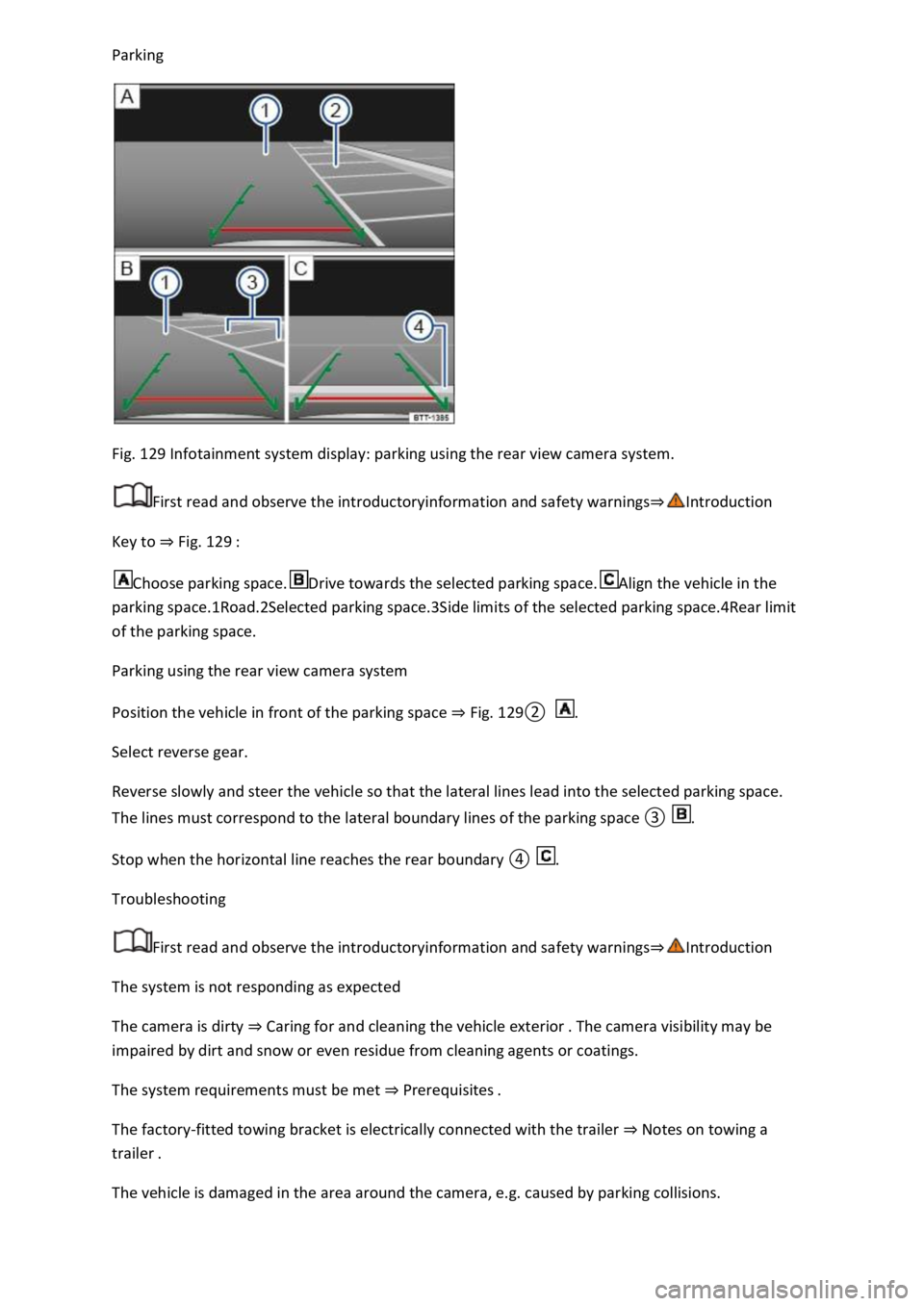
Fig. 129 Infotainment system display: parking using the rear view camera system.
First read and observe the introductoryinformation and safety warnings
Key to Fig. 129
Choose parking space.Drive towards the selected parking space.Align the vehicle in the
parking space.1Road.2Selected parking space.3Side limits of the selected parking space.4Rear limit
of the parking space.
Parking using the rear view camera system
Position the vehicle in front of the parking space Fig.
0.
Select reverse gear.
Reverse slowly and steer the vehicle so that the lateral lines lead into the selected parking space.
The lines must correspond to the l.
Troubleshooting
First read and observe the introductoryinformation and safety warnings
The system is not responding as expected
The camera is dirty Caring for and cleaning the vehicle exterior
impaired by dirt and snow or even residue from cleaning agents or coatings.
The system requirements must be met Prerequisites
The factory-fitted towing bracket is electrically connected with the trailer Notes on towing a
trailer
The vehicle is damaged in the area around the camera, e.g. caused by parking collisions.
Page 271 of 502

NOTICE
Park Assist uses parked vehicles, the kerbs and other objects as guidance. Make sure that the tyres
and wheel rims are not damaged when parking the vehicle. If necessary, stop the parking procedure
in good time to prevent damage to the vehicle.
Prerequisites
First read and observe the introductoryinformation and safety warnings
The following prerequisites must be met for driving into and out of parking spaces:
The traction control system (TCS) must be switched on Brake support systems
Distance: maintain a distance of 0.5 2.0 metres when driving past the parking space.
The parking space must have at least the dimensions required by Park Assist.
Speed when driving past the parking space (for parking spaces parallel to the road): not above
40 km/h (25 mph).
Speed when driving past the parking space (for parking spaces perpendicular to the road): not above
20 km/h (12 mph).
Maximum speed: 7 km/h (4 mph). An automatic braking intervention can take place when driving
into a parking space.
No trailer is connected electrically with the factory-fitted towing bracket Notes on towing a
trailer
The parking manoeuvre can be continued after the automatic brake intervention.
The automatic braking intervention takes place a maximum of once per parking manoeuvre. The
parking manoeuvre will be cancelled if a speed of approximately 7 km/h (4 mph) is exceeded again.
WARNING
Do not let the automatic braking intervention triggered by Park Assist tempt you to take any risks
while driving. The system is not a substitute for the full concentration of the driver.
Park Assist has system-related limitations. In some situations, automatic braking intervention may
function only in a limited way or not at all.
You should always be prepared to brake the vehicle yourself.
The automatic braking intervention is ended after approximately 1.5 seconds. Depress the brake
pedal of the vehicle yourself following the automatic braking intervention.
Looking for a parking space
Page 277 of 502

ng
space or manoeuvring. Rear Traffic Alert functions using radar sensors in the rear bumper.
Key to Fig. 134
Critical situation. Do not drive on!Possible critical situation.
Detection of a critical situation can also take place acoustically:
A warning signal will sound and a text message will be displayed in the instrument cluster for
vehicles without Park Distance Control.
In vehicles with Park Distance Control, an acoustic signal will sound with the continuous tone of Park
Distance Control. If the Park Distance Control is deactivated, no warning can be given to the driver
and the Rear Traffic Alert system will also be switched off temporarily.
If there is a system fault in the scanned area, the indicator lamp will light up yellow on the
instrument cluster display.
Automatic braking intervention to minimise damage
If Rear Traffic Alert detects an approaching road user and the driver has not pressed the brake, the
system can brake automatically.
Automatic braking intervention is activated when reversing at speeds of between 1 km/h (1
mph). The vehicle is held stationary for up to two seconds after vehicle standstill has been
detected.
After automatic braking intervention is activated to prevent damage to the vehicle, the system
requires approximately ten seconds before it can activate another automatic braking intervention.
Automatic braking intervention can be interrupted by pressing the accelerator or brake pedal
sharply and taking control of the vehicle.
Automatic deactivation
Rear Traffic Alert is deactivated automatically and cannot be switched on if the factory-fitted towing
bracket is electrically connected to a trailer or similar Notes on towing a trailer
electrically connected to the vehicle and the driver pulls away, a text message appears in the
instrument cluster display to inform the driver that Rear Traffic Alert has been deactivated. Rear
Traffic Alert will be automatically activated again when the trailer has been unhitched from the
vehicle. This applies if the functions were previously activated. Rear Traffic Alert must be switched
off manually for trailer towing if a non-factory-fitted towing bracket is used.
WARNING
The intelligent Rear Traffic Alert technology cannot overcome the laws of physics, and functions only
within the limits of the system. Do not let the assistance function of Rear Traffic Alert tempt you to
take any safety risks while driving. The system is not a substitute for the full concentration of the
driver.
Page 296 of 502

Even when the above-mentioned requirements for using the services are met, the functionality of
the Car-Net services can be impaired or interrupted due to factors that lie outside the control of
Volkswagen AG. Such factors include in particular:
s.
The telecommunications provider has changed the mobile telecommunication standard for
transferring mobile data, e.g. from UMTS to EDGE or GPRS
An existing mobile telecommunications standard has been shut down by the telecommunications
provider.
Impairment or interruption to mobile and GPS reception, e.g. due to high speeds, solar storms,
weather, landscape, interfering devices or intensive use of the mobile network in the relevant cells.
Restricted availability, completeness or correctness of information provided by third parties, e.g.
maps.
Countries where Volkswagen Car-Net services are not available.
Apps
First read and observe the introductoryinformation and safety warnings
The Volkswagen Car-Net app can execute Volkswagen Car-Net services in the vehicle and provide
information.
Volkswagen App-Connect allows content from Volkswagen apps and third party apps on mobile
devices to be shown on the Infotainment system screen.
There may be problems with compatibility with third party apps.
A wide range of applications may be available and they may be vehicle-specific and country-specific
o depend on
availability of services offered by third parties.
We are unable to guarantee that the available apps can be run on all mobile devices and all
operating systems.
Applications offered by Volkswagen can be changed, discontinued, deactivated, reactivated and
expanded without prior notice.
Transporting items
Stowing luggage and loads
Cargo and luggage can be transported in the vehicle, on a trailer Technical requirementsand on
the roof Roof carrier
Stowing luggage safely in the vehicle
Always distribute any loads in the vehicle as evenly as possible.