warning light VOLKSWAGEN T-ROC 2020 Repair Manual
[x] Cancel search | Manufacturer: VOLKSWAGEN, Model Year: 2020, Model line: T-ROC, Model: VOLKSWAGEN T-ROC 2020Pages: 502, PDF Size: 8.58 MB
Page 246 of 502
Failure to switch off Front Assist in the situations mentioned can result in accidents and serious
injuries.
Pedestrian Monitoring
First read and observe the introductoryinformation and safety warnings
Pedestrian Monitoring can help to avoid accidents with pedestrians crossing the vehicle's path or to
mitigate the consequences of an accident.
The system gives a warning when there is a risk of collision, prepares the vehicle for emergency
braking, helps to brake the vehicle or performs an automatic brake intervention. In the event of an
advance warning, the warning lamp lights up in the instrument cluster
When Front Assist is switched on, Pedestrian Monitoring is active as part of Front Assist in a vehicle
speed range from approx. 5 km/h (3 mph) to 65 km/h (40 mph).
Pedestrian Monitoring is not available in all countries, depending on the vehicle equipment level.
WARNING
The intelligent Pedestrian Monitoring technology cannot overcome the laws of physics, and
functions only within the limits of the system. Never let the extra convenience afforded by the
Pedestrian Monitoring system tempt you into taking any safety risks when driving. The driver is
always responsible for braking in time.
If Pedestrian Monitoring issues a warning, brake your vehicle immediately depending on the traffic
situation or avoid the pedestrian.
Pedestrian Monitoring cannot prevent accidents and serious injuries on its own.
Pedestrian Monitoring can issue unnecessary warnings and carry out unwanted braking
interventions in complex driving situations, e.g. on a main road that turns sharply.
Pedestrian Monitoring can issue unnecessary warnings and carry out unwanted braking
interventions when its function is impaired, e.g. if the radar sensor is covered or its position has
been changed.
Be prepared to take over control of the vehicle yourself at all times.
Operating the area monitoring system (Front Assist)
First read and observe the introductoryinformation and safety warnings
Front Assist and the advance warning (in some countries) are automatically switched on when you
switch on the ignition.
However, the system is not available or its functions are restricted for a period of around 30 seconds
(also longer, depending on the driving situation).
Page 247 of 502
on at all times. Exceptions Limits of Front Assist
Switching on and off
Switch Front Assist on and off in the vehicle settings of the Infotainment system Vehicle settings
menu
Or: switch Front Assist on and off in the instrument cluster menus Instrument cluster menus
If you switch off Front Assist, the advance warning and distance warning will also be switched off.
The yellow indicator lamp lights up in the instrument cluster display. .
Setting the distance and advance warnings
Switch on Front Assist.
Switch the desired function on and off in the vehicle settings of the Infotainment system Vehicle
settings menu
Depending on the vehicle equipment, you can also set the warning time for the advance warning.
Some settings can be stored in the user accounts of the personalisation function and therefore
change automatically when the user account changes Personalisation
Troubleshooting
First read and observe the introductoryinformation and safety warnings
Front Assist is not available, the radar sensor does not have sufficient visibility.
The radar sensor is dirty. Clean the radar sensor Vehicle care
The visibility of the radar sensor is impaired due to the weather conditions, e.g. snow, or due to
detergent deposits or coatings. Clean the radar sensor Vehicle care
The visibility of the radar sensor is impaired by add-on parts, the trim frames of number plate
holders or stickers. Keep the area around the radar sensor free.
The radar sensor has been displaced or damaged, e.g. due to damage to the front of the vehicle.
Check whether damage is visible Repairs and technical modifications
Structural modifications have been made to the front of the vehicle.
The genuine Volkswagen badge is not used.
If the problem persists, switch off Front Assist and go to a qualified workshop.
Front Assist does not function as expected or is triggered unnecessarily several times.
The radar sensor is dirty. Clean the radar sensor Vehicle care
The system limits are not met Limits of Front Assist
Page 249 of 502
If the camera's field of view is dirty, covered or damaged, the function of the lane keeping system
may be impaired.
Some settings can be saved in the user accounts of the personalisation function and can therefore
change automatically when the user account is changed Personalisation
Driving with the lane keeping system
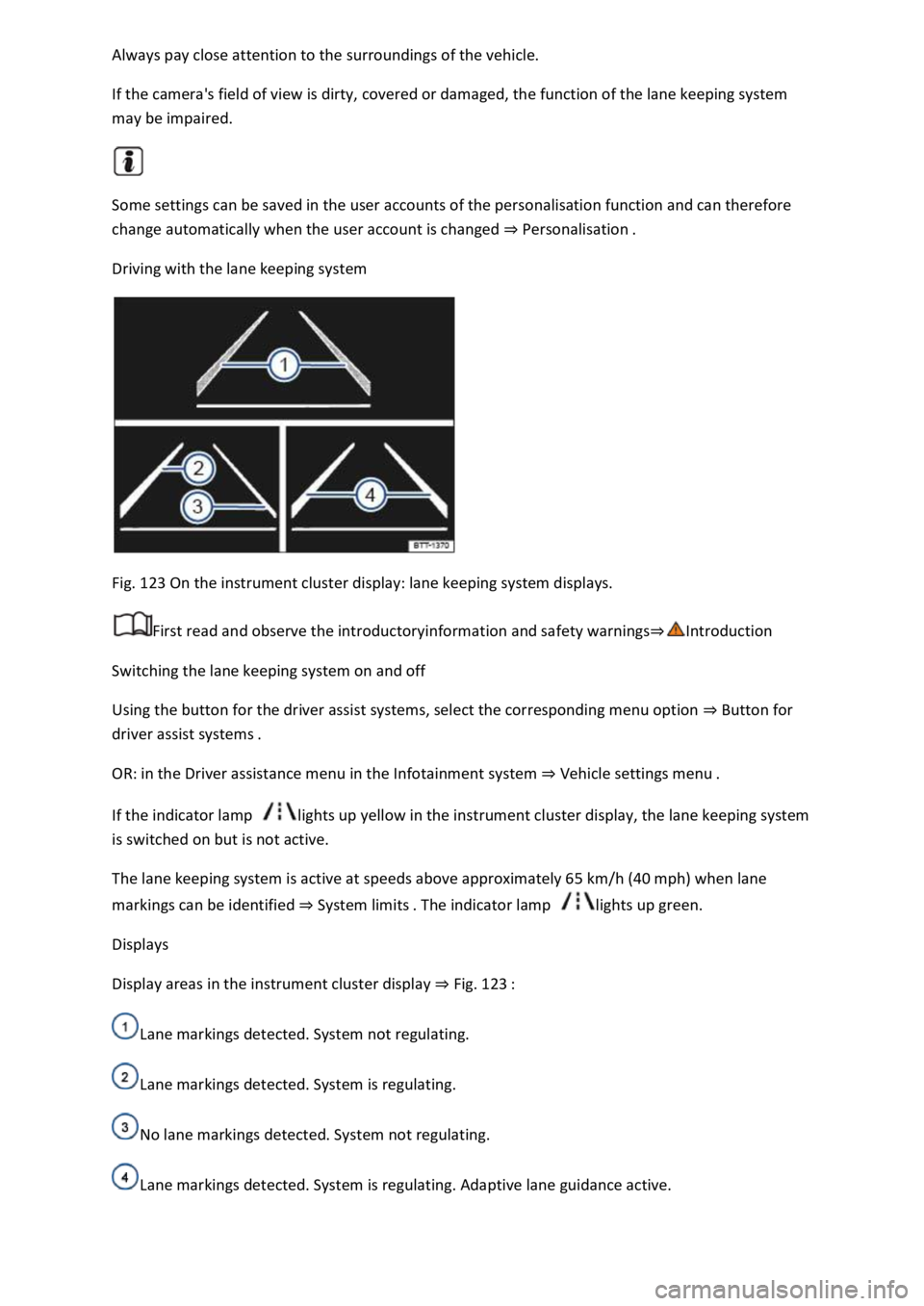
Fig. 123 On the instrument cluster display: lane keeping system displays.
First read and observe the introductoryinformation and safety warnings
Switching the lane keeping system on and off
Using the button for the driver assist systems, select the corresponding menu option Button for
driver assist systems
OR: in the Driver assistance menu in the Infotainment system Vehicle sett
If the indicator lamp lights up yellow in the instrument cluster display, the lane keeping system
is switched on but is not active.
The lane keeping system is active at speeds above approximately 65 km/h (40 mph) when lane
markings can be identified System limits lights up green.
Displays
Display areas in the instrument cluster display Fig. 123
Lane markings detected. System not regulating.
Lane markings detected. System is regulating.
No lane markings detected. System not regulating.
Lane markings detected. System is regulating. Adaptive lane guidance active.
Page 253 of 502

the driver and can keep the vehicle in lane
automatically, or brake the vehicle to a standstill if required. The system can therefore actively help
to prevent an accident.
Emergency Assist is an extension of the lane keeping system (Lane Assist), and combines these
functions with the Adaptive Cruise Control (ACC). Please therefore read both these chapters and
observe the information about the system limits and warnings.
Description
If there is no driver activity, Emergency Assist prompts the driver to take control of the vehicle again
by visual and acoustic warnings and by braking jolts.
If the driver remains inactive, the system automatically controls the accelerator, brake and steering
to slow the vehicle down and keep it in lane t stopping distance, the system
decelerates the vehicle to a complete stop and switches on the electronic parking brake
automatically Operating the electronic parking brake
When Emergency Assist is actively controlling the vehicle, the hazard warning lights are switched on
and the vehicle performs slight snaking movements within its lane to warn other road users.
The hazard warning lights can be deactivated by pressing the accelerator or brake, by making a
steering intervention or, depending on the situation, by pressing the button for the hazard warning
lights.
When Emergency Assist has been triggered, the system is not available again until the ignition has
been switched off and then back on.
Prerequisites
The lane keeping system and ACC are switched on.
The selector lever is in position D/S or in the Tiptronic gate.
The system has detected a lane marking on both the right and left sides of the vehicle Fig. 123
Switching Emergency Assist on and off
Emergency Assist is activated automatically when the lane keeping system Driving with the lane
keeping systemis switched on.
WARNING
The intelligent technology used in Emergency Assist cannot overcome the laws of physics, and
functions only within the limits of the system. The driver is always responsible for controlling the
vehicle.
Adapt your speed and distance from the vehicles ahead to suit visibility, weather, road and traffic
conditions.
Your hands should always be on the steering wheel so that you can steer at any time.
Emergency Assist cannot always prevent accidents and serious injuries on its own.
Page 255 of 502
the Blind Spot Monitor can cause accidents and serious injuries. The system is not a substitute for
the full concentration of the driver.
Adapt your speed and distance from the vehicles ahead to suit visibility, weather, road and traffic
conditions.
Your hands should always be on the steering wheel so that you can steer at any time.
Pay attention to the indicator lamps in the exterior mirrors and in the instrument cluster display and
respond according to the commands.
Always pay close attention to the surroundings of the vehicle.
Never use the Blind Spot Monitor if the radar sensors are dirty, covered or damaged. These
conditions can impair the proper functioning of the system.
It may be hard to see the indicator lamp in the exterior mirror in direct sunlight.
Some settings can be saved in the user accounts of the personalisation function and can therefore
change automatically when the user account is changed Personalisation
Driving with the Blind Spot Monitor
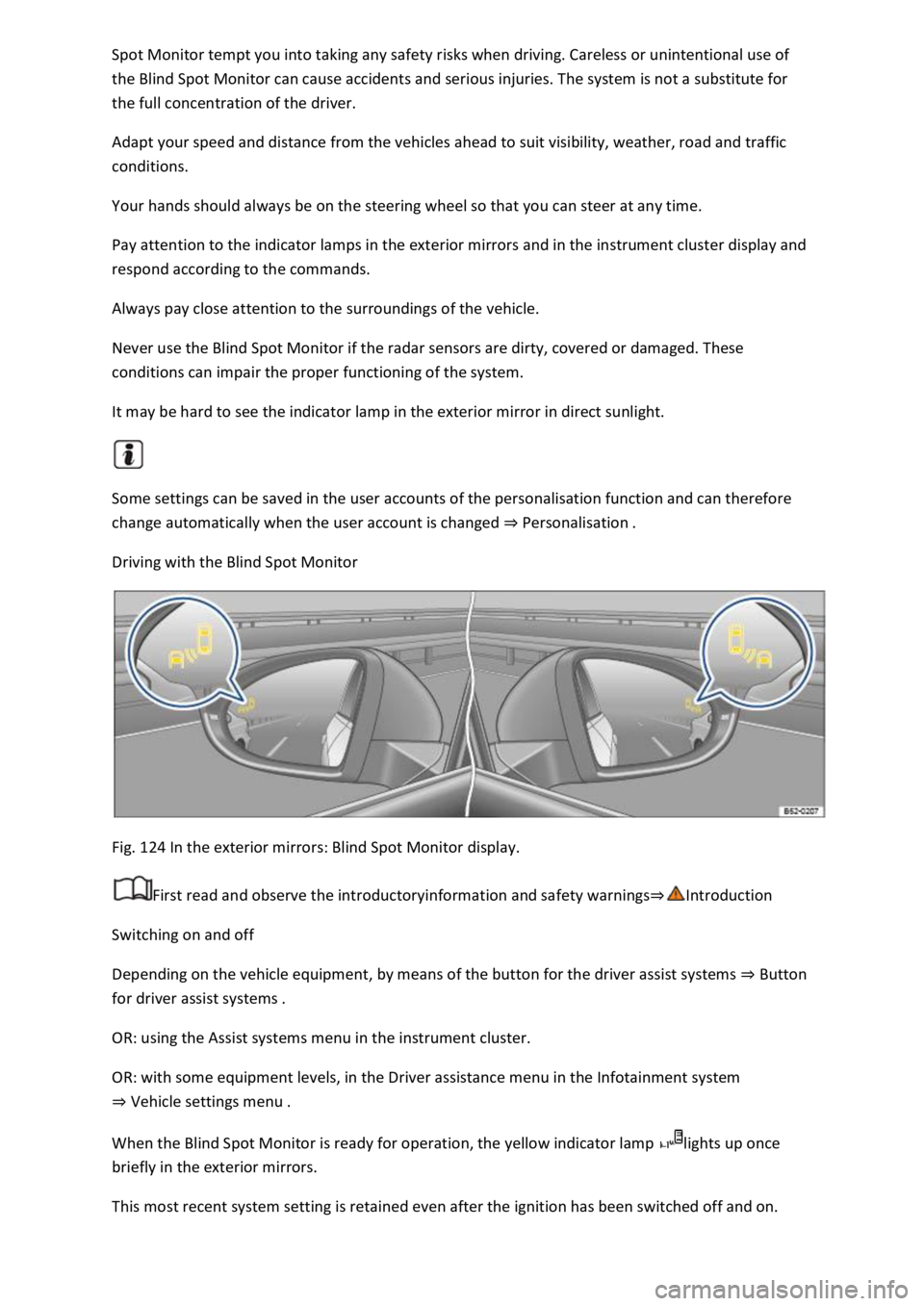
Fig. 124 In the exterior mirrors: Blind Spot Monitor display.
First read and observe the introductoryinformation and safety warnings
Switching on and off
Depending on the vehicle equipment, by means of the button for the driver assist systems Button
for driver assist systems
OR: using the Assist systems menu in the instrument cluster.
OR: with some equipment levels, in the Driver assistance menu in the Infotainment system
Vehicle settings menu
When the Blind Spot Monitor is ready for operation, the yellow indicator lamp lights up once
briefly in the exterior mirrors.
This most recent system setting is retained even after the ignition has been switched off and on.
Page 256 of 502

When switched on, the Blind Spot Monitor is active from a speed of approx. 15 km/h (9 mph).
In the following driving situations, the yellow indicator lamp will light up in the corresponding
exterior mirror: Fig. 124
If your vehicle is being overtaken.
When overtaking another vehicle with a speed difference of up to approximately 10 km/h (6 mph).
No display will be shown if the takeover manoeuvre is much faster.
If a vehicle is detected in the blind spot and the turn signal is additionally activated in the direction
of the detected vehicle
In vehicles with the lane keeping system, the yellow indicator lamp will flash even if you do not
activate the turn signal when leaving your lane, provided that the lane keeping system is switched on
(Blind Spot Monitor Plus). The driver is warned by a corrective steering intervention when changing
lanes during a possible critical situation (information level, warning level). This also occurs when the
turn signal is activated for the corresponding direction. If the steering intervention is overridden by
the driver, the steering wheel vibrates to give an additional warning.
The quicker another vehicle approaches, the earlier there is a corresponding display in the exterior
mirror.
Automatic deactivation
The radar sensors for the Blind Spot Monitor will switch off automatically if, for example, the system
detects that a radar sensor is continuously covered. This can be caused by a layer of ice or snow in
front of the radar sensor, for example.
A text message will be shown on the instrument cluster display.
If the Blind Spot Monitor has been automatically deactivated, the system cannot be activated until
the ignition has been switched off and back on again.
The Blind Spot Monitor is automatically deactivated and cannot be activated when the factory-fitted
towing bracket is electrically connected to a trailer or similar Trailer towing
electrically connected to the vehicle and the driver pulls away, a text message appears in the
instrument cluster display to inform the driver that the Blind Spot Monitor has been deactivated.
The Blind Spot Monitor will be automatically activated again when the trailer has been unhitched
from the vehicle. This applies if the function was previously activated. The Blind Spot Monitor must
be deactivated manually if you tow a trailer using a towing bracket that was not fitted at the factory.
Troubleshooting
First read and observe the introductoryinformation and safety warnings
Blind Spot Monitor is not working
The indicator lamp lights up yellow.
Go to a qualified workshop.
Page 258 of 502

Lock the vehicle.
Additional points to note on uphill and downhill gradients
Before switching off the engine, turn the steering wheel so that the front wheels will roll against the
kerb if the parked vehicle starts to move.
When facing downhill, turn the wheels so that they face the kerb.
When facing uphill, turn the wheels so that they face the centre of the road.
WARNING
The components of the exhaust system become very hot. This can cause fires and serious injuries.
Never park the vehicle where parts of the exhaust system can come into contact with inflammable
material underneath the vehicle, e.g. undergrowth, leaves, dry grass, spilt fuel, oil etc.
WARNING
The vehicle may roll away if you leave and park the vehicle incorrectly. This can cause accidents and
serious injuries.
Ensure that the electronic parking brake is switched on before you leave the vehicle and the
indicator lamp in the instrument cluster lights up red after you switch off the ignition.
Never remove the vehicle key from the ignition if the vehicle is in motion. The steering lock may be
activated and you will no longer be able to steer or control the vehicle.
Never leave children or people requiring assistance alone in the vehicle. They could switch off the
electronic parking brake, or move the selector lever or gearshift lever, and thus set the vehicle in
motion.
Always take all vehicle keys with you every time you leave the vehicle. The engine can be started and
electrical equipment such as the window controls can be operated. This can cause serious injury.
Never leave children or people requiring assistance alone in the vehicle. They could become trapped
in the vehicle in an emergency and may not be able to get themselves to safety. For example, locked
vehicles may be subjected to very high or very low temperatures depending on the season. This can
cause serious injuries and illness or fatalities, especially in the case of small children.
NOTICE
Objects that protrude from the ground can damage the bumper and other components when
parking the vehicle or driving out of a parking space. Always take care when driving into parking
spaces with high kerbs or fixed boundaries. Stop before the wheels touch the fixed boundaries or
kerbs.
Page 260 of 502

stopped using the foot brake
Pull the button. The vehicle brakes hard. A signal tone can be heard at the same time.
WARNING
Incorrect use of the electronic parking brake can cause accidents and serious injuries.
Never use the electronic parking brake to brake the vehicle, except in emergencies. The braking
distance is considerably longer as only the rear wheels are braked. Always use the foot brake.
WARNING
Failing to park the vehicle properly before leaving it may result in the vehicle rolling away. This can
cause accidents, serious injuries and damage to property.
Always park the vehicle in the specified order Parking
Ensure that the electronic parking brake is switched on before you leave the vehicle and the
indicator lamp in the instrument cluster lights up red after you switch off the ignition.
Troubleshooting
Fault in electronic parking brake
The indicator lamp lights up yellow. Go to a qualified workshop or a Volkswagen dealership.
Electronic parking brake does not switch off
The prerequisites for switch off are not met.
OR: the 12-volt vehicle battery is discharged.
Check whether all requirements for switching off the electronic parking brake are met Switching
off
Use jump leads Jump starting the vehicle
Noises from the electronic parking brake
You may hear noises when the electronic parking brake is switched on and off.
If the electronic parking brake has not been used for a long period, the system will carry out
occasional automatic and audible checks when the vehicle is parked.
Auto Hold function
Page 262 of 502

button button Fig. 126
(arrow) goes out.
The electronic parking brake switches on automatically to hold the vehicle securely. However, the
electronic parking brake will not switch on if the brake pedal is depressed when the Auto Hold
function is switched off
Temporarily switching off the Auto Hold function with the button
It can sometimes be necessary to switch off the Auto Hold function temporarily to enable the vehicle
to roll more easily, for example when manoeuvring.
Press the brake pedal when the engine is on.
Press the button. The Auto Hold function is deactivated.
The Auto Hold function will be reactivated as soon as the brake pedal is depressed again when the
vehicle has come to a standstill.
System limits
If the clutch slips during switching off of the ignition or opening of the driver door, the vehicle may
not be secured against rolling away by either the Auto Hold function or the electronic parking brake
lamp in the instrument cluster displaylights upred. The electronic parking brake is switched on.
WARNING
The intelligent Auto Hold function cannot overcome the laws of physics, and operates only within
the limits of the system. Do not let the extra convenience afforded by the Auto Hold function tempt
you into taking any safety risks when driving.
Make sure that the indicator lamp lights up green or red on the instrument cluster display if the
vehicle is to be held securely. The vehicle is being held by the Auto Hold function if the green
indicator lamp is lit and by the electronic parking brake if the red warning lamp is lit.
Never leave the vehicle if the engine is running and the Auto Hold function is switched on.
In some cases, the Auto Hold function cannot sufficiently hold the vehicle on uphill gradients or
brake it sufficiently on downhill gradients, e.g. if the ground is slippery or icy.
NOTICE
Switch off the Auto Hold function before driving into a car wash. Damage may otherwise be caused
by automatic activation of the electronic parking brake.
Safety notes on the parking systems
The parking systems include the following:
Park Distance Control Park Distance Control
Page 263 of 502

Rear view camera system (Rear View)
Park Assist Park Assist
The available systems vary according to the vehicle equipment level.
Limits of the parking systems
The sensors or cameras may not always be able to detect objects such as thin rails, fences, posts,
trees, very low or high obstacles and open or opening boot lids.
In some cases, dirt and ice on the sensors or cameras could be registered as an obstacle.
Limits of the rear view camera system
The rear view camera system shows only two-dimensional images on the screen. The lack of depth
of field means that potholes and protruding objects on the ground may only be detected with
difficulty, or may not be detected at all.
The system displays the orientation lines irrespective of the area surrounding the vehicle. There is no
automatic obstacle detection. Drivers must judge for themselves whether the vehicle will fit into the
parking space.
WARNING
The intelligent technology used in the parking systems cannot overcome the laws of physics, and
functions only within the limits of the system. Never let the extra convenience afforded by the
parking systems tempt you into taking any risks when driving. The parking systems cannot replace
the full concentration of the driver.
Always adapt your speed and driving style to suit visibility, weather, road and traffic conditions.
Unintentional vehicle movements can cause serious injury.
Keep looking in the direction in which you are parking and at the relevant area surrounding the
vehicle.
Do not allow the displays in the instrument cluster and the images shown in the Infotainment
system to distract you from the traffic.
Always monitor the area around the vehicle as the parking systems will not always detect infants,
animals and objects.
The parking systems have blind spots in which obstacles and people are not registered.
External sources of sound and certain surfaces on objects and clothing may influence the signals of
the sensors. In certain circumstances, the systems will be unable to detect or properly detect people
and objects.
Certain objects, for example narrow posts or railings, may be difficult or impossible to see on the
screen because of its resolution or poor light conditions.