Door VOLKSWAGEN T-ROC 2021 Owner´s Manual
[x] Cancel search | Manufacturer: VOLKSWAGEN, Model Year: 2021, Model line: T-ROC, Model: VOLKSWAGEN T-ROC 2021Pages: 502, PDF Size: 9.42 MB
Page 75 of 502

WARNING
The front passenger front airbag should be switched off only in exceptional circumstances.
To prevent damage to the airbag system, switch the front passenger front airbag on and off only
when the ignition is switched off.
It is the driver's responsibility to ensure that the key-operated switch is set to the correct position.
Switch off the front passenger front airbag only if in exceptional circumstances a child seat is fitted
on the front passenger seat.
Switch the front passenger front airbag back on again as soon as the child seat on the front
passenger seat is no longer being used.
WARNING
Do not leave the vehicle key in the key switch while driving.
Strong vibrations may cause the vehicle key to turn in the key switch, which could cause the front
passenger front airbag to be activated.
Untimely inflation of the front passenger front airbag could lead to serious or fatal injuries.
NOTICE
If the key bit is not inserted far enough, the key switch could be damaged when the key is turned.
NOTICE
Do not leave the vehicle key in the key switch, as this could result in damage to the interior door
trim, dash panel, key switch or vehicle key when the front passenger door is closed.
Safe transport of children
Introduction
This chapter contains information on the followingsubjects:
⇒ Types of child seat
⇒ Fitting and using child seats
⇒ Securing systems
⇒ Securing a child seat with ISOFIX
⇒ Securing child seats with a seat belt
Page 85 of 502

When the hazard warning lights are switched on, for example if you are being towed, you can still
indicate a change in direction or lane change by operating the turn signal. The hazard warning lights
will be interrupted temporarily.
Switch on the hazard warning lights, e.g. in the following situations:
When traffic ahead suddenly starts moving more slowly or you reach the tail end of a traffic jam to
warn vehicles behind you.
There is an emergency situation.
The vehicle has broken down.
When tow-starting or towing.
Always follow local regulations on the use of the hazard warning lights.
If the hazard warning lights are not working, you must use an alternative method of drawing
attention to the broken-down vehicle. This method must comply with traffic legislation.
WARNING
Any broken-down vehicle poses a high accident risk for the vehicle occupants and for other road
users.
Stop the vehicle as soon as possible and when safe to do so.
Park the vehicle at a safe distance from moving traffic.
Switch on the hazard warning lights.
Never leave other persons alone in the vehicle, particularly children or people requiring assistance.
This applies in particular when the doors are locked. People locked in the vehicle may be subjected
to very high or very low temperatures.
WARNING
Ignoring any of the items on this important safety checklist can lead to accidents and severe injuries.
Always follow the instructions in the checklist and observe the general safety procedures.
WARNING
The components of the exhaust system become very hot. This can cause fires and serious injuries.
Park the vehicle so that no part of the exhaust system can come into contact with any inflammable
material underneath the vehicle, e.g. dry grass, fuel.
Page 87 of 502
Depending on the vehicle equipment, the high-visibility waistcoat may be located in a stowage
compartment in the front door trim or in the stowage compartment on the front passenger side
⇒ Driver door , ⇒ Front passenger side .
The high-visibility waistcoat must comply with legal requirements.
Fire extinguisher
Depending on the equipment, a fire extinguisher may be located in a holder in the footwell under
the front passenger seat.
The fire extinguisher must meet legal requirements, be ready for use at all times and be checked on
a regular basis (see inspection seal on the fire extinguisher).
WARNING
In the event of a sudden driving or braking manoeuvre or accident, loose objects could be flung
though the vehicle and cause severe injuries.
Always secure the first-aid kit, warning triangle and fire extinguisher safely in the holders in the
vehicle.
Stow the high-visibility waistcoat in the stowage compartments so that it can be easily accessed.
Information call, breakdown call and emergency call service
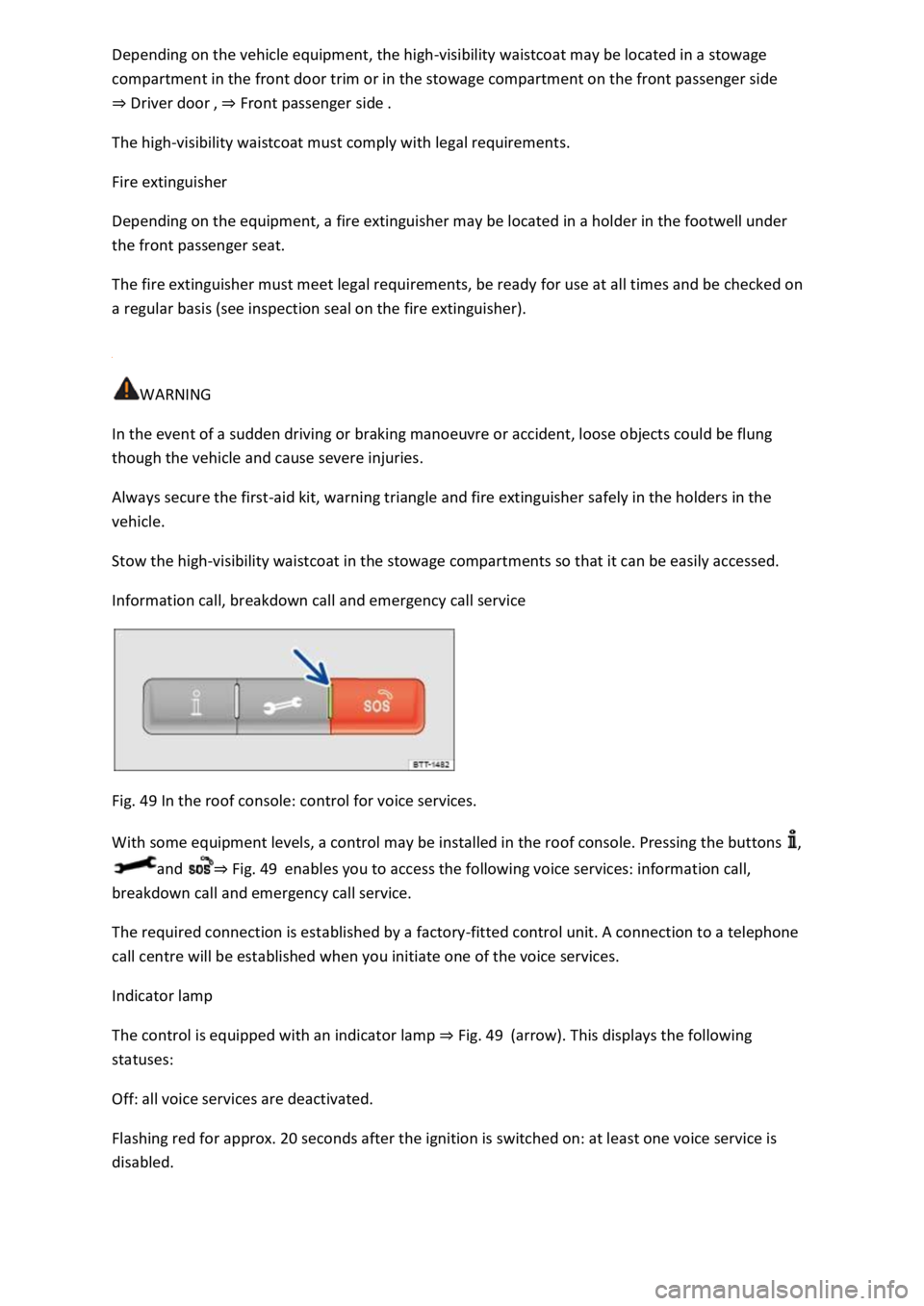
Fig. 49 In the roof console: control for voice services.
With some equipment levels, a control may be installed in the roof console. Pressing the buttons ,
and ⇒ Fig. 49 enables you to access the following voice services: information call,
breakdown call and emergency call service.
The required connection is established by a factory-fitted control unit. A connection to a telephone
call centre will be established when you initiate one of the voice services.
Indicator lamp
The control is equipped with an indicator lamp ⇒ Fig. 49 (arrow). This displays the following
statuses:
Off: all voice services are deactivated.
Flashing red for approx. 20 seconds after the ignition is switched on: at least one voice service is
disabled.
Page 89 of 502
Please also observe the other information on Volkswagen Car-Net ⇒ Mobile online services .
Opening and closing
Vehicle key
Functions of the vehicle key
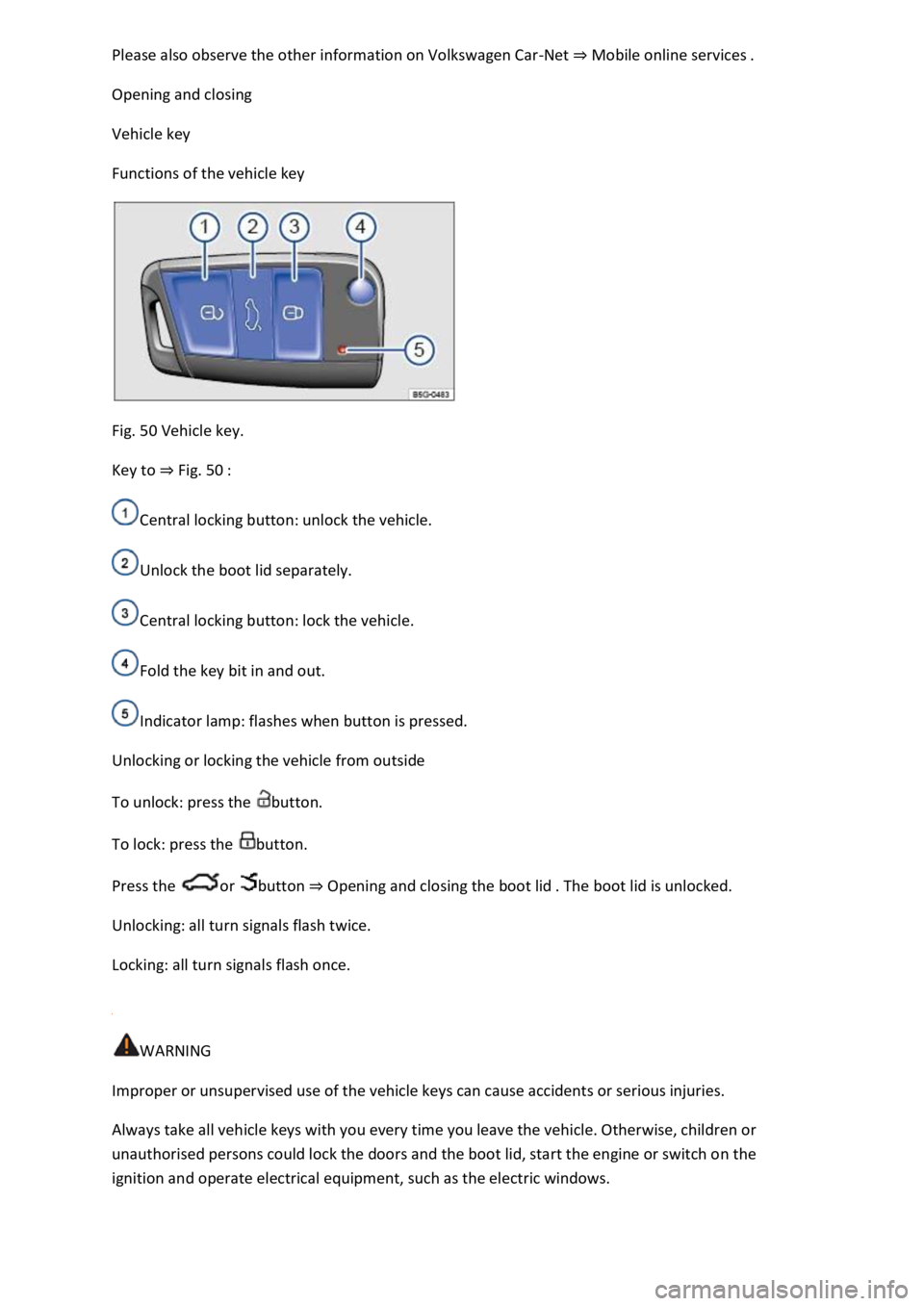
Fig. 50 Vehicle key.
Key to ⇒ Fig. 50 :
Central locking button: unlock the vehicle.
Unlock the boot lid separately.
Central locking button: lock the vehicle.
Fold the key bit in and out.
Indicator lamp: flashes when button is pressed.
Unlocking or locking the vehicle from outside
To unlock: press the button.
To lock: press the button.
Press the or button ⇒ Opening and closing the boot lid . The boot lid is unlocked.
Unlocking: all turn signals flash twice.
Locking: all turn signals flash once.
WARNING
Improper or unsupervised use of the vehicle keys can cause accidents or serious injuries.
Always take all vehicle keys with you every time you leave the vehicle. Otherwise, children or
unauthorised persons could lock the doors and the boot lid, start the engine or switch on the
ignition and operate electrical equipment, such as the electric windows.
Page 91 of 502

Always keep the vehicle key, key ring with batteries, spare batteries, button cells and other batteries
that are larger than 20 mm out of the reach of children.
Call for medical help immediately you suspect that someone has swallowed a battery.
NOTICE
The vehicle key can be damaged if the button cell is not changed properly.
Unsuitable batteries can damage the vehicle key. Replace discharged batteries only with new
batteries of the same voltage rating, size and specification.
Make sure the polarity is correct when inserting the battery.
Dispose of discharged batteries in accordance with environmental regulations.
Synchronising the vehicle key
If you cannot lock or unlock the vehicle with the vehicle key, synchronise the vehicle key or replace
the button cell ⇒ Replacing the button cell .
Fold out the key bit.
Remove the cap on the driver door handle ⇒ Opening and closing the driver door manually .
Stand beside the vehicle.
Press the button on the vehicle key.
Unlock the vehicle using the key bit.
Fit the cap ⇒ Opening and closing the driver door manually .
The synchronisation process is complete.
Troubleshooting
Vehicle cannot be locked or unlocked
The remote control is subject to interference caused by obstacles, adverse weather conditions or
other transmitters operating in the same frequency range in the vicinity of the vehicle, e.g. mobile
devices.
OR: the central locking switches off briefly to protect it from overloading.
Close the driver door.
OR: synchronise the vehicle key ⇒ Synchronising the vehicle key .
Indicator lamp does not flash
If the indicator lamp in the vehicle key does not flash when a button is pressed, the button cell in the
vehicle key must be changed ⇒ Replacing the button cell .
Page 92 of 502
Keyless locking and starting system Keyless Access
Introduction
This chapter contains information on the followingsubjects:
⇒ Unlocking or locking the vehicle with
⇒ Troubleshooting
The Keyless Access locking and starting system enables the vehicle to be locked and unlocked
without active use of the key. For this purpose, a valid vehicle key must be within the vehicle's
range.
Unlocking or locking the vehicle with Keyless Access
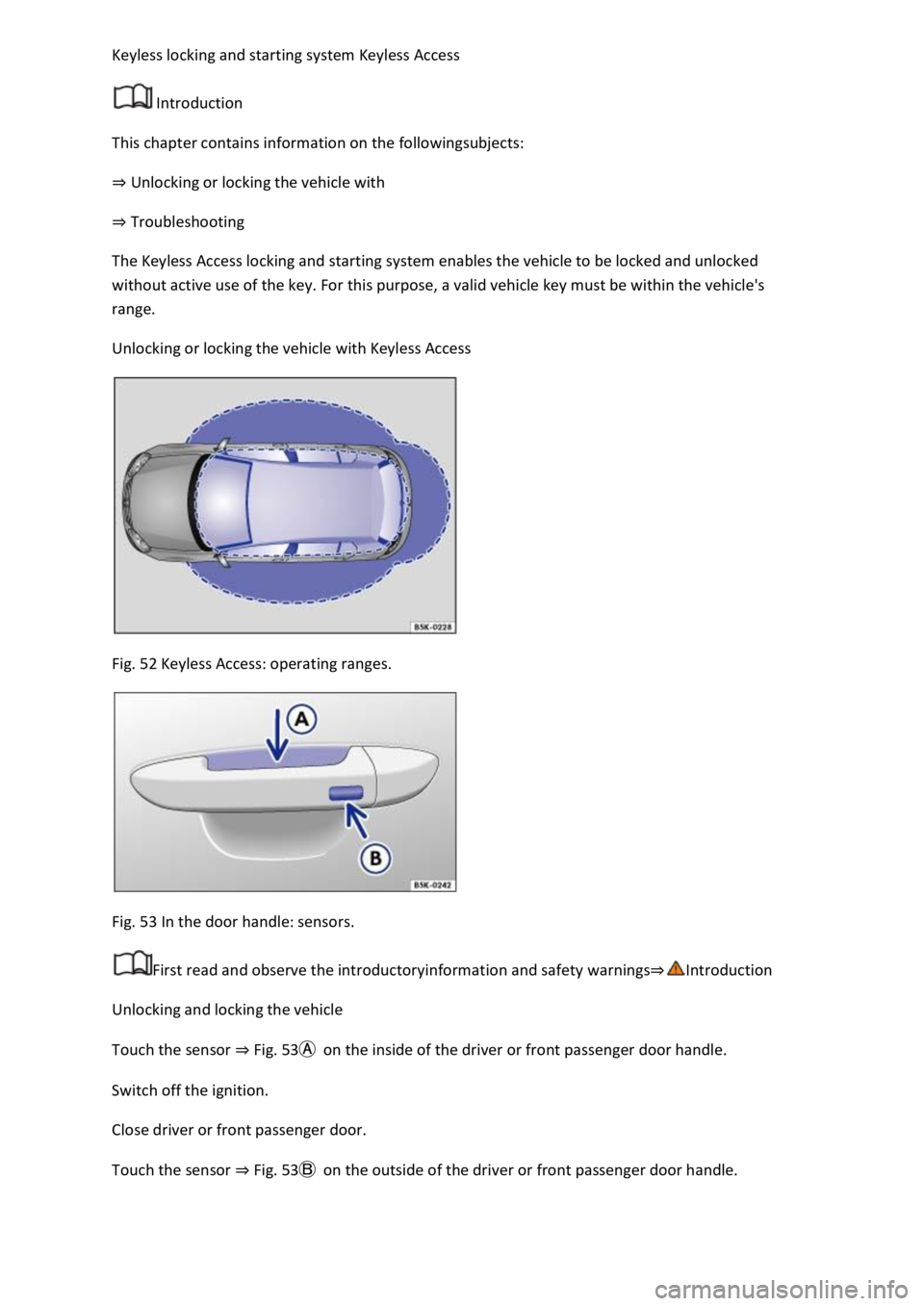
Fig. 52 Keyless Access: operating ranges.
Fig. 53 In the door handle: sensors.
First read and observe the introductoryinformation and safety warnings⇒Introduction
Unlocking and locking the vehicle
Touch the sensor ⇒ Fig. 53Ⓐ on the inside of the driver or front passenger door handle.
Switch off the ignition.
Close driver or front passenger door.
Touch the sensor ⇒ Fig. 53Ⓑ on the outside of the driver or front passenger door handle.
Page 93 of 502

Vehicle unlocking is confirmed by all the turn signals flashing twice and locking by the turn signals
flashing once.
Locking and unlocking the boot lid
When the vehicle is locked, the boot lid will be unlocked automatically if you open it when a vehicle
key is located within the operating range of the boot lid ⇒ Fig. 52 .
The boot lid is locked automatically after it is closed.
If the vehicle is completely unlocked, the boot lid will not lock automatically when closed.
Temporarily deactivating Keyless Access
Keyless Access can be deactivated temporarily as described below so that the vehicle cannot be
unlocked and started due to misuse by unauthorised third parties.
Lock the vehicle with the button in the vehicle key.
In addition, touch the sensor on the outside of the door handle ⇒ Fig. 53Ⓑ once within five
seconds. Do not reach into the door handle.
Keyless Access is temporarily deactivated.
Check deactivation by waiting for at least ten seconds and then pull the door handle again. It should
not be possible to open the door.
When the vehicle is next unlocked, it can be unlocked only using the vehicle key. The Keyless Access
locking and starting system is reactivated the next time the vehicle is unlocked.
Operating the convenience functions
All electric windows and the glass roof can be closed automatically.
Keep a finger on the sensor ⇒ Fig. 53Ⓑ of the driver or front passenger door handle for a few
seconds until the windows and glass roof are closed.
The sensor functions can be set in the Vehicle settings menu in the Infotainment system
⇒ Infotainment system controls and displays .
The unlocking function is deactivated for a few seconds so that you can check that the vehicle has
been locked successfully.
If the message Keyless Access system faulty appears on the instrument cluster display, there may be
a malfunction in the Keyless Access system. Go to a qualified workshop.
If there is no vehicle key in the vehicle or if it is not detected, a message will be shown on the
instrument cluster display. This may occur if the vehicle key is subject to interference by another
Page 94 of 502

radio signal or is covered by another item, e.g. an aluminium case ⇒ Starting and stopping the
engine .
If the vehicle has a DSG® dual clutch gearbox, it can be locked only if the selector lever is in
position P.
The entire vehicle will be unlocked if the sensor is touched twice, even if a single door has already
been unlocked.
Troubleshooting
First read and observe the introductoryinformation and safety warnings⇒Introduction
Keyless Access does not work
The function of the sensors may be restricted if they become very dirty.
Clean the sensors.
All turn signals flash four times
The vehicle key used last is still in the vehicle.
Doors and central locking button
Introduction
This chapter contains information on the followingsubjects:
⇒ Indicator lamp in the driver door
⇒ Automatic locking and unlocking
⇒ Central locking button
⇒ Opening and closing the driver door manually
⇒ Manually closing the front passenger door and rear doors
⇒ Childproof lock
⇒ SAFELOCK
⇒ Troubleshooting
If the vehicle key or central locking fails, the doors can be locked manually and, in some cases, also
unlocked manually.
The central locking system enables you to centrally lock and unlock all the doors, the boot lid and
the tank flap of the vehicle.
Page 95 of 502

The vehicle can be locked only if the ignition has been switched off or the driver has switched off the
engine before leaving the vehicle.
A symbol in the instrument cluster display ⇒ Displays indicates if one or more doors are not closed
properly. Do not drive on! Open the appropriate door and then close it again.
This symbol is also visible when the ignition is switched off and will go out a few seconds after the
vehicle has been locked when all doors are closed.
WARNING
A door which is not closed properly could open suddenly while the vehicle is in motion. This could
lead to serious injuries.
Stop as soon as possible and close the door.
Make sure that the door is closed properly and that the lock has engaged. The closed door must be
flush with the surrounding body panels.
Doors should be opened or closed only when you are sure that nobody is in their path.
WARNING
Any door being held open by the door arrester could close unexpectedly in strong winds or if the
vehicle is on a slope. This could lead to injuries.
Always hold doors by the handle when opening and closing doors.
WARNING
The opening and closing paths of the doors and boot lid are potential danger areas where injury can
occur.
The doors and boot lid should therefore be opened or closed only when you are sure that nobody is
in their path.
WARNING
Careless locking of the doors can cause serious injuries.
If the vehicle is locked from the outside, the doors and electric windows cannot be opened from the
inside.
The central locking system locks all doors. Locking the vehicle from the inside can prevent the doors
from being opened unintentionally and unauthorised persons from entering the vehicle. However,
locked doors can delay assistance to passengers inside the vehicle in the event of an accident or
emergency.
Page 96 of 502

Never leave children or people requiring assistance alone in the vehicle. All doors can be locked from
the inside using the central locking button. This may mean that people lock themselves in the
vehicle. People locked in the vehicle may be subjected to very high or very low temperatures.
Temperatures inside a locked vehicle may become extremely hot or cold, depending on the season.
This can cause serious injuries and illness or fatalities, especially in the case of small children.
Never leave anyone inside a locked vehicle. People in the vehicle could become trapped in an
emergency and will not be able to get themselves to safety.
NOTICE
When carrying out manual opening or closing, remove parts carefully and install them again
correctly in order to avoid damage to the vehicle.
Indicator lamp in the driver door
First read and observe the introductoryinformation and safety warnings⇒Introduction
The central locking indicator lamp is located in the driver door ⇒ Vehicle overviews .
Vehicle is locked: a red LED flashes for approximately two seconds, firstly at short intervals and then
more slowly. The indicator lamp does not flash if the vehicle was locked with the central locking
button in the driver door ⇒ Central locking button .
Automatic locking and unlocking
First read and observe the introductoryinformation and safety warnings⇒Introduction
Settings for central locking can be made in the Vehicle settings menu in the Infotainment system
⇒ Infotainment system controls and displays .
Automatic locking (Auto Lock)
The vehicle can lock itself automatically at speeds above approximately 15 km/h (9 mph). The
indicator lamp in the central locking button will light up yellow when the vehicle is locked.
Automatic unlocking (Auto Unlock)
If one of the following conditions applies, all doors and the boot lid will be automatically unlocked:
The vehicle is at a standstill and the vehicle key has been removed.
In vehicles with DSG® dual clutch gearbox: the selector lever is in position P and the ignition has
been switched off.
OR: the vehicle is stationary and the button has been pressed.
OR: the door release lever has been operated.
OR: in an accident where the airbags have been triggered ⇒ Troubleshooting .
Automatic unlocking provides access to the vehicle if assistance is required.