mirror VOLKSWAGEN T-ROC 2021 Owner´s Manual
[x] Cancel search | Manufacturer: VOLKSWAGEN, Model Year: 2021, Model line: T-ROC, Model: VOLKSWAGEN T-ROC 2021Pages: 502, PDF Size: 9.42 MB
Page 147 of 502
If the electrolyte fluid gets onto shoes or clothing, wash immediately with plenty of water for at least
15 minutes. Clean shoes and clothes thoroughly before wearing them again.
If the electrolyte fluid is swallowed, immediately rinse the mouth with plenty of water for at least
15 minutes. Do not induce vomiting unless instructed to do so by a doctor. Seek medical assistance
immediately.
NOTICE
If the glass of an automatic anti-dazzle mirror is broken, electrolyte fluid can leak from the mirror.
This fluid corrodes plastic surfaces. Remove the fluid as soon as possible, e.g. using a wet sponge.
Interior mirror
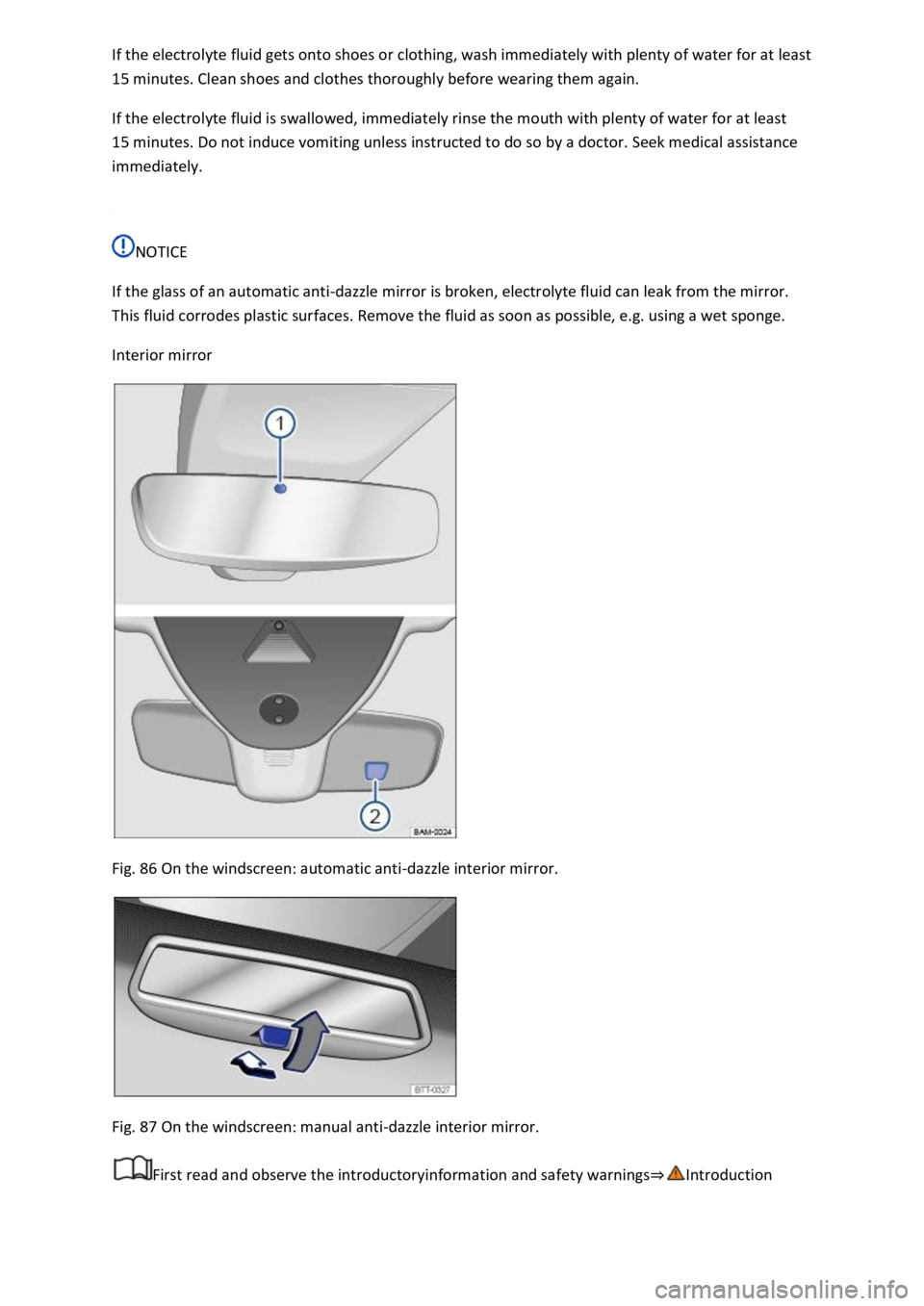
Fig. 86 On the windscreen: automatic anti-dazzle interior mirror.
Fig. 87 On the windscreen: manual anti-dazzle interior mirror.
First read and observe the introductoryinformation and safety warnings⇒Introduction
Page 148 of 502
Automatic anti-dazzle interior mirror
When the ignition is switched on, the sensors measure the incident light from the rear ⇒ Fig. 86 ①
and from the front ②.
Depending on the values measured, the interior mirror dips automatically.
If the incident light on the sensors is hindered or interrupted, e.g. by a sun blind or other hanging
objects, the automatic anti-dazzle interior mirror will not function or will not function correctly.
Mobile navigation systems fitted to the windscreen or near the interior automatic anti-dazzle
interior mirror can also affect the sensors ⇒ .
The automatic anti-dazzle function will be deactivated in some situations, e.g. when reverse gear is
engaged.
Manual anti-dazzle interior mirror
Basic position: the lever on the lower part of the mirror is pointing towards the windscreen.
Pull the lever to the back to use the anti-dazzle function ⇒ Fig. 87 .
WARNING
The illuminated display from a mobile navigation device can lead to malfunctions of the interior
automatic anti-dazzle mirror and cause accidents or serious injuries.
You may not be able to precisely determine the distance from vehicles travelling behind you or from
other objects if the automatic anti-dazzle function malfunctions.
Exterior mirrors
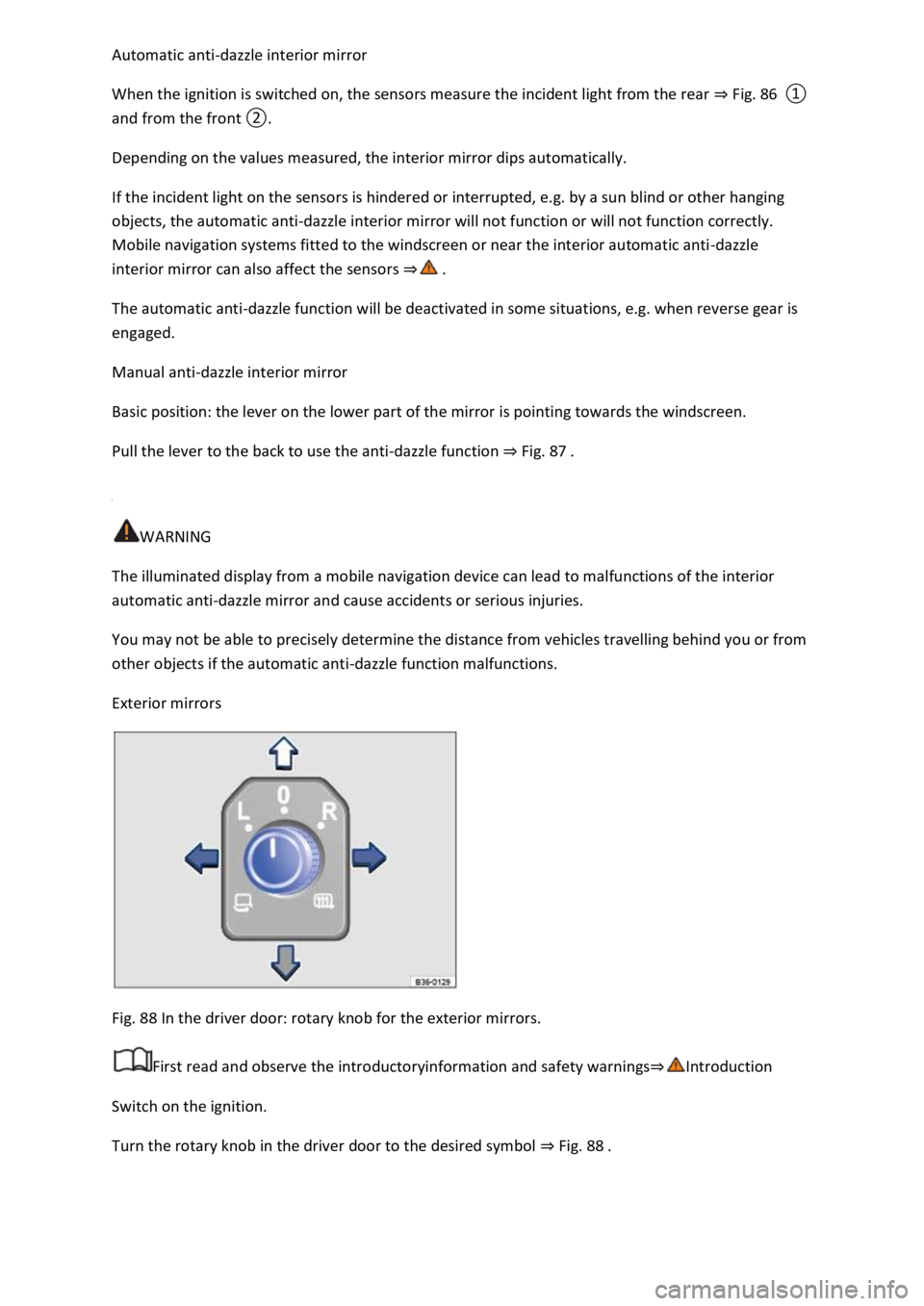
Fig. 88 In the driver door: rotary knob for the exterior mirrors.
First read and observe the introductoryinformation and safety warnings⇒Introduction
Switch on the ignition.
Turn the rotary knob in the driver door to the desired symbol ⇒ Fig. 88 .
Page 149 of 502

Swivel the rotary knob forwards, backwards, right or left in the direction of the arrow in order to
adjust the exterior mirror.
Electrically fold in the exterior mirrors ⇒ .Switch on the exterior mirror heating. The
exterior mirror heating heats only at ambient temperatures below +20°C (+68°F) and initially with
the highest setting. Heating takes place dependent on the ambient temperature after around
two minutes.Adjust the left-hand exterior mirror.Adjust the right-hand exterior mirror.Zero
position. The exterior mirror cannot be adjusted and all functions are switched off.
Activating the exterior mirror functions
The following exterior mirror functions must be activated once in the Infotainment system in
the Vehicle settings menu ⇒ Infotainment system controls and displays :
Synchronous mirror adjustment
Synchronous mirror adjustment means that the right-hand exterior mirror is also adjusted at the
same time when you adjust the left-hand exterior mirror.
Turn the rotary knob to position .
Adjust the left-hand exterior mirror. The right-hand exterior mirror will be adjusted at the same time
(synchronously).
Correct the settings for the right-hand exterior mirror if necessary: swivel the rotary knob to
position and adjust the right-hand exterior mirror.
Folding in the exterior mirrors while parking
When the vehicle is locked or unlocked from the outside, the exterior mirrors fold in or out
automatically. For this, the rotary knob must be in position , , or .
If the rotary knob for the electrically adjustable exterior mirrors is in position , the exterior
mirrors stay folded in.
Saving and recalling the front passenger exterior mirror settings for reversing
Unlock the vehicle with the vehicle key to which the settings should be assigned.
Switch on the electronic parking brake.
Switch on the ignition.
Put the gearbox into neutral.
Select reverse gear.
Adjust the front passenger exterior mirror so that you have a good view of the kerb area, for
example.
The set mirror position will be saved and assigned to the vehicle key.
Turn the rotary knob for the exterior mirrors to position .
Page 150 of 502

Select reverse gear while the ignition is switched on. The right-hand exterior mirror moves to the
saved position.
The front passenger exterior mirror will move out of the position saved for reversing when the
vehicle is driven forwards faster than approximately 15 km/h (9 mph) or when the rotary knob is
moved out of position into another position.
WARNING
Injuries can be sustained if you do not take care when folding the exterior mirrors in and out.
Fold the exterior mirrors in or out only when there is no obstruction in the path of the mirror.
Always ensure that no fingers are caught between the exterior mirror and the mirror base when the
exterior mirrors are moved.
NOTICE
Always fold in exterior mirrors before using an automatic car wash.
Do not fold electrically folding exterior mirrors in or out manually as this can damage the electric
drive.
The exterior mirror heating should be switched off when it is no longer needed. If the heating is left
on, this will result in unnecessary fuel consumption.
If there is a fault, the electric exterior mirrors can be adjusted by hand by pressing on the outside of
the mirror.
Some settings can be stored in the user accounts of the personalisation function and therefore
change automatically when the user account changes ⇒ Personalisation .
Protection from the sun
Sun visors
Page 151 of 502
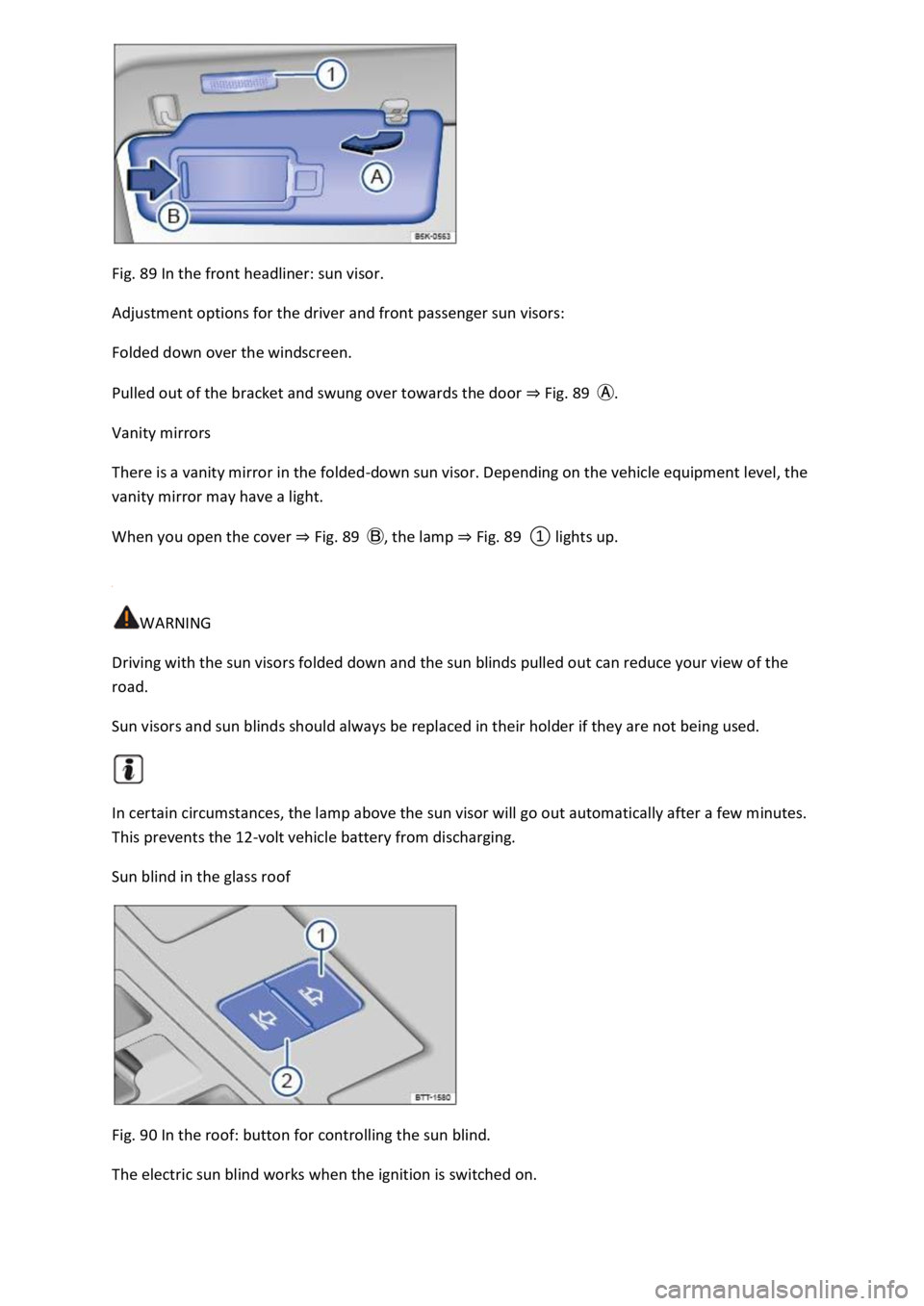
Fig. 89 In the front headliner: sun visor.
Adjustment options for the driver and front passenger sun visors:
Folded down over the windscreen.
Pulled out of the bracket and swung over towards the door ⇒ Fig. 89 Ⓐ.
Vanity mirrors
There is a vanity mirror in the folded-down sun visor. Depending on the vehicle equipment level, the
vanity mirror may have a light.
When you open the cover ⇒ Fig. 89 Ⓑ, the lamp ⇒ Fig. 89 ① lights up.
WARNING
Driving with the sun visors folded down and the sun blinds pulled out can reduce your view of the
road.
Sun visors and sun blinds should always be replaced in their holder if they are not being used.
In certain circumstances, the lamp above the sun visor will go out automatically after a few minutes.
This prevents the 12-volt vehicle battery from discharging.
Sun blind in the glass roof
Fig. 90 In the roof: button for controlling the sun blind.
The electric sun blind works when the ignition is switched on.
Page 197 of 502
gearbox the clutch can be opened at idling speed, thus saving fuel. Thanks to its efficiency, low
weight and intelligent control system, the DSG® dual clutch gearbox usually enables fuel
consumption that is equal to or lower than a manual gearbox.
However, just like the manual gearbox, the clutch in the DSG® dual clutch gearbox is subject to wear.
Regular maintenance is necessary depending on the type of DSG® dual clutch gearbox; further
information ⇒ Scope of service . In the event of a fault in one gear train half, the DSG® dual clutch
gearbox also allows one gear train half to be deactivated and the journey to be continued using the
other gear train half ⇒ Troubleshooting . The gearbox must then be checked as soon as possible by a
qualified workshop.
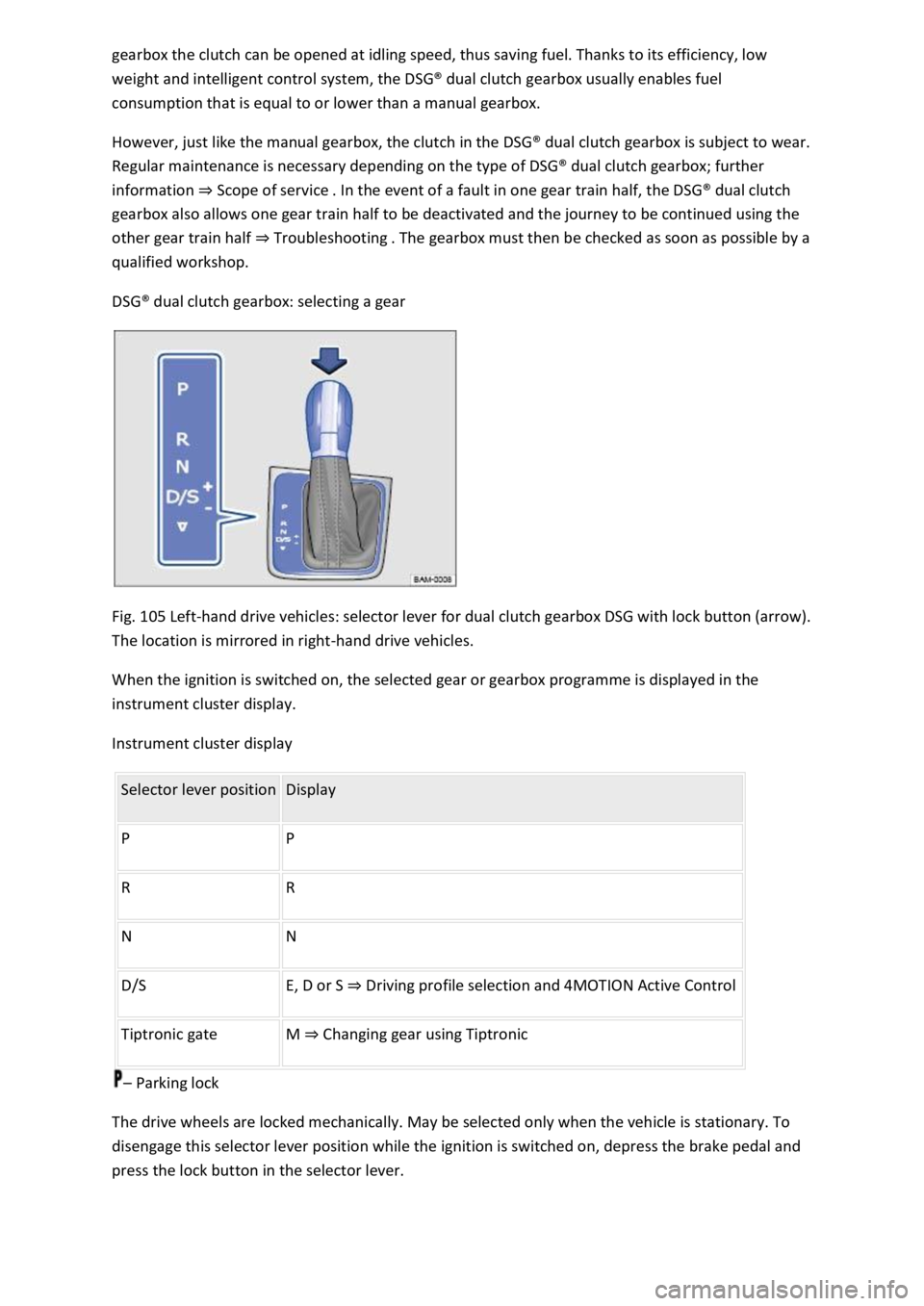
DSG® dual clutch gearbox: selecting a gear
Fig. 105 Left-hand drive vehicles: selector lever for dual clutch gearbox DSG with lock button (arrow).
The location is mirrored in right-hand drive vehicles.
When the ignition is switched on, the selected gear or gearbox programme is displayed in the
instrument cluster display.
Instrument cluster display
Selector lever position Display
P P
R R
N N
D/S E, D or S ⇒ Driving profile selection and 4MOTION Active Control
Tiptronic gate M ⇒ Changing gear using Tiptronic
– Parking lock
The drive wheels are locked mechanically. May be selected only when the vehicle is stationary. To
disengage this selector lever position while the ignition is switched on, depress the brake pedal and
press the lock button in the selector lever.
Page 200 of 502
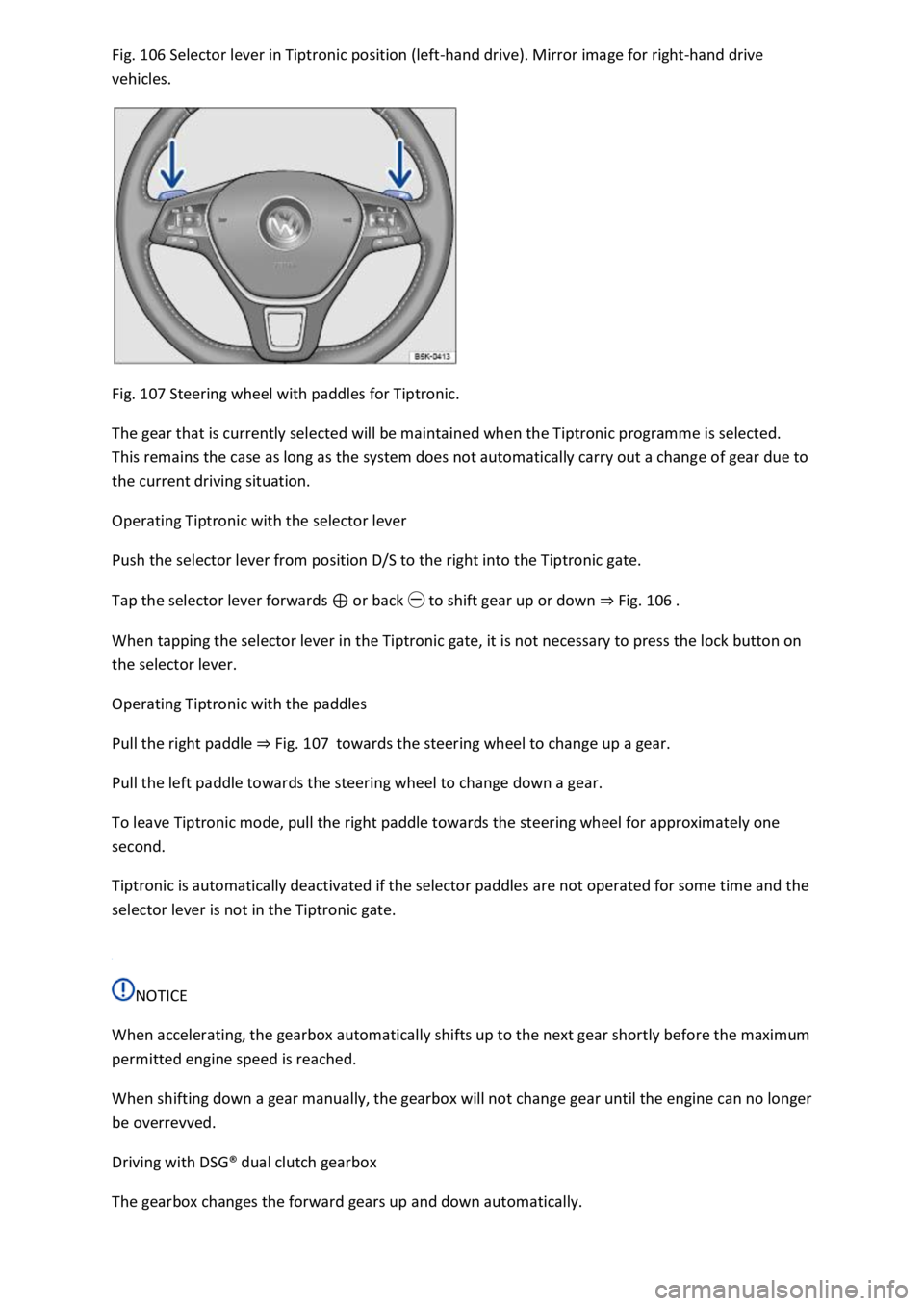
Fig. 106 Selector lever in Tiptronic position (left-hand drive). Mirror image for right-hand drive
vehicles.
Fig. 107 Steering wheel with paddles for Tiptronic.
The gear that is currently selected will be maintained when the Tiptronic programme is selected.
This remains the case as long as the system does not automatically carry out a change of gear due to
the current driving situation.
Operating Tiptronic with the selector lever
Push the selector lever from position D/S to the right into the Tiptronic gate.
Tap the selector lever forwards ⊕ or back ㊀ to shift gear up or down ⇒ Fig. 106 .
When tapping the selector lever in the Tiptronic gate, it is not necessary to press the lock button on
the selector lever.
Operating Tiptronic with the paddles
Pull the right paddle ⇒ Fig. 107 towards the steering wheel to change up a gear.
Pull the left paddle towards the steering wheel to change down a gear.
To leave Tiptronic mode, pull the right paddle towards the steering wheel for approximately one
second.
Tiptronic is automatically deactivated if the selector paddles are not operated for some time and the
selector lever is not in the Tiptronic gate.
NOTICE
When accelerating, the gearbox automatically shifts up to the next gear shortly before the maximum
permitted engine speed is reached.
When shifting down a gear manually, the gearbox will not change gear until the engine can no longer
be overrevved.
Driving with DSG® dual clutch gearbox
The gearbox changes the forward gears up and down automatically.
Page 254 of 502
If the radar sensor for the Adaptive Cruise Control (ACC) or the camera for the lane keeping system
is covered or moved, Emergency Assist may make unwanted braking or steering manoeuvres.
Emergency Assist does not react to persons, animals or vehicles crossing or approaching in the same
lane.
WARNING
If Emergency Assist is triggered unnecessarily, this can result in accidents and serious injuries.
If there is a malfunction in the Emergency Assist system, switch off the lane keeping system (Lane
Assist) ⇒ Driving with the lane keeping system . This will also switch off Emergency Assist.
Go to a qualified workshop and have the system checked. Volkswagen recommends using a
Volkswagen dealership for this purpose.
Blind Spot Monitor
Introduction
This chapter contains information on the followingsubjects:
⇒ Driving with the Blind Spot Monitor
⇒ Troubleshooting
Radar sensors monitor the area behind the vehicle. The system measures the distance and
difference in speed in relation to other vehicles and uses visual signals in the exterior mirrors to
inform the driver.
System limits
Use the Blind Spot Monitor only on surfaced roads.
The Blind Spot Monitor may not always interpret the traffic correctly in the following situations:
In tight bends.
When driving in the middle of two lanes.
When road lanes are of varying width.
At road crests.
In poor weather conditions.
Where there are special roadside structures, e.g. high or offset crash barriers.
WARNING
The intelligent technology used in the Blind Spot Monitor cannot overcome the laws of physics, and
functions only within the limits of the system. Never let the extra convenience afforded by the Blind
Page 255 of 502
Spot Monitor tempt you into taking any safety risks when driving. Careless or unintentional use of
the Blind Spot Monitor can cause accidents and serious injuries. The system is not a substitute for
the full concentration of the driver.
Adapt your speed and distance from the vehicles ahead to suit visibility, weather, road and traffic
conditions.
Your hands should always be on the steering wheel so that you can steer at any time.
Pay attention to the indicator lamps in the exterior mirrors and in the instrument cluster display and
respond according to the commands.
Always pay close attention to the surroundings of the vehicle.
Never use the Blind Spot Monitor if the radar sensors are dirty, covered or damaged. These
conditions can impair the proper functioning of the system.
It may be hard to see the indicator lamp in the exterior mirror in direct sunlight.
Some settings can be saved in the user accounts of the personalisation function and can therefore
change automatically when the user account is changed ⇒ Personalisation .
Driving with the Blind Spot Monitor
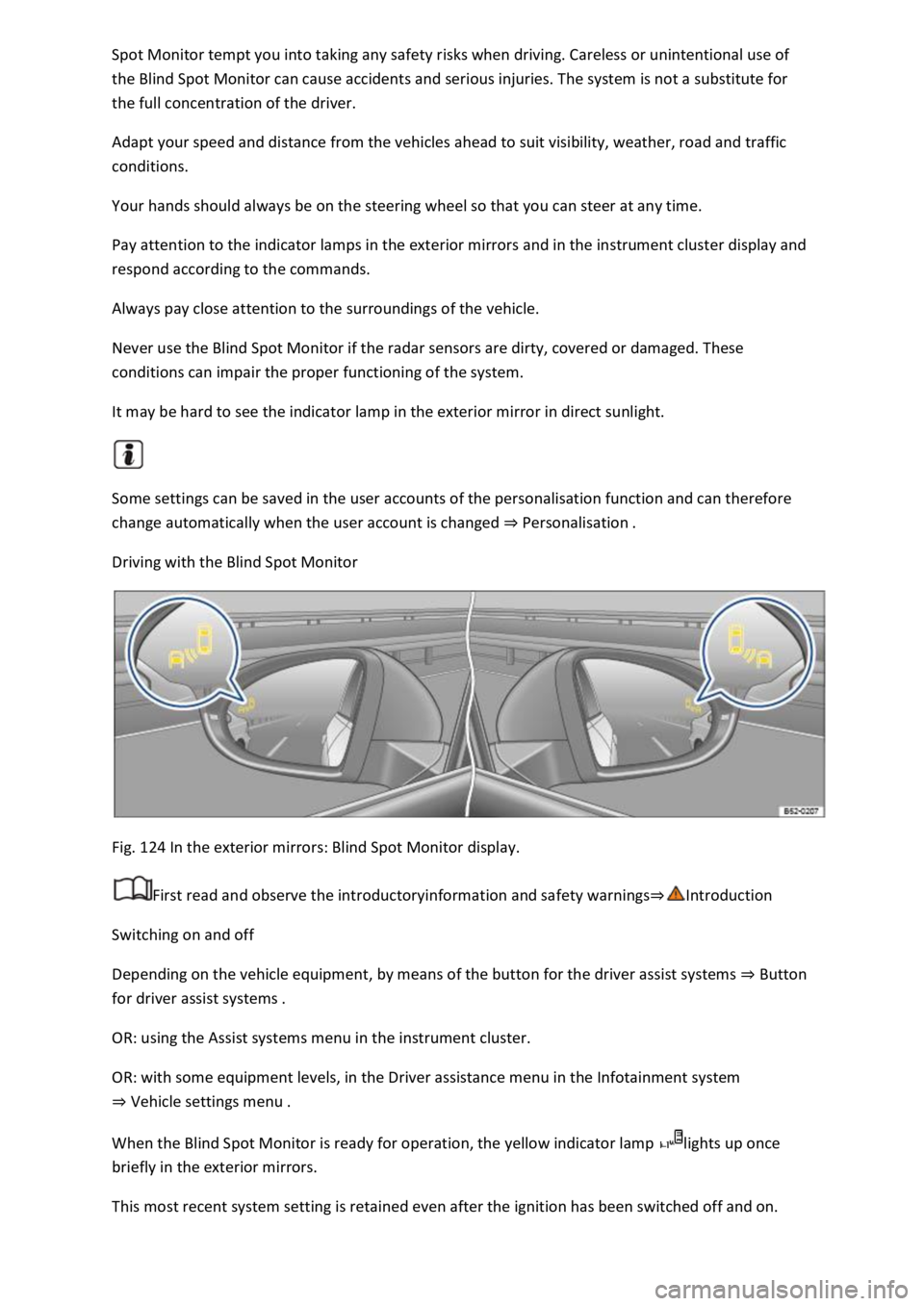
Fig. 124 In the exterior mirrors: Blind Spot Monitor display.
First read and observe the introductoryinformation and safety warnings⇒Introduction
Switching on and off
Depending on the vehicle equipment, by means of the button for the driver assist systems ⇒ Button
for driver assist systems .
OR: using the Assist systems menu in the instrument cluster.
OR: with some equipment levels, in the Driver assistance menu in the Infotainment system
⇒ Vehicle settings menu .
When the Blind Spot Monitor is ready for operation, the yellow indicator lamp lights up once
briefly in the exterior mirrors.
This most recent system setting is retained even after the ignition has been switched off and on.
Page 256 of 502

Function
When switched on, the Blind Spot Monitor is active from a speed of approx. 15 km/h (9 mph).
In the following driving situations, the yellow indicator lamp will light up in the corresponding
exterior mirror: ⇒ Fig. 124
If your vehicle is being overtaken.
When overtaking another vehicle with a speed difference of up to approximately 10 km/h (6 mph).
No display will be shown if the takeover manoeuvre is much faster.
If a vehicle is detected in the blind spot and the turn signal is additionally activated in the direction
of the detected vehicle ⇒ , the yellow indicator lamp will flash.
In vehicles with the lane keeping system, the yellow indicator lamp will flash even if you do not
activate the turn signal when leaving your lane, provided that the lane keeping system is switched on
(Blind Spot Monitor Plus). The driver is warned by a corrective steering intervention when changing
lanes during a possible critical situation (information level, warning level). This also occurs when the
turn signal is activated for the corresponding direction. If the steering intervention is overridden by
the driver, the steering wheel vibrates to give an additional warning.
The quicker another vehicle approaches, the earlier there is a corresponding display in the exterior
mirror.
Automatic deactivation
The radar sensors for the Blind Spot Monitor will switch off automatically if, for example, the system
detects that a radar sensor is continuously covered. This can be caused by a layer of ice or snow in
front of the radar sensor, for example.
A text message will be shown on the instrument cluster display.
If the Blind Spot Monitor has been automatically deactivated, the system cannot be activated until
the ignition has been switched off and back on again.
The Blind Spot Monitor is automatically deactivated and cannot be activated when the factory-fitted
towing bracket is electrically connected to a trailer or similar ⇒ Trailer towing . Once a trailer is
electrically connected to the vehicle and the driver pulls away, a text message appears in the
instrument cluster display to inform the driver that the Blind Spot Monitor has been deactivated.
The Blind Spot Monitor will be automatically activated again when the trailer has been unhitched
from the vehicle. This applies if the function was previously activated. The Blind Spot Monitor must
be deactivated manually if you tow a trailer using a towing bracket that was not fitted at the factory.
Troubleshooting
First read and observe the introductoryinformation and safety warnings⇒Introduction
Blind Spot Monitor is not working
The indicator lamp lights up yellow.
Go to a qualified workshop.