Drive mode VOLKSWAGEN T-ROC 2021 Owner´s Manual
[x] Cancel search | Manufacturer: VOLKSWAGEN, Model Year: 2021, Model line: T-ROC, Model: VOLKSWAGEN T-ROC 2021Pages: 502, PDF Size: 9.42 MB
Page 250 of 502
Temporarily switching off the lane keeping system
Switch off the lane keeping system in the following situations:
Very sporty driving.
In poor weather conditions and when driving on poor roads.
In roadworks and before crests in the road.
Driver intervention prompt
In the absence of any steering input, the system prompts the driver with acoustic warnings and a
display on the instrument cluster display to take over active steering.
If the driver does not respond, the system will give another warning by initiating a quick jolt of the
brake before switching to passive mode or activating Emergency Assist (with some equipment
levels).
Steering wheel vibration
The following situations can lead to vibration of the steering wheel:
If the corrective steering intervention is not sufficient to keep the vehicle in its lane.
If the system can no longer detect a lane during a significant steering intervention.
If there is a system fault, the lane keeping system can deactivate itself automatically.
Troubleshooting
First read and observe the introductoryinformation and safety warnings⇒Introduction
No camera visibility, error message, system switches itself off
Clean the windscreen ⇒ Caring for and cleaning the vehicle exterior .
Check whether any damage is visible on the windscreen in the camera's field of view.
The system is not responding as expected
Regularly clean the camera's field of view, and keep it free from snow and ice.
Do not cover the camera's field of view.
Check the area of the windscreen that is in the camera's field of view for damage.
Do not fit any objects to the steering wheel.
Traffic Jam Assist
Traffic Jam Assist helps the driver to keep in lane, and also provides assistance when following other
vehicles in congestion or slow-moving traffic.
Page 266 of 502
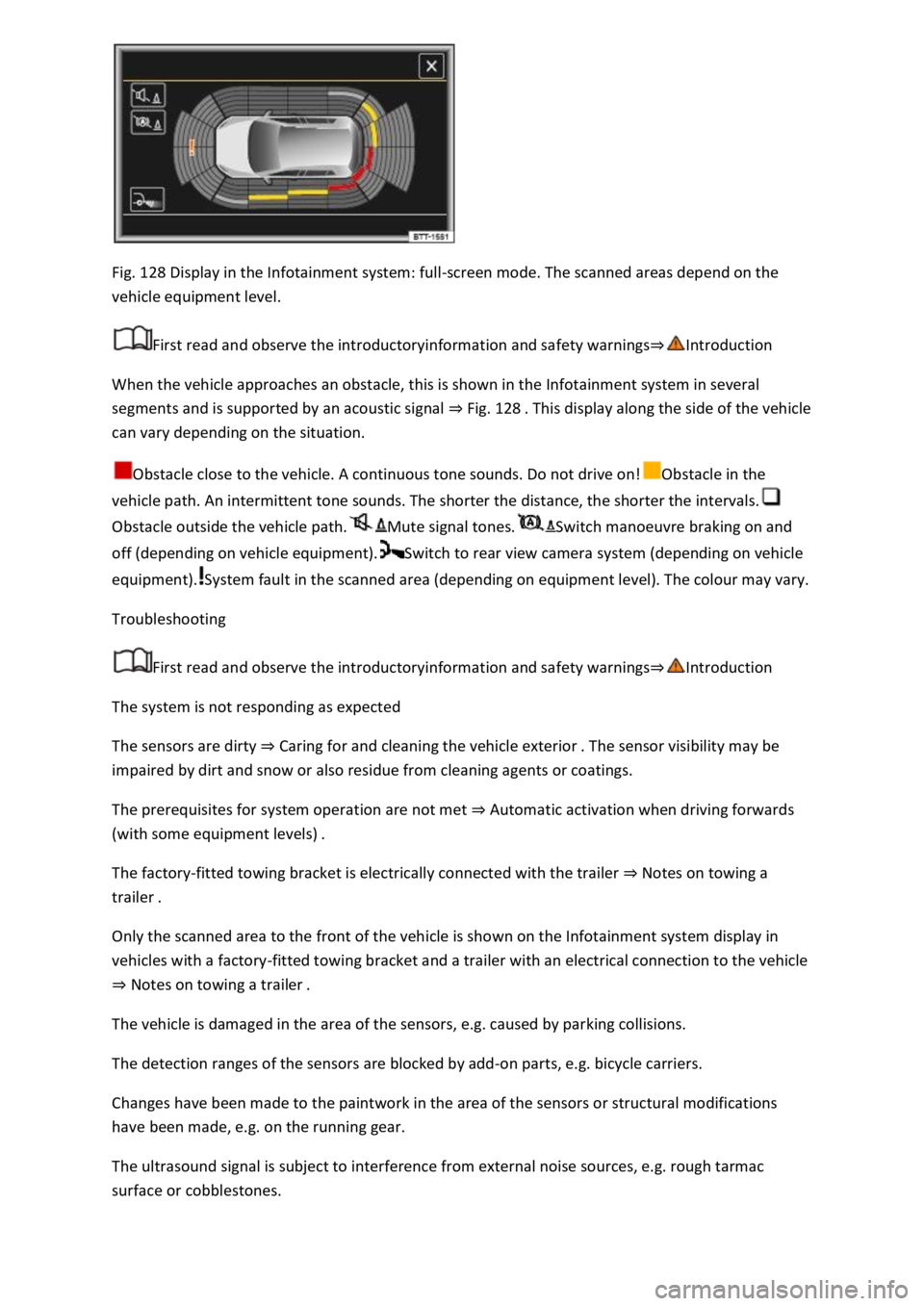
Fig. 128 Display in the Infotainment system: full-screen mode. The scanned areas depend on the
vehicle equipment level.
First read and observe the introductoryinformation and safety warnings⇒Introduction
When the vehicle approaches an obstacle, this is shown in the Infotainment system in several
segments and is supported by an acoustic signal ⇒ Fig. 128 . This display along the side of the vehicle
can vary depending on the situation.
Obstacle close to the vehicle. A continuous tone sounds. Do not drive on!Obstacle in the
vehicle path. An intermittent tone sounds. The shorter the distance, the shorter the intervals.
Obstacle outside the vehicle path.Mute signal tones.Switch manoeuvre braking on and
off (depending on vehicle equipment).Switch to rear view camera system (depending on vehicle
equipment).System fault in the scanned area (depending on equipment level). The colour may vary.
Troubleshooting
First read and observe the introductoryinformation and safety warnings⇒Introduction
The system is not responding as expected
The sensors are dirty ⇒ Caring for and cleaning the vehicle exterior . The sensor visibility may be
impaired by dirt and snow or also residue from cleaning agents or coatings.
The prerequisites for system operation are not met ⇒ Automatic activation when driving forwards
(with some equipment levels) .
The factory-fitted towing bracket is electrically connected with the trailer ⇒ Notes on towing a
trailer .
Only the scanned area to the front of the vehicle is shown on the Infotainment system display in
vehicles with a factory-fitted towing bracket and a trailer with an electrical connection to the vehicle
⇒ Notes on towing a trailer .
The vehicle is damaged in the area of the sensors, e.g. caused by parking collisions.
The detection ranges of the sensors are blocked by add-on parts, e.g. bicycle carriers.
Changes have been made to the paintwork in the area of the sensors or structural modifications
have been made, e.g. on the running gear.
The ultrasound signal is subject to interference from external noise sources, e.g. rough tarmac
surface or cobblestones.
Page 267 of 502
No sensor visibility, error message, system switches itself off
The sensor area is switched off permanently if a sensor fails.
Park Distance Control malfunctions will be indicated by a text message with an acoustic warning and
the indicator lamp in the button flashing when the system is switched on for the first time. If the
sensors are dirty or covered, the affected sensor cluster will be displayed on the Park Distance
Control screen. A cleaning message also appears (depending on the vehicle equipment level).
Possible solution
Switch off the system temporarily.
Check whether any of the causes described apply.
Clean the sensors or remove stickers or accessories from the sensors and cameras ⇒ Caring for and
cleaning the vehicle exterior .
Check whether any damage is visible.
You can switch the system back on again once you have rectified the cause of the problem.
If the system still fails to respond as expected, have the system checked by a qualified workshop or
your Volkswagen dealership.
Rear view camera system (Rear View)
Introduction
This chapter contains information on the followingsubjects:
⇒ Switching on and off
⇒ Display representation
⇒ Prerequisites
⇒ Parking
⇒ Troubleshooting
The rear view camera system in the rear of the vehicle makes it easier for the driver to see behind
the vehicle and provides support for parking manoeuvres.
The rear view camera system shows the area behind the vehicle on the Infotainment system screen.
Depending on the operating mode, orientation lines support the view to the rear.
WARNING
Using images from the camera to estimate the distance from obstacles (people, vehicles etc.) is
inaccurate and could cause accidents and severe injuries.
Camera lenses enlarge and distort the field of vision and show objects differently and inaccurately
on the screen.
Page 272 of 502
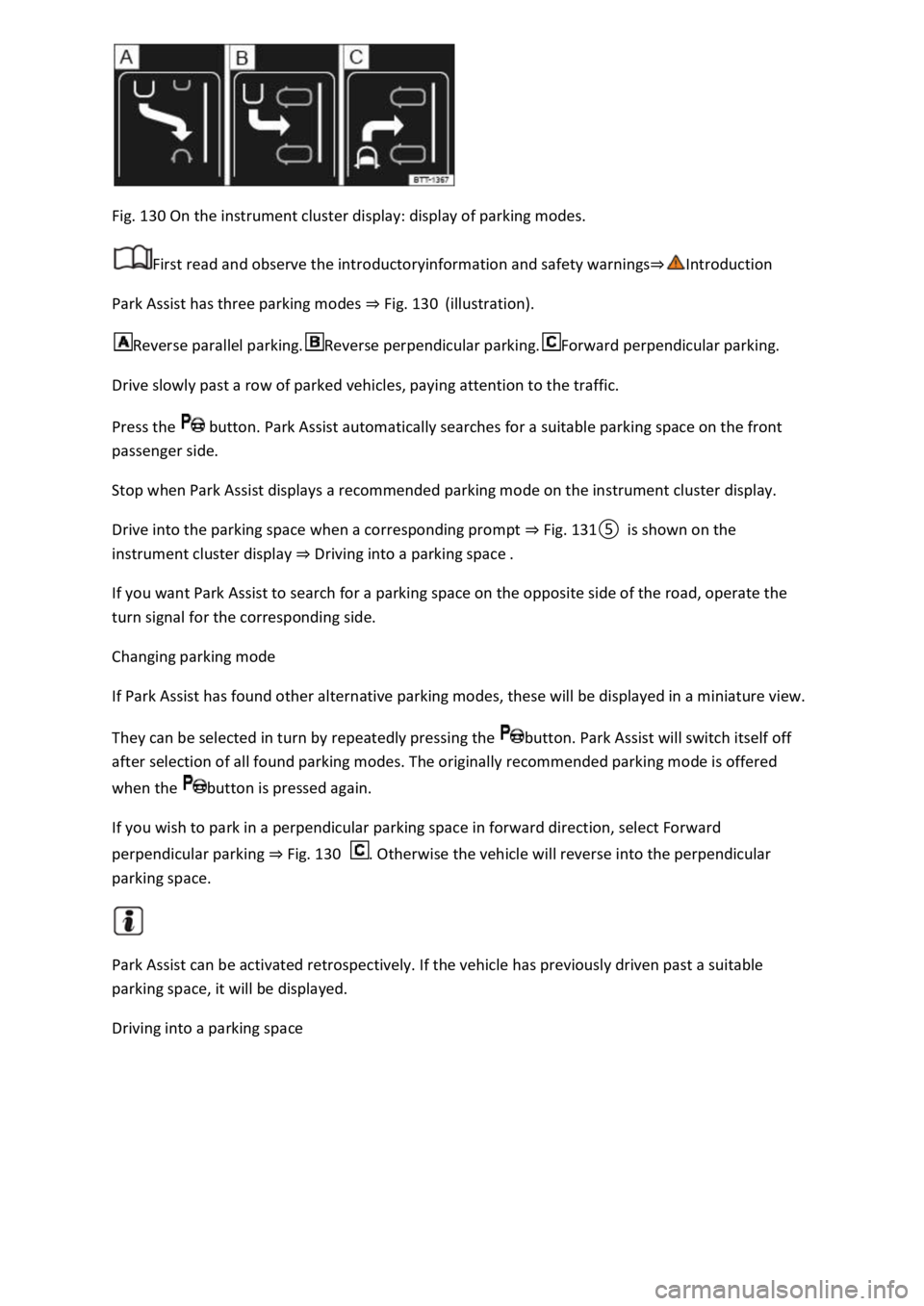
Fig. 130 On the instrument cluster display: display of parking modes.
First read and observe the introductoryinformation and safety warnings⇒Introduction
Park Assist has three parking modes ⇒ Fig. 130 (illustration).
Reverse parallel parking.Reverse perpendicular parking.Forward perpendicular parking.
Drive slowly past a row of parked vehicles, paying attention to the traffic.
Press the button. Park Assist automatically searches for a suitable parking space on the front
passenger side.
Stop when Park Assist displays a recommended parking mode on the instrument cluster display.
Drive into the parking space when a corresponding prompt ⇒ Fig. 131⑤ is shown on the
instrument cluster display ⇒ Driving into a parking space .
If you want Park Assist to search for a parking space on the opposite side of the road, operate the
turn signal for the corresponding side.
Changing parking mode
If Park Assist has found other alternative parking modes, these will be displayed in a miniature view.
They can be selected in turn by repeatedly pressing the button. Park Assist will switch itself off
after selection of all found parking modes. The originally recommended parking mode is offered
when the button is pressed again.
If you wish to park in a perpendicular parking space in forward direction, select Forward
perpendicular parking ⇒ Fig. 130 . Otherwise the vehicle will reverse into the perpendicular
parking space.
Park Assist can be activated retrospectively. If the vehicle has previously driven past a suitable
parking space, it will be displayed.
Driving into a parking space
Page 284 of 502
If necessary, unlock the stowage compartment. The stowage compartment is locked when the key
slot is vertical.
To open: pull the opening lever.
To close: push the stowage compartment upwards.
WARNING
If the stowage compartment on the front passenger side is left open, this can increase the risk of
serious injury in the event of an accident or during sudden braking or driving manoeuvres.
Always keep the stowage compartment closed while the vehicle is in motion.
NOTICE
In some vehicle models, the stowage compartment on the front passenger side contains apertures.
Small items could fall through the apertures and become trapped behind the trim. This could cause
unusual noises and damage to the vehicle.
Stow small objects only in the stowage areas that are intended for such items.
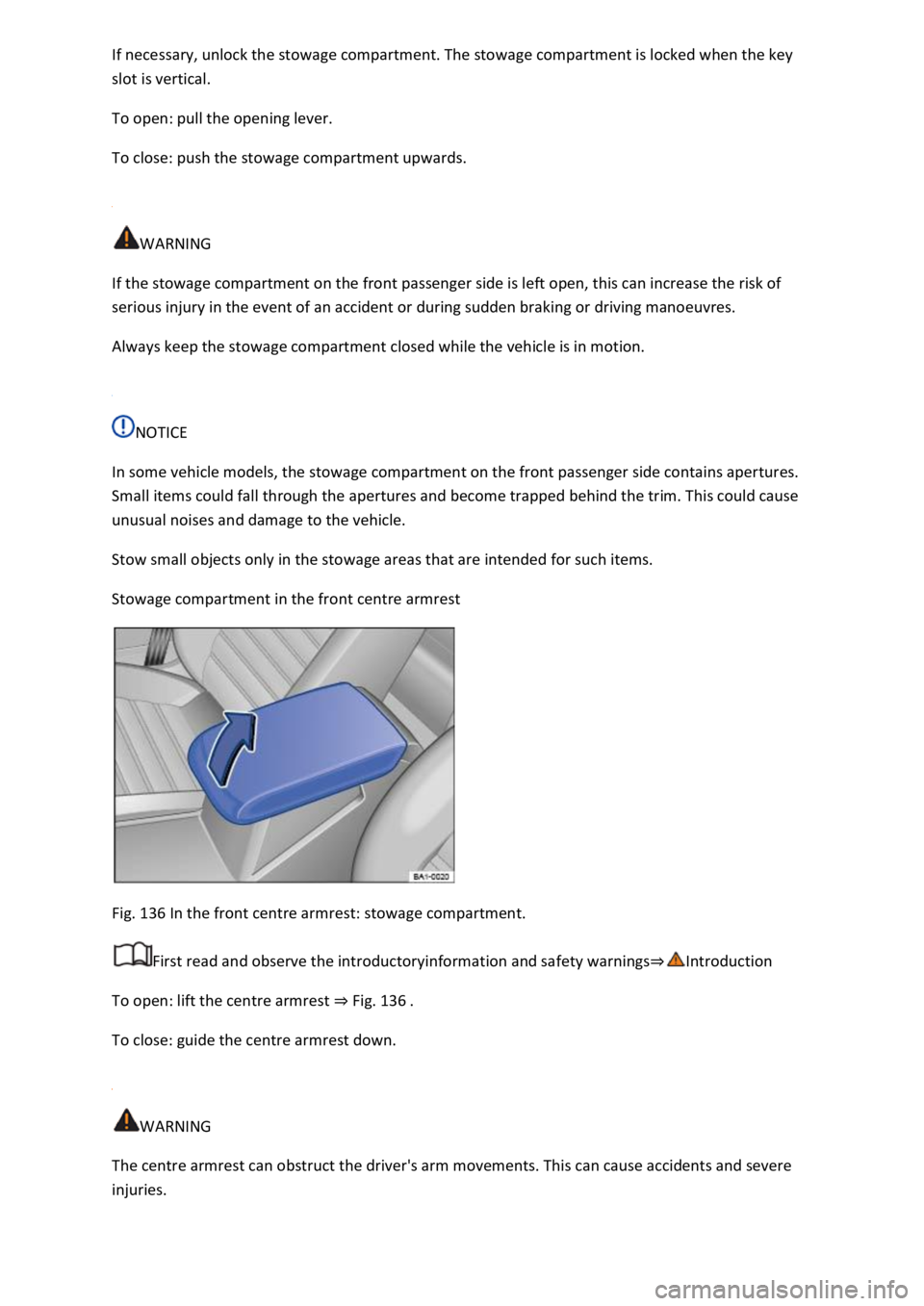
Stowage compartment in the front centre armrest
Fig. 136 In the front centre armrest: stowage compartment.
First read and observe the introductoryinformation and safety warnings⇒Introduction
To open: lift the centre armrest ⇒ Fig. 136 .
To close: guide the centre armrest down.
WARNING
The centre armrest can obstruct the driver's arm movements. This can cause accidents and severe
injuries.
Page 319 of 502
prior to downhill gradients (manual gearbox or Tiptronic mode of the
automatic gearbox) to additionally make use of engine braking. The brake system could otherwise
overheat and fail.
will change because of the
trailer load and the increased combined towing weight of the vehicle and trailer.
When driving with this combination, drive particularly carefully and slowly.
Pulling off on slopes when towing a trailer
Depending on the steepness of the uphill gradient and the total weight of the trailer and vehicle, a
vehicle towing a trailer could roll back a short distance when moving off on a hill.
When towing a trailer, pull off on slopes as follows:
once to switch off the electronic parking brake ⇒ Electronic parking brake .
ly.
⇒ Manual gearbox: selecting a gear or selector lever position D/S⇒ DSG® dual
clutch gearbox .
button and hold it in this position to hold the vehicle and trailer with the electronic
parking brake.
ake pedal.
button only when the engine has sufficient power to move off.
WARNING
Incorrect trailer towing can cause loss of vehicle control and serious personal injury.
and increase the braking distance.
pt your speed and driving style to suit visibility, weather, road and traffic conditions.
Reduce your speed, particularly when going downhill.
care when overtaking. Reduce your speed immediately if the trailer shows even the
slightest sign of snaking.
Page 383 of 502

Brake fluid that is compliant with VW standard 501 14 is available from Volkswagen dealerships.
If this brake fluid is not available and it is necessary to use another high-quality brake fluid instead,
brake fluid that is compliant with DIN ISO 4925 CLASS 4 or US standard FMVSS 116 DOT 4 can be
used.
Not all brake fluids that are compliant with DIN ISO 4925 CLASS 4 or US standard FMVSS 116 DOT 4
have the same chemical composition. Some of these brake fluids may contain chemicals that can
damage or destroy brake system components over time.
Volkswagen therefore recommends the use of brake fluid that is compliant with VW standard 501 14
to ensure sustained proper operation of the brake system.
Brake fluid that is compliant with VW standard 501 14 fulfils the requirements of DIN ISO 4925
CLASS 4 or US standard FMVSS 116 DOT 4.
Brake fluid level
The brake fluid level must always be between the MIN and MAX marking on the brake fluid reservoir
or above the MIN marking ⇒ .
The brake fluid level cannot be checked accurately in all models as engine components may partially
conceal the fluid level in the brake fluid reservoir. If the brake fluid level cannot be read exactly,
please go to a qualified workshop.
The brake fluid level drops slightly during vehicle operation as the brake pads wear and the brakes
are automatically adjusted.
Brake fluid level
The indicator lamp lights up red.
Brake fluid level is too low.
Do not drive on! Check the brake fluid level.
If the brake fluid level is too low, inform a qualified workshop. Have the brake system checked.
Changing the brake fluid
The brake fluid should be changed by a qualified workshop. Volkswagen recommends using a
Volkswagen dealership for this purpose. Only brake fluid that conforms with the required
specification should be used.
WARNING
Brake failure or reduced braking efficiency can be caused by the brake fluid level being too low or by
brake fluid that is too old or unsuitable.
Page 486 of 502

a) In certain European countries, the activation of or permission to use radio technology may be
restricted, not possible, or possible only when additional requirements have been fulfilled.
Technical data
Notes on technical data
Unless otherwise indicated or separately listed, the technical data apply to the basic model. The
values may differ if additional equipment is fitted, for different model versions and for special
vehicles and in the case of country-specific vehicle specifications. All data in the official vehicle
documents take precedence over these data.
Engine
The vehicle data sticker and the official vehicle documents show which engine is installed in your
vehicle.
Weight
The values for the kerb weight in the following tables apply for the road-ready vehicle with driver
(75 kg), service fluids including fuel tank carrying 90% of its capacity and, where applicable, tools and
spare tyre ⇒ . Additional equipment and retrofitted accessories increase the stated kerb weight
and reduce the maximum permitted load accordingly.
The load comprises the weights of the following:
system
Performance figures
In certain vehicles with heavy duty running gear, the engine could be governed to provide a
maximum speed of 210 km/h.
The performance figures were measured without equipment which may negatively influence
performance, such as a roof carrier or mudflaps.
Gross combination weight
The specified gross combination weights are applicable only for altitudes up to 1,000 m above sea
level. The maximum gross combination weight must be reduced by approximately 10% for every
further started 1,000 m in altitude.
Notes on the tables
Gearbox abbreviations: MG = manual gearbox, AG = automatic gearbox, DSG® = DSG® dual clutch
gearbox. MG6 = 6-speed manual gearbox.
WARNING
Page 493 of 502

when driving into
parking spaces
with high kerbs or
fixed boundaries.
Objects that
protrude from the
ground can
damage the
bumper and other
components when
parking the
vehicle.pecified
values can vary
due to different
wheel rim and tyre
sizes, additional
equipment,
different model
versions or
retrofitted
accessories, and
also for special
vehicles and
vehicles that have
been
manufactured for
other
countries. Fig. 217 :
Value
factory)
Ⓕ Length (from
bumper to
bumper)
4,234
mm
Ⓖ Wheelbase 2,590
mm
Ⓗ Ground
clearance
when ready to
driveb)
between the
axles
161
mm
Ⓘ Height with
open bonnet
1,838